Most advice about vidIQ for YouTube starts with the wrong question. “Is it worth it?” assumes every creator needs the same type of growth, but a tutorial channel, a vlog, and an affiliate business are not trying to solve the same problem. vidIQ can help you choose a stronger topic and package a video for discovery, but it can't tell you whether that attention became a subscriber, lead, customer, or sale.
That distinction matters more as a channel matures. A search-driven creator may get practical value from keyword data and competitor research, while a revenue-focused creator may still lack the attribution needed to decide which videos deserve more production budget. vidIQ is useful, but its value depends on where your bottleneck sits.
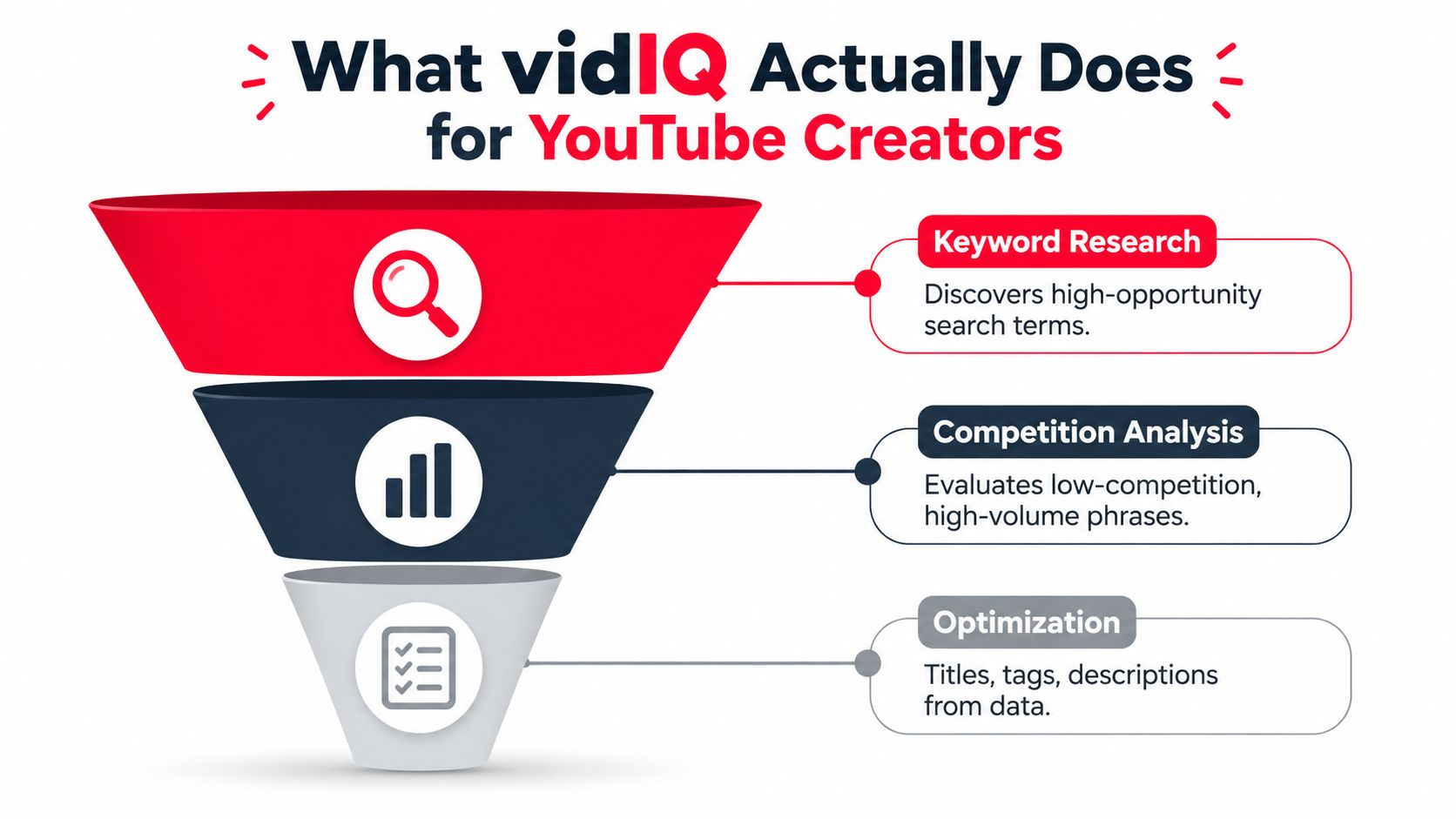
What vidIQ Actually Does for YouTube Creators
Many creators install vidIQ expecting a complete growth system. That expectation is too broad. vidIQ is best understood as a research and optimization layer that helps you make better decisions before and around publication, not as a replacement for content strategy, audience development, retention analysis, or revenue measurement.
The product helps surface keyword opportunities, competition signals, topic ideas, and metadata suggestions. Its free keyword workflow asks creators to enter a topic, assess search volume and competition, and select one primary phrase that has realistic ranking potential. The practical benefit is simple: instead of producing a video around a broad idea with no clear demand, you can align the subject and packaging with a query that has measurable interest and less competitive pressure. vidIQ's keyword tools also recommend checking YouTube Studio's Reach tab at 7 and 28 days, using the queries that generated impressions and the CTR those queries produced to refine titles or chapters.
Where the tool creates leverage
vidIQ sits near the top of the creator funnel:
- Topic selection: It helps you compare possible subjects before you spend time scripting and filming.
- Keyword validation: It gives search-volume and competition signals that make a target phrase easier to evaluate.
- Packaging support: It suggests titles, descriptions, tags, and related terms that can clarify the video's subject.
- Competitive research: Its browser tools let you inspect videos and channels while you browse YouTube.
- Post-publish iteration: You can compare the queries producing impressions with the language used in your title and chapters.
That workflow can improve discovery efficiency, especially when search intent drives a meaningful share of a channel's views. It can't engineer the opening of a video, repair weak pacing, make a thumbnail compelling, or guarantee that a viewer will continue watching.
Practical rule: Use vidIQ to reduce uncertainty around the decision to publish. Don't mistake reduced uncertainty for a growth guarantee.
The company has been operating in this category for a long time. vidIQ says it was born on July 1, 2011, founded by Rob Sandie and Todd Troxell in Bethlehem, Pennsylvania, and launched publicly in 2013 after roughly two years of development. Its early shift from broader video distribution toward YouTube-specific analytics and workflow support helps explain why the product is closely associated with search performance and channel research. The company's history provides that background.
The brand also has substantial visibility among creators. As of August 2026, vidIQ's own channel reports 2.42 million subscribers, 276.57 million total views, and 5.35 million views in the last 30 days. The vidIQ channel statistics page says the channel started on February 22, 2013, ranks #24,479 worldwide, and gained about 20,000 subscribers in the latest 30-day period. Those figures demonstrate audience reach and longevity, not proof that the software delivers the same outcome for every customer.
Core Features That Drive Discoverability
vidIQ works best when each feature changes a publishing decision. Opening the dashboard and collecting scores without adjusting what you research, script, or publish creates activity without a clear outcome.
Start with a query, not a vague topic
Use Keyword Inspector before writing the script. Enter a broad seed phrase, review related suggestions, and compare the available demand and competition signals. Then select one primary phrase that matches the specific question the video will answer.
A beginner tutorial creator should avoid an enormous subject such as “photography.” A narrower phrase tied to a defined problem gives the script a clearer promise and makes the title easier to shape. Use the results to determine whether viewers want a walkthrough, comparison, explanation, or review. Broader SEO tools for creators can help compare keyword research approaches.
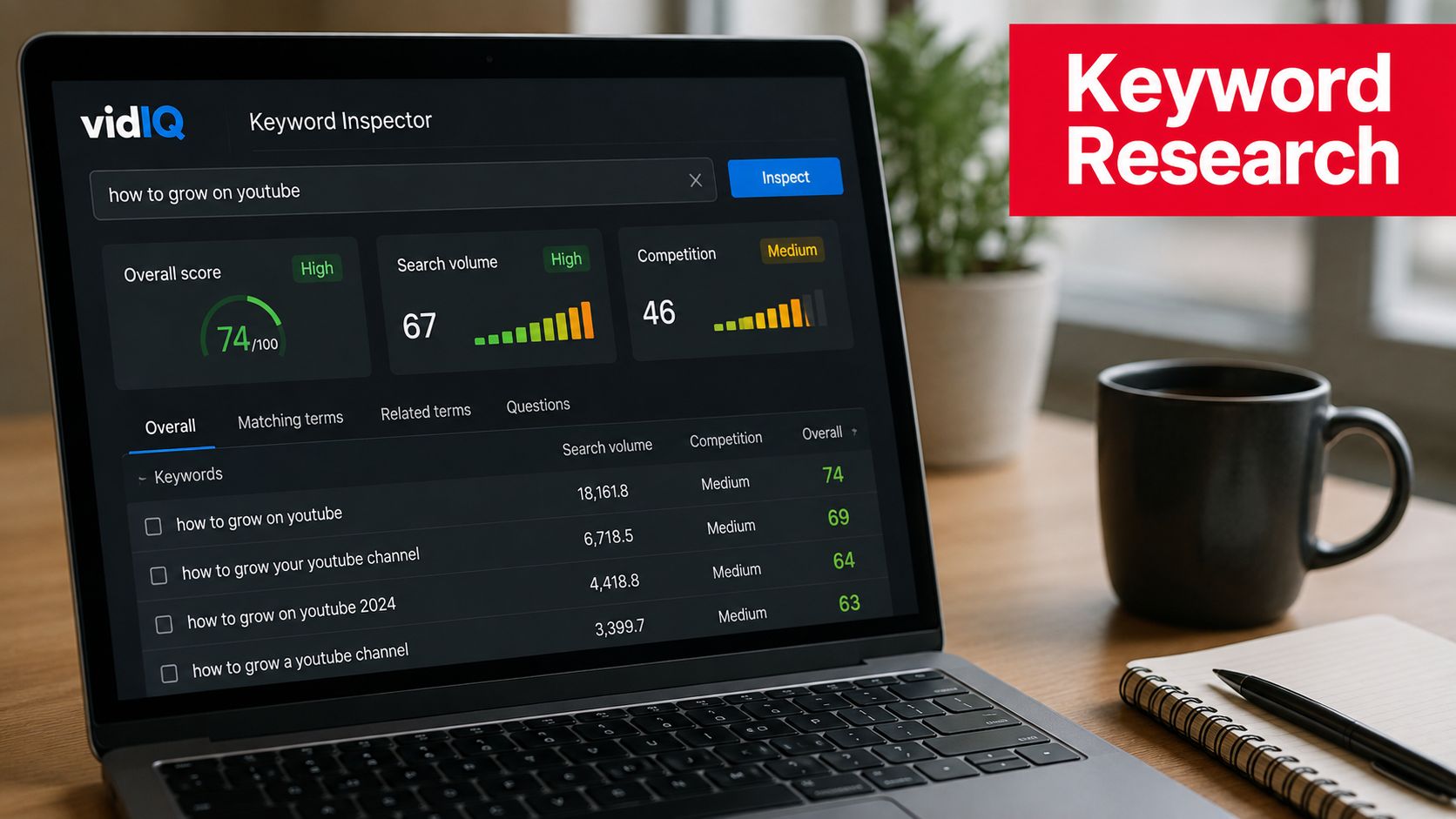
Record the selected phrase, its search intent, and the video promise in a simple planning document. A YouTube video keywords guide can help organize that research while keeping the editorial plan under your control.
Use the browser extension while studying competitors
The Chrome overlay places channel and video signals beside the content you are already watching. Open several relevant videos, identify recurring subjects and packaging patterns, and look for outliers that perform unusually well compared with the channel's usual catalog. Study the underlying promise, audience problem, specificity, and format instead of copying a title or thumbnail.
Competitor research earns its place when it answers a concrete question, such as which viewer need keeps appearing but is explained poorly. It loses value when the process becomes a search for tags to paste into the next upload.
Treat optimization scores as a checklist
The SEO scorecard can review metadata during drafting. Use it to check that the primary phrase appears naturally, the description explains the video, and supporting terms remain relevant. A high score confirms that selected optimization elements meet the tool's criteria. It does not establish that the title will earn clicks or that viewers will be satisfied.
AI-generated titles and descriptions can speed up a first draft. They still require editorial judgment in niches where accuracy, trust, and a distinct point of view affect performance. Generic AI suggestions often sound interchangeable. Keep the useful structure, then rewrite the language in your channel's voice.
Use trends and daily ideas selectively
Trend Alerts can reveal rising interest before a subject becomes crowded. Daily Ideas may also help when production stalls, although the suggestions usually need another pass. Use them to prompt a question you already understand, with audience knowledge supplying the judgment.
Best Time to Post is directional as well. Use it as a scheduling starting point, then compare the recommendation with your audience activity and early performance in YouTube Studio. vidIQ can inform that choice, while channel-specific observation determines whether the timing helps.
Which Creator Types Benefit Most from vidIQ
vidIQ creates the most value when search intent is close to the way a channel gets discovered. That usually includes tutorials, how-to videos, product reviews, software explainers, and educational content. In these formats, a viewer often begins with a problem or query, and keyword research can influence the subject before production begins.
Independent 2026 reviews describe vidIQ as strongest for search-driven channels because its keyword data and browser overlay support real-time topic and video audits. They also identify a structural limitation: the product helps optimize an idea after you have one, but it doesn't solve upstream audience-demand discovery or remove the need for experimentation. OneTube's 2026 review frames the tool as decision support rather than a complete operating system for content.
Search-driven channels
Tutorial and review creators can use vidIQ throughout the editorial cycle. They can validate a phrase, identify adjacent questions, inspect competing videos, and refine metadata after seeing which queries generate impressions. This makes the product particularly relevant for evergreen libraries, where a well-matched search result can continue attracting viewers after publication.
Beginners can also benefit because the tool gives structure to decisions that otherwise feel arbitrary. The risk is over-reliance. A new creator may spend too much time chasing scores and too little time learning whether the video answers the viewer's question.
Entertainment-first channels
Vloggers, commentators, storytellers, and personality-led creators may find fewer direct benefits from keyword research. Their videos often depend more on a compelling premise, thumbnail clarity, viewer familiarity, recommendation behavior, and retention than on matching a precise search phrase.
vidIQ can still help these channels research adjacent topics and inspect competitors. It just shouldn't become the center of the workflow. If the main problem is weak opening structure or an unconvincing thumbnail, more keyword suggestions won't address it.
Revenue-focused channels
Affiliate, sponsorship, coaching, and product-led channels face a different gap. vidIQ can help generate views and improve discoverability, but it doesn't directly connect a video to email signups, booked calls, product purchases, or attributed revenue. That leaves a business-critical question unanswered: which content produced attention that mattered commercially?
| Creator Type | Primary Discovery Model | vidIQ Fit | Key Limitation |
|---|---|---|---|
| Tutorial educator | YouTube Search and related queries | Strong | It doesn't improve teaching quality or retention by itself |
| Product reviewer | Search, comparison intent, and recommendations | Strong | It doesn't prove which review generated a sale |
| Vlogger | Home, Suggested, and returning viewers | Moderate to limited | Keyword data is less central to personality-led discovery |
| Commentary channel | Browse, Suggested, and topical relevance | Moderate | Packaging and audience timing may matter more than tags |
| Affiliate or service creator | Search plus external conversion paths | Partial | No direct revenue attribution workflow |
| Multi-channel team | Coordinated production and reporting | Limited to moderate | Bulk and enterprise orchestration may be thin |
Established creators may use vidIQ efficiently as a research layer, especially when several team members need a shared process for topic validation. Diminishing returns appear when the channel already has strong internal analytics and its main bottleneck is packaging testing, production capacity, distribution, or conversion measurement.
Pricing Tiers and Real-World Value per Dollar
vidIQ's free tier tests whether keyword research fits your channel. Paid tiers add AI functions, broader research, competitor tracking, and channel-level tools, but credit limits and annual-plan costs can surprise creators who use those features heavily. The practical question is how many publishing decisions the subscription improves each month.
The available 2026 reviews repeatedly mention AI credits, higher annual-plan costs, and friction for creators who use AI Coach or script features frequently. Some reviewers describe those outputs as generic or say credits disappear quickly. Plan limits and prices can change, so check the current offer inside vidIQ before committing.
| Plan | Monthly Cost | Key Features | AI Credits | Best For |
|---|---|---|---|---|
| Free | Verify current pricing | Basic keyword and research access | Verify current allowance | Testing the workflow before paying |
| Pro | Verify current pricing | Expanded keyword research and creator tools | Metered, verify current allowance | Solo search-driven publishers |
| Boost | Verify current pricing | Broader AI, optimization, and channel features | Metered, verify current allowance | Creators who use the suite regularly |
| Enterprise | Custom or current quote | Team and multi-channel capabilities | Verify current allowance | Larger operations with coordination needs |
The supplied brief mentions $39 per month for Pro and a 70-credit monthly ceiling. Those figures come from planning notes rather than a verified source, so treat them as items to confirm on vidIQ's live pricing page rather than current facts.
Calculate the cost per usable decision
A solo creator publishing twice weekly may need one validated topic, one strong title direction, and limited competitor research for each upload. If AI credits go toward brainstorming or script generation without improving the finished video, the paid tier may deliver less value than expected. A team handling five channels has more opportunities to use the suite, while also requiring workflow support beyond keyword discovery.
Before choosing an annual plan, ask:
- How often will you publish? More uploads can increase the value of research access and raise credit consumption.
- Which features will you use? Skip AI functions if filming or editing is the actual bottleneck.
- Can you measure a business outcome? Views alone make return on software spend difficult to evaluate, especially for creators selling services or products.
- Will your channel strategy change? A yearly commitment adds pressure when your niche, format, or publishing model remains unsettled.
Review the tool by decisions changed, not dashboards opened. Track whether vidIQ altered topic selection, improved the metadata process, or reduced wasted production effort. If it produces a longer list of suggestions without changing those decisions, downgrade or cancel.
For creators comparing commitment structures, this guide to monthly versus annual plans explains the trade-off between flexibility and longer-term pricing. Read the cancellation terms carefully as well. A 2026 review of user sentiment highlighted complaints about billing, auto-renewal, and refund friction, with Trustpilot sentiment reported around 2.6 out of 5 in that review. The cited review video is review commentary, not proof that every user will have the same experience.
vidIQ also has a clear stopping point for revenue-focused workflows. It can help choose and package topics, while a system such as ViewsMax is needed to connect YouTube attention with downstream actions and attributed revenue. That distinction should shape the subscription decision: search-driven creators can judge value through better production choices, but businesses need a separate measurement layer to evaluate commercial return.
Using vidIQ to Optimize a Video from Idea to Publish
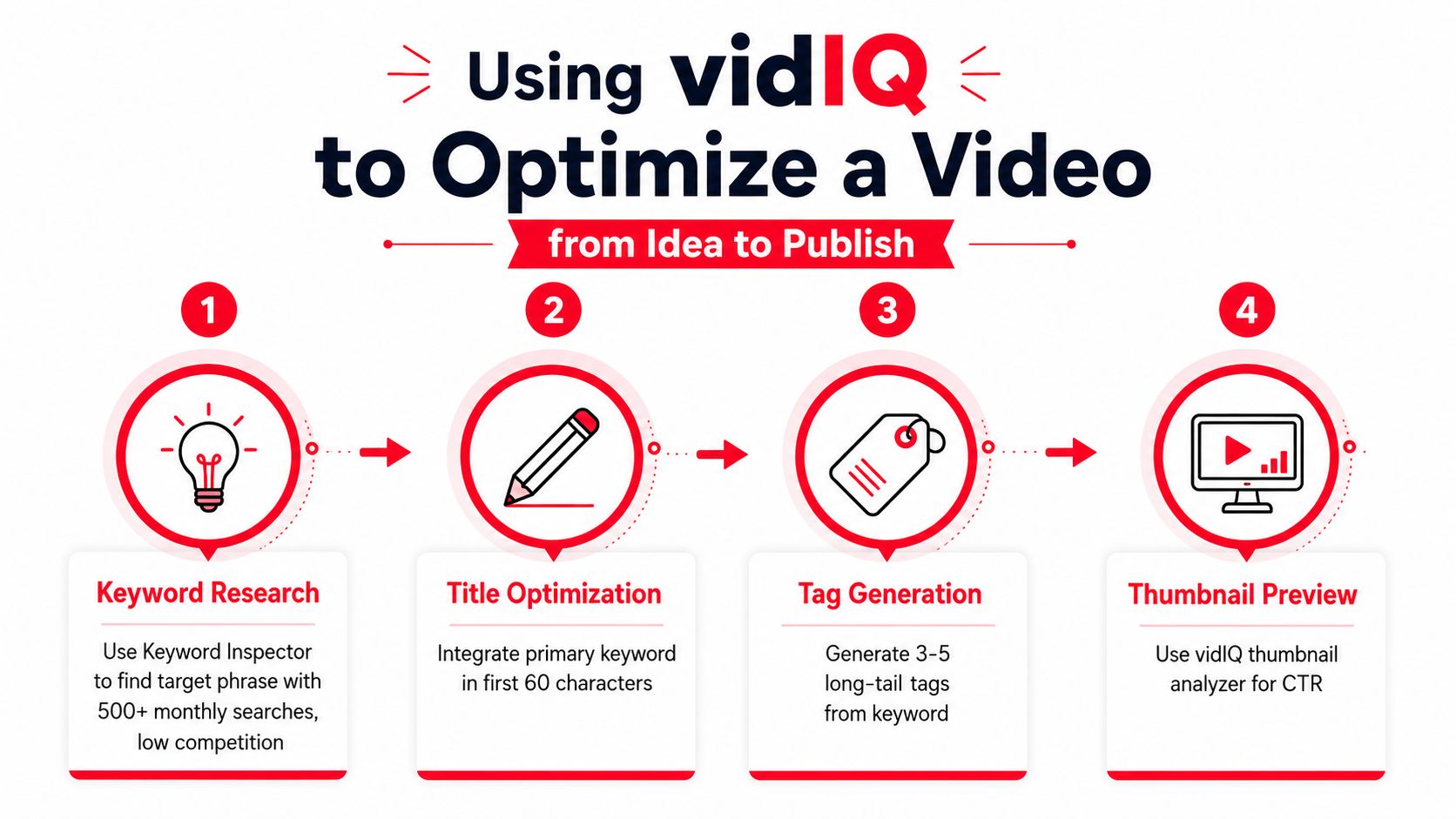
A practical vidIQ workflow starts before the script and ends after YouTube Studio supplies real query data. Consider a creator planning a beginner tutorial in a software niche.
First, enter the broad subject into Keyword Inspector. Review related phrases, compare competition signals, and select one primary term that matches the video's intended answer. Then use trend information to check whether interest appears to be building, stable, or too narrow to justify production. The result should be a clear working brief, not a promise that the video will rank.
Build the package around one promise
Draft several titles around the selected phrase. Use the AI title generator for variations, then remove bland language and make the outcome specific. A title should tell the viewer what they'll learn or accomplish, while the thumbnail adds a separate visual reason to click.
In the description, explain the video in natural language, include useful context, and add chapters where they help navigation. The YouTube video description template can provide a starting structure, but don't fill it with irrelevant keywords.
Review tags without confusing them with strategy
Use tag suggestions to find relevant variants, spelling alternatives, and longer phrases. Filter for terms that describe the actual content rather than selecting every high-volume suggestion. Tags may support classification, but they won't rescue a video whose topic, promise, or delivery is weak.
Next, inspect competing videos with the browser overlay. Look at their titles, descriptions, topics, and apparent audience fit. Ask what they leave unanswered. That gap is more valuable than copying a list of metadata fields.
Here is a short visual walkthrough of the product experience:
Before publication, check whether the title, thumbnail, opening, and script make the same promise. After publication, use YouTube Studio's Reach tab to see which queries generated impressions and what CTR each query produced. If a query is attracting impressions but not clicks, revise the title or chapters around that intent. If viewers click but leave quickly, the problem is probably delivery rather than keyword selection.
The critical limitation appears after the view arrives. vidIQ can help you earn discovery, but it doesn't show whether that viewer subscribed, joined an email list, requested a quote, purchased a product, or generated sponsor value. You still need a separate measurement layer if the channel supports a business.
A view is an acquisition event, not a revenue conclusion.
That distinction prevents a common mistake. A video can be an SEO success and a commercial failure, or it can attract modest search traffic while producing the most valuable leads in the catalog. vidIQ helps with the first half of that decision.
vidIQ vs TubeBuddy vs ViewsMax Compared
These tools address different creator problems, so a winner-takes-all comparison produces the wrong recommendation. vidIQ is oriented toward topic research, keyword intelligence, browser-based analysis, and metadata optimization. TubeBuddy is commonly considered when a publisher needs workflow support such as bulk management, testing, or moderation. ViewsMax belongs in a different category, attribution and content-to-revenue measurement.
The right choice depends on the question blocking your next decision:
- Getting found: vidIQ helps evaluate search demand, competition, and packaging.
- Managing publishing at scale: TubeBuddy may be more relevant when bulk actions and operational workflow are central.
- Proving business value: ViewsMax is designed to connect content activity with clicks, leads, and attributed sales.
| Capability | vidIQ | TubeBuddy | ViewsMax |
|---|---|---|---|
| Keyword research | Strong focus | Available, compare current features | Not the primary role |
| Competitor and browser research | Strong focus | Available through creator tools | Not the primary role |
| Metadata suggestions | Titles, descriptions, tags, and scores | Optimization and workflow tools | Supports content workflow, not search scoring |
| Bulk channel management | Limited compared with operations-focused tools | More relevant for bulk publishing tasks | Content planning and multi-platform publishing |
| Title or thumbnail experimentation | Reviews identify limitations | Testing capabilities are a key comparison point | Not the primary role |
| Revenue attribution | Not the core function | Not the core function | Trackable links, clicks, leads, and attributed sales |
| Best fit | Search-driven creators | High-volume publishers and channel operators | Creators treating content as a revenue channel |
vidIQ and TubeBuddy can coexist. A tutorial creator might use vidIQ to identify a query, TubeBuddy to manage repetitive channel tasks, and a separate analytics or attribution system to connect traffic to a commercial result. Adding tools only makes sense when each one solves a different bottleneck.
For a broader SEO comparison before deciding, review this guide to the best YouTube SEO tools. Don't use a feature checklist as the final test. The better test is whether the tool changes a decision you currently make badly or too slowly.
The missing layer is downstream measurement
Search optimization ends when a viewer discovers and clicks the video. A revenue workflow continues through the description link, landing page, booking form, checkout, or sponsor action. If your business depends on those outcomes, view counts and keyword scores cannot tell you which upload deserves another version, a larger promotion budget, or a stronger call to action.
That is where attribution becomes more important than another idea generator. You need to know which content created the commercial action, not just which content attracted the largest audience.
Choosing the Right Tool for Your Channel Goals
Choose the tool according to the channel's dominant constraint. If you can't explain what you need the software to improve, a larger plan will probably create a larger dashboard rather than a better business.
Match the product to the creator archetype
The search-driven educator has a clear fit for vidIQ. This creator publishes tutorials, explainers, reviews, or how-to content and needs help choosing a query before investing in production. Keyword validation, competitor inspection, and metadata review can make the publishing process more deliberate.
The entertainment-focused creator should keep the SEO layer light. Vlogs, commentary, storytelling, and personality-led channels often need stronger concepts, thumbnails, openings, retention design, and audience feedback. vidIQ can offer useful context, but it shouldn't distract from the creative elements that drive the click and the next watch.
The revenue-focused creator needs a measurement system beyond discovery. If the channel sells services, courses, products, memberships, or sponsorships, the central question is which content creates commercial outcomes. vidIQ can support topic selection, but it can't provide the full attribution path.
Creators researching adjacent media opportunities, such as Springfield NJ podcast growth, should apply the same logic. Audience discovery, publishing workflow, and revenue measurement are separate jobs, even when one brand produces all the content.
Ask five questions before paying
- What percentage of your traffic comes from Search? If search is a minor source, keyword tooling may not be your primary lever.
- Does revenue attribution matter to the channel? If views need to become leads or sales, plan for a dedicated measurement layer.
- Does the subscription fit the channel's current economics? Avoid annual commitment while your format or niche is still changing.
- How many videos do you publish each month? Frequent publishing can justify broader research access, but it can also consume AI credits faster.
- Will AI-generated insights reduce real work? Test whether suggestions improve your decisions, rather than counting how many suggestions the product generates.
vidIQ is strongest when you use it as a disciplined research assistant. It can help a solo creator identify a better search opportunity, inspect the competitive environment, and tighten a video's metadata. It won't replace audience judgment, retention analysis, packaging experiments, or revenue attribution.
The most useful decision is often not “vidIQ or no vidIQ.” It's whether the channel needs better discovery, better production operations, or better proof of commercial impact. Start with the constraint that costs you the most, then add only the tool that addresses it.
ViewsMax helps creators connect content with commercial outcomes by using trackable links to measure clicks, leads, and attributed sales across their publishing workflow. If vidIQ helps you improve discovery while ViewsMax shows which content contributes to revenue, visit ViewsMax to evaluate the attribution layer for your YouTube business.