Choosing the right keyword for your YouTube video is the one thing that can make or break its success. It's how you tell both the YouTube algorithm and your potential audience what your content is all about. Nail this, and you tap directly into a stream of viewers who are already looking for you.
Why Keyword Selection Is a Game Changer

In a sea of endless videos, the right keyword is your video's lifeline. It's the difference between shouting into an empty room and having a meaningful conversation with an audience that actually wants to listen. This isn’t just some tedious SEO task; it's the heart of a winning content strategy.
The competition is staggering. By 2025, it’s estimated YouTube will host 5.1 billion videos—a mind-boggling jump from just half a billion back in 2015. With almost 950 million new videos uploaded every single year, you can't just hope to be found. You need a plan. You can dig deeper into YouTube's growth on seo.ai if you're curious.
The Foundation of Your Video Strategy
Think of your keyword as the foundation of a house. You can have a brilliant script, slick editing, and an eye-catching thumbnail, but without a solid foundation, the whole thing is likely to collapse. A carefully chosen keyword for a YouTube video does a few critical things for you:
- Signals Relevance: It clearly tells the YouTube algorithm who your video is made for, which massively boosts its chances of being recommended to the right people.
- Drives Targeted Traffic: It pulls in viewers who are already searching for your topic, which naturally leads to better watch time and higher engagement.
- Builds Channel Authority: When you consistently show up for certain keywords, you start to establish your channel as the go-to expert in that niche.
Choosing a keyword isn’t about trying to trick an algorithm. It's about clearly communicating your video's value to the people who will get the most out of it.
This is where tools like ViewsMax come in. They take the guesswork out of this crucial first step and replace it with data. Instead of crossing your fingers and hoping for an audience, you can strategically place your content right in front of the viewers searching for it. That foresight makes all your hard work count, influencing everything from your initial view count to your channel's long-term growth.
Building Your Initial Keyword Idea List
The best keyword ideas don’t just pop into your head while you're staring at a blank screen. They come from putting yourself in your audience's shoes and digging into what they’re already looking for. This first step isn't about finding that one perfect keyword; it's about casting a wide net and building a solid list of possibilities.
We need to get past what we think people are searching for and find out what they’re actually typing into that YouTube search bar. It’s a bit of detective work, but it’s worth it. Your entire content strategy will be built on real viewer demand, not just guesswork.
Let’s start by looking at what’s already working for others.
Mine Competitor Channels for Gold
Your competitors are sitting on a goldmine of proven keyword ideas. They’ve already spent the time and money testing topics, so you can learn from what’s worked for them. First, pull up 3-5 successful channels in your niche.
Head over to their "Videos" tab and sort by "Most Popular." This is your cheat sheet, showing you the exact videos that have pulled in the most eyeballs. Take a close look at the titles.
- Spot the patterns: Are their biggest hits "how-to" videos? Product reviews? Top 10 lists? The format itself is often a clue.
- Pull out specific phrases: Pay attention to the precise wording. If a top video is called "Best Budget Camera for YouTube 2024," you can bet "best budget camera for youtube" is a keyword worth exploring.
Make a list of these high-performing topics and title formulas. The goal isn’t to copy them, but to understand the language that clicks with the audience you're trying to reach. To get a better handle on this, you can learn more about what people are searching on YouTube in our detailed guide.
Let YouTube Search Be Your Guide
Believe it or not, the YouTube search bar is one of the best free keyword tools out there. As you type, the autocomplete feature (or "search predictions") shows you what other people are searching for in real-time.
Try typing a broad term from your niche, like "home workout," but don't hit enter. Just watch what YouTube suggests:
- "home workout for beginners"
- "home workout no equipment"
- "home workout for weight loss"
These aren't just random guesses. They are the most common phrases people are actively using to find content. Every suggestion is a validated keyword idea that points directly to a specific audience need.
Pro Tip: Go a step further. Type your seed keyword followed by a space and then the letter 'a' (e.g., "home workout a"), then 'b', then 'c', and so on. This simple trick can unearth a ton of long-tail keyword variations you might have otherwise missed.
This little exercise gives you a direct peek into the viewer’s mind, helping you create a list of keywords that already have an audience waiting. Of course, you can speed this all up with a tool like ViewsMax, which scrapes these suggestions and related terms for you, saving you a bunch of manual effort.
Seed Keyword Generation Methods
There are several ways to come up with those initial "seed" keywords. Each method has its own strengths, depending on what you're trying to achieve.
| Method | Description | Best For |
|---|---|---|
| Competitor Analysis | Reviewing top-performing videos from channels in your niche. | Finding proven topics and title formulas that already resonate with your target audience. |
| YouTube Autocomplete | Typing a broad term into the search bar and noting the suggestions. | Uncovering high-demand, specific search queries directly from user behavior. |
| Audience Comments | Reading comments on your own videos or competitors' videos. | Identifying pain points, questions, and content gaps directly from the community. |
| Community Forums | Browsing sites like Reddit or Quora for discussions related to your topic. | Discovering the raw, unfiltered language and problems your audience is talking about. |
Ultimately, a mix of these methods will give you the most comprehensive list to start with. Don't just rely on one; pull ideas from all of them to build a well-rounded foundation for your research.
Validating Keywords with Real Data and Search Intent
Having a list of keyword ideas is a great first step, but it's just that—a starting point. To transform those raw ideas into a real strategy, you need to anchor them in data and, critically, understand what viewers are actually looking for. An idea without validation is a guess, and guessing is an expensive way to run a YouTube channel.
It's so easy to fall into the trap of chasing keywords with enormous search volumes. But that's usually a recipe for disappointment. High volume almost always means brutal competition from creators with massive head starts. The real magic happens when you find that sweet spot: a keyword with enough demand that you can realistically rank for, creating a clear path from your video to the people who need to see it.
This whole validation process is about making sure you’re not just making content, but making content for an audience that already exists.
This flowchart lays out the process perfectly. It shows how to filter your raw ideas through competitor analysis and audience needs to land on keywords that are actually worth targeting.
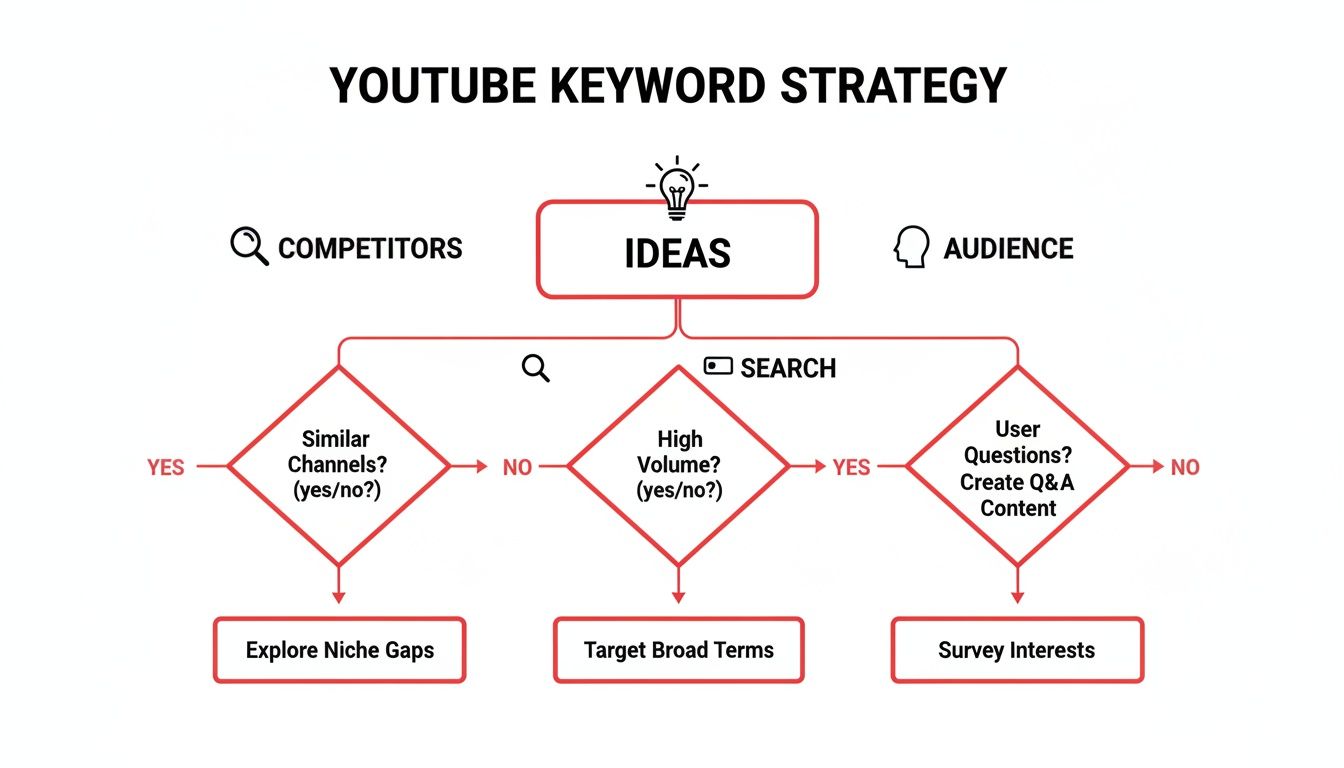
Think of it as a decision tree that takes you from broad concepts to specific, data-backed keywords ready for your next video.
Decoding Search Intent: The Why Behind the Click
More important than any number is search intent. This is the why behind a viewer's search. What do they really want? Are they looking for a quick answer, a step-by-step tutorial, a product review, or just something to watch on their lunch break?
Getting the intent wrong is a classic mistake. It’s why some videos rank well but have terrible watch time. If someone searches for a "how-to" and your video is a 15-minute unboxing, they're gone in seconds. That's a negative signal to YouTube's algorithm, telling it your video wasn't a good match, and it will kill your video's momentum.
A high click-through rate is useless if your audience retention is in the gutter. The key to turning a click into a loyal subscriber is matching your content to the viewer's intent.
To get this right, start thinking about your keywords in terms of these categories:
- Informational: The viewer needs to learn something (e.g., "how to edit video on iphone").
- Navigational: They're trying to find a specific channel or brand (e.g., "ViewsMax channel").
- Commercial: They're researching before they buy (e.g., "sony fx30 vs blackmagic 6k").
- Transactional: They're ready to pull the trigger on a purchase (e.g., "buy adobe premiere pro").
Using Tools to Analyze the Competitive Landscape
Now it's time to roll up your sleeves and see what you're up against. A quick, manual search on YouTube is a good first look, but to get the full picture, you really need to bring in some specialized tools.
Using one of the best YouTube SEO tools like ViewsMax gives you an immediate advantage. You can see estimated search volumes, a keyword difficulty score, and who the top-ranking creators are for any term. This data lets you make a smart call. Do you go head-to-head, find a less crowded long-tail version of the keyword, or pivot entirely?
For instance, trying to rank for "best budget camera" is a massive uphill battle against giant tech channels. But a more focused term like "best vlogging camera under $500 for beginners" could be your ticket to owning a valuable, underserved niche.
Weaving Your Keywords into Your Video Metadata
Alright, you've nailed down the perfect keyword. Now for the fun part: actually putting it to work. This means strategically weaving it into your video’s title, description, and tags. This isn’t about just spamming your keyword everywhere you can. It’s a craft. You’re sending clear signals to both the YouTube algorithm and, just as importantly, to the human you want to watch your video.
Think of your metadata as the packaging for your content. You could have the most amazing video in the world, but if the box it comes in is confusing or unappealing, no one's going to open it. Getting this right is how you make sure all your hard work actually finds its audience.
Crafting a Title That Demands a Click
Your title is your first impression. It’s your handshake, your billboard, and often your only shot at getting someone to stop scrolling. A great title has to do two things at once: satisfy the search algorithm and pique human curiosity.
Try to get your main keyword for youtube video as close to the front of the title as you can. YouTube gives more weight to the words that appear first. Once that's in place, add a hook—something that promises a benefit, creates intrigue, or solves a problem.
Here are a few title formulas I've seen work time and time again:
- The "How-To": [Your Keyword] | A Beginner's Step-by-Step Guide
- The Listicle: 7 [Your Keyword] Tips That Actually Work in 2024
- The Problem/Solution: Can't Figure Out [Common Problem]? This [Your Keyword] Trick Works Every Time
A title has two jobs. The first is to get your video ranked by telling the algorithm what it's about. The second, and more important job, is to get a human to actually click on it. Never sacrifice clickability for the sake of keyword placement.
Writing a Description That Informs and Ranks
So many creators treat the video description as an afterthought, but it’s an absolute SEO powerhouse. This is your space to give YouTube all the rich context it needs to understand your video, while also reinforcing your main keyword and sprinkling in related ones. Don't just toss in a single sentence and call it a day.
Your very first line should be a clear, compelling sentence that includes your primary keyword. This is what often shows up as the snippet in search results, so it needs to pack a punch. After that, open up into a couple of paragraphs that really sell the video, explaining what the viewer is going to learn or see.
A solid description structure often looks like this:
- The Hook: Start with that strong, keyword-rich sentence.
- The Summary: Write two or three paragraphs about the video's value. This is a great place to naturally work in your secondary keywords.
- Timestamps: Break down the video into chapters. This is fantastic for user experience and helps your video rank for specific moments.
- Calls to Action: Add links to subscribe, check out another video, or visit your website.
On a related note, if you can transcribe your YouTube video, that text gives search engines even more content to crawl, which can seriously boost your video's discoverability.
Making Sense of Your Video Tags
Tags are another signal you send to YouTube about your video's content. Their importance has waxed and waned over the years, but they still play a key role in helping the algorithm understand the nuances of your topic and connect it to other, similar videos.
Your very first tag should always be your exact-match primary keyword. No exceptions. From there, branch out. Add a few variations and some related long-tail keywords. Think about the broader categories your video fits into. For instance, if your video is about "beginner landscape photography," your tags could include things like "photography for beginners," "landscape photography tips," and "how to shoot landscapes."
A tool like ViewsMax can be a huge time-saver here, generating a whole list of relevant, high-impact tags based on your main keyword. For a deeper dive, check out our guide on YouTube SEO optimization tips.
Just look at the world of music on YouTube for proof of how powerful the right topic can be. 'Baby Shark Dance' has racked up over 16.22 billion views, and an incredible 48.2% of global users watch music videos weekly. This shows that tapping into popular trends, even through sounds or genres in your videos, can be a game-changer for getting discovered.
Tracking Your Keywords and Refining Your Strategy

So, you've published your video. Now what? Hitting "publish" isn't the end of the road; it's just the beginning. Your initial keyword research was your best-educated guess. Now it's time to see how that guess holds up in the real world and use that data to get smarter for the next video.
This is where you stop guessing and start knowing. Your primary tool for this mission is your YouTube Analytics dashboard. It's easy to get lost in the sea of numbers, so let's focus on the metrics that actually matter for keyword performance.
The Metrics That Tell the Real Story
Forget vanity metrics like total views for a moment. To see if your keyword for a youtube video is actually pulling its weight, you need to dig a little deeper into how people are finding you.
Here's what I always check first:
- Traffic Sources: YouTube Search: This is your report card. It tells you what percentage of your views came directly from someone typing a query into YouTube's search bar. Even better, it shows you the exact terms they used. This is pure gold.
- Impressions and Click-Through Rate (CTR): Impressions are the number of times your video's thumbnail appeared on someone's screen. The CTR is the percentage of those people who chose to click. A solid CTR means your title and thumbnail are hitting the mark for that search query.
- Average View Duration & Audience Retention: These tell you if you delivered on the promise. If people click but leave within the first 30 seconds, the algorithm notices. High retention signals that your video was exactly what the viewer was looking for based on the keyword.
A high CTR with terrible audience retention is a huge warning sign. It's the classic clickbait signal—you made a promise with your title and thumbnail that the video itself didn't keep. This tells the algorithm your video isn't a good result for that keyword.
From Data Points to Smart Decisions
Looking at these numbers isn't just an academic exercise; it's about finding opportunities.
Maybe you'll spot a surprising keyword in your Traffic Sources report that's driving a ton of views. That's a clear sign from your audience telling you, "Hey, make more content about this!" To keep a close eye on these trends and the overall health of your channel, using dedicated tools for YouTube monitoring can be a real game-changer.
This data-driven approach has a direct impact on your bottom line. YouTube's ad revenue hit an incredible $36.1 billion in 2024, which is a 14.6% increase from the previous year. For creators who are dialed into their keyword strategy, this growth means a bigger pie to share. By optimizing for the right terms, you can attract more valuable ads and boost your channel's revenue.
Finally, don't be afraid to go back and breathe new life into your old videos. If a video isn't performing well in search, it's not a lost cause. Do some fresh keyword research and update the metadata. A simple tweak to the title, a rewritten description, or a new set of tags can completely change its trajectory and help the algorithm rediscover its relevance.
Your Top YouTube Keyword Questions, Answered
When you start digging into YouTube SEO, a lot of questions pop up. It's easy to get bogged down in the details, but getting clear answers is what separates a frustrating process from a confident, repeatable strategy.
Let's cut through the noise and tackle some of the most common questions I hear from creators about picking and using keywords.
How Many Keywords Should I Actually Use?
It's tempting to cast a wide net, but when it comes to keywords, less is more. For every video, you should be laser-focused on one primary keyword. This is your North Star. It's the phrase that should be front and center in your title and pop up within the first couple of sentences of your description.
From there, you can support that main target with 3-5 secondary, related keywords. Think of these as close variations or longer, more specific phrases that add extra context for the algorithm.
- Your Primary Keyword: "beginner sourdough recipe"
- A Few Secondary Keywords: "easy sourdough for beginners," "how to make a sourdough starter," "no-knead sourdough bread"
Weave these secondary terms naturally into your description and use them as a starting point for your video tags. The idea isn't to cram as many keywords in as possible; it's to signal to YouTube exactly what your video is about and who it's for.
What Is the Difference Between a Keyword and a Tag?
This one trips up a lot of people, but the difference is actually pretty straightforward. Your keyword is the strategic search phrase you're trying to rank for. It's the core theme of your entire video, influencing everything from the title to the script itself.
Tags, however, are descriptive labels you add in the dedicated "tags" section when you upload. They're all about giving YouTube extra context to help it categorize your video and show it to the right people.
Here's a simple way to think about it: Your primary keyword is the title of a book chapter. Your tags are all the individual entries in the index that point to specific topics covered within that chapter.
So, if your primary keyword is "Sony FX3 review," your tags might look like: "Sony FX3," "FX3 review," "best cinema camera 2024," "full-frame camera," and "filmmaking gear." They all support the main topic.
Can I Change Keywords on an Old YouTube Video?
Yes, you absolutely can—and you should! This is a seriously underrated tactic for breathing new life into older videos that never quite took off.
Head over to your YouTube Analytics and hunt for videos where the percentage of views from "YouTube search" is disappointingly low. That's a huge red flag that your original keyword choice missed the mark.
Do some fresh keyword research for that topic. You might discover a better, less competitive phrase or a new search trend that perfectly matches your content. Go back into that video and update the title, description, and tags with your new primary keyword. While you're at it, consider creating a fresh, more clickable thumbnail. This quick optimization can completely change a video's trajectory, helping it finally find its audience.
Ready to stop guessing and start growing? ViewsMax provides the AI-powered tools and data-driven insights you need to find the right keywords, optimize your videos, and build a successful YouTube channel. Discover how ViewsMax can transform your content strategy.