So, you're ready to start earning money from your YouTube channel. That's a huge milestone! Before you can flip the switch on monetization, you first need to get accepted into the YouTube Partner Program (YPP). Think of it as YouTube's official gateway for creators to start earning.
Let's break down exactly what you need to do to get there.
Understanding the Path to Monetization
Turning your passion into a paycheck is a game-changer. But before you can see revenue from ads, channel memberships, or Super Chats, you have to prove your channel has what it takes. That's where the YPP comes in.
The eligibility requirements are there for a reason. They act as a filter to ensure that creators who get access to monetization tools are consistently making content that people actually want to watch. Hitting these numbers shows YouTube you’ve built a real, engaged community.
The Core Requirements Explained
YouTube gives you two main ways to qualify for the YPP, which is great because it caters to both long-form creators and those killing it with Shorts.
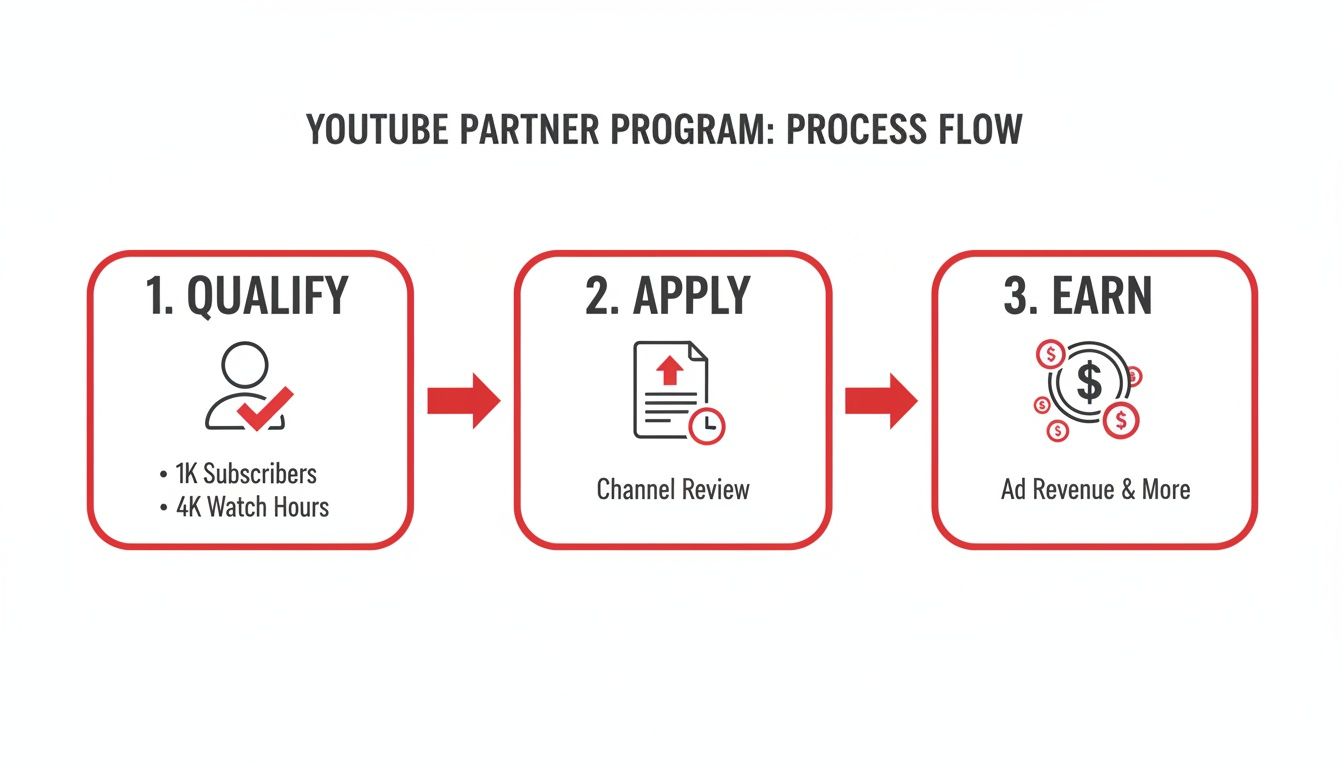
Here's a quick look at the core requirements you'll need to hit.
YouTube Partner Program Eligibility at a Glance
| Requirement | Threshold | Key Details |
|---|---|---|
| Subscribers | 1,000 | This is a non-negotiable baseline for all applicants. |
| Long-Form Video Watch Hours | 4,000 hours | Must be from public videos within the last 12 months. |
| YouTube Shorts Views | 10 million views | Must be from public Shorts within the last 90 days. |
Remember, you just need to hit the subscriber goal plus one of the viewership goals (either watch hours or Shorts views), not both. This gives you the flexibility to lean into the format that works best for your content and audience.
Here’s a more detailed breakdown:
The Long-Form Video Path: This is the classic route. You need to rack up 4,000 valid public watch hours within the last 365 days. The key words here are "valid public"—hours from private, unlisted, or deleted videos won't count toward your total.
The YouTube Shorts Path: If you're all about short-form content, this one's for you. You'll need 10 million valid public Shorts views in the last 90 days. It's a faster-paced alternative designed for creators who thrive on creating viral, bite-sized videos.
Getting into the YPP is no small feat. To put it in perspective, out of over 115 million channels, only about 3 million have made it in. That means less than 3% of all active channels are actually monetized through the program.
While you're working on your YouTube growth, it's also smart to look into broader monetization strategies for creators that can complement your channel's income.
For a more in-depth look, check out our guide on what is monetization on YouTube: https://blog.viewsmax.com/what-is-monetization-on-youtube/
Getting Your Channel Ready for a Flawless Application
Hitting those subscriber and watch time milestones feels amazing, but don't rush to hit "apply" just yet. That's only half the journey. Before you do anything else, you need to give your channel a thorough, honest audit. A real person at YouTube is going to review your application, and they're looking at much more than just the numbers. They're evaluating the overall health, authenticity, and professionalism of your entire channel.
Think of this as your pre-flight check. It’s your opportunity to catch and fix any issues that could get you rejected right out of the gate. Trust me, you want to avoid that frustrating 30-day waiting period before you can reapply.
Conduct a Deep Content Audit
First things first, you have to look at your own content through the eyes of a YouTube reviewer. They'll be combing through your videos to make sure you're following all the rules, and a few common mistakes can sink your application fast. The biggest culprits are often reused or repetitive content.
This doesn’t mean you can’t have a consistent show format. What it does mean is that low-effort content—like unedited gaming streams with no commentary or simple slideshows with a text-to-speech voiceover—will almost certainly get you denied.
Every single video needs to bring something unique to the table. Ask yourself these two questions:
- Is my content transformative? Did I add my own significant commentary, provide real educational value, or put a creative spin on the topic that's entirely mine?
- Is this 100% my own work? You have to be ruthless here. Go through your videos and listen for any third-party content. Even a few seconds of a copyrighted song playing on a radio in the background can cause a problem.
Dive into your YouTube Studio and hunt down any active copyright claims or Community Guideline strikes. Even one active strike is often enough to get your application rejected. You absolutely must resolve these issues before you apply.
Polish Your Channel's Professionalism
Believe it or not, your channel’s appearance and all the text you write are just as critical as the videos themselves. The reviewer is looking at your channel as a complete package to see if you're a serious creator. This is the time to clean up your video titles, descriptions, and thumbnails.
Your channel is your digital storefront. A human reviewer will look at your most-viewed videos, your newest content, and the overall theme of your channel to decide if you're a good fit for the Partner Program.
Go through your video descriptions and get rid of any shady links, like those pointing to unapproved websites. Make sure your thumbnails aren't clickbait or overly sensationalized. Every little piece of your channel should accurately represent your content and follow YouTube's advertiser-friendly guidelines. If you need a refresher, it's a good idea to learn more about what public watch hours on YouTube truly mean, since that’s directly tied to the type of content YouTube is looking for.
Secure Your Account with Two-Step Verification
This one isn't a suggestion—it's a hard requirement. You absolutely must have Two-Step Verification enabled on the Google Account that your YouTube channel is linked to. It’s a mandatory security measure for joining the YouTube Partner Program.
If you don't have it turned on, your application will be blocked before it even gets reviewed. You can set it up in just a few minutes in your Google Account security settings. Taking these steps shows YouTube you're a responsible creator who's serious about keeping their channel secure, and it massively improves your odds of getting approved on the very first try.
The Application Process Demystified
Alright, you've put in the work, your channel is looking sharp, and you've hit those crucial eligibility numbers. Now for the exciting part: officially applying to the YouTube Partner Program (YPP). This is the moment everything has been building towards.
The entire process kicks off right inside your YouTube Studio, so you don't need to go hunting for it. It's a clear, step-by-step path that you can get through in one go.
To start, just navigate to the Earn tab on the left-hand menu of your Studio dashboard. The first thing you'll see are the YPP base terms. It might be tempting to just scroll and click "accept," but I'd recommend actually reading through them. This is the official agreement that covers how you get paid, the rules you have to follow, and everything in between.
Getting Your AdSense Account Sorted
After you've agreed to the terms, YouTube will prompt you to link a Google AdSense account. This is non-negotiable—it's the system Google uses to actually pay you.
You've got two paths here:
- Link an existing AdSense account: If you've used AdSense before for a blog or another project, you can simply connect that one.
- Create a new AdSense account: No account? No problem. YouTube guides you through creating one right from the application screen.
A Word of Warning: You are only allowed to have one AdSense account per person. Seriously. Trying to create a new one if you already have an account (even if you forgot about it) will cause major headaches and can get your application rejected. Double-check before you proceed.
Once your account is linked up, AdSense has its own little verification dance to do. The biggest part of this is verifying your physical address. After you earn your first $10 or so, Google will mail a postcard to the address you provided. This postcard contains a Personal Identification Number (PIN) that you'll need to enter back into your AdSense account. It’s a mandatory security step to confirm you are who you say you are, and it can take a few weeks for the postcard to arrive.
Before you even click that apply button, make sure your channel is truly ready. Think of it as a final pre-flight check.
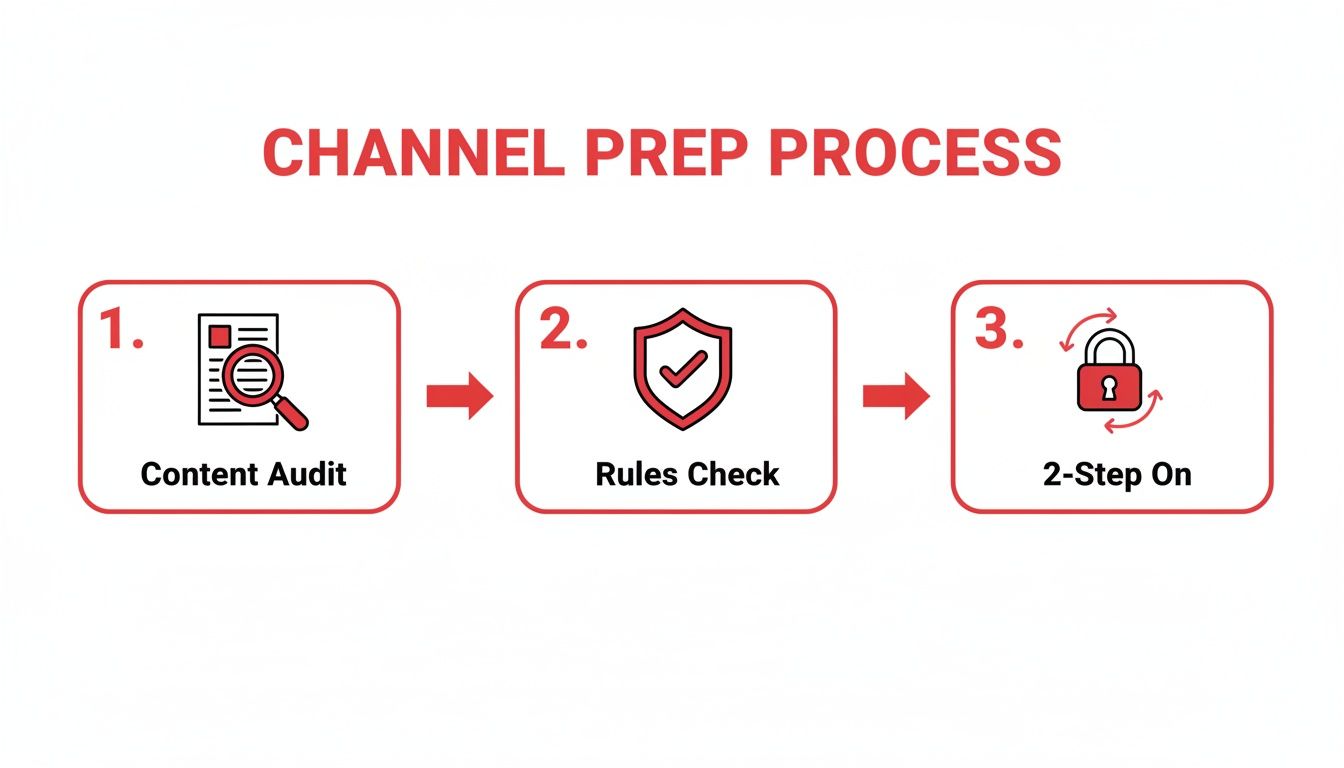
This really boils it down to the essentials: auditing your content, ensuring you're compliant with all the rules, and locking down your account's security.
Hitting 'Submit' and The Waiting Game
With the terms accepted and your AdSense account connected, you’re at the final hurdle. It’s time to submit your channel for review. Once you do, your application status will flip to "in review," and this is where patience becomes your best friend.
A real person at YouTube will now go through your channel with a fine-tooth comb. They're looking to get a feel for what your channel is all about and making sure it meets all their policies.
Specifically, they focus on:
- Your channel’s main theme and niche.
- Your most popular and most-viewed videos.
- Your most recently uploaded videos.
- All your metadata—that means titles, thumbnails, and descriptions.
YouTube says this process usually takes about a month, but that can vary. I've seen channels get approved in a week and others that take longer, especially when there's a high volume of applications.
My best advice? Keep making great content. Don't just sit there refreshing the page. Continuing your regular upload schedule shows you're committed. Eventually, you'll get that email with the final decision.
What to Do if YouTube Rejects Your Application
Getting that rejection email from the YouTube Partner Program is a punch to the gut. After pouring so much effort into your channel, it's easy to feel defeated. But don't despair—this is usually a temporary setback, not a permanent dead end.
Most rejections boil down to a few common, fixable issues. The key is to take a breath and carefully analyze the feedback YouTube gives you. The two reasons you'll see most often are “Reused Content” and “Repetitive Content,” and many creators get them mixed up. Let's break down what they actually mean.
Understanding YouTube's Feedback
While they sound alike, these two policies target different types of low-effort content. Ultimately, both are about a lack of originality, which is a non-negotiable for YouTube when it's time to enable YouTube monetization.
Reused Content: This is the big one. It means your videos lean too heavily on content you didn't create, without adding something new and substantial. Think about unedited clips from movies or sports games, compilations of other people's TikToks, or simply re-uploading your raw Twitch streams. If you're not transforming it with your own commentary, educational insight, or a creative twist, it’s likely to get flagged.
Repetitive Content: This one is about your own videos feeling too much like an assembly line. Are you mass-producing content where only minor details change from one video to the next? This often includes channels using robotic text-to-speech voices reading Reddit posts over stock footage or videos made from a simple, repeated template.
The bottom line is this: YouTube wants to see you in your content. Your personality, your expertise, and your creative spin need to be front and center.
Building Your Comeback Plan
Okay, so you’ve figured out the issue. What now? You get a 30-day window before you can apply again, and you need to make it count.
Your first job is to perform a thorough audit of your channel. Go through your videos one by one and be brutally honest. Any video that even tiptoes into the "reused" or "repetitive" zone needs to go. Deleting or privatizing them might sting, especially if they have good views, but it’s a crucial step to show the review team you're serious.
During those 30 days, your focus should shift to creating new, high-quality videos that are textbook examples of your best work. Pack them with original ideas, insightful commentary, and your unique personality.
The world of YouTube monetization is fiercely competitive, a huge change from before the YPP rules were tightened in 2018. With YouTube's ad revenue hitting an incredible $36.15 billion in 2025 and creators like MrBeast approaching a net worth of $1 billion, the stakes are high. As you aim to join the ranks of over 5 million monetized channels, proving your value is everything. You can discover more about YouTube's explosive growth and statistics to get a sense of the scale here.
When you finally resubmit your application, a human reviewer will look at your channel again. You want them to see an immediate and obvious transformation—the old, problematic content is gone, and in its place are fantastic new videos that leave no doubt about the value you bring to the platform. That's how you turn a rejection into an approval.
Activating and Optimizing Your Monetization
Congratulations, you're in the YouTube Partner Program! Getting that acceptance email is a huge milestone, but now the real work begins—turning your channel into a genuine source of income. The first stop on this journey is your YouTube Studio.
Turning On Monetization for Your Videos
First things first, let's get ads running on your existing library of videos. You don't have to do this one by one. Head over to the Content tab in your Studio, select all your videos, and use the "Edit" dropdown to switch monetization on for the whole batch. It’s a massive time-saver.
To make sure you’re earning from day one on new content, set up an upload default. Go to Settings > Upload defaults > Monetization and check the boxes for the ad formats you want. This little tweak ensures every video you publish is ready to earn money automatically.
Choosing the Right Ad Formats
YouTube gives you a few different ad types to play with, and finding the right mix is crucial for balancing your revenue with the viewer's experience. Bombarding your audience with ads is a quick way to get them to click away.
Here’s a quick look at the main ad types you’ll be working with:
- Skippable in-stream ads: The classic ads before, during, or after a video. Viewers can skip them after five seconds.
- Non-skippable in-stream ads: Shorter ads (usually 15-20 seconds) that must be watched all the way through.
- Bumper ads: Very short, six-second non-skippable ads.
- Overlay ads: Simple banner ads that pop up at the bottom of the video player on desktop.
If your videos are longer than eight minutes, you unlock the ability to place mid-roll ads. You can let YouTube place these automatically or manually pick the timestamps yourself. My advice? Start with automatic placements. Then, watch your videos and fine-tune the ad breaks to fit natural pauses in your content so you don't interrupt the flow.
Thinking Beyond Ad Revenue
While ads are your foundation, relying on them alone can leave you vulnerable to fluctuating ad rates. The YPP unlocks several other income streams that create a more direct connection with your audience.
- Channel Memberships: Let your most loyal fans support you with a monthly fee in exchange for perks like custom emojis, badges, and exclusive content.
- Super Chat & Super Thanks: These features allow viewers to pay to have their message highlighted during a live chat or to leave a one-time tip on any video.
- YouTube Shopping: You can tag products from your own store or from affiliate partners directly in your videos, turning your content into a storefront.
As soon as you're approved, you should really start digging into all these options. The landscape is always changing, so it’s also smart to learn how to monetize YouTube Shorts and maximize earnings, as that’s a huge growth area.
Understanding Your Earnings with RPM
To truly grow your channel's income, you need to get familiar with Revenue Per Mille (RPM). This is the metric that shows you what you actually earn per 1,000 views after YouTube takes its 45% cut. It's the number that matters.
Your niche and your audience's location are the two biggest factors affecting your RPM. To give you some real-world perspective, here’s how much potential earnings can vary.
Ad Revenue Potential by Niche and Region
| Niche / Region | Average CPM (What Advertisers Pay) | Why It's High/Low |
|---|---|---|
| Finance / Investing | $25 – $50+ | Advertisers are selling high-value products (like trading platforms) and are willing to pay a premium to reach an audience with disposable income. |
| Tech Reviews | $15 – $30 | Tech companies have large marketing budgets and want to reach consumers who are actively looking to make a purchase. |
| United States | $30 – $40 | The U.S. has a highly competitive ad market with many large brands, driving up the cost for advertisers. |
| Gaming (Entertainment) | $5 – $12 | A very broad audience and high video volume means ad inventory is plentiful, which can lower the cost for advertisers. |
| India | $2 – $5 | The ad market is still developing compared to Western countries, so advertisers pay less per view on average. |
This table shows the CPM, which is what advertisers pay before YouTube's cut. Your RPM will be lower, but the trend is the same: a video about investing shown to a U.S. audience will earn drastically more than a gaming video shown to viewers in India.
This is where a tool like ViewsMax becomes so valuable—it can help you find high-RPM keywords to build your content strategy around, ensuring you're targeting the most profitable topics and audiences.
Want to dive deeper? Check out our guide explaining exactly https://blog.viewsmax.com/cpm-meaning-youtube/.
Frequently Asked Questions
Going through the YouTube Partner Program application process always sparks a few questions. After guiding hundreds of creators through this exact journey, I’ve seen the same concerns pop up again and again. Let's tackle them head-on so you can get monetized without any unnecessary stress.
How Long Does the YPP Review Actually Take?
This is probably the most common question I get. Officially, YouTube says to expect "about a month." But in my experience, it's all over the map. I’ve seen channels get the green light in less than a week, while others have been left waiting for over 30 days.
The wait time often depends on how swamped the review teams are. My best advice? Stay patient. Don't go making any drastic changes to your channel while your application is pending. Just keep to your regular upload schedule—it shows the reviewers you're consistent and serious about your content.
What if I Have AdSense Account Issues?
AdSense hiccups are a real pain and a common reason for getting stuck. The biggest mistake I see is creators accidentally creating a duplicate account. Remember, Google has a strict one-account-per-person policy. If you get a rejection notice saying you already have an account, you have to find and close that old one.
Do not try to get around this by applying with a new email. That just creates a bigger mess. You must go through Google's official recovery process to resolve the ownership of the original AdSense account before linking it to your YouTube channel.
Does Private Video Watch Time Count?
Nope, it doesn't. Only watch hours from valid public videos count towards that 4,000-hour mountain. Any watch time you've racked up on videos that are now private, unlisted, or have been deleted won't be part of your total.
This rule is in place to make sure you're building an audience with content that's actually out there for people to see. Before you apply, do a quick check to ensure all the videos contributing to your watch time are set to "Public."
Can I Reapply After a Rejection?
Absolutely. If your application gets denied, YouTube will give you a general reason, like "Reused Content," and you'll have to wait 30 days before you can reapply.
Don't just sit on your hands for that month. Use that time to do a deep dive into your channel. Be ruthless—audit your videos, delete anything that even hints at a policy violation, and focus on creating fresh, original content. When you reapply, the reviewer needs to see a clear, tangible effort to fix what was wrong. That’s what gets you approved the second time around.
Ready to take the guesswork out of your YouTube strategy? ViewsMax provides AI-powered tools to help you find high-RPM keywords, optimize your videos for discoverability, and make data-driven decisions that accelerate your channel's growth. Stop guessing and start growing by checking out our tools.