YouTube doesn't have a fixed pay rate for every 1,000 views. Most creators' real-world RPM falls somewhere between roughly $2 and $12 per 1,000 views, depending on niche, geography, and audience quality.
That range is wide enough to make a simple answer misleading. Two videos can attract the same number of views while producing dramatically different revenue because one reaches finance buyers in the United States and the other reaches casual entertainment viewers in a lower-value advertising market. The view count is identical. The commercial value of the audience isn't.
The useful question isn't “How much does YouTube pay per 1,000 views?” as if YouTube publishes a rate card. The useful question is, “What RPM does this particular audience, topic, format, and monetization setup produce?” Once you understand that distinction, you can estimate your earnings and identify the levers that may move your number.
What Pay Per 1000 Views YouTube Really Means
The phrase “pay per 1,000 views YouTube” usually refers to RPM, or Revenue Per Mille. YouTube defines RPM as the money a creator earns per 1,000 video views, including revenue from advertising, YouTube Premium, memberships, Super Chat, and Super Stickers, as explained in YouTube's RPM documentation.
The important word is “creator.” RPM is a creator-side measure of take-home revenue, not the price advertisers paid to reach viewers. Industry estimates commonly place creator earnings in a broad range of about $2 to $12 per 1,000 views, with some major English-language markets and valuable niches reaching $5 to $10 or more, while many emerging markets produce lower results. The range reflects real differences in advertiser demand, viewer purchasing power, content category, and monetized viewing.
Why one average number fails
YouTube sells advertising through auctions. Advertisers compete for available placements, and the winning price changes according to who is watching, what the video is about, where the viewer lives, and whether an ad can be served. A software buyer researching a business tool can be more valuable to an advertiser than a casual viewer watching general entertainment, even if both watch the same length of video.
Geography also matters because advertisers often bid more aggressively for audiences with greater purchasing power. A channel with substantial traffic from the United States, United Kingdom, Canada, or Australia can operate in a different RPM environment from a channel with similar traffic volume in lower-value advertising markets.
Practical rule: Treat an industry range as a starting point, not a promise. Your YouTube Studio RPM is the number that describes your channel.
What changes the number
Several mechanics determine the final result:
- The CPM-to-RPM funnel: Advertiser-facing CPM and creator-facing RPM measure different things.
- YouTube's revenue share: Long-form creators receive 55% of net ad revenue, while YouTube retains 45%, according to YouTube's official monetization guidance.
- The total-view denominator: RPM includes all video views, including views that didn't receive a monetized ad impression.
- Niche and geography: Finance, technology, education, gaming, and entertainment can sit in very different advertising bands.
- Eligibility: A view doesn't generate YouTube ad revenue for a creator who hasn't qualified for the relevant monetization features.
The rest of the calculation becomes much easier once these pieces are separated. You won't leave with one artificial “pay per 1,000 views” figure. You'll have a way to estimate your own RPM, compare videos intelligently, and decide whether topic, audience, format, or monetization is holding your revenue back.
CPM vs RPM The Core Concept Explained
CPM means Cost Per Mille, or the amount advertisers pay for 1,000 ad impressions. RPM means Revenue Per Mille, or the amount the creator earns per 1,000 total video views after YouTube's share and the effect of non-monetized views.
A simple analogy helps. Think of CPM as the wholesale price shown to the advertiser. Think of RPM as the amount that reaches the creator's side of the transaction after the platform's revenue share and after the calculation includes views that didn't produce an ad impression. These numbers answer different questions, so they shouldn't be used interchangeably.
The advertiser-side number
CPM focuses on impressions, not every video view. If an advertiser pays for 1,000 monetized ad impressions, that price reflects the auction value of those impressions. It may be influenced by the topic, audience location, buying intent, season, and available ad inventory.
That number can look impressive in YouTube Studio while overstating what the creator earns per 1,000 video views. A viewer may watch without receiving an ad, use an ad blocker, have a YouTube Premium subscription, or leave before an available ad opportunity. Those views still count toward the total view count used for RPM.
For a broader explanation of the advertiser-facing metric, see this guide to what CPM means on YouTube.
The creator-side number
RPM starts with the creator's revenue and divides it by total views, then expresses the result per 1,000 views. It can include several YouTube revenue sources, not only watch-page advertising. That makes RPM more useful for answering the question a creator cares about: “How much did my channel earn for the audience it reached?”
Consider a simplified example. Suppose an analytics screen shows a $10 CPM. YouTube's 55% long-form share would leave the creator with less than the advertiser-facing amount, and the creator's RPM may fall further because the denominator includes views without monetized ads. The final RPM could therefore be materially below $10. The exact result depends on monetized playbacks and other revenue included in the reporting period.
The easiest explanation: CPM describes what advertisers pay for ad impressions. RPM describes what creators earn across total views.
Why RPM is the better planning metric
Use CPM to understand the strength of advertiser demand. Use RPM to forecast creator revenue, compare videos, and estimate what a future view target might produce.
A channel can have a strong CPM and a disappointing RPM if many viewers don't receive ads. Another channel may show a lower CPM but achieve efficient monetization across a larger share of its views. For budgeting, RPM is the number that belongs in the calculation.
How YouTube Calculates Your Earnings Per 1000 Views
There is no fixed YouTube payment for every 1,000 views. The amount depends on which views create monetized ad opportunities, the revenue sources included in the period, and the audience those views represent.
For long-form videos, advertisers bid for available placements. YouTube selects eligible ads, and monetized playbacks generate advertising revenue. The creator receives 55% of net ad revenue, while YouTube retains 45%. This split applies to the relevant advertising revenue, not to every view automatically.
The calculation then uses total video views as its denominator. That includes views where no monetized ad impression occurred, so RPM can sit well below the CPM shown in analytics. A view can help discovery and audience growth without producing an ad impression.
The calculation in plain language
The process works like this:
- Advertisers bid on eligible ad placements.
- Winning bids create revenue when an ad impression or monetized playback occurs.
- YouTube applies its revenue share.
- Eligible revenue sources included in RPM are combined.
- The creator's revenue is divided by total video views.
- YouTube reports the result per 1,000 views.
The practical formula is:
Estimated creator revenue = RPM × total views ÷ 1,000
If a channel has an RPM of $6 and a video receives 10,000 views, the estimate is:
$6 × 10,000 ÷ 1,000 = $60
That figure is an estimate, not a guaranteed payout. Studio results can change as the reporting period, revenue sources, or view totals change. Creators reviewing their figures should also understand how YouTube calculates views, because the view count affects the denominator in this calculation.
What can lower the result
The denominator can grow faster than monetized revenue when viewers watch without creating an ad opportunity. Common reasons include:
- No available ad: Suitable inventory may not exist for every viewer or playback.
- Ad blocking: An ad blocker can prevent an impression from occurring.
- Premium viewing: YouTube Premium viewers do not receive standard ads, although Premium revenue can be allocated separately.
- Limited eligibility: Content restrictions can reduce available advertising.
- Audience behavior: A viewer who leaves early may never reach an available mid-roll placement.
These factors explain why two channels with the same view count can report different RPMs.
What can improve the numerator
Revenue can rise when advertiser demand is stronger, eligible ad formats are available, and long-form videos provide suitable mid-roll opportunities. Retention matters because viewers need to remain active long enough to encounter available ads. Audience geography also changes auction value, so identical content can earn different amounts from different viewer mixes.
Before checking Studio, estimate several scenarios:
Your expected revenue = expected RPM × expected views ÷ 1,000
Use low, middle, and high RPM assumptions based on your own historical analytics. A generic CPM can overstate take-home revenue, because RPM accounts for total views and the creator's actual share.
RPM Ranges by Niche and Audience Geography
A “pay per 1,000 views” figure is a range, not a universal price. Independent benchmark data report median RPM ranges of roughly $8 to $18 for finance and investing, $6 to $13 for technology reviews and tutorials, $3.50 to $9 for education and how-to, $4 to $9 for gaming hardware and peripherals, and $1.50 to $3.50 for casual gaming among United States audiences, according to YouTube RPM benchmark data.
These figures are benchmark bands rather than guaranteed rates. A specific video can fall outside them because of its audience mix, viewer retention, seasonality, available advertising, and monetization eligibility. Two channels with the same view count can therefore receive very different revenue.
A practical comparison
| Niche | Tier-1 RPM, US, UK, Canada, Australia | Tier-2 RPM, EU, Brazil, Mexico | Tier-3 RPM, India, Philippines, Indonesia |
|---|---|---|---|
| Finance and investing | Roughly $8 to $18 | Usually lower than Tier 1 | Usually lower than Tier 2 |
| Technology reviews and tutorials | Roughly $6 to $13 | Usually lower than Tier 1 | Usually lower than Tier 2 |
| Education and how-to | Roughly $3.50 to $9 | Usually lower than Tier 1 | Usually lower than Tier 2 |
| Gaming hardware and peripherals | Roughly $4 to $9 | Usually lower than Tier 1 | Usually lower than Tier 2 |
| Casual gaming | Roughly $1.50 to $3.50 | Usually lower than Tier 1 | Usually lower than Tier 2 |
The benchmark source supports the five listed RPM bands and shows why geography matters. It does not establish universal RPM ranges for insurance, legal, beauty, fitness, comedy, or entertainment. For those categories, use channel analytics instead of assigning precise figures without supporting data.
Why niche value changes
Advertisers buy access to potential customers, not views in isolation. Finance advertisers may compete for viewers researching investments or financial products. Technology advertisers may target people comparing software or hardware. Casual gaming can attract substantial viewing while receiving weaker advertiser bids in some markets.
The benchmark coverage reports that moving from casual gaming toward finance-oriented content can create a 3x to 5x RPM shift with similar view counts. The difference reflects advertiser demand, audience buying power, and competition within the category. It does not mean a creator should switch to an unrelated subject. A topic that fits the audience and solves a commercial problem can improve earning potential before the video is published.
Geography changes the same topic
A finance video watched mainly in a Tier-1 market can produce a different RPM from the same video watched mainly in a Tier-3 market. Country mix affects buying power, available advertisers, and auction competition. The niche supplies the subject, while geography changes the value of the viewers interested in it.
Check RPM by video and compare it with the geography report. A blended channel average can hide the reason one upload earned more than another. Review these questions:
- Which topics produce the highest RPM on this channel?
- Which countries supply viewers for those videos?
- Does the content attract people with a clear commercial problem to solve?
- Are those viewers eligible for monetized ad opportunities?
The answers indicate whether the next improvement should come from topic selection, audience targeting, or a larger share of valuable viewers. Keep relevance intact. Chasing a higher-paying category without serving the audience can reduce retention and weaken the channel's long-term results.
Worked Examples Earnings From 1000 and 100000 Views
The formula is straightforward:
Revenue = RPM × views ÷ 1,000
The difficulty is choosing a defensible RPM. The examples below use verified benchmark-style figures as illustrations, not promises. They also separate YouTube-reported RPM revenue from taxes or business expenses, which aren't included in the RPM calculation.
Example one with a higher-value finance audience
Assume a finance explainer earns a $12 RPM, within the benchmark range reported for finance and investing channels. At 1,000 views, the estimated creator revenue is:
$12 × 1,000 ÷ 1,000 = $12
At 100,000 views:
$12 × 100,000 ÷ 1,000 = $1,200
The same formula works at any view count. At 150,000 views, the estimate would be $1,800 at a $12 RPM. That figure represents estimated YouTube revenue included in RPM. It doesn't automatically represent what the creator keeps after income taxes, transaction charges, production costs, or other business expenses.
Example two with a lower casual-gaming RPM
Now assume a casual gaming channel earns a $1.50 RPM, the lower boundary of the cited United States casual-gaming benchmark. At 1,000 views, the estimate is:
$1.50 × 1,000 ÷ 1,000 = $1.50
At 100,000 views:
$1.50 × 100,000 ÷ 1,000 = $150
At 500,000 views, the estimate becomes $750.
| Scenario | RPM | Views | Estimated YouTube revenue |
|---|---|---|---|
| Finance explainer | $12 | 1,000 | $12 |
| Finance explainer | $12 | 100,000 | $1,200 |
| Casual gaming | $1.50 | 1,000 | $1.50 |
| Casual gaming | $1.50 | 100,000 | $150 |
| Casual gaming | $1.50 | 500,000 | $750 |
The comparison shows why scale can't always compensate for a low-RPM lane. The finance example earns substantially more from fewer views because the audience and category support stronger advertiser demand. In practice, geography can push either example up or down, and a channel's actual Studio RPM should replace the benchmark assumption.
Use examples to plan scenarios, not to forecast certainty. Your own RPM by video is more useful than another creator's headline average.
Monetization Prerequisites Creators Must Meet First
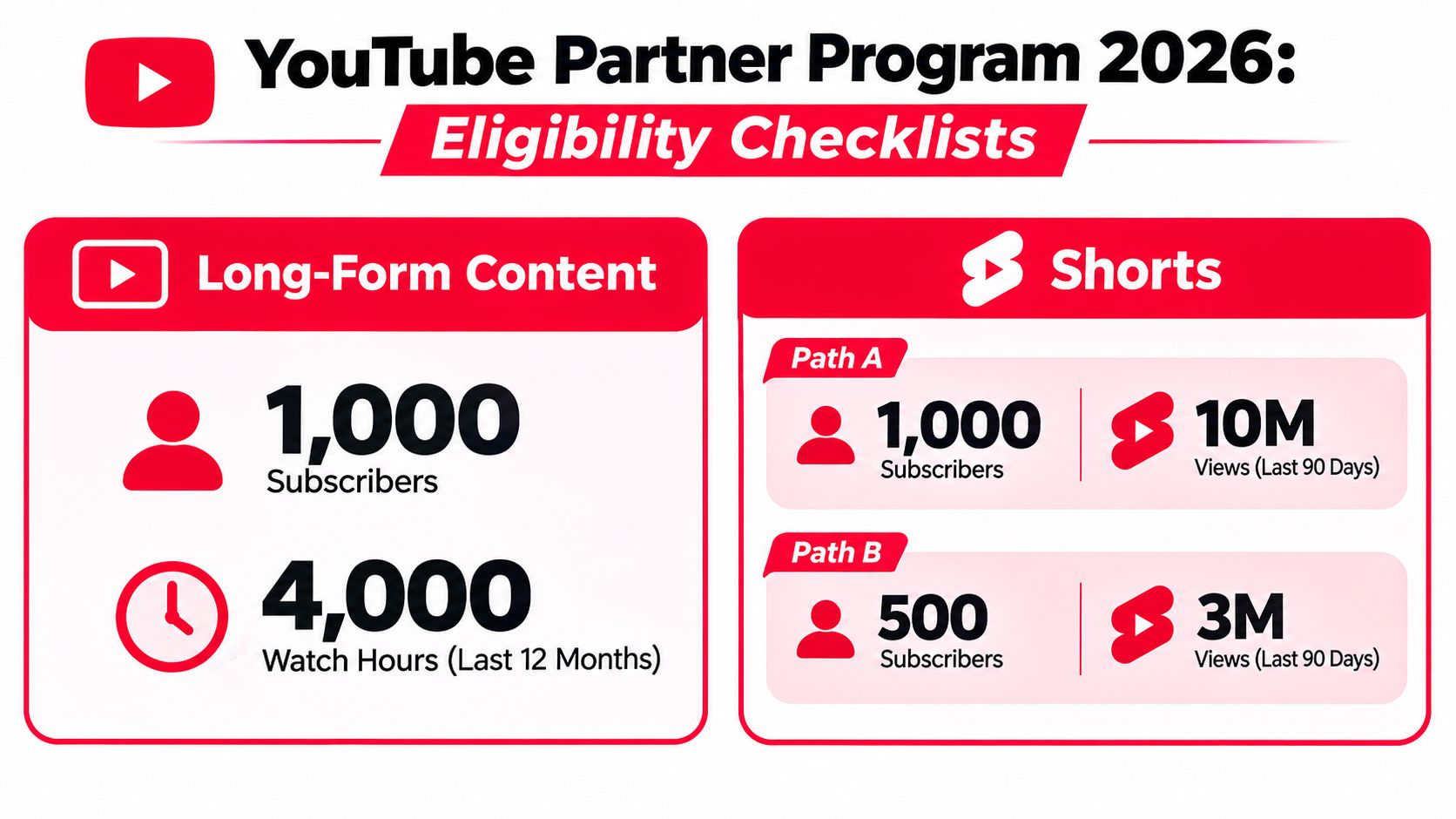
A creator can receive millions of views and still earn zero YouTube ad revenue if the channel isn't eligible for the relevant monetization program. Full ad and Premium access is tied to 1,000 subscribers plus either 4,000 watch hours or 10 million Shorts views, according to the 2026 eligibility information provided in the brief and this guide to enabling YouTube monetization.
The thresholds are different for long-form videos and Shorts, so creators shouldn't combine the two formats as if they use one shared calculation.
Long-form eligibility
The full long-form route requires:
- 1,000 subscribers: The channel must reach the subscriber threshold.
- 4,000 watch hours: The qualifying watch-time requirement applies to the stated rolling period.
- Policy compliance: The channel must satisfy YouTube's monetization and community rules.
- Account setup: The creator needs the required payment and AdSense arrangements.
Some early-access features may have lower entry requirements, but early access shouldn't be confused with full watch-page ad monetization. A creator must check the current eligibility screen in YouTube Studio because YouTube can update program requirements and feature availability.
Shorts use a different economy
Shorts revenue doesn't work like a standard long-form pre-roll or mid-roll attached directly to one video. Revenue is pooled across the Shorts Feed and distributed through the Shorts monetization model, so a Shorts view shouldn't be compared directly with a long-form view.
Recent 2026 benchmark coverage places Shorts RPM at roughly $0.02 to $0.12 per 1,000 views, far below the broad long-form RPM range, according to the 2026 YouTube monetization rules overview. Eligibility, the pool-based model, and whether views qualify for monetization all affect the result.
The practical sequence is simple:
- Build a compliant audience.
- Reach the relevant eligibility threshold.
- Apply and connect the required account details.
- Confirm monetization is active.
- Analyze RPM after revenue data accumulates.
Until the creator crosses the required gate and receives approval, the answer to “how much does YouTube pay per 1,000 views?” is nothing from YouTube ad revenue, even if the content performs well. That makes eligibility the foundation of every later RPM strategy.
Proven Strategies to Increase Your Pay Per 1000 Views
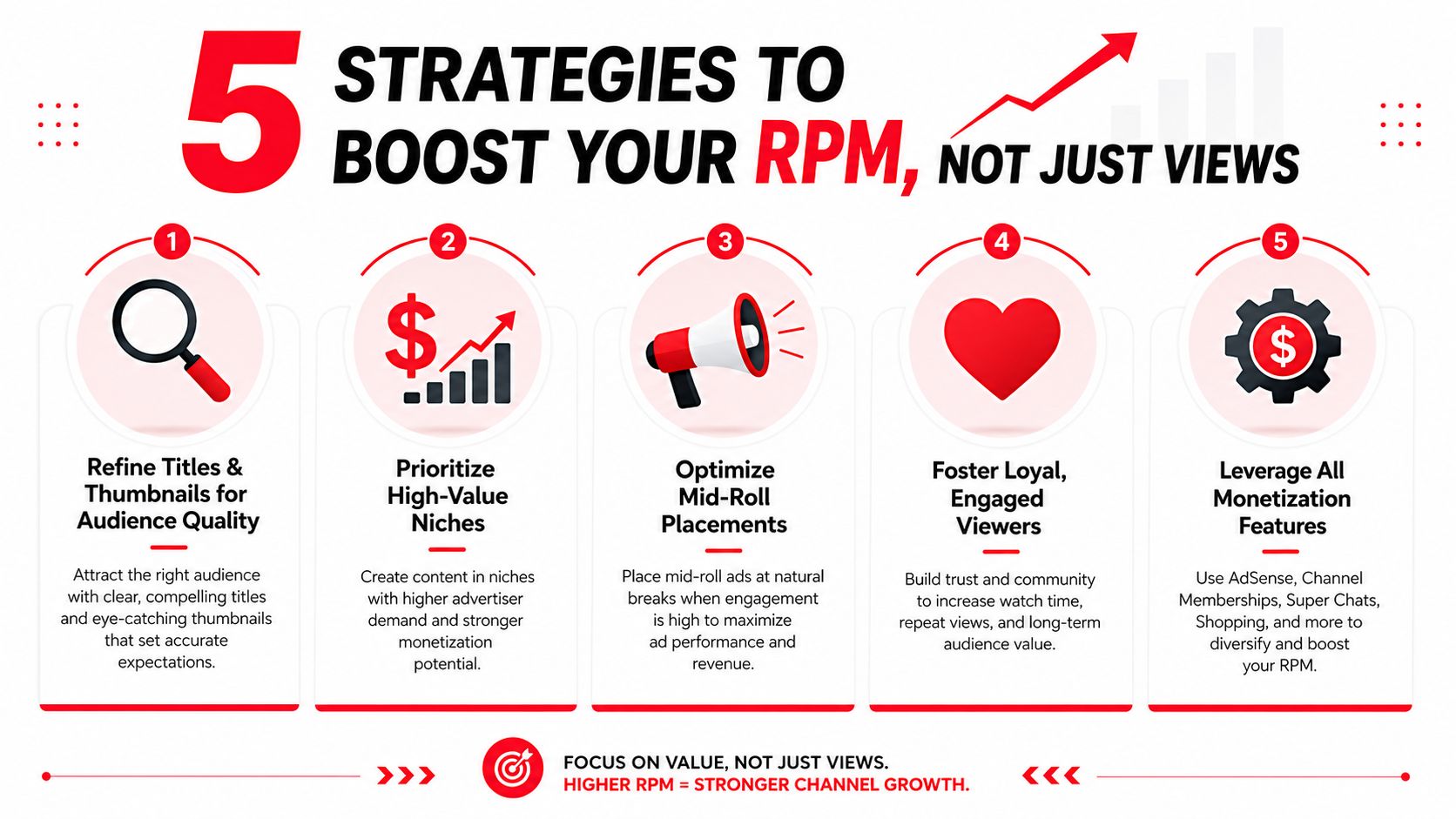
More views can increase revenue, but views alone don't determine revenue efficiency. A creator with a smaller audience in a valuable niche can earn more from ads than a creator with a larger audience in a low-RPM category. The strongest strategy is to improve the quality and commercial relevance of each view, not just chase a larger counter.
Start with audience quality
Titles and thumbnails should attract the viewer most likely to value the topic, not every possible viewer. A title such as “Best Budgeting Apps for Freelancers” signals a stronger commercial context than a vague title about money. The goal isn't to manipulate clicks. It's to help YouTube find viewers whose interests align with the subject.
Retention supports monetization because viewers must remain engaged long enough to encounter available ad opportunities. Use audience-retention graphs in YouTube Studio to identify introductions that drag, unclear transitions, and sections where viewers leave. A stronger opening and cleaner structure can improve the number of viewers who reach later parts of a video.
Choose topics advertisers value
Finance, technology, and other high-demand categories can attract stronger bids than casual entertainment. The benchmark data cited earlier reports finance and investing RPM around $8 to $18 and casual gaming around $1.50 to $3.50 for United States audiences, so a creator evaluating a niche should compare commercial demand as well as personal interest.
Don't force an unrelated topic onto an existing audience. Instead, look for adjacent subjects that solve expensive or recurring problems. A gaming channel might test hardware comparisons or setup tutorials, while an educator might focus on software workflows with clear purchasing intent.
Improve geographic relevance carefully
Subtitles, translated metadata, and dubbed versions can help a creator reach viewers in additional markets. They don't guarantee a higher RPM, and targeting a higher-value geography only works when the content remains useful to that audience. Language quality, cultural context, and topic relevance matter more than adding a translation mechanically.
Audit the channel in this order
- Inspect RPM by video: Find the topics and formats that already monetize efficiently.
- Review country mix: Compare higher-RPM videos with their audience geography.
- Study retention: Identify where viewers stop before later ad opportunities.
- Test advertiser-friendly subjects: Develop adjacent topics without breaking audience trust.
- Use eligible monetization features: Include the revenue sources that YouTube reports within RPM when they fit the channel.
Seasonality can also change advertiser demand, so compare similar periods rather than treating one month as a permanent baseline. Evergreen videos may continue generating views after publication, while timely videos can attract a short burst of attention. The best mix depends on the channel's audience and production capacity.
Turning Views Into Revenue With Attribution Tracking
RPM is useful, but it isn't the complete revenue picture for a creator who sells a product, service, course, membership, or consultation. A video can produce modest ad revenue and still be commercially valuable if it sends qualified viewers to an offer.
Consider the difference between two creators. Creator A earns $4 RPM and sells a $500 offer to 0.5% of viewers. Creator B earns $20 RPM but has no off-platform funnel. Those figures alone don't prove what either creator will earn because conversion quality, costs, refunds, and attribution rules matter. They do show why ad RPM shouldn't be treated as the ceiling for a creator business.
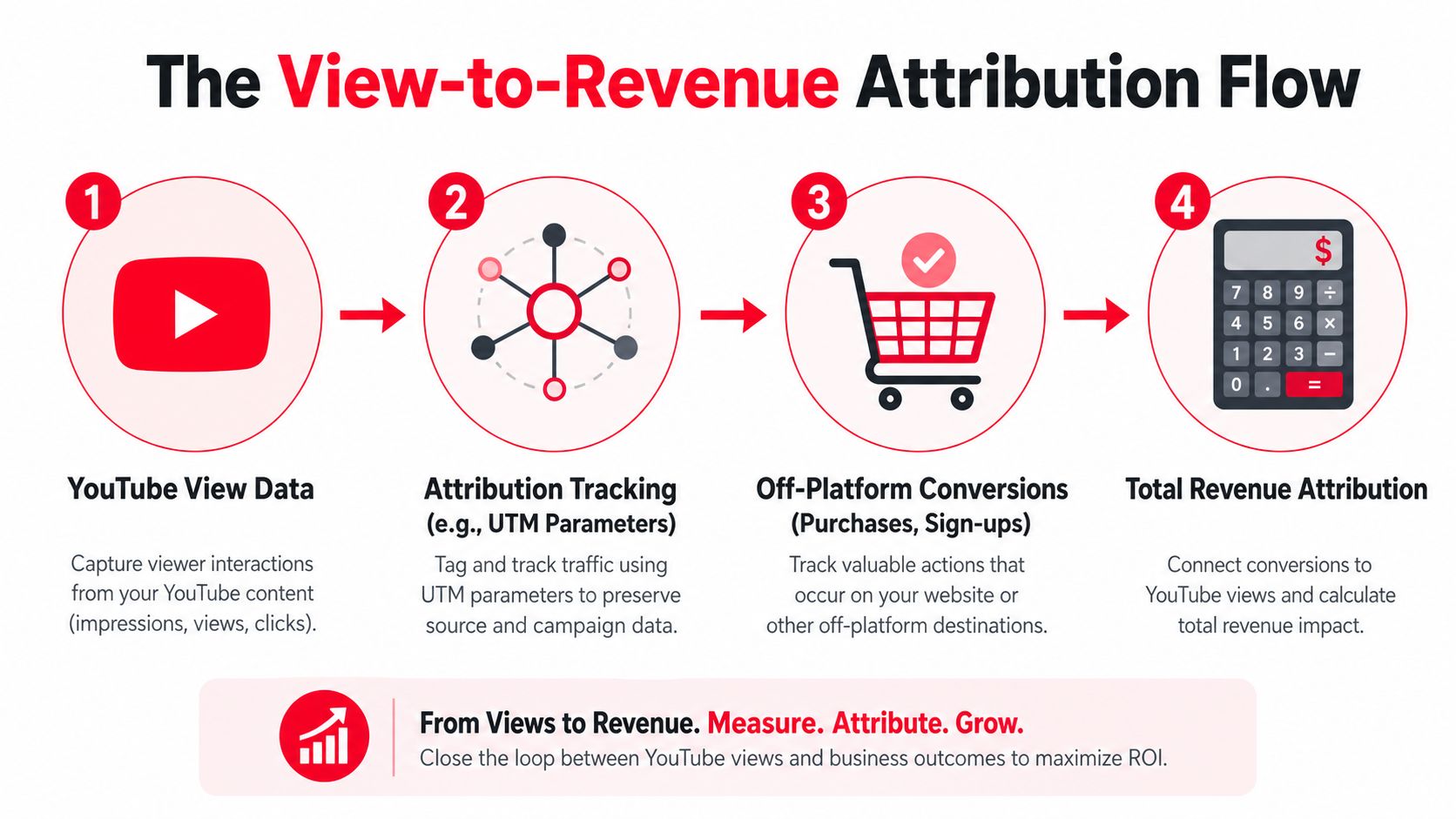
Connect the view to the action
A basic attribution setup can include:
- UTM-tagged links: Add campaign, source, and content identifiers to the URL in a video description.
- Short redirects: Use a tool such as Bitly to create a memorable link and preserve campaign tracking.
- Unique discount codes: Give each video or series a distinct code so sales can be associated with the originating content.
- CRM records: Store the source data when a viewer becomes a lead, books a call, or completes a purchase.
The important detail is consistency. If every video uses the same untagged homepage link, you can count clicks but you won't know which content generated them. A separate tracking link for each offer and video creates a more useful connection between publishing and revenue.
Understand assisted conversions
Last-click attribution gives the final touchpoint all the credit. YouTube may introduce the viewer, build trust, and influence a later search or direct visit, while the last-click report assigns the sale to another channel. A multi-touch model can give credit across the interactions that preceded the conversion, although no model perfectly reconstructs a buyer's decision.
Use the model that matches your sales cycle. For a direct purchase, last click may offer a practical operational view. For a course, service, or higher-consideration offer, compare first-touch, last-touch, and assisted activity before deciding which videos deserve more investment.
Make each thousand views measurable
A creator should know more than views and RPM:
- Which video generated the click?
- Which landing page received the viewer?
- Did the viewer become a lead?
- Did that lead buy?
- How much revenue can the business reasonably attribute to the content?
ViewsMax provides trackable links, content planning, publishing workflows, and performance reporting that connects content activity with clicks, leads, and attributed sales. If you want to turn your YouTube views into measurable revenue rather than a vanity metric, visit ViewsMax and set up tracking before you scale your next content campaign.