A great script for a youtube video is your blueprint. It’s the secret sauce that turns a good idea into content that feels intentional, delivers real value, and keeps people glued to their screens. A script is what separates a video that gets a passing click from one that earns a loyal subscriber, and that difference is everything to the YouTube algorithm.
Why Your Script Is the Key to YouTube Growth
In a world drowning in content, a cool idea just isn’t enough to cut through the noise. What really makes a video stand out is a solid script. I like to think of it as "engineered engagement"—it’s your tool for strategically placing hooks, controlling the pace, and taking your audience on a journey from the first second to the last.
If you just wing it, you risk rambling, losing your train of thought, and, worst of all, losing your audience.

From Idea to Impact
A common myth I hear from creators is that scripting kills spontaneity and makes you sound robotic. It’s actually the opposite. A well-written script frees you up to be your best self on camera. You can focus on your delivery and personality because you're not scrambling to remember what to say next. It's your safety net, making sure every word you say has a purpose.
This prep work gives you a huge advantage in a few key areas:
- Clarity of Message: The act of writing forces you to sharpen your ideas into a logical flow. This makes your content way easier for viewers to follow and absorb.
- Better Pacing: You can intentionally build excitement, hit your key points with impact, and cut out all the awkward pauses and "ums" that make people click away.
- YouTube SEO Boost: A script lets you weave in your target keywords and phrases naturally. This is a massive signal to YouTube's algorithm, helping it understand what your video is about and who should see it.
Standing Out in a Crowded Space
Let's be real: the competition on YouTube is fierce. By late 2025, the platform was home to an incredible 29 billion videos. The data shows that the top 1% of those videos get 91% of all viewing time, while the other 99% of us are left fighting for the remaining 9%.
That stat alone shows why scripting isn't just a "nice to have"—it's a critical step if you want a shot at breaking into that top tier.
A script isn't just a document; it's a strategic tool. It transforms a raw idea into a polished piece of content designed to maximize viewer retention and satisfy the algorithm.
Once you have a great video, you can squeeze even more value out of it. For example, it’s easy to transcribe YouTube videos and turn that text into blog posts, social media updates, or email newsletters. This guide will give you the practical, no-fluff steps to turn your ideas into scripts that build a real, engaged audience.
The Pre-Scripting Blueprint for a Viral Video
Before you write a single word of your script, you need a plan. This is the part everyone wants to skip, but trust me, the groundwork you lay here is what separates a video that flops from one that has a real shot at going viral. It's all about connecting your creative idea with what actual people are searching for.

This whole process boils down to one simple, focused question: What is the one thing this video needs to achieve? It's so tempting to cram everything in, but a video that tries to educate, entertain, and sell usually fails at all three.
Defining a singular goal is the most crucial step in crafting a high-performing script. Every word, every scene, and every call to action must serve this primary objective. If it doesn't, it's just noise.
Know Who You Are Talking To
Forget about generic demographics. Knowing your audience is "creators aged 25-34" tells you almost nothing useful. A truly effective script for a youtube video needs to feel like it's speaking directly to one person about their specific problems and goals.
To get inside their head, ask yourself a few questions:
- What are their biggest frustrations? Get specific about the pain points related to your topic.
- What questions are they literally typing into YouTube? Frame your content around the answers they're already looking for.
- What's the "quick win" they want? Your video should deliver a tangible piece of value they can use right away.
When you can answer these, your script stops feeling like a lecture and starts feeling like a helpful conversation. You're solving a real problem, and viewers feel that.
Finding Your Content Gap
Smart research is the engine of this blueprint. You're looking for that sweet spot where what you're passionate about overlaps with what your audience is dying to watch. This is where keyword research becomes your secret weapon, turning your gut feelings into data-backed ideas.
A great place to start is by seeing what your competition is up to. Go to YouTube, search for your video idea, and watch the top 3-5 videos. But don’t just watch them—dissect them.
- What common themes or questions do they all cover?
- What did they miss? This is your opening.
- What are people saying in the comments? Are they confused? Are they asking for more?
The comments section is a goldmine. It shows you exactly where the existing content is falling short, revealing the perfect gap for your video to fill. Understanding what people are searching on YouTube is the foundation for creating something people actually want to click on.
Once you’ve done this homework, pull it all together into a simple, one-page outline. This isn't the final script; it’s the roadmap. It should have a working title, the main goal, a quick profile of your ideal viewer, a few key talking points, and what you want them to do at the end. This little document keeps you on track and ensures your script is built for success from the ground up.
Crafting a Hook That Stops the Scroll
Let's be blunt: you don't have minutes to grab someone's attention on YouTube. You have seconds. The first 5 to 15 seconds of your video are the most valuable real estate you'll ever own. This opening, your hook, is your only chance to stop the scroll and convince a viewer that your video is worth their time.
Get it wrong, and they're gone. A weak hook leads to an instant click-away, tanking your audience retention and signaling to the YouTube algorithm that your content isn't hitting the mark.
The sheer volume of content you're up against is staggering. Every single day, users watch over 1 billion hours of video on YouTube—that’s a collective 5 billion videos watched daily. And with Shorts adding another 70 billion daily views to the pile, a powerful hook isn't just nice to have; it's a survival tool.
A truly great hook does more than just state the topic. It creates a psychological itch—an "open loop"—in the viewer's mind. It poses a question or sparks a curiosity so compelling that they feel an urge to see it through. This is what turns a passive scroller into an engaged viewer, leaning in to hear what you have to say next.
Proven Hook Formulas for Higher Retention
You don't need to reinvent the wheel every time you sit down to write. The best creators have a toolkit of proven hook formulas they adapt to their content. This approach ensures your script for a youtube video starts with a punch, every single time.
To get you started, I've put together a table of a few battle-tested hook formulas that consistently work. Think of these as frameworks you can mold to fit your specific video topic and style.
| Proven Hook Formulas for Higher Retention |
| :— | :— | :— |
| Hook Formula | Description | Example |
| The Controversial Statement | Start with a bold, counterintuitive opinion that challenges the viewer's assumptions and makes them want to hear your reasoning. | (Tech Channel): "This brand new, thousand-dollar smartphone is actually a downgrade from last year's model." |
| The In Medias Res Opening | Latin for "in the middle of things," this technique drops the viewer right into the most exciting part of the action or story. | (Travel Vlogger): Opens with a shot of being lost in a crowded market "Okay, I have no idea where I am, and my flight leaves in two hours." |
| The Shocking Statistic | Grab attention with a surprising number or a little-known fact that immediately establishes your authority on the subject. | (Finance Channel): "Did you know that 50% of Americans in their 50s have zero dollars saved for retirement? Today, we're going to fix that." |
The key is to pick a hook that aligns perfectly with the promise you made in your title and thumbnail. You want the viewer to feel like they’ve landed in exactly the right place.
From Hook to Introduction
Once you've hooked them, you need a smooth transition into your introduction. This is where you set expectations and deliver your value proposition—the "what's in it for me" for the viewer. Resist the temptation to waste this crucial moment with a long, animated intro or by immediately asking for likes and subscribes.
Your introduction has one job: answer the viewer's unspoken question, "Why should I keep watching?" Be direct, be clear, and promise a specific outcome. This builds immediate trust.
A powerful intro really only needs two parts. First, tell them what the video is about and who it's for. Second, explain the benefit they'll walk away with.
Let’s look at an example for a creator making a video about YouTube Shorts.
Weak Intro: "Hey guys, welcome back to my channel. In this video, we're going to talk all about YouTube Shorts. Before we start, don't forget to like and subscribe!"
Strong Intro: "If you're tired of your Shorts getting stuck at 100 views, this video is for you. By the end, you'll know the three scripting tricks I used to take my own Shorts from a handful of views to over 50,000."
See the difference? The strong intro connects with a pain point, promises a real solution, and even adds a bit of social proof. It respects the viewer's time and gets straight to the point. When scripting, pour your energy into these first few lines. Their impact on your video's success is massive, and they're essential if you want to get more views on YouTube Shorts.
Structuring Your Content for Maximum Engagement
Alright, you’ve nailed the hook. Your viewer is intrigued and has decided to stick around for more than five seconds—that's a huge win. But now comes the hard part: delivering on that initial promise. A killer intro followed by a rambling, disorganized body is a surefire way to send your audience retention plummeting.
Think of your video's structure as the roadmap for a journey. You wouldn't send someone on a trip without directions, and you shouldn't expect a viewer to follow your content without clear signposts. This framework is what turns a collection of ideas into a cohesive, easy-to-follow experience.
The hook you chose actually sets the stage for the entire structure. If you promised a shocking result, the body of your video needs to build up to that reveal logically. This decision tree shows just how interconnected your hook and your content structure really are.
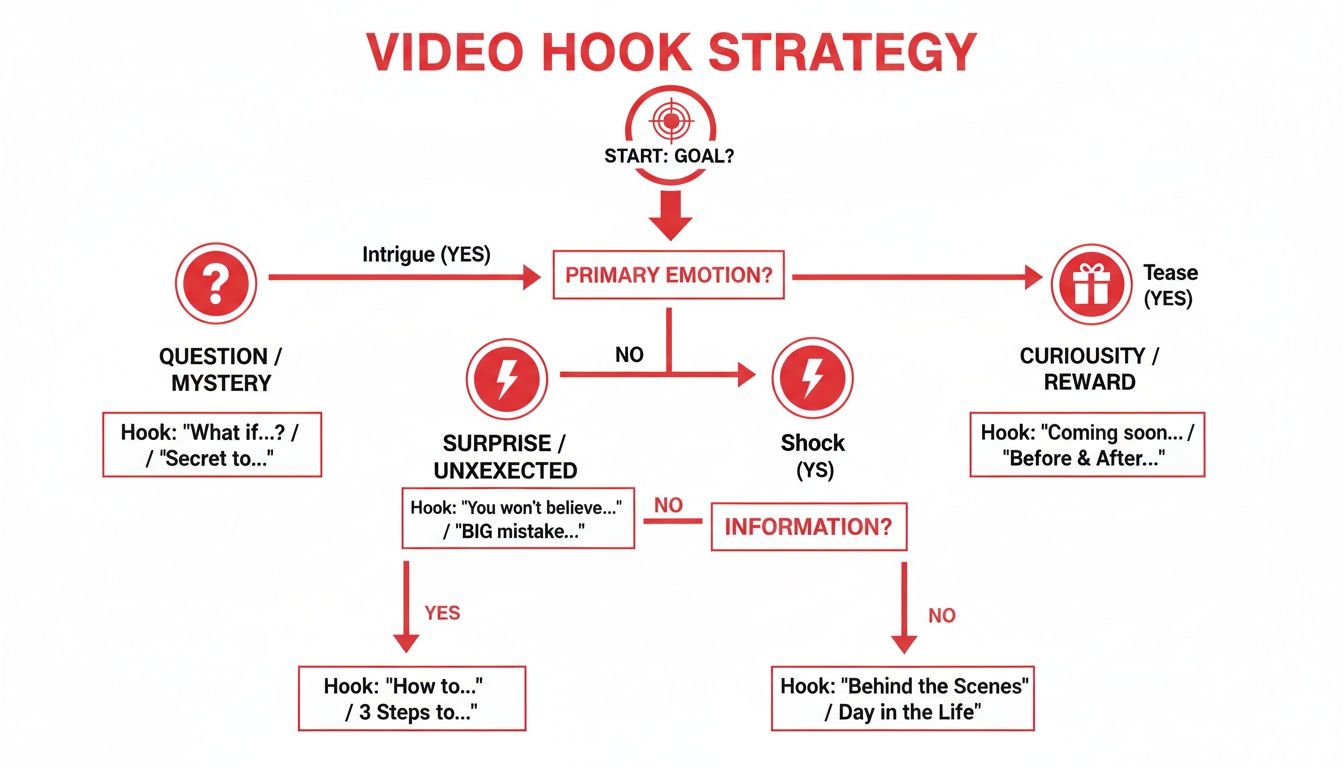
As you can see, the emotional trigger of your hook—whether it's curiosity, shock, or empathy—directly informs the kind of journey your script needs to take the viewer on.
Frameworks That Keep Viewers Watching
You wouldn't use the same script structure for a personal vlog and a complex software tutorial, right? Choosing the right narrative framework is about more than just organizing your points; it's about creating a psychological flow that keeps people glued to the screen.
Here are a few battle-tested frameworks I’ve seen work wonders on YouTube:
- Problem-Agitate-Solve (PAS): This is pure gold for tutorials, reviews, or any content that solves a problem. Start by defining a pain point everyone recognizes (the Problem). Really dig into why it’s so frustrating (the Agitate part). Then, you ride in like a hero with the Solution—the core value of your video.
- What-Why-How: Perfect for educational content. You start simple by defining the concept (What is it?). Then you sell them on its importance (Why does it matter?). Finally, you deliver the goods with actionable steps (How do you do it?). It’s clean, logical, and incredibly effective.
- Chronological Storytelling: This is the natural fit for vlogs, travel diaries, or case studies. You’re simply walking the viewer through events as they happened. The magic here is in building a narrative with a clear beginning, a messy and interesting middle, and a satisfying end.
Picking one of these frameworks upfront makes the entire scripting process a thousand times easier. It gives you a backbone to build upon, ensuring your final video feels complete and satisfying.
A well-chosen structure does more than just organize your talking points. It creates a rhythm and pace that guides the viewer's emotional journey, making your content feel more compelling and memorable.
Maintaining Momentum with Pacing and Transitions
Your structure is the skeleton, but pacing is the heartbeat that keeps your video alive. Nothing kills a video faster than a long, monotonous section or a jarring jump between topics. You have to actively manage the viewer's energy from start to finish.
A simple but powerful trick is to use verbal signposts. These are just short phrases that orient the viewer. Something as simple as, "Okay, now that we've covered the basics, let's get into the advanced stuff…" works wonders. It signals a shift and gives the viewer's brain a micro-second to reset and re-engage.
Another must-have tool is the pattern interrupt. This is any change—visual or auditory—that breaks up the flow and jolts the viewer back to attention.
Here are a few ways to script these in:
- Change of Scenery: In your script, make a note to cut to a B-roll shot or punch in with a different camera angle.
- On-Screen Text: I often write things like
[TEXT ON SCREEN: Key Takeaway]directly into my script to remind me to add visual emphasis later. - Sound Effects: A quick "whoosh" or "ding" when a graphic appears can be surprisingly effective at recapturing focus.
These little interruptions are like mini-refreshers that prevent viewing fatigue. By planning them in your script, you're not just hoping for an engaging video—you're engineering one.
Writing an Outro That Drives Action
Let's be honest, the end of your video is just as crucial as the beginning. A weak ending just… fizzles out. It leaves your viewer staring at a grid of suggested videos, ready to click away and forget all about you. But a powerful ending? That’s your chance to turn a casual viewer into a real part of your community, converting a single view into a long-term fan.
So many creators throw away their final seconds with a tired, forgettable "Thanks for watching, like and subscribe!" It’s a plea, not a plan. Think of your outro as prime real estate. You need to guide your audience toward one specific, meaningful action that actually matters to your channel's goals. Don't just ask them to do something; tell them exactly what to do and why it's the best next step for them.
Moving Beyond the Generic CTA
A strong Call to Action (CTA) isn't a desperate request; it's a confident recommendation. It should feel like the natural next step in the journey you just took your viewer on. When you're scripting this part of your script for a youtube video, the golden rule is to keep it singular and crystal clear. Hitting them with "like, comment, subscribe, hit the bell, and follow me on Instagram" just creates decision paralysis, and they'll end up doing nothing at all.
Instead, pick one primary goal for that specific video and lean into it.
- Want more watch time? "If you found this helpful, you're going to love my deep-dive on [Related Topic]. I've linked it right here on the screen—it's the perfect video to watch next."
- Need to boost engagement? "I'm genuinely curious—what's the single biggest challenge you're facing with [Topic]? Drop a comment below, I read every single one and I'd love to help out."
- Trying to grow your email list? "I actually put together a free one-page checklist that walks you through this entire process. You can grab it by clicking the first link in the description."
See the difference? Each example is direct and continues to offer value. You’re not just asking for a favor; you're handing them another resource. This simple shift frames the action as a win for the viewer, not just for you.
Summarize and Reinforce Value
Right before you hit them with that CTA, take a quick beat to summarize the video's core takeaway. This does two things: it reinforces the value you just provided and makes the viewer feel smart for having watched. It solidifies the main point in their mind and reminds them that their time was well spent.
This isn't a long, drawn-out recap. A single, punchy sentence is all you need.
A killer outro serves two purposes: it recaps the value you delivered and provides a clear path forward. It makes the viewer feel accomplished and gives them a reason to stick around.
For a cooking video, it might be as simple as, "And there you have it—three simple steps to a perfect sourdough starter. Just remember, patience and consistent feeding are everything." This neatly packages the entire video before you pivot to what you want them to do next.
Scripting for YouTube's End Screen
You have to script with YouTube's end screen elements in mind. Those clickable video or playlist suggestions pop up in the final 5-20 seconds of your video, and if you haven't planned for them, they'll just awkwardly appear over your face while you're still talking.
Design the last few lines of your script to perfectly accommodate these visuals. The best creators I know verbally direct attention right to them. It feels incredibly natural.
Here’s how that might sound in a script:
"So that's my complete breakdown of how I plan my content. Now, if you want to see this exact method in action, you should watch my video on scripting next. I've put it right up here on the screen for you. And to make sure you don't miss future guides, just click my face over here to subscribe. Thanks for watching, and I'll see you in the next one."
This simple technique transforms the end screen from a passive feature into an interactive part of your content. When you plan for it in your script, you create a seamless, professional finish that actively encourages viewers to keep watching—a huge signal to the YouTube algorithm that your content is worth binging.
Using AI to Write Better Scripts, Faster
Let's shift from theory to technology. AI tools have become a creator's secret weapon for writing a high-quality script for a youtube video without the usual burnout. This isn't about having a robot do all the work. It's about having a creative co-pilot to help you navigate the tricky parts, from brainstorming ideas to adding that final polish.
Think about it. You're staring at a blank page, totally stuck on a video idea. An AI idea generator can take one simple keyword and spit out dozens of potential titles, hooks, and content angles in seconds. This is how you instantly smash through writer's block. You're not starting from scratch anymore; you have a foundation to build on. It's all about boosting your own creativity, not replacing it.
Fine-Tuning Your Script with Data
Beyond just brainstorming, AI is incredible at optimization. Let's say you have a few strong title ideas. A good tool can analyze which one is most likely to catch a viewer's eye based on actual search behavior. Right from the start, you're building your script around a concept people are already looking for, which massively boosts your video's chances of getting discovered.
This data-first approach takes a lot of the guesswork out of the equation. You're no longer just hoping your script will land with your audience; you're making smart decisions backed by real-world search patterns. We've actually put together a deep dive on how to use a YouTube video title generator that shows exactly how this works.
The ViewsMax AI Script Generator, for instance, can create a full outline based on a title you know has potential.
As you can see, you can pop in a title and get a structured script with an intro, main points, and an outro. Think of all the time that saves.
Key Takeaway: The real power of AI scriptwriting tools is in ideation and structure. They build the skeleton; you add the personality, stories, and unique insights that make it your content.
As you start working with AI, knowing how to rewrite AI text to sound perfectly human is the most important skill you can develop. The goal is to let the AI handle the speed and structure, then you come in and infuse it with your own voice. This hybrid approach lets you create better, more optimized videos in a fraction of the time, so you can focus more on what you love—filming and connecting with your audience.
Got Questions? We've Got Answers
Diving into scriptwriting for YouTube can feel a bit overwhelming, and it's natural for questions to pop up. Let's tackle some of the most common ones we hear from creators.
How Long Should My YouTube Script Actually Be?
If you're looking for a quick rule of thumb, aim for about 150 to 170 words for every minute of video. That means a typical 10-minute video script would be around 1,500 to 1,700 words long.
But that's just a guideline, not a hard-and-fast rule.
The real answer is hidden in your YouTube Analytics. Check out your audience retention graphs—they’ll show you exactly where people stop watching. This data is gold because it reveals the sweet spot for video length that keeps your specific audience hooked.
Full Script vs. Bullet Points: Which is Better?
This one really boils down to your personal style and the type of video you're making. Honestly, there's no single right way to do it, and you'll find top creators in both camps.
-
A full, word-for-word script is a lifesaver when you're starting out. It takes all the pressure off, so you can focus on your delivery. It's also perfect for really detailed, technical topics or sponsored videos where you need to get the messaging just right.
-
A bullet-point outline gives you a much more spontaneous, off-the-cuff feel. This is great for vlogs, commentary, or live streams where you want your personality to come through loud and clear without sounding like you're reading from a teleprompter.
Pro-Tip: Try a hybrid approach. Many seasoned creators fully script their intro and outro—to nail the hook and CTA—but use bullet points for the main body. It's the best of both worlds, giving you structure where it counts and freedom where you need it.
Can AI Genuinely Help with Writer's Block?
Yes, one hundred percent. Think of AI tools as the ultimate brainstorming partner. When you're staring at a blinking cursor with no idea where to start, an AI idea generator can spit out dozens of video titles, fresh angles on a topic, or killer hooks from just one keyword.
You can also have it generate a complete outline for your video. It gives you a solid skeleton to work with, which is way less intimidating than a blank page.
Ready to put this into action and start writing scripts that get results? The AI-powered tools from ViewsMax are designed to help you brainstorm, outline, and refine your content in a fraction of the time. Start creating smarter scripts with ViewsMax today.