You can watch a video collect thousands of likes and still have no idea whether it helped your channel, your audience, or your business. That's the gap behind the YouTube like count. The number is easy to see, but its meaning depends on what viewers did before the click, what they did afterward, and whether the interaction survived YouTube's filtering and reporting systems.
A like is useful evidence, not a verdict. Treat it as a surface-level sign of approval, then compare it with retention, returning viewers, clicks, subscriptions, and revenue before deciding that a video connected.
What the YouTube Like Count Really Represents
A creator opens a video and notices that the visible count has changed. Sometimes it rises slowly, sometimes it appears to lag, and sometimes the expected number seems to have vanished from a familiar part of the interface. That experience can make the count feel like a direct audience reading, but it's better understood as a public-facing aggregate of one viewer action.
A viewer presses the thumbs-up button. YouTube records that action against the relevant video and viewer account, then combines eligible interactions into the number shown on the public watch page. The count doesn't reveal which viewers liked the video, why they did it, or what happened during the rest of the viewing session.
It also doesn't expose every piece of sentiment. Public dislike counts are no longer available, while creator-side dislike metrics remain accessible in Studio, creating a separation between what viewers can audit and what the creator can analyze internally. CNET's reporting on YouTube's public dislike change describes this asymmetry between public engagement signals and creator analytics.
The action behind the number
A like can mean several things:
- Approval: The viewer enjoyed the video or agreed with its point.
- Utility: The viewer found the tutorial, review, or explanation useful.
- Support: The viewer wants to encourage the creator.
- Participation: The viewer responded to a prompt or community habit.
- Low-friction feedback: The viewer wanted to react without leaving a comment.
Those meanings aren't interchangeable. A tutorial may earn likes because it solved a specific problem. A dramatic opinion video may earn likes because viewers agree with its framing. A short entertainment clip may receive a quick reaction without creating much lasting interest.
That's why a like count shouldn't be read as a complete measure of satisfaction, loyalty, or buying intent. It tells you that eligible viewers selected the thumbs-up action. It doesn't tell you whether they watched to the end, returned for another upload, clicked a product link, or recommended the video privately.
Practical rule: Use the public count to observe audience response, not to diagnose the entire audience experience.
For a more structured way to compare likes with views and other interactions, use a YouTube engagement rate calculator. The important habit is to interpret the ratio alongside the underlying behavior, rather than treating the visible total as the result you're trying to maximize.
How YouTube Records and Displays Likes
A like moves through several surfaces before you see it in a dashboard. Understanding that path makes discrepancies less alarming.
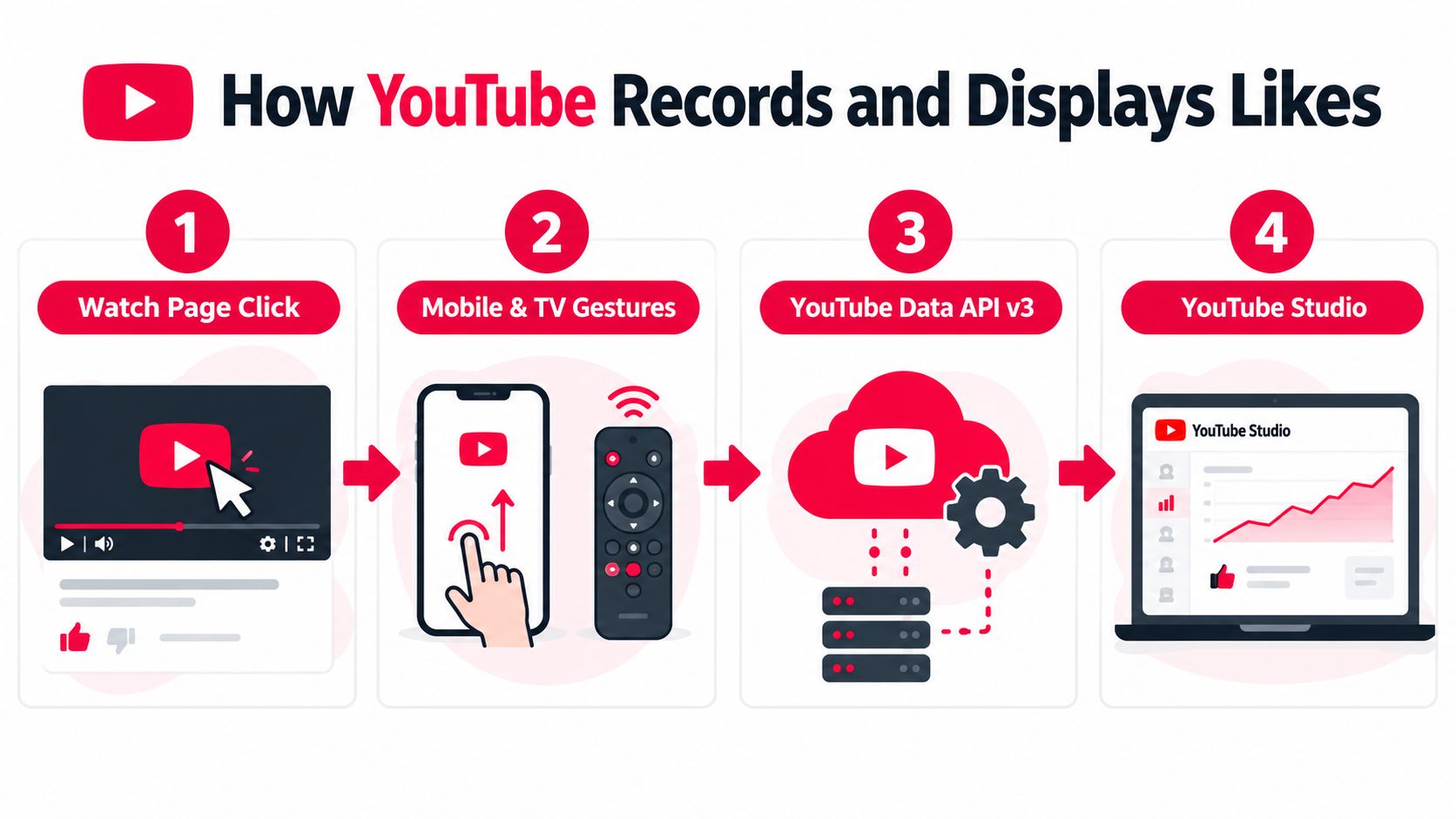
First, a viewer selects the thumbs-up control on the watch page. The same basic action can happen through a mobile gesture, a connected television interface, or another supported YouTube experience. The platform then processes the event and updates the relevant video-level aggregate.
Second, YouTube reconciles the event with account status, platform rules, and filtering systems. A visible counter isn't necessarily an immutable ledger. YouTube may remove ineligible interactions, update totals after processing, or display information differently across public and creator-facing surfaces.
Third, creators encounter the result in Studio. Studio can expose broader analytics than the public watch page, including creator-side dislike information and other performance details. Public viewers, by contrast, can directly inspect the like total but can't inspect the corresponding dislike total.
The YouTube Data API v3 is another reporting surface. Developers can use YouTube's official API documentation and connected tools to request video statistics, but a third-party display may not refresh at the same moment as the watch page or Studio. A tool can also apply its own caching or reporting schedule.
Why totals can disagree
Creators usually notice differences for practical reasons:
- Processing delay: One surface may update before another.
- Filtering: YouTube can remove activity that doesn't qualify.
- Interface changes: Studio can relocate or hide a familiar column.
- Tool timing: An API client or external dashboard may use cached data.
- Public versus private analytics: The watch page and Studio don't expose identical fields.
The platform's product surfaces have changed repeatedly. YouTube publicly tested removing the visible dislike count in 2021, while the like and dislike history remained available through account activity views rather than being fully deleted, as documented in coverage of the 2021 YouTube engagement-count change.
By 2026, the like count was still a moving Studio interface element. Reporting noted that the Likes column began disappearing from the Content page around mid-to-late May 2026, with creator complaints peaking in late June 2026. That doesn't mean likes stopped being recorded. It means the place where creators saw the value continued to change, as described in reporting on the YouTube Studio Likes column.
If you're comparing channel performance, also separate likes from views. A YouTube views calculation guide can help clarify why view reporting and engagement reporting shouldn't be treated as one identical counter. Creators evaluating channel income may also find a Forexyoutube monetization tool useful for putting monetization questions beside, rather than inside, the like metric.
Why the Public Like Count Is Only One Signal
The visible count answers a narrow question: how many eligible viewers selected thumbs up? It doesn't answer whether YouTube should recommend the video more widely, whether viewers found the opening compelling, or whether the content created value after the session ended.
YouTube's own help guidance frames likes as one engagement signal among views, subscriptions, and other interactions, rather than a standalone growth engine. YouTube's creator documentation on analytics and engagement is useful because it places likes inside a broader measurement system.
The deeper signals behind performance
A strong like response can coexist with weak retention. A controversial title can attract viewers who react quickly, then leave before the main explanation. A practical tutorial can receive fewer visible likes while keeping viewers engaged, earning returning viewers, and generating useful clicks.
Read the signals together:
| Metric | Where It Appears | Role in Recommendation System | What Movement Tells Creators |
|---|---|---|---|
| Public likes | Watch page and selected Studio surfaces | Supporting sentiment signal | Viewers found a reason to approve or support the video |
| Retention | YouTube Studio Analytics | Shows whether the video holds attention | The script, pacing, and payoff are working or failing |
| Watch time and viewing behavior | YouTube Studio Analytics | Helps describe session quality | Viewers spend meaningful time with the content |
| Click-through rate | YouTube Studio Analytics | Connects impressions with viewing decisions | Packaging attracts or fails to attract the intended audience |
| Shares, subscriptions, and return visits | Studio and audience reports | Shows deeper audience response | The video may have created a relationship beyond a single reaction |
This is why a high like-to-view ratio can mislead. A small but enthusiastic audience may like nearly everything, while a broader audience may watch carefully without pressing the button. Neither pattern proves success by itself.
A better interpretation framework has three questions. Did the viewer stay for the promised value? Did the viewer take a useful next action? Did the video attract the audience the channel wants to serve?
A public like count is visible feedback. Retention and downstream behavior explain whether that feedback matters.
Use the count as a diagnostic clue. If likes rise while retention falls, inspect the opening and packaging. If likes remain modest but returning viewers, subscriptions, or qualified clicks improve, don't dismiss the video. For a wider look at how multiple signals combine into breakout performance, explore what makes a YouTube video go viral.
Practical Tactics Creators Use to Earn Meaningful Likes
Meaningful likes usually follow a clear exchange. The viewer receives a useful idea, an emotional payoff, a solution, or a memorable experience, then chooses to signal approval. Asking for a like can help, but the request works best when the video has already earned the response.
Start with the promise viewers can recognize
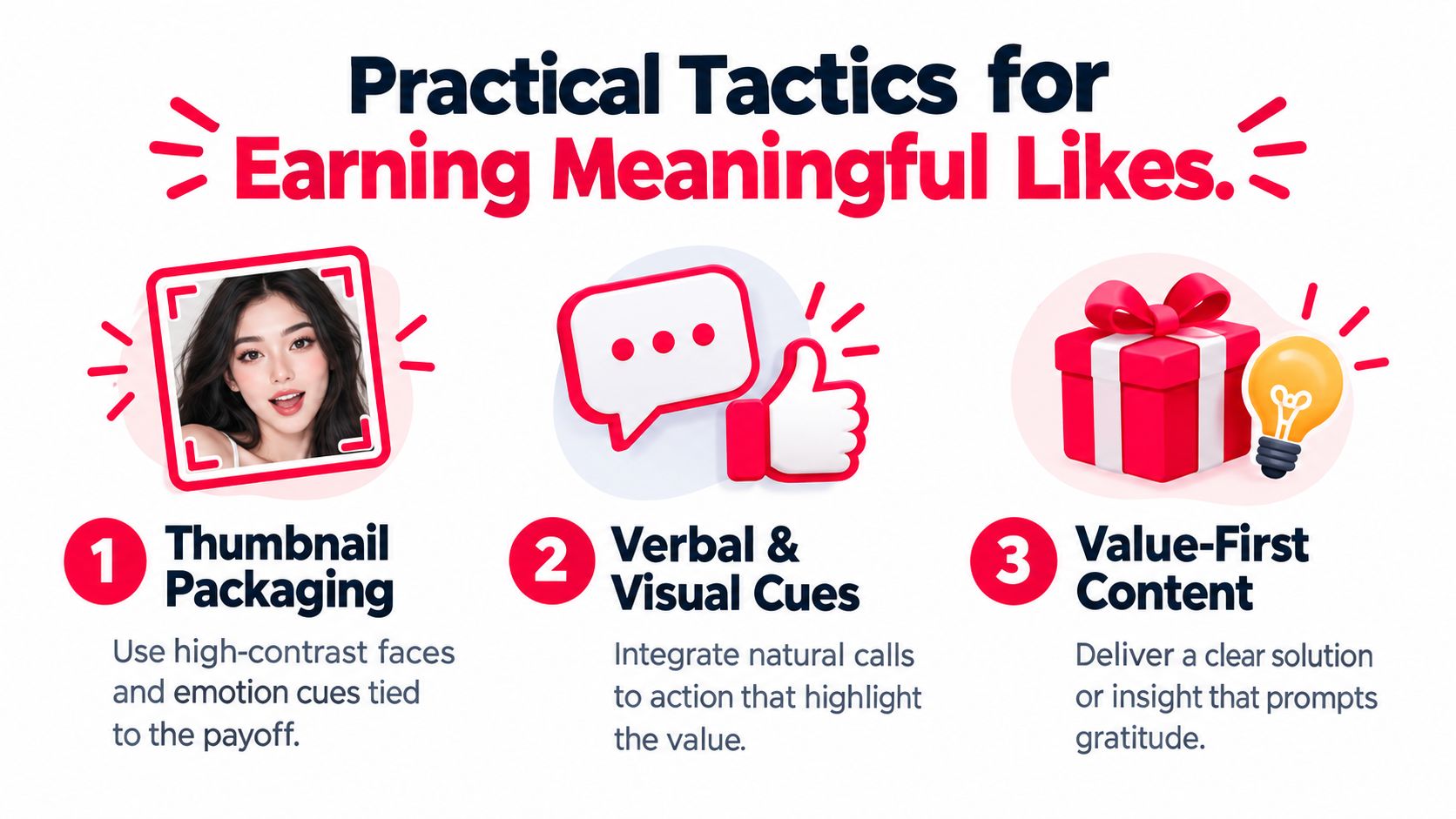
Your thumbnail should make the payoff legible. Use a face when human reaction matters, strong contrast when the subject needs to stand out, and an emotion cue that matches what the video delivers. A dramatic expression attached to a calm educational explanation can win the click but weaken trust once the viewer starts watching.
The title and thumbnail should form one promise, not two competing ones. If the title promises a fix for a specific problem, the opening should confirm that problem quickly and establish why the viewer should continue.
Build the like into the value exchange
A natural prompt connects the action to the viewer's experience:
- After a useful solution: “If this fixed the issue, tap like so I know this format helped.”
- After a clear comparison: “If the distinction is useful, leave a like before we test the next option.”
- Before a transition: “If you're getting value from this breakdown, a like helps other viewers find it.”
These prompts work because they give the viewer a reason. Avoid repeating the request so often that it interrupts the lesson, story, or review.
The strongest moment may come after the first confirmed payoff, not immediately after the greeting. Viewers haven't received enough value at the start to make the request feel earned.
Use the surrounding channel experience
A pinned comment can extend the conversation with a focused question. Ask viewers to identify the part they'll apply, choose between two options, or describe the problem that brought them to the video. That creates a reason to comment without turning the video into an engagement contest.
Community posts can prepare an audience before a premiere or upload. Share the problem, an early question, or a small decision point, then make the full video the place where viewers receive the complete answer.
Playlists, chapters, cards, and end screens can guide interested viewers toward the next relevant piece of content. They don't manufacture a like, but they can help viewers continue through a coherent topic sequence. That additional context gives the original video a better chance of being remembered and appreciated.
Know when restraint is the better tactic
A direct prompt isn't suitable for every subject. Sensitive news, personal disclosures, grief-related material, or artistic shorts can lose credibility when the creator inserts a cheerful request at the wrong moment.
YouTube has publicly discouraged engagement-bait patterns, so don't offer artificial rewards, pressure viewers to click repeatedly, or frame the like as a test of loyalty. Make the request optional, specific, and subordinate to the content.
The aim isn't to make every viewer press a button. It's to create a video where the button feels like a reasonable response to the value delivered.
Reading Likes Against Revenue and Attribution
A public like can show appreciation, but it can't settle a revenue question. Revenue depends on the audience reached, the viewing experience, monetization conditions, offers presented, and the actions people take after watching.
Creators should read the like-to-view relationship beside average view duration, retention, click-through rate, subscriber conversion, RPM, and attribution events. These metrics answer different questions. Likes describe a reaction. Retention describes attention. Attribution connects content with a measurable business outcome.
The signals that matter after the reaction
A video can attract enthusiastic approval but send few people toward an offer. Another can generate quieter engagement while introducing qualified viewers to a service, course, product, or consultation.
| Signal | What It Measures | Revenue Connection |
|---|---|---|
| Public likes | Visible approval from eligible viewers | Indicates sentiment, but doesn't identify buyers |
| Average view duration | How long viewers stay | Helps show whether the content holds attention around the offer |
| Retention | Where viewers continue or leave | Reveals whether the explanation reaches its important moments |
| RPM and ad performance | Monetization associated with viewing | Connects audience activity with advertising revenue |
| Clicks, leads, and sales | Actions after exposure | Shows whether content contributes to commercial results |
Don't use invented benchmarks to judge one video against another. Instead, compare videos within your own channel and ask whether the audience behavior matches the business goal.
For example, a video designed to sell a service should have a clear path from explanation to action. Use trackable links in the description, pinned comment, or relevant post, then compare the resulting clicks and conversions with the visible reaction. A thumbs-up can't tell you which viewer became a lead, but attribution can connect the content to that journey.
Creators who want a practical walkthrough can read YouTube Studio metrics before building a reporting routine. Studio provides the behavioral context needed to avoid making decisions from the loudest number on the page.
Decision filter: Keep likes in the report, but let retention, qualified clicks, subscriptions, and attributed revenue decide what you publish next.
A useful weighting approach is simple. First, confirm that the video reached the intended audience. Next, inspect whether viewers stayed for the core promise. Then review the actions that support the channel's objective. Finally, use likes to understand sentiment and identify topics viewers openly appreciated.
Troubleshooting Sudden Drops and Discrepancies
A falling like count feels personal because creators often watch it as a live audience verdict. It isn't always one. YouTube can reconcile activity after the initial display, and different reporting surfaces can show different stages of that reconciliation.
Start by separating a count problem from an audience problem. If the like number changed but retention, comments, returning viewers, and traffic sources look stable, the count may reflect filtering, delayed processing, or an interface difference rather than a sudden change in audience opinion.
A calm diagnostic sequence
Use this order before changing the title, deleting the video, or publishing an apology:
- Check the same video in multiple surfaces. Compare the public watch page with Studio and any legitimate API-based reporting tool you already use.
- Look for platform notices. Review Studio messages and removal reports for signs that YouTube has invalidated activity.
- Inspect behavior, not just reactions. Check retention, traffic sources, and returning viewers for a matching movement.
- Allow processing time. A temporary discrepancy can resolve after YouTube finishes updating its systems.
- Record the change. Save the date, surface, and displayed value so you can identify a recurring reporting pattern.
Don't assume the Data API and watch page must return an identical value at every moment. They can update on different schedules, and an external dashboard may add another delay.
When the shift may reflect a real problem
A genuine audience reaction often leaves more than one trace. If a controversial statement appears at a specific timestamp, retention may dip there and comments may become more critical. If a title or thumbnail changes, click-through rate may move while the content itself remains unchanged.
A recommendation loop can also bring a video to viewers who aren't a good fit. In that case, the count may grow while retention weakens, or negative feedback may become more visible in comments and audience reports.
Avoid reacting to one number in isolation. Compare the timing of the like movement with publishing changes, packaging edits, traffic-source changes, and audience behavior. If the public count is the only metric that moved, investigate reporting first. If several signals changed together, review the content and distribution strategy.
Creator Checklist and What Comes Next
Run this checklist before publishing and during the first monitoring window:
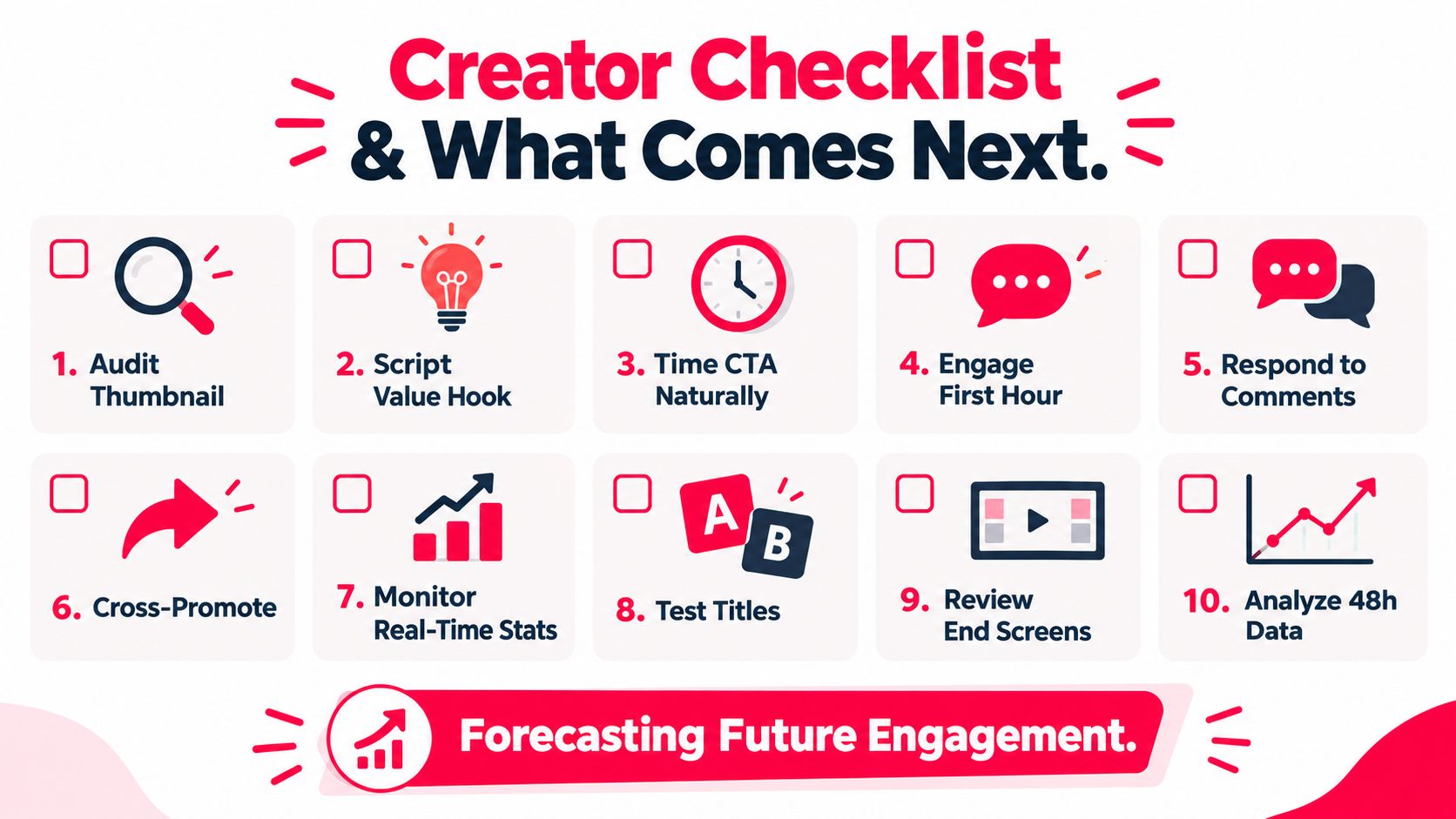
- Audit the thumbnail: Confirm that the visual cue matches the actual payoff.
- Script the value hook: State the problem and intended result early.
- Time the CTA naturally: Ask for a like after a useful moment, not before the viewer has context.
- Engage early viewers: Reply to comments and look for repeated questions.
- Respond with substance: Use comments to identify confusion, appreciation, and objections.
- Cross-promote selectively: Send the video to audiences that need its subject.
- Monitor live signals: Compare likes with retention, traffic sources, and viewing behavior.
- Test packaging carefully: Change titles or thumbnails only when you have a clear reason.
- Review end screens: Guide satisfied viewers toward the next relevant video.
- Analyze the early data: Compare the initial response with later audience quality instead of chasing a single count.
What may change next
The public presentation of engagement is likely to remain flexible through 2026. YouTube has already changed how dislike information appears publicly, and Studio has continued reorganizing where creators find like data. Future interface changes could alter visibility or presentation again, but that possibility shouldn't change the core measurement habit.
YouTube has also updated public view-count language to emphasize engaged views in Analytics, reinforcing the difference between visible surface counts and the metrics creators use internally. The practical implication is clear. Build reporting around behavior and outcomes, then use the public like count as supporting context.
Don't buy likes. Artificial activity may inflate the visible number while weakening the reliability of your reports and giving you no trustworthy evidence about audience satisfaction or commercial intent.
A public like count is most valuable when it reflects audience respect, not when it becomes the goal itself.
ViewsMax helps creators connect content with measurable business actions by creating trackable links and showing clicks, leads, and attributed sales alongside content performance. If you want to move beyond counting likes and identify which videos contribute to revenue, visit ViewsMax and build your attribution workflow around the audience actions that matter.