You wake up to find that yesterday's video has gathered fresh views overnight, three uploads are waiting in your schedule, and your inbox is full of collaboration requests, copyright notices, and questions from viewers. Before breakfast, you've opened YouTube Studio, a spreadsheet, a thumbnail editor, an email client, a transcription tool, and perhaps a separate dashboard for social posts. By noon, you've completed dozens of small tasks, yet you still can't explain which action improved watch time or produced a sale.
That's the problem YouTube automation tools are meant to solve. They aren't a replacement for creative judgment. Used properly, they hand repetitive work to software, preserve human review where it matters, and connect publishing activity to outcomes that affect the business.
The Monday Morning of a Modern YouTube Creator
Maya runs a mid-sized educational channel about home technology. Her Monday starts with a glance at overnight performance. One video is holding attention well, another has a promising click-through rate but weak early retention, and a Short has attracted comments she hasn't sorted yet.
Then the queue demands attention. She checks that the next long-form upload has the right thumbnail, description, chapters, subtitles, end screen, and scheduled release. A second video needs a pinned comment. Three Shorts need captions and platform-specific copy. None of these jobs is difficult, but each one interrupts the work Maya enjoys: researching ideas, testing explanations, and improving the next story.
Her inbox creates a second layer of friction. A brand wants a product review, a viewer reports a broken link, and an automated copyright claim needs investigation. She moves between dashboards because each system owns only part of the workflow. YouTube Studio shows audience behavior, her editing software contains the project files, her email contains commercial context, and her link tracker may hold the only evidence that a video generated a lead.

The repetitive work hiding inside a creative job
Maya's workload contains several handoffs that software can manage:
- Publishing: Upload approved files, apply metadata, add subtitles, and release content on schedule.
- Research: Collect topic ideas, organize search terms, and turn transcripts into reusable notes.
- Asset preparation: Produce thumbnail variations, chapters, captions, and clips from one source video.
- Engagement triage: Separate spam, routine questions, support issues, and comments that deserve a personal reply.
- Reporting: Bring performance data together so she isn't comparing disconnected screenshots.
Browser-based helpers can also reduce small administrative tasks. For example, a guide to Chrome extensions for YouTubers can help creators identify where lightweight browser tools fit without turning the entire workflow into an uncontrolled collection of add-ons.
The question behind the software
Maya doesn't need a machine to decide what her channel should mean. She needs a dependable production assistant that prepares work, moves approved assets, and flags exceptions. Her judgment still belongs in topic selection, factual review, storytelling, brand relationships, and the final decision to publish.
That distinction matters because the creator-tool market has changed. Third-party products have moved beyond isolated analytics helpers into workflow suites that support research, scripting, editing, subtitles, thumbnail testing, scheduling, and cross-platform posting. Recent industry reporting describes a solo creator completing many of those steps in a single afternoon, with channels automating at least 10 distinct production and distribution steps in some workflows. (Toolglance's 2026 creator report)
The useful question is no longer, “Which tool should I buy?” It's, “Which repeatable handoff should software own, and what result should improve when it does?” The answer starts with a clear definition.
What YouTube Automation Tools Actually Are
YouTube automation tools are software products that perform recurring channel tasks without requiring the creator to repeat every click manually. They can schedule publishing, generate metadata drafts, organize comments, create captions, prepare assets, connect data sources, or compile reports.
Think of the software as a production assistant. It can prepare the room, label the files, set the calendar, and bring you the relevant notes. It shouldn't decide whether your argument is accurate, whether a joke fits your audience, or whether a sensitive claim needs more context.
Three layers of automation
The first layer is rule-based automation. You define a trigger and an action. When a video reaches an approved status, the system might place it in a publishing queue. When a new transcript arrives, it might create a research document. This approach is predictable because it follows instructions rather than generating judgment.
The second layer is API-driven integration. An external application connects with YouTube through authorized interfaces to read data or perform supported actions. A scheduling system can send approved uploads to YouTube, while an analytics platform can retrieve channel performance and combine it with information from other services.
API architecture creates an operational constraint that growing channels must respect. YouTube Data API automation is governed by a per-project daily quota model, not a per-channel model. Independent coverage describes a default project as having 10,000 shared quota units per day, plus separate 100-call daily buckets for some endpoints, while upload calls are billed against their own bucket. That makes batching, retry control, and quota-aware job queues more reliable than launching many parallel requests. (Blotato's explanation of YouTube API pricing)
The third layer is AI-assisted automation. AI can draft title options, summarize a transcript, suggest chapters, create a first-pass script, or generate subtitle text. It can accelerate preparation, but it can also introduce factual errors, bland language, or misleading phrasing. Human approval remains essential.
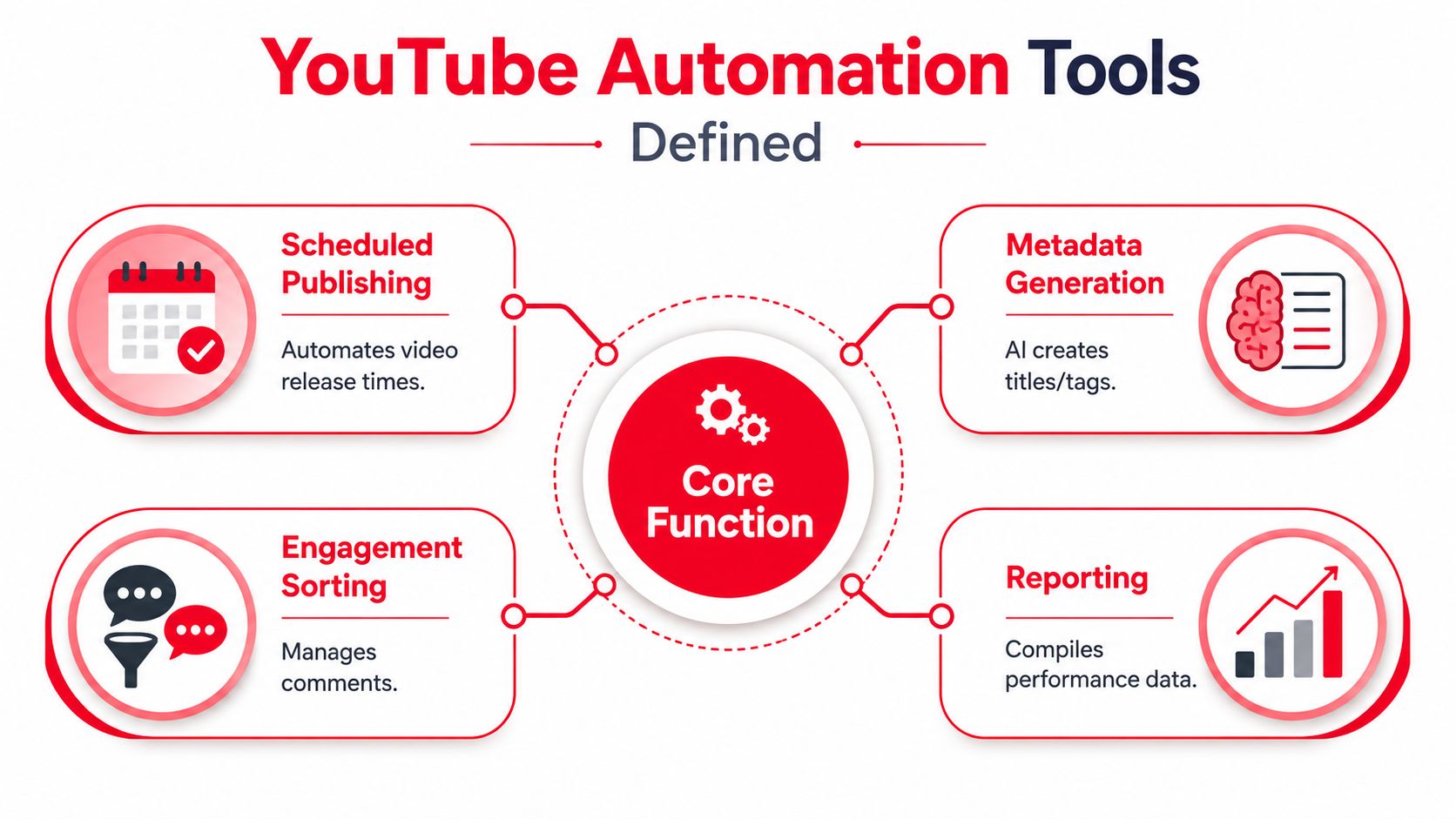
Automation is a stack, not a single button
A transcript utility illustrates the preparation layer. A resource such as the Tactiq YouTube transcript generator can turn spoken material into text that a creator may review, quote, summarize, or repurpose. The tool doesn't replace editorial decisions. It makes the source material easier to work with.
The category has evolved from single-purpose bots into composable creator stacks. A channel might use one product for research, another for editing, an official integration for scheduling, a moderation system for comments, and a separate reporting or attribution layer. A broader overview of AI tools for content creators can help map those products to the jobs they perform rather than treating every tool as interchangeable.
The safest operating model is simple. Let software prepare and move work. Let people approve anything that affects meaning, trust, compliance, or audience relationships.
The Five Core Categories Every Stack Needs
Start with the job, not the brand. A tool earns its place when it changes an operating outcome you can observe, such as shortening preparation, protecting release consistency, improving discoverability, clarifying audience behavior, or connecting content work to business value. That outcome should also shape the handoff to the next tool, so the stack works like a production line rather than a shelf of disconnected applications.
| Category | Primary Job | Example Workflow Moment | Success Signal |
|---|---|---|---|
| Scheduling and publishing | Move approved videos and Shorts through a release queue | A finished upload receives its metadata, publishing time, and distribution tasks | Fewer missed releases and fewer manual handoffs |
| SEO and metadata | Prepare titles, descriptions, tags, chapters, and captions | A creator compares several title directions before final approval | Faster optimization with stronger alignment between topic and viewer intent |
| Analytics and performance | Explain audience behavior and content results | The team reviews retention, traffic sources, and testing outcomes after release | Decisions rely on patterns instead of isolated impressions |
| Comment moderation and community | Sort conversations and protect creator attention | Spam is filtered while genuine questions are routed for replies | Less moderation burden and more relevant audience interaction |
| Bulk editing and asset production | Create repeatable supporting assets at scale | One long-form upload produces subtitles, chapters, thumbnail variants, and clips | More usable assets from the same source material |
Scheduling and publishing
Publishing tools handle the final operational mile. They can queue videos, coordinate Shorts drops, apply approved metadata, and organize release dates across a content calendar. The useful result is not maximum frequency. It is a planned release that reaches viewers on schedule without forcing a creator to repeat the same checklist.
Engineering quality matters here because API limits can affect the whole stack. A system that retries failed jobs indefinitely may consume shared quota and delay unrelated tasks. Look for queue controls, failure alerts, and a visible record of each change. Those features turn publishing from a fragile handoff into an auditable workflow.
SEO and metadata
Metadata tools package an idea for discovery. They may suggest title variants, organize descriptions and tags, create chapters, and draft captions. The measurable outcome is faster preparation and clearer topic alignment, not guaranteed search placement.
A creator still checks whether the title describes the actual video, whether the description helps viewers decide to watch, and whether the wording sounds like the channel. For a closer examination of discoverability workflows, see this guide to YouTube SEO tools. Use suggestions as options, then approve the language that matches viewer intent.
Analytics and performance
Analytics tools answer a different question: what happened after publication, and what should change next? Reports may show retention curves, traffic sources, audience segments, and results from thumbnail or title tests. Their value appears when a finding changes a production decision.
A useful report links a metric to an action. A retention drop may lead to a revised opening, a thumbnail result may change the next brief, and weak results from a time-heavy format may justify stopping it. A dashboard crowded with charts does not create that clarity by itself.
Comment moderation and community
Moderation systems organize attention. They can identify likely spam, group recurring questions, and help teams apply response standards. The boundary is clear: automation can filter and route, while sensitive or emotionally important conversations need the creator's judgment.
The success signal is a cleaner queue, not just fewer visible comments. Genuine questions should be easier to find, assign, and answer, with fewer irrelevant items competing for attention.
Bulk editing and assets
This category expands one approved video into a usable content package. It can support thumbnail variants, chapters, translations, subtitles, pinned comments, end screens, and clips. The outcome is more publishable material from the same source, provided each asset still receives a quality check.
Domain-specific automation is becoming more important. Recent coverage points to specialized workflows such as OCR for developers, slide recognition for educators, and scene or product detection for reviewers, rather than assuming one generic system fits every format. (Vidno's 2026 automation coverage)
Separate applications are normal. What matters is a clean handoff between them, one source of truth for status, clear ownership, and approval records. Track each category against its intended outcome, then keep the tools that improve the workflow and remove the ones that only add another dashboard.
Benefits and Risks Worth Weighing Honestly
Automation creates benefits, but benefits magnify mistakes. A good stack removes repetitive effort while keeping the channel's distinctive thinking visible. A careless stack can publish faster, spread errors further, and make the audience feel managed rather than understood.
| Dimension | What You Gain | What You Risk |
|---|---|---|
| Time | Less repetitive uploading, formatting, and sorting | More time spent repairing failed jobs or correcting poor drafts |
| Consistency | A dependable release and asset workflow | A rigid template that makes every video feel identical |
| Optimization | Faster title, thumbnail, and keyword preparation | Generic metadata that doesn't reflect the actual content |
| Engagement | A cleaner comment queue and quicker routing | Bot-like replies that weaken audience trust |
| Scale | More output across formats and platforms | More copyright, quality, and compliance exposure |
| Reporting | Centralized operational information | Dashboard overload and unclear ownership |
The gains are practical
A scheduler can protect a publishing cadence when the creator is filming or traveling. A captioning system can prepare accessibility assets while the editor works on pacing. A moderation filter can remove obvious noise from the queue so the creator can respond to real questions.
Automation also supports structured testing. Instead of changing a title, thumbnail, posting time, and video format simultaneously, a team can document one change, observe the result, and preserve the learning. That discipline matters more than the number of tools involved.
The creator economy now supports specialized tooling at substantial scale. Independent reporting in 2026 estimated that roughly 91% of creators in the United States and United Kingdom use AI tools for content production, idea generation, or workflow automation. (Toolglance's 2026 creator report) Automation is mainstream, but mainstream adoption doesn't make every implementation safe.
Practical rule: Automate the repeatable action, not the responsibility for its consequence.
The risks are operational, not theoretical
YouTube's policies concerning spam, deceptive practices, and artificial engagement create a clear boundary. Tools that manipulate views, likes, subscribers, or comments are not legitimate workflow automation. Mass uploads, repetitive templates, misleading metadata, and unattended auto-replies can also damage a channel's standing or audience relationship.
Quality drift appears more subtly. An AI-generated description may contain claims the video never makes. Captions may mishear a technical term. A thumbnail system may optimize for immediate curiosity while weakening trust. If nobody reviews the output, the workflow saves minutes at the cost of credibility.
Vendor lock-in creates another problem. A channel may become dependent on a platform's templates, storage, integrations, or reporting format. Export rights, account access, and ownership of source files should be part of the buying decision.
The decision rule is straightforward: automate work that doesn't require your unique creative judgment. Keep human approval for facts, claims, narrative choices, sensitive replies, sponsorship obligations, and final publication.
How to Choose and Roll Out the Right Stack
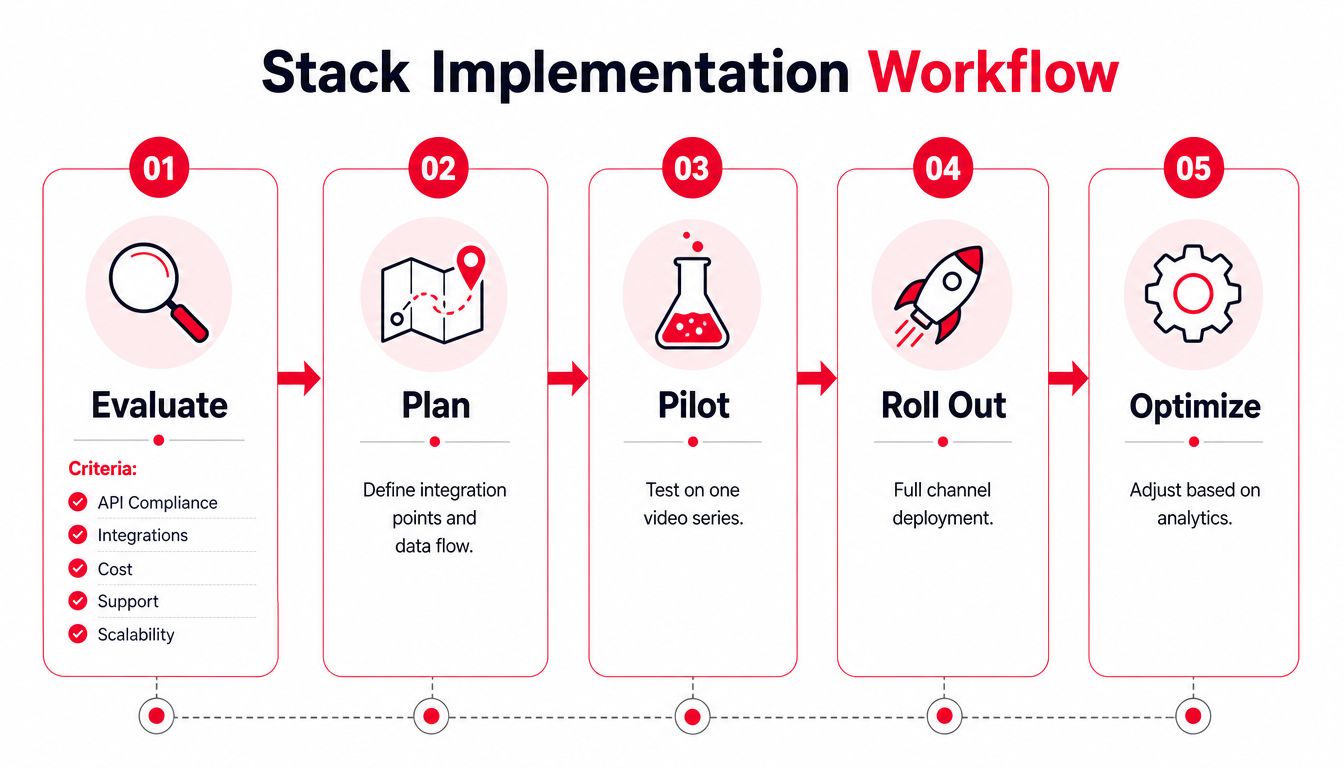
Start with the workflow you have, not the stack you wish you had. List recurring tasks from idea selection through reporting, then mark which ones are repetitive, which ones create errors, and which ones require your voice or judgment.
Five evaluation criteria
Native API compliance comes first. Prefer tools that use authorized YouTube connections and explain what permissions they request. Avoid products that ask for unnecessary credentials or promise artificial engagement.
Integration fit determines whether the tool reduces work or adds another inbox. Check whether it connects with your editor, storage, calendar, caption workflow, analytics system, and existing project-management process.
Stage-appropriate pricing matters because a solo channel has different needs from an agency managing many clients. Begin with the smallest plan that can test the workflow. Don't confuse more seats, credits, or features with a better operating result.
Data ownership and export rights protect your history. Confirm that you can export reports, retrieve source assets, remove access, and continue operating if you cancel.
Human-in-the-loop safeguards should be visible in the product. Look for approval states, change logs, review queues, permissions, and alerts when a job fails.
Use a simple scorecard:
| Criterion | Score from 1 to 5 | Evidence |
|---|---|---|
| API compliance | Permissions and documentation | |
| Integration fit | Tested connection with current workflow | |
| Cost fit | Trial or monthly plan | |
| Data ownership | Export and cancellation terms | |
| Human review | Approval controls and audit trail |
A rollout you can run this week
- Audit manual tasks. Track recurring work for several publishing cycles. Record who performs it, how long it takes, and where errors occur.
- Map tasks to categories. Assign each task to scheduling, metadata, analytics, moderation, or asset production. This prevents you from buying overlapping products.
- Pilot one tool at a time. Test the product on one series or workflow rather than changing the entire channel at once.
- Define success before launch. Choose operational measures such as hours saved, fewer failed uploads, improved reporting clarity, or a documented testing process. Don't claim a lift unless your measurement method can support it.
- Retire weak tools. If a product doesn't improve the chosen outcome, remove it. A subscription that nobody uses is not part of the stack. It's inventory.
Document every trigger, approval, owner, fallback, and failure message. Creators who manage partnerships can apply the same discipline to outreach by using a resource such as Cold Email That Gets Replies, then keeping the final message and relationship decisions under human control.
Review failures weekly, the stack monthly, and policy exposure quarterly. Don't buy annual plans before a workflow survives a real pilot, and don't stack two tools that perform the same job unless you can explain the difference.
Where Revenue Attribution Changes the Equation
Most creator stacks can tell you what was published and how viewers behaved. Fewer can answer the commercial question: which video, link, format, or publishing decision produced revenue?
That gap changes how you evaluate automation. Saving time is useful, but the larger opportunity appears when saved time moves toward content that creates qualified demand, product sales, bookings, or other business outcomes.
An attribution layer such as ViewsMax can sit beside scheduling, SEO, and analytics tools. It can connect content planning and publishing activity with trackable links, clicks, leads, and attributed sales, giving the team a view that standard audience dashboards often don't provide. It shouldn't replace retention analysis or creative review. It adds the commercial context needed to decide what deserves more production capacity.
Three decisions attribution can improve
First, identify videos that produce disproportionate revenue per view. A high-view video may create awareness, while a smaller tutorial may attract viewers who are ready to buy. Without attribution, teams can easily prioritize reach and overlook intent.
Second, test creative and distribution choices against business outcomes. A thumbnail or posting-time change shouldn't be judged only by impressions or clicks if the channel exists to generate sales. Track the downstream action as well, then compare the result with the content cost and production effort.
Third, reallocate production hours. If a particular format consistently generates qualified leads, the team can give it more research, editing, and promotional support. If another format attracts attention but never contributes to the commercial objective, the creator can redesign it, use it for awareness, or stop investing in it.
A clean data flow is essential. The scheduler must preserve video identity, the link system must use consistent tracking, and the revenue source must record conversions accurately. Otherwise, the attribution dashboard becomes another layer of confident-looking guesses.
Campaign planning also benefits from the same economic view. Teams comparing creator partnerships can use a guide to performance influencer campaign budgeting as a planning reference, then connect campaign links and outcomes to the content that generated them.
The broader creator-tool market reflects this shift toward measurable operations. One 2026 estimate placed the YouTube Creator Automation Tools market at $1.2 billion with an 18.5% CAGR, while another projected the broader YouTube automation market from $6.5 billion in 2025 to $12.3 billion by 2033. (Askpot's market overview) Those estimates describe market expansion, not a guarantee for an individual channel. For a creator, the practical lesson is to demand a clear relationship between software cost, workflow improvement, and revenue evidence.
Templates and Best Practices You Can Use Today
A workflow becomes useful when collaborators can follow it without asking the architect what each step means. Copy these starting structures into your project system and adapt the fields to your channel.
Publishing schedule template
- Video: Title and working link
- Format: Long-form, Short, livestream, or clip
- Target audience: Viewer problem or intent
- Thumbnail freeze: Date and approver
- Metadata freeze: Date and approver
- Upload window: Planned release time
- Promotion slots: Community post, email, short clip, partner mention
- Tracking link: Destination and campaign label
- Final review: Accuracy, copyright, captions, end screen, pinned comment
SEO brief template
Working title: [Clear promise plus specific topic]
Viewer question: [What the audience wants answered]
Primary phrase: [Natural search language]
Supporting phrases: [Related questions and terms]
Description opening: [Two sentences explaining the value]
Chapter plan: [Main sections with viewer-friendly labels]
End-screen anchor: [The next video or offer]
Thumbnail idea: [One visual promise, separate from the title]
Use generated suggestions as drafts. Keep the final title truthful and readable, and make sure the description serves the viewer rather than repeating a keyword.
Comment reply matrix
| Comment type | Default action | Human review |
|---|---|---|
| Genuine question | Answer briefly or route to a detailed resource | Required for technical or sensitive topics |
| Praise | Thank the viewer and invite a relevant follow-up | Optional, depending on tone |
| Support issue | Move to the correct support channel | Required before sharing account guidance |
| Criticism | Read for useful feedback, then respond calmly or leave it | Required |
| Spam or abuse | Hide, report, or remove according to policy | Review uncertain cases |
Bulk-editing checklist
- Verify end screens point to current destinations.
- Confirm cards and pinned comments use working links.
- Review translated subtitles for meaning, names, and technical terms.
- Check thumbnail variants for accurate promises.
- Confirm every description contains the correct tracking link.
- Record the person who approved the batch.
Set one weekly analytics review and keep a shared runbook. Retire tools that haven't produced a measurable lift within 60 days, and document the reason so the team doesn't repurchase the same capability later.
Stop Collecting Tools and Start Measuring Outcomes
Creators often add another dashboard when the actual problem is an unanswered operational question. More software won't clarify a workflow if nobody owns the decisions, reviews the outputs, or removes products that no longer contribute.
Schedule a 90-minute stack audit this week. Pull the latest quarter of channel analytics, list every active tool, and attach each product to one specific KPI or operating outcome. If a tool has no clear owner, no documented contribution, or no safe fallback when it fails, mark it for review.
Use a four-question scorecard
- Adoption depth: Does the team use the tool consistently, or only during setup?
- Time saved: Which manual task disappeared, and how will you verify that?
- Lift generated: Did the tool improve a chosen outcome, such as publishing reliability, testing quality, qualified leads, or attributed revenue?
- Policy safety: Can a human review the output, control permissions, and trace what changed?
Consolidate overlapping products. Assign one human to each automation, even when several people touch the workflow. That owner should know the trigger, approve the result, investigate failures, and decide whether the tool stays.
A tool is part of your operating system only when someone can explain what it changes.
End the audit by writing down three decisions: what you'll keep, what you'll remove, and what you'll test next. That short list turns YouTube automation from a shopping exercise into an accountable growth process.
ViewsMax helps creators connect content activity with commercial outcomes through trackable links, planning, publishing, and revenue attribution. If you're ready to see which videos and campaigns are driving clicks, leads, and sales, visit ViewsMax and evaluate your automation stack against revenue, not just reach.