You can have a polished video, a strong thumbnail, and a decent title, then still watch the first week of analytics tell a frustrating story. The clicks came from Browse and Suggested, the description barely moved anything, and the link you cared about is buried under boilerplate nobody opened. That's the part most creators miss, because youtube video descriptions aren't just a text box, they're one of the few places where search intent, viewer trust, and revenue attribution all meet on the same screen.
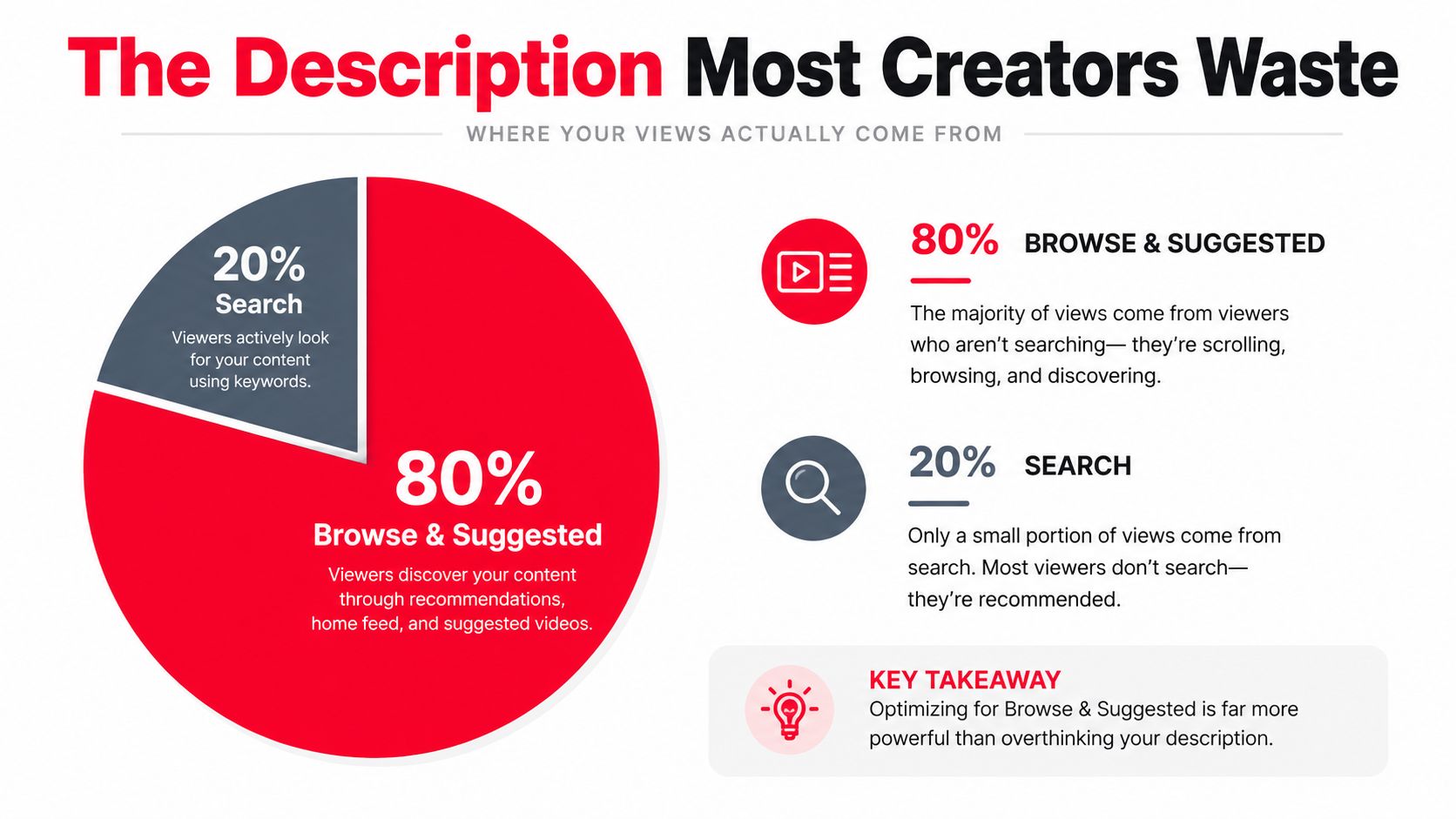
The Description Most Creators Waste
Most descriptions fail for a simple reason, they're written like they're invisible. A creator uploads a clean edit, drops in sponsor copy, a channel plug, maybe a vague “check out my socials,” then wonders why the description never seems to earn its place on the page. On mobile, the first lines are the only part most viewers ever notice, and YouTube's own structure makes that opening prime real estate, not filler.
The better mental model is to treat the description as the most underrated surface on the entire video page. YouTube's metadata system is structured and editable, chapter timestamps are built into descriptions, and snippet.description has a formal size limit in the API, which all points to the same thing, this field is supposed to do real work, not sit there as a dumping ground for leftovers. You can see that platform logic in the way YouTube supports chapters in descriptions and in the metadata history documentation surfaced through YouTube metadata history and description structure.
What usually gets wasted
If your first three sentences are generic, you're wasting the one part of the description that most viewers see before they click anything else. If the opening line says “Welcome back to the channel” or leads with sponsor housekeeping, you've already lost the chance to match the viewer's reason for being there. And if your description never tells a viewer what to do next, it also fails as a conversion surface.
Practical rule: open your own video page on a phone and read only the visible lines. If the first screen doesn't explain the video and offer a next step, the description isn't doing its job.
A quick audit fixes a lot of this. Paste the first three sentences into a phone preview, search your own title in incognito, and ask one question, does the snippet sound like it belongs to the audience you wanted? If it doesn't, the problem usually isn't “YouTube SEO” in the abstract, it's that the description doesn't answer the viewer's immediate intent.
For creators who want a simple starting point, a practical template can help, especially if you also need a profile-level description. A useful example of that approach is the faceless video creator YouTube tips guide, which shows how a description can be organized around clarity instead of filler.
The first fix is always structural
Before you rewrite keywords, rewrite the order. Put the viewer promise first, put the clickable offer early, and leave the boilerplate for later or remove it entirely. That doesn't mean every description has to be long, it means every line needs a job.
A good description should feel like a landing page excerpt, not a diary entry. The page already has a title and thumbnail doing some of the discovery work, so the description should finish the thought, not repeat the introduction. When creators fix this ordering, they usually stop asking whether descriptions “matter” and start asking which line is doing the most work.
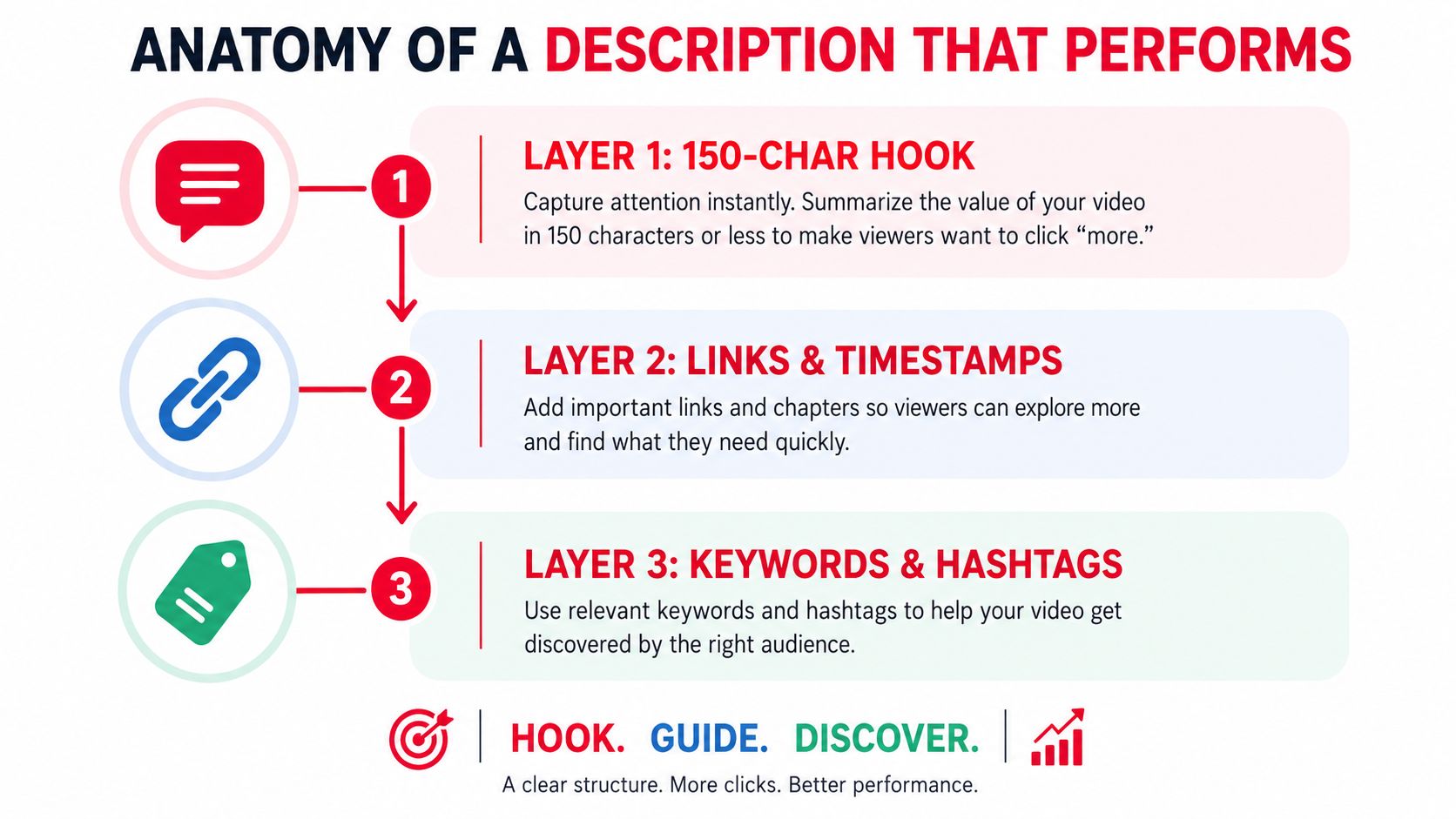
Anatomy of a Description That Performs
A description that performs is built in layers, because different readers arrive with different intent. Some people want a quick answer, some want proof, and some are already ready to click a link. If you stack those needs in the right order, the description becomes easier to read and easier to measure.
Layer 1 is the mobile hook
The first visible line needs to earn the next scroll or click. Write it as a single sentence that answers, “Why should I keep reading?” and keep it tight enough to survive the mobile preview without feeling chopped. That opening should carry the primary keyword naturally, but it should still read like a sentence a human would say.
Layer 2 is the value expansion
The next two or three sentences should extend the promise, not restart it. Secondary keywords, related phrases, and a clearer outcome fit naturally here, because the viewer now has enough context to understand why the video exists. The best versions sound specific, not stuffed, and they stay close to the actual thing the video helps the viewer do.
Layer 3 is the link block
Links work best when they're separated from the hook with whitespace and a short line of context. Put the most important trackable offer link above the fold if you care about response intent, then add supporting links beneath it with clear labels. The point is scannability, not decoration.
| Element | What it should do | What it should not do |
|---|---|---|
| Hook | State the viewer promise fast | Waste the visible lines on filler |
| Expansion | Add search context and a clear benefit | Rephrase the title three times |
| Link block | Give one obvious next click | Bury the offer under clutter |
Layer 4 is the structured block
After the opener and links, add chapters, resource credits, and a short FAQ-style paragraph if the video deserves it. Chapters matter because they make the video easier to find your way around, and they also add contextual wording that can help searchers understand what's inside. Keep each timestamp tied to a real topic shift, not arbitrary intervals, and use consistent formatting so the whole block is easy to scan.
The description should read like the video has a path, not like it was assembled from scraps.
Layer 5 is the disclosure line
If the video includes sponsorship or affiliate links, the disclosure belongs before the first promotional link, in plain language. Don't hide it in a wall of text, and don't make the viewer hunt for it. Clear disclosure protects trust and makes the rest of the description easier to defend internally if you're managing a channel for a brand or client.
A reusable scaffold looks like this:
[Primary keyword]
[One-sentence viewer promise]
[Secondary keyword or related phrasing]. [Outcome-driven expansion sentence]. [Optional credibility or context sentence].
[CTA label] → [CTA link]
[Supporting resource] → [Link]
[Social or next-step link] → [Link]
0:00 [Intro]
1:12 [Topic shift one]
3:40 [Topic shift two]
6:05 [Topic shift three]
[Short FAQ or resource note]
[Disclosure line]
For creators comparing production support, the workflow also fits neatly into agency-style publishing. A practical reference point is video production companies, especially if you're trying to standardize descriptions across a team instead of rewriting every upload from scratch.
Writing for Search Engines and Humans
The hardest part of a description is the opening, because it has to satisfy two different readers at once. One reader is the person on the video page, the other is the system trying to understand what the video is about. If you swing too hard toward search, the copy gets mechanical. If you swing too hard toward personality, the metadata can get fuzzy.
YouTube's own help defines impressions as thumbnail exposures and CTR as the share of impressions that become clicks, which is why the description can't be judged in isolation from the title and thumbnail package. A 2023 peer-reviewed study found that videos with higher CTR got significantly more views, while higher retention or total average watch time per view showed limited evidence of association with more views, so the opening lines should support click behavior first and everything else second YouTube help on impressions and CTR. That doesn't mean retention stops mattering, it means description changes should be tested against packaging, not mythology.
SEO-first versus human-first
An SEO-first opener puts the primary keyword near the front, adds a synonym, and gives the algorithm extra context fast. It can work well on evergreen tutorials, explainers, and compilations where the viewer already knows what they want. The downside is that it can sound flat, like a search result dressed up as a sentence.
A human-first opener leads with a benefit, a scene, or a pain point. It tends to feel stronger on vlogs, commentary, and personality-driven videos because the viewer gets a reason to care before the keyword load kicks in. The trade-off is that it relies more on the title and thumbnail to carry search context.
| Element | SEO-First Opener | Human-First Opener |
|---|---|---|
| First sentence | Keyword-rich and specific | Benefit-led and conversational |
| Best for | Tutorials, how-tos, evergreen search | Vlogs, essays, reaction content |
| Weakness | Can feel stiff | Can understate the topic |
| Strength | Stronger topical clarity | Better emotional pull |
A useful middle ground is simple. Make the first sentence human, the second sentence keyword-rich, and the third sentence benefit-led with a clear CTA. That sequence usually reads naturally while still giving the platform enough context to classify the video.
For creators trying to improve discoverability at the keyword level, this practical keyword guide is worth a look, youtube video keywords, because the description only works when the words match what people are actually searching for.
Two rewrites of the same video
SEO-first version:
Learn how to make sourdough bread at home with this beginner sourdough bread tutorial. This sourdough bread recipe covers starter feeding, dough shaping, and baking basics for first-time bakers. If you want the full ingredient list and written steps, use the link below.
Human-first version:
If your first loaf kept turning dense, this video shows the exact fixes that make sourdough easier. You'll see the starter, the shaping, and the bake in a way that makes the process less guesswork and more repeatable. Grab the ingredient list below if you want to bake along.
The second version feels more like a person talking to a viewer, while the first gives search systems cleaner topical cues. Neither is universally better. The right choice depends on whether the video is trying to capture demand that already exists or create attention from people who didn't come in searching for the exact phrase.
Building Blocks That Earn Clicks
Every element after the opener should earn its place. Chapters, links, CTAs, hashtags, and disclosures are not decoration, they each have a job inside the same text block. Treat them as filler and the description gets longer without getting stronger.
Chapters and timestamps
Chapters help viewers jump to the part they want, and they also make a long video easier to trust. Start with 0:00, then add real topic shifts instead of arbitrary time stamps, because the viewer is scanning for usefulness, not a stopwatch record. A consistent format also helps both humans and systems read the structure quickly.
Links and CTAs
Put the most important link first, then support it with related links, each on its own line. A clean label like “Read the full breakdown →” works better than a vague “Click here” because it tells the viewer why the click matters. For more on improving that click-through rate, see our guide on how to improve click-through rate. Keep the CTA singular, too, because repeating the same action in different wording can weaken the instruction.
Practical rule: one description, one primary action. If the video is meant to drive downloads, every CTA should point back to that same intent.
Hashtags and disclosures
Hashtags belong at the bottom, and they work best when they stay narrow and relevant. The broadest channel tag can come first, followed by niche tags that match the exact topic of the video. Disclosures should appear before the first affiliate or sponsored link, and they should be written plainly enough that a viewer doesn't need to decode them.
Here's a simple structure that keeps the blocks distinct:
- Chapters: Use a clean
0:00 Titleformat and tie each entry to a real topic change. - Pinned links: Place the most valuable URL first, then supporting resources underneath it.
- CTA: Pick one action, then repeat that action consistently.
- SEO terms: Keep them natural, visible, and tied to what the video delivers.
For teams trying to improve packaging and link behavior together, I also like tools that make description editing and attribution easier to manage in one workflow. One example is ViewsMax, which can generate YouTube descriptions customized to a channel or niche and lets users edit a video description directly inside YouTube Studio. That matters because the description stops being guesswork once the links are tagged and measurable.
Description Templates for Common Niches
Generic templates usually underperform because every niche is asking the viewer to do something different. A tutorial viewer wants a result, a review viewer wants a verdict, a vlog viewer wants a relationship, and a finance viewer wants trust before anything else. The faster the description matches that expectation, the less work the viewer has to do.
Match the opening to the click target
Tutorials and how-tos should front-load the outcome, because the reader is usually hunting for a solution. Review and comparison channels should give the verdict early, because the searcher is comparing options and doesn't want to wait for the answer. Vlog and lifestyle channels can lead with a story beat or emotional setup, since the description is often serving fans rather than pure discovery.
Gaming and entertainment channels usually benefit from brevity, clean timestamps, and optional merch or related links. Finance, health, and legal creators need extra care, because disclosures and source context matter more than any marginal gain in clicks. In those niches, clarity protects the channel.
Use the template that fits the format
| Niche | Opening Hook | Primary Link | CTA Type | Disclosure Required |
|---|---|---|---|---|
| Tutorial or how-to | Lead with the finished outcome | Worksheet, template, or tool | Download or learn more | If affiliate or sponsored |
| Review or comparison | Give the verdict early | Comparison page or product list | Compare or check specs | If affiliate or sponsored |
| Vlog or lifestyle | Lead with the story or moment | Community, newsletter, or membership | Join or follow | If paid promotion applies |
| Gaming or entertainment | Keep it short and direct | Merch or clips page | Watch, buy, or subscribe | If required by sponsor |
| Finance, health, legal | Lead with context and caution | Source list or disclaimer page | Read, review, or consult | Yes, always review carefully |
The biggest mistake is copying a format without adapting the first line and the link hierarchy. A tutorial description that starts like a vlog will feel off, and a vlog description that reads like a white paper will lose its personality. The structure can stay consistent, but the opening and call to action should always match the viewer's expectation.
A practical comparison for agencies and solo creators is to keep one master template, then swap only the opening line, link block, and disclosure line per niche. That gives you consistency without flattening the channel voice.
Tracking Revenue from Every Link
A description only earns its keep when you can prove which click produced which result. If the links are not tagged, you're guessing, and guessing gets expensive fast when one video is doing the selling while another is getting the credit.
The cleanest setup is to tag every URL with a consistent naming scheme. Use utm_source=youtube, utm_medium=video_description, utm_campaign=[video-slug], and utm_content=[link-label] so each link can report separately. Then create distinct medium values for video_description, pinned_comment, and end_screen, because otherwise the data collapses into one bucket and you lose the ability to compare placement performance.
Keep the redirect stable
A short redirector helps because you don't want to edit published descriptions every time a destination changes. It also keeps the visible URL cleaner and lets you rename UTM fields later without breaking old posts. If affiliate tracking matters, the redirect should preserve the original affiliate ID so the network still recognizes the referral.
Verify before the traffic arrives
Click every link once after upload and make sure the destination shows the expected source and medium. Then compare description-driven results against your broader acquisition reports on a weekly basis, because a broken tag is much easier to fix before the video gets traction. This is also where teams often discover that a link looked fine in the description but pointed to the wrong campaign in analytics.
YouTube won't hand you reliable native click reporting for every description link, so the external analytics layer has to do the heavy lifting.
If you're managing this at scale, the workflow becomes easier when the reporting surface is consistent. A tool like ViewsMax video stats and link tracking workflow can sit alongside your analytics stack if you want to keep the content, the links, and the attributed revenue in one place.
The point is not to make the description more technical for its own sake. The point is to make it attributable, so a creator can see whether a line of copy, a CTA order, or a resource link is contributing to revenue.
Testing and Iterating With Real Data
A description change only matters if you can isolate it. Change the hook, link order, and CTA in the same upload, and you lose the ability to tell which edit moved impressions, CTR, or link clicks.
Start with one variable per cycle, such as the opening hook, CTA placement, link order, or timestamp format. Keep the thumbnail and title fixed, because YouTube defines impressions and CTR downstream of that packaging, and the description test should measure its own effect instead of noise from elsewhere. A single spreadsheet can handle the rest if you record the video ID, variant label, impressions, CTR, average view duration, and downstream link clicks by UTM medium. To see how these metrics look in practice, check out our breakdown of YouTube view stats.
What to compare
There is no universal target worth chasing. Compare against your own baseline and against the traffic source pattern for your niche. CTR shifts by source and topic, so the useful habit is to compare like with like instead of treating one number as proof.
| Test variable | Keep constant | What to watch |
|---|---|---|
| Opening hook | Title and thumbnail | CTR and early clicks |
| CTA placement | Link destination | Link clicks by UTM medium |
| Link order | CTA wording | Which URL gets the first click |
| Timestamp format | Topic and packaging | Navigation behavior and retention |
Wait for separation, not hope
A description that looks stronger on day one can flatten later if the audience mix shifts. Review results after enough comparable uploads, not after one lucky spike or one weak launch. Seasonality matters too, because holidays and broader platform shifts can distort a small sample.
When a variant wins, promote it into the standard template. When a variant loses, retire it and keep the note in your spreadsheet so you do not repeat the mistake three months later. Re-test old losers quarterly, because audience behavior drifts and a weak opener can become stronger when the channel's audience changes.
The final loop is simple. Pull the click data, compare description clicks with pinned-comment and end-screen clicks, retire what underperforms, and promote the version that ties the content to the most measurable downstream result.