Before you ever hit "record," the most crucial work for a successful YouTube channel happens. It's all about laying the right foundation. This isn't just about picking a topic; it's about building a strategic framework so every single video you create has a clear purpose and speaks directly to a specific audience.
Laying the Groundwork for YouTube Success
Let's be real: starting a YouTube channel can feel like shouting into an empty room at first. What separates the channels that take off from those that never get traction is a solid plan. Think of this initial stage as creating a business plan for your content—it's what ensures you're not just making videos, but building a brand that connects with people. Getting this right from the start means you're operating with a clear sense of direction, not just guessing and hoping something sticks.
For a deeper dive into this, understanding how to create a content strategy that drives real growth is a game-changer for attracting and keeping an audience.
Define Your Niche and Value Proposition
First things first: you need a niche. And I mean a real niche. A broad topic like "cooking" is a battle you probably won't win against established giants. But a laser-focused niche like "30-minute vegan meals for busy professionals" gives you a fighting chance to become the go-to expert for a very specific audience. It's about finding that sweet spot where your passion meets a genuine audience need.
If you're feeling stuck, we have a detailed guide on choosing the best niche for YouTube that can help you brainstorm and validate your ideas.
Once you’ve got your niche, it's time to define what makes you different—your unique value proposition (UVP). Why should someone watch your videos over the thousands of others? Maybe you bring a cinematic flair to your tech reviews, or you inject some much-needed dry humor into personal finance explainers. Your UVP is that special sauce.
Key Takeaway: A winning channel lives at the intersection of your passion, a hungry audience, and an angle that nobody else is taking. You're not just creating content; you're solving a problem or offering a unique experience for your viewers.
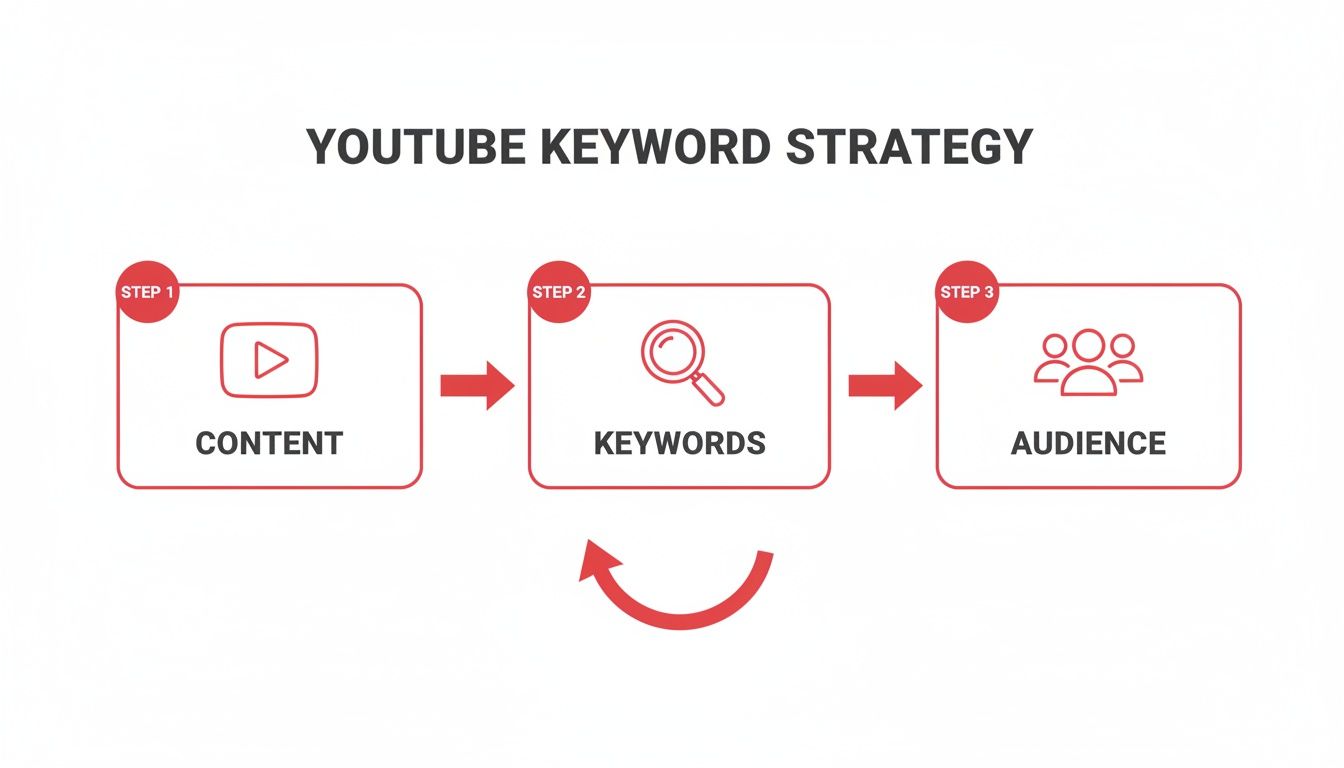
This simple flowchart breaks down how these foundational pieces fit together.

As you can see, your niche and value prop are the bedrock. Everything else is built on top of them.
Establish Your Content Pillars
With a clear niche and UVP, you can now build out your content pillars. These are simply the 3-5 main sub-topics or video formats that will form the backbone of your channel. They give your channel structure and let your audience know exactly what to expect.
For example, if your channel is about "sustainable home living," your pillars might look something like this:
- DIY Upcycling Projects
- Zero-Waste Product Reviews
- Minimalist Home Tours
These pillars keep your content focused, make brainstorming new ideas a breeze, and create a consistent experience that keeps viewers coming back for more.
And don't be intimidated by the scale of YouTube. While there are around 2.7 billion monthly active users, the vast majority of channels are small. This leaves a massive opportunity for new creators with a well-defined niche to find their audience and grow.
To make this planning phase crystal clear, use this checklist to ensure you've covered all your bases before you even think about filming.
Your Channel Launch Checklist
This table summarizes the critical first steps to ensure your channel starts on the right foot.
| Phase | Action Item | Why It Matters |
|---|---|---|
| Strategy | Define a specific, audience-focused niche. | Prevents you from being a small fish in a giant pond; helps you stand out. |
| Branding | Pinpoint your unique value proposition (UVP). | Gives viewers a compelling reason to choose your content over competitors. |
| Content Plan | Establish 3-5 core content pillars. | Creates structure for your channel and makes content planning systematic, not random. |
| Audience | Create a simple profile of your ideal viewer. | Ensures every video is made with a specific person in mind, increasing resonance. |
Completing these steps isn't just busy work—it's the strategic foundation that will support everything you do on YouTube from here on out.
Building Your Content Production Workflow

A killer channel idea is just the starting line—it's consistent execution that actually wins the race. The real engine of any successful YouTube channel is a repeatable, efficient production system. This workflow is what turns chaotic creativity into a manageable process, letting you pump out high-quality content without burning out.
Forget the myth that you need a Hollywood-level studio to get started. Here's a secret from seasoned creators: viewers will forgive mediocre video quality, but they absolutely will not tolerate bad audio. If you're going to invest anywhere, make it a decent microphone.
This focus on a smart, sustainable process is what separates the channels that last from the ones that fizzle out. It's not about the flashiest gear; it’s about building a system that works for you.
The Gear That Actually Matters
When you're starting out, the best camera is probably the one in your pocket. Modern smartphones shoot in gorgeous 4K, which is more than enough for YouTube. So instead of spiraling down a rabbit hole of camera specs, focus on these three things that deliver 90% of your production value.
- Crystal-Clear Audio: A simple USB microphone or an affordable lavalier mic (the kind you clip to your shirt) will make you sound a hundred times more professional than your phone's built-in mic. Seriously, this is a non-negotiable first upgrade.
- Good Lighting: You don’t need a movie set. Just position yourself facing a window to use natural light for free. If you film at night or in a darker room, a simple ring light can obliterate shadows and give your videos a clean, polished look.
- A Stable Shot: Nobody likes watching shaky, nauseating footage. A small, inexpensive tripod for your phone is one of the best investments you can make to instantly boost your video quality.
Pro Tip: Think of your production workflow like a muscle. The more you use it, the stronger and more efficient it becomes. Don't aim for perfection on your first video; aim for completion.
Creating Your Pre-Production Checklist
The secret to a smooth, stress-free filming session is doing the work beforehand. A solid pre-production checklist is your best friend here, saving you from frustrating delays and soul-crushing reshoots. It transforms filming day from a panicked scramble into a calm, systematic process.
Your own checklist will evolve over time, but here’s a solid template to get you started.
| Category | Action Item | Why It's Important |
|---|---|---|
| Concept | Finalize video title and main talking points. | Ensures your video has a clear focus and delivers on its promise. |
| Scripting | Complete your script or bullet-point outline. | Prevents rambling and keeps your content concise and engaging. |
| Equipment | Charge all batteries (camera, mic) and clear memory cards. | Avoids the classic, painful mistake of running out of power or space mid-take. |
| Location | Set up your lighting and tidy the background. | Creates a professional-looking scene and minimizes distractions for the viewer. |
| Audio | Do a quick soundcheck to test microphone levels. | Guarantees your audio is crisp and free of distracting background noise. |
A well-written script is the foundation of an efficient shoot. If you need a hand with that, you can learn more about how to script for YouTube videos in our detailed guide. This small step upfront saves massive headaches in the editing room later.
The Power of Batching Your Content
One of the most powerful strategies for staying consistent is batching. Instead of planning, filming, and editing one video at a time, you tackle the same task for multiple videos all in one go.
For example, you could dedicate one Monday to filming all four videos for the upcoming month. Then, you could spend Tuesday editing two of them, and so on. This approach is a game-changer for a few reasons:
- It Maximizes Your Efficiency: You only have to set up your lights, camera, and mic once. This saves a massive amount of setup and teardown time that really adds up.
- It Ensures Consistency: Life gets busy. Having a backlog of videos ready to publish means you won't miss an upload day, which is a crucial signal to the YouTube algorithm that your channel is active and reliable.
- It Reduces Creator Burnout: Constantly being on the content hamster wheel is exhausting. Batching creates breathing room in your schedule, freeing you up to focus on other parts of channel growth, like promotion and engaging with your community.
By building a system around the essential gear, a rock-solid checklist, and a smart batching strategy, you create a workflow that supports long-term success. This is how you stop just "making videos" and start building a sustainable YouTube channel that can truly grow.
Making Your Videos Impossible to Ignore with YouTube SEO

You've poured your heart and soul into creating an incredible video. That's a huge win, but it's really only half the battle. If no one can find it, all that effort goes to waste. This is where mastering YouTube SEO comes in—it’s the engine that will drive your channel's growth and get your videos in front of the right people.
Think of YouTube as more than just a video platform; it's the second-biggest search engine in the world. Every single minute, people are searching for answers, entertainment, and how-to guides. Your job is to make sure your video shows up when they do.
Getting a handle on YouTube SEO is a fundamental part of building a channel that grows on its own. It's how you signal to the algorithm what your video is about, who it's for, and why it's worth watching.
Crafting High-Impact Video Titles
Your title is the most valuable piece of SEO real estate you own. It has to pull double duty: grab the algorithm's attention with the right keywords and convince a real person to click. It’s a delicate dance.
So many creators stumble here. They either get too artsy with a title that has zero searchable words, or they create something robotic and stuffed with keywords that no human would ever click. The sweet spot is a blend. Start with your main keyword phrase, then add a hook that promises value.
For instance, "My New Skincare Routine" is vague and won't get you far. A much better title would be "How to Build a Skincare Routine for Oily Skin | My 5 Must-Have Products." See the difference? It's highly searchable, but it also makes a specific promise to the viewer.
The Art of the Clickable Thumbnail
If your title makes the promise, your thumbnail is what closes the deal. In a sea of other videos, it’s what makes someone stop scrolling. Your title and thumbnail work as a team to boost your Click-Through Rate (CTR), a metric YouTube cares about deeply. A high CTR tells the algorithm your content is a great match for what people are looking for.
What makes a thumbnail work?
- Bright, Contrasting Colors: Make it pop, whether someone is using light or dark mode.
- Clear, Expressive Faces: We're hardwired to connect with human emotion. Use it.
- Short, Punchy Text: Just 2-5 bold words to reinforce the video's main idea.
- Consistent Branding: Stick to similar fonts and colors so your audience recognizes you instantly.
Key Takeaway: Your title and thumbnail aren't separate things; they're a single, powerful ad for your video. They need to tell the same compelling story to earn that click.
Inside ViewsMax, we have tools that provide AI-powered title and thumbnail ideas. It analyzes top-performing content in your niche, so you're not just guessing what works—you're making data-driven decisions.
Writing Descriptions That Rank and Convert
Don't sleep on the video description! This is your chance to give the YouTube algorithm a ton of rich context. A great description helps you rank for more keywords and can even be used to drive your audience to other places.
Your first two or three sentences are the most important. They appear above the "Show more" button, so they need to include your main keywords and give viewers a clear idea of what to expect. From there, you can build out a more detailed summary.
An optimized description should always include:
- A keyword-rich opening that summarizes the video's value.
- Timestamps to create video chapters, which helps with both user experience and SEO.
- Links to your social media, website, or relevant affiliate products.
- A few well-chosen hashtags to help with discoverability.
If you really want to go deep on this, our guide to YouTube SEO for beginners breaks down every element in even greater detail.
YouTube SEO Optimization Checklist
Before you hit "Publish," run through this quick checklist. It’s a simple way to make sure you’ve given your video the best possible chance to get discovered by the algorithm and your future audience.
| SEO Element | Best Practice | Impact on Discoverability |
|---|---|---|
| Video Title | Include the primary keyword phrase upfront; keep it under 70 characters. | High – The most important factor for search ranking and CTR. |
| Thumbnail | Use high-contrast colors, an expressive face, and minimal bold text. | High – Directly influences CTR, a key ranking signal. |
| Description | Place keywords in the first 2-3 sentences; add timestamps and links. | Medium – Provides context to the algorithm and ranks for long-tail keywords. |
| Tags | Use a mix of broad and specific tags; lead with your exact target keyword. | Low-Medium – Helps YouTube categorize and suggest your content. |
Getting these four elements right for every single video is a non-negotiable habit for successful creators.
Using Tags Strategically
Think of tags as another clue you're giving the algorithm about your video. While they aren't as powerful as they once were, they still help YouTube connect your content with similar videos, which is key for getting recommended in the "Up Next" sidebar.
Your strategy here should be a mix of specific and broad terms. Always make your very first tag the exact keyword phrase you're targeting. After that, add some variations and other related topics. Put yourself in the viewer's shoes: what else might they search for to find your video?
Discoverability is the name of the game. A staggering 71% of viewers find new content through YouTube's search and recommendation features. For channels pulling in millions of views, an average of 54.8% of their traffic comes directly from search, as highlighted in stats from Meltwater. By consistently optimizing these on-page elements, you're not just uploading a video; you're building a system for being found.
Effective Promotion and Community Building

So you've hit "publish." That amazing feeling of relief is great, but the work isn't over. In fact, some of the most important work is just beginning.
The old "if you build it, they will come" fantasy is probably the most dangerous myth for new YouTubers. In the early days, you are your channel's marketing department, and getting your videos in front of people is entirely on you.
This means you have to think beyond just dropping a link on your social media with a generic "new video is up!" caption. That's not marketing; that's just noise. You need to get strategic, meet your potential audience where they already hang out, and give them a reason to care.
Share Your Content Without Being Spammy
The best way to get your first real views is to bring your content to existing communities. The trick is to do it in a way that adds value, not just clutter. Every platform has its own unwritten rules, and ignoring them is a fast track to getting ignored (or even banned).
Take Reddit, for example. Find subreddits where your ideal viewer hangs out. Before you even think about posting a link to your video, spend time there. Answer questions, join discussions, and become a familiar, helpful face. When you finally share your content, frame it as a resource that directly addresses a common problem or question in that community.
Here's how this looks on different platforms:
- Twitter/X: Grab a punchy 30-60 second clip from your video to use as a teaser. Post it with an engaging question and a few relevant hashtags to get a conversation going.
- Instagram: A well-edited Reel showing off a key moment or a quick tip from your video can do wonders. It's a fantastic way to drive people from their Instagram feed over to your YouTube channel.
- Pinterest: Design a sharp, vertical Pin that acts as a mini-infographic for your video's main points. Pins have an incredibly long lifespan and can send you consistent traffic for months or even years.
Build Relationships, Not Just View Counts
Collaborations are easily one of the most powerful growth hacks on YouTube, but most creators approach them the wrong way. It’s not just about a simple shoutout or swapping audiences. It's about building real connections with other people in your space.
Start small. Find other channels in your niche (especially those just a little bigger than you) and engage with their work genuinely. Leave thoughtful, specific comments on their videos that add to the conversation. This is the most organic way to get on another creator's radar.
A strong community is your ultimate moat. The algorithm can change, trends can fade, but a loyal audience that feels seen and heard will stick with you through it all. They become your most powerful marketing asset.
Once you’ve built that initial rapport, you can reach out with a collaboration idea. But here’s the key: make sure your pitch is about mutual benefit. Frame it as, "Here’s a cool video we could make together that both of our audiences would love," not, "Can you help me get more subscribers?"
Turn Viewers Into a Community
Promotion gets people to click, but community is what makes them subscribe and come back for every single video. The easiest and most effective way to start building that is by simply responding to comments. It’s your direct line to your audience, showing them there's a real, appreciative person behind the scenes.
Encourage people to comment by asking specific questions in your videos. Instead of a vague "leave a comment below," try something direct like, "What's the one tool you can't live without for this? Let me know in the comments." This gives them a clear prompt to follow. Don't forget to "heart" and pin the best comments to show you're paying attention.
If you really want to expand your community's borders, you can translate videos and reach a global audience. This simple step can unlock massive new viewer bases who are looking for content just like yours.
At the end of the day, your goal is to create a positive feedback loop. Your audience feels heard, so they engage more, which in turn helps your channel grow. That's how you build a channel that lasts.
Analyzing Performance to Fuel Growth
Hitting "publish" on a video might feel like the finish line, but in reality, it's the starting gun for your most important work: listening. The data you get from YouTube Analytics is the most honest, unfiltered feedback you'll ever receive. It’s where you stop guessing what your audience wants and start knowing what keeps them coming back.
This isn't about getting lost in endless charts and spreadsheets. It's about knowing which numbers tell the real story of your content's performance. Learning to read that story is what separates the channels that fizzle out from the ones that seem to grow overnight.
Decoding Your Click-Through Rate
Before anyone can love your video, they have to click on it. That’s where your Click-Through Rate (CTR) comes in. It’s the percentage of people who saw your video pop up on their screen and actually chose to watch it. A high CTR is a powerful signal to YouTube that your title and thumbnail are a winning combination.
A low CTR, on the other hand, is your first major clue that something's off. Maybe the title is a bit boring, or the thumbnail is too cluttered to understand at a glance. Think of it as your first diagnostic tool—it tells you if the "packaging" of your video is doing its job.
When you're just starting, a CTR between 2% and 5% is pretty standard. Don't sweat it. As your channel grows and people start recognizing your style, you'll want to aim for anything north of 5%. If a video's CTR is in the gutter, don't just abandon it. Try swapping out the thumbnail for a completely different design—you might be surprised how a simple change can give a video a second wind.
The Story Behind Audience Retention
You got the click. Now, can you hold their attention? Audience Retention is arguably the single most important metric for real, sustainable growth. It shows you, second by second, the exact percentage of your audience that is still watching.
A strong, flat retention graph tells the algorithm your video is delivering on its promise. It's a massive green light. But a huge, sudden drop in the first 30 seconds? That’s a blaring alarm bell, usually pointing to an intro that was too long, too slow, or just didn't get to the point fast enough.
My Two Cents: Your audience retention graph is a roadmap to a better video. Every dip is a lesson on what bored your viewers, and every spike is a clue about what they loved. Use it to figure out what to do more of—and what to leave on the cutting room floor next time.
By really digging into this graph, you can diagnose specific problems. A sudden dip in the middle might be right where you went on a tangent. A slow, steady decline could mean your overall pacing just wasn't energetic enough. This isn't criticism; it's a blueprint for your next edit.
Understanding Your Traffic Sources
Knowing how people find you is just as crucial as knowing if they stick around. Your Traffic Sources report is a goldmine of strategic information, breaking down exactly where your views are coming from.
This report shows you which of your efforts are actually paying off.
- YouTube Search: If this is a top source, pat yourself on the back. It means your keyword research and SEO are working. You're successfully grabbing viewers who are actively looking for what you have to offer.
- Browse Features: This is traffic from the YouTube homepage and subscription feeds. Strong performance here means YouTube itself is starting to trust your content and push it out to a wider audience. It's a great sign.
- Suggested Videos: This is the holy grail for channel growth. When your video gets recommended next to another popular video, YouTube is essentially giving you a direct introduction to a whole new, highly relevant audience.
Let's play out a real-world scenario. You notice one of your videos is getting a ton of views from being "suggested" next to a video from a much bigger creator. That's not a coincidence. YouTube sees a direct connection. Your immediate next move? Make another video that's a follow-up or a deeper dive on that exact same topic. Double down on what the algorithm is telling you works.
Creating a Data-Driven Feedback Loop
The real magic happens when you stop looking at these metrics in isolation and start using them to create a cycle of constant improvement. This isn't a one-time check-in; it's the engine of your entire growth strategy.
By combining these data points, you can answer the questions that truly matter.
| When You See This… | It's Answering This Question… | Your Next Action Should Be… |
|---|---|---|
| High CTR, Low Retention | "My thumbnail and title are awesome, but the video itself isn't what people expected. Where did I lose them?" | Dive into that retention graph. Find the exact point of the mass exodus and figure out why it happened. Avoid that mistake next time. |
| Low CTR, High Retention | "The few people who click through absolutely love the video, but not enough people are clicking. What's wrong with my 'cover'?" | Your video is solid, but the packaging sucks. It's time to A/B test new thumbnails and brainstorm more compelling, benefit-driven titles. |
| High Search Traffic | "Which of my keywords are actually bringing in viewers who stick around and subscribe?" | Pinpoint your top-performing search terms and build a whole content pillar around them. Create a series or a playlist. |
When you consistently review your analytics this way, you shift from being a creator who hopes for a hit to a strategist who engineers one. This is how you build a channel that doesn't just launch, but actually lasts.
Common Questions from New YouTube Creators
Diving into YouTube is exciting, but let's be real—it also brings up a ton of questions. Getting good answers from the start helps you sidestep the common traps so you can focus on what really matters: making great videos.
Here are some of the biggest questions I hear from creators who are just starting out.
How Long Until I Can Actually Make Money?
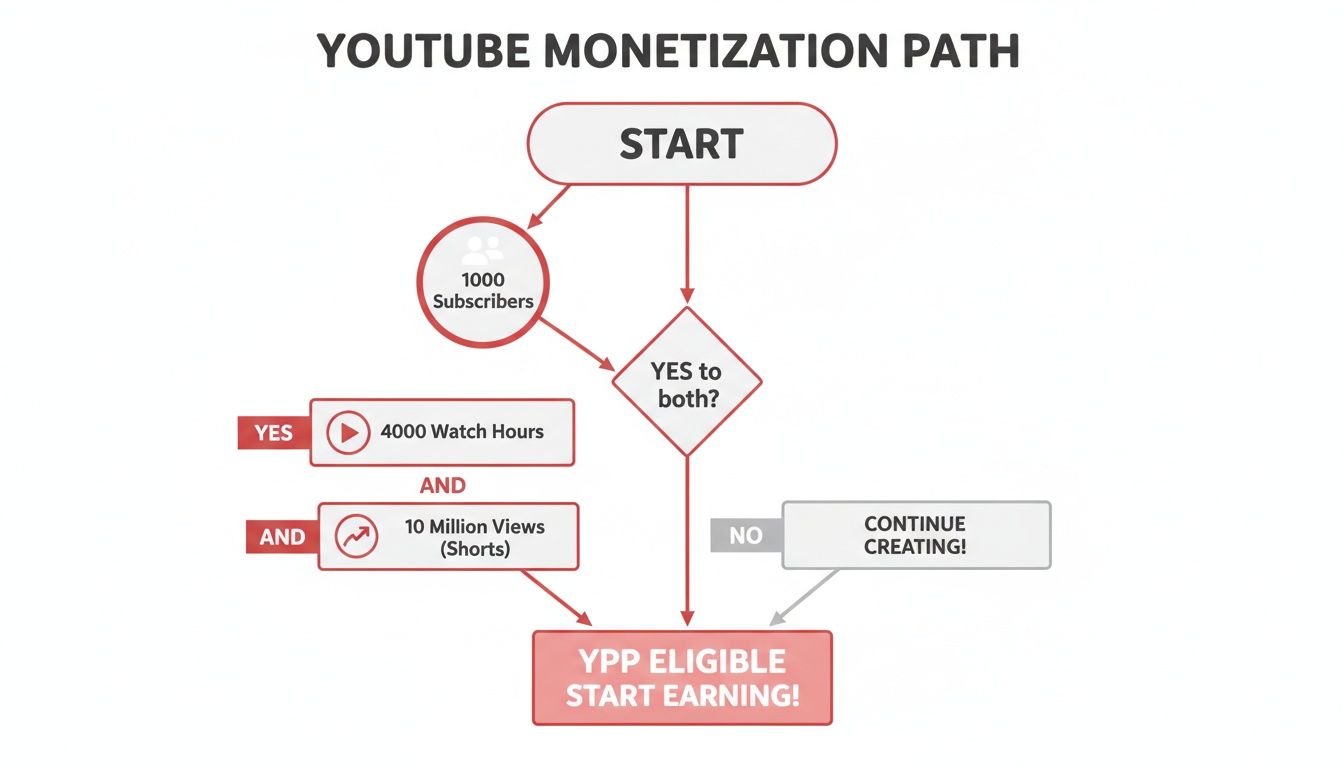
This is the big one, right? The most well-known path is the YouTube Partner Program (YPP). To get in, you need to clear two hurdles: 1,000 subscribers and 4,000 hours of public watch time in the last 12 months. If you're all-in on Shorts, you can also qualify with 10 million valid public Shorts views in the last 90 days.
For most people, hitting these numbers takes anywhere from six months to a couple of years of steady work. But here’s the thing: you don't have to wait for the YPP to start earning.
You can actually start monetizing much sooner.
- Affiliate Marketing: From your very first video, you can drop affiliate links in your description. When someone buys through your link, you get a cut.
- Selling Your Own Stuff: If you have a course, an ebook, merch, or offer coaching services, you can start promoting it immediately. You don't need a huge audience, just a loyal one.
The real key is building a small community that trusts you and values what you have to say.
What’s the Best Uploading Schedule?
When you’re just starting, consistency trumps frequency every single time. The YouTube algorithm loves a predictable schedule. It's way better to post one amazing, fully optimized video every single week like clockwork than it is to dump three mediocre videos in one week and then go silent for a month.
Set a realistic goal you know you can hit, like one video a week. Pick a day and time and stick to it. Once you get your production process down and feel more comfortable, then you can think about upping the frequency.
Expert Tip: Check your YouTube Analytics to see when your viewers are most active online. If you schedule your uploads for those peak hours, you give your new videos a much better shot at getting that crucial initial traction.
What Equipment Do I Really Need to Start?
You absolutely do not need a pro-level studio. Honestly, one of the biggest mistakes beginners make is blowing their budget on fancy gear they don't need. Your energy should be spent on creating valuable content, not on obsessing over the perfect camera.
Your smartphone shoots incredible video, likely in 4K. If you have some money to invest, don't spend it on a camera—spend it on audio.
Viewers will put up with slightly grainy video, but they will not tolerate bad sound. They’ll click off in a heartbeat. A simple lavalier mic that clips to your shirt or a decent USB microphone will make a world of difference and won't break the bank. After sound, think about lighting. Before you buy anything, just try filming in front of a window with natural light.
What Are the Biggest Mistakes I Should Avoid?
A lot of the early grind on YouTube is just about avoiding the rookie mistakes that can kill a channel's momentum before it even starts.
If you can steer clear of these, you’ll save yourself months of frustration:
- Ignoring SEO: If you don't optimize your titles, thumbnails, and descriptions, your videos are basically invisible. YouTube is a search engine, and you need to tell it what your video is about.
- Forgetting About Audio: I'll say it again because it's that important. Bad audio is a channel killer. Make it a priority.
- Being Inconsistent: A random upload schedule confuses both the algorithm and your potential subscribers. People won't subscribe if they don't know when to expect your next video.
- Quitting Too Early: This is maybe the most common mistake of all. Growth takes time. So many creators give up right before their channel is about to take off.
Ready to stop guessing and start growing? ViewsMax gives you the AI-powered tools and real data you need to nail your titles, master your SEO, and make smarter content decisions. Streamline your entire workflow and turn your creative ideas into real channel growth at https://blog.viewsmax.com.