ViewsMax
Sign In Sign Up Free

Tag: youtube monetization

  • What Are Public Watch Hours on YouTube and How to Get Them

    What Are Public Watch Hours on YouTube and How to Get Them

    So, what exactly are "public watch hours" on YouTube? Think of it as the total time, in minutes and hours, that people have spent actively watching your public videos. This isn't just a vanity metric; it's one of the most critical factors for growing your channel and, more importantly, unlocking the ability to earn money.

    Unlocking YouTube Monetization With Watch Hours

    Ever wonder why some channels are plastered with ads while others aren't? The answer almost always comes back to public watch hours. This metric is more than just a number; it's a direct measure of how engaging your content truly is.

    While views can be fleeting and subscribers can go dormant, watch time is solid proof that your videos are compelling enough to hold someone's attention. YouTube sees this as a sign of quality, and it's how they decide if your channel is a good place for advertisers to spend their money.

    That’s why there's a specific goalpost for getting into the YouTube Partner Program (YPP). To start monetizing your channel, you need to hit 4,000 valid public watch hours within the last 12 months, along with reaching 1,000 subscribers. You can discover more insights about YouTube's massive viewing statistics on Senalnews.com.

    Why Watch Hours Matter More Than Views

    Many new creators fall into the trap of chasing views, hoping for that one viral hit. But YouTube's algorithm is much smarter than that; it prioritizes sustained engagement over quick, shallow views.

    Think about it: a video with 10,000 views where everyone clicks away after 30 seconds isn't very valuable. A different video with only 2,000 views, but where the average viewer watches for a full 10 minutes, is a goldmine. The second video accumulates far more watch time, sending a powerful signal to YouTube that the content is genuinely good.

    In essence, watch time is YouTube's currency for content quality. A high watch time tells the algorithm that your videos are satisfying viewers, which encourages it to promote your content to a wider audience.

    We can break down why watch hours are the superior metric with a quick comparison.

    Why Watch Hours Outweigh Other Metrics

    Metric What It Really Measures Its Role in Monetization
    Watch Hours True Engagement: How long you can hold a viewer's attention and deliver value. Direct Requirement: A core pillar for YPP eligibility (4,000 hours). Signals a high-quality, ad-friendly channel.
    Views Initial Interest: How many times a video was clicked on. Can be misleading due to clickbait or short watch times. Indirect Role: High views are great, but without watch time, they mean little for monetization.
    Subscribers Audience Potential: The number of people who want to see more of your content in the future. Direct Requirement: A key YPP metric (1,000 subs), but doesn't guarantee your content is being watched.

    At the end of the day, a healthy subscriber count and a steady stream of views are fantastic, but they don't paint the full picture. It's the watch hours that truly demonstrate your channel's ability to engage and retain an audience, which is precisely what YouTube wants to see before it lets you monetize.

    Understanding what is monetization on YouTube really begins here. It's a reward for creating content people stick around for. Building up those 4,000 hours is your first major milestone in turning a creative hobby into a real, sustainable venture. You're proving your value not just to your viewers, but to YouTube itself.

    What Actually Counts Toward Your 4000 Hours

    Getting to the 4,000-hour mark can feel like a marathon, and the last thing you want is to realize some of your hard-earned watch time doesn't even count. It’s a common tripwire for new creators. Not all watch time is created equal in YouTube's eyes, especially when it comes to qualifying for the YouTube Partner Program (YPP).

    Think of it this way: YouTube wants to see that you can build a real, engaged audience that genuinely wants to watch your content. So, the rules are set up to measure just that. The main source of "valid" public watch hours comes from your standard, long-form public videos. Every second someone spends watching a video you’ve set to "Public" gets added to your running total. It's that simple.

    Beyond your regular uploads, YouTube Premieres are another solid source. The watch time accumulated during the live premiere event and all the views it gets afterward as a regular public video both count. The same goes for public livestreams. Every minute viewers watch you live, plus all the time people spend watching the replay, gets tallied up for your YPP goal.

    What YouTube Doesn't Count for YPP

    Now for the tricky part. It's just as critical to know what doesn't count so you don't pour your energy into the wrong buckets. Many creators get a nasty surprise when they check their monetization progress, only to find the number is lower than they expected.

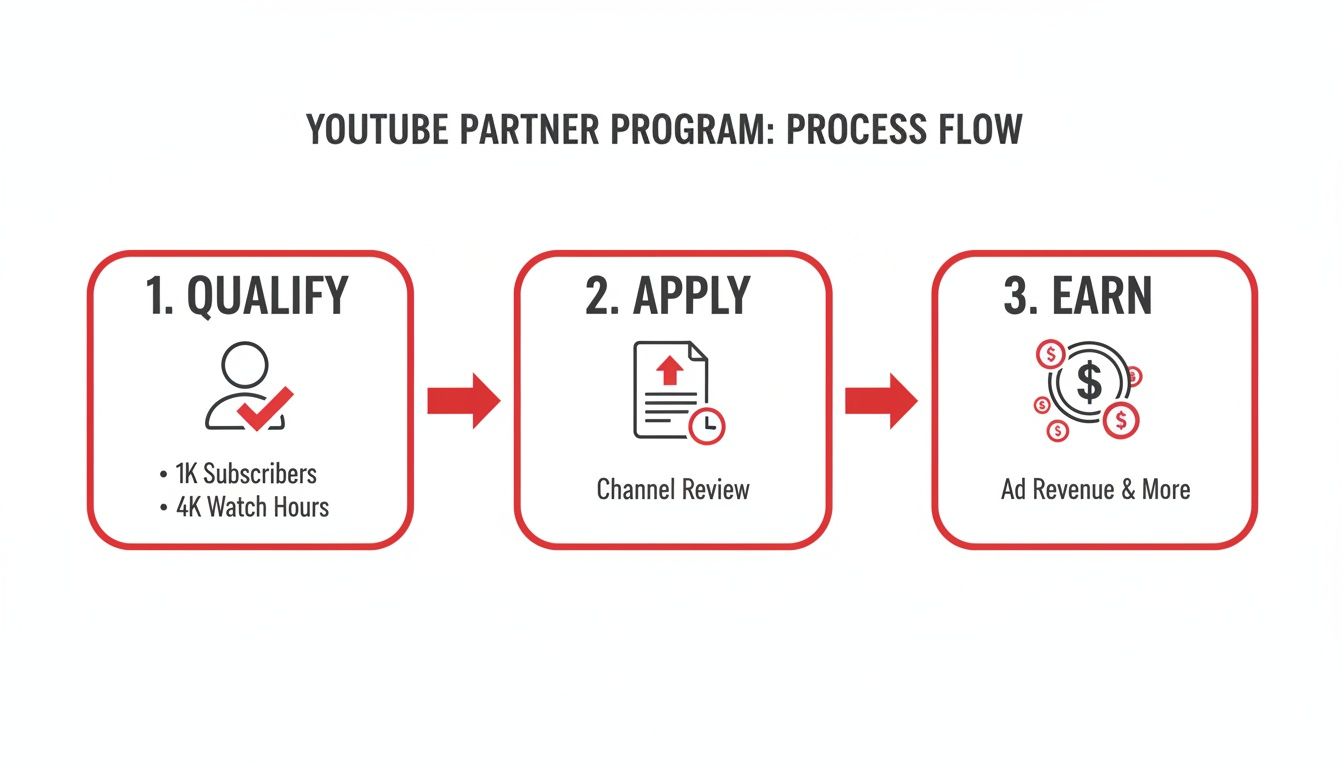
    This is the core challenge: reaching 1,000 subscribers and hitting 4,000 watch hours are the two pillars you have to build before you can even apply to monetize.
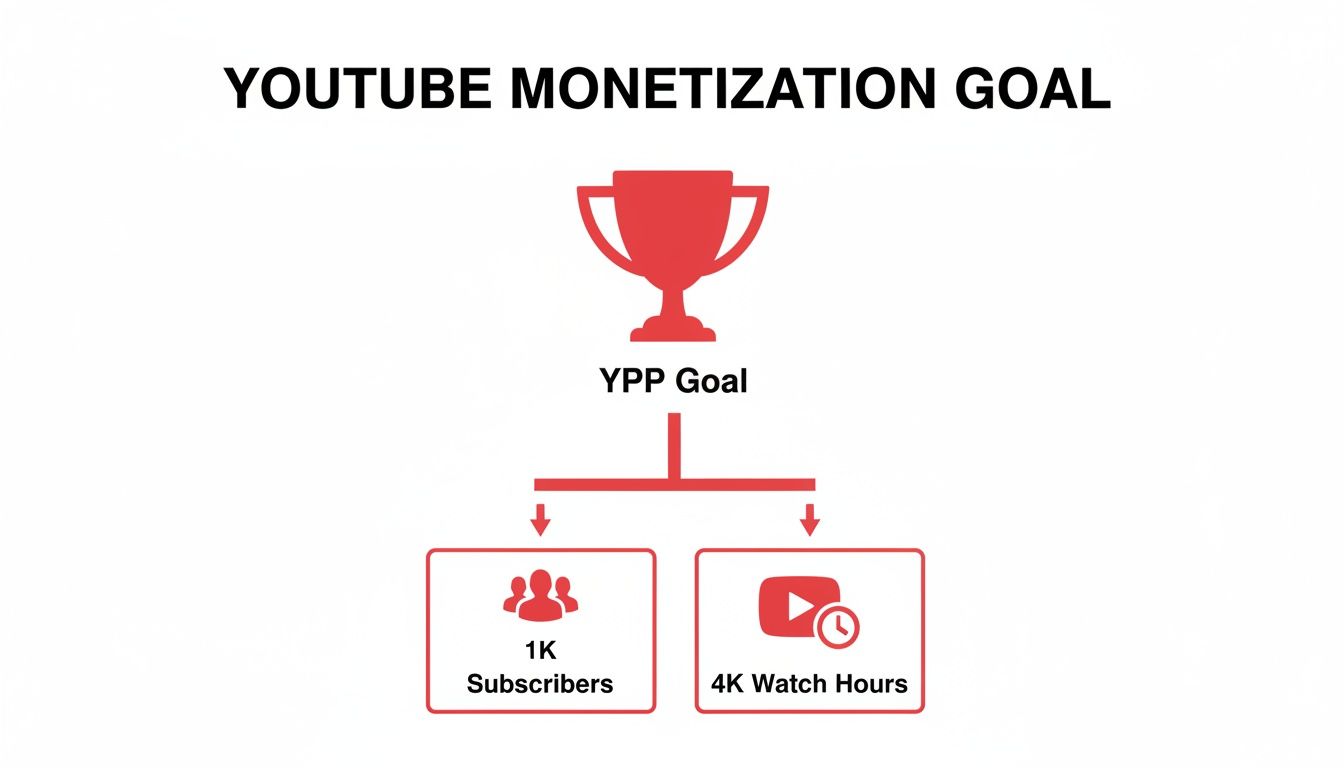
    Diagram illustrating YouTube's monetization goal (YPP) with requirements: 1K subscribers and 4K watch hours.

    To make sure you're focused on the right things, let’s get specific. Here's a breakdown of the video types and view sources that YouTube excludes from the 4,000-hour calculation.

    Valid vs Invalid Watch Hour Sources

    Understanding this distinction is the key to a smart content strategy. This table breaks down exactly what helps you and what doesn't on your path to monetization.

    Content Type Does It Count for YPP? Key Takeaway for Creators
    Public Videos Yes This is your bread and butter. Focus on creating engaging long-form content.
    Public Livestreams Yes Both the live viewing and the archived replay contribute. A great way to rack up hours.
    YouTube Premieres Yes The initial event and all subsequent views count. Build hype and watch time simultaneously.
    Private Videos No If the public can't see it, the watch time is invisible to the YPP counter.
    Unlisted Videos No Similar to private videos, unlisted content doesn't contribute to your public total.
    Deleted Videos No Any watch hours a video earned are permanently erased from your YPP total if you delete it.
    YouTube Shorts No Shorts are amazing for discovery, but their watch time does not apply to the 4,000-hour goal.
    Ad Campaign Views No Views from Google Ads are paid, not organic, so they don't count toward YPP eligibility.

    At the end of the day, the rules are designed to reward creators who build a genuine community around their long-form content. By focusing your efforts on public videos, premieres, and livestreams, you can be sure that every minute of your audience's attention is pushing you closer to your monetization goal.

    How to Track Your Watch Time in YouTube Studio

    Alright, you know the rules of the game. Now, how do you check the score? This is where YouTube Studio comes in. It's your mission control for turning the abstract goal of "getting more watch hours" into a concrete, data-driven strategy.

    Your first stop should always be the Earn tab. Think of this as your official report card for the YouTube Partner Program (YPP). It cuts through the noise and shows you exactly where you stand with your public watch hours and subscriber count. No fluff, just the facts.

    Finding Your Monetization Progress

    Getting to this dashboard is a piece of cake. Seriously, it's just a few clicks.

    1. Log into your account and open up YouTube Studio.
    2. Look at the menu on the left and click the Earn tab (it has a little dollar sign icon).
    3. Scroll down a bit to the "How to join" section. You'll see two progress bars: one for subscribers and one for public watch hours.

    This is the screen you'll be checking obsessively, showing your climb toward those magic numbers.

    A man tracking YouTube watch time on his laptop at a desk with office supplies.

    This simple view clearly lays out how close you are to hitting the 4,000-hour and 1,000-subscriber milestones.

    Digging Deeper with Analytics

    The Earn tab tells you what your progress is, but the Analytics tab tells you why. This is where the real detective work begins. Here, you can pinpoint your powerhouse videos and figure out which ones are falling flat.

    Just head to Analytics > Content, and you can sort all of your videos by watch time. This immediately reveals your top performers.

    The real secret isn't just watching the total watch hours tick up; it's figuring out which specific videos are doing the heavy lifting. I’ve seen channels where one or two breakout videos account for the vast majority of their total watch time.

    Once you identify these "watch time heroes," you can start looking for patterns. Are they all long-form tutorials? Maybe they're part of a specific series that really resonates with your audience? Finding these common threads gives you a blueprint for what to create next.

    If you want to get your content seen by more people in the first place, our guide on YouTube SEO for beginners is a great starting point.

    Beyond YouTube's own platform, it's also helpful to understand how other general analytics tools work to get a wider view of content performance. Within YouTube Analytics itself, pay close attention to the audience retention graphs. They show you the exact second viewers are clicking away, giving you invaluable feedback to tighten up your intros and keep people hooked longer.

    Proven Strategies to Increase Your Public Watch Hours

    Desk setup with open notebook, pen, 'INCREASE WATCH HOURS' sign, and display of video thumbnails.

    Knowing what watch hours are is one thing, but actually making them climb is the real challenge. There's no secret "hack" here. It all comes down to building a solid content strategy that genuinely keeps people watching.

    The core idea is simple: create videos so valuable that viewers can't help but stick around. This not only racks up your watch time but also sends fantastic signals to the YouTube algorithm, telling it to show your content to more people.

    Create Longer, Value-Packed Videos

    One of the most straightforward ways to get more watch time is to simply make longer videos. It’s just math—a 15-minute video has more potential to earn watch hours than a 5-minute one, but only if you can hold the viewer's attention.

    The goal isn't to add fluff just to increase the runtime. Instead, think about creating deep-dive tutorials, comprehensive product reviews, or detailed "how-to" guides that justify the length. Audiences are more than willing to invest their time in quality content, and the algorithm often rewards videos that contribute to longer viewing sessions.

    Leverage the Power of Playlists

    Playlists are your secret weapon for boosting watch hours, and honestly, they're criminally underused. When you group your videos into a logical sequence, you create an effortless binge-watching experience for your viewers.

    Once one video ends, the next one in the playlist automatically cues up. It's a brilliant way to guide people through your content library without them having to lift a finger.

    Try a few of these playlist ideas:

    • A Multi-Part Series: Think "Learn Guitar – Part 1," "Part 2," and so on.
    • Themed Collections: Group videos around a central topic, like "Beginner Woodworking Projects" or "Advanced SEO Techniques."
    • Problem-to-Solution Guides: Structure a playlist that walks a viewer from a common problem to the ultimate solution over several videos.

    This simple trick can turn a single view into an entire viewing session, multiplying your watch hours on the spot.

    By strategically curating playlists, you're not just organizing content; you're designing a user journey. You're telling the viewer, "If you liked this, you're going to love what's next," which is a powerful way to increase public watch hours on YouTube.

    Master Your Video Structure and Pacing

    You have to earn a viewer's attention second by second. A strong hook in the first 15-30 seconds is non-negotiable—it's your chance to stop the scroll. Tell them exactly what the video is about and why they should stick around.

    From there, keep things dynamic. Use "pattern interrupts" like switching up your camera angle, adding on-screen text or graphics, or cutting to B-roll footage. These small changes reset the viewer's attention and keep them locked in.

    A well-planned script for your YouTube videos is the backbone of good pacing. It prevents you from rambling and ensures your points land clearly and logically. To make sure people find your amazing videos in the first place, check out these YouTube SEO tips. Combining a great script with smart SEO gets people to click and gives them a reason to watch all the way to the end.

    Using Live Streams for Rapid Watch Hour Growth
    A smiling man is shown with live streaming equipment and a 'LIVE Streams' banner.

    If getting watch time from regular videos is a marathon, then live streaming is the sprint. It’s probably the single most powerful tool you have for racking up a huge number of public watch hours in a short amount of time.

    Let's do some simple math. A standard video is a one-to-one deal: one viewer watches for a specific duration. A live stream, on the other hand, acts like a multiplier. If you go live for two hours and manage to keep an average of 50 concurrent viewers, you’ve just banked 100 public watch hours in a single session. It's the event-like atmosphere and real-time interaction that keeps people watching for way longer than they would on a pre-recorded video.

    The Double Benefit of Live Content

    The real beauty of live streaming is how it boosts your watch time in two distinct phases. First, you get that massive initial surge of hours while the stream is actually happening. People tune in, hang out in the chat, and become part of a live community, all of which adds directly to your total.

    But it doesn't stop when you hit the "End Stream" button. The replay of your stream becomes a regular public video on your channel, where it can continue to collect watch hours from new viewers. This turns a one-time event into a long-term asset that keeps working for you. For brands, marketers, and especially gaming channels using growth tools like ViewsMax, this makes live streaming a clear and direct path to monetization. The scale here is hard to ignore; YouTube Live generated over 5 billion watch hours in two out of three months in early 2025. You can dig deeper into YouTube Live's impressive stats over on ElectroIQ.com.

    Best Practices for a Successful Stream

    Of course, just hitting the "Go Live" button isn't a guarantee for success. You need a game plan to keep your audience engaged and tuned in. A great stream is all about solid preparation and active interaction.

    Live streaming transforms passive viewing into active participation. When a viewer feels seen and heard in the chat, their reason for staying shifts from just consuming content to being part of a shared experience. That connection is what drives marathon watch sessions.

    Before you even think about starting, plan your stream around a topic that your audience is genuinely excited about. Don't forget to promote it on your other social media channels for a few days beforehand to build some buzz.

    Once you're live, make interaction your absolute priority:

    • Acknowledge Viewers: Welcome people by name when they pop into the stream. A simple shout-out goes a long way.
    • Answer Questions: Keep one eye on the chat at all times and respond to questions as they come in.
    • Run Polls: Use YouTube's built-in poll feature. It's a fantastic way to get instant feedback and make your audience feel like they're part of the show.

    This community-first approach does more than just boost what are public watch hours on youtube; it builds a stronger bond with your most loyal fans, ensuring they’ll be back for the next video or stream.

    Common Watch Hour Myths That Hurt Your Channel

    When you're chasing that 4,000-hour goal, it feels like everyone has a "secret trick" or a shortcut. Unfortunately, a lot of that advice is just plain wrong and can do more harm than good. Let's cut through the noise and bust some of the most common myths that trip creators up.

    Myth 1: Buying Watch Hours is a Smart Shortcut

    This is probably the most dangerous myth out there. You'll see services online promising to deliver thousands of watch hours overnight. It sounds tempting, but it's a trap.

    These services use bots and click farms, and YouTube's detection system is incredibly good at spotting this kind of fake engagement. Getting caught violates their policies, and the consequences are severe. At best, YouTube will just remove the fake hours. At worst? You could get a channel strike or even have your entire channel terminated. It's just not worth the risk.

    Myth 2: You Need a Viral Video to Succeed

    So many creators think they need that one-in-a-million viral hit to get monetized. While a video exploding to millions of views would definitely get you there fast, banking on it is like trying to win the lottery. It's not a strategy.

    A much more reliable—and frankly, better—approach is to focus on consistency. When you consistently publish quality content that serves a specific audience, you build a loyal community. People subscribe and come back for more, video after video.

    Think about it: ten solid videos that each pull in 400 hours of watch time from a dedicated community get you to the same place as one viral video with 4,000 hours from a fleeting audience. Consistency builds a real channel; virality is just a lucky break.

    Myth 3: YouTube Shorts Will Get You to 4,000 Hours

    Finally, let's talk about Shorts. They're an amazing tool for getting your channel discovered and gaining subscribers quickly. But when it comes to the 4,000-hour requirement for the YouTube Partner Program, they're a completely different ballgame.

    It's crucial to understand the two separate paths to monetization:

    • Long-Form Videos: The watch time from these videos counts directly toward the 4,000 public watch hours goal.
    • YouTube Shorts: Their views count toward a separate goal: 10 million views in the last 90 days.

    The bottom line? Use Shorts to attract a new audience and get people interested in your channel. But to hit that magic 4,000-hour number, you need to focus on creating compelling long-form content that keeps people watching. Steer clear of these myths, and you'll be able to focus your effort on what actually works.

    Got Questions? We've Got Answers

    Let's tackle some of the most common questions that pop up for creators grinding toward that 4,000-hour mark. Chances are, if you're wondering about it, so are thousands of other YouTubers.

    How Often Does YouTube Update Watch Hours?

    You might notice that your watch hours in the YouTube Studio Earn tab don't update instantly. That's totally normal. There's usually a processing delay, so you can expect to see your numbers refresh every 24-48 hours.

    So, if one of your videos suddenly takes off, don't sweat it if the stats don't reflect it right away. Just give the system a day or two to catch up.

    Do Public Watch Hours Expire?

    Yes, they do, but it's more of a "rolling window" than a hard expiration date. The YouTube Partner Program requires 4,000 hours within the last 365 days.

    Think of it like this: every new day that starts, the watch hours from 366 days ago fall off your total. Your job is to keep that number above the threshold within the most recent 12-month period, not just accumulate hours indefinitely.

    This rolling 365-day window is YouTube's way of checking if a channel is still relevant. It ensures monetized channels are actively keeping an audience engaged, not just living off the glory of a single viral video from years ago.

    Can I Get Kicked Out of the YPP if My Hours Drop?

    Good news here. Once you're in the YouTube Partner Program (YPP), you won't be automatically booted out if your watch hours dip below 4,000 for a little while. Phew.

    However, there is a catch. YouTube wants to see that you're still an active creator. If your channel goes completely inactive for six months and you fall below the YPP thresholds, you run the risk of being removed from the program. The key is to stay active.


    Ready to turn those analytics into a real growth strategy? ViewsMax gives you the AI-powered tools to create smarter content, increase your watch time, and reach your monetization goals faster. Learn more and start growing today.
  • What Is Monetization on YouTube A Guide to Making Money

    What Is Monetization on YouTube A Guide to Making Money

    So, what exactly is YouTube monetization? Put simply, it’s the process of earning money from the videos you create and upload.

    Think of your channel like a digital storefront. You stock the shelves with great content, and monetization is how you open for business and start making sales.

    Unpacking Your Creator Toolkit

    A person works on a laptop with a camera and microphone, preparing to monetize their channel.

    Becoming a monetized creator isn't about flipping a single switch. Instead, YouTube hands you a whole toolkit filled with different ways to build an income. Each tool works a bit differently, and some will be a better fit for your channel and audience than others.

    The one everyone knows is ad revenue—getting a cut from the ads that run on your videos. But that’s just the tip of the iceberg. The platform has evolved to offer a ton of ways to earn directly from your community, brand partners, and even YouTube itself.

    The 8 Main Ways to Earn on YouTube

    To really get what monetization is, you need to see it as a collection of different opportunities, not just one paycheck. The most successful creators I know rarely rely on a single income source; they mix and match several methods to build a much more stable and reliable business.

    Let's quickly break down the primary tools in your monetization toolkit.

    To give you a bird's-eye view, here's a quick summary of the most common ways creators earn money on the platform.

    YouTube Monetization Methods at a Glance

    Monetization Method How It Works Best For
    Ad Revenue You earn a share of the money from ads shown on or around your videos. All eligible channels; a foundational income stream.
    Channel Memberships Viewers pay a monthly fee for exclusive perks like badges, emojis, and members-only content. Channels with a dedicated, loyal community.
    Super Chat & Stickers Fans can buy highlighted messages or animated stickers during live streams and Premieres. Creators who do live streams and engage with their audience in real time.
    Super Thanks Viewers can buy a fun animation on a video page to show extra appreciation. Any creator looking for a simple way for fans to show support on-demand.
    YouTube Premium You get a portion of a viewer's subscription fee when they watch your content. All monetized channels, as it's a passive income stream.
    Merchandise Shelf You can showcase and sell your own branded products directly below your videos. Creators with a strong brand identity and engaged fanbase.
    Brand Deals You partner with brands for sponsored content or affiliate marketing. Channels of all sizes, but especially those with a defined niche.

    Each of these methods opens up a new potential revenue stream for your channel.

    A common mistake is thinking monetization is only about ads. The reality is, a diversified strategy that taps into fan funding and brand deals almost always leads to more significant and stable earnings over time.

    To understand the bigger picture of how creators make money online, exploring general monetization strategies can be a real eye-opener. For now, let's dive into each of these YouTube-specific tools so you can figure out how to unlock and make the most of them for your channel.

    Unlocking Your Earnings with the YouTube Partner Program

    Before you can turn your creative passion into a paycheck, you have to get the keys to the kingdom. On YouTube, that key is the YouTube Partner Program (YPP), the official gateway that unlocks all the money-making features on the platform. Think of it as your formal entry into YouTube's bustling creator economy.

    But joining the YPP isn't automatic; it's a milestone you have to earn. YouTube has put some clear benchmarks in place to make sure creators have built a real, engaged audience and are consistently playing by the rules before they can start earning. It's a system designed to protect everyone—viewers, advertisers, and other creators—from low-effort or harmful content.

    The Milestones You Need to Hit

    To even be considered for the YPP, your channel has to meet some specific thresholds. These numbers aren't arbitrary; they show YouTube that you have a proven track record of getting people to watch and stick around.

    The primary requirements are:

    • 1,000 Subscribers: This is the first big signal that you’ve built a foundational community that actually cares about what you're making.
    • 4,000 Public Watch Hours: This one is a bit trickier—it has to be accumulated over the last 12 months. It proves your content isn't just getting clicks, but is genuinely holding people's attention.

    There's also a path for creators who live and breathe short-form content. You can qualify with 1,000 subscribers and 10 million valid public Shorts views in the last 90 days. Hitting these numbers is your ticket to apply. It’s also smart to keep an eye on platform updates, since these things can shift. You can read up on recent changes in YouTube to stay in the loop.

    It's More Than Just Numbers: You Have to Follow the Rules

    Hitting your subscriber and watch time goals is really only half the battle. To get accepted into—and, just as importantly, stay in—the YPP, you have to be a stickler for YouTube's policies.

    Your channel must have zero active Community Guideline strikes and follow all YouTube channel monetization policies, including the AdSense Program policies. This is non-negotiable for long-term success.

    This boils down to creating original, advertiser-friendly content that respects copyright law and doesn't violate community standards. Once you meet the eligibility numbers, you’ll submit your application right from YouTube Studio. From there, a real human on the review team will manually go through your channel—your videos, your themes, your descriptions—to make sure everything aligns with their guidelines.

    The financial incentive for playing by the rules is massive. YouTube’s ad revenue recently shot up to $36.1 billion, a 14.6% jump from the previous year. For creators in the YPP, a piece of that enormous pie is up for grabs, with the standard revenue share sending 55% of ad earnings straight to your pocket. This really drives home why understanding and following the rules isn't just a suggestion; it's critical to your success.

    Your Primary Income Streams: Ads and Premium

    Once you get that "Congratulations, you're in!" email from the YouTube Partner Program, you unlock the two most fundamental ways to make money: ad revenue and YouTube Premium revenue.

    Think of these as the foundation of your channel's earnings. They're the consistent, mostly passive income sources that scale directly with your audience. Getting a solid grip on how they work is the first real step toward building a predictable income from your content.

    The process itself is pretty simple once you're approved.

    Process flow for YouTube Partner Program: qualify with subscribers and watch hours, apply, and earn revenue.

    This graphic really boils it down: meet the thresholds, get approved, and you're officially in the business of earning. So, let's break down what those earnings actually come from.

    Decoding Your Ad Revenue

    When people talk about YouTube monetization, ads are usually the first thing that comes to mind. Once you flip the switch, YouTube will start placing different types of ads on your videos—like the skippable ones you see before a video or the short, non-skippable ones. For every ad that runs on your content, you get to keep a 55% share of what the advertiser paid.

    Everything is handled through Google AdSense, which you’ll link to your channel to process all the payments. A common misconception is that more views automatically mean more money, but it's more nuanced. Your earnings depend heavily on who is watching, what they're watching, and where they're watching from.

    You'll quickly run into two key metrics in your analytics:

    • CPM (Cost Per Mille): This stands for "cost per 1,000 impressions." It's what advertisers are paying to have their ads shown 1,000 times across YouTube. It’s an advertiser-focused metric.
    • RPM (Revenue Per Mille): This is your "revenue per 1,000 views." This is the number that really matters to you. It shows your total earnings (from ads, Premium, and more) for every 1,000 video views, after YouTube has taken its cut.

    Things like your channel's niche, your audience's location and age, and even how long your videos are can cause these numbers to swing wildly. If you want to get into the nitty-gritty, our guide on the meaning of CPM on YouTube breaks it all down.

    Earning with YouTube Premium

    There's another powerful revenue stream that often flies under the radar: YouTube Premium. This is the platform's ad-free subscription service, and it creates a completely separate way for you to get paid. When a Premium subscriber watches your video, you earn a portion of their monthly subscription fee.

    The calculation is pretty straightforward: it’s based on how much watch time you get from Premium members. The more a Premium subscriber watches your channel, the bigger your piece of the revenue pie.

    This is a bigger deal than you might think. YouTube Premium has been growing like crazy, recently hitting 125 million subscribers—that's a massive 25% jump from just 100 million. It took seven years for the service to reach 50 million subscribers, but only two more years to more than double that number.

    This signals a huge shift in how people consume content. For creators with dedicated audiences, especially in fields like education or coaching where viewers are highly engaged, Premium revenue can sometimes even outpace ad revenue on a per-view basis.

    Building Community with Fan Funding Features

    Man records video about fan funding with a smartphone, two jars of dried herbs on the table.

    Ad revenue is a great starting point, but it's a passive stream that can swing wildly from month to month. The real key to understanding YouTube monetization is building a direct, authentic connection with your audience. That’s where fan funding comes in.

    These tools empower your most dedicated viewers to support you directly, turning them from casual watchers into true patrons of your work. Think of it like this: ads are like a radio station playing commercials for everyone, while fan funding is like selling tickets to your own private concert. It’s a far more stable and personal way to earn because it's built on relationships, not just algorithms.

    Turn Your Channel into a VIP Club with Memberships

    Channel Memberships are essentially YouTube's built-in version of Patreon. Your viewers can pay a small monthly fee to join your channel's "club," unlocking special perks that you get to design.

    This is where you can let your creativity run wild and offer genuine value that your public videos don't. Some of the most successful perks I've seen include:

    • Custom Emojis and Badges: Members get special emojis to spam in the comments and a loyalty badge next to their name that levels up over time. It's a simple, visual way to recognize your top supporters.
    • Exclusive Content: Think behind-the-scenes vlogs, early access to new videos, or even members-only live streams where you can hang out in a more intimate setting.
    • Community Access: Many creators set up a members-only Discord server or a private section in their channel's Community tab.

    You can set up multiple tiers—like Bronze, Silver, and Gold—with increasingly valuable perks. This gives everyone a chance to support you at a level they're comfortable with.

    The secret to great fan funding isn't just about asking for money. It's about creating an experience so cool and exclusive that your community genuinely wants to be part of it.

    Make Live Streams Interactive with Supers

    During a live stream or a video Premiere, the chat can fly by at a million miles an hour. "Supers" are a way for your audience to pay to make their message pop, and it's an incredible tool for boosting engagement and earnings during live events.

    There are a few different types of Supers you'll see:

    1. Super Chat: A viewer pays to have their comment highlighted in a bright, flashy color. It gets pinned to the top of the chat for a certain amount of time—the more they pay, the longer it stays.
    2. Super Stickers: Instead of a message, viewers can buy fun, animated stickers that appear in the chat feed. It's a quick, visual way to show support and get your attention.
    3. Super Thanks: This is basically a tip jar for your regular, pre-recorded videos. A viewer can buy a colorful animation that plays right over your video, and their comment will be highlighted in the comments section to show their appreciation.

    These features make supporting you feel like a game. It's interactive, it's fun, and it gives you a chance to shout out your biggest fans in real-time, which only strengthens that community bond you've been working so hard to build.

    Monetizing Your Brand Beyond YouTube

    While YouTube's built-in tools are great starting points, the most successful creators know their channel is a launchpad, not the final destination. Real, sustainable growth comes from building a brand that can stand on its own, independent of any single platform.

    It's a mental shift—from thinking like a YouTuber to thinking like a business owner.

    This is where you graduate from earning a slice of YouTube's ad revenue to creating and controlling your very own income streams. These off-platform methods often have a much higher ceiling for earnings because you're the one setting the prices and keeping the lion's share of the profits. You’re turning your hard-earned influence into a tangible, independent business.

    Selling Your Own Products

    One of the most powerful ways to do this is through YouTube Shopping. This handy feature lets you link your own online store, like one built on Shopify or Spring, directly to your channel. Your products show up in a slick "merchandise shelf" right under your videos, making it ridiculously easy for fans to shop without ever leaving the page.

    And this goes way beyond just slapping your logo on a t-shirt. Think about what your audience actually needs or wants.

    • A fitness creator? Sell custom workout plans or branded resistance bands.
    • An artist? Offer prints of your work, digital brush packs, or your favorite art supplies.
    • A gaming channel? Think custom mousepads or inside-joke apparel that only true fans will get.

    When you create products that genuinely solve a problem or resonate with your community’s identity, you’re building a revenue stream that’s both valuable and scalable.

    The real magic of selling your own merch is that you control everything: the product, the price, and the direct relationship with your customers. This helps insulate your business from the whims of ad rates or algorithm changes.

    Partnering with Brands and Affiliates

    Another massive opportunity lies in working directly with brands. This happens outside of YouTube's built-in systems and usually takes two forms:

    1. Sponsorships: A brand pays you to create content featuring their product. This could be a whole dedicated video or just a quick mention.
    2. Affiliate Marketing: You promote a product using a special link or a discount code. For every person who buys through that link, you get a commission.

    The absolute key to making this work is authenticity. Your audience trusts you. Don't break that trust by promoting something you don't actually believe in. A single inauthentic partnership can do lasting damage to your credibility. As your channel grows, you'll also see that short-form video opens up new doors for these kinds of deals. We dive deeper into that in our guide on how to make money on YouTube Shorts.

    Common Questions About YouTube Monetization

    Diving into the world of YouTube monetization can feel like navigating a maze. Lots of questions pop up, especially when you're just starting out. Getting clear answers from the get-go can save you a ton of headaches and help you avoid common pitfalls.

    Let's clear up some of the most frequent questions creators have about earning money on YouTube.

    How Long Does It Take to Make Money?

    This is the big one, and the honest answer is: it depends entirely on how quickly your channel grows. There's no magic number. Before you can earn a single penny from ads, you have to get into the YouTube Partner Program (YPP).

    To even apply for the YPP, you need to hit two key milestones: 1,000 subscribers and 4,000 hours of public watch time within a 12-month period. Some creators knock this out in a few months of dedicated effort, while for others, it can take a year or more.

    Once you hit those numbers and apply, YouTube's team will review your channel, which can take up to a month. If you're approved, you can finally switch on monetization. But even then, the money doesn't just show up in your bank account. You only get paid once your AdSense earnings reach the $100 payment threshold.

    Do I Pay Taxes on YouTube Earnings?

    Yes, absolutely. Any money you earn from YouTube is considered taxable income. For tax purposes, you're usually treated as a self-employed individual or a small business owner. This means you are responsible for tracking your income and reporting it to the tax authorities in your country.

    Google will ask you to fill out tax forms in your AdSense account, and depending on where you live, they might even withhold a portion of your earnings for taxes.

    Treat your channel like a business from day one—this is non-negotiable. I always recommend consulting with a tax professional. They can help you understand your obligations, find eligible deductions (like new gear or software!), and set up a system to manage your finances correctly.

    Can I Monetize Videos with Copyrighted Music?

    This is a huge minefield for new creators. Using popular, copyrighted music without a license is a surefire way to get your video demonetized.

    Most of the time, the song's owner will hit your video with a Content ID claim. When this happens, they get to place ads on your video and keep 100% of the revenue. It's their music, so it's their money. To play it safe and actually earn from your hard work, stick to music from the YouTube Audio Library or use a trusted royalty-free music service where you pay for a license.

    Thinking beyond ads is also smart. To diversify your income, you can explore tools that offer YouTube integrations for enhanced content, which can open up new avenues for sales outside the platform.


    Ready to turn your passion into a profession? ViewsMax gives you the AI-powered tools to optimize your titles, tags, and descriptions, helping you meet those monetization thresholds faster. Grow your channel with confidence by visiting https://blog.viewsmax.com.

  • Cpm Meaning YouTube: What Is cpm meaning youtube for Creators

    Cpm Meaning YouTube: What Is cpm meaning youtube for Creators

    On YouTube, the term CPM gets thrown around a lot, but what does it actually mean for your wallet? CPM stands for Cost Per Mille, which is just a fancy way of saying cost per thousand impressions.

    Think of it as the price an advertiser is willing to pay to have their ad show up on your videos 1,000 times. It’s the foundational metric that tells you how much your channel’s "digital real estate" is worth to businesses.

    What Does CPM Mean for Your YouTube Channel

    A wooden desk with a laptop, coffee cup, and notebook, featuring a 'CPM Explained' YouTube overlay.

    Let's use an analogy. Imagine your YouTube channel is a busy highway, and your viewers are the cars driving down it. Advertisers want to put up billboards (their ads) to catch the attention of all that traffic.

    The CPM is the price they agree to pay for every 1,000 cars that pass by their billboard.

    It's a purely advertiser-focused number. It tells you what they're bidding to get in front of your audience, not what you actually pocket. Still, it’s a critical number because a higher CPM often means advertisers see your audience as a premium, high-value group they're willing to pay more to reach.

    Why CPM Matters for Monetization

    Getting a handle on your CPM is one of the first real steps to building a sustainable income on YouTube. It gives you a direct look into the market value of the content you work so hard to create.

    Here's why it's a metric you can't ignore:

    • It's a Barometer for Your Content's Value: A high CPM is a clear signal that advertisers in your niche see your channel as prime advertising space. They believe your viewers are exactly who they want to reach.
    • It Directly Influences Your Bottom Line: While CPM isn't your take-home pay (we'll get to that!), a higher CPM is the starting point for higher earnings. Think of it as the raw ingredient for your revenue.
    • It Helps Steer Your Strategy: By watching your CPM, you can see which videos attract the big spenders. This insight is gold, helping you decide what kind of content to make next to maximize your income.

    Essentially, CPM is the raw price tag for ad space on your channel. It’s what advertisers pay, not what you earn, but it’s one of the most powerful clues you have about your channel's monetization potential.

    To boil it down, here is a quick look at what CPM really means for a creator.

    CPM at a Glance

    Concept Simple Explanation
    CPM The amount an advertiser pays for 1,000 ad views on your videos.
    Advertiser-Centric This metric reflects the advertiser's cost, not your final paycheck.
    Value Indicator A higher CPM shows that your audience is more valuable to advertisers.

    Ultimately, understanding this key metric helps you make smarter, more informed decisions about your content and growth strategy. It’s about working smarter, not just harder, to turn your passion into a profession.

    How YouTube Calculates Your CPM

    Knowing what CPM stands for is the first step, but the real power comes from understanding how that number gets calculated. It’s the key to seeing what advertisers are willing to pay to get in front of your audience.

    The formula itself is actually pretty straightforward. It’s a simple calculation designed to figure out the average cost for every one thousand ad views on your content.

    The CPM Formula:
    (Total Advertiser Ad Spend / Total Ad Impressions) x 1,000 = CPM

    This formula gives you the raw number—the gross amount an advertiser paid before YouTube takes its cut. Think of it as a pure measure of your content's value in the ad market. It's a fantastic indicator of how much advertisers are competing for your viewers' attention.

    A Practical Calculation Example

    Let's put this into a real-world context. Say you have a video that's doing pretty well, and you dive into your YouTube Studio analytics for a specific time frame.

    Here's what you see:

    • Advertiser Ad Spend: $150 (The total amount advertisers paid to show ads on your video).
    • Total Ad Impressions: 25,000 (The number of times ads were actually displayed to viewers).

    Now, let's run the numbers through the formula:

    1. Divide the total ad spend by the total impressions: $150 / 25,000 = $0.006
    2. Multiply that result by 1,000: $0.006 x 1,000 = $6.00

    In this example, your CPM is $6.00. This means for every 1,000 times an ad was shown on that video, advertisers paid an average of $6.00.

    Standard CPM vs. Playback-Based CPM

    When you get into your YouTube Analytics, you'll spot two different kinds of CPM. This is a small detail that trips up a lot of creators, but it’s easy to understand once you see the difference.

    • Standard CPM: This is a broad metric. It includes ad impressions from all over YouTube—the homepage, search results, your channel page, and of course, your videos.
    • Playback-Based CPM: This is the one you really want to watch. It only counts the ad impressions that happened while someone was actively watching one of your videos. This gives you a much clearer, more accurate picture of what your specific content is earning.

    Because it's so focused, your playback-based CPM is usually higher than the standard CPM. It’s the true measure of your video's monetization power.

    Staying on top of this and other platform updates is crucial. To get a better sense of the landscape, you can learn more about recent changes in YouTube that could impact your channel. For now, just remember to keep your eyes on the playback-based CPM—it’s the number that will help you make the smartest decisions for your content strategy.

    Understanding CPM vs RPM for Creators

    Diving into your YouTube analytics can feel a bit like trying to read a foreign language. You're hit with a wall of acronyms, and two of the most confusing are CPM and RPM. They sound almost the same, but they tell completely different stories about how your channel makes money. For any creator who's serious about turning their passion into a paycheck, getting these two straight is non-negotiable.

    Let's break it down with a simple analogy. Think of CPM (Cost Per Mille) as the sticker price an advertiser is willing to pay to show their ad 1,000 times on videos like yours. It’s an advertiser-focused number that reflects the raw market value of your audience, before anyone else gets a piece of the pie.

    Now, RPM (Revenue Per Mille) is the number you really want to keep your eye on. This is your actual take-home pay for every 1,000 views your videos get, after YouTube has taken its 45% cut from ad revenue. RPM gives you a far more realistic picture of how much money is actually landing in your bank account.

    Why RPM Is the Creator’s North Star

    Having a high CPM is great, don't get me wrong. It means advertisers see value in your audience. But it's not the whole story, and it certainly doesn't guarantee a big payout. The real key to understanding your channel's financial health is tracking your RPM.

    That's because RPM is a much broader metric. It doesn't just look at ad revenue; it bundles together all the ways you make money on the platform.

    Your RPM calculation includes earnings from:

    • Advertisements: The money from ads that play before, during, or after your videos.
    • YouTube Premium: Your cut from the subscription fees of Premium members who watch your content.
    • Channel Memberships: The monthly recurring revenue from fans who join your channel.
    • Super Chat & Super Stickers: Donations and paid messages viewers send during live streams and premieres.

    In simple terms, RPM answers the single most important question you have as a creator: "For every 1,000 views I get, how much am I actually making?" Focusing on this number is what allows you to make smart, strategic decisions to grow your income.

    For instance, you might have a video with a so-so CPM from ads, but if it's a livestream that generated a ton of Super Chats, its RPM could be through the roof. Looking only at CPM would give you a misleading picture of that video's success. RPM gives you the full, unvarnished truth.

    CPM vs RPM A Clear Comparison

    To really nail down the difference, it helps to see them side-by-side. This quick comparison should clear up any lingering confusion and show you exactly when to look at each metric.

    Metric What It Measures Who It's For Key Takeaway for Creators
    CPM The gross amount advertisers pay per 1,000 ad impressions before any cuts. Advertisers and YouTube A great indicator of how valuable your audience is to the market, but it’s not what you actually earn.
    RPM The net revenue you earn per 1,000 video views, after YouTube's cut and including all revenue sources. You, the creator This is the most accurate measure of your channel's financial performance and should be your guide for monetization strategy.

    Ultimately, CPM tells you what advertisers are willing to spend, while RPM tells you what you actually get to keep. Both are useful, but only one gives you a true sense of your business's bottom line.

    The Key Factors That Influence Your CPM Rate

    Have you ever looked at your YouTube analytics and wondered why your CPM seems to be all over the place? It’s a common question. One creator might be pulling in a $25 CPM, while another is stuck around $3. This isn't just luck of the draw—several key factors directly influence what advertisers are willing to pay to get in front of your audience.

    Once you understand what these variables are, you can start to see where you have some control to boost your channel's earnings.

    Audience Location

    The single biggest factor dictating your CPM is where your viewers are watching from. Think about it from an advertiser's perspective: they'll always pay a premium to reach audiences in countries with strong economies and high purchasing power. A view from someone in the United States or Germany is simply more valuable to a global brand than one from a region with lower average consumer spending.

    The difference isn't small, either. It can be massive. For example, data shows that Norway can have a CPM as high as $43.15. That means a creator could earn $43 for every thousand ad impressions from a Norwegian audience. Germany is not far behind at $38.85, and the United States often hovers between $32.75 and $36.03.

    Your Content Niche

    Right after geography comes the topic you cover. The niche of your channel plays a huge role in determining your CPM because advertisers in certain industries just have bigger budgets. They’re willing to spend top dollar to reach a highly relevant audience.

    • High-CPM Niches: If you create content about personal finance, software tutorials, real estate, or luxury cars, you're in a great position. An advertiser in one of these spaces knows that a single lead from your video could be worth hundreds, if not thousands, of dollars to their business.
    • Lower-CPM Niches: On the other hand, entertainment-focused niches like gaming vlogs or comedy skits tend to have lower CPMs. They can attract enormous audiences, but the products being advertised are often lower-cost consumer goods, which naturally leads to smaller ad bids.

    For a deeper dive, it's worth learning about mastering content performance metrics to see the bigger picture. A big part of that is choosing the right topics and then zeroing in on high-value YouTube video keywords to attract the right kind of advertisers.

    Seasonality and Video Length

    Finally, two other practical elements can cause your CPM to swing: the time of year and how long your videos are.

    First, ad spending isn't a flat line throughout the year. It predictably spikes in the fourth quarter (Q4) as brands ramp up their budgets for the holiday shopping season. Creators often refer to this as the "Q4 bump," where CPMs climb in October, November, and December because of the intense competition for ad placements.

    Second, the length of your videos matters a lot. Any video over eight minutes long becomes eligible for mid-roll ads. These are the ad breaks you see in the middle of a longer video. Having more ad slots available on a single piece of content increases your potential earnings and can significantly lift the overall CPM for that video.

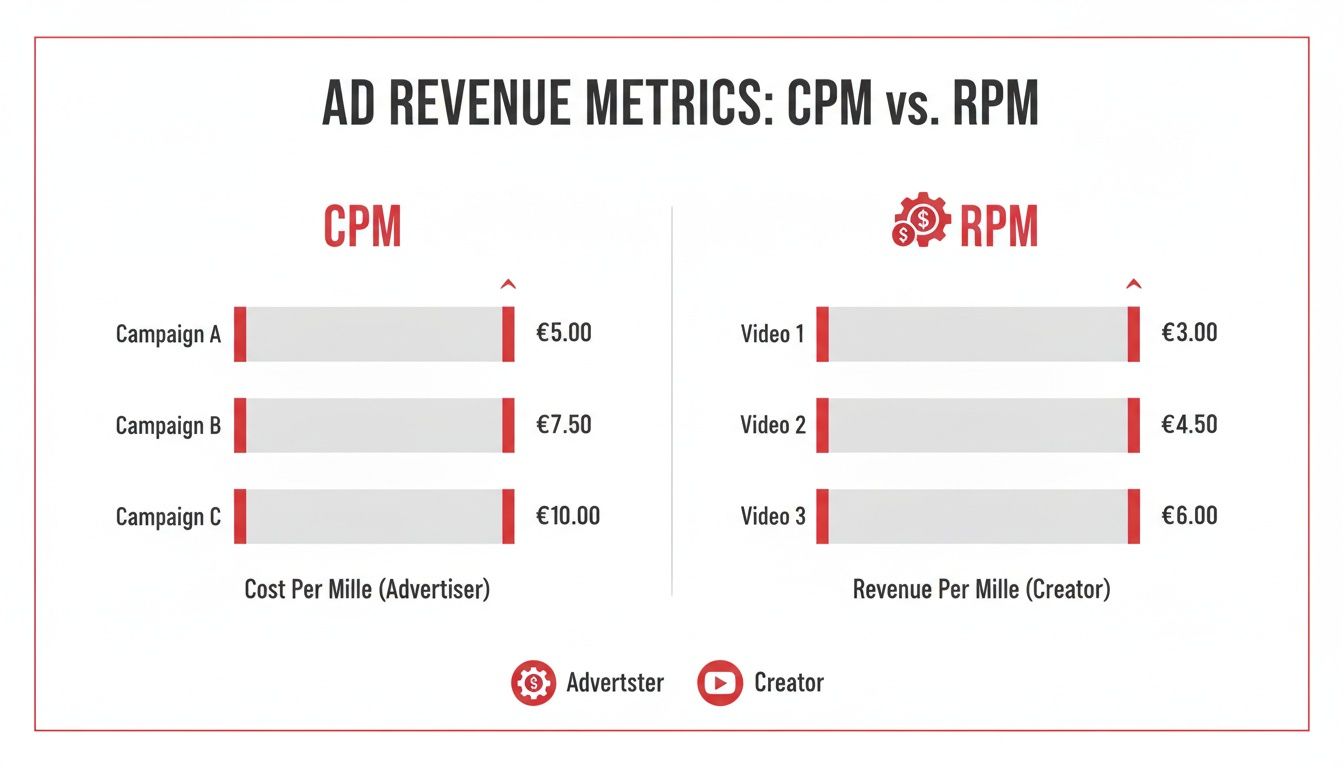
    This image below does a great job of breaking down the difference between CPM (what advertisers pay) and RPM (what you, the creator, actually earn).

    A chart comparing ad revenue metrics: CPM (Cost Per Mille) for advertisers and RPM (Revenue Per Mille) for creators.

    It’s a simple but crucial distinction: CPM is the advertiser's cost, while RPM is a more accurate measure of your actual revenue per thousand views after YouTube takes its cut.

    Ready to Boost Your YouTube CPM? Here’s How.

    A desk workspace with a laptop, camera, lamp, documents, and a red banner displaying 'increase CPM'.

    Knowing what CPM means is half the battle. The other half? Actually getting that number to climb. Boosting your YouTube CPM isn't just wishful thinking; it comes down to making smart, strategic choices about your content, your audience, and how you structure your videos. A few focused tweaks can make your channel far more valuable to advertisers.

    It all starts with the kind of content you produce. Some topics are just naturally more profitable because the audience they attract has more spending power. Think about it—advertisers will pay a lot more to reach people actively looking for information on finance, technology, or business.

    At the same time, you have to create content that’s considered "advertiser-friendly." That means steering clear of controversial topics and sticking to YouTube's community guidelines. The more brand-safe your channel is, the bigger the pool of advertisers willing to bid for a spot on your videos.

    Target High-Value Audiences and Niches

    In the world of YouTube ads, not all views are created equal. A view from a viewer in a country with a strong economy is often worth more to an advertiser than a view from somewhere else.

    This is where picking the right niche becomes so important. Topics like finance and digital marketing consistently pull in the highest rates, with CPMs often ranging from $14.55 to $36.36. In contrast, other niches might not even come close.

    The same logic applies to geography. Focusing on viewers in high-CPM countries like Norway (where CPMs can hit $8.19–$43.15) or Germany ($9.79–$38.85) can dramatically increase your earnings. You can also translate your YouTube videos to reach a global audience, which opens you up to more viewers and potentially higher-paying international advertisers.

    Key Takeaway: Your CPM is directly tied to who is watching and what they’re watching. If you want to raise your ad revenue, focus on high-value niches and target audiences in countries with strong economies.

    Optimize Video Length and Ad Placements

    Here’s one of the most powerful levers you can pull: video length. Once your videos are longer than eight minutes, YouTube gives you the option to place mid-roll ads. These are commercial breaks you can strategically insert during natural pauses in your video.

    Think of it this way: a longer video creates more ad inventory. More ad slots mean more chances for advertisers to run their campaigns, which can drive up the total revenue (and thus, the CPM) for that single video.

    But there’s a catch. You have to keep your audience engaged. If you cram too many ads into your content, you risk annoying your viewers and sending your watch time plummeting. The secret is finding that sweet spot where you maximize revenue without sacrificing the viewer experience.

    Why a High CPM Doesn't Always Mean High Earnings

    Here’s a lesson every creator learns, sometimes the hard way: a big, flashy CPM number in your YouTube Analytics doesn't automatically translate into a bigger paycheck. It’s a common misconception. Remember, CPM is what advertisers are willing to pay for 1,000 ad impressions, not what you actually earn from 1,000 video views.

    Think about it. Your video could be racking up millions of views, but if ads aren't actually being shown and watched during those views, you're not making any money from them. The real money is made in the gap between a simple "view" and a "monetized view."

    Views vs. Monetized Playbacks

    This is the most important distinction to grasp. A view only counts as a monetized playback if a viewer is actually shown an ad. If no ad runs, no money is generated for that view.

    So, what stops an ad from running? A few common culprits are at play:

    • Ad Blockers: A surprising number of people use software that stops ads from ever loading.
    • Skipped Ads: Viewers who hit "Skip Ad" instantly often don't register as a paid impression for the advertiser.
    • No Ad Available: Sometimes, YouTube's system simply doesn't have a suitable ad to show to a particular viewer at that exact moment.

    Think of it this way: a high CPM is like knowing the price of a single, premium fish at the market. That's great information, but your total income for the day depends on how many fish you actually catch and sell.

    This is exactly why a channel with a modest CPM but a dedicated audience that watches ads can easily earn more than a channel with a sky-high CPM and an audience that skips everything. Chasing CPM alone gives you a distorted view of your business. That's why RPM is a much more reliable metric for understanding what you're actually banking.

    Your Top YouTube CPM Questions, Answered

    Even with a solid grasp of the basics, a few questions about YouTube CPM always seem to pop up. It's totally normal. Let's dig into some of the most common ones I hear from creators so you can get a clearer picture of what’s happening with your channel’s revenue.

    What Is a Good CPM on YouTube?

    This is the big one, isn't it? Everyone wants to know the magic number. But the truth is, there isn't one. What's considered a "good" CPM is completely relative and hinges on your niche and where your viewers are watching from.

    • A gaming creator with a worldwide audience might be thrilled with a $3 to $5 CPM.
    • But for a creator making videos about personal finance for a US-based audience, anything under $15 could feel disappointing.

    The best way to think about it is to stop chasing some universal "good" number and start benchmarking against other channels in your specific field. A good CPM for you is one that's either growing over time or holding steady compared to your peers.

    Here's the key takeaway: A good CPM isn't a single number. It's a competitive figure for your niche and your audience. Focus on improving your own metrics instead of getting hung up on what creators in totally different categories are earning.

    Why Does My CPM Fluctuate So Much?

    If you've ever seen your CPM numbers jump around and felt a little panicked, take a breath—it's perfectly normal. Your CPM isn't a static rate. It’s the live result of a dynamic ad auction, and it's always in motion.

    The single biggest reason for this is seasonality. Advertisers pour money into ads during the fourth quarter (Q4) to reach holiday shoppers, which is why CPMs often shoot up in October, November, and December. Then, just as predictably, they tend to drop in January when new budgets are set. On top of that, advertiser demand for your specific niche can change with market trends, causing your CPM to go up or down unexpectedly.

    How Do I Find My CPM in YouTube Studio?

    Thankfully, YouTube makes it easy to find this data. Everything you need is right inside your channel's dashboard.

    1. First, log in to YouTube Studio.
    2. On the left-hand menu, click on the Analytics tab.
    3. From there, select the Revenue tab at the top of the page.
    4. You'll see a graph that prominently displays your Playback-based CPM.

    From this screen, you can also change the date range to track how your CPM has performed over weeks, months, or even years. If you want to get really granular, click "See More" to break down the CPM for individual videos and figure out which content is attracting the highest-paying advertisers.


    Ready to stop guessing and start growing? ViewsMax provides AI-powered tools to help you optimize your titles, find high-value keywords, and make data-driven decisions that can boost your CPM and RPM. Start turning your creative passion into measurable channel growth today. Learn more at https://blog.viewsmax.com.