Let's cut right to it. Public watch hours are the total amount of time people have spent watching your public videos over the last 365 days. Simple, right? But this single metric is one of the most important on your journey to becoming a full-fledged YouTube creator. It's how YouTube gauges if you're not just getting clicks, but actually keeping people engaged.
What Public Watch Hours Mean for Your Channel

Think of watch hours as the real currency on YouTube. Sure, views and subscribers look great on paper, but watch time is the ultimate proof that your content has value. It tells the platform that when someone finds your video, they actually stick around.
This is why it's a non-negotiable requirement for joining the YouTube Partner Program (YPP), the gateway to running ads and earning money from your channel. To get your foot in the door, you have to hit two key milestones.
The Two Pillars of YouTube Monetization
Your path to making money on YouTube hinges on proving you can consistently hold an audience. YouTube has laid out two clear, black-and-white goals you need to hit:
- 1,000 Subscribers: This shows you’re building a dedicated community that wants to follow your work.
- 4,000 Public Watch Hours: This confirms your content is compelling enough to keep people watching for extended periods.
You need to hit both of these targets within a 12-month period to even be considered for the YPP. If you want to dive deeper, you can learn more about what monetization on YouTube really involves. It’s not a one-and-done deal; it’s about proving your channel has staying power.
Understanding the Rolling 12-Month Window
Here’s where many new creators get tripped up: the "rolling 365-day" window. This has nothing to do with the calendar year. It's a constantly moving timeframe that looks back exactly 12 months from today.
Picture it like this: You have a bucket that can only hold 365 days' worth of watch hours. Every morning, you add the hours from yesterday, but to make room, the hours from 366 days ago fall out the bottom. So, the watch time you earned on January 15th of last year will disappear from your YPP total on January 16th of this year.
This means your watch hour count can actually go down if you're not consistently earning new ones. A high-performing month from a year ago will eventually "expire," and you need fresh content to replace those hours.
This system is designed to reward consistency. That viral hit from 13 months ago won't do you any good today. Instead, YouTube is looking for creators who can build a steady, reliable stream of engaging content. It’s a marathon, not a sprint.
What Actually Counts Toward Your 4,000 Watch Hours?
When you’re grinding to hit that 4,000-hour milestone for monetization, it feels like every single second a viewer spends on your channel should count. But YouTube has some very specific rules about what it considers a "public watch hour," and not understanding them can be a major roadblock.
The main takeaway is this: only watch time from videos set to 'Public' actually moves the needle.
Think of it like filling a bucket to get into the YouTube Partner Program. Every hour someone watches one of your public videos, you get a drop of water. But if you set that video to private, unlisted, or delete it, YouTube essentially pokes a hole in the bucket and that water drains right back out. It’s a crucial detail that shapes your entire content strategy.
This isn’t just some minor technicality; it’s a core part of how YouTube measures genuine audience engagement. If someone watches your unlisted video for 10 hours, those hours contribute nothing to your goal, no matter how engaged they were. To get the full picture, you can dive into YouTube’s official creator policies to see the guidelines for yourself.
To make this crystal clear, let's break down which video types help you and which ones don't. The following table gives you a quick reference for how your content contributes (or doesn't) to that all-important 4,000-hour goal.
Watch Hour Contribution by Video Type
| Video Type / Source | Counts Towards Monetization? | Key Considerations |
|---|---|---|
| Public Videos | ✅ Yes | This is the only type of standard video that counts. All watch time from public videos directly adds to your total. |
| Unlisted Videos | ❌ No | Views on unlisted videos are invisible to the monetization counter. Changing a public video to unlisted will subtract its hours. |
| Private Videos | ❌ No | Private videos are meant for personal viewing and their watch time is completely excluded. |
| Deleted Videos | ❌ No | Deleting a video permanently erases all of its accumulated watch hours from your channel's total. |
| YouTube Shorts | ❌ No | Watch time from views on the Shorts shelf does not count toward the 4,000-hour goal. |
| Live Streams (Archived as Public) | ✅ Yes | Both live viewing hours and subsequent views on the public VOD (Video on Demand) count. |
| Ad Campaign Views | ❌ No | Watch time generated from ad campaigns (like Google Ads) is not considered organic and does not count. |
Understanding this table is the first step. You need to be deliberate about how you manage your content's visibility, especially after it's published.
A Real-World Example: Let's say you have a video that’s earned a solid 150 public watch hours. If you decide to make it 'Unlisted' to share it in a private newsletter, your monetization progress meter in YouTube Studio will immediately drop by those 150 hours.
What About Shorts and Live Streams?
Beyond your regular uploads, things get a little more nuanced with formats like Shorts and live streams.
YouTube Shorts: The Big Exception
YouTube Shorts have their own path to monetization (10 million views in 90 days), but here’s the catch: the watch time from viewers scrolling through the Shorts feed does not count toward the 4,000-hour requirement.
However, Shorts can still be a gateway. If a viewer discovers your channel through a Short and then clicks over to watch one of your full-length public videos, all the time they spend on that long-form content will count. So, they’re a great discovery tool, just not a direct contributor to your watch hour total.
Live Streams: A Powerful Watch Hour Generator
Live streams can be an absolute goldmine for racking up public watch hours, but you have to handle them correctly. Here's how it works:
- While You're Live: Every minute that viewers are tuned in while you're actively broadcasting is counted.
- After the Stream: If you archive the stream as a public video on your channel, it becomes a VOD. All future watch time on that replay will continue to add to your total. This is a huge opportunity!
- The Wrong Way: If you archive the stream as unlisted or private, or you delete it, any watch time it earned (both live and on replay) will either not count or be removed.
One final thing to keep in mind is that paid views don't count. Any watch time you get from running a YouTube ad campaign is ignored for monetization purposes. YouTube wants to see real, organic interest in your content, not views you've paid for. Focus on making great public videos, and you'll be on the right track.
Tracking Your Progress in YouTube Studio
Knowing the rules is one thing, but actually keeping track of your progress is where the real work begins. Your command center for all this is YouTube Studio. It’s packed with data, but you have to know exactly where to find the specific numbers for the public watch hours that count toward monetization.
You can get a quick peek on the "Earn" tab, which is fine for a high-level summary. But to really understand what's happening, you need to dive into the Analytics section. This is where you shift from just uploading videos to making smart, data-driven decisions about your content.
Navigating to Your Watch Time Analytics
Let's walk through how to find the exact, actionable numbers YouTube uses for YPP eligibility. It only takes a few clicks.
- Open YouTube Studio: First, log into your YouTube account and head over to studio.youtube.com.
- Select 'Analytics': Look for the "Analytics" tab in the menu on the left and click it.
- Find the 'Watch time (hours)' Card: Right there on the main overview screen, you’ll spot a card showing your watch time.
- Set the Correct Timeframe: This is the most crucial step. The view usually defaults to the last 28 days. You need to click the date range in the top-right corner and select "Last 365 days."
This view gives you the official, rolling 12-month total that YouTube is looking at for your monetization goal. It's the only number that truly matters for this requirement.

The graph gives you a great visual of your daily watch hours, helping you spot trends, see the spikes from new uploads, and understand how older videos perform over time.
Lifetime vs. Last 365 Days
It’s incredibly common for creators to mix up their channel's lifetime watch hours with the rolling 365-day total. Seeing a massive lifetime number feels great, but for getting into the YPP, only the hours from the past 365 days count. If you've been on YouTube for more than a year, your lifetime number will always be higher than your monetization number.
Think of it this way: the 4,000-hour requirement isn't a one-and-done finish line. It’s a measure of your channel's current ability to keep an audience engaged over the past year.
Identifying Your Top-Performing Videos
The real game-changer is figuring out which of your videos are the true watch-time champions. This is how you stop guessing what works and start creating more of what your audience actually wants to see.
- In the Analytics tab, click on the 'Content' sub-tab.
- You'll see a list of your videos, probably sorted by views.
- Just click on the 'Watch time (hours)' column header to re-sort the list.
That simple click instantly shows you which videos are doing the heavy lifting for your channel. These are the videos to analyze. What were the topics? What was the format or editing style? How long were they? The answers create your roadmap for earning more public watch hours.
To go even deeper, you might want to look into some of the best YouTube SEO tools that can help you dissect your content's performance and find new growth opportunities. By focusing on what’s already successful, you can build a solid strategy to hit your monetization goals much faster.
Choosing Your Path to the Partner Program
Getting your channel monetized used to be a one-way street, but things have changed. With Shorts now a major part of the platform, YouTube has opened up a second route to the YouTube Partner Program (YPP). This isn't about picking the "best" path—it's about figuring out which one fits your content and creative style.
You only need to meet the requirements for one of these paths to apply. Understanding the difference between them is the key to focusing your energy where it will count the most.
The Traditional Path: Public Watch Hours
This is the classic route, built on creating content that truly holds an audience's attention. To get into the YPP this way, you need to prove that people stick around to watch what you make.
The requirements are straightforward:
- 4,000 public watch hours in the last 365 days.
- 1,000 subscribers.
This path is a natural fit for creators making longer videos. We're talking about in-depth tutorials, video essays, long-form vlogs, or gaming streams. Success here is measured in minutes and hours, not just clicks. It’s a marathon, not a sprint, and it rewards creators who can build a library of substantial, engaging content.
The Shorts Path: High-Volume Views
YouTube saw the massive wave of short-form video and wisely created an alternative path just for it. This route is all about creating quick, punchy content that grabs viewers scrolling through the Shorts feed.
For this path, the numbers look different:
- 10 million valid public Shorts views within the last 90 days.
- 1,000 subscribers.
Notice that the subscriber requirement is the same, but the timeline is much shorter—just 90 days instead of a full year. This is a sprint, plain and simple. It’s built for creators who can jump on trends, use popular sounds, and create videos with viral potential. The game here isn't long-term engagement on a single video, but massive, immediate reach.
Think of it this way: the traditional path is like writing a novel that people can't put down, while the Shorts path is like writing a collection of hit singles that top the charts.
Which Path Should You Choose?
So, which road do you take? The answer lies in your creative strengths.
Are you a storyteller who loves crafting 20-minute deep dives? The watch-hour path is probably your best bet. Are you a master of the 15-second hook that can rack up views overnight? Then the Shorts path is calling your name.
You don't have to be exclusive, but you should concentrate your efforts on the path that feels most natural for your channel right now. And no matter which route you're on, staying out of trouble is crucial. Understanding how to avoid copyright strikes on YouTube is non-negotiable, as strikes can completely derail your monetization journey.
Ultimately, both roads lead to the same place. The key is to commit to the one that plays to your strengths and get to work.
Sustainable Strategies to Increase Watch Hours
Hitting that magic number of 4,000 public watch hours isn't about finding a secret hack or a clever loophole. It's about building a solid, sustainable system that genuinely earns your viewers' attention. Forget those risky shortcuts—they often do more harm than good in the long run. The most successful creators I've seen all operate on one simple principle: provide so much value that viewers can't imagine clicking away.
This means you need to shift your focus from chasing fleeting views to earning quality watch time. A "view" might only last a few seconds, but watch time is the real measure of engagement. It’s the difference between someone stumbling upon your video and someone who is captivated enough to see it all the way through. The strategies below are all about building that deep, lasting connection with your audience.
Create Videos That Justify Their Length
Longer videos can be a goldmine for racking up watch hours, but there’s a catch: they have to be packed with value from the first second to the last. A 20-minute video that meanders and could have been five will absolutely tank your audience retention. Your goal should be to create content that feels substantial, not just padded for time.
How do you do that? Structure is everything. If you're making a tutorial, break it down into clear, logical steps that are easy to follow. For a video essay, build a compelling argument with a strong intro, solid supporting points, and a conclusion that ties everything together neatly. This focused approach ensures every minute has a purpose, which is exactly what keeps viewers engaged. For a deeper dive, check out our guide on how to write a script for a YouTube video: https://blog.viewsmax.com/how-to-write-a-script-for-youtube-videos/
The math here is pretty convincing. Let's say you need to get to 3,000 watch hours. If your videos average 5 minutes of watch time, you'd need 36,000 total views. But if you produce longer, more engaging content that averages 10 minutes of watch time, you’d only need 18,000 views to hit the same goal. It's clear that video length and retention work together to get you to monetization much more efficiently.
Master the Art of Audience Retention
Audience retention is just a fancy term for the average percentage of your video that people actually watch. Getting this number up is hands-down the most effective way to boost your public watch hours. Why? Because high retention sends a powerful signal to the YouTube algorithm that your video is satisfying viewers, making it more likely to get recommended to a wider audience.
Here are a few proven techniques to keep your viewers glued to the screen:
- Nail the Hook: The first 15-30 seconds are make-or-break. You need to grab their attention immediately. Start with a provocative question, a bold statement, or a quick-fire preview of the most exciting part of the video.
- Use Pattern Interrupts: To keep things fresh, change what’s on screen every 10-20 seconds. This could be a quick zoom, some B-roll footage, on-screen text, or a simple graphic. These little changes reset a viewer's attention and prevent them from getting bored.
- Tell a Story: Even a "how-to" video can benefit from a good story. Frame the problem, show the struggle of trying to solve it, and then present your solution as the climax of that journey. We're all wired to follow stories to their conclusion.
Turn Viewers into Binge-Watchers with Playlists
Playlists are one of the most powerful—and most overlooked—tools for boosting watch time. It's simple: when a viewer finishes one video in a playlist, the next one starts playing automatically. This can easily turn a single view into a full-blown viewing session, which sends your watch hours soaring.
By strategically grouping your videos into a series or a themed collection, you’re not just organizing content; you're creating a guided journey for your audience. Instead of leaving them to guess what to watch next, you serve them the perfect follow-up, keeping them on your channel far longer.
Try grouping videos that have a natural flow, like a multi-part tutorial or a collection of vlogs from a specific trip. Once you’ve built your playlists, make sure to promote them in your end screens, cards, and video descriptions to encourage people to dive in.
This chart lays out the two main routes you can take to get into the YouTube Partner Program. It really highlights how you need to choose between racking up long-form watch hours or going for high-volume Shorts views.
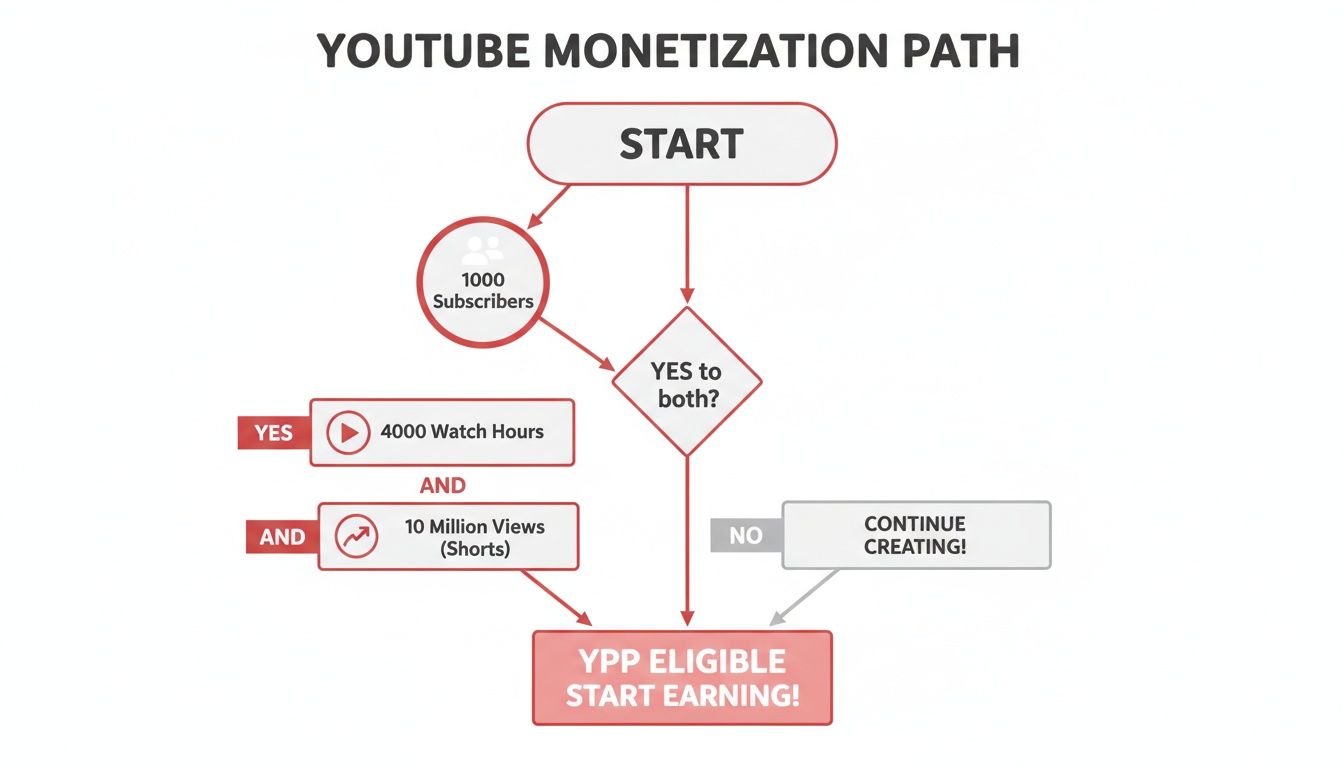
As you can see, both paths require 1,000 subscribers. From there, you have to decide whether your strategy is built for the deep engagement that drives watch hours or the viral potential of Shorts.
Drive Traffic from Other Platforms
Don't just sit back and wait for the YouTube algorithm to discover you. You have to be your own biggest promoter. Share your videos across all your social media channels to pull in traffic from outside of YouTube. A well-placed link can introduce your best content to a whole new audience.
For example, learning how to use a full video link in bio on platforms like Instagram or TikTok can create an easy, direct path for your followers to find your longer content, which directly adds to your watch time. By actively making it easy for people to find and watch your videos, you're taking control of your channel's growth instead of just hoping for the best.
Common Mistakes That Sabotage Your Growth
The journey to 4,000 public watch hours is a marathon, not a sprint, and there are plenty of potholes along the way. I've seen countless creators with great ideas fall into traps that don't just stall their progress—they can actively hurt their channel's reputation with the YouTube algorithm.
Knowing what these pitfalls are is half the battle. The most dangerous ones often look like tempting shortcuts, promising a quick boost but ultimately setting you up for long-term failure.
The Myth of Shortcuts
Let's get this out of the way first: buying watch hours or getting involved in "watch-for-watch" groups is a terrible idea. These tactics are a direct violation of YouTube's fake engagement policies, and they do more harm than good.
Here’s a look at the real damage they cause:
- You'll Wreck Your Analytics: The algorithm is constantly learning who your ideal viewer is. When you feed it fake views from bots or people who have no interest in your niche, you completely confuse it. It will start showing your videos to the wrong audience, and your organic reach will dry up fast.
- Your Audience Retention Will Tank: Bots don't stick around. People in "watch-for-watch" groups might click play, but they aren't actually watching. This signals to YouTube that your content is boring or clickbait, causing the algorithm to stop promoting it.
- You Could Lose Your Channel: If (and when) YouTube catches on, the penalties are steep. Your channel could be demonetized, get a strike, or even be terminated for good. It's a massive risk for a temporary, meaningless number.
The thing is, these shortcuts only give you empty metrics. You get a number on a screen, but you don't get a community. Real, sustainable growth comes from actual viewers who click on your video because they genuinely want to see what you've made.
Subtle Habits That Hurt Your Channel
Beyond the obvious no-nos, there are a few common habits I see creators fall into that quietly kill their momentum. These are a bit trickier because they often feel like you're working hard, just on the wrong things.
Chasing Views Instead of Watch Time
It's so easy to get fixated on the view count, especially right after you publish. But a video with a ton of views and terrible audience retention is actually a bad sign. It means your title and thumbnail wrote a check that your video couldn't cash.
Instead of just looking at views, you need to live in your audience retention reports. Seriously. A video with fewer views but a healthy 50% retention rate is infinitely more valuable than a viral dud that people abandon in the first 30 seconds. High retention is the single best signal you can send to YouTube that your content is worth recommending.
Publishing Without a Plan
The YouTube algorithm loves predictability. When you post on a consistent schedule—whether that's every Tuesday or the first of every month—you're training both your audience and the algorithm when to look for your new stuff.
Uploading randomly whenever you feel like it makes it incredibly hard to build momentum. Consistency signals that you're a committed creator, which helps keep your channel top-of-mind for viewers and favored by the algorithm.
Got Questions About Watch Hours? We’ve Got Answers.
As you work your way toward that 4,000-hour goal, you’re bound to run into a few tricky questions. Let's clear up some of the most common head-scratchers that creators face.
Do My Live Stream Hours Count?
Yes, absolutely! But there's a small catch you need to know about. All the watch time you rack up while you're live and interacting with your audience counts toward monetization.
Once the stream is over, you have a choice. If you save the replay as a public video, people can keep watching it, and those views will continue to add to your total. However, if you switch it to unlisted, set it to private, or delete it altogether, all the watch hours from that stream will vanish from your YPP count.
Help! Why Did My Public Watch Hours Drop?
Seeing your hard-earned watch hours go down can be a shock, but don’t panic! It’s almost always because of how YouTube measures eligibility. They don’t look at a calendar year; they look at a rolling 365-day period.
Think of it like a moving window that only shows the last 12 months. If you had a video go viral on February 1st last year and it earned 100 hours, those hours will disappear from your total on February 2nd of this year. Your job is to keep creating fresh content that brings in new hours to replace the old ones as they fall off the back end of that 365-day window.
Your public watch hours total isn't a lifetime score. It’s a real-time snapshot of your channel's performance over the past year. A dip just means an older, popular day has moved out of view.
Does Watch Time from YouTube Ads Count?
Nope. Any watch time that comes from paid advertising won't get you any closer to the 4,000-hour threshold. Views from ad campaigns, like the ones you might run through Google Ads, are filtered out of the YPP calculation.
YouTube wants to see that you're building a real, organic audience. They're looking for proof that viewers are finding and choosing your content on their own through things like search, recommendations, and their subscription feed—not because you paid to put it in front of them.
How Long Does It Take for Watch Hours to Update?
Your numbers in YouTube Studio aren't instant. It usually takes the system about 48 to 72 hours to process all the data and refresh your totals.
So, if one of your videos suddenly takes off, you won't see that spike on your "Earn" page right away. Give it a couple of days. The number you see today is actually a reflection of your channel's performance from two or three days ago.
Ready to turn these insights into real growth? ViewsMax provides AI-powered tools to help you create videos that earn more public watch hours. From optimizing your titles and descriptions to analyzing what works, we help you make smarter content decisions. Start growing your channel with confidence.