Optimizing a YouTube channel is so much more than just uploading videos and hoping for the best. It's a strategic mix of strong branding, smart video SEO, and creating consistent content that truly resonates with a specific audience. When you get it right, your channel stops being a simple video library and transforms into a discovery engine that works for you, signaling to YouTube’s algorithm that your content is valuable and worth pushing to more people.
Building Your YouTube Growth Blueprint
Before you even think about tweaking a video title or designing a new thumbnail, you need to lay a solid foundation. So many creators fall into the trap of obsessing over individual video performance, but that's a shortsighted view. YouTube's algorithm looks at your channel as a complete package.
A well-thought-out, holistic optimization strategy tells YouTube exactly who you are, who you're trying to reach, and why your videos deserve a spot on people's homepages. This big-picture approach is what separates random viral hits from sustainable, long-term growth.
It all starts with a crystal-clear vision. What value are you offering? Who is your ideal viewer? Answering these questions is non-negotiable because it forces you to define your niche. A well-defined niche is one of the most powerful signals you can send the algorithm, helping it categorize your channel and serve your content to the right people. If you're still figuring this part out, our guide on choosing the best niche for YouTube is packed with actionable advice.
To give you a clearer picture, here’s a quick breakdown of the core pillars that support a thriving channel.
Core Pillars of YouTube Channel Optimization
A quick look at the fundamental areas of channel optimization and how they contribute to growth.
| Optimization Pillar | Core Activity | Impact on Growth |
|---|---|---|
| Branding & Identity | Creating a professional banner, logo, and "About" page. | Builds trust and recognizability, encouraging subscriptions. |
| Content Strategy | Defining your niche and content formats. | Signals authority to the algorithm, attracting a loyal audience. |
| Video SEO | Optimizing titles, descriptions, and tags. | Improves discoverability in search results and recommendations. |
| Viewer Engagement | Crafting compelling thumbnails and engaging content. | Boosts key metrics like CTR and Audience Retention. |
As you can see, each pillar supports the others to create a channel that's built for discovery from the ground up.
Understanding The Metrics That Matter
If you want to optimize your channel effectively, you have to learn to speak the algorithm's language. It really boils down to two key performance indicators (KPIs) that drive nearly every recommendation on the platform:
- Click-Through Rate (CTR): This is the percentage of people who click on your video after seeing its thumbnail and title. A high CTR tells YouTube that your packaging is compelling and relevant to what viewers are looking for.
- Audience Retention: This metric shows you exactly how long people stick around to watch your videos. High retention is a massive signal to YouTube that your content is engaging and delivers on the promise you made.
Think of these two metrics as a team. A sky-high CTR doesn't mean much if everyone clicks away after 30 seconds. Likewise, an amazing video with high retention won't get seen if the thumbnail and title are too weak to earn the click. The goal is to create a seamless experience where a compelling promise (CTR) is fulfilled by genuinely valuable content (retention).
Why Channel-Level Optimization Drives Discoverability
When you optimize your channel as a whole, you create a powerful feedback loop. A viewer watches one of your videos, enjoys it, and clicks over to your channel page. If they find a professional, well-organized space that’s clearly focused on a topic they care about, they’re far more likely to watch another video.
This behavior massively increases your channel's overall session watch time—a huge ranking factor.
YouTube’s number one goal is to keep users on the platform for as long as possible. By optimizing everything from your banner art to your playlists, you make it easy for the algorithm to serve up your content back-to-back, creating a binge-worthy experience for viewers.
This is especially critical when you consider the competition. YouTube has 2.85 billion monthly active users, making it the second most visited website online with a staggering 74.8 billion monthly visits. In an ecosystem that massive, you have to be strategic to stand out. The algorithm rewards channels that consistently demonstrate authority in a specific niche.
For anyone serious about making progress, this guide on how to grow a YouTube channel fast offers some great complementary tactics. By establishing a clear brand, defining your niche, and zeroing in on CTR and retention from day one, you build a channel that the algorithm can't help but promote. This initial blueprint is the most important asset you have for long-term success.
Crafting a Memorable Brand Identity
Your channel's branding is the first handshake you have with a potential subscriber. Long before they watch a single second of your content, they’ve already made a snap judgment based on your profile icon, channel banner, and the overall vibe of your page. A strong brand identity does more than just look good; it instantly builds trust and signals what you're all about to both viewers and the YouTube algorithm.
Think of your channel page as your digital storefront. If it looks sloppy or thrown together, people are going to click away. But when you present a sharp, cohesive brand, you're telling everyone you're a serious creator worth their time.
Designing Your Visual Cornerstones
Your profile icon and channel art (the banner at the top) are the two biggest pieces of your visual real estate. They show up everywhere—from a tiny phone screen to a giant smart TV—so they have to be clean, compelling, and look great at any size.
Your profile icon needs to be simple and instantly recognizable. If you're a personal brand, a crisp, high-quality headshot is usually the best bet. For a channel with a unique name, a clean logo is the way to go. Just avoid cramming in a bunch of tiny text or a busy image that turns into a blurry mess when it's shrunk down.
Your channel art is your chance to pitch your channel's value in a single glance. A new visitor should be able to figure out three things almost immediately:
- Who are you? Put your name or face front and center.
- What's your channel about? Use images or a short tagline to show your niche (e.g., "Authentic Italian Cooking" or "No-Nonsense Tech Reviews").
- When do you upload? Adding a simple schedule like "New Videos Every Tuesday" is a pro move that sets expectations and gives people a reason to come back.
This blueprint shows how powerful branding works together with click-through rate (CTR) and audience retention to build a successful channel.
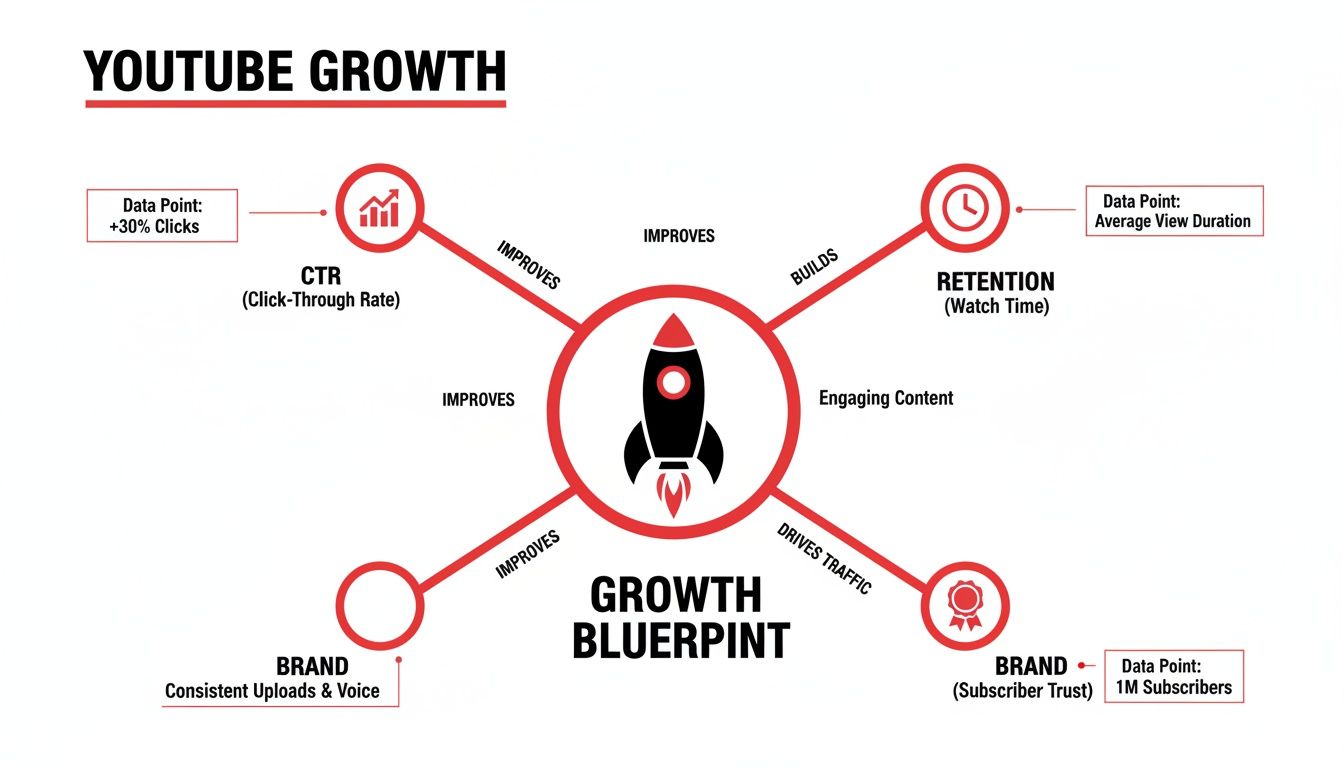
As you can see, great branding isn't just window dressing. It's a core pillar that directly impacts whether someone decides to click on your video and stick around.
Writing an About Page That Converts
So many creators treat the 'About' page as an afterthought, and it's a huge mistake. This page is a goldmine for YouTube SEO. It’s your chance to tell the algorithm exactly what your channel is about by loading it with the keywords your ideal audience is searching for.
Even more importantly, it's where you sell your story to potential subscribers and collaborators. A well-written 'About' page should be easy to read, packed with personality, and straight to the point.
Your 'About' section is your elevator pitch. You need to hook them in the first two sentences, explain the value you bring to the table, and wrap up with a strong call to action telling them why they should subscribe.
Keep your paragraphs short. Kick things off with a powerful opener that sums up your channel's mission. Use the middle part to talk about the kinds of videos you make and what makes your take on the topic unique. Finally, add links to your social media or website and give them that final nudge to hit the subscribe button.
The Art of the Channel Trailer
A channel trailer is that short, punchy video that automatically plays for anyone who lands on your channel but isn't subscribed yet. Its one and only job is to turn those visitors into subscribers. The best ones are tight—usually between 30 and 60 seconds—and follow a tried-and-true formula.
- Open with a Hook: Grab their attention immediately. Ask a question, make a bold claim, or hit them with a fast-paced montage of your absolute best moments.
- Introduce Yourself & Your Value: Quickly say who you are and what your channel offers. Frame everything around the viewer—what will they get out of watching?
- Show, Don't Just Tell: This is key. Use exciting clips from your best videos to showcase your content, your personality, and your production quality.
- Finish with a Strong Call to Action: Don't be shy. Explicitly ask them to subscribe and tell them what they can expect, maybe by reinforcing your upload schedule one last time.
By creating a consistent visual theme and a compelling story across your banner, 'About' page, and trailer, you start building brand recognition from the very first impression. This is a crucial part of optimizing your YouTube channel for long-term loyalty and growth. Since visuals are so important, you can get more tips in our guide to YouTube video thumbnail sizes and best practices.
Mastering YouTube SEO for Discoverability
Great branding might bring people to your channel page, but it's smart YouTube SEO that gets their eyeballs on your videos in the first place. A lot of creators forget that YouTube is basically the world's second-biggest search engine. If you're not intentionally optimizing your video’s metadata—the title, description, and tags—you're leaving billions of potential viewers in the dark.
This isn't about gaming the algorithm. It's about giving YouTube clear, strong signals about what your video is and who it’s for. When you nail this, the algorithm thanks you by putting your content in front of the right people, which translates directly into more views, longer watch time, and real channel growth.
Uncovering What Your Audience Really Wants
Solid YouTube SEO starts with knowing what people are actually typing into that search bar. This is way more than just guessing a few keywords. You need to become a detective and figure out the exact questions and problems your audience is trying to solve.
An easy place to start is right in YouTube's search bar. Type in a broad topic from your niche and watch what the autofill suggestions tell you. Those aren't random guesses; they're real searches from actual users. For example, typing "how to edit video" might reveal popular searches like "how to edit video on iphone" or "how to edit video for beginners."
Another goldmine? The comments section on popular videos in your niche. Scour them for the questions viewers are asking and the frustrations they're sharing. These comments give you a direct line to content ideas and long-tail keywords you know are in demand. For a deeper dive, our guide on choosing the right YouTube video keywords will help you build a killer strategy.
Writing Titles That Demand a Click
Think of your video title as its headline. It has two incredibly important jobs: first, to clearly tell the algorithm what your video is about, and second, to spark enough curiosity to make a real person click. The sweet spot is a title that’s both keyword-rich and genuinely compelling.
I see so many creators make the mistake of using a bland title like "My Garden Tour." A much stronger, SEO-driven alternative would be something like, "Small Balcony Garden Tour | 10 Must-Have Plants for Urban Gardeners." This version hits multiple keywords ("small balcony garden tour," "urban gardeners") and makes a specific promise of value ("10 Must-Have Plants").
The best titles often merge a clear benefit with a dash of intrigue. They answer the viewer's first question—"What's this about?"—while making them ask a new one—"What are those ten plants I need?"
Crafting a Powerful Video Description
Your video description is probably the most overlooked SEO tool you have. YouTube gives you a massive 5,000 characters to explain your video's context, and you should use every bit of it you can. The algorithm actually reads this text to understand your content, so a thoughtfully written description can give your visibility a serious boost.
Structure your description to appeal to both people and search algorithms. Here's a framework that works:
- The Hook (First 2-3 Lines): Start strong. Write a compelling, keyword-rich summary of the video. This is the snippet people see before they click "Show more," so make it grab them.
- Detailed Summary: Now, elaborate. Write a few natural-sounding paragraphs that weave in your main and secondary keywords. Talk about what viewers will learn or see.
- Timestamps: Break your video into chapters with clickable timestamps. This not only improves the viewing experience but can also get your video featured as "key moments" in Google search results.
- Important Links: Add links to your social media profiles, website, affiliate products, or other relevant videos on your channel. This is great for driving traffic and keeping people in your ecosystem.
For creators really looking to maximize their reach, an advanced tactic is repurposing your video's script. Learning about converting YouTube video to text can help you turn your spoken content into blog posts or show notes, further boosting your SEO footprint.
Using Tags and Playlists Strategically
While YouTube themselves have said that tags play a "minimal role in video discovery," they aren't useless. They still help the algorithm with categorization, especially for commonly misspelled keywords related to your topic. A good practice is to use your main target keyword as your very first tag, followed by a mix of broader and more specific tags.
Finally, don't sleep on playlists. Playlists are one of the most effective ways to increase your channel's session watch time. When one video in a playlist ends, the next one starts automatically, keeping viewers on your channel longer. Grouping related videos into a binge-worthy series sends a powerful signal to the algorithm that your content is engaging and valuable.
Using Analytics to Fuel Your Growth
Stop guessing what works and start letting the data drive your strategy. For many creators, YouTube Analytics looks like a confusing mess of charts and numbers, but it’s hands-down the most powerful tool you have for growing your channel. When you learn how to read it, you stop being just a content creator and become a content strategist.
This isn't about getting obsessed with view counts. It's about digging into the story behind those numbers. When you figure out why a video popped off, you can replicate that magic. And when you see exactly where viewers are dropping off, you can fix what's broken.

Decoding Your Audience Retention Graph
If you only look at one thing in your analytics, make it the Audience Retention graph. This report is your video's pulse, showing you the exact percentage of viewers still watching at any given second. It's a real-time report card on how engaging your content truly is.
Keep an eye out for these common patterns:
- The Steep Intro Drop: See a massive nosedive in the first 10-15 seconds? Your hook isn't working. You're losing people before you even get to the good stuff. Time to make that intro shorter and punchier.
- Sudden Dips: A sharp drop mid-video is a huge red flag. It points to a specific segment that was boring, confusing, or just dragged on too long. Did you go on a tangent? Did the audio quality suddenly get worse? That’s your cue to be ruthless with your editing next time.
- Spikes and Bumps: Those little hills in the graph are pure gold. A spike means people are actually rewinding to re-watch a specific part. Whatever you did there was incredibly valuable or entertaining—do more of that!
Learning to read these graphs gives you a clear blueprint for your next video. This is a core skill when you're learning how to optimize your YouTube channel for what viewers really want.
Analyzing Your Traffic Sources
Where are your views actually coming from? The Traffic Sources report answers this question, and the answer tells you where to focus your energy.
Think of your Traffic Sources report as a map showing you all the different roads people take to find your channel. If 80% of your views are from YouTube Search, you know your SEO is on point. If most come from Suggested Videos, the algorithm trusts your content enough to recommend it after other popular videos.
Pay close attention to these key sources:
- YouTube Search: This shows you which keywords are leading viewers to you. It's direct, unfiltered feedback on whether your SEO strategy is hitting the mark.
- Suggested Videos: This is the holy grail for channel growth. When you see this number climb, it means YouTube is actively promoting your content for you.
- Browse Features: These are views from the YouTube homepage and subscription feed. Getting traffic here means your thumbnails and titles are compelling enough to win the click in a very crowded space.
If one source is outperforming the others, double down on it. If another is lagging behind, you've just found a new area to work on.
Building Your Ideal Viewer Profile
So, who are you actually talking to? The Audience tab turns your anonymous viewers into real people by showing you their age, gender, and where they're watching from.
This data is crucial for making your content resonate. For instance, if you find out 75% of your audience is between 18-24 years old, you might want to adjust your editing style, humor, and cultural references to connect with them better. Seeing your top countries can also be a nudge to add translated captions or subtitles.
Using YouTube Analytics effectively is a game-changer. Newer metrics around Shorts remixes and cross-platform views allow for incredibly precise adjustments. The platform now weighs viewer satisfaction—measured through surveys and replay behavior—just as heavily as traditional signals like watch time. We’ve seen channels boost engagement by up to 35% simply by segmenting their data for subscribers versus non-subscribers and tailoring content accordingly. You can find more deep-dive guides on YouTube analytics and channel growth on Gyre.pro.
Finally, pull all this data together to shape your content strategy. Go find your top 5 videos by watch time. What do they all have in common? Is it the topic? The format? The way you structured the title? Pinpoint that winning formula and use it as a template for what you create next. This data-backed approach is the secret to real, sustainable growth.
Advanced Strategies: From Views to a Real Community
Alright, you've built a solid foundation. Your channel looks great, your videos are optimized, and people are starting to find you. Now, we shift gears from just getting views to building something that lasts: a real, engaged community.
This is where the magic happens. We're moving beyond basic SEO and into strategies that turn a casual viewer into a loyal fan. This is how you transform a content library into a sustainable, and hopefully profitable, business. The goal is simple: create an experience that keeps people watching, interacting, and coming back for more.
Let's dive into the specific tools and tactics that get you there.
Guiding Viewers and Boosting Watch Time
Your job isn’t done when the video ends. In fact, that's one of the most critical moments. You need to tell your audience exactly what to do next. YouTube gives you some powerful tools to point them in the right direction, which massively boosts your session watch time.
Two of the most important features here are End Screens and Cards.
- End Screens: These are the clickable elements that pop up in the final 5-20 seconds of your video. Don't just slap random videos on there. Think like a viewer. If they just finished your video on "beginner camera settings," the most logical next step is a video on "easy lighting setups for beginners." Guide them on a journey.
- Cards: Think of these as little, non-intrusive pop-ups that can appear during your video. They are perfect for referencing a related video or a specific product you mention. For example, if you say, "I talked all about this in my last video," a card can appear linking directly to it.
Using these tools thoughtfully sends a huge signal to the YouTube algorithm that your channel offers a binge-worthy experience. The platform loves that.
It's a Community, Not Just a Comment Section
True engagement is so much more than view counts and likes. A powerful, loyal community is forged in the trenches of your comment section and on your Community Tab. This is where you connect with your audience on a human level and get priceless feedback to make your next video even better.
Responding to comments is non-negotiable. I can't stress this enough. That initial flurry of interaction in the first few hours after publishing can give your video a serious boost. But don't just give a generic "thanks!" Ask follow-up questions. Acknowledge their ideas. Use the "heart" feature to show you appreciate the great comments.
And don't sleep on the Community Tab. It's basically your channel's private social media feed. Use it!
- Run polls to see what video topic your audience is most excited about.
- Share behind-the-scenes photos to make your channel feel more personal.
- Post quick updates, ask questions, or share interesting thoughts.
A channel with a lively Community Tab feels like it has a pulse. It shows you genuinely care about your audience beyond their watch time, and that's the secret sauce for turning a casual viewer into a dedicated subscriber who feels like they're part of something special.
Getting Your Channel Ready for Monetization
For many creators, making money is a key goal. But before you can join the YouTube Partner Program (YPP), you have to hit a few key milestones and play by the rules.
Here are the current thresholds you need to meet:
- Subscribers: You'll need at least 1,000 subscribers.
- Watch Time: This is a big one. You need either 4,000 valid public watch hours over the last 12 months OR 10 million valid public Shorts views in the last 90 days.
- Compliance: Your channel must strictly adhere to all YouTube monetization policies. No shortcuts here—avoid spam, scams, and harmful content.
But don't just stop at ad revenue. The most successful creators build multiple streams of income right on the platform. As you grow, start thinking about:
- Channel Memberships: Let your biggest fans support you with a monthly fee for exclusive perks like custom badges, emojis, and members-only videos.
- Super Chat & Super Stickers: During live streams, viewers can pay to have their comments pinned and highlighted. It's a great way to interact directly with your most engaged fans.
- Merch Shelf: Sell your own products—t-shirts, mugs, you name it—directly below your videos by integrating with a supported merch provider.
By mastering these on-platform engagement tools and planning your monetization strategy from the get-go, you're setting yourself up for real, long-term success on YouTube.
Answering Your Top Channel Optimization Questions
Diving into YouTube optimization can feel like a maze, and it's natural to have a ton of questions. Getting clear answers is the first step toward building a real strategy that works. Let's walk through some of the most common things creators wonder about when they're trying to grow their channel.
How Often Should I Refresh the SEO on My Old Videos?
You definitely don't need to be constantly tinkering with every single video you've ever uploaded. That's a recipe for burnout. Instead, be strategic and focus your efforts on your evergreen content—those solid videos that reliably pull in views week after week, month after month.
A good practice is to give your top-performing older videos a quick check-up every 6 to 12 months. Dive into your YouTube Analytics and look specifically at their click-through rate (CTR). If you spot a gradual but steady decline, that’s your cue. A simple refresh—like a more modern thumbnail or a rephrased title—can often breathe new life into a video and get it picked up again by the algorithm.
Will YouTube Penalize Me for Keyword Stuffing?
Yes, they will, and it's not worth the risk. YouTube’s algorithm is smarter than ever and is laser-focused on viewer experience. Jamming keywords unnaturally into your titles and descriptions is a huge red flag that screams "spam." This almost always backfires, pushing your content down in the rankings instead of up.
Your mantra should be: write for people first, search engines second. Keywords should fit seamlessly into your sentences, providing context for both viewers and the algorithm. For instance, a clunky title like "DIY Desk Build, Woodworking Desk, Computer Desk" is awful. A much more natural and compelling title is "Building My Dream DIY Desk | A Beginner's Woodworking Guide."
Think of keywords as signposts, not filler. They're there to help the algorithm understand what your video is about, but the language you use needs to grab a real person who's just scrolling by.
What's More Important for Growth: Thumbnails or Titles?
This is like asking what's more important on a car, the engine or the wheels. They're a team, and one is useless without the other.
Your thumbnail is the visual hook. It's the billboard that has to stop someone mid-scroll and create an instant emotional connection. But once you have their attention, the title seals the deal by providing context and a clear promise of what they'll get by clicking.
A mind-blowing thumbnail with a lazy, boring title won't get the click. And a fantastic, intriguing title paired with a dull thumbnail will just get ignored. You have to nail both. The only way to figure out what works for your audience is to constantly experiment with different combinations and see what gets you the best CTR.
How Long Until I Actually See Results from All This?
YouTube is a marathon, not a sprint, so patience is absolutely essential. The time it takes to see results really hinges on what you’re changing.
Some tweaks can show an impact almost immediately. Swapping out an underperforming thumbnail for a better one, for example, can boost a video's CTR in as little as 24 to 48 hours.
But the bigger-picture changes—like overhauling your channel's branding, refining your content niche, or building out thoughtful playlists—are long-term plays. If you stick with it, consistently applying these optimization principles and uploading quality videos, you should start seeing a noticeable upward trend in your views and subscribers within one to three months.
Ready to stop guessing and start growing? ViewsMax provides the AI-powered tools and actionable insights you need to optimize your content, improve discoverability, and build a thriving channel. Take the next step in your YouTube journey by visiting us at ViewsMax.
Leave a Reply