ViewsMax
Sign In Sign Up Free

Tag: watch time

  • How YouTube Video Rankings Actually Work in 2026

    How YouTube Video Rankings Actually Work in 2026

    Pinkfong's “Baby Shark Dance” has about 17.3 billion views, while the next two videos in YouTube's all-time ranking, CoComelon's “Wheels on the Bus” and Luis Fonsi's “Despacito,” sit at roughly 9.0 billion each, according to TubeAnalytics' ranking of the most-viewed YouTube videos. The gap is measured in billions, not millions.

    That disparity changes how creators should think about YouTube video rankings. Ranking isn't a contest for the highest view count, and YouTube doesn't choose recommendations by sorting every upload from most viewed to least viewed. Its system first finds plausible candidates, then evaluates which candidate is most likely to create a satisfying viewing session for a particular person.

    For revenue-focused creators, that distinction matters. A ranking win that produces views but no qualified clicks, leads, or sales may be less valuable than a smaller discovery win that reaches the right audience. The practical question isn't only, “How do I rank higher?” It's, “Which ranking signals create the kind of attention my business can convert?”

    The Scale of YouTube Rankings Today

    The upper end of YouTube's ranking system is almost impossible to comprehend through ordinary creator benchmarks. “Baby Shark Dance” leads the all-time list with about 17.3 billion views, while “Wheels on the Bus” and “Despacito” are each around 9.0 billion views. The leader therefore has nearly twice the views of either title below it, a sharp example of how concentrated the top of the platform can become. (TubeAnalytics)

    That concentration didn't appear overnight. The first video to reach 1 billion views was Psy's “Gangnam Style” in December 2012. By January 13, 2022, “Baby Shark” had become the first video to reach 10 billion views, and independent 2026 rankings report that more than 30 videos had crossed 4 billion views, with 14 surpassing 5 billion. (Likes.io's historical summary)

    Why the top of the list looks different

    The historical pattern also reveals a shift in what sustains attention. Since Lady Gaga's “Bad Romance” reached the top of YouTube's all-time most-viewed ranking in April 2010, every later video to claim that position has been a music video. Children's content now occupies several leading positions, suggesting that repeatable, family-friendly formats can generate viewing across years rather than depending on a short viral burst. (Likes.io)

    That doesn't mean a new educational channel must compete with “Baby Shark.” All-time rankings measure cumulative reach, while search and recommendation systems evaluate a video in the context of a viewer, a topic, and competing candidates. A specialist tutorial can rank for a valuable query without approaching the lifetime scale of global music or children's content.

    The useful comparison isn't your video against the biggest video on YouTube. It's your video against the alternatives shown to the same viewer.

    A safer way to read ranking data

    The table below uses only the verified all-time ranking facts available here. It doesn't claim an average for ordinary channels or a percentage share of platform views, because those figures aren't established in the supplied evidence.

    Channel Tier Avg. Lifetime Views % of Total Platform Views
    All-time leader, “Baby Shark Dance” About 17.3 billion Not established
    Next two all-time titles Around 9.0 billion each Not established
    Broader top tier More than 30 videos above 4 billion views Not established
    Typical new or niche upload Varies by channel and topic Not established

    The scale can feel discouraging, but it also clarifies the opportunity. YouTube's recommendation model doesn't need every creator to become a global hit. It needs enough evidence to decide that a particular video is relevant and satisfying for a particular audience. Creators who understand that decision process can replace superstition with measurable experiments.

    How the YouTube Recommendation Engine Actually Works

    YouTube's recommendation architecture is easier to understand as a two-stage funnel than as a single mysterious algorithm. The first stage generates a manageable set of possible videos. The second stage ranks those candidates using detailed information about the viewer and the videos. This structure is described in Google's technical paper on deep neural networks for YouTube recommendations.

    Think of a librarian serving a reader. The librarian doesn't evaluate every book in the building in the same depth. First, the librarian pulls a smaller shelf of books that match the reader's interests. Then the librarian studies that smaller group and chooses which books to place directly in front of the reader.

    Stage one, candidate generation

    The candidate-generation network narrows a very large video corpus using signals connected to user context. Those signals can include a viewer's watch history, previous interactions, and the relationship between videos watched by similar audiences. The output is not the final recommendation. It's a pool of plausible options.

    For a creator, this stage answers a basic question: Can YouTube identify the people and topics your video might fit? Titles, descriptions, spoken content, thumbnails, and channel context help provide that fit. A video with unclear subject matter may struggle to enter the right candidate pool, even if the production quality is strong.

    Stage two, ranking

    The ranking network then scores each candidate with a richer feature set describing the video and the viewer's current context. Google's research states that the system is optimized around predicted watch time, which means a click matters because it may lead to a longer viewing session, not because the click itself is the final objective. A compelling thumbnail that attracts the wrong audience can therefore create a weak downstream result.

    A video can pass candidate generation but lose in the ranking stage. It may be relevant enough to appear among possible recommendations, yet fail to win the final placement because viewers leave quickly or respond poorly. Conversely, a well-satisfied audience can help a clearly positioned video compete for additional exposure among related viewers.
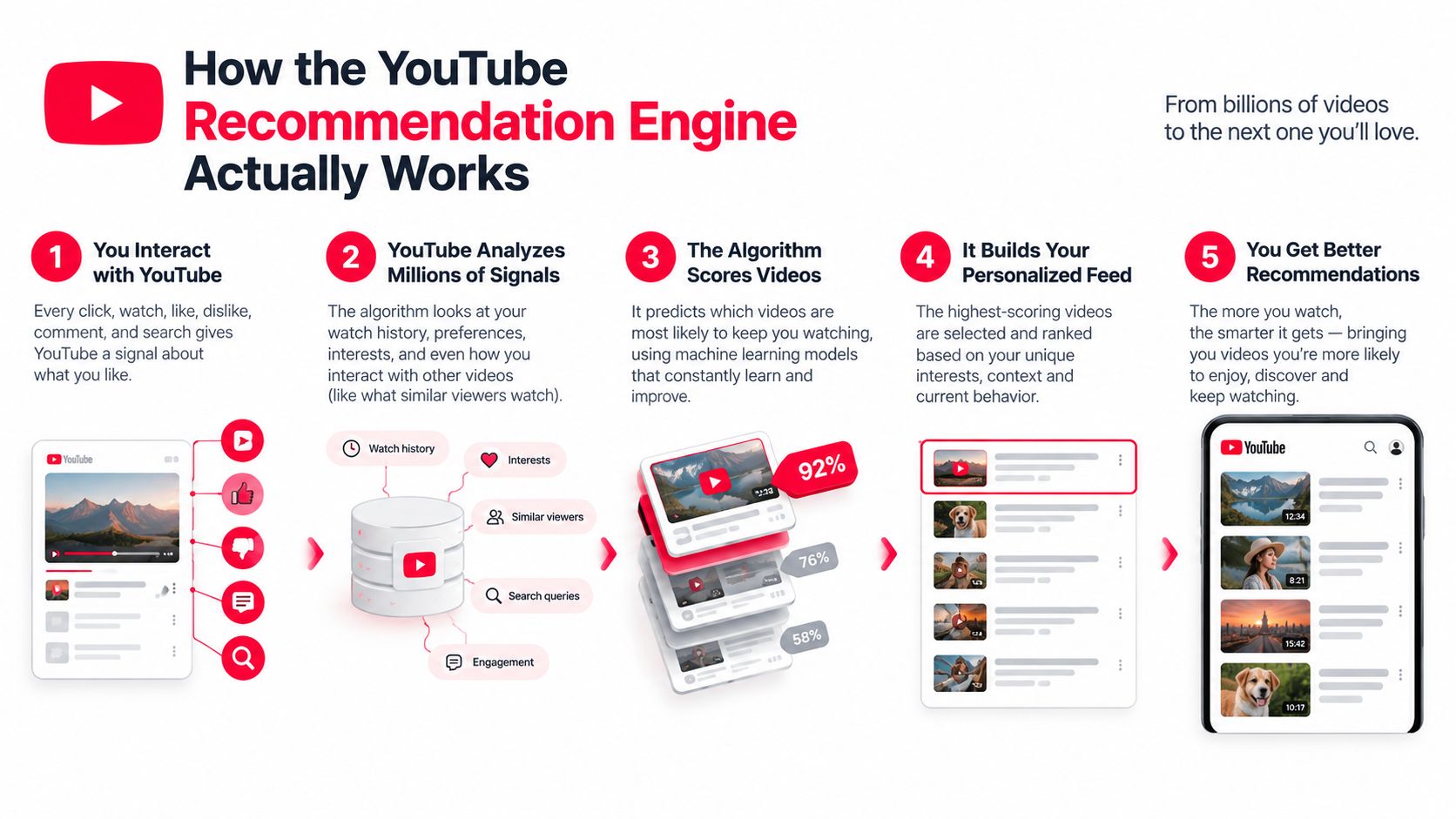
    A five-step infographic explaining how the YouTube recommendation engine algorithm analyzes user behavior to suggest personalized videos.

    This is why metadata and audience response shouldn't be treated as competing strategies. Metadata helps YouTube understand where to test a video. Viewer behavior helps determine whether the test should expand. Creators looking for a broader overview of how platform changes affect distribution can also review this YouTube algorithm change guide.

    The same distinction applies to monetization. Once a video earns discovery, the creator still needs a path from viewing to action. For a practical explanation of how paid and organic discovery can support that path, see Wojo Media's guide to turn browsing intent into conversions.

    The Ranking Signals That Move the Needle

    The most useful way to read YouTube ranking signals is as a sequence. Relevance gets a video considered. The click creates an opportunity. Watch behavior and satisfaction determine whether that opportunity becomes durable distribution. No single dashboard number explains the entire process.

    Click appeal starts the test

    A title and thumbnail create the first decision. If the packaging doesn't communicate a clear reason to watch, the video may receive fewer opportunities to prove its value. But a high click-through rate isn't enough by itself. Google's description of the recommendation system makes clear that the deeper ranking stage is concerned with predicted viewing time and user context, not clicks in isolation. (Google Research)

    The practical implication is simple. Your thumbnail should make a promise that the opening delivers. A dramatic image paired with a vague or exaggerated title can generate curiosity, but if viewers leave after discovering the mismatch, the initial click won't rescue the video.

    Retention gives the click meaning

    Average view duration measures how long viewers watch. Percentage viewed measures how much of the video they consume relative to its length. A longer upload can produce more minutes per viewer, but only if the structure earns those minutes. Padding a script creates more opportunities for viewers to leave.

    The supplied SEO analysis found that videos in the top positions averaged 2.65% engagement, compared with a 0.09% platform average, and that top-position videos averaged 358,000 views, versus 303,000 for second position and 292,000 for third. The same analysis found that 8 to 9 minute videos appeared in top positions most frequently. These figures are correlations, not guaranteed targets for every niche, but they show why format, engagement, and viewing behavior should be analyzed together. (Search Engine Journal)

    Satisfaction adds the quality check

    Satisfaction is broader than watch time. It includes whether people respond positively, continue watching related content, return to the channel, or signal that a recommendation wasn't useful. Recent industry discussion has focused on viewer satisfaction as a dominant consideration, but the evidence is contextual and mixed across formats, regions, and discovery surfaces. (OutlierKit)

    A revenue-focused creator should therefore ask two questions after a ranking lift:

    1. Did viewers stay long enough to demonstrate value?
    2. Did the audience take a commercially useful next step?

    Likes and comments can support the first answer, but they aren't revenue proof. A video can attract substantial discussion while reaching people who have no relationship to the creator's offer. Conversion tracking must sit alongside native engagement data.
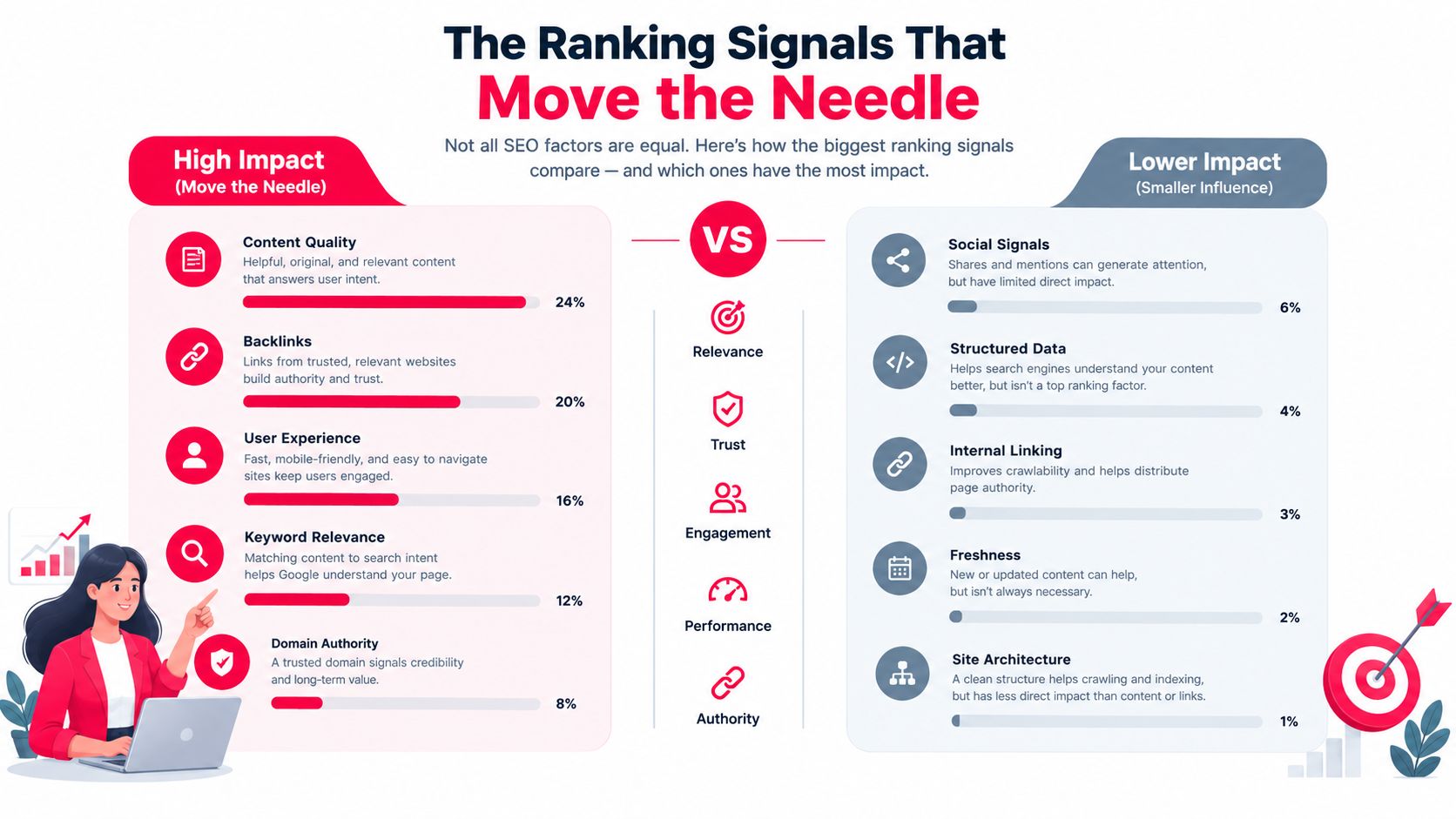
    An infographic showing the comparative ranking impact of various SEO factors like content quality and backlinks.

    Older assumption Better operating rule
    Maximize raw watch time Earn sustained viewing from the right audience
    Make every video longer Choose a length the topic can support without filler
    Optimize for clicks alone Align the title and thumbnail with the delivered experience
    Treat engagement as the outcome Measure engagement alongside qualified actions
    Read ranking as a vanity metric Connect ranking exposure to downstream business results

    The signal to improve first depends on the failure point. Low impressions with strong retention may indicate a relevance or packaging problem. Strong impressions with weak retention point toward a promise, pacing, or audience-fit issue. Good viewing behavior with no business action suggests the conversion path needs work.

    Optimization Tactics You Can Apply This Week

    Optimization works best when each change has a specific job. Titles and descriptions clarify relevance. Thumbnails earn the click. The opening protects the promise. The middle gives viewers a reason to continue. You don't need to redesign the whole channel before publishing the next useful test.

    Start with the promise

    Write the title before finalizing the script. Lead with the viewer's intent, then add a specific outcome or tension. “YouTube Video Rankings Explained for Revenue-Focused Creators” tells the audience what the video is about, while “Why Your Ranking Win Isn't Producing Sales” creates a business consequence.

    Use the description to reinforce that promise. Put a concise explanation in the opening lines, then add chapters with descriptive labels that reflect the questions viewers care about. Tags can act as a confirmation layer for topic context, but they shouldn't carry the discovery strategy on their own.

    For a broader set of practical channel adjustments, use these YouTube SEO optimization tips as a planning reference.

    Design the click before production ends

    A thumbnail should remain legible when it's small. Use strong contrast, a clear focal point, and only the visual information needed to make the idea understandable. If text appears, keep it short enough to read without effort.

    Test the title and thumbnail as a pair. Ask a colleague who hasn't seen the script what they expect from the video after seeing the package. If their answer doesn't match the actual lesson, the packaging is creating the wrong candidate audience.
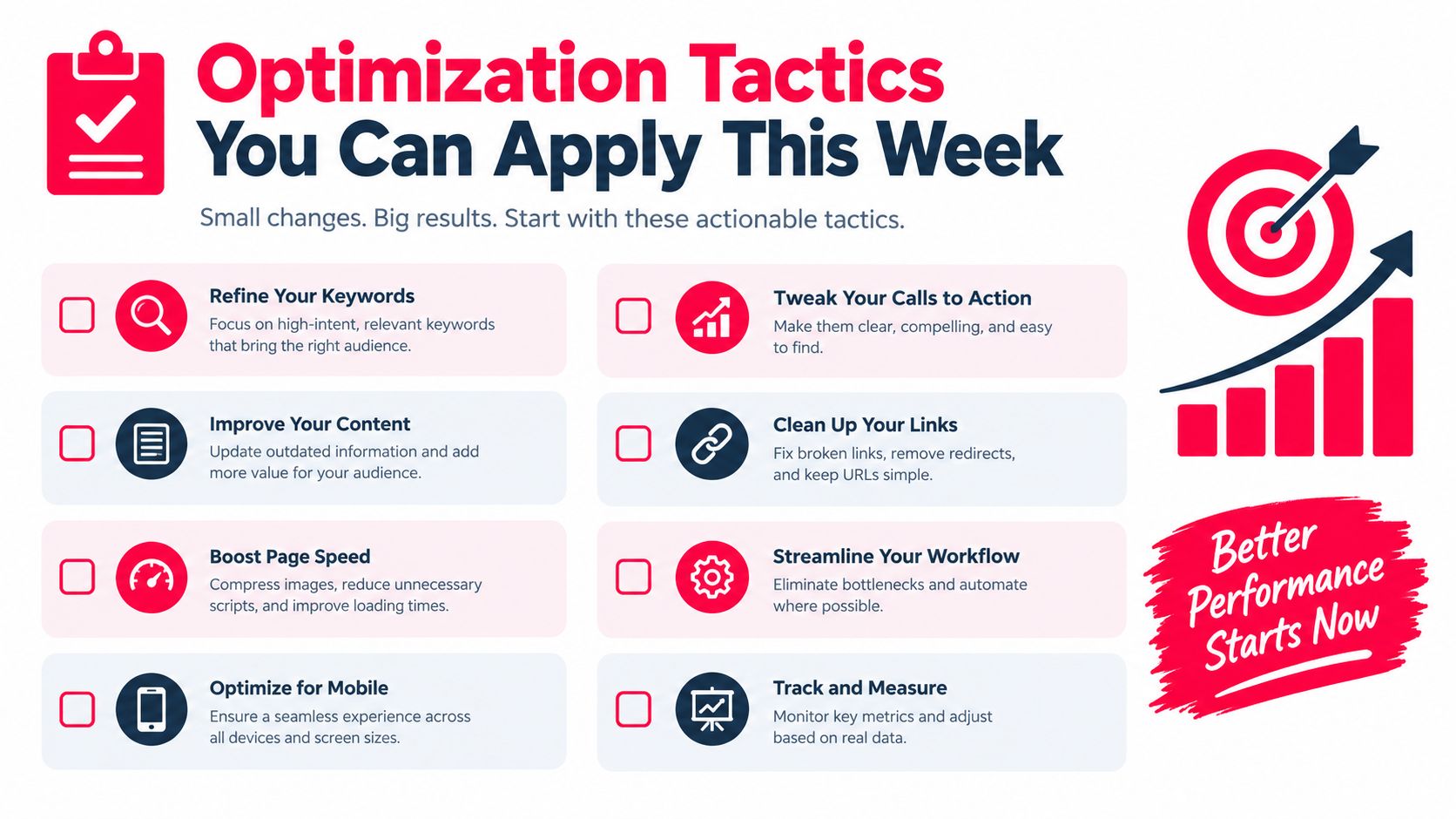
    A checklist infographic titled Optimization Tactics You Can Apply This Week featuring eight actionable website improvement strategies.

    Treat the opening as a contract

    The first moments should answer three questions:

    • What problem will this solve? State the outcome in plain language.
    • Why should the viewer trust the video? Establish the relevant evidence or perspective quickly.
    • What will keep the viewer watching? Tease the most useful step without delaying the first payoff.

    A practical script pattern is: “If your videos rank but don't generate customers, this tutorial will show you where the funnel breaks. We'll start with the ranking signal, then connect it to the click and sale you can track. By the end, you'll have a review process for deciding which videos deserve more distribution.”

    Cut logos, long greetings, and background information that doesn't serve that promise. The opening should feel like the video has already begun, because it has.

    Protect the middle

    Retention often weakens when the presenter repeats a point or changes topics without a visible transition. Use an open loop, a visual reset, or a chapter pivot to give the viewer a reason to stay oriented.

    A screen recording can replace a static talking-head explanation. A simple diagram can clarify the relationship between impressions, viewing, and conversion. End each major idea with a clear next step rather than a generic transition. These edits improve the viewing experience without forcing a longer runtime.

    Native Analytics Compared With ViewsMax Attribution

    YouTube Studio and attribution software answer different questions. Studio explains what happened inside YouTube. Attribution explains which content interaction contributed to action outside YouTube. Treating one tool as a replacement for the other leaves a blind spot.

    YouTube Studio is the right place to evaluate impressions, click-through rate, average view duration, audience retention, and traffic sources. It helps a creator decide whether the title needs work, whether the opening loses viewers, and whether a video is reaching audiences through search, browse, suggested content, or external referrals.

    It doesn't, by itself, connect every viewer behavior to a completed external outcome. A creator may see that a video received more impressions and watch time, but still be unable to identify which video drove a consultation request, affiliate click, course purchase, or sponsor-linked action without a separate tracking layer.

    What each tool can reveal

    ViewsMax can sit on top of the content workflow by using trackable links for offers and connecting clicks, leads, and sales back to the content source. That makes it useful when the decision isn't only whether a video performed well, but whether the video helped produce a business result. ViewsMax is one option for creators who need planning, publishing coordination, and content-level attribution in the same operating process.

    Capability YouTube Studio ViewsMax Attribution
    Impressions and click-through rate Reports in-platform exposure and click behavior Uses content and link activity to add downstream context
    Watch time and retention Shows how viewers behave during the video Helps connect content interactions with tracked outcomes
    Traffic sources Breaks down where YouTube views came from Attributes tracked clicks, leads, and sales to content or campaigns
    External ad-spend connection Limited for full revenue attribution Supports campaign-level attribution when tracking is configured
    Sponsor or offer reporting Shows audience performance inside YouTube Helps organize evidence of actions tied to a creator or campaign
    Revenue visibility Not a complete external sales ledger Designed to show attributed business outcomes beside content performance

    Use Studio for in-platform creative decisions. Use attribution when you need to defend a budget, compare offers, or understand whether a ranking improvement brought buyers rather than only viewers. The two datasets become more useful when they're read together, especially alongside YouTube view statistics that help establish the reach and behavior context for each upload.

    A Repeatable Workflow for Ranking and Revenue

    A useful workflow begins before the camera turns on and ends after the revenue review. The creator's job is to maintain the loop, not to treat publishing as a sequence of isolated bets.

    Research with a commercial question

    Set aside a recurring research block to examine the language viewers use, the topics competitors cover, and the promises their thumbnails make. Shortlist ideas that match both audience intent and your offer. A video can be relevant to your niche yet commercially disconnected from what you sell, so label each idea with its likely next action before writing the script.

    For each candidate, record:

    • Viewer problem: What does the audience want to understand or accomplish?
    • Ranking surface: Is the idea primarily suited to search, suggested content, or both?
    • Business path: Which tracked page, offer, or follow-up video should receive interested viewers?
    • Evidence to collect: Which Studio and attribution metrics will determine whether the idea worked?

    Prepare the full package

    Before publishing, finalize the title, thumbnail, opening promise, description, chapters, and end-screen destination as one system. The end screen shouldn't be an afterthought. It should continue the viewer journey established by the topic.

    Make sure the external destination matches the video's promise. If the video teaches a process, the linked offer should help the viewer complete or extend that process. A mismatch can preserve views while weakening trust and conversion quality.
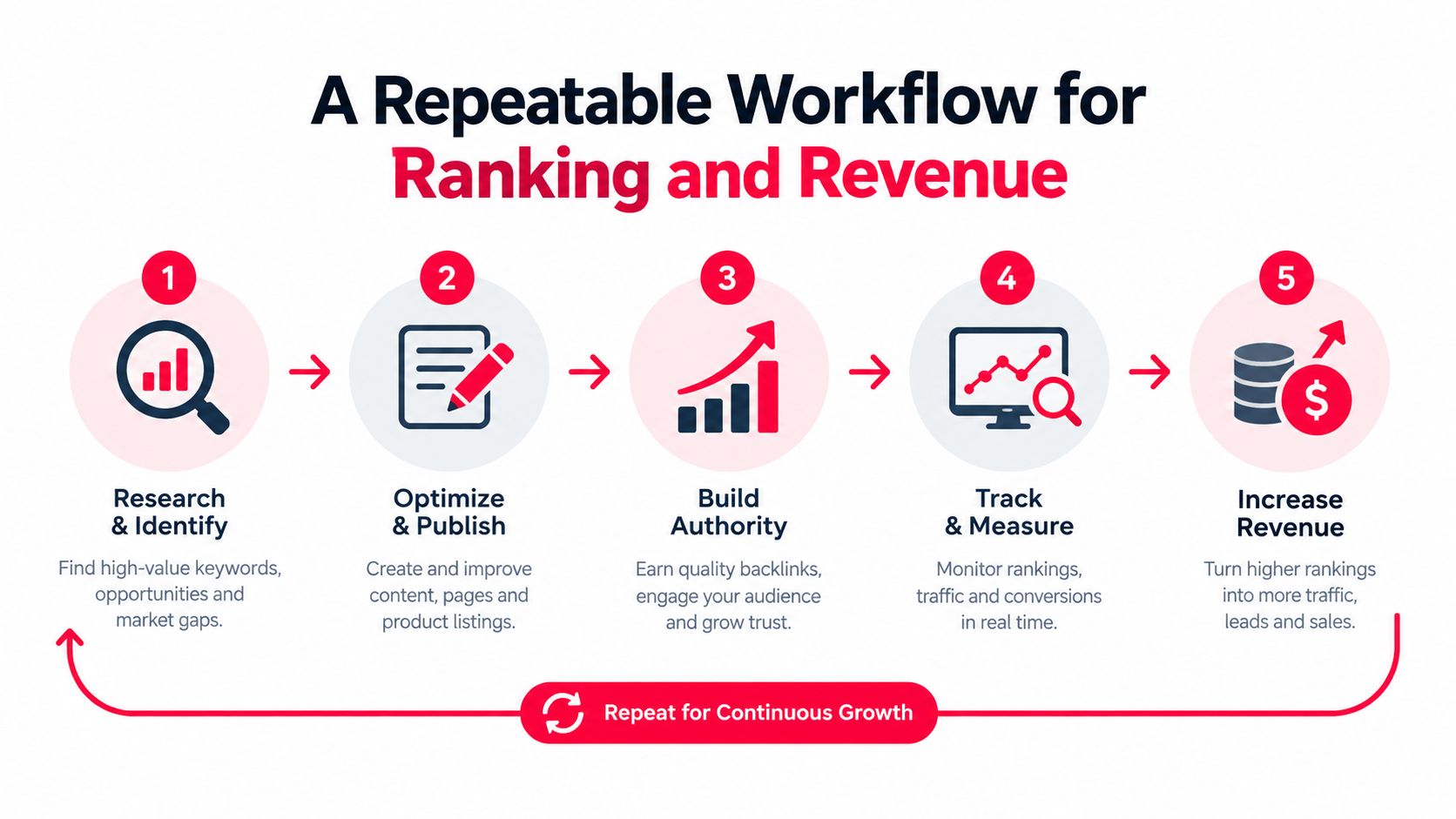
    A diagram illustrating a five-step repeatable SEO workflow for improving search rankings and business revenue.

    Review the launch as a diagnosis

    Early performance should guide investigation, not trigger random changes. If impressions are available but clicks lag, test the packaging. If clicks arrive but viewers leave quickly, inspect the opening and the promise match. If viewing is healthy but external action is weak, review the call to action and destination rather than rewriting the thumbnail.

    Record every change. Without a change log, you can't tell whether a result came from a new title, a different thumbnail, a distribution push, or normal variation.

    Close the loop weekly

    At the weekly review, compare ranking movement with attributed clicks, leads, and sales. A video that ranks well but attracts unqualified traffic may need a sharper audience promise. A modestly ranked video that repeatedly sends high-intent visitors may deserve more internal linking, paid support, or a sequel.

    That's the core discipline. Optimize for the business outcome that ranking is supposed to create, not for the ranking screenshot itself.

    Common Myths About the YouTube Algorithm

    Myth one, new creators are automatically buried

    New channels don't need an existing all-time audience to become candidates for discovery. The recommendation system's candidate-generation stage evaluates whether a video fits a viewer context, then the ranking stage evaluates how that candidate performs. That doesn't guarantee broad distribution, but it does mean a creator can compete through relevance and viewer response rather than relying only on historical fame. (Google Research)

    Corrected rule: Make the topic legible and the promise specific enough for YouTube to test the video with a plausible audience.

    Myth two, longer videos always rank higher

    Length creates no automatic ranking advantage. Google's model focuses on predicted viewing time, while current research and industry analysis connect ranking with engagement, format alignment, and audience behavior. A concise tutorial that satisfies its audience can outperform a longer upload that delays the answer.

    The supplied ranking analysis found that 8 to 9 minute videos appeared in top positions most frequently, but that observation isn't a universal runtime prescription. (Search Engine Journal)

    Corrected rule: Choose the shortest structure that can deliver the promised outcome clearly, then use retention data to remove sections that don't earn their place.

    Myth three, publishing more often guarantees growth

    A faster schedule can produce more opportunities, but frequency doesn't compensate for weak topic fit, unclear packaging, or poor satisfaction. A creator who publishes repeatedly without reviewing retention and conversion data may repeat the same failure at greater speed.

    There's also no reliable basis in the supplied evidence for claiming that a specific upload cadence, live-stream schedule, or posting volume guarantees ranking performance. Treat cadence as a production constraint, not as a magic signal.

    Corrected rule: Publish at a pace that lets you research the topic, build a credible promise, review viewer behavior, and connect the result to the next commercial decision.

    Turning Rankings Into Real Business Results

    A ranking is a distribution event. Revenue appears only when that distribution reaches a relevant person, earns enough trust, and offers a clear next action.

    The funnel starts with the impression. The title and thumbnail determine whether the viewer enters. The opening and structure determine whether the viewer stays. The lesson, product demonstration, or point of view determines whether the viewer believes the creator can help with the underlying problem.

    That sequence explains why satisfaction signals matter to revenue-focused creators. A misleading package may create activity at the top of the funnel, but it attracts people who are less likely to trust the channel or take the intended next step. A well-matched video can produce a smaller audience with stronger commercial relevance.

    Use ranking data as a decision system

    Review each upload through four connected questions:

    • Discovery: Did the video reach the audience and topic it was designed for?
    • Viewing: Did the packaging and opening sustain attention?
    • Intent: Did viewers click the relevant link, end screen, or next resource?
    • Revenue: Did a tracked action lead to a sale, lead, booking, or other defined business result?

    YouTube Studio is useful for the first two questions. A tracking and attribution layer is needed for the last two. The combination lets you distinguish a visibility problem from a conversion problem. It also helps you decide whether to improve the existing video, create a related follow-up, change the offer, or stop investing in that topic.

    The next upload should reflect what the data taught you. Keep the elements that produced qualified attention, replace the ones that created mismatch, and preserve a clear record of the experiment. That's how YouTube video rankings become a repeatable revenue process rather than a vanity scoreboard.


    ViewsMax helps creators plan content, publish across channels, and connect trackable clicks, leads, and sales back to the exact content that generated them. Visit ViewsMax to see how attribution can turn ranking and engagement data into clearer content and revenue decisions.

  • How Long Should a YouTube Video Be for Maximum Impact

    How Long Should a YouTube Video Be for Maximum Impact

    Let's get one thing straight right away: when someone asks, "How long should my YouTube video be?" the only real answer is this: as long as it needs to be to deliver its value, and not a single second longer.

    There's no magic number. A viral 30-second Short and a gripping 30-minute documentary can both be wildly successful. This proves that the content itself—not a stopwatch—is what truly determines the perfect length.

    Why There Is No Magic Number for Video Length

    Laptop displaying YouTube logo, a 'NO MAGIC NUMBER' sign, notebook, pen, and glasses on a wooden desk.

    One of the biggest mistakes new creators make is chasing a specific minute count they heard was "optimal." The perfect video length is a moving target. It shifts based on your goals, your video's format, and, most importantly, what your audience has come to expect from you. A snappy product review and an in-depth tutorial serve different purposes, so of course, they should have different runtimes.

    Think of yourself as a storyteller. Some stories are best told as a quick, witty anecdote. Others need the breathing room of a full-length novel to really land. If you chop a novel down to a single paragraph, you lose all its depth. But if you stretch a simple anecdote into a 20-page chapter, it becomes a boring slog. Your job is to be the editor who knows exactly what the story needs.

    The Real Metrics That Matter

    Instead of obsessing over the clock, you need to focus on what the YouTube algorithm actually cares about. It's all about two key metrics that are directly tied to your video's length and quality:

    • Watch Time: This is the grand total of all the minutes people have spent watching your videos. For YouTube, this is a massive signal that you're creating quality content that keeps people on the platform.
    • Audience Retention: This is the percentage of your video that, on average, people stick around to watch. A high retention rate tells the algorithm your video is genuinely engaging from start to finish.

    The core idea is simple: A video's ideal length is the duration that maximizes both watch time and audience retention. It has to be long enough to feel substantial but tight enough to keep people from clicking away.

    Setting the Stage for Your Channel

    Getting a feel for this trade-off is the first real step toward finding your channel's sweet spot. A longer video has the potential to rack up a ton of watch time, but it also comes with a much bigger risk of viewers getting bored and leaving early, which tanks your retention.

    On the flip side, a super short video might get fantastic retention rates, but it won't contribute much to your channel's overall watch time. It's a balancing act.

    In the next sections, we'll dive into how to manage these competing metrics. We'll look at some data-backed starting points for different kinds of videos and, crucially, show you how to use your own channel's analytics to let your audience's behavior guide your strategy.

    Why Watch Time Is Your Most Important Metric

    A person holds a tablet displaying a red clock icon with the text "WATCH TIME MATTERS".

    Before we can even talk about the perfect video length, we need to get inside YouTube's head. Think of YouTube as a gigantic, global television network. Its main goal? Keep people watching for as long as humanly possible. The more they watch, the more ads YouTube can show, and the more money it makes. Simple as that.

    Your channel is a business partner in this mission, and your primary contribution is a metric called watch time. This isn't about how many people click play; it's the total, cumulative number of minutes people spend watching your videos. When your content keeps people on the platform, the algorithm sees your channel as a valuable partner and rewards you for it.

    Retention vs. Watch Time: The Critical Difference

    So many creators get hung up on Audience Retention, which is the percentage of a video that people watch. A high percentage seems great, but it's only one piece of a much larger puzzle. The total minutes watched almost always carries more weight.

    Let's look at a quick example.

    • Video A: A 3-minute video with a fantastic 90% retention.
    • Video B: A 10-minute video with a decent 50% retention.

    Instinct might tell you Video A is the winner, but let's do the math. The average viewer of Video A sticks around for 2.7 minutes. But the average viewer of Video B watches for a full 5 minutes. Video B generates nearly double the watch time from every single view. That’s a powerful signal to the YouTube algorithm.

    High watch time is the ultimate vote of confidence. You're not just telling YouTube that your content is interesting enough to click on—you're proving it's engaging enough to hold someone's attention.

    This is exactly why longer videos often have a higher ceiling for growth. They simply have more potential to rack up the massive watch time totals that get YouTube's attention and fuel your discoverability.

    Monetization and The 8-Minute Mark

    Watch time isn't just about pleasing the algorithm; it directly impacts your wallet. Once you're in the YouTube Partner Program, videos that are over eight minutes long can have mid-roll ads placed throughout the content, not just at the start.

    This gives you far more opportunities to earn revenue from a single video. Of course, this only works if your video is compelling enough to keep viewers watching through those ad breaks. This is where good pacing and structure become essential. For these longer videos, knowing how to properly add chapters to a YouTube video can make a world of difference for the viewer experience.

    Ultimately, by focusing on content that keeps people watching longer, you create a win-win scenario. You provide more value to your audience, generate more watch time for YouTube's algorithm, and open up more revenue for your channel. While length is a key part of this, it's just one element of a larger strategy for how to grow YouTube subscribers.

    Matching Your Video Length to Your Content Format

    A desk with a plant, camera, smartphone showing photos, tablet, and text 'MATCH YOUR FORMAT'.

    Before you can even begin to answer, "how long should my YouTube video be?", you need to ask a much more important question: what kind of video am I actually making? It’s a simple question, but the answer changes everything.

    Someone clicking on a quick tech tutorial has a totally different mindset—and a different amount of time to spare—than a viewer settling in for a long-form documentary. The secret isn't finding a single magic number; it's about aligning your video's length with its format to meet your audience's expectations head-on.

    Think of it this way: a steak needs a few minutes of intense heat, while a good stew needs to simmer for hours. If you get those two mixed up, you’re left with a mess. Your content works the same way. The format is your recipe, and it dictates the ideal cooking time.

    Quick and Engaging Formats

    For content meant to be consumed on the fly, brevity is your best friend. These formats are all about delivering a quick hit of value, a laugh, or a key piece of information before the viewer scrolls on.

    • YouTube Shorts (Under 60 seconds): This one is a hard rule set by YouTube itself. Shorts are designed for pure, unadulterated speed. You've got less than a minute to land a single idea, a punchline, or a "wow" moment. There's no room for a fancy intro—you have to hook them in the first three seconds and get straight to it.

    • Product Reviews (5-10 minutes): When someone is thinking about buying something, they want a clear, no-fluff summary of the pros and cons. A solid 5-10 minute video gives you just enough time to cover the essential features, show the product in action, and give your final verdict without dragging it out.

    Deep Dive and Storytelling Formats

    When your goal is to teach a complex skill, tell a compelling story, or offer a deep analysis, you've got a lot more runway. Viewers clicking on these videos are prepared to invest more of their time, but only if you keep them engaged and deliver on your promise.

    Your video should be as long as it takes to tell the full story and not a second more. If a section doesn't serve the core message, it’s a candidate for the cutting room floor, regardless of your target runtime.

    This is where looking at platform-wide data can be a huge help. It might surprise you to learn that the average YouTube video length hovers around 11.7 minutes. That number isn't an accident. It reflects that delicate balance creators strike between providing detailed content and holding onto their audience's attention. Videos in that 5-15 minute sweet spot often nail this balance, and the algorithm tends to reward them for it.

    Educational and In-Depth Content

    These types of videos succeed only when they provide a complete, satisfying answer to a viewer's problem. If you rush it, you'll leave them feeling like they didn't get what they came for.

    • Tutorials and How-To Guides (10-18 minutes): If you’re teaching something complicated, you need the time to do it right. This length allows you to break down each step, show clear examples, and troubleshoot common issues without making the viewer feel overwhelmed. A tight script is absolutely critical here to keep things moving. A great place to start is our guide on how to write a script for your YouTube videos.

    • Vlogs and Personal Stories (8-15 minutes): With vlogs, the real goal is to build a personal connection. This duration gives you enough time to craft a genuine narrative arc—a clear beginning, middle, and end—that makes your audience feel like they've just shared a meaningful experience with you.

    At the end of the day, these are just guidelines, not strict rules. The perfect length is always going to be unique to your channel, your topic, and your audience. But by starting with a length that matches your format, you’re giving yourself a massive head start.

    Using Your Analytics to Find What Works

    Forget industry averages for a second. The most powerful data for figuring out how long your YouTube videos should be is already sitting in your dashboard, waiting for you. Your own audience is giving you the answer with every single view. It's time to put on your detective hat and dive into YouTube Studio.

    Your primary tool in this investigation is the Audience Retention graph. Think of this as your secret weapon. It shows you, second-by-second, the exact moment a viewer’s attention starts to wander. It's like having a live focus group for every video you post, showing you what’s working and, more importantly, what’s causing people to click away.

    By digging into this data, you can stop guessing and start making decisions based on how your viewers actually behave.

    Decoding Your Audience Retention Graph

    Picture your Audience Retention graph as the story of your video's engagement. The line always starts at 100%—that’s everyone who clicked play. As the video goes on, the line will naturally dip as people leave. Your job is to keep that line as high as possible for as long as possible.

    Here’s what a typical retention graph looks like inside the YouTube Studio dashboard.

    This visual tells a crystal-clear story, showing where the video held attention and where it fell flat. It's full of clues for your next video.

    So, what are you actually looking for? The trick is to spot patterns not just in a single video, but across your entire channel.

    • Sudden Dips: A sharp, steep drop is a huge red flag. Jump to that exact timestamp in your video. What happened there? A long, boring intro? A confusing point? A sponsor read that felt jarring? These dips are your audience shouting, "This part wasn't for me."
    • Gradual Slopes: A slow, steady decline is completely normal, but you still need to pay attention to where the drop-off accelerates. If your 12-minute videos consistently lose a huge chunk of viewers around the 7-minute mark, that’s a powerful signal. It could mean your audience has a shorter attention span, or maybe your videos just need a "re-hook" around that point to pull them back in.
    • Flat Plateaus and Spikes: Ever see moments where the line stays flat or even bumps up? These are your golden nuggets. It means viewers are actually re-watching that specific part. Go figure out what you did right. Was it a brilliant joke, an incredibly clear explanation, or a stunning visual? Whatever it was, bottle that magic and do more of it.

    Comparing Videos to Find Your Sweet Spot

    The real breakthrough happens when you start comparing the retention graphs of different videos. Open up two tabs: one for your best-performing long video and one for your best-performing short video.

    Your analytics don't just show you what happened; they tell you why. By comparing the retention curves of successful and unsuccessful videos, you can build a blueprint for what your specific audience wants to see.

    Don't get fixated on just the final retention percentage. The shape of the curve tells the real story. Does your 15-minute video suffer a massive drop in the first two minutes, while your 7-minute video holds strong almost to the end? That’s a strong hint that your shorter, punchier content is doing a much better job of grabbing and holding your audience's attention.

    On the other hand, if a longer video maintains a high, flat retention plateau for over 10 minutes, your audience is clearly hungry for that kind of in-depth content. Let this data be your guide. If your viewers are telling you they love your 12-minute deep dives by sticking around, lean into it. If they consistently bail after 5 minutes, it’s time to be more ruthless in your editing and get to the point faster. Your data holds the answer to "how long should my YouTube videos be?" for your channel.

    How to Systematically Test Your Video Lengths

    Looking at your past performance is a fantastic starting point. But to truly nail down how long your YouTube videos should be, you have to move from just looking at data to actively testing your assumptions. The best way I’ve found to do this is with simple A/B tests—it’s a methodical way to see what your audience actually wants, not just what you think they want.

    The idea is pretty simple. You create two videos on a very similar topic, but you intentionally make them different lengths. This helps you isolate the video’s duration as the main thing you’re testing.

    Setting Up Your A/B Test

    First, you'll need to pick a topic that you already know your audience enjoys. It also needs to be a topic that you can present in both a quick, to-the-point version and a more detailed one.

    Let’s say you run a cooking channel. You could create two different videos about making the perfect pizza dough.

    • Video A (The Short Version): This one would be a snappy, 7-minute video. It gets straight to the recipe and the core techniques, with no fluff or extra chatter.
    • Video B (The Long Version): This is your 12-minute deep dive. It covers the same recipe but also gets into the science of fermentation, compares different flour types, and walks through common mistakes to avoid.

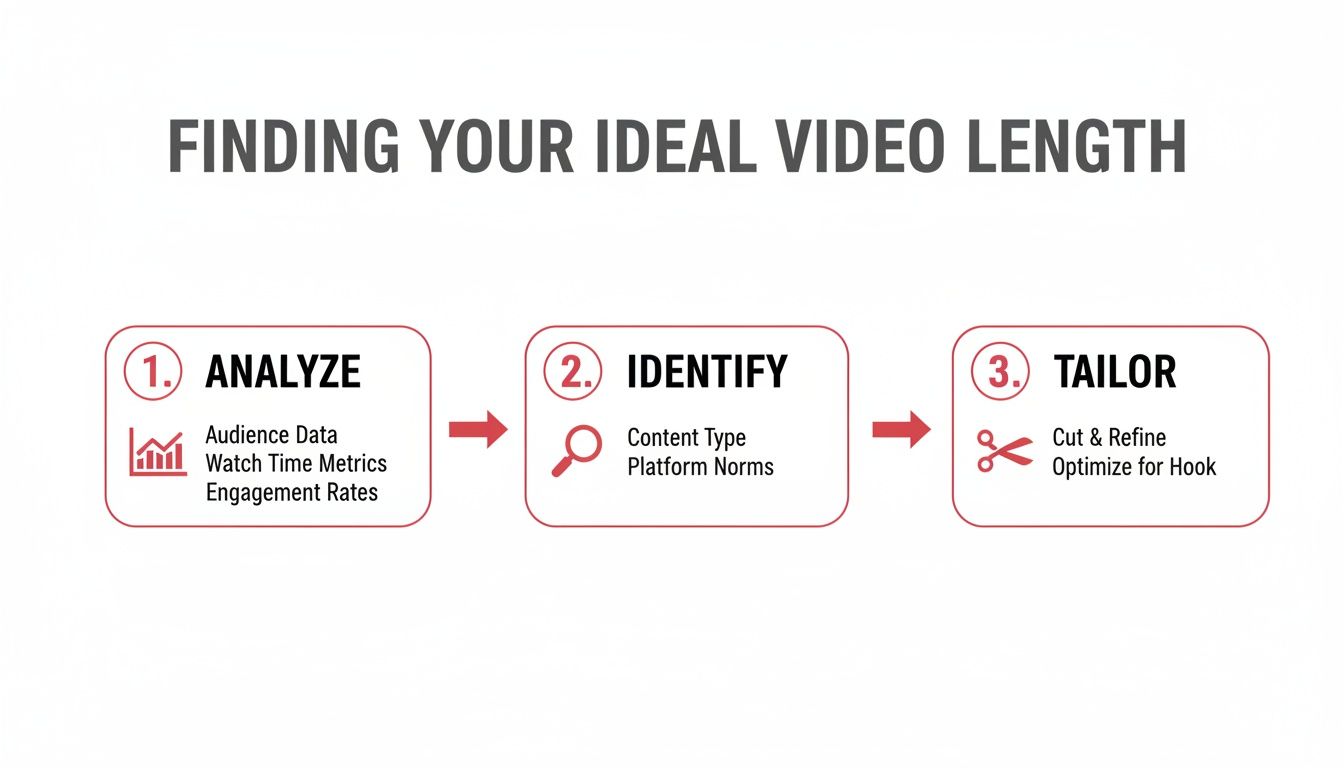
    It’s this process—analyze, identify, and tailor—that gets you closer to your ideal video length.

    A three-step infographic outlining how to find your ideal video length by analyzing data, identifying content types, and tailoring content.

    The image here really breaks it down: you look at your data, spot the patterns, and then adjust your video length to give your audience exactly what they’re sticking around for. To produce different versions quickly for testing, you might find that some text-to-video tools can help speed up the workflow.

    Measuring Your Test Results

    After both videos are published, you need to give them some time—at least a few weeks—to collect enough meaningful data. Once that’s done, jump into your YouTube Studio analytics and put them side-by-side, focusing on a few key metrics.

    Don't just look at the view count. A shorter video might get more initial clicks, but the deeper metrics will tell you which one actually provided more value to your viewers and the algorithm.

    Here’s exactly what you need to be looking at:

    1. Average View Duration (AVD): This is your number one metric. Did the 12-minute video hold people for an average of 6 minutes, while the 7-minute one only kept them for 3? If so, the longer video generated way more total watch time per viewer.
    2. Audience Retention at Key Moments: Pull up the retention graphs for both videos. Does the longer one have a massive drop-off halfway through, or does it hold steady? The shape of that curve tells you if your extra details were genuinely engaging or just felt like filler.
    3. Click-Through Rate (CTR): This is a good secondary metric. Are viewers more drawn to a title that promises a quick answer, or one that signals a comprehensive guide? This gives you a clue about what they were looking for when they clicked.

    By comparing these numbers, you're essentially letting your audience vote with their attention. Do this a few times, and you’ll start to build a clear, data-backed understanding of what works for your channel. Making these little experiments a regular part of your strategy is a game-changer. And if you need a hand staying organized with it all, you might want to use something like a YouTube content calendar template.

    It’s About Value, Not a Stopwatch

    So, after all that talk about analytics, testing, and different video formats, what's the real answer? How long should your YouTube video actually be?

    The truth is, the perfect length isn't a number you can just look up. It’s however long it takes you to deliver a complete, compelling experience to your audience. Nothing more, nothing less.

    Your number one job is to respect the viewer’s time. Think about it this way: if you can explain a concept brilliantly in four minutes, don't drag it out to eight just to squeeze in another ad. You'll kill your audience retention and, worse, you'll break their trust. On the flip side, cramming a complex tutorial that needs fifteen minutes into a rushed five-minute video just leaves everyone confused and frustrated.

    Stop chasing a magic number. Start listening to what your content and your audience are telling you. The perfect length is the one that makes your viewer feel like their time was well spent—leaving them satisfied, informed, and genuinely excited for what you post next.

    The Real Goal

    Ultimately, you want to make your video as long as it needs to be and not a single second longer.

    When you focus on creating a tight, value-packed video, the watch time and retention metrics naturally fall into place. The data-driven strategies we've talked about aren't for hitting some arbitrary time target; they're for figuring out how much detail your audience truly wants.

    Think of your analytics as your compass. It will always point you toward creating videos that are perfectly paced for the people who matter most—your viewers. When they feel you've valued their time, they’ll reward you with the kind of engagement that truly grows a channel.

    Frequently Asked Questions

    Even with a solid game plan, you're bound to have some lingering questions about video length. Let's tackle a few of the most common ones I hear from creators.

    Does Making Videos Over 8 Minutes Automatically Make More Money?

    In short, no. It’s a common misconception. While hitting the 8-minute mark unlocks the potential for mid-roll ads, you only get paid if people actually watch them.

    If your audience clicks away before the first mid-roll even has a chance to play, that magic 8-minute mark means nothing for your bottom line. Your real focus should be on making a video that's so engaging people want to stick around. When you nail that, the watch time and ad revenue will naturally follow.

    Think engagement first, ad placements second. A truly captivating video will always outperform one that's just stretched to hit a certain timestamp.

    Should I Break a Really Long Video Idea Into a Series?

    Absolutely. This is one of the smartest moves you can make for a deep-dive topic. If you feel a video is creeping past the 25-30 minute mark and you’re worried about losing people, splitting it up is the way to go. A tight series of 10-15 minute episodes often works wonders.

    Here’s why that approach is so powerful:

    • It gets people hooked: A great Part 1 almost guarantees a click on Part 2. Hello, binge-watching!
    • It juices your channel's watch time: All those minutes add up across the entire series, sending positive signals to the algorithm.
    • It gives you more chances to be found: Every video you upload is another lottery ticket in the YouTube discovery game.

    Can I Re-upload a Shorter Cut of a Video That Flopped?

    You can, but don't just trim it and hit "upload" again. YouTube's system can flag that as duplicate content, which you definitely want to avoid.

    Instead, treat it as a brand-new creation. Go back to the drawing board and re-edit the core ideas into a snappier, more engaging video. Figure out what went wrong the first time—was the hook too slow? Did a section in the middle drag on forever? Fix that core problem. Then, give it a completely fresh title, thumbnail, and description and send it out into the world.


    Ready to stop guessing and start growing? ViewsMax provides AI-powered tools to help you find the perfect video length, optimize your titles, and analyze your performance. Get the insights you need to grow faster on ViewsMax.