Let's settle the debate once and for all: do hashtags actually work on YouTube? The short answer is yes, they absolutely do. But how they work is where most creators get tripped up.
It's best to think of hashtags not as magic wands for instant virality, but as helpful signposts for the YouTube algorithm. They provide that extra layer of context, helping YouTube figure out precisely what your video is about and, more importantly, who it should be shown to.
The Real Deal on Using YouTube Hashtags for Growth

A lot of creators feel let down by hashtags because they expect them to function like they do on Instagram or TikTok, where they are a primary engine for discovery. On YouTube, their role is far more subtle, but no less critical.
Think of it this way: your title and thumbnail are the flashy billboard on the highway designed to grab a viewer's attention. Your hashtags, on the other hand, are the street signs that guide the right traffic—your ideal audience—straight to your video. They're a supporting player, not the star of the show.
In essence, hashtags are just another form of metadata. They help YouTube’s algorithm group your video with other, similar content. This increases the odds it will show up on dedicated hashtag pages or as a suggested video after someone watches a related clip.
For a complete strategy, it’s crucial to understand how hashtags fit into the wider world of YouTube SEO best practices. When used correctly, they complement your other efforts to boost rankings and channel growth.
Setting the Right Expectations
It's easy to get lost in the weeds with YouTube strategy, so let's clear up exactly what hashtags do and what they don't. The table below breaks down their true function versus some common myths.
YouTube Hashtags Function vs Misconception
| True Function (How They Really Work) | Common Misconception (What They Don't Do) |
|---|---|
| Categorize Content: They act as clear labels, helping the algorithm instantly classify your video's topic and niche. | Guarantee Virality: A hashtag alone will never make a low-performing video go viral. Quality content is still king. |
| Aid in Discovery: Your video becomes clickable on hashtag-specific pages, creating another path for viewers to find you. | Replace SEO: Hashtags are a piece of the SEO puzzle, not a substitute for strong keywords in your title and description. |
| Group Your Videos: A unique branded hashtag (#YourChannelName) lets you create a private feed of all your related content. | Drive Massive Traffic: Unlike on other platforms, they won't trigger a sudden flood of views. Their impact is more gradual and targeted. |
So, what's the takeaway? The real power of hashtags comes from adding clarity for YouTube's system after you’ve already nailed the essentials like a great title, description, and thumbnail. Their main jobs are to:
- Improve Categorization: Help the algorithm quickly understand what your video is about.
- Boost Discoverability: Get your video seen on specific hashtag pages.
- Connect Your Content: Link your videos together with a unique branded hashtag.
And this isn't just theory—the data backs it up. One study showed that adding a hashtag to a video can increase views by 26% and boost comment engagement by 14% compared to videos that don't use them.
Ultimately, a smart hashtag won't save a bad video, but it can give a great video the extra algorithmic nudge it needs to find its audience. As the platform evolves, staying on top of important changes in YouTube is key, and you'll find that metadata like this remains a consistent factor for success.
How YouTube's Algorithm Actually Reads Your Hashtags
When you add a hashtag to your video, you’re doing more than just adding a trendy label. You're giving the YouTube algorithm a clear, direct signal about what your video is about. Think of each hashtag as a signpost that points the algorithm toward your content's core topic and context.
The algorithm uses these signposts to categorize your video and connect it to a whole universe of similar content. By understanding your hashtags, it knows to put your video on that hashtag's dedicated results page. So, if you use #DIYBookNook, your video instantly gets a spot on the page where people are actively looking for DIY book nook ideas.
This opens up brand new ways for viewers to find your channel. It also helps YouTube group your content with other creators in your niche, suggesting your videos alongside theirs.
Where You Put Your Hashtags Matters
Placement is everything. YouTube gives you three main spots to put your hashtags, and each one tells the algorithm—and your viewers—something a little different. Getting this right is a huge part of figuring out do hashtags work on YouTube for your specific channel.
Here are your options:
- Above the Title: This is prime real estate. The first three hashtags you put in your description automatically show up here, making them impossible to miss.
- In the Title: You can also put a hashtag right in the video title itself. This makes the hashtag a core part of the video's identity and is great for tying it to a major trend.
- In the Description: This is where you can add more hashtags (up to a point) to give the algorithm extra context without making your title look messy.
Each of these has its own strategic advantage. Hashtags above the title offer amazing visibility, but you only get three slots, so you have to choose wisely. Putting a hashtag in the title is powerful, especially for trending topics, but it eats up character space you might need for other descriptive keywords.
By using hashtags, you are essentially telling the algorithm: "My video is about this specific topic, so please show it to people who are interested in this topic." This direct communication is a simple yet effective way to influence your video's discoverability.
Choosing the Right Placement Strategy
So, what's the best approach? It really depends on what you're trying to achieve with that specific video.
If you're jumping on a viral challenge, putting #ViralChallenge directly in the title makes a lot of sense. On the other hand, if you've made a detailed tutorial, you might put three hyper-specific hashtags like #SolderingTips, #ElectronicsRepair, and #BeginnerCircuits in the description so they appear prominently above the title.
To see what's working for others in your niche, you can check out different YouTube tag extractor tools that show you what the top-ranking videos are using. This kind of insight shows you how successful creators are labeling their content for the algorithm. Once you get the hang of these mechanics, you can turn hashtags into an active part of your growth strategy.
Crafting Your Optimal Hashtag Strategy
Alright, now that we've covered the mechanics, let's talk about building a smart, repeatable process for your hashtags. A winning strategy isn't about throwing everything at the wall to see what sticks; it's about surgical precision. Your goal is to send the clearest possible signal to YouTube's algorithm about what your video is and who it's for.
A classic mistake I see all the time is "hashtag stuffing." Creators get caught up in the idea that more tags magically equal more views. That's a myth, and it can actually torpedo your video's performance. When you cram dozens of semi-related tags into your description, you don't help the algorithm—you just confuse it. A confused algorithm has no idea who to show your video to, so it often ends up showing it to almost no one.
Think of it this way: hashtags are one of the first and most direct inputs you give the algorithm to help it categorize your content. This flowchart breaks down that simple process.
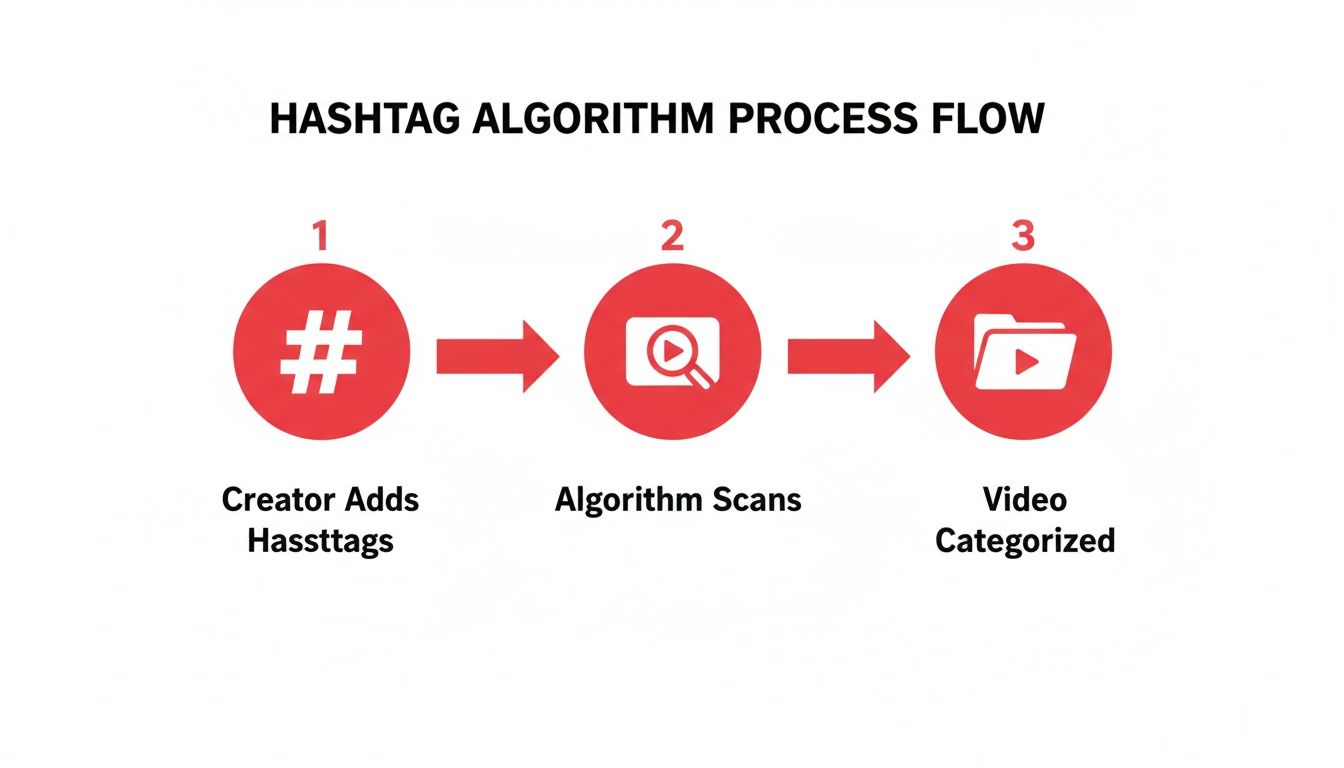
As you can see, what you choose directly informs how YouTube sorts and classifies your video right from the start.
The Art of Hashtag Research
Finding the right hashtags means getting inside the head of your ideal viewer. What words are they actually typing into the search bar to find a video like yours? Good research involves a balanced mix of broad, specific, and branded tags.
Broad Hashtags: These are your high-level, high-volume terms that cover the general topic, like
#TechReviewsor#DIYCrafts. They cast a wide net but also come with a ton of competition. It’s usually best to use just one to set the overall category.Niche-Specific Hashtags: This is where the magic happens. Instead of a generic
#TechReviews, you get hyper-focused with something like#iPhone15ProMaxCameraTest. Rather than#DIYCrafts, you use#ResinCoasterTutorial. The search volume is lower, but the audience you attract is far more qualified and ready to watch.Branded Hashtags: This is a tag that's all yours, like
#ViewsMaxTips. It's a fantastic way to group all your related content and build a community. Essentially, it turns into a clickable, unofficial playlist for your biggest fans.
A solid strategy pulls from all three buckets. For instance, a video reviewing a new gaming mouse might use #GamingGear (broad), #RazerViperV2ProReview (niche-specific), and #YourChannelGaming (branded). That combination tells the algorithm everything it needs to know: the general topic, the specific subject, and how this video connects to the rest of your channel.
Less Is More: The Rules of the Game
When creators ask me if hashtags really work on YouTube, the answer often comes down to whether they're playing by the platform's rules. YouTube is not a fan of spammy behavior.
The platform has a hard limit: use more than 60 hashtags, and YouTube will simply ignore all of them. But honestly, the real rule among creators who know what they're doing is to stay far, far below that number. The consensus from most experts is that 3-5 highly relevant hashtags give you the biggest bang for your buck. One study on YouTube hashtag usage backs this up with data.
The takeaway is simple: a few laser-focused hashtags are way more powerful than a dozen generic ones. Aim for precision over quantity, every single time.
This minimalist approach ensures you’re sending strong, clear signals that help the algorithm do its job. Of course, hashtags are just one piece of the puzzle. They work best when paired with strong video tags in the dedicated "tags" section. To round out your strategy, I highly recommend checking out our guide on finding the best tags for YouTube.
Adapting Hashtags for Your Channel Size
What works for a creator with millions of subscribers probably won’t work for you. It's a hard truth, but a successful hashtag strategy isn't a one-size-fits-all template; it has to be tailored to where you are right now.
Ignoring your channel's size is like a tiny sailboat trying to cut through a busy shipping lane—you’ll just get lost in the wake of the giant container ships. The secret is to adapt your approach as you grow, making sure you're always using the right tools to get noticed without fighting battles you can't win.
Strategy for Small or New Channels
When you're just starting out, your main goal is getting found by a small but passionate audience. This means that chasing huge, popular hashtags like #Gaming or #Fitness is a recipe for disappointment. You’re competing against millions of other videos, and YouTube's algorithm will almost always favor the big, established players.
Your mission, then, is to hunt for hyper-niche, low-competition hashtags. Think of them as a secret handshake with a dedicated community that’s already looking for exactly what you make.
Your goal isn't to be a small fish in a massive ocean. It's to be a big fish in a small pond. That's how you build a loyal following from scratch.
Here’s what that looks like in practice:
- Instead of
#RetroGaming: Try something specific like#SNESGameCollectingor#DreamcastHiddenGems. - Instead of
#HomeWorkout: Niche down to#KettlebellWorkoutForBeginnersor#NoEquipmentApartmentWorkout. - Instead of
#VeganRecipes: Get targeted with#HighProteinVeganMealPrepor#OilFreeVeganDesserts.
This approach puts your content directly in front of the people who will actually appreciate it, giving your videos a real chance to stand out.
When to Compete for Broader Hashtags
As your channel picks up steam and you build a solid subscriber base, your strategy can start to shift. Once the algorithm sees you as a credible source with consistent viewership, you can begin dipping your toes into more competitive waters.
This is the time to mix in one or two broader hashtags alongside your more specific ones. You'll keep that strong connection with your core audience while reaching out to a much larger group of potential fans who might be interested in your topic.
The Power of Hashtags for Emerging Creators
This isn't just a theory—the data backs it up. The effectiveness of hashtags is often directly tied to channel size, and it's the smaller creators who see the biggest boost.
For instance, one analysis showed that social profiles with under 5,000 followers saw 36.85% more reach per post when using hashtags. That's a huge lift! For larger accounts, the improvement was much smaller, which really underscores how vital a smart hashtag strategy is for building that initial momentum. If you want to dive deeper, you can discover more insights about hashtag performance on GRIN.co.
How to Measure Your Hashtag Performance

So, you've got a hashtag strategy. Great. But it's pretty useless if you can't tell what’s actually working. Instead of just guessing, you can—and should—dive into your YouTube Analytics to find real data on your hashtag performance.
This is where theory gets put to the test. The best place to start is the Traffic Sources report inside YouTube Studio. This is your command center for understanding exactly how viewers are finding your videos, offering solid clues about whether your hashtags are hitting the mark.
Pinpointing Hashtag Impact in Your Analytics
Now, YouTube doesn't give you a nice, clean report labeled "hashtag traffic." That would be too easy. Instead, we have to do a bit of detective work by looking for evidence in a few key areas that are heavily influenced by good hashtagging.
Keep a close eye on these two traffic sources:
YouTube Search: Are you seeing more views coming from search, especially for the exact keywords you used as hashtags? That's a huge win. It’s a direct signal that your tags are successfully connecting with what people are actually looking for.
Suggested Videos: If your video starts popping up next to other videos that share the same hashtags, you’ll see a bump here. This tells you the algorithm is correctly categorizing your content and putting it in front of the right audience.
The key is to connect your actions to these results. When a video suddenly takes off, dig into its traffic sources. Did views from search spike right after you added a trending hashtag? There's your answer. For a deeper dive into what these numbers mean, you can benchmark your performance with a YouTube engagement rate calculator.
A Simple Framework for Testing
If you want definitive proof, nothing beats a straightforward A/B test. It sounds technical, but it’s not. Just pick two similar videos from your back catalog that have comparable performance.
- Video A (Your Control): Don't touch a thing. Leave its original hashtags just as they are.
- Video B (Your Test): Go in and update it with a new, carefully chosen set of 3-5 hashtags.
Now, watch what happens. Monitor both videos for the next 30 days. Pay attention to impressions, click-through rates, and, most importantly, traffic from YouTube Search and Suggested Videos.
If Video B shows a clear lift in these key metrics, you’ve found a winning formula you can start using on other videos. This is how you stop guessing and start building a hashtag strategy based on what actually works for your channel.
Common Questions About YouTube Hashtags
Even with a solid plan, a few nagging questions can hold you back. Let's clear up some of the most common things creators ask about hashtags so you can move forward with total confidence.
Where's the Best Place to Put Hashtags on YouTube?
For the biggest discovery boost, your video description is prime real estate. The first three hashtags you put in the description get special treatment—YouTube displays them right above your video title, making them highly visible to potential viewers.
You can also put them in the title itself. This works well for jumping on a huge trend, but just remember it eats up valuable space you could use for a compelling, clickable title. Any other hashtags you add further down in the description will still feed the algorithm useful information, they just won't be displayed as prominently.
Should I Use the Same Hashtags on Every Video?
Definitely not. Think of it this way: each video is unique, so its hashtags should be too. It’s a great idea to have one consistent branded hashtag (like #ViewsMaxTips, for example) to build your community, but the rest need to be specifically chosen for that video's topic.
Copying and pasting the same generic list of tags on every single video is one of the worst things you can do. It tells the YouTube algorithm that you're not putting in the effort, and it confuses the system about what each video is actually about.
This lazy tactic can backfire, preventing the algorithm from properly categorizing your content and showing it to the right people.
How Many Hashtags Should I Use on a YouTube Video?
This is a classic case of quality over quantity. The sweet spot, and the widely accepted best practice, is to stick to 3 to 5 hyper-relevant hashtags.
Sure, YouTube lets you add more, but stuffing your description with dozens of tags just dilutes your message. A focused set of 3 to 5 sends a crystal-clear signal to the algorithm about your video's core topic. Going overboard can look spammy and actually confuse the algorithm, which is the exact opposite of what you want.
Do Hashtags Work in YouTube Shorts?
They absolutely do. In fact, you could argue they're even more important for YouTube Shorts than for traditional long-form videos. The Shorts feed is a fast-moving environment, and the algorithm leans heavily on hashtags to figure out what your content is and who to show it to.
You always want to include the #shorts tag—that's non-negotiable. But the real magic happens when you add a few other specific, topical hashtags that help your Short find its perfect audience. A good hashtag strategy is essential if you want your Shorts to take off.
Ready to stop guessing and start growing? ViewsMax offers AI-powered tools to help you find the perfect hashtags, optimize your video descriptions, and analyze your performance with real data. Take the guesswork out of your YouTube strategy by visiting us at https://blog.viewsmax.com.