ViewsMax
Sign In Sign Up Free

Tag: youtube seo

  • Unlocking Growth with YouTube Video Keywords

    Unlocking Growth with YouTube Video Keywords

    Think of YouTube video keywords as the bridge between what you create and the people who are actively looking for it. They're the exact words and phrases someone types into that search bar, hoping to find a video just like yours. Getting a handle on these keywords is non-negotiable if you want to get discovered on the second-biggest search engine in the world.

    Why YouTube Video Keywords Are Your Secret Weapon

    Let's get real for a second. You can pour your heart and soul into making fantastic videos, but if no one can find them, what's the point? This is where a smart keyword strategy completely changes the game. Too many creators treat YouTube like a simple video-hosting site, but it’s really a massive search engine. Your content isn't just fighting for attention; it's fighting for discoverability.

    When you start targeting the right youtube video keywords, you stop just uploading videos and start strategically placing them in front of millions of people who are already interested. It’s the difference between shouting into the void and having a direct conversation with your ideal audience. By aligning your topic, title, and description with what people are actually searching for, you're giving the YouTube algorithm a crystal-clear signal about who needs to see your video.

    Moving Beyond Guesswork to Growth

    A keyword strategy based on real data gives you a repeatable roadmap for growth. Forget relying on luck or praying for a video to go viral. Instead, you can build a system that consistently brings in the right viewers.

    This approach directly boosts the metrics that matter most for your channel's health:

    • Better Search Rankings: Using the right keywords helps your videos climb higher in YouTube's search results, making it so much easier for new people to find you.
    • Higher Watch Time: When your video is the perfect answer to someone's search, they're going to stick around and watch more of it. That's a huge positive signal to the algorithm.
    • The Right Subscribers: Targeting specific phrases attracts an audience that’s genuinely into your niche, which means you get more loyal and engaged subscribers who actually care.

    This isn't just a hunch; the numbers are mind-boggling. YouTube pulls in 1.7 billion organic visits every single month, with people watching a billion hours of content daily. With 500 hours of video being uploaded every minute, a solid keyword strategy is how you cut through all that noise. You can learn more about how to stay ahead of the curve by understanding the latest changes in YouTube.

    The fundamental shift you need to make is this: Don't create content and just hope people find it. Figure out what people are searching for, and then create the absolute best content to answer that need. That mindset is the bedrock of every successful YouTube channel.

    By mastering keyword research, you take control of your channel's future. You turn random views into a real community. This guide will walk you through the practical, actionable steps to make your content impossible to ignore and drive growth you can actually measure.

    Finding Keywords That Viewers Actually Use

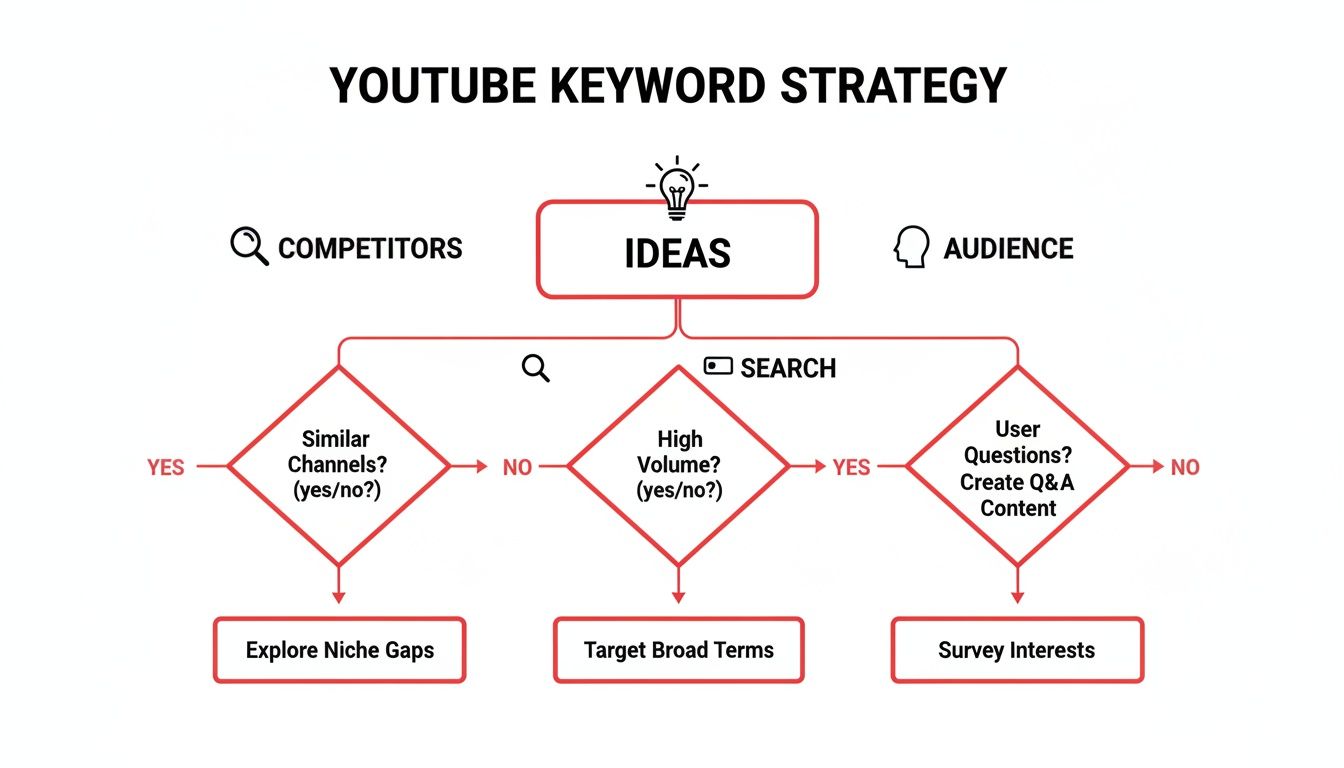
    Theory is great, but the real magic happens when you uncover the exact words and phrases people are typing into that YouTube search bar. To do this, you have to get out of your own head and think like a viewer. It’s about moving past the obvious, generic terms and digging for the specific, intent-driven YouTube video keywords that lead to clicks, watch time, and new subscribers.

    The best approach is a blend of scrappy, manual detective work and smart, data-driven analysis. This process isn't just about finding keywords; it's about understanding the relationship between your content, your audience, and how they find you.

    Diagram illustrating a YouTube keyword strategy with steps for content, keywords, and audience.

    Think of it this way: your great content is the destination, and keywords are the road signs that guide your ideal audience right to it.

    Start With What's Free and In Front of You

    You don't need a hefty budget to kick off your research. In fact, some of the most potent keyword research methods are completely free and baked right into the platform. These techniques reveal what real people are looking for, right now.

    • YouTube Autocomplete: This is your secret weapon. Seriously. Head to the YouTube search bar and start typing a broad topic. The suggestions that appear aren't random; they're the most popular related searches. Typing "beginner watercolor" might lead you to gems like "beginner watercolor tutorial for landscapes" or "beginner watercolor supplies you actually need." Those longer, more specific phrases are keyword gold.

    • Spy on Your Competitors (Ethically!): Pick a few channels in your niche that are crushing it. Go to their "Videos" tab and sort by "Most Popular." What do you see? Scour the titles of their biggest hits. You’ll quickly spot patterns and keyword phrases that have a proven track record of resonating with the very audience you want to reach.

    • Mine Your Own Comments Section: Your current audience is telling you what they want to see, you just have to listen. Scroll through your comments. Are people asking questions like, "how do you edit your audio?" or "can you do a video on your camera settings?" Each question is a direct content request and a powerful keyword phrase handed to you on a silver platter.

    Your most powerful keyword insights often come from simply listening. Pay attention to the language your community uses, the questions they ask, and the problems they're trying to solve. Your next hit video idea is probably already in your comment section.

    Get Inside the Viewer's Head: Understanding Search Intent

    Not all searches mean the same thing. Someone searching for "iPhone 15 review" has a very different goal than someone searching for "how to fix iPhone 15 screen." If you can nail the intent behind the search, you can create a video that delivers exactly what the viewer wants, keeping them hooked.

    On YouTube, search intent usually boils down to a few key types:

    1. Informational Intent: These are the classic "how-to," "tutorial," and "what is" searches. The viewer wants to learn something or find an answer.
    2. Commercial Intent: The viewer is in research mode, getting ready to make a purchase. Think "best camera for vlogging" or "[Product Name] vs [Competitor Name]."
    3. Navigational Intent: Simple and direct. The viewer is looking for a specific channel or video, like searching for "ViewsMax channel."
    4. Entertainment Intent: The viewer just wants to be entertained. Keywords here are often broader, like "funny cat videos" or "gaming highlights."

    What people search for is constantly shifting. For instance, data shows that searches for UFC-related content have skyrocketed with 203% growth in the last five years, while ASMR videos pull in a staggering 53 million global searches every single month. Tracking these trends, which you can explore on sites like ExplodingTopics.com, helps you see where the attention is going.

    Using Tools to Validate and Find Hidden Gems

    After you’ve gathered a solid list of ideas from your manual digging, it’s time to bring in the data. Paid tools can feel like a superpower, helping you validate your ideas and uncover opportunities you might have missed.

    Choosing the right tool depends on your budget and what you're trying to achieve. Some are browser extensions that work right inside YouTube, while others are powerful, all-in-one SEO platforms.

    Comparing Keyword Research Tools for YouTube Creators

    Tool Type Best For Key Feature
    YouTube Autocomplete Free Generating initial long-tail keyword ideas. Real-time, popular search suggestions directly from viewers.
    TubeBuddy Paid (Freemium) On-platform analysis and channel optimization. Browser extension with a Keyword Explorer and competitor insights.
    vidIQ Paid (Freemium) Competitive analysis and trend alerts. "Trending" video suggestions and robust channel audit features.
    Semrush Paid In-depth market and competitor keyword research. Comprehensive SEO suite that shows keyword volume and difficulty.

    These tools give you the hard numbers—like search volume and competition scores—that turn a good guess into a strategic decision.

    The goal isn't just to find a keyword with a massive search volume. Sure, a term with 50,000 monthly searches looks great on paper, but if the competition is "High," your video will be buried on page 10. You'll never get found.

    The real sweet spot, especially for growing channels, is in keywords with reasonable search volume (think 500-5,000 searches/month) and "Low" or "Medium" competition. These are the battlegrounds you can actually win. By targeting these opportunities, you can start ranking, driving consistent traffic, and building the authority you need to eventually take on the bigger keywords.

    Writing Titles and Descriptions That Actually Get Clicks

    So you’ve done the hard work and found the perfect keywords. That’s a huge win, but it’s only half the battle. Now comes the fun part: weaving those keywords into your titles and descriptions in a way that satisfies the algorithm and convinces a real person to click.

    This is where the art and science of YouTube SEO really come together. A great title sparks curiosity and promises a solution, while a killer description gives YouTube more context and pulls viewers deeper into your world. Let’s break down how to get both right.

    A creative workspace with a laptop displaying "YouTube EDITOR" and sticky notes, next to a notebook and pen, with text about "CLICK-WORTHY TITLES DRAFTS".

    Crafting Magnetic Video Titles

    Think of your video’s title as its first impression. It has to pull double duty, appealing to both search algorithms and human psychology. The single most important rule? Front-load your primary keyword.

    Getting your main keyword as close to the beginning of the title as possible instantly signals to YouTube and potential viewers what your video is all about.

    I’ve found this simple formula works wonders:
    [Primary Keyword] + [Benefit or Curiosity Hook] + [Context]

    Let's see how this plays out.

    • Before: My New Camera Gear
    • After: Best Camera for YouTube in 2024? My Unbiased Review

    The "before" title is vague and won't show up in any meaningful search. The "after" version, however, leads with a high-value keyword, uses a question to spark curiosity, and adds credibility with "unbiased review." It’s a night-and-day difference.

    Here’s another one for a tutorial:

    • Before: Baking Sourdough Bread
    • After: Easy Sourdough Bread Recipe for Beginners (No-Knead Method!)

    The improved title targets a specific, searchable phrase ("easy sourdough bread recipe"), calls out the intended audience ("for beginners"), and highlights a major selling point ("no-knead method"). This is the kind of detail that turns a passive impression into an enthusiastic click.

    Pro Tip: Aim to keep your titles under 60 characters. YouTube gives you more space, but longer titles often get cut off in search results, especially on mobile. Don't let your brilliant hook or keyword get hidden!

    Structuring Your Description for Maximum Impact

    Too many creators treat the description box as an afterthought. Don't make that mistake. It’s an absolute powerhouse for both SEO and viewer engagement.

    The algorithm pays closest attention to the first 200 characters—that's about two or three sentences. This is your most valuable real estate.

    Just like with the title, you need to get your primary keyword in that very first sentence. This immediately confirms to YouTube that your video is a strong match for the search query. A great opening also serves as a hook, tempting viewers to click that "Show more" button.

    Once you’ve nailed the intro, a well-organized description can guide the entire viewer experience. Here’s a structure I use all the time:

    1. The Hook (First 2-3 Sentences): Kick things off with a compelling summary of the video. Naturally weave in your primary keyword and maybe a secondary one. This is all most people will see, so make it count.
    2. Timestamps (Video Chapters): Break your video into chapters using timestamps. This isn't just great for viewers; it also helps Google display "Key Moments" in its search results, giving you even more visibility. Be sure to use keywords in your chapter names (e.g., "02:15 Choosing Camera Settings").
    3. Important Links: This is your chance to drive traffic where you want it to go. Add links to your website, social media, products, or other relevant videos. If you want to turn your video's content into a more structured narrative, our guide on crafting a great script for YouTube videos is a huge help.
    4. Keyword-Rich Paragraph: After the links, write a short paragraph (3-4 sentences) that expands on the video's topic. This is the perfect spot to sprinkle in related long-tail keywords you found during your research. Think of it as a mini-blog post that gives the algorithm more juicy details to index.

    Let's see what this looks like for our sourdough video example:

    "Learn our easy sourdough bread recipe for beginners with this simple, no-knead method! In this tutorial, we'll walk you through making a perfect artisan loaf from scratch…

    (Show More)

    CHAPTERS:
    00:00 – Introduction
    01:10 – Feeding Your Sourdough Starter
    03:45 – Mixing the Dough
    08:20 – Folding and Shaping the Loaf
    12:50 – Baking Your Sourdough Bread

    FOLLOW US:
    [Your Social Media Links Here]

    ABOUT THIS VIDEO:
    If you've been looking for a foolproof homemade sourdough tutorial, this is the one for you. We cover the entire process, from maintaining a healthy sourdough starter to getting that perfect crust in your Dutch oven. This guide is designed for anyone who has struggled with complex baking techniques in the past."

    This approach transforms your description from a forgotten text box into a strategic tool that works for you 24/7.

    Tags and Other "Hidden" SEO Opportunities

    While your title and description do most of the heavy lifting, ignoring the other SEO levers is like leaving views on the table. Think of tags, filenames, and even playlists as your supporting cast. They give YouTube’s algorithm extra context to really understand what your video is about and, more importantly, who it should be recommended to.

    A lot of creators either skip these things or just get them plain wrong. That's a huge opportunity for you. Let's pull back the curtain on video tags and some of those other spots where you can seriously strengthen your youtube video keywords game.

    Making Sense of YouTube Video Tags

    For years, the YouTube community has debated whether tags still matter. Let me settle it for you: yes, they absolutely do, but their role has shifted. Tags are now less about direct search ranking and more about helping YouTube connect your video with similar content.

    A solid tag strategy is your ticket to getting your video to show up in the "suggested videos" sidebar, which is a massive source of traffic for most channels.

    Here’s a simple, effective way to structure your tags:

    • Primary Keyword First: Your very first tag should always be the exact primary keyword you used in your title. No exceptions. This creates a strong, clear signal to the algorithm.
    • Broader Category Tags: Next, add a few tags that describe the general category. For a video on an "easy sourdough bread recipe," you'd use tags like "baking," "bread making," or "homemade bread."
    • Specific & Long-Tail Tags: Now get more specific. Include variations like "how to make sourdough for beginners" or "no-knead sourdough method." These are the phrases people might be searching for.
    • Brand & Channel Tags: Always toss in your channel name and any common misspellings of it. This helps YouTube suggest your other videos to people who are already watching your content.

    Don't go overboard. The old strategy of stuffing the tag box with hundreds of keywords is dead and can actually confuse the algorithm. I've found that 5-15 highly relevant tags work best. Quality always wins over quantity here.

    If you want to go even deeper on this, our full guide on choosing the best tags for YouTube has more advanced tips and tools.

    SEO Starts Before You Even Hit "Upload"

    Believe it or not, your video's SEO journey begins before it ever touches YouTube's servers. One of the most common mistakes I see is people uploading a video with a generic filename.

    Before you upload, change the name of your raw video file to your primary keyword.

    So, instead of MOV_2451.mp4, rename it to easy-sourdough-bread-recipe.mp4. YouTube reads this filename, and it acts as one more piece of evidence confirming your video's topic. It’s a simple, two-second habit that backs up your entire keyword strategy.

    The Untapped Power of Playlists and Captions

    Once your video is live, you’re not done. Playlists and captions are two incredibly powerful tools for boosting both visibility and watch time.

    Build Keyword-Rich Playlists
    Playlists are so much more than just a way to keep your videos organized; they are a discovery engine. When someone watches a video from one of your playlists, the next one starts playing automatically—a fantastic way to rack up session watch time.

    Try creating playlists around the core topics of your channel. Give the playlist a keyword-optimized title and description, just like you would for a single video. A playlist titled "Beginner Baking Tutorials," for example, can start to rank in search results all on its own, bringing new viewers to a whole collection of your best work.

    Supercharge Your Closed Captions
    YouTube does a decent job of automatically transcribing your videos for closed captions (CC), but the results are often riddled with errors. By uploading your own accurate transcript or just taking a few minutes to edit the auto-generated one, you're essentially handing the algorithm a perfect, keyword-rich script of your video.

    This gives YouTube a ton of extra context, helping it understand every single word you said and rank your video for all sorts of long-tail search terms you hadn't even thought of. Plus, it makes your content accessible to a wider audience, which is always a win.

    Finally, don't sleep on video chapters. Beyond just tags, mastering video timestamps for better SEO lets you create clickable chapters in your description. You can name these chapters with relevant keywords, which not only improves the viewer experience but also helps you show up for more specific searches.

    Tracking Your Results to Refine Your Strategy

    A keyword strategy isn't something you can just set and forget. It's a living, breathing part of your channel's growth that needs constant attention. The real work actually begins after you hit publish—that's when you get to see what's working, what isn't, and where your next big opportunity might be hiding.

    This is where you put on your data-detective hat and dive into YouTube Studio. Tracking the real-world performance of your chosen YouTube video keywords is the only way to know if all that research is actually paying off. It's how you turn educated guesses into a repeatable system for growth.

    A computer monitor displaying data performance charts, with a notebook, pen, and keyboard on a wooden desk. Text: Track Keyword Performance.

    Uncovering Your Best Performing Keywords

    Your most valuable insights are waiting for you right inside YouTube Studio. To find them, head over to the Analytics tab for a specific video and dig into the "Reach" section. This is where you'll see exactly how viewers are finding your content.

    The gold is in the Traffic source: YouTube search report. This little gem lists the exact search terms people typed into YouTube right before they clicked on your video. This isn't theoretical data from some third-party tool; it’s a direct look at the phrases that are driving actual views to your channel.

    Keep an eye out for keywords you didn't even mean to target. Sometimes, you'll start ranking for unexpected long-tail phrases, which can be an absolute goldmine for future video ideas.

    Connecting Keywords to Viewer Engagement

    Driving traffic is great, but it’s pretty meaningless if those viewers click away after 10 seconds. The next step is to connect your traffic sources with your audience retention data. Are the keywords you're ranking for bringing in people who actually want to watch your stuff?

    Here’s how this plays out in the real world:

    1. You see a video is getting a ton of traffic from the keyword "quick video editing tips."
    2. You then check the audience retention graph specifically for traffic coming from YouTube search.
    3. You notice that viewers who found you through that search term have a much higher-than-average retention rate.

    Bingo. That’s a powerful signal. It tells you that your content perfectly nailed the searcher's intent for that keyword. Now you know you should double down and create more content around that specific topic.

    Your goal isn't just to rank for keywords; it's to rank for the right keywords that attract viewers who will stick around. High watch time from search traffic is one of the strongest positive signals you can send to the YouTube algorithm.

    Using Data to Optimize and Experiment

    Once you have this data, you can start making smart, informed decisions. Don't be afraid to experiment, A/B test your thumbnails, and even go back and update older videos to give them a second chance at life.

    Here are a few actionable ways to use your findings:

    • Optimize Underperformers: Find a video that has high impressions from search but a really low click-through rate (CTR). This means people see your video in the results but aren't clicking. Try rewriting the title to be more compelling or creating a completely new, eye-catching thumbnail.
    • Update Old Metadata: Go back to some of your popular videos from a year ago. Are there new, relevant keywords you’ve discovered since then that you could add to the description or tags? A simple metadata refresh can give an old video a surprising new boost.
    • Inform Your Content Calendar: Use your top-performing search terms as direct inspiration for your next few videos. If "sourdough starter for beginners" is driving tons of engaged traffic, your next video could easily be "common sourdough starter mistakes" or "how to feed your sourdough starter."

    Ultimately, YouTube ranks videos based on two main things: how well the metadata matches a search query and which videos have generated the most engagement for that query. This is exactly why a data-driven approach is so effective—it lets you align your content perfectly with what both the algorithm and your audience want.

    Of course, even with a perfect keyword strategy, timing is essential. Understanding when to upload on YouTube to boost views helps ensure your freshly optimized video gets the maximum initial traction it needs.

    Got Questions About YouTube Keywords? We’ve Got Answers.

    When you get deep into YouTube SEO, the big picture starts to make sense, but it’s the little details that can trip you up. Creators are always asking about the nitty-gritty of keyword strategy, and for good reason—getting it right is what separates the channels that grow from those that stagnate.

    Let's clear up some of the most common questions I hear all the time. This is all about practical, no-fluff advice you can start using today.

    How Many Keywords Should I Really Use?

    This is probably the number one question, and my answer is always the same: quality over quantity, every single time. The old-school method of cramming dozens of keywords into your metadata is long dead. It just confuses YouTube’s algorithm and can actually do more harm than good.

    A much smarter, more focused approach works best. For any given video, think in terms of a simple hierarchy:

    • One Primary Keyword: This is your North Star. It’s the main phrase you're trying to rank for, and it absolutely needs to be in your title and right at the top of your description.
    • Two to Three Main Variations: Think of these as supporting actors. Weave a couple of closely related, long-tail versions of your primary keyword into the first few sentences of your description. Make it sound natural.
    • Five to Fifteen Highly Relevant Tags: Keep your tag list tight and strategic. It should include your main keyword, a few specific variations, broader category terms, and, of course, your channel name.

    You're trying to send a few powerful signals to the algorithm, not a hundred weak ones.

    Are Long-Tail Keywords Actually Better?

    For most channels just getting started or still in the growth phase, the answer is a huge "yes." It’s so tempting to go after a massive, single-word keyword like "fitness," but you'll find yourself up against giant channels with millions of subs. Frankly, it’s a battle you're not going to win right now.

    But a long-tail keyword like "best 20-minute HIIT workout no equipment" is a whole different ballgame. It's incredibly specific, which gives you two massive advantages:

    1. The competition is way, way lower.
    2. The viewer knows exactly what they want.

    When someone searches for that phrase, they have a clear problem they need to solve. If your video is the solution, they’re much more likely to watch the whole thing. That high watch time and engagement sends a massive thumbs-up to the YouTube algorithm.

    The fastest way to grow is to win the smaller battles first. Dominating specific, long-tail keywords builds the authority you need to eventually compete for those bigger, broader terms.

    Should I Bother Updating Keywords on Old Videos?

    You absolutely should. Going back to optimize older content is one of the most underrated growth hacks on YouTube. Your YouTube Studio Analytics is basically a treasure map pointing you to hidden opportunities.

    Here’s what to look for: find videos with a high number of search impressions but a really low click-through rate (CTR). That's a huge red flag. It means people are seeing your video in search results, but something is stopping them from clicking. The culprit is almost always a weak title, a boring thumbnail, or off-target keywords.

    When you spot one of these underperformers, give it a refresh. Do some new keyword research for that topic, write a more compelling title, and punch up the description. Swap out the old tags for your new, focused list. And please, make a fresh thumbnail—sometimes that alone is enough to breathe new life into a forgotten video.

    Does Saying My Keywords in the Video Actually Matter?

    It matters more than you’d think. YouTube automatically transcribes every single video to create captions, and its algorithm combs through that transcript to figure out what your video is truly about.

    When you naturally say your target keywords and related phrases—especially near the beginning of your video—you're basically giving the algorithm an extra layer of confirmation. It's a powerful signal that reinforces everything you've done with your title, description, and tags.

    This isn't about awkwardly shoehorning phrases into your script. It's just about talking naturally about your chosen topic. When your spoken words align with your written metadata, you create a cohesive SEO signal that can genuinely boost your rankings.


    Optimizing your videos is a cycle: you research, you apply what you've learned, and you analyze the results. With the right strategy, you can stop guessing and start building a channel that sees real, measurable growth. ViewsMax was built to give you that edge, offering AI-powered insights to find the best keywords, write killer titles, and make smarter content decisions. Learn how ViewsMax can help you grow your channel faster.

  • How to Grow YouTube Channel Fast (how to grow youtube channel fast)

    How to Grow YouTube Channel Fast (how to grow youtube channel fast)

    If you want to grow a YouTube channel fast, the work starts long before you ever press the record button. It’s all about building a strategic foundation. You need to define a specific niche, find the gaps your competitors are missing, and lock in a consistent content schedule. This is what separates the creators who rely on luck from those who engineer rapid, sustainable growth from day one.

    Build a Foundation for Rapid YouTube Growth

    Growing quickly on YouTube isn't about chasing fleeting trends or just hoping the algorithm smiles on you. It's about being intentional. So many creators fizzle out because they skip this critical planning phase, and they end up with random content and a confused audience.

    Real growth starts with a deep, almost obsessive, understanding of who you're making videos for. From there, you build a clear plan to serve that audience better than anyone else. This foundation comes down to three things: nailing your niche, spying on the competition, and mapping out a content strategy you can actually stick with. Without this clarity, you’re just shouting into the void, making it impossible for YouTube to figure out who to show your videos to.

    Find Your Profitable Niche

    Your niche isn't just a topic; it's the sweet spot where three things overlap: what you're passionate about, what you genuinely know, and what a real audience wants to watch. Passion is what keeps you going when the views are low. Expertise is what builds trust and authority. And audience demand? That ensures you’re not just making videos for yourself.

    Start by brainstorming broad topics you love, then get laser-focused. Don't just do "cooking." Do "30-minute vegan meals for busy professionals." Don't just be a "gaming" channel. Be the go-to source for "in-depth strategy guides for Valorant agents." A specific niche helps you stand out in a sea of creators and attracts a loyal, dedicated community.

    Key Takeaway: A well-defined niche makes your content instantly recognizable. More importantly, it tells the YouTube algorithm exactly who your ideal viewer is, which supercharges the recommendation process.

    Analyze Your Competition and Find the Gaps

    Once you’ve got a niche in mind, it's time for some recon. Find 5-10 channels that are already killing it in that space. Your goal isn't to copy them—it's to find opportunities they've missed.

    • What topics do they cover over and over? This is a dead giveaway for high viewer interest.
    • What questions pop up constantly in their comments? These are free content ideas handed to you on a silver platter.
    • What formats are they not using? If everyone is doing long, rambling tutorials, maybe there's a huge opening for short, punchy tip videos.
    • What’s their production quality like? Look for weaknesses. Can you offer clearer audio, better graphics, or more dynamic editing?

    You're hunting for the "content gap"—that valuable topic, angle, or format your competitors have completely overlooked. This is your way in.

    Create a Sustainable Content Strategy

    Think of your content strategy as your channel's roadmap. It outlines what you’re making and when you’re posting it. One of the best ways to structure this is by using content pillars. These are 2-4 main sub-topics within your niche that you'll return to again and again.

    For example, if your channel is about personal finance for millennials, your pillars might be:

    1. Budgeting for Beginners
    2. Investing Explained Simply
    3. Side Hustle Ideas

    This simple framework keeps you focused and helps you build topical authority. It’s a strong signal to YouTube that you’re an expert in your field.

    A diagram outlining the YouTube foundation process in three key steps: Niche, Strategy, and Schedule.

    This entire process ensures every single video you create is targeted, strategic, and part of a bigger plan. It’s also smart to keep an eye on how the platform itself is evolving; you can learn more about recent changes in YouTube that might open up new opportunities for your content.

    Finally, build a consistent schedule around these pillars—say, one long-form video every Tuesday. This trains your audience to come back for more. This isn't just about a few quick tricks; it's about building a system for lasting success.

    Craft Videos People Can't Help But Click

    A man works on a laptop at a desk with a 'CONTENT STRATEGY' sign on the wall, surrounded by colorful sticky notes.

    You could have the best video idea on the planet, but if no one clicks on it, it’s just digital noise. That first impression in a crowded feed or a long list of search results is everything. It all boils down to the powerful trifecta: your title, your thumbnail, and your opening hook.

    When these three elements work together seamlessly, they create an almost irresistible urge to click. They make a clear promise to the viewer about what they're going to get—whether that's valuable information, pure entertainment, or the solution to a nagging problem. Getting this combination right is one of the fastest ways to put your channel on the growth fast track.

    Write Titles That Make People Curious

    A great title doesn’t just describe your video; it sells it. It has to pull double duty, appealing to a real person scrolling by while also signaling to the YouTube algorithm what your content is about. So, let’s ditch the boring, literal descriptions and aim for titles that spark an emotional response or create a "curiosity gap."

    This is where the ViewsMax Title Suggester can be a secret weapon, giving you data-backed ideas you probably wouldn't think of on your own. A simple but effective trick is to frame your topic as a compelling solution, a burning question, or a surprising result.

    • Weak Title: "My Morning Routine"
    • Strong Title: "The 5 AM Morning Routine That Changed My Life"

    See the difference? Adding specificity and a clear benefit makes the second option so much more powerful. It sets an expectation and promises a real takeaway.

    Design Thumbnails That Stop the Scroll

    Think of your thumbnail as your video’s billboard. In an endless sea of content, it has less than a second to catch someone's eye. Your goal is a design that’s clean, emotionally engaging, and visually different from everything else on the page.

    A few fundamental principles will immediately boost your thumbnail game:

    • High Contrast is Key: Use bright, bold colors that pop against YouTube's white, grey, or dark-mode interface. Try to avoid using too much red, white, or black, as they tend to blend in.
    • Keep Text Minimal: If you use text, stick to three or four powerful words at most. The font needs to be huge and dead simple to read, even on a tiny phone screen.
    • Faces Draw Clicks: Human faces are magnetic. A thumbnail showing a clear emotion—like shock, excitement, or confusion—can seriously boost your clicks.

    The following table shows how a title and thumbnail can work in tandem to create a click-worthy package.

    Title and Thumbnail Synergy Examples

    This table illustrates how to create powerful title and thumbnail combinations that work together to maximize clicks by sparking curiosity and clearly communicating value.

    Video Concept Weak Combination (Low CTR) Strong Combination (High CTR)
    Building a DIY Desk Title: "How to Build a Desk"
    Thumbnail: A photo of the finished desk.
    Title: "I Built My Dream Desk for Under $100!"
    Thumbnail: A close-up of a power tool mid-cut, with a surprised face and "$97?!" text overlay.
    Making a New Recipe Title: "Chocolate Chip Cookie Recipe"
    Thumbnail: A plate of cookies.
    Title: "The One Mistake RUINING Your Cookies"
    Thumbnail: An expressive face looking disappointed at a burnt cookie, next to a perfect one.
    Productivity App Review Title: "Review of a New App"
    Thumbnail: The app's logo.
    Title: "This App Saved Me 5 Hours Last Week"
    Thumbnail: A person looking relaxed, with "5 Hours/Week!" in bold text next to a phone screen.

    When your title and thumbnail support each other, they tell a micro-story that viewers want to see the end of.

    When your title asks a question, your thumbnail should hint at the answer. This synergy is key to getting a higher Click-Through Rate (CTR), a crucial metric for anyone looking to grow their YouTube channel fast.

    Nail the All-Important First 15 Seconds

    You got the click! Now the clock is ticking. The first 15-20 seconds of your video, known as the hook, are absolutely make-or-break. This is your chance to prove to the viewer that they made the right choice and need to stick around.

    A killer hook does three things, fast:

    1. Confirms the Promise: It immediately reassures the viewer they're in the right place by reflecting the title and thumbnail.
    2. Gives a Sneak Peek: It teases the most valuable or exciting part of the video that’s coming up.
    3. Sets the Tone: It establishes the energy and style for the rest of the content.

    Nothing kills watch time faster than a slow, rambling intro. Jump right into the meat of your topic. To make sure your videos are not just clickable but also keep people watching, check out these actionable video script tips that focus on viewer retention.

    A solid opening is non-negotiable, and you can get a great head start by reading our guide on how to write a script for YouTube videos.

    Master YouTube SEO to Dominate Search and Discovery

    A person designs irresistible thumbnails on a tablet, with a camera and papers on a desk.

    Getting someone to click on your video is a huge win, but what happens after that? The real magic behind growing a channel fast is getting YouTube's algorithm to do the heavy lifting for you, promoting your content long after you hit publish. This is where mastering YouTube SEO becomes your secret weapon.

    It helps to think of YouTube as the world’s second-largest search engine. Believe it or not, a staggering 70% of what people watch is driven by its recommendation algorithm. When you optimize your videos the right way, you're not just crossing your fingers and hoping for views. You're giving the platform a clear roadmap, telling it exactly who needs to see your work. This is how a single video can keep pulling in new viewers for months, or even years.

    The Foundation of YouTube SEO: Keyword Research

    Before you even think about your title or description, you have to get inside the head of your audience and figure out what they’re actually searching for. Solid keyword research is the difference between creating a video that gets found and one that gets lost in the noise.

    Your mission is to find search terms with decent traffic that aren't completely saturated with competition. A great starting point is YouTube's own search bar—the autocomplete suggestions are a goldmine of what's popular right now. For a deeper dive, using a dedicated tool can give you hard data on search volumes and competition. For example, the ViewsMax Tag Recommendations tool is fantastic for uncovering related long-tail keywords you would have never thought of on your own.

    Pro Tip: Don’t just chase single, broad keywords. The real opportunity is in "long-tail keywords"—phrases of three or more words, like "how to edit gaming videos for beginners." They're far less competitive and attract a super-specific, highly motivated viewer.

    Weave Keywords into Your Video Metadata

    Once you've got your target keywords, it's time to put them to work. The algorithm scans your video's title, description, and tags to understand what it's about. This metadata is how you speak its language.

    Your Title: Your main keyword needs to be in your title, preferably as close to the beginning as you can get it without sounding unnatural. This is the single most valuable piece of SEO real estate you have.

    Your Description: The first two or three sentences are absolutely critical. This is the snippet that shows up in search results, so it has to hook a human while also telling the algorithm what's inside. But don't just stop there. Aim for a detailed, helpful description of at least 150-200 words.

    Write Descriptions That Serve Viewers and the Algorithm

    A lot of creators sleep on the video description, but it's an incredibly powerful growth tool. It provides massive value to both your audience and YouTube's crawlers. A great description isn't about stuffing keywords; it’s about providing context and making the viewing experience better.

    Here’s a simple but effective structure I always recommend:

    • A strong opening: Kick things off with a punchy paragraph that summarizes the video's value and naturally includes your primary keyword.
    • Add helpful timestamps: For any video longer than a few minutes, timestamps are a non-negotiable. They create chapters, making it easy for viewers to find what they need and giving YouTube even more contextual clues about your content.
    • Include relevant links: This is your chance to keep people in your world. Link to your socials, other relevant videos on your channel, or any tools and resources you mentioned.

    The Strategic Art of Tagging

    Tags are another crucial signal you send to YouTube about your video's subject matter. While the debate on their exact impact on discovery rages on, they still play a key role in helping the algorithm categorize your video and connect it with similar content.

    The best approach is to think in layers, from specific to broad:

    1. Specific Tags: Start with your primary long-tail keyword (e.g., "fastest way to level up in Elden Ring").
    2. Broader Tags: Add more general terms that relate to your topic (e.g., "Elden Ring guide," "gaming tips").
    3. General Niche Tags: Round it out with broad tags that define your channel's category (e.g., "video games," "RPG").

    This layered strategy helps YouTube understand not just what your video is about, but also where it fits in the wider content ecosystem. That’s how you start showing up as a recommended video next to the big players in your niche.

    Use Shorts and Content Trends for Explosive Growth

    If you're serious about growing a YouTube channel quickly right now, ignoring Shorts is like trying to build a fire without oxygen. It’s not just another feature; it’s a totally separate ecosystem built for speed, discovery, and getting new subscribers in the door.

    The Shorts feed plays by a different set of rules. It rewards quick engagement and instant gratification, which is a massive opportunity for new channels. While your longer videos work to build a loyal audience over time, a single well-made Short can get blasted out to millions of people in a few days. It's the most powerful magnet you have for pulling in viewers who might never have found you otherwise.

    The Shorts Growth Flywheel Effect

    The potential here is staggering because Shorts tap into a completely different viewing behavior: the endless scroll. Some channels have seen absolutely meteoric rises, like CurioVerse, which pulled in over 1.7 million subscribers in just 30 days by cranking out viral clips.

    With 63% of all YouTube views coming from mobile, vertical video is king. To get in on this, you need to be posting Shorts daily, jumping on trending audio, and writing titles that grab people instantly. You can get a feel for what's working by checking out the latest YouTube trends to see which niches are blowing up.

    But it’s not just about the views on that one Short. This creates a powerful flywheel. A viral Short brings in thousands of new subscribers. The next time you post a long-form video, that bigger subscriber base gives the main algorithm a huge initial signal, boosting its velocity and getting it recommended to even more people.

    Best Practices for Creating Viral Shorts

    Making a great Short is an art form. It's a blend of speed, value, and psychology. The rules are different here.

    • Hook in the First Second: Forget introductions. Start with the most shocking, interesting, or valuable part of your video immediately. You have no time to waste.
    • Use Trending Audio: Hopping on a trending song or sound is like catching a wave. The algorithm is already pushing content with that audio, giving you an instant lift.
    • Master the Loop: The best Shorts are infinitely rewatchable. Craft them so the end flows seamlessly back into the beginning. This tricks people into watching multiple times and skyrockets your retention.
    • Deliver One Clear Idea: Don't cram too much in. A Short should be about a single tip, a single surprising fact, or a single entertaining moment. Keep it simple.

    The goal of a Short is to deliver a quick dopamine hit that leaves the viewer feeling satisfied or curious. If they learn something, laugh, or are amazed in under 60 seconds, they are far more likely to check out what else your channel has to offer.

    Smartly Repurposing Your Long-Form Content

    The good news? You don't have to create every Short from scratch. Some of your best short-form content is probably already hiding inside your existing videos. This is the smartest way to feed the Shorts algorithm without burning yourself out.

    Comb through your longer videos and look for moments that can stand on their own.

    1. Find the "Golden Nuggets": Isolate the single most powerful tip, the most surprising statistic, or the funniest moment from your video.
    2. Reformat for Vertical: Edit that clip into a 9:16 aspect ratio. Add big, bold captions because most people watch with the sound off.
    3. Add a Call-to-Action (CTA): End the Short with a simple text overlay or a quick voiceover like, "Full breakdown linked in the comments!" to drive people back to the original video.

    This strategy turns your Shorts into powerful little trailers for your main content. If you're looking for more inspiration, we have a whole guide packed with YouTube Shorts ideas to get your creative gears turning. By folding Shorts into your strategy, you’re not just making more videos—you’re building a complete growth engine.

    Turn Your Viewers Into a Loyal Community

    Getting a flood of views is great, but it's just the first step. The real magic, the secret to long-term, sustainable growth, is turning those viewers into a genuine community. A view can be a one-time thing, but a community member shows up for every video, lights up your comments section, and tells their friends about your channel.

    This shift from passive viewer to active fan all comes down to one thing: making them feel like part of something. It starts with holding their attention. The YouTube algorithm is obsessed with watch time and audience retention. When people stick around for your entire video, it screams to YouTube that your content is valuable, which in turn gets you recommended to more people. This is the feedback loop that fuels explosive channel growth.

    Keep Them Watching, Second by Second

    From the moment your video starts, you're fighting for every second of a viewer's attention. A static, ten-minute talking head video is a recipe for a massive drop-off in viewership. The key is to constantly reset their focus.

    This is where pattern interrupts come into play. These are small, almost unnoticeable changes that snap a viewer's wandering attention back to your video.

    • B-Roll Footage: Don't just tell them, show them. Cut away to relevant clips, screen recordings, or graphics. It gives context and breaks up the visual monotony.
    • On-Screen Text & Graphics: Use text to punch up key points or simple animations to explain a tricky concept. This adds another layer of engagement.
    • Zooms and Angle Changes: Even something as simple as a slow zoom-in when you're making a crucial point can pull a viewer back in. It’s a subtle cue that says, "Hey, pay attention to this."

    Think of your video's editing like a good story—it needs rhythm, moments of intensity, and visual variety to keep people hooked until the very end.

    The Art of a Call-to-Action That Actually Works

    We've all heard the robotic "Like, comment, and subscribe" at the end of a video. But the most successful creators know that a truly effective call-to-action (CTA) is specific, well-timed, and gives people a compelling reason to act.

    Stop just asking for a comment and start asking a question in your comment. If you made a video about budget travel, you could ask, "What's the single best budget travel hack you've ever discovered? Drop it in the comments!" Suddenly, your comment section transforms from a simple metric into a goldmine of shared knowledge.

    The goal isn't just to rack up engagement numbers; it's to start a real conversation. When you pose a specific, interesting question, you're inviting your audience to be part of the content, which builds a much stronger sense of community.

    The same goes for subscribing. Tie it to what's coming next. Instead of just "subscribe," try: "If you found this useful, make sure you subscribe because next week, I'm revealing my exact process for finding the cheapest flights." Now, they know exactly what they get for hitting that button.

    Take the Conversation Beyond the Video

    The community isn't just built during the video; it's nurtured long after you hit "publish." Your two best friends here are your comment section and the Community Tab.

    Get Active in the Comments: Make it a personal rule to respond to as many comments as you can, especially in the first hour or two after a video goes live. Heart your favorite comments and pin the most helpful or insightful ones to the top. This shows people you're actually listening and that you value what they have to say.

    Master the Community Tab: This feature is your direct hotline to your most dedicated fans. Don't just use it for self-promotion. Treat it like a real community hub:

    • Run polls to ask what video they want you to make next.
    • Share behind-the-scenes photos from your recent shoot.
    • Pose open-ended questions to get a discussion going.

    This ongoing interaction is what builds the relationship. For a deeper dive into fostering this kind of audience connection, check out these effective community management strategies on social media. Following these steps will help you transform your channel from a place people just watch videos into a place where they feel like they truly belong.

    Common Questions About Growing a YouTube Channel

    Smiling man engaging with a red smartphone and laptop, showing a social media community feed.

    Even with a solid game plan, the road to YouTube growth is full of questions. Every creator hits these common roadblocks, so let’s tackle them head-on with some straight, practical answers.

    Getting clarity on these key areas will help you stay focused on what actually moves the needle. Let's clear up the confusion so you can get back to creating great content.

    How Long Does It Realistically Take to Grow a YouTube Channel Fast?

    This is the big one, isn't it? While "fast" is a bit subjective, you can see real, meaningful momentum within 3 to 6 months if you're consistent and strategic. But that timeline depends heavily on your niche's competition, how good your videos are, and how often you're publishing.

    Sure, a viral Short can get you a burst of subscribers overnight, but building a loyal community around your long-form videos is a marathon. A decent goal for most new creators is hitting that first 1,000 subscribers within a year. But if you apply the strategies we've covered from day one, you can definitely speed that up.

    Should I Focus on Video Quality or Quantity When Starting?

    It's a balancing act, but when you're just starting out, lean towards consistent quantity with "good enough" quality. Your first goal is to get into a rhythm, start gathering data, and figure out what your audience actually wants to watch.

    Posting more frequently helps you:

    • Test out different video ideas and see what sticks.
    • Get faster at editing and filming just through repetition.
    • Give the algorithm more data to understand who your channel is for.

    Once you have some traction and your analytics are telling you what's working, then you can start pouring more time and money into making those proven video formats look and sound amazing. The aim is sustainable output, not perfection right out of the gate.

    Can I Grow a YouTube Channel Without Showing My Face?

    Absolutely. Plenty of huge channels have built massive audiences without the creator ever showing their face. The trick is delivering outstanding value in other ways.

    For these "faceless" channels, success usually comes down to:

    • High-Quality Information: Your content has to be incredibly well-researched, accurate, and genuinely helpful.
    • Engaging Narration: A clear, confident voiceover is non-negotiable. It's what keeps people listening.
    • Strong Visual Storytelling: Whether you use slick animations, screen recordings, or stock footage, your visuals need to carry the narrative.

    It can be easier to build a personal connection when viewers see your face, but you can build a massive, loyal community with a strong brand voice, a consistent style, and content that solves a real problem.

    How Important Is Promoting My Videos Outside of YouTube?

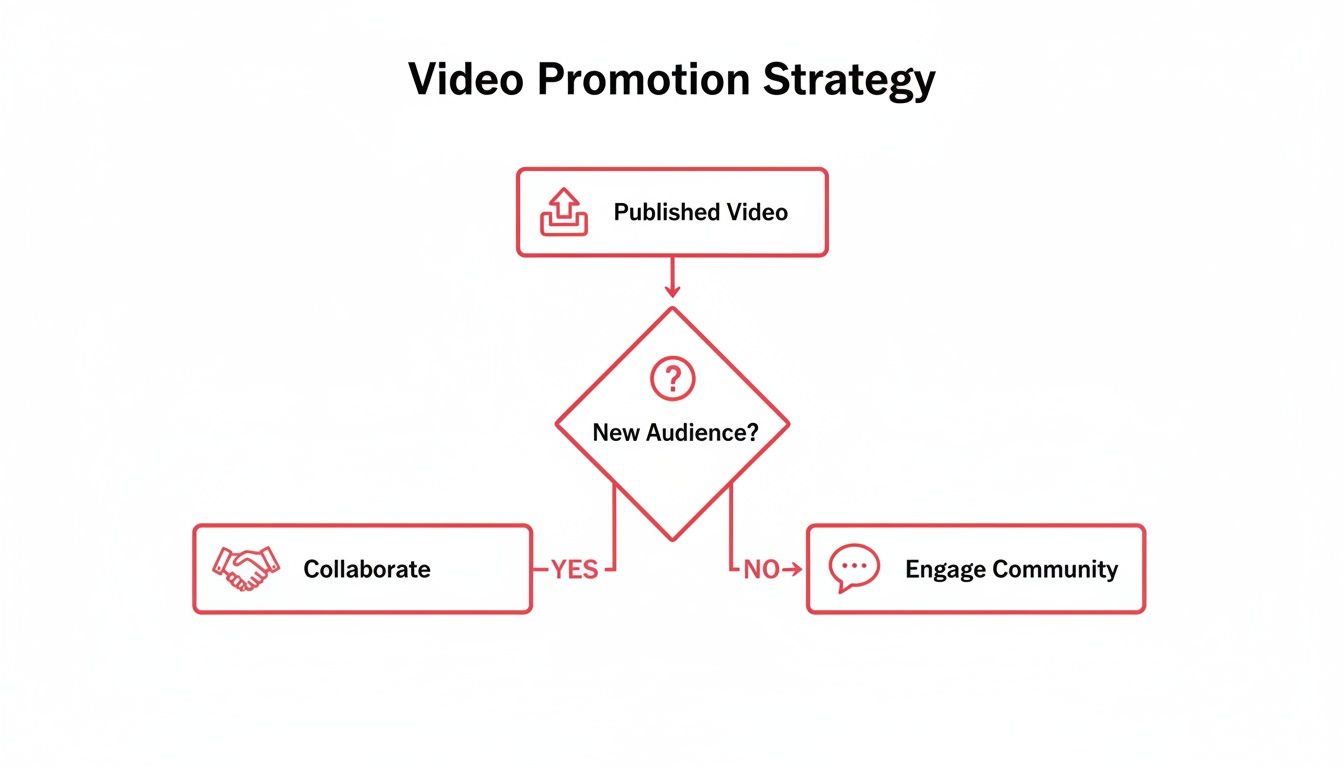
    In the beginning, it's critical. When your channel is new, the YouTube algorithm doesn't know you exist yet. It's your job to bring the first wave of viewers to the party.

    That initial traffic from outside sources sends all the right signals to YouTube—things like watch time and engagement. These signals tell the algorithm, "Hey, people like this video, maybe you should show it to more people here on the platform." The key is to share your content where it adds real value, not just spamming links everywhere.

    A few smart ways to do this include:

    • Sharing your video in relevant subreddits where people would genuinely find it useful.
    • Posting in niche Facebook groups or online forums that align with your topic.
    • Creating eye-catching pins on Pinterest that lead back to your video.
    • Sending your latest video out in an email newsletter to your list.

    Think of external promotion as the spark that gets the algorithmic fire going.


    Ready to stop guessing and start growing? ViewsMax gives you the AI-powered tools and data-driven insights you need to optimize your titles, find the right tags, and make smarter content decisions. Take control of your channel's growth by visiting https://blog.viewsmax.com today.

  • 10 Best Tags for YouTube to Maximize Your Reach in 2025

    10 Best Tags for YouTube to Maximize Your Reach in 2025

    YouTube's algorithm is a complex beast, but one of its most critical signals for understanding and ranking your content is still one of the simplest: your video tags. While titles and thumbnails grab viewer attention, tags work behind the scenes, telling YouTube precisely what your video is about, who it's for, and where it should appear in search results and recommendations. Misusing them is like giving the algorithm a blurry map; using them correctly is like handing it a crystal-clear GPS, directly influencing your visibility and discoverability.

    Many creators either neglect their tags entirely or fill the section with generic, low-impact terms. This is a missed opportunity. A well-crafted tag strategy can be the difference between a video that gets lost in the noise and one that consistently surfaces for the right audience. For a comprehensive overview of effective tagging strategies, consider this article on the 8 Best YouTube Tags for Viral Videos from TimeSkip, which provides a solid foundation. This guide, however, goes deeper into the specific types of tags and the strategic thinking behind them.

    This listicle breaks down the 10 most effective tagging strategies every creator needs to master. We will explore everything from foundational primary keyword tagging to advanced competitor analysis and semantic keyword usage. You'll learn not just what tags to use, but the strategic 'why' behind each one. Expect actionable examples, copy-and-paste tag sets for different niches, and clear guidance on finding the best tags for YouTube videos in any category. We’ll skip the fluff and get straight to the methods that will help you classify your content accurately, reach new viewers, and ultimately grow your channel.

    1. Primary Keyword Tagging

    Primary Keyword Tagging is the cornerstone of any effective YouTube SEO strategy. It involves identifying and using the single most important keyword or keyphrase that accurately describes your video's core topic. Think of it as the main signpost telling YouTube's algorithm exactly what your content is about, enabling it to match your video with the right audience actively searching for that subject.

    This foundational tag should be the first one you add, as it carries the most weight in how YouTube categorizes your video. A strong primary tag directly aligns your content with user search intent, which is a critical first step in finding the best tags for YouTube and boosting your visibility.

    A magnifying glass highlights 'PRIMARY TAG' on a red banner, next to a laptop and notebook on a wooden desk.

    Why It's a Top Strategy

    The primary keyword tag is non-negotiable because it provides immediate context to YouTube's discovery system. Without a clear primary tag, the algorithm has to work harder to understand your video, potentially leading to incorrect categorization and missed opportunities for views. Getting this right is especially crucial for new channels or videos in competitive niches.

    How to Implement Primary Keyword Tagging

    Follow these steps to select and apply the perfect primary tag:

    • Match Your Title and Content: Your primary tag should be an exact or near-exact match of your video title. If your title is "Ultimate iPhone 15 Pro Max Review," your primary tag should be iPhone 15 Pro Max review.
    • Research Search Volume: Before finalizing, use a keyword research tool to check the search volume. Aim for phrases with a healthy search volume (ideally 10K-100K monthly searches) but manageable competition. For assistance in discovering and generating effective primary keywords, a dedicated YouTube Hashtag Generator can be an invaluable resource.
    • Be Specific and Accurate: Your tag must precisely reflect the video’s content. A video about making sourdough bread should have the primary tag how to make sourdough bread, not just baking.

    This focused approach ensures your content is indexed correctly from the start. A similar principle of using highly relevant keywords also applies to YouTube Shorts, where discoverability is paramount. You can explore how targeted keywords increase visibility in our guide on getting more views on YouTube Shorts.

    2. Long-Tail Keyword Tagging

    Where primary keywords lay the foundation, Long-Tail Keyword Tagging builds the framework for attracting a highly engaged, niche audience. These tags are longer, more specific phrases (typically three or more words) that reflect precise user search queries. While they have lower search volume individually, they capture viewers with much higher intent, making them a powerful tool for finding the best tags for YouTube.

    This strategy helps you sidestep the intense competition for broad, single-word tags. Instead of fighting for "gaming laptop," you can directly target viewers searching for exactly what your video offers, such as "best budget gaming laptop under $500." This precision leads to higher click-through rates and better audience retention.

    A red rectangular tag featuring the text 'Long-Tail Tag,' next to a smartphone and a white keyboard.

    Why It's a Top Strategy

    Long-tail keywords are essential because they align perfectly with how real people search. Users often type full questions or detailed phrases into the search bar. By matching these conversational queries, you connect your content directly with an audience that is past the initial discovery phase and is actively looking for specific solutions, reviews, or tutorials, leading to more qualified views.

    How to Implement Long-Tail Keyword Tagging

    Follow these steps to find and use effective long-tail tags:

    • Think Like Your Viewer: Ask yourself what specific questions your video answers. If your video is a tutorial, a great long-tail tag would be how to fix a leaky kitchen faucet. For a product comparison, use a tag like beginner crochet patterns for blankets.
    • Use Search Autocomplete: Type the beginning of a potential keyword into the YouTube or Google search bar and see what suggestions appear. These are popular long-tail queries that users are actively searching for.
    • Target 3-5 Per Video: Include a mix of 3 to 5 highly relevant long-tail tags in your tag list. This helps YouTube understand the specific nuances and sub-topics covered in your video, casting a wider, more targeted net.
    • Focus on Conversational Phrases: Prioritize tags that sound like natural language. Phrases like what is the best camera for vlogging 2024 are far more effective than a jumble of keywords like camera vlogging 2024 best.

    3. Branded Keyword Tagging

    Branded Keyword Tagging is a powerful strategy that involves using tags related to specific brand names, products, or even your own channel name. This approach connects your content to established entities that already have their own search volume and audience interest. By doing this, you tell YouTube that your video is relevant to discussions, reviews, or tutorials surrounding these popular brands.

    This method helps your content appear in suggested video sidebars when users are watching content about that brand. A strong branded tag can effectively piggyback on the existing popularity and search traffic of well-known names, making it a critical technique for finding the best tags for YouTube, especially in review or tutorial-based niches.

    Why It's a Top Strategy

    Branded keyword tags are essential because they tap into high-intent search queries. Users searching for "iPhone 15 review" or "MAC cosmetics tutorial" know exactly what they want to see. By including these tags, you position your content directly in front of this highly motivated audience, increasing the likelihood of clicks, views, and engagement from users who are already invested in the topic.

    How to Implement Branded Keyword Tagging

    Follow these steps to effectively use branded tags:

    • Be Directly Relevant: Only use a branded tag if the brand or product is a central focus of your video. For example, a tech review channel covering the new MacBook Pro should use tags like MacBook Pro and Apple MacBook Pro.
    • Use Official Names and Spelling: Always use the official brand and product names to capture the most accurate search traffic. Tag PlayStation 5, not ps5, unless the acronym is also a highly common search term.
    • Combine with an Action or Topic: Enhance your branded tags by adding context. Instead of just Samsung Galaxy, use tags like Samsung Galaxy S24 camera test or Samsung Galaxy tips and tricks.
    • Include Your Own Brand: Don't forget to create a unique tag for your own channel (e.g., mkbhd or unboxtherapy) and include it in every video. This helps group your content together and encourages YouTube to recommend your other videos to viewers.

    4. Competitor Analysis Tagging

    Competitor Analysis Tagging is a powerful and strategic approach to YouTube SEO that involves researching the tags used by successful videos in your niche. Instead of guessing which keywords will perform well, this method allows you to learn from the proven strategies of high-performing competitors, giving you a significant head start. By analyzing their tags, you can identify effective keywords, understand audience search behavior, and uncover opportunities you might have missed.

    This reverse-engineering tactic is one of the smartest ways to find the best tags for YouTube because it’s based on real-world success data. It helps you align your content with what is already working, tapping into existing traffic streams and positioning your video alongside established content in your field.

    Why It's a Top Strategy

    This strategy is highly effective because it removes much of the guesswork from keyword selection. By studying what top creators are doing, you gain direct insight into the phrases that YouTube’s algorithm already associates with your topic. It’s a shortcut to understanding keyword trends and audience intent, allowing you to compete more effectively even if your channel is smaller or newer.

    How to Implement Competitor Analysis Tagging

    Follow these steps to effectively analyze and leverage competitor tags:

    • Identify Top Competitors: Find 5-10 videos that rank highly for your primary keyword and have strong engagement. Focus on channels with a similar audience or subscriber count to find more relevant and attainable keyword targets.
    • Use SEO Tools to Extract Tags: Manually viewing source code is cumbersome. Use browser extensions or tools like TubeBuddy or VidIQ to instantly view the tags on any YouTube video. This makes the research process fast and efficient.
    • Look for Patterns and Consistency: Analyze the tags across several competitor videos. Note any keywords that appear consistently, as these are likely core to their channel's SEO strategy. For example, a successful cooking channel might always use tags like easy weeknight dinner and 30-minute meals.
    • Adapt, Don't Just Copy: While you can use some of the same tags, always customize them to fit your unique video content. Blend their proven tags with your own specific, branded, and long-tail keywords to create a comprehensive and unique tag list.

    5. Trending Topic Tagging

    Trending Topic Tagging is a time-sensitive strategy that involves piggybacking on current events, viral news, or cultural moments. This approach leverages the massive, albeit temporary, spikes in search volume for trending keywords to give your video an immediate visibility boost. By aligning your content with what audiences are actively searching for right now, you can tap into algorithm momentum and attract a wave of new viewers.

    This method works by inserting your channel into a larger, ongoing conversation. When done correctly, it's one of the fastest ways to get discovered, as YouTube's algorithm often prioritizes fresh content that addresses what's currently popular. It's a key tactic for creators looking for rapid, short-term growth and is one of the best tags for YouTube when timeliness is critical.

    Why It's a Top Strategy

    This strategy is powerful because it capitalizes on urgency and high search intent. During a trending event, like a new product launch or a major news story, user search behavior skyrockets for related terms. Tagging your video with these keywords allows you to ride this wave, capturing traffic that would otherwise be unattainable. It’s particularly effective for news, commentary, and reaction-style channels.

    How to Implement Trending Topic Tagging

    Follow these steps to effectively use trending tags:

    • Monitor Trends Proactively: Use tools like Google Trends and monitor trending sections on platforms like Twitter (X) and TikTok. Set up alerts for keywords relevant to your niche so you can react quickly.
    • Create Responsive Content: Speed is everything. Have video templates or formats ready that allow you to produce and publish content within a few hours of a trend emerging. For instance, a gaming channel might have a "first impressions" format ready for a new game release.
    • Combine Trend with Niche: Don't just copy a trending tag. Connect it to your channel's unique angle. If a new movie trailer drops, a film analysis channel might use tags like new movie trailer reaction and new movie trailer explained.
    • Balance with Evergreen Tags: Mix trending tags (e.g., iPhone 16 launch event) with your standard evergreen tags (e.g., tech reviews, Apple products) to ensure the video has potential for long-term discovery after the initial hype fades.

    This reactive approach is also a fantastic source for new content. For more inspiration on creating timely videos, you can explore our guide on YouTube Shorts ideas that capitalize on trends.

    6. Semantic and Related Keyword Tagging

    Semantic and Related Keyword Tagging is a sophisticated strategy that moves beyond exact phrase matches to include terms with similar meanings or conceptual relationships. YouTube's algorithm is intelligent enough to understand these semantic connections, allowing you to create a richer, more contextualized set of tags. This technique helps the algorithm grasp the nuances of your video, improving its ability to recommend your content to a wider, yet highly relevant, audience.

    This advanced approach essentially builds a web of related concepts around your primary topic, making your video discoverable through a variety of search queries. By incorporating synonyms and related ideas, you are finding some of the best tags for YouTube because you are aligning your content with the natural way users think and search for information, capturing more diverse search intent.

    A desk with a keyboard, a red 'Related Tags' card, numerous small content cards, and office supplies.

    Why It's a Top Strategy

    This strategy is powerful because it casts a wider net without sacrificing relevance. YouTube's discovery system rewards videos that it can confidently understand and categorize. By providing a cloud of semantically related keywords, you give the algorithm more data points to confirm your video's subject matter. This increases the chances of your video appearing in "suggested videos" alongside content on similar topics, a major source of views.

    How to Implement Semantic and Related Keyword Tagging

    Follow these steps to build a comprehensive list of related tags:

    • Brainstorm Synonyms and Variations: Start with your primary keyword and list all possible synonyms and variations. If your main tag is weight loss, related tags could be lose weight, fat burning, diet tips, and fitness training.
    • Analyze Related Searches: Perform a search for your primary keyword on YouTube and Google. Scroll to the bottom of the results page to find the "Related searches" or "People also ask" sections for a goldmine of tag ideas.
    • Focus on Conceptual Links: Think about the broader context. For a Python programming video, related concepts include Python coding, learn Python, and programming tutorial. For a travel vlog, consider tags like adventure travel, travel video, and explore destinations.
    • Use Keyword Tools: Leverage synonym finders or AI writing assistants to generate lists of conceptually related terms you might not have considered, ensuring every tag remains directly relevant to your video's core topic.

    7. Question-Based Tagging

    Question-Based Tagging is a powerful strategy that aligns your video with the natural language people use when searching for answers. It involves using tags formatted as common questions that your audience might type into YouTube or Google, such as 'how', 'what', 'why', and 'where'. This method directly targets user intent, making your content a solution to their specific problem.

    By framing your tags as questions, you optimize for both search engine algorithms and human curiosity. This approach positions your video as a definitive answer, increasing the likelihood of it appearing in highly visible search results and suggested video feeds, making it one of the best tags for YouTube strategies to capture a problem-aware audience.

    Why It's a Top Strategy

    This strategy is highly effective because it mirrors the conversational nature of modern search queries. Viewers often seek direct answers, and a video tagged with how to start a youtube channel is a much stronger match for that query than one tagged simply with youtube channel. It captures high-intent traffic and helps your content rank in Google's "People Also Ask" sections, driving external views.

    How to Implement Question-Based Tagging

    Follow these steps to effectively integrate question-based tags:

    • Align with Your Content: Your video must directly and thoroughly answer the question used in the tag. A video titled "How to Bake Sourdough Bread for Beginners" should have tags like how to bake sourdough bread and what do I need for sourdough bread.
    • Source Real Questions: Use tools like AnswerThePublic or browse the "People Also Ask" box in Google search results for your topic. Look at your own comments section to see what questions your audience is already asking. For instance, if your topic is dog behavior, you might find questions like why do dogs bark at nothing.
    • Target Search Suggestions: Start typing a question related to your video into the YouTube search bar and see what auto-suggestions appear. These are popular, real-time queries that people are actively searching for.
    • Mix Question Formats: Include a variety of question words. For a video on affordable travel, use tags like where to find affordable flights, how to travel on a budget, and what are the cheapest countries to visit.

    8. Audience Demographics and Interest Tagging

    Audience Demographics and Interest Tagging is a strategic approach that goes beyond what your video is about and focuses on who it is for. It involves using tags that describe your target viewer's characteristics, such as their age, location, gender, and specific interests. This method helps YouTube's algorithm connect your content with the viewer segments most likely to engage, subscribe, and become loyal fans.

    By tailoring your tags to a specific audience profile, you tell YouTube that your video is not just for anyone searching a topic, but for a particular community. This precision is a key factor in finding the best tags for YouTube, as it helps build a dedicated viewership rather than attracting fleeting, one-time views.

    Why It's a Top Strategy

    This strategy is powerful because it prioritizes audience-content fit, which is a major signal for YouTube's recommendation engine. When your video resonates strongly with a specific demographic, it leads to higher engagement rates like watch time and shares. The algorithm then promotes your content to more people who fit that same profile, creating a positive feedback loop for growth.

    How to Implement Audience and Interest Tagging

    Follow these steps to effectively target your ideal viewer:

    • Define Your Audience Persona: Before tagging, create a clear profile of your ideal viewer. Are they Gen Z gamers, millennial finance enthusiasts, or women over 40 interested in beauty?
    • Research Their Interests: Brainstorm tags related to the culture, hobbies, and other creators your target audience follows. A gaming channel targeting Gen Z might use tags like Twitch streamers, esports gaming, or gaming memes.
    • Use Demographic-Specific Language: Incorporate tags that reflect how your audience identifies or what they search for. For a finance channel targeting millennials, use tags like millennial money, investing for beginners, and side hustle.
    • Analyze Your Analytics: Use your YouTube Analytics "Audience" tab to see your current demographic breakdown. Refine your tags to either double down on your core audience or expand into a new, desired segment. This is a core component of sustainable channel development, a topic covered extensively in discussions about YouTube growth.

    9. Mixed-Intent Keyword Tagging

    Mixed-Intent Keyword Tagging is a sophisticated strategy that targets viewers at different stages of their search journey. This balanced approach involves using tags that satisfy informational ("how-to"), navigational ("brand-specific"), and commercial ("buy now") intents, allowing your video to appear in a wider variety of search results and capture a broader audience.

    By combining these different types of keywords, you tell YouTube's algorithm that your content is valuable to people with varying goals. For instance, someone just learning about a topic (informational intent) and someone ready to make a purchase (commercial intent) can both discover your video. This is one of the most versatile ways to find the best tags for YouTube, as it maximizes reach across the entire viewer lifecycle.

    Why It's a Top Strategy

    This strategy is powerful because it diversifies your video's potential audience. Instead of only targeting one type of viewer, you attract users with different motivations, which can lead to higher overall views, engagement, and even conversions. It's an effective way to make a single piece of content work harder for your channel by serving multiple purposes.

    How to Implement Mixed-Intent Keyword Tagging

    Follow these steps to build a balanced set of mixed-intent tags:

    • Allocate Based on Intent: A common split is 40% informational, 30% navigational, and 30% commercial tags. For a tech review video, this could mean tags like how digital cameras work (informational), Canon EOS R8 review (navigational), and best camera deals 2024 (commercial).
    • Research Keyword Intent: Before adding a tag, determine its likely intent. Tools like the Google Ads Keyword Planner can help classify keywords, or you can analyze the search results for a term to see what kind of content ranks.
    • Align Tags with Video Content: Ensure the tags accurately reflect segments of your video. If you compare two products before recommending one, you have content that serves both navigational and commercial intent, so your tags should reflect that. A travel channel might use Paris travel tips (informational), Eiffel Tower tour (navigational), and booking Paris flights cheap (commercial).

    10. Location and Language-Specific Tagging

    Location and Language-Specific Tagging is a geo-targeting strategy that involves using tags related to specific cities, countries, or regions, as well as keywords in different languages. This approach narrows your video's focus, telling the YouTube algorithm to prioritize showing it to viewers in a particular geographic area or those who speak a specific language. It’s a powerful method for local businesses, travel vloggers, and any creator aiming to build a strong community in a defined market.

    By adding these localized identifiers, you connect directly with audiences interested in content relevant to their home or culture. This is one of the best tags for YouTube strategies to enhance local discovery and relevance, ensuring your video doesn't get lost in the vast sea of global content. It signals to YouTube that your video serves a specific community, increasing its value to that demographic.

    Why It's a Top Strategy

    This strategy is crucial for maximizing relevance and engagement within a target market. A video about "best coffee shops in London" will perform significantly better with London-based viewers than a generic coffee video. By using tags like London coffee or UK cafe culture, you attract a highly engaged audience more likely to watch, comment, and subscribe because the content is directly applicable to them. It's also essential for creators looking to break into non-English speaking markets.

    How to Implement Location and Language-Specific Tagging

    Follow these steps to effectively target your content geographically and linguistically:

    • Be Specific with Locations: Don't just use a country tag. Drill down to states, cities, or even neighborhoods if relevant. For a video about a Sydney fitness center, use Sydney gym, Perth fitness, and Australian fitness to capture various levels of local interest.
    • Incorporate Local Language: If targeting a Spanish-speaking audience for a cooking video, include tags in both English and Spanish, such as Spanish food, comida española, and recetas de tapas. This captures searches from bilingual and native-speaking viewers.
    • Use Regional Search Trends: Use Google Trends filtered by country or region to discover how local audiences search for your topic. Their terminology might differ from standard keywords, offering a unique SEO advantage.
    • Analyze Your Audience Data: Check your YouTube Studio analytics to see where your viewers are located. If you notice a growing audience in a specific country, start adding tags relevant to that region to nurture that viewership.

    Top 10 YouTube Tag Types Comparison

    Strategy Implementation Complexity 🔄 Resource Requirements ⚡ Expected Outcomes 📊⭐ Ideal Use Cases 💡 Key Advantages ⭐
    Primary Keyword Tagging Low 🔄 — single focused tag, easy to implement Low ⚡ — minimal research; match title/description High 📊⭐ — stronger main-topic ranking and CTR Core topic videos; single-focus content Direct algorithm categorization; high impact on primary searches ⭐
    Long-Tail Keyword Tagging Medium 🔄 — multiple specific phrases needed Low–Medium ⚡ — keyword tools and time for variants Medium–High 📊⭐ — easier to rank; higher intent traffic Niche tutorials, targeted how‑tos, product-specific queries Less competition; higher conversion from intent ⭐
    Branded Keyword Tagging Low 🔄 — add brand/product/channel names Low ⚡ — knowledge of brands and correct spelling Medium 📊⭐ — taps existing brand searches; variable competition Reviews, comparisons, brand-focused content Access to established search traffic; attracts brand-loyal viewers ⭐
    Competitor Analysis Tagging Medium–High 🔄 — research and adapt competitor tags Medium–High ⚡ — tools (VidIQ/TubeBuddy) and time Medium–High 📊⭐ — leverages proven tag combos; reduces guesswork Benchmarking, channels entering competitive niches Identifies proven keywords and gaps to exploit ⭐
    Trending Topic Tagging Medium 🔄 — requires rapid tagging and publishing High ⚡ — real-time monitoring and fast production Very High short-term 📊⭐ — immediate visibility spikes News, reactions, event coverage, viral moments Fast exposure and algorithm momentum during trend windows ⭐
    Semantic & Related Keyword Tagging High 🔄 — research related concepts and synonyms Medium–High ⚡ — semantic tools and deeper research High 📊⭐ — better context understanding; broader discoverability Evergreen content, recommendation-focused videos Improves algorithmic context; captures varied phrasing ⭐
    Question-Based Tagging Medium 🔄 — identify common question queries Low–Medium ⚡ — use PAA, AnswerThePublic, search suggestions Medium–High 📊⭐ — good for voice search and SERP features Tutorials, FAQs, educational content Aligns with natural queries; boosts Google/voice visibility ⭐
    Audience Demographics & Interest Tagging Medium 🔄 — define personas and tag accordingly Medium ⚡ — analytics, testing, and audience research Medium 📊⭐ — higher engagement and retention from target groups Niche audiences, community building, monetization strategies Targets right-fit viewers; improves engagement and subscriptions ⭐
    Mixed-Intent Keyword Tagging High 🔄 — balance informational, navigational, commercial tags Medium–High ⚡ — planning, intent research, ongoing optimization High 📊⭐ — captures viewers across funnel; better monetization Channels seeking conversions across stages (awareness→purchase) Maximizes reach across user intents; diversified traffic sources ⭐
    Location & Language-Specific Tagging Medium 🔄 — add geo and language variants correctly Medium ⚡ — localization, native validation, regional research Medium 📊⭐ — improved local recommendations and relevance Local businesses, travel, multilingual channels Targets regional audiences; reduces irrelevant impressions; boosts local discovery ⭐

    Turning Your Tags into a Growth Engine

    You’ve made it through the comprehensive guide to the best tags for YouTube, and by now, one thing should be crystal clear: YouTube tags are not just an afterthought. They are a fundamental pillar of your channel's discoverability and a direct line of communication with the platform's algorithm. Moving beyond simply stuffing the tag box with random keywords, you now possess a strategic framework to transform this metadata into a powerful growth engine.

    We've explored the ten essential pillars of a robust tagging strategy, from foundational Primary and Long-Tail Keywords to the more nuanced tactics of Competitor Analysis and Semantic Tagging. Each type of tag serves a unique purpose, working in concert to create a comprehensive "signal cloud" around your video. This is the key takeaway: success isn't about finding one perfect tag; it's about building a diverse, layered, and contextually rich set of tags that tells YouTube precisely who your video is for and what it's about.

    Your Path to Tag Mastery: Key Takeaways

    To truly harness the power of your tags, distill the insights from this article into a consistent, repeatable workflow. Here are the most critical takeaways to implement immediately:

    • Embrace a Multi-Layered Approach: Your tag list should be a blend. Start with a core primary keyword, expand with specific long-tail variations, add your branded tag for channel cohesion, and sprinkle in semantic and competitor tags to capture related and adjacent audiences. This diversity is your greatest strength.
    • Think Like a Viewer: The most effective tags are born from empathy. Put yourself in your audience's shoes. What questions are they asking? What problems are they trying to solve? Use Question-Based and Audience Interest tags to meet them exactly where they are in their search journey.
    • Audit, Analyze, and Adapt: Your work isn't done after you hit "publish." Regularly dive into your YouTube Analytics, specifically the "Traffic Sources > YouTube Search" report. This is your report card. It shows you which tags are actually driving views, allowing you to double down on what works and refine what doesn't for future uploads.
    • Consistency is Your Algorithm Ally: The consistent use of branded tags and a core set of niche-specific keywords across your videos helps YouTube understand your channel's authority on a particular topic. This builds momentum over time, making it easier for the algorithm to recommend your content to the right viewers.

    From Theory to Tangible Growth

    Mastering the use of the best tags for YouTube is a direct investment in your channel’s long-term health and visibility. It’s the difference between hoping for views and strategically engineering them. By implementing these practices, you are actively increasing the surface area of your content, making it discoverable through countless search queries and recommendation pathways.

    This isn't just about a temporary spike in traffic. It's about attracting a sustainable stream of highly relevant viewers who are more likely to subscribe, engage, and become loyal members of your community. Every tag is an opportunity, a new doorway for someone to find your content. Start treating your tag section with the strategic importance it deserves, and you will unlock a new level of consistent, organic growth for your channel.


    Ready to put these advanced tagging strategies on autopilot and save hours of research? ViewsMax uses powerful AI to analyze top-ranking videos in your niche, generating optimized tag suggestions that align with the best practices we've covered. Stop guessing and start growing by leveraging data-driven insights with a single click at ViewsMax.