So, what exactly is YouTube monetization? Put simply, it’s the process of earning money from the videos you create and upload.
Think of your channel like a digital storefront. You stock the shelves with great content, and monetization is how you open for business and start making sales.
Unpacking Your Creator Toolkit
Becoming a monetized creator isn't about flipping a single switch. Instead, YouTube hands you a whole toolkit filled with different ways to build an income. Each tool works a bit differently, and some will be a better fit for your channel and audience than others.
The one everyone knows is ad revenue—getting a cut from the ads that run on your videos. But that’s just the tip of the iceberg. The platform has evolved to offer a ton of ways to earn directly from your community, brand partners, and even YouTube itself.
The 8 Main Ways to Earn on YouTube
To really get what monetization is, you need to see it as a collection of different opportunities, not just one paycheck. The most successful creators I know rarely rely on a single income source; they mix and match several methods to build a much more stable and reliable business.
Let's quickly break down the primary tools in your monetization toolkit.
To give you a bird's-eye view, here's a quick summary of the most common ways creators earn money on the platform.
YouTube Monetization Methods at a Glance
| Monetization Method | How It Works | Best For |
|---|---|---|
| Ad Revenue | You earn a share of the money from ads shown on or around your videos. | All eligible channels; a foundational income stream. |
| Channel Memberships | Viewers pay a monthly fee for exclusive perks like badges, emojis, and members-only content. | Channels with a dedicated, loyal community. |
| Super Chat & Stickers | Fans can buy highlighted messages or animated stickers during live streams and Premieres. | Creators who do live streams and engage with their audience in real time. |
| Super Thanks | Viewers can buy a fun animation on a video page to show extra appreciation. | Any creator looking for a simple way for fans to show support on-demand. |
| YouTube Premium | You get a portion of a viewer's subscription fee when they watch your content. | All monetized channels, as it's a passive income stream. |
| Merchandise Shelf | You can showcase and sell your own branded products directly below your videos. | Creators with a strong brand identity and engaged fanbase. |
| Brand Deals | You partner with brands for sponsored content or affiliate marketing. | Channels of all sizes, but especially those with a defined niche. |
Each of these methods opens up a new potential revenue stream for your channel.
A common mistake is thinking monetization is only about ads. The reality is, a diversified strategy that taps into fan funding and brand deals almost always leads to more significant and stable earnings over time.
To understand the bigger picture of how creators make money online, exploring general monetization strategies can be a real eye-opener. For now, let's dive into each of these YouTube-specific tools so you can figure out how to unlock and make the most of them for your channel.
Unlocking Your Earnings with the YouTube Partner Program
Before you can turn your creative passion into a paycheck, you have to get the keys to the kingdom. On YouTube, that key is the YouTube Partner Program (YPP), the official gateway that unlocks all the money-making features on the platform. Think of it as your formal entry into YouTube's bustling creator economy.
But joining the YPP isn't automatic; it's a milestone you have to earn. YouTube has put some clear benchmarks in place to make sure creators have built a real, engaged audience and are consistently playing by the rules before they can start earning. It's a system designed to protect everyone—viewers, advertisers, and other creators—from low-effort or harmful content.
The Milestones You Need to Hit
To even be considered for the YPP, your channel has to meet some specific thresholds. These numbers aren't arbitrary; they show YouTube that you have a proven track record of getting people to watch and stick around.
The primary requirements are:
- 1,000 Subscribers: This is the first big signal that you’ve built a foundational community that actually cares about what you're making.
- 4,000 Public Watch Hours: This one is a bit trickier—it has to be accumulated over the last 12 months. It proves your content isn't just getting clicks, but is genuinely holding people's attention.
There's also a path for creators who live and breathe short-form content. You can qualify with 1,000 subscribers and 10 million valid public Shorts views in the last 90 days. Hitting these numbers is your ticket to apply. It’s also smart to keep an eye on platform updates, since these things can shift. You can read up on recent changes in YouTube to stay in the loop.
It's More Than Just Numbers: You Have to Follow the Rules
Hitting your subscriber and watch time goals is really only half the battle. To get accepted into—and, just as importantly, stay in—the YPP, you have to be a stickler for YouTube's policies.
Your channel must have zero active Community Guideline strikes and follow all YouTube channel monetization policies, including the AdSense Program policies. This is non-negotiable for long-term success.
This boils down to creating original, advertiser-friendly content that respects copyright law and doesn't violate community standards. Once you meet the eligibility numbers, you’ll submit your application right from YouTube Studio. From there, a real human on the review team will manually go through your channel—your videos, your themes, your descriptions—to make sure everything aligns with their guidelines.
The financial incentive for playing by the rules is massive. YouTube’s ad revenue recently shot up to $36.1 billion, a 14.6% jump from the previous year. For creators in the YPP, a piece of that enormous pie is up for grabs, with the standard revenue share sending 55% of ad earnings straight to your pocket. This really drives home why understanding and following the rules isn't just a suggestion; it's critical to your success.
Your Primary Income Streams: Ads and Premium
Once you get that "Congratulations, you're in!" email from the YouTube Partner Program, you unlock the two most fundamental ways to make money: ad revenue and YouTube Premium revenue.
Think of these as the foundation of your channel's earnings. They're the consistent, mostly passive income sources that scale directly with your audience. Getting a solid grip on how they work is the first real step toward building a predictable income from your content.
The process itself is pretty simple once you're approved.
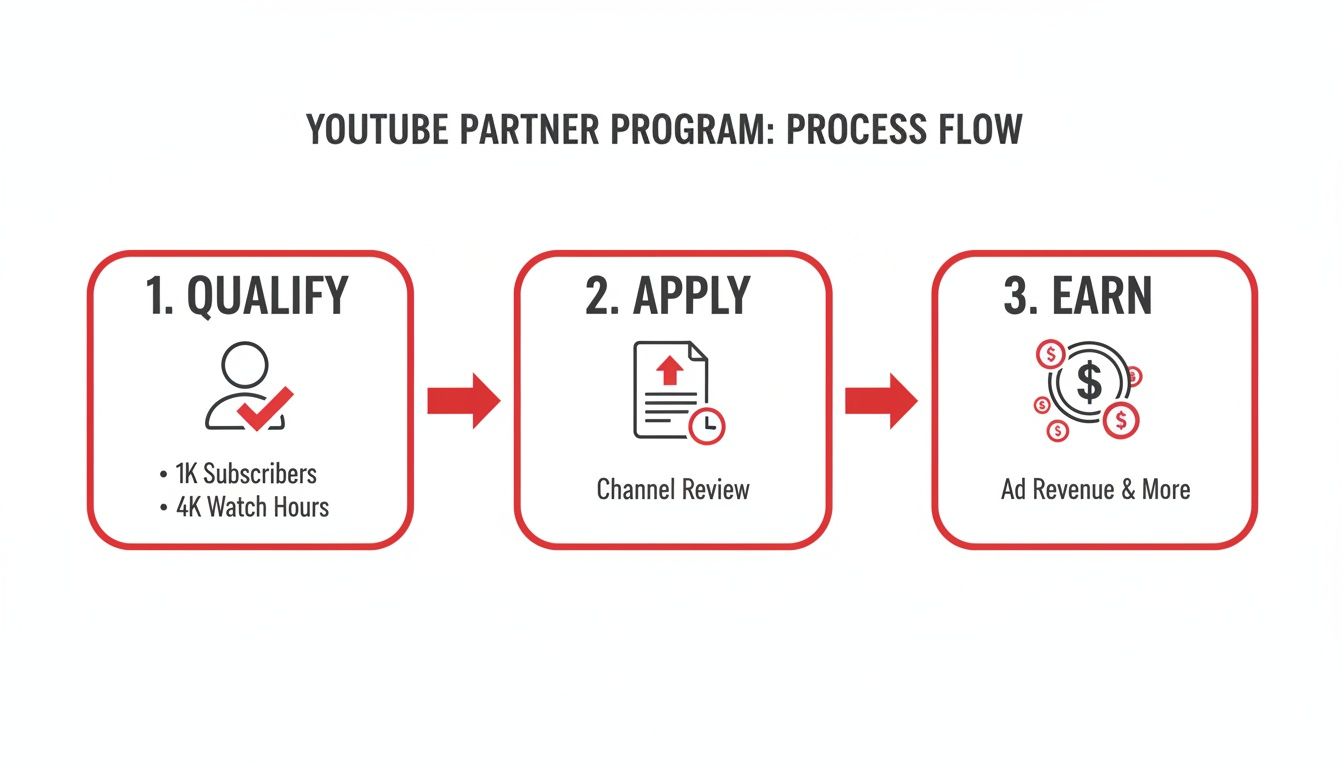
This graphic really boils it down: meet the thresholds, get approved, and you're officially in the business of earning. So, let's break down what those earnings actually come from.
Decoding Your Ad Revenue
When people talk about YouTube monetization, ads are usually the first thing that comes to mind. Once you flip the switch, YouTube will start placing different types of ads on your videos—like the skippable ones you see before a video or the short, non-skippable ones. For every ad that runs on your content, you get to keep a 55% share of what the advertiser paid.
Everything is handled through Google AdSense, which you’ll link to your channel to process all the payments. A common misconception is that more views automatically mean more money, but it's more nuanced. Your earnings depend heavily on who is watching, what they're watching, and where they're watching from.
You'll quickly run into two key metrics in your analytics:
- CPM (Cost Per Mille): This stands for "cost per 1,000 impressions." It's what advertisers are paying to have their ads shown 1,000 times across YouTube. It’s an advertiser-focused metric.
- RPM (Revenue Per Mille): This is your "revenue per 1,000 views." This is the number that really matters to you. It shows your total earnings (from ads, Premium, and more) for every 1,000 video views, after YouTube has taken its cut.
Things like your channel's niche, your audience's location and age, and even how long your videos are can cause these numbers to swing wildly. If you want to get into the nitty-gritty, our guide on the meaning of CPM on YouTube breaks it all down.
Earning with YouTube Premium
There's another powerful revenue stream that often flies under the radar: YouTube Premium. This is the platform's ad-free subscription service, and it creates a completely separate way for you to get paid. When a Premium subscriber watches your video, you earn a portion of their monthly subscription fee.
The calculation is pretty straightforward: it’s based on how much watch time you get from Premium members. The more a Premium subscriber watches your channel, the bigger your piece of the revenue pie.
This is a bigger deal than you might think. YouTube Premium has been growing like crazy, recently hitting 125 million subscribers—that's a massive 25% jump from just 100 million. It took seven years for the service to reach 50 million subscribers, but only two more years to more than double that number.
This signals a huge shift in how people consume content. For creators with dedicated audiences, especially in fields like education or coaching where viewers are highly engaged, Premium revenue can sometimes even outpace ad revenue on a per-view basis.
Building Community with Fan Funding Features

Ad revenue is a great starting point, but it's a passive stream that can swing wildly from month to month. The real key to understanding YouTube monetization is building a direct, authentic connection with your audience. That’s where fan funding comes in.
These tools empower your most dedicated viewers to support you directly, turning them from casual watchers into true patrons of your work. Think of it like this: ads are like a radio station playing commercials for everyone, while fan funding is like selling tickets to your own private concert. It’s a far more stable and personal way to earn because it's built on relationships, not just algorithms.
Turn Your Channel into a VIP Club with Memberships
Channel Memberships are essentially YouTube's built-in version of Patreon. Your viewers can pay a small monthly fee to join your channel's "club," unlocking special perks that you get to design.
This is where you can let your creativity run wild and offer genuine value that your public videos don't. Some of the most successful perks I've seen include:
- Custom Emojis and Badges: Members get special emojis to spam in the comments and a loyalty badge next to their name that levels up over time. It's a simple, visual way to recognize your top supporters.
- Exclusive Content: Think behind-the-scenes vlogs, early access to new videos, or even members-only live streams where you can hang out in a more intimate setting.
- Community Access: Many creators set up a members-only Discord server or a private section in their channel's Community tab.
You can set up multiple tiers—like Bronze, Silver, and Gold—with increasingly valuable perks. This gives everyone a chance to support you at a level they're comfortable with.
The secret to great fan funding isn't just about asking for money. It's about creating an experience so cool and exclusive that your community genuinely wants to be part of it.
Make Live Streams Interactive with Supers
During a live stream or a video Premiere, the chat can fly by at a million miles an hour. "Supers" are a way for your audience to pay to make their message pop, and it's an incredible tool for boosting engagement and earnings during live events.
There are a few different types of Supers you'll see:
- Super Chat: A viewer pays to have their comment highlighted in a bright, flashy color. It gets pinned to the top of the chat for a certain amount of time—the more they pay, the longer it stays.
- Super Stickers: Instead of a message, viewers can buy fun, animated stickers that appear in the chat feed. It's a quick, visual way to show support and get your attention.
- Super Thanks: This is basically a tip jar for your regular, pre-recorded videos. A viewer can buy a colorful animation that plays right over your video, and their comment will be highlighted in the comments section to show their appreciation.
These features make supporting you feel like a game. It's interactive, it's fun, and it gives you a chance to shout out your biggest fans in real-time, which only strengthens that community bond you've been working so hard to build.
Monetizing Your Brand Beyond YouTube
While YouTube's built-in tools are great starting points, the most successful creators know their channel is a launchpad, not the final destination. Real, sustainable growth comes from building a brand that can stand on its own, independent of any single platform.
It's a mental shift—from thinking like a YouTuber to thinking like a business owner.
This is where you graduate from earning a slice of YouTube's ad revenue to creating and controlling your very own income streams. These off-platform methods often have a much higher ceiling for earnings because you're the one setting the prices and keeping the lion's share of the profits. You’re turning your hard-earned influence into a tangible, independent business.
Selling Your Own Products
One of the most powerful ways to do this is through YouTube Shopping. This handy feature lets you link your own online store, like one built on Shopify or Spring, directly to your channel. Your products show up in a slick "merchandise shelf" right under your videos, making it ridiculously easy for fans to shop without ever leaving the page.
And this goes way beyond just slapping your logo on a t-shirt. Think about what your audience actually needs or wants.
- A fitness creator? Sell custom workout plans or branded resistance bands.
- An artist? Offer prints of your work, digital brush packs, or your favorite art supplies.
- A gaming channel? Think custom mousepads or inside-joke apparel that only true fans will get.
When you create products that genuinely solve a problem or resonate with your community’s identity, you’re building a revenue stream that’s both valuable and scalable.
The real magic of selling your own merch is that you control everything: the product, the price, and the direct relationship with your customers. This helps insulate your business from the whims of ad rates or algorithm changes.
Partnering with Brands and Affiliates
Another massive opportunity lies in working directly with brands. This happens outside of YouTube's built-in systems and usually takes two forms:
- Sponsorships: A brand pays you to create content featuring their product. This could be a whole dedicated video or just a quick mention.
- Affiliate Marketing: You promote a product using a special link or a discount code. For every person who buys through that link, you get a commission.
The absolute key to making this work is authenticity. Your audience trusts you. Don't break that trust by promoting something you don't actually believe in. A single inauthentic partnership can do lasting damage to your credibility. As your channel grows, you'll also see that short-form video opens up new doors for these kinds of deals. We dive deeper into that in our guide on how to make money on YouTube Shorts.
Common Questions About YouTube Monetization
Diving into the world of YouTube monetization can feel like navigating a maze. Lots of questions pop up, especially when you're just starting out. Getting clear answers from the get-go can save you a ton of headaches and help you avoid common pitfalls.
Let's clear up some of the most frequent questions creators have about earning money on YouTube.
How Long Does It Take to Make Money?
This is the big one, and the honest answer is: it depends entirely on how quickly your channel grows. There's no magic number. Before you can earn a single penny from ads, you have to get into the YouTube Partner Program (YPP).
To even apply for the YPP, you need to hit two key milestones: 1,000 subscribers and 4,000 hours of public watch time within a 12-month period. Some creators knock this out in a few months of dedicated effort, while for others, it can take a year or more.
Once you hit those numbers and apply, YouTube's team will review your channel, which can take up to a month. If you're approved, you can finally switch on monetization. But even then, the money doesn't just show up in your bank account. You only get paid once your AdSense earnings reach the $100 payment threshold.
Do I Pay Taxes on YouTube Earnings?
Yes, absolutely. Any money you earn from YouTube is considered taxable income. For tax purposes, you're usually treated as a self-employed individual or a small business owner. This means you are responsible for tracking your income and reporting it to the tax authorities in your country.
Google will ask you to fill out tax forms in your AdSense account, and depending on where you live, they might even withhold a portion of your earnings for taxes.
Treat your channel like a business from day one—this is non-negotiable. I always recommend consulting with a tax professional. They can help you understand your obligations, find eligible deductions (like new gear or software!), and set up a system to manage your finances correctly.
Can I Monetize Videos with Copyrighted Music?
This is a huge minefield for new creators. Using popular, copyrighted music without a license is a surefire way to get your video demonetized.
Most of the time, the song's owner will hit your video with a Content ID claim. When this happens, they get to place ads on your video and keep 100% of the revenue. It's their music, so it's their money. To play it safe and actually earn from your hard work, stick to music from the YouTube Audio Library or use a trusted royalty-free music service where you pay for a license.
Thinking beyond ads is also smart. To diversify your income, you can explore tools that offer YouTube integrations for enhanced content, which can open up new avenues for sales outside the platform.
Ready to turn your passion into a profession? ViewsMax gives you the AI-powered tools to optimize your titles, tags, and descriptions, helping you meet those monetization thresholds faster. Grow your channel with confidence by visiting https://blog.viewsmax.com.
Leave a Reply