So, what exactly is a YouTube content calendar template? Think of it as a pre-built roadmap for your channel, usually in a spreadsheet or a project management tool. It's designed to help you plan, schedule, and keep track of all your videos in one place. This isn't just about jotting down dates; a great template helps you turn the chaos of random uploading into a smooth, organized process that prevents burnout and keeps you on track.
It’s where you’ll brainstorm ideas, track your production status, and even map out your SEO keywords to give every video the best possible chance to succeed.
Why a Content Calendar Is Your Secret Weapon for Growth
Let's be real for a second: uploading videos whenever you feel like it gets you random, unpredictable results. If you're tired of staring at flatlining analytics and wondering what you're doing wrong, the answer isn't always to work harder—it's to work smarter. A content calendar is the strategic engine that signals to both the YouTube algorithm and your viewers that you're a reliable creator. It’s what separates the hobbyists from the pros.
Flying without a plan means you're always in reactive mode. You're constantly scrambling, and that dreaded "what should I post today?" paralysis sets in. This kind of inconsistency is a red flag for the YouTube algorithm, which heavily favors channels that publish on a predictable schedule.
Turning Chaos into a Streamlined Machine
Having a structured plan completely changes the game. It opens the door to batching your content—a life-saving technique where you knock out similar tasks in dedicated time blocks. Imagine spending a Monday just scripting four videos, and then using Tuesday to film all of them. This is infinitely more efficient than tackling one video from start to finish, then starting all over again.
This approach is your best defense against creator burnout. By taking the daily pressure of what to create off your shoulders, your calendar becomes your guide, telling you exactly what needs to get done and when.
A content calendar isn’t about restricting creativity; it's about creating a structure that gives your creativity the space to flourish. When you don't have to worry about the 'what' and 'when,' you can focus entirely on making your videos great.
The Power of Predictable Publishing
On YouTube, consistency is king. When your audience knows you drop a new video every Tuesday and Friday, they’re far more likely to subscribe and hit that notification bell. You're building a reliable appointment with them, creating a loyal community that actually looks forward to your content.
The algorithm pays close attention to this, too. Regular uploads tell YouTube your channel is active and delivering value, which often results in your videos getting recommended more frequently. I once worked with a small gaming creator who was stuck with sporadic uploads and stagnant views. After we implemented a simple calendar and committed to three videos a week, their views jumped by 35% in just a couple of months. It’s proof that the algorithm rewards that kind of discipline.
Laying the Foundation for Strategic Growth
Your calendar is much more than a simple schedule; it's a strategic growth document. This is where you can intentionally plan a diverse mix of content to keep your audience hooked.
A healthy mix might include:
- Pillar Content: Your big, in-depth, high-value videos that are evergreen and designed to attract new subscribers.
- Community Content: Things like Q&As, behind-the-scenes vlogs, or live streams that nurture the audience you already have.
- Trending Topics: Quick-turnaround videos that let you tap into viral trends or news within your niche.
Plotting this mix out on your calendar ensures you maintain a balanced strategy that fuels long-term growth. To really kick things into high gear, incorporating actionable YouTube Shorts best practices into your calendar can make a huge difference.
It lets you zoom out, see the bigger picture, spot content gaps, and build a library of videos that all work together to grow your channel. This disciplined approach is the foundation for everything else you do.
Choosing the Right Content Calendar Template for You
Your workflow is unique, and your content calendar should be too. A solo creator filming vlogs on a phone has a completely different set of needs than a small agency juggling multiple client channels. The best youtube content calendar template is the one that slots right into how you already work—not one that shoehorns you into a rigid, complicated system.
The point isn't just to have a schedule. It's to build a central hub for your entire video production machine. This is where you'll track everything from half-baked ideas and script drafts to SEO keywords and thumbnail variations. Getting the format right from the start is the first step toward making that happen.
Your Downloadable Template Options
To get you up and running right away, we’ve put together three different templates. Each one is built for a different style of creator, so there’s no single “best” option—just the one that’s best for you.
-
Google Sheets Template: Perfect for collaborators and anyone who loves simplicity and needs access from anywhere. It’s the classic spreadsheet approach, but supercharged for teamwork with real-time edits and comments.
-
Notion Template: This one is for the all-in-one organizer. If you want to connect your calendar directly to scripts, mood boards, and task lists, Notion is your answer. Think of it less like a spreadsheet and more like a dynamic, interconnected database for your entire channel.
-
Excel Template: The go-to for offline power users and data nerds who live by formulas, filtering, and keeping everything self-contained on their own computer.
So, which one should you pick? It really boils down to your team size, how you manage your other creative files, and whether you need to be in the cloud 24/7.
Don't overcomplicate it. The best content calendar is the one you actually stick with. Start with the format that feels most intuitive, and you can always add more bells and whistles later on.
Comparison of Content Calendar Template Formats
To help you decide, let's look at what really sets these formats apart. Each one has its own strengths and weaknesses, depending on what you’re trying to accomplish.
This quick table breaks it all down.
| Template Format | Best For | Pros | Cons |
|---|---|---|---|
| Google Sheets | Solo creators and small teams needing easy collaboration and cloud access. | • Free and universally accessible • Real-time collaboration is seamless • Easy to customize and share |
• Can get sluggish with tons of data • Lacks advanced database features |
| Notion | Creators who want an all-in-one workspace to manage the entire content lifecycle. | • Highly visual and flexible • Can link calendar entries to other documents • Excellent for project management |
• Steeper learning curve • Can be overkill if you just need a simple schedule |
| Excel | Data-focused creators or those who prefer working offline without cloud dependency. | • Powerful data sorting and filtering • Works entirely offline • Familiar interface for many users |
• Collaboration is clunky and difficult • Not built for real-time team updates |
Ultimately, your choice should feel like it's helping your creative process, not getting in the way. If you're a team of one, the robust project management features in Notion might be more than you need. But if you're trying to coordinate with a scriptwriter and an editor, the real-time commenting in Google Sheets could be a total game-changer for your workflow.
The best part? You can always switch. Give one a try, and if it doesn't click, don't be afraid to jump to another.
Bringing Your Video Ideas to Life Inside the Calendar
Alright, this is where your planning pays off. A filled-out YouTube content calendar template is a great start, but now we need to turn that list of ideas into a real, functioning production line that consistently puts out great, optimized videos. This isn't just about filling in a spreadsheet; it's about creating a system that frees up your brainpower for the creative stuff.
It all begins with your 'Video Ideas' column. Don't let this become a digital junk drawer. Instead, treat it like a curated gallery of validated topics. Put yourself in a viewer's shoes: What problems are they trying to solve? What are they curious about? I often use tools like Google Trends or just peek at YouTube’s own search suggestions to see what people are actually typing into that search bar.
So, if you run a cooking channel, "cake recipe" is way too broad. Think more specific, searchable titles like "10-Minute Mug Cake Recipe" or "How to Bake a Vegan Chocolate Cake." Those are the kinds of ideas that get clicks.
From Vague Idea to Video in Production
Once you’ve got a solid bank of ideas, the calendar starts to work its magic. The real trick is to physically move an idea across your production status columns. Seeing that visual progress is incredibly motivating and stops you from feeling buried by the sheer amount of work that goes into one video.
A typical workflow I see with successful creators looks something like this:
- Idea: The initial concept, confirmed to have audience interest.
- Outline/Scripting: The video's skeleton gets built. Here you’ll jot down key points, calls-to-action, and the story you want to tell.
- Filming: Time to get the raw footage.
- Editing: You piece it all together, add graphics, and create the final cut.
- Ready for Upload: The finished video, just waiting for its big debut.
Let’s walk through a real-world example. A tech reviewer has an idea: "New Smartphone Teardown." They drag it from the idea list into 'Scripting.' They outline the key components to show off and the tests they'll run on camera. After filming, the card moves to 'Editing,' where they'll add B-roll and graphics. This step-by-step tracking ensures nothing important gets missed in the final push.
Get a Head Start on Your SEO
This is a big one. So many creators treat SEO as something they slap on at the last minute. Your calendar is the perfect place to do this work upfront. Every single video idea should have dedicated spots for its core SEO elements. By getting this done early, you make sure every video is ready for discovery the second it goes live.
Your YouTube content calendar is more than a schedule; it’s a pre-optimization tool. Filling out titles, descriptions, and tags during the planning phase turns a last-minute chore into a strategic advantage.
Make sure your template has fields for these essentials:
- Target Keyword: The main search phrase you want to rank for.
- Video Title: A working title that's catchy and includes your keyword.
- Description Outline: A basic template for the description, complete with links, timestamps, and a keyword-rich summary.
- Tags: A list of 5-10 relevant tags, mixing broad terms with more specific ones.
Honestly, this pre-planning is a total game-changer. For a DIY channel planning a "Build a Bookshelf" video, the target keyword might be "DIY bookshelf." While scripting, they can draft a title like "How to Build a Simple DIY Bookshelf in a Weekend" and list out tags like "DIY projects," "woodworking for beginners," and "bookshelf build."
The infographic below shows how to pick the right tool to manage all this. It's a simple choice, but an important one.
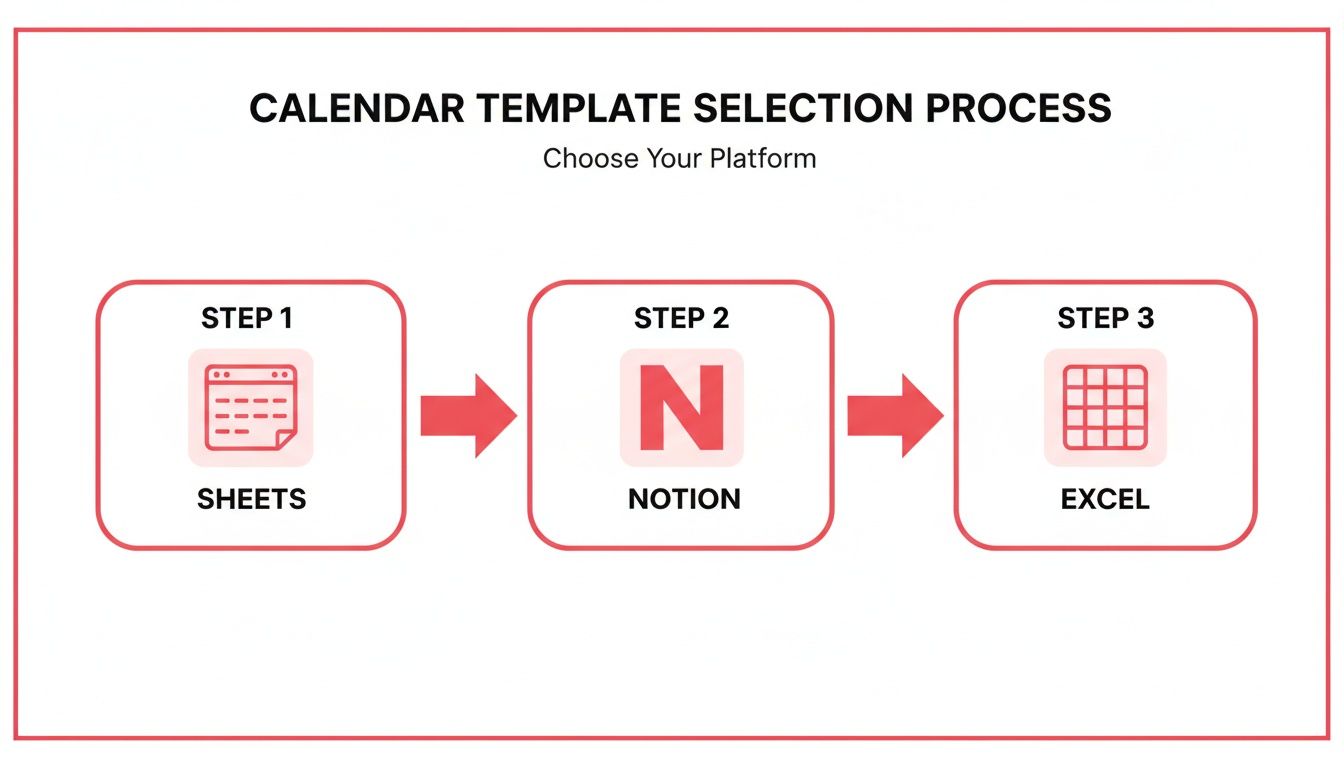
As you can see, the tool you choose—whether it's Sheets, Notion, or Excel—really just needs to fit how you work and who you're working with.
Don't Forget Different Content Formats
Your calendar should also be flexible enough to handle different video formats, especially YouTube Shorts. Since Shorts are usually way faster to produce, they need their own lightweight workflow. I like to use a 'Format' column or simply color-code my entries. This lets me see my content mix at a glance and make sure I’m balancing those epic long-form videos with quick, discoverable short-form content.
If you need some inspiration, check out our guide with some killer YouTube Shorts ideas you can drop right into your new calendar.
Finally, as you’re bringing these ideas to life, always keep the platform's rules in mind. The planning stage is the perfect time to source royalty-free music or double-check that your clips fall under fair use. There are some great tips on how to avoid copyright strikes on YouTube that can prevent a lot of future pain. Add this to your pre-production checklist in the calendar, and you'll be building a much safer, more sustainable channel.
Finding Your Ideal Publishing Rhythm for Maximum Impact
Let's get one thing straight: "post consistently" is terrible advice. It's not wrong, but it's not helpful either. What does "consistently" even mean for you? Your ideal publishing rhythm isn't about hitting some arbitrary quota that leads to burnout. It's about finding a sustainable pace that your audience learns to expect and the YouTube algorithm learns to trust.
This is where your YouTube content calendar template becomes your best friend. It’s the perfect place to map out different scheduling models and find that sweet spot between making great videos and, you know, having a life. Some creators absolutely crush it with a high-volume schedule; others build empires on one fantastic video a week. There's no single right answer.
Balancing Deep Dives with Quick Hits
So many creators fall into the trap of thinking it's an either/or game: long-form videos or Shorts. The truth is, the most successful channels are blending both beautifully.
A fantastic starting point for most channels is a rhythm of two videos per week—one meaty, in-depth piece and one or two Shorts to supplement it. This approach is powerful because it caters to two different viewer mindsets: the person searching for a detailed solution and the person scrolling for a quick hit of entertainment.
Think about it. Your long-form videos are what build your authority and create a real community. But your Shorts? They're your discovery engine. With Shorts pulling in an incredible 200 billion daily views and accounting for 10% of all watch time on the platform, you're leaving a massive audience on the table by ignoring them.
Sample Cadences for Different Channel Types
What works for a daily vlogger would be a recipe for disaster for someone creating animated documentaries. Your niche plays a huge role in dictating a realistic and effective schedule.
Here are a few real-world examples you can plug into your own calendar and adapt:
- The Educator/Tutorial Channel: Drop one comprehensive, evergreen tutorial every Tuesday. Then, follow it up with two Shorts on Thursday and Saturday that pull out quick, actionable tips from that main video. It's a brilliant way to reinforce your core content.
- The Gaming Channel: Post two longer "Let's Play" episodes on Monday and Friday. Throughout the week, pepper in daily Shorts showcasing funny moments, epic wins, or quick game tips. This gives dedicated fans the deep dives they want while using clips to attract new viewers.
- The Lifestyle/Vlog Channel: Release one main weekly vlog on Sunday. Then, publish 3-4 Shorts during the week with "day in the life" clips, an outfit of the day, or a quick product find. This keeps your channel feeling active and personal between the big uploads.
The real goal here is to build an appointment with your audience. When they know you have a new video coming every Friday morning, they’ll start showing up for it. Your calendar is how you lock in those appointments and prove you're reliable.
Integrating Shorts for Maximum Discovery
Please, don't treat Shorts as an afterthought. They are one of the most powerful tools you have for getting in front of people who would never have found your channel otherwise. Use your calendar to be strategic about when they go live. A great tactic is to schedule them during peak mobile usage times, like lunch breaks or evening commutes.
The secret is figuring out when your specific audience is most active. You can get a much clearer picture by reading our guide on the best time to upload YouTube videos to really dial in those golden hours. Use your calendar to test different posting slots for your Shorts and pay close attention to how they perform in the first few hours.
Ultimately, your perfect rhythm is the one you can stick with for the long haul. Use your content calendar not just for scheduling, but for experimenting. Try a new cadence for a month, watch your analytics like a hawk, and see how your audience—and your own energy levels—respond. Your calendar isn't set in stone; it's a living document that should grow and change right along with your channel.
How to Automate and Optimize Your Calendar Workflow
Having a solid YouTube content calendar template is a great first step, but let's be honest—if it just creates more admin work, what's the point? The real magic happens when your calendar stops being a static spreadsheet and starts working for you. It should be a dynamic tool that actively helps your channel grow, not just a list of dates.
It's time to build a smarter, more automated workflow.
The first and easiest win is to eliminate those last-minute panics. We’ve all been there: a video is set to go live in an hour, and you suddenly realize you completely forgot to make the thumbnail. A few simple automations can make that a thing of the past.
Set Up Automated Reminders and Notifications
Whether you're using a tricked-out Google Sheet, Notion, or a dedicated tool like Monday.com, most have automation features you can tap into. The goal is to get the right notifications to the right people at the right time.
For instance, you could set up a simple trigger. As soon as you change a video's status from 'Filming' to 'Ready for Edit,' your editor automatically gets an email. No more chasing people down on Slack—the system keeps the production line humming along.
Here’s a simple but effective reminder schedule I’ve seen work wonders:
- 7 days before publish: Ping the team to finalize the video edit and get the thumbnail designed.
- 3 days before publish: Nudge yourself to write the final title, description, and tags.
- 1 day before publish: A final alert to schedule the video in YouTube Studio.
Suddenly, your calendar isn't just a passive document. It’s an active project manager that keeps everyone on track.
Create a Powerful Performance Feedback Loop
This is where your calendar graduates from an organizational tool to a strategic weapon. Instead of only looking forward, you need to use it to analyze what's already happened. The best way to do this is by adding a new section or a few columns dedicated to post-publish analytics.
Your calendar shouldn't just be a place to plan what's next. It should be a dashboard that tells you what worked, what didn't, and why—turning historical data into your roadmap for future success.
After a video has been live for a set period—say, 7 or 30 days—go back and fill in the numbers. This creates an incredibly powerful feedback loop that will directly inform your next round of video ideas.
I recommend tracking these core metrics for every video:
- Views (First 24h): A raw look at how well your title and thumbnail grabbed initial attention.
- Watch Time (Hours): The ultimate measure of whether your content was actually engaging.
- Average View Duration: Pinpoints exactly how much of your video people are watching and where they might be dropping off.
- Subscriber Gain/Loss: Did this video attract new, long-term fans to your channel?
After just a few months, your calendar will become a goldmine of data. You’ll be able to sort your entire content library by performance and see, at a glance, which topics, formats, or thumbnail styles are actually working.
Use Data to Identify Content Pillars and Series
With this performance data right in your calendar, you can finally stop guessing. You'll start making strategic choices backed by real numbers.
Look for the patterns. Did that one tutorial on a specific software get double your average watch time? That’s a massive signal from your audience to create a whole series around it. Did a quick-tip Short go viral? You've just found a content pillar you need to lean into.
This approach gives you the confidence to plan long-term series and build a cohesive content library that drives consistent growth. On the flip side, if a certain video style consistently flops, you have the data to prove it's time to cut your losses and focus your energy elsewhere.
To really dig into the keywords and topics behind your best videos, check out our guide on the best YouTube SEO tools to use alongside your calendar.
Got Questions? I've Got Answers
Even with the best template in hand, you're bound to run into a few questions as you start planning. I get it. Here are some of the most common things creators ask when they're building out their YouTube content calendar for the first time.
How Far Out Should I Actually Plan My Videos?
This is a classic question, and the honest answer is: it depends, but there's a definite sweet spot. For most channels, planning your content 4 to 6 weeks in advance is the magic number. This gives you plenty of runway to script, shoot, and edit in batches without that last-minute panic setting in. It also leaves you nimble enough to pivot and jump on a trending topic if something blows up in your niche.
But what if you run a news or commentary channel? In that case, a super long-term plan is pointless. You'd probably be better off with a shorter, 2-week rolling calendar. The whole point is to find a rhythm that feels sustainable for you. A calendar should reduce stress, not create it.
What are the "Must-Have" Columns for My Calendar?
Okay, let's talk essentials. If you're starting from scratch, there are a few columns you absolutely cannot skip. These are your non-negotiables:
- Video Topic: The big idea. What's the video about?
- Status: Where are you in the process? (e.g., Idea, Scripting, Filming, Editing, Published).
- Publish Date: The day it all goes live.
- Final Video Link: Trust me, you'll want this later for easy access.
Now, if you want to level up from just scheduling to actually growing, you need to add a few more details. I always recommend columns for Target Keywords, a link to your script, and a couple of post-publish metrics like "Views in 24h" and "Watch Time." This is how your calendar becomes a real strategic tool.
The best content calendars don't just organize your uploads—they track your results. By adding a few simple analytics columns, you create a powerful feedback loop that shows you what’s working, so your future videos are based on data, not just a gut feeling.
Should I Bother Putting YouTube Shorts on My Calendar?
Yes! A thousand times, yes. With the way Shorts are driving discovery right now, not planning them is a huge missed opportunity.
You don't need a separate calendar for them, either. The easiest way to handle it is by adding a "Format" column to your main template. Or, if you're a visual person, just color-code your Shorts entries. This lets you see at a glance how you're mixing short-form and long-form content.
For example, you can strategically schedule a Short to act as a teaser for an upcoming long-form video. A common tactic that works really well is publishing 3-5 Shorts per week in between your bigger video uploads to keep the engagement flowing.
How Can I Stick to the Plan When I'm Just Not Feeling It?
Creator burnout is no joke. We’ve all been there. The trick is to use your calendar as a support system, not another source of pressure.
First, embrace batching. I can't stress this enough. Set aside one day to script four videos, and another day just to film them. It's so much easier to build and maintain momentum this way than trying to start the entire creative process from zero every few days.
Second, keep a running list of simple, low-effort video ideas right in your calendar. Think of this as your "burnout backlog." When you're having a low-energy day, you can grab one of these and still get something done. And finally, look at your own data! Scroll back through your calendar's analytics columns and look at your past wins. Seeing how far you've come is often the best motivation there is.
Ready to stop guessing and start growing? The ViewsMax AI-powered toolkit helps you plan, optimize, and analyze your content with confidence. Get intelligent recommendations for titles, descriptions, and tags to increase your channel's discoverability. Build your strategic YouTube content calendar template with ViewsMax today.
Leave a Reply