ViewsMax
Sign In Sign Up Free

Author: development@iclicksee.com

  • A Creator’s Guide to the Latest Changes in YouTube

    A Creator’s Guide to the Latest Changes in YouTube

    The biggest shift on YouTube lately isn't just one thing—it's the platform's full-blown transformation from a simple video-sharing site into a true multi-format playground. If you're not using Shorts, Live streams, and Community posts, you're missing huge opportunities, because YouTube's algorithm is now actively rewarding creators who connect with their audience in all these different ways.

    Understanding the New YouTube Playbook

    Running a YouTube channel today feels a lot less like uploading to a video archive and more like running your own TV network. The platform's entire identity has changed. What used to be the go-to place for long-form videos is now a bustling ecosystem where different types of content are designed to do different jobs. This isn't just a minor update; it's a complete rethink of how YouTube finds content, shows it to viewers, and helps you make money.

    If you’re still putting all your energy into traditional long-form videos, you risk falling behind. Winning on YouTube now requires a strategy that understands how each format works together.

    The Multi-Format Mandate

    Think of your YouTube channel as a central hub with several doors. Each content format—long-form, Shorts, Live, and even Community posts—is a different way for people to walk in and discover you.

    • Long-Form Videos: These are still the heart and soul of your channel. They're where you build deep trust, show off your expertise, and rack up that all-important watch time.
    • YouTube Shorts: Shorts are your billboard. They’re a powerful, fast-paced tool for getting in front of massive new audiences who would have never stumbled upon your longer videos.
    • Live Streams: This is where you build your tribe. Going live lets you connect with your audience in real-time, answer their questions on the fly, and create a truly loyal community.
    • Community Posts: Think of this as your channel’s own social media feed. It’s perfect for running polls, sharing quick updates, and keeping the conversation going between uploads.

    This multi-format strategy isn't just a "nice to have" anymore. YouTube has come a long way from its humble beginnings in 2005. As of early 2024, it reached an incredible 2.53 billion users—that's nearly a third of everyone on the planet. You can dig into the numbers behind YouTube's massive user growth on datareportal.com. To connect with such a massive and varied audience, you need to be speaking their language, whatever format that may be.

    The new playbook is simple: a successful channel is one that speaks multiple content languages. Ignoring any single format means you're leaving a huge chunk of your potential audience on the table.

    To keep up with these changes on YouTube, you have to stop thinking of your channel as just a collection of videos and start seeing it as a complete content ecosystem. The creators who really get this are the ones who are going to win in the long run.


    Before we dive deeper, let's take a quick look at the major shifts we're seeing across the platform. This table breaks down the most important updates and what they actually mean for you as a creator.

    Quick Guide to Recent YouTube Changes and Creator Impact

    A summary of the most significant recent updates on YouTube and what they mean for your content strategy.

    Area of Change Description of the Change Immediate Impact on Creators
    Algorithm & Discovery The algorithm now heavily promotes a multi-format approach, blending Shorts, long-form, and Live streams in viewer feeds. Channels that only produce one type of content may see slower growth. A mix of formats is now key for discoverability.
    Monetization The YouTube Partner Program (YPP) has new, lower eligibility tiers for fan funding features and has expanded Shorts ad revenue sharing. It's now easier for smaller creators to start earning, and there's a direct financial incentive to create successful Shorts.
    YouTube Shorts Shorts have become a primary discovery tool, with a dedicated feed and new creative tools like Collab and green screen effects. Shorts are no longer optional for growth. They are the best way to reach new, broad audiences quickly.
    Community & Engagement Features like Community tab posts (polls, images, text) and channel memberships are being pushed to foster deeper audience connection. Creators need to actively engage their community between video uploads to maintain momentum and build loyalty.
    AI & Creator Tools Introduction of AI-powered tools like YouTube Create, Dream Screen for AI backgrounds, and AI-powered comment summaries. These tools can help streamline content creation, but creators must learn how to integrate them effectively into their workflow.

    This table is just a snapshot, of course. Each of these changes has ripple effects that we'll explore in more detail throughout this guide, starting with how the algorithm itself has fundamentally changed.

    How the New YouTube Algorithm Really Works

    Let's get one thing straight: the idea of a single, all-powerful YouTube algorithm is a myth. If you're still thinking that way, you're playing by rules that no longer exist. The reality today is much more nuanced. YouTube now runs on a team of specialized AIs, each with a different job to do. Grasping this is probably the most important part of understanding the recent changes in YouTube.

    Think of it like this: the algorithm suggesting a 15-minute documentary has a totally different brain than the one serving up a 30-second Short. They’re looking for different signals and have completely different goals. This means a one-size-fits-all strategy for your content is doomed to fail.

    The old game of just chasing "watch time" is officially over. While it definitely still matters, the new system is built around a much more human concept: viewer satisfaction.

    From Watch Time to Viewer Satisfaction

    For years, the gospel was simple: longer watch times meant a better video. That's still a key factor for your standard, long-form videos, but YouTube's AI now digs a lot deeper. It’s essentially asking, "Did the viewer actually enjoy that?"

    So, how does it measure something so subjective? It looks at a whole cluster of signals:

    • Direct Engagement: The classics still count. Likes, comments, and shares are clear signs that people found value in what you made.
    • Post-Watch Surveys: You've probably seen them. Those little pop-ups asking if a video was "satisfying" or "worth your time." This is direct feedback, and you can bet the algorithm pays close attention to it.
    • Repeat Viewership: This is the big one. When someone watches one of your videos and then comes back to your channel for more, it sends a massive signal that you're delivering quality.

    This evolution is why a modern channel has to be more than just a collection of videos. It’s an ecosystem.

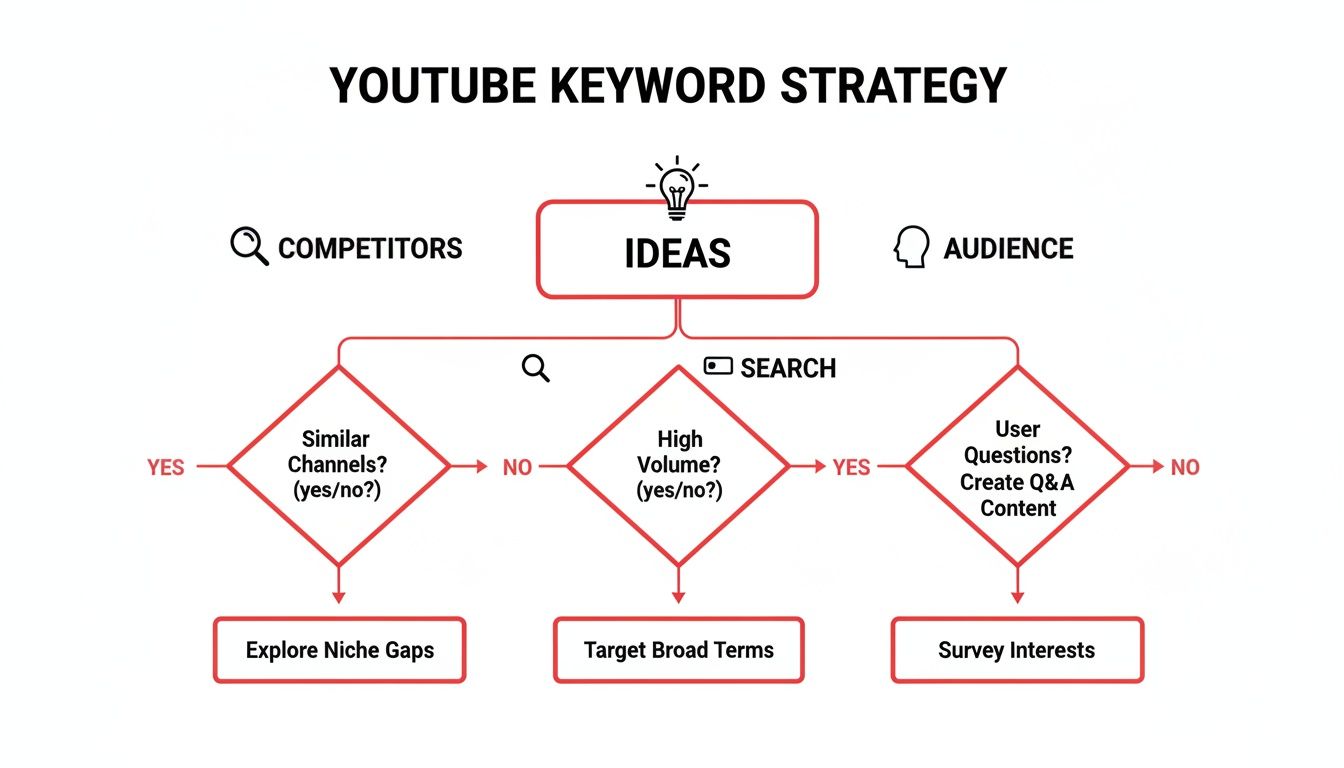
    A diagram illustrates YouTube's evolution with branches showcasing features like Shorts, Live, and Community.

    As you can see, a healthy channel now depends on a smart strategy that weaves together long-form content, Shorts, Live streams, and direct community engagement.

    The Two Main Algorithmic Personalities

    To make this easier to wrap your head around, let's break the system down into two main "personalities." Think of one as a thoughtful curator and the other as a lightning-fast matchmaker.

    1. The Long-Form Algorithm (The Curator): This AI is all about creating a great viewing session. It wants to keep people on the platform by recommending high-quality, relevant videos that perfectly match their interests. It obsesses over session duration, audience retention, and all those satisfaction signals we just talked about.

    2. The Shorts Algorithm (The Matchmaker): The Shorts AI, on the other hand, is built for speed and discovery. Its entire job is to introduce your channel to a massive new audience as quickly as possible. It looks for instant reactions—did they watch the whole thing, swipe away immediately, or watch it on a loop? It’s all about reach and first impressions.

    Understanding this split is critical. Your long-form videos are for nurturing your dedicated audience, while your Shorts are your scouting party, out finding new people to bring into your world.

    Building Topic Authority and Repeat Viewership

    Knowing all this, two strategies become non-negotiable. First up is building topic authority. The algorithm needs to know, without a doubt, what your channel is about. When you consistently publish great videos on a specific subject, you're effectively teaching the AI to see you as an expert in that niche. This makes it far more likely to recommend your content to anyone interested in that topic.

    The algorithm wants to find the best video for every viewer. When you establish clear topic authority, you're making it easy for the AI to choose your content.

    This is where fundamentals like keywords and tags are still incredibly important. They’re the signposts that help the algorithm categorize your video right out of the gate. For a full breakdown, check out our guide on finding the best tags for YouTube.

    Second, you have to be obsessed with repeat viewership. YouTube is now actively rewarding channels that can turn a first-time viewer into a returning fan. It's the ultimate signal of satisfaction. A healthy channel isn't just one that gets a viral hit; it's one that builds a loyal community that keeps coming back. It’s time to double down on encouraging subscriptions, using end screens strategically, and creating content that makes people excited for what's next.

    Integrating Shorts Into Your Content Strategy

    Let's be blunt: YouTube Shorts are no longer a side project or a fun experiment. They're a core part of the platform's DNA now. For creators, ignoring short-form video is like trying to fish without bait—you’re missing your biggest opportunity to get a bite. YouTube has retooled its entire discovery engine around Shorts, and you absolutely need a plan to make them work for you.

    Think of Shorts as your channel's front door and your long-form videos as the main event inside. The Shorts algorithm is built for one thing above all else: massive, top-of-the-funnel reach. Its job is to put your content in front of a huge pool of people who have never seen your channel before. It’s a powerful first handshake.

    Because of this unique role, Shorts play by a different set of rules. Your traditional videos are judged on things like viewer satisfaction and how long someone stays on YouTube after watching. Shorts, on the other hand, live and die by rapid-fire engagement. Did the viewer watch it again? Did they immediately swipe away? This fast-paced world is your ticket to finding a ton of new viewers.

    A hand holds a smartphone displaying a vertical video with a person walking on grass, and a 'SHORTS STRATEGY' sign is below.

    Bridging The Gap From Short To Subscriber

    I hear this all the time: creators are terrified that Shorts will "cannibalize" their main channel, training their audience to only want 30-second clips. It’s a fair point, but that only really happens when there’s no strategy connecting the two. The real skill is building a bridge that guides people from a quick, catchy Short to your deeper, long-form content.

    Your mission is to create a seamless journey. Someone stumbles upon your viral Short, gets hooked, taps on your channel name, and lands on a library of amazing long-form videos just waiting for them.

    Here are a few practical ways to build that bridge:

    • Create Teaser Shorts: Pull the most exciting or mysterious clip from an upcoming long video and post it as a Short. End with a simple call-to-action like, "The full breakdown drops tomorrow!"
    • Repurpose "Best Of" Moments: Dig into your analytics and find your best-performing long-form videos. Pull out the funniest, most valuable, or most shocking moments. Each one can be a killer Short that basically acts as a free ad for your best stuff.
    • Answer a Single Question: Use a Short to give a quick, satisfying answer to one specific question in your niche. Then, point viewers to your latest long video for the full, detailed explanation.

    When you design Shorts to complement your main videos, they stop being a distraction and become a powerful lead-generation machine for your channel. For a deeper dive on this, check out our complete guide on how to get more views on YouTube Shorts.

    Your Shorts are the hook; your long-form videos are the reason they stay. One introduces them to your brand, the other turns them into a loyal fan.

    Navigating Shorts Monetization And Content Creation

    Monetization for Shorts is a different beast, too. You won't see pre-roll ads like on your longer videos. Instead, revenue comes from a "creator pool" funded by the ads that run between Shorts in the feed. Your cut is based on your share of the total Shorts views across the entire platform. While the payout per view is definitely smaller than long-form, the potential for massive volume means it can still add up to a serious income stream.

    The way you create the content also requires a shift in thinking. You’re competing in a feed where the next video is just a flick of the thumb away. You have to get to the point—fast.

    • Hook Within 3 Seconds: The first few seconds are everything. Don't waste them. Start with action, a bold claim, or a question that demands an answer.
    • Focus on a Single Idea: Don't try to cram a 10-minute video's worth of information into 45 seconds. A Short should have one clear, simple takeaway.
    • Optimize for Loops: Smart creators make content that’s satisfying to watch over and over. A seamless loop or a surprise ending can trick people into re-watching, which juices your watch time.

    Figuring out the optimal lengths for YouTube Shorts is also a huge piece of the puzzle for keeping viewers engaged. A perfectly timed clip is far more likely to be watched all the way through, which is a massive signal to the Shorts algorithm. This focus on vertical, fast-paced content is make-or-break, especially when you consider the scale you're up against. Every single minute, over 500 hours of video are uploaded, and users watch more than 1 billion hours of content daily. In an environment that crowded, every second counts. Your Shorts strategy is your best weapon for getting noticed.

    Unlocking New Monetization and Revenue Streams

    Workspace with laptop displaying business dashboard, red smartphone, and notebooks, emphasizing revenue diversification.

    Relying only on AdSense is a risky game. It's like trying to build a business on a foundation with just one support beam—it might hold for a while, but it’s far from stable. YouTube gets this, and recent changes are a massive signal that they want creators to build stronger, more diverse income models. Thankfully, they're giving us the tools to do it.

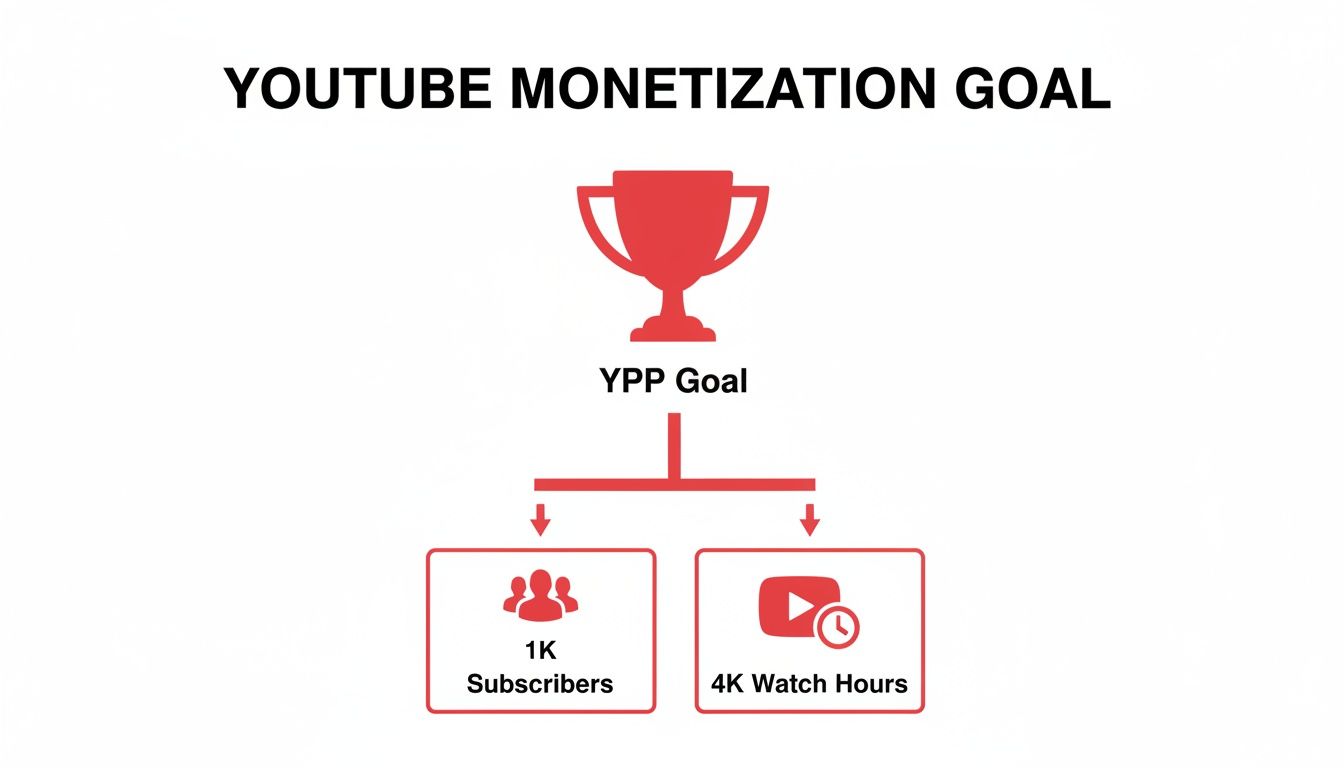
    For years, the path to earning money was a serious grind. The classic goal was hitting 1,000 subscribers and 4,000 watch hours before you could even think about seeing a dime. That's not the reality anymore. YouTube has lowered the barrier to entry for its Partner Program (YPP), creating a new on-ramp for smaller channels to start generating income way sooner.

    This new structure is a huge deal. It means you can start building a direct financial connection with your biggest fans long before ad revenue becomes a major factor. It’s all about creating a portfolio of income streams.

    Tapping Into Fan Funding Sooner

    The biggest change is getting early access to fan funding features. Once you hit a much lower threshold—think 500 subscribers and 3,000 watch hours—a whole suite of direct-support tools opens up.

    • Channel Memberships: This is your own subscription service. Viewers can pay a monthly fee for exclusive perks like custom badges, emojis, or members-only videos, giving you a predictable, recurring revenue stream.
    • Super Chat & Super Stickers: During live streams, these let viewers pay to have their messages or animated stickers stand out. It’s a fantastic way to generate income while boosting real-time engagement.
    • Super Thanks: Think of this as a digital tip jar. Viewers can buy a cool one-time animation on your videos or Shorts to show a little extra appreciation for your work.

    These tools completely change the dynamic. They let you monetize the loyalty of your core community long before you have the massive viewership needed for significant ad money.

    The new YPP tiers are basically YouTube saying, "Your community's direct support is a legitimate business model." You no longer have to wait for huge view counts to start building something sustainable.

    This thinking also applies to Shorts, which have their own monetization model. To really get a handle on it, understanding how to make money on YouTube Shorts is a must, as it’s a different beast with massive potential.

    Integrating E-Commerce with YouTube Shopping

    Beyond getting tips from fans, YouTube is leaning hard into e-commerce. The platform is quickly evolving from just a video site into a full-blown storefront where you can sell products directly to your audience.

    With YouTube Shopping, you can link your own store (from platforms like Shopify) and tag products right in your videos and Shorts. When someone's watching and sees something they like, they can click to browse and buy without ever leaving the YouTube app.

    It creates a buttery-smooth journey from discovery to checkout. Picture a DIY channel tagging the exact power drill used in a project, a beauty creator linking to their lipstick, or a gamer selling their own line of merch. The opportunities are endless.

    These features transform your content from a passive viewing experience into an interactive, shoppable one. By weaving together ad revenue, fan funding, and e-commerce, you're building a much more resilient and scalable creator business—one that can easily adapt to whatever changes come next. This is the new formula for success on YouTube.

    Keeping Up with YouTube's Ever-Changing Rulebook

    Let's be honest: YouTube isn't just a platform for creativity; it's a governed digital nation with its own set of laws. Keeping up with its policies isn't just about dodging trouble—it's about building a channel that advertisers trust and that can thrive for years to come. These rules are constantly evolving to keep pace with new tech and societal norms, and pleading ignorance won't save you from a channel strike.

    Think of the YouTube Community Guidelines as the living, breathing terms and conditions for your business. A small, even accidental, slip-up can get a video demonetized or taken down entirely. The latest changes in YouTube policy have zeroed in on transparency and safety, which means creators have to be more careful than ever.

    The New Rules for AI-Generated Content

    One of the biggest recent shifts is how YouTube handles content made with artificial intelligence. If you're using AI to create realistic content that could fool someone—like making it look like a person said or did something they didn't—you now have to officially label it. This is all about maintaining trust with the audience.

    YouTube has rolled out a new disclosure tool right in Creator Studio to make this easy. When you upload, you can flag content that uses altered or synthetic media. Skipping this step can lead to real consequences, from having the content removed to getting kicked out of the YouTube Partner Program. This isn't an attack on creativity; it's a defense against the potential for believable deepfakes and misinformation.

    The rule of thumb is pretty straightforward: if a viewer could reasonably get confused about whether what they're seeing is real, you need to disclose it. Transparency is your best policy here.

    Stronger Protections for Younger Viewers

    Protecting teens and children is a massive priority for YouTube, and their methods for doing so are getting smarter. In the US, the platform is now using machine learning to better guess a user's age based on their watch history and searches, not just the birthday they plugged in when they signed up.

    This directly affects how your content is delivered. If the algorithm flags a viewer as a teen, it automatically tightens the guardrails:

    • Personalized ads get shut off for that user on your video, which can impact revenue.
    • Wellbeing features like "take a break" reminders are automatically enabled.
    • Recommendations are limited to avoid sending them down rabbit holes of potentially harmful content, like videos fixated on body image or social aggression.

    What does this mean for you? Some of your videos might be shown under these stricter conditions, even if you didn't mark them as "made for kids." The smartest strategy is to always create with a brand-safe filter in mind. Make sure your content is genuinely appropriate for your target audience and doesn't push the boundaries on sensitive subjects.

    Your Quick Compliance Checklist

    Staying on top of these rules has to be an active part of your workflow. A little bit of self-auditing now can prevent a massive headache later. Here's a simple checklist to run through:

    1. Check Your AI Footprint: Look at your recent uploads. Did you use AI to create a realistic scene, clone a voice, or alter someone's likeness? If so, does it need that new disclosure label?
    2. Audit Your Packaging: Are your titles and thumbnails an honest reflection of what's in the video? Or could they be interpreted as misleading clickbait? YouTube's getting stricter on this.
    3. Scan for Sensitive Content: Re-watch any videos that discuss topics like health, finance, or major news events. You have to be incredibly careful not to make claims that could be flagged as harmful or unsubstantiated.

    And if you do get a warning or a strike, take a breath. The appeals process exists for a reason. When you file an appeal, be professional and specific. Clearly explain why you believe your content follows the guidelines, pointing to the exact rules. A calm, evidence-based appeal will always get you further than an emotional rant. Building compliance into your routine isn't just about following rules—it's about protecting your channel's future.

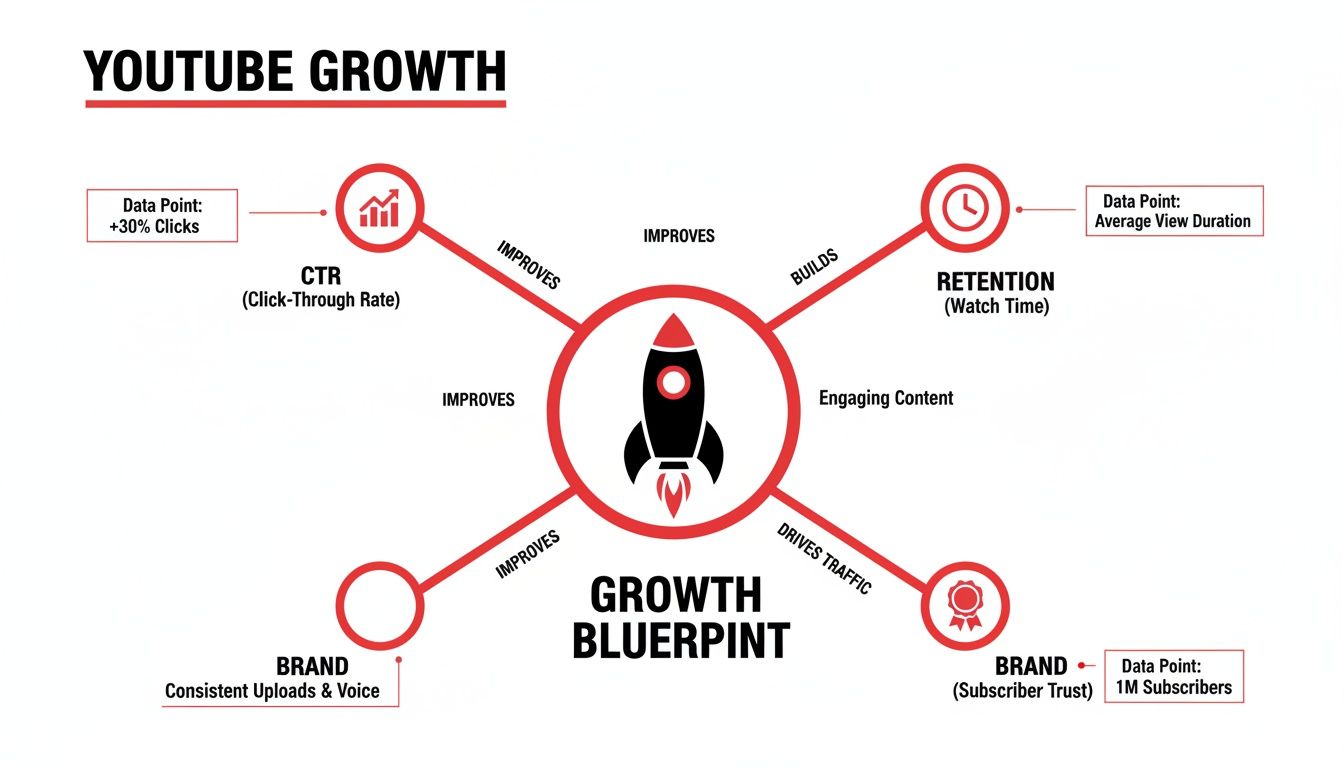
    Your Action Plan for Success on the New YouTube

    Knowing the why behind all these YouTube changes is one thing, but actually putting that knowledge to work is what separates the channels that stall from the ones that grow. This is where we get practical.

    Instead of trying to do everything at once and feeling overwhelmed, we're going to build a clear roadmap. Think of it as a step-by-step guide to fine-tune your channel so it's perfectly aligned with where YouTube is headed.

    The idea is to stop reacting to every little platform shift and start building a proactive strategy. We'll begin by looking at what you've already done, then create a sustainable content schedule that plays to the strengths of different formats. Let's dive in.
    Step 1: Conduct a Content Audit

    Before you can plan your next move, you have to understand your starting position. A content audit is your way of looking back at your own work to see what’s resonating with viewers and where the algorithm is already giving you clues.

    This isn't about being critical of your old videos. It's about finding the gold that's already sitting in your analytics.

    Here’s what to do this week:

    • Find Your Heavy Hitters: Jump into YouTube Studio and pull up your top 5-10 videos based on views, watch time, and subscribers gained. What was it about them? The topic? The title? The format? These are your proven concepts.
    • Look for Repurposing Gold: Scan those top-performing videos again. Every single one is a potential goldmine for Shorts. Your mission is to find at least three killer moments from just one of those videos that you can clip out and turn into a standalone Short.
    • Check Your Topic Focus: Take an honest look at your last 20 videos. Do they tell a clear story about what your channel is? Or are they a bit scattered? The algorithm loves consistency, so you want your recent uploads to scream, "This is what I'm an expert in."

    Step 2: Develop a Multi-Format Schedule

    With your audit done, it's time to build a content calendar that works in this new multi-format world. A smart schedule doesn't just mean posting more; it means posting smarter across different formats to keep your loyal fans happy while constantly reaching new people.

    Here’s a simple framework to start with:

    1. Set Your Anchor: Plan one high-quality, long-form video per week or maybe every two weeks. This is your flagship content, the stuff that builds deep connections. Give it the time and planning it deserves. A solid plan is everything; our guide on writing a great script for YouTube videos can really help here.
    2. Surround It with Shorts: For every big video you post, aim to release 3-5 related Shorts. These can be teasers before it drops, highlight clips after it's live, or even quick tips that dive deeper into a small point you made.
    3. Keep the Conversation Going: Schedule at least one Community tab post between your bigger video uploads. A simple poll or a behind-the-scenes photo keeps your channel active in the algorithm's eyes and makes your subscribers feel connected.

    A winning YouTube strategy isn't just about chasing one viral hit. It's about creating a steady, predictable rhythm with different types of content that all work together to serve your audience and the platform.

    This kind of system takes the guesswork out of content creation. Each piece you make supports the others, creating a growth loop that's sustainable. By taking these concrete steps, you’re setting your channel up to do more than just survive YouTube's changes—you're preparing it to thrive.

    Your Top YouTube Questions, Answered

    Keeping up with YouTube can feel like a full-time job. You're not alone in wondering what all these updates actually mean for your channel. Here are the straight-up answers to the questions we get asked most often.

    So, Do I Really Have to Make Shorts to Grow?

    Look, nobody's going to force you. But if you're not making Shorts, you're basically turning down free promotion on YouTube's biggest discovery engine. It's the most powerful way to get in front of fresh eyes right now.

    The smartest play is to use Shorts as a hook—a gateway drug, if you will—that leads new viewers back to your long-form videos. You don't have to abandon your main content, but ignoring Shorts completely means leaving a ton of potential growth on the table.

    Is Watch Time Still the King of All Metrics?

    Watch time is still incredibly important, but it's not the absolute monarch it once was. The algorithm is now much more focused on a broader concept: viewer satisfaction. This is less about one number and more about a collection of signals that tell YouTube someone genuinely loved your video.

    We're talking about things like strong audience retention, likes, shares, and a big one—repeat viewers. Are people coming back for more? That's a massive green flag for the algorithm. A video that keeps people happy and coming back can easily beat a longer video that people click away from. The name of the game is earning loyalty, and good watch time will naturally come with it.

    How Do the New YPP Tiers Actually Help Small Channels?

    For anyone just starting out, the new, lower-entry tiers for the YouTube Partner Program are a game-changer. Hitting a milestone like 500 subscribers used to just be a number on your dashboard. Now, it unlocks real monetization tools way sooner.

    This gives you early access to fan funding features, including:

    • Super Thanks: A simple way for viewers to tip you on your videos.
    • Super Chat: Lets fans pay to have their messages highlighted during your live streams.
    • Channel Memberships: Allows your most loyal fans to support you with a monthly subscription.

    This is huge. It means you can start building a real, sustainable income directly from your core community long before you're eligible for ad revenue. It shifts the focus from chasing massive view counts to building a dedicated audience that wants to support you directly.


    Trying to figure all this out on your own can be a real headache. ViewsMax gives you the AI-powered tools and clear, data-backed insights to stop guessing and start growing. You can see what's working, adapt your strategy, and optimize every video with confidence. Explore our features and see how we can help you thrive.

  • How to Write a Script for YouTube Videos That Gets Views

    How to Write a Script for YouTube Videos That Gets Views

    A great script for a YouTube video is more than just words on a page; it's the architectural blueprint for content that works. It's what separates a video that gets clicks, keeps people watching, and ultimately gets them to act, from one that just sort of… exists.

    Think of it as the difference between a rambling, unfocused chat and a story that pulls you in and won't let go.

    Laying the Groundwork for a Winning Script

    Before a single word of your script is written, the most successful creators do the prep work. They don't just open a blank document and hope for the best. This pre-writing phase is all about defining the "why" behind your video, making sure every line you eventually write has a clear and specific job.

    Trying to write a script without this foundation is like trying to build a house without a blueprint. It's a recipe for disaster.

    Watch this on how to write better scripts

    Define Your Video’s Core Mission

    Every video needs one primary job. What are you trying to accomplish? Are you teaching someone a new skill, trying to make them laugh, or convincing them that your new product is worth their money? This single decision shapes the entire tone, structure, and feel of your script.

    Most videos fall into one of three buckets:

    • Educate: Your mission here is to transfer knowledge. Think tutorials, how-to guides, or deep dives into a complex subject. Your script needs to be logical, follow a clear sequence, and be dead simple to understand.

    • Entertain: This is all about emotion. You're aiming for laughter, excitement, or pure curiosity. Vlogs, skits, and commentary videos live here. The script should focus heavily on great storytelling, dynamic pacing, and letting your personality shine through.

    • Persuade: Your goal is to guide the viewer toward taking a specific action. Product reviews, case studies, or sales videos are prime examples. For these, your script must build trust, hammer home the benefits, and finish with a strong, clear call to action.

    Of course, these aren't mutually exclusive. You can have a funny tutorial or an educational product review. But one mission has to be in the driver's seat, guiding all your other choices.

    Build a Specific Viewer Persona

    Here's a hard truth: you are not making a video for "everyone." The moment you try, you make a video for no one. A vague idea of your audience results in a generic script that connects with nobody. The key is to create a detailed persona of your one, single, ideal viewer.

    I always write as if I'm talking to one specific person. It makes the script feel like a direct, personal conversation. When you try to speak to a crowd, your message gets diluted. When you speak to an individual, you create a real connection.

    Get granular. Ask yourself some tough questions about this person:

    • What's the main problem or question they have that this video will answer?

    • How much do they already know about this topic? Are they a total newbie or a seasoned pro?

    • What kind of language do they use? Is it casual slang or more formal, technical jargon?

    • What's the one thing that would make them click away in the first 10 seconds?

    A script for a "beginner's guide to photo editing" aimed at a 20-year-old student using their phone will sound completely different from one targeting a 50-year-old professional photographer. The first might reference TikTok trends and free apps, while the second will dive into Lightroom presets and color theory.

    Choose Your Video Format Wisely

    The format is the vehicle for your message. The one you pick directly impacts how you'll structure your script and sets expectations for the viewer the second they read your title.

    Some popular and proven formats include:

    • Tutorial/How-To: These are linear and step-by-step. Clarity is king here, so the script has to be precise.

    • Listicle ("Top 5…"): This format is a gift for scripting. You can write each point as its own mini-segment, which is great for keeping viewers engaged.

    • Product Review: Typically follows a predictable and effective flow: unboxing, features, pros and cons, and the final verdict.

    • Vlog: This is all about narrative and personal connection. Your "script" might be more of a loose outline of key story beats rather than a word-for-word document.

    • Explainer: The goal is to make something complicated seem simple. The script needs to lean heavily on simple analogies and be written with visuals in mind.

    Once you’ve locked in your goal, your audience, and your format, you're ready to actually start writing. You're no longer just staring at a blank page; you're building a piece of content that's been engineered for success from the ground up.

    Nail the First 15 Seconds to Keep Viewers Watching

    You have a tiny window—maybe five to ten seconds—to convince someone your video is worth their time. That's it. In a sea of endless content, your hook isn't just a part of the script; it's a brutal, all-or-nothing audition.

    A weak opening is a guaranteed click away, which tells the YouTube algorithm your content isn't keeping people around. But a powerful one? That can lock a viewer in for the entire ride. This is why professionals use tactics to increase watch time and boost viewer retention that all start with a killer opening.

    Field-Tested Hook Formulas That Actually Work

    Forget starting with a bland "Hey guys, what's up." You need to lead with a formula designed for impact. These structures aren't just random; they're built on basic human psychology—curiosity, problem-solving, and the promise of a quick win.

    A video groundwork summary outlining goal, audience, and format with corresponding icons.

    Before you even write a hook, you need a solid foundation. As this graphic shows, you have to know your goal, your audience, and your format. Once that’s clear, you can pick the right tool for the job.

    Here are a few hook formulas I've seen work time and time again.

    High-Impact Hook Formulas for YouTube Videos

    Proven hook formulas with examples to help you start your script with maximum impact.

    Hook Formula Description Example Usage
    Problem-Agitator State a common pain point your viewer has. Then, twist the knife by describing why it's so frustrating before promising your solution. "Are you tired of your houseplants dying? You've tried watering more, watering less, and nothing works. I'll show you the three mistakes you're making and how to fix them for good."
    Results-First Show off the amazing final result right away. If it's a DIY project, show the finished masterpiece. If it's a tutorial, reveal the impressive outcome. A baking video opens with a slow-motion shot of a perfect cake slice. Voiceover: "This is the fluffiest chocolate cake you'll ever make, and I'm about to show you how."
    Bold Statement Open with a controversial or surprising statement that makes the viewer stop and think. It challenges a commonly held belief. "Everything you've been told about productivity is wrong. The 'hustle' culture is actually making you less effective, and today I'm going to prove it."

    Experiment with these. See which one feels most natural for your topic and your audience. The right hook makes the rest of the script flow so much better.

    Moving From Hook to Intro

    Okay, you've grabbed their attention. Now what? Your intro needs to immediately set expectations and deliver a clear reason to stick around. The hook bought you a few seconds; the intro is where you close the deal.

    Your introduction should quickly answer three questions for the viewer:

    • What is this video about? Be direct and state the topic.

    • What's in it for me? Explain the benefit or skill they will gain.

    • Why should I trust you? Briefly establish your credibility.

    Pro Tip: Keep your entire introduction under 20-30 seconds. I’ve seen so many analytics charts where viewers drop off because the creator rambled for a minute straight. Get to the point fast to maintain the momentum your hook created.

    This quick, punchy approach is absolutely essential for shorter videos. When you're figuring out https://blog.viewsmax.com/how-to-get-more-views-on-youtube-shorts/, you'll realize the entire video is basically a hook. There’s zero room for fluff.

    Structuring Your Video's Main Body to Keep People Watching

    Flat lay of a wooden desk with a laptop, red notebook, pens, and a spiral notebook, featuring a 'CLEAR STRUCTURE' banner.

    Alright, you've landed a solid hook and made a promise to your audience. The next few minutes are where the real work begins—and where most creators lose their viewers. This is the part where you have to deliver.

    The main body of your video is a make-or-break moment. A jumbled, confusing middle is the fastest way to get someone to click away, tanking your audience retention. Think of your script not as one long monologue, but as a series of connected mini-chapters. Each one should flow logically into the next, making your content incredibly easy for viewers to follow.

    Finding the Right Narrative Structure for Your Content

    There’s no single, magic formula for how to structure your video. The best approach depends entirely on what kind of video you're making. The goal is to match your script's flow to the viewer's expectations for that specific format.

    Here are a few battle-tested structures I’ve seen work time and time again:

    • For Tutorials (The Step-by-Step Method): This one is beautifully simple. Your script should break down the entire process into a numbered or sequential list. State the end goal upfront, then walk them through each step in a logical order. I always recommend adding on-screen numbers for each step; it helps people follow along and makes it easy to rewind if they miss something.

    • For Vlogs (The Story Arc): A great vlog is more than just a random collection of clips from your day—it's a story. You need a beginning, middle, and end. Script out the key beats: an "inciting incident" (what kicks things off), some rising action (challenges or interesting moments), a climax (the main event), and a resolution. This gives your vlog momentum and keeps it from feeling like a boring diary entry.

    • For Reviews (The Criteria-Based Breakdown): When people watch a review, they want objective, well-organized information. Script your review around specific criteria like design, features, performance, and price. Dedicate a segment to each, covering the pros and cons for that point before you deliver a final verdict. This approach makes your review feel comprehensive and trustworthy.

    A solid structure gives your viewer a roadmap. It shows them you know where you're going, which makes them want to stick around for the whole ride.

    Keeping Your Audience Glued with Pacing and Pattern Interrupts

    Structure is the skeleton, but pacing is what brings your video to life. Even a perfectly organized script can be a total snooze-fest if the pacing is flat. The trick is to constantly vary the rhythm and energy.

    Good pacing means mixing things up. You might have a quick montage with upbeat music and fast cuts, then immediately slow down for a more personal, direct-to-camera explanation of a tricky concept. This variety keeps the viewer’s brain from zoning out.

    This is where pattern interrupts come in. They're a scriptwriter's best friend. A pattern interrupt is anything that breaks the viewer’s train of thought. In your script, this could look like:

    • A sudden change in camera angle.

    • An unexpected sound effect or on-screen graphic.

    • A quick, self-aware joke or a personal story.

    • Asking the audience a direct question.

    I’ve found that scripting in small interruptions every 60-90 seconds is a game-changer. You’re essentially hitting a reset button on your viewer's attention span, which is a powerful way to fight that mid-video slump where retention graphs usually nosedive.

    For example, in the middle of a dry explanation, your script could note: [CUT TO: Extreme close-up] "Look, I know this sounds like a lot of jargon, but let me put it this way..." That simple visual shift is often enough to pull a viewer back in.

    Scripting Smooth and Seamless Transitions

    Transitions are the glue holding your video's "chapters" together. A clunky transition can feel jarring and pull the viewer right out of the experience. Your script needs to account for these moments.

    Don't just stop one section and abruptly start the next. Use transitional phrases in your dialogue to signal what’s coming up.

    Think along these lines:

    • "So now that we've nailed down the keyword research, let's look at how to actually use it in your video titles."

    • "While the build quality feels amazing, that’s useless if the performance isn’t there. So, let’s fire this thing up and put it to the test."

    These phrases act as a natural bridge, making the jump between topics feel smooth. Remember to plan for visual transitions as well. Make notes in your script about where you’ll use a specific B-roll shot, a graphic, or a unique cut to guide the viewer from one idea to the next. By thoughtfully structuring your main body, mastering pacing, and scripting clear transitions, you create a video that’s not just informative, but genuinely engaging from start to finish.

    Writing Calls to Action That Actually Work

    A great script doesn't just fade to black. It tells the viewer exactly what to do next. Your Call to Action (CTA) is what turns someone who just watched your video into an actual member of your community.

    Think of it this way: you did all the hard work to script, shoot, and edit an amazing video. Without a clear CTA, all that energy and goodwill you built up just evaporates. A good CTA channels that energy into something that helps you and the viewer.

    Beyond “Like and Subscribe”

    We've all heard "like, comment, and subscribe" a million times. It's a YouTube staple, sure, but it's far from the only play you should be running. The best CTAs are specific, valuable, and feel like the logical next step after watching your video.

    So, what makes sense for your video?

    • Just finished a tutorial? Offer a free downloadable checklist or template that makes it even easier for them to apply what you taught.

    • Reviewing a product? The most natural CTA is to provide your affiliate link so they can check the current price or see more details.

    • Posted a deep-dive video essay? Guide them to another one of your videos that explores a related topic you only touched on briefly.

    The whole idea is to match your request to their mindset. They just got value from you, so give them an easy way to get even more.

    Smart CTA Placement

    Most creators cram their CTAs into the last 10 seconds, but look at your audience retention graphs. You'll often see a massive viewer drop-off right at the end as people click away to whatever YouTube suggests next. We need to be smarter about this.

    The perfect time to ask for something is right after you've delivered a huge "aha!" moment. Drop a CTA mid-video, immediately after a game-changing tip, and you'll catch viewers when their appreciation for your content is sky-high.

    For example, after you explain a really clever editing trick, you could jump in with: "If you found that useful, I break down five more just like it in my advanced editing guide. The link is right there in the description." It feels less like an ad and more like genuine help.

    Crafting the Perfect Outro

    Your outro has two main jobs: wrap things up nicely and deliver your final, most important CTA. A solid conclusion makes the viewer feel like their time was well spent and reinforces the value you just gave them.

    Here's a simple structure for a great outro script:

    1. A Quick Recap: Briefly remind them of the core takeaway. "So, that's the three-step process for repotting an orchid without killing it." This makes them feel accomplished.

    2. The Main CTA: Now, be direct and confident. Instead of a vague "check out my website," be specific: "Head over to my website to grab the full list of my recommended potting soils." Tell them exactly what to do and what they'll get.

    3. Build Your Community: This is the ideal spot for the classic "like and subscribe." Frame it as a community thing: "If this helped, drop a comment and let me know which tip you're going to try first."

    This simple formula provides closure while giving your viewers a clear path forward. Without this final piece, your script for a YouTube video isn't really complete. It's how you turn a single view into a real connection.

    Adapting Your Script for Different YouTube Formats

    Think about it: a script for a 20-minute deep-dive tutorial would be an absolute train wreck as a 60-second YouTube Short. The format you choose sets the rules, and your script is how you play the game. Treating every video the same is a surefire way to kill your audience retention and bring channel growth to a halt.

    Adapting your writing style isn't just a good idea; it's mandatory. Each format connects with a completely different viewer mindset. Someone grabbing a coffee and settling in for a long-form product review is in a totally different headspace than someone swiping through Shorts on their lunch break. Your script for a YouTube video has to respect that.

    Scripting for Clarity in Tutorials

    When you're scripting a tutorial, your North Star is clarity. People are there to solve a problem, and if they get confused, they're gone. Your script needs to be meticulously structured and ruthlessly efficient.

    Here's a battle-tested approach I always use:

    • Promise the Outcome Immediately: Your hook needs to instantly confirm what the viewer will achieve. For instance, "In the next ten minutes, you'll have a fully functional contact form on your website, even if you've never touched a line of code."

    • Break It Into Obvious Steps: Structure the core of your video with clear, numbered steps. I always script verbal signposts like, "Alright, moving on to step three, we're going to…" It keeps viewers grounded and focused.

    • Answer Questions Before They're Asked: A great tutorial script feels like you're reading the viewer's mind. Weave in lines like, "A common mistake here is forgetting to save. Make sure you hit that save button before you do anything else." This builds incredible trust.

    Scripting for Trust in Product Reviews

    With product reviews, the only currency that matters is trust. Your audience has to believe you're giving them the real story, not a sales pitch. The script has to be built from the ground up to establish that credibility.

    I find that a balanced review script almost always works best:

    1. Set the Scene: Briefly explain why you're reviewing this product and who it's actually for.

    2. Walk Through the Features: Cover the key specs and selling points logically.

    3. Show, Don't Just Tell: This is where the magic happens. Detail your real-world experience using the product, covering both the good and the bad.

    4. Summarize the Pros and Cons: A dedicated summary section is a fantastic way to reinforce your objectivity.

    5. Deliver the Verdict: End with a clear recommendation on who should—and just as importantly, who shouldn't—buy it.

    Your script must balance the shiny positives with genuine criticisms. A review that’s 100% positive just feels like a sponsored ad, and that instantly kills viewer trust. Scripting in specific, honest drawbacks shows you’ve actually put in the work.

    Scripting for Impact in YouTube Shorts

    YouTube Shorts is a different universe with its own laws of physics. You don't have minutes to build a connection; you have seconds to make an impact. Forget the intro—your entire script is the hook.

    The shift to this format has been massive. Shorts now rack up over 70 billion daily views, and most active channels are now focused on this short-form content. To stay relevant, you have to master scripting for lightning-fast hooks and repeatable formats.

    To get the most out of your Shorts, you need to understand how the YouTube Shorts algorithm works and write your scripts to feed it exactly what it wants. For some practical starting points, check out our guide on YouTube Shorts ideas you can start scripting today.

    Here's the scripting formula that works for Shorts:

    • No Wind-Up: Start directly with the most exciting, surprising, or valuable part of the video.

    • One Idea, One Video: A Short should have a single, crystal-clear message. Trying to cram in too much is the fastest way to lose the viewer.

    • Pace, Pace, Pace: Think fast cuts, dynamic on-screen text, and high-energy delivery. Your script should be all punchlines and no setup—every single word has to earn its place.

    • Craft a Perfect Loop: End the video in a way that flows seamlessly back to the beginning. Getting viewers to re-watch is a powerful signal to the algorithm that you've got something good.

    When you start thoughtfully adapting your script to the specific demands of each format, you stop just making videos and start strategically engineering content that's built to perform.

    Using Analytics to Refine and Improve Your Scripts

    Laptop showing retention analysis charts, next to a notebook, glasses, and magnifying glass on a wooden table.

    So you’ve hit publish. The work isn't over—in fact, the most valuable part is just beginning. Think of your finished script not as a final product, but as a hypothesis. Once your video is out in the wild, YouTube Analytics gives you all the data you need to see if that hypothesis was right.

    This is how you stop guessing what your audience wants and start knowing. Their viewing habits become your roadmap, showing you exactly what to do more of and what to cut out of your next script for a YouTube video.

    Decoding Your Audience Retention Graph

    The most powerful scriptwriting tool you have is already in your YouTube Studio: the Audience Retention graph. This chart is your video's EKG, showing you the exact moment-by-moment percentage of viewers who are still tuned in. It's a raw, unfiltered look at how well your script held their attention.

    When you see a steep drop-off, that’s not just a random dip. It's a bright red flag. It’s a group of people deciding, "Nope, I'm out."

    Think of your Audience Retention graph as a 24/7 focus group. Every dip is a piece of feedback. It’s a viewer telling you, "This part dragged on," "I got confused here," or "You took way too long to get to the good stuff." Learning to read these signals is a game-changer.

    Here's what you do: pull up the video and scrub to the exact timestamp where the graph takes a nosedive. More often than not, you'll find it lines up perfectly with one of these common script killers:

    • A long-winded explanation that could have been said in half the time.

    • An awkward or clunky transition between two different ideas.

    • A mismatch where what you're saying doesn't quite fit the visuals on screen.

    • An intro that promised something amazing but then took forever to deliver.

    Once you spot these patterns, you can make a conscious effort to avoid them next time. For instance, if you notice viewers consistently bail during your outros, it's a clear sign they need to be shorter and punchier. Small, data-backed adjustments like these are what lead to huge improvements in watch time.

    Weaving in Keywords and Search Insights

    Analytics isn't just about retention; it's also about discovery. You can use tools like TubeBuddy or VidIQ—or even just poke around YouTube's search bar—to see the exact words and phrases your ideal viewer is typing.

    Don't just cram these keywords into your title and description. You need to actually say them in your video. When you speak the terms people are searching for, YouTube’s transcription system hears it, which can help signal your video's relevance to the algorithm.

    Let's say your research shows a popular search is "how to fix grainy video footage." A generic script might say, "Let's clean up your clips." A data-informed script, however, would say something like, "Now, let's talk about how to fix grainy video footage so it looks crisp and professional." It's a subtle change that makes a world of difference.

    This creates a powerful feedback loop. The data from one video helps you write a better script. That better script gets better engagement, which gives you even more precise data for the next one. For anyone creating Shorts, understanding how this viewer data feeds the shorts algorithm is absolutely essential for breaking through. This cycle is what turns good scripts into undeniable, view-grabbing videos.

    Got Questions About Scripting? We've Got Answers.

    Even when you have a solid plan, getting into the nitty-gritty of scriptwriting always brings up new questions. It's one thing to know the theory, but it's another to stare at a blank page. Let's tackle some of the most common hurdles creators face.

    These are the little things that can get you stuck, but once you know the answers, they're easy to push past.

    How Long Should My Script Be?

    There's no single magic number, but a great rule of thumb is that 150 to 160 words will translate to about one minute of on-screen talking time. So, if you're aiming for a 10-minute video, you'll want a script that’s roughly 1,500 to 1,600 words long.

    But remember, that's just a starting point. Your real goal should be to cover the topic completely without fluff. Don't stretch a 7-minute idea into a 10-minute video just to hit a number.

    The best judge of your video's length is your audience retention graph. If you consistently see a huge viewer drop-off at the 8-minute mark on your 12-minute videos, that’s a clear signal to tighten things up.

    Use the word count to guide you, but let your content—and your data—have the final say.

    Should I Script Everything Word-for-Word?

    When you're just starting out, absolutely. A full, word-for-word script is your best friend. It acts as a safety net, making sure you hit every single point you want to make. It also gives you total control over the video's pacing and helps you kill those dreaded "ums" and "ahs."

    As you get more comfortable in front of the camera, you might find you don't need every word written out. Many seasoned creators eventually switch to a detailed bullet-point outline. This approach gives you the best of both worlds:

    • Structure: It keeps you on topic and ensures your video flows logically from one point to the next.

    • Flexibility: It leaves room for a more natural, off-the-cuff delivery that feels less stiff and more conversational.

    Ultimately, the right method comes down to you and the type of video you're making. A complex tutorial probably needs a precise script, while a casual vlog is going to feel much more authentic with a looser, bulleted format.

    What’s the Best Software for Writing Scripts?

    You really don't need fancy or expensive software for this. The best tool is usually the one you're already comfortable with and that doesn't get in your way.

    By far the most common choice is Google Docs. It’s free, it’s in the cloud so you can access it anywhere, and sharing it with a collaborator is a breeze. Other creators swear by tools like Notion because they can keep their scripts, content calendars, and research all in one place. Honestly, even a simple text editor works if you want zero distractions.

    The key is to find something that works for you and stick with it. Consistency is what matters.


    Ready to turn these insights into measurable growth? ViewsMax provides AI-powered tools and data-informed recommendations to help you craft better scripts, optimize your videos, and grow your channel faster. Start making smarter content decisions today by visiting https://blog.viewsmax.com.

  • 10 Best Tags for YouTube to Maximize Your Reach in 2025

    10 Best Tags for YouTube to Maximize Your Reach in 2025

    YouTube's algorithm is a complex beast, but one of its most critical signals for understanding and ranking your content is still one of the simplest: your video tags. While titles and thumbnails grab viewer attention, tags work behind the scenes, telling YouTube precisely what your video is about, who it's for, and where it should appear in search results and recommendations. Misusing them is like giving the algorithm a blurry map; using them correctly is like handing it a crystal-clear GPS, directly influencing your visibility and discoverability.

    Many creators either neglect their tags entirely or fill the section with generic, low-impact terms. This is a missed opportunity. A well-crafted tag strategy can be the difference between a video that gets lost in the noise and one that consistently surfaces for the right audience. For a comprehensive overview of effective tagging strategies, consider this article on the 8 Best YouTube Tags for Viral Videos from TimeSkip, which provides a solid foundation. This guide, however, goes deeper into the specific types of tags and the strategic thinking behind them.

    This listicle breaks down the 10 most effective tagging strategies every creator needs to master. We will explore everything from foundational primary keyword tagging to advanced competitor analysis and semantic keyword usage. You'll learn not just what tags to use, but the strategic 'why' behind each one. Expect actionable examples, copy-and-paste tag sets for different niches, and clear guidance on finding the best tags for YouTube videos in any category. We’ll skip the fluff and get straight to the methods that will help you classify your content accurately, reach new viewers, and ultimately grow your channel.

    1. Primary Keyword Tagging

    Primary Keyword Tagging is the cornerstone of any effective YouTube SEO strategy. It involves identifying and using the single most important keyword or keyphrase that accurately describes your video's core topic. Think of it as the main signpost telling YouTube's algorithm exactly what your content is about, enabling it to match your video with the right audience actively searching for that subject.

    This foundational tag should be the first one you add, as it carries the most weight in how YouTube categorizes your video. A strong primary tag directly aligns your content with user search intent, which is a critical first step in finding the best tags for YouTube and boosting your visibility.

    A magnifying glass highlights 'PRIMARY TAG' on a red banner, next to a laptop and notebook on a wooden desk.

    Why It's a Top Strategy

    The primary keyword tag is non-negotiable because it provides immediate context to YouTube's discovery system. Without a clear primary tag, the algorithm has to work harder to understand your video, potentially leading to incorrect categorization and missed opportunities for views. Getting this right is especially crucial for new channels or videos in competitive niches.

    How to Implement Primary Keyword Tagging

    Follow these steps to select and apply the perfect primary tag:

    • Match Your Title and Content: Your primary tag should be an exact or near-exact match of your video title. If your title is "Ultimate iPhone 15 Pro Max Review," your primary tag should be iPhone 15 Pro Max review.
    • Research Search Volume: Before finalizing, use a keyword research tool to check the search volume. Aim for phrases with a healthy search volume (ideally 10K-100K monthly searches) but manageable competition. For assistance in discovering and generating effective primary keywords, a dedicated YouTube Hashtag Generator can be an invaluable resource.
    • Be Specific and Accurate: Your tag must precisely reflect the video’s content. A video about making sourdough bread should have the primary tag how to make sourdough bread, not just baking.

    This focused approach ensures your content is indexed correctly from the start. A similar principle of using highly relevant keywords also applies to YouTube Shorts, where discoverability is paramount. You can explore how targeted keywords increase visibility in our guide on getting more views on YouTube Shorts.

    2. Long-Tail Keyword Tagging

    Where primary keywords lay the foundation, Long-Tail Keyword Tagging builds the framework for attracting a highly engaged, niche audience. These tags are longer, more specific phrases (typically three or more words) that reflect precise user search queries. While they have lower search volume individually, they capture viewers with much higher intent, making them a powerful tool for finding the best tags for YouTube.

    This strategy helps you sidestep the intense competition for broad, single-word tags. Instead of fighting for "gaming laptop," you can directly target viewers searching for exactly what your video offers, such as "best budget gaming laptop under $500." This precision leads to higher click-through rates and better audience retention.

    A red rectangular tag featuring the text 'Long-Tail Tag,' next to a smartphone and a white keyboard.

    Why It's a Top Strategy

    Long-tail keywords are essential because they align perfectly with how real people search. Users often type full questions or detailed phrases into the search bar. By matching these conversational queries, you connect your content directly with an audience that is past the initial discovery phase and is actively looking for specific solutions, reviews, or tutorials, leading to more qualified views.

    How to Implement Long-Tail Keyword Tagging

    Follow these steps to find and use effective long-tail tags:

    • Think Like Your Viewer: Ask yourself what specific questions your video answers. If your video is a tutorial, a great long-tail tag would be how to fix a leaky kitchen faucet. For a product comparison, use a tag like beginner crochet patterns for blankets.
    • Use Search Autocomplete: Type the beginning of a potential keyword into the YouTube or Google search bar and see what suggestions appear. These are popular long-tail queries that users are actively searching for.
    • Target 3-5 Per Video: Include a mix of 3 to 5 highly relevant long-tail tags in your tag list. This helps YouTube understand the specific nuances and sub-topics covered in your video, casting a wider, more targeted net.
    • Focus on Conversational Phrases: Prioritize tags that sound like natural language. Phrases like what is the best camera for vlogging 2024 are far more effective than a jumble of keywords like camera vlogging 2024 best.

    3. Branded Keyword Tagging

    Branded Keyword Tagging is a powerful strategy that involves using tags related to specific brand names, products, or even your own channel name. This approach connects your content to established entities that already have their own search volume and audience interest. By doing this, you tell YouTube that your video is relevant to discussions, reviews, or tutorials surrounding these popular brands.

    This method helps your content appear in suggested video sidebars when users are watching content about that brand. A strong branded tag can effectively piggyback on the existing popularity and search traffic of well-known names, making it a critical technique for finding the best tags for YouTube, especially in review or tutorial-based niches.

    Why It's a Top Strategy

    Branded keyword tags are essential because they tap into high-intent search queries. Users searching for "iPhone 15 review" or "MAC cosmetics tutorial" know exactly what they want to see. By including these tags, you position your content directly in front of this highly motivated audience, increasing the likelihood of clicks, views, and engagement from users who are already invested in the topic.

    How to Implement Branded Keyword Tagging

    Follow these steps to effectively use branded tags:

    • Be Directly Relevant: Only use a branded tag if the brand or product is a central focus of your video. For example, a tech review channel covering the new MacBook Pro should use tags like MacBook Pro and Apple MacBook Pro.
    • Use Official Names and Spelling: Always use the official brand and product names to capture the most accurate search traffic. Tag PlayStation 5, not ps5, unless the acronym is also a highly common search term.
    • Combine with an Action or Topic: Enhance your branded tags by adding context. Instead of just Samsung Galaxy, use tags like Samsung Galaxy S24 camera test or Samsung Galaxy tips and tricks.
    • Include Your Own Brand: Don't forget to create a unique tag for your own channel (e.g., mkbhd or unboxtherapy) and include it in every video. This helps group your content together and encourages YouTube to recommend your other videos to viewers.

    4. Competitor Analysis Tagging

    Competitor Analysis Tagging is a powerful and strategic approach to YouTube SEO that involves researching the tags used by successful videos in your niche. Instead of guessing which keywords will perform well, this method allows you to learn from the proven strategies of high-performing competitors, giving you a significant head start. By analyzing their tags, you can identify effective keywords, understand audience search behavior, and uncover opportunities you might have missed.

    This reverse-engineering tactic is one of the smartest ways to find the best tags for YouTube because it’s based on real-world success data. It helps you align your content with what is already working, tapping into existing traffic streams and positioning your video alongside established content in your field.

    Why It's a Top Strategy

    This strategy is highly effective because it removes much of the guesswork from keyword selection. By studying what top creators are doing, you gain direct insight into the phrases that YouTube’s algorithm already associates with your topic. It’s a shortcut to understanding keyword trends and audience intent, allowing you to compete more effectively even if your channel is smaller or newer.

    How to Implement Competitor Analysis Tagging

    Follow these steps to effectively analyze and leverage competitor tags:

    • Identify Top Competitors: Find 5-10 videos that rank highly for your primary keyword and have strong engagement. Focus on channels with a similar audience or subscriber count to find more relevant and attainable keyword targets.
    • Use SEO Tools to Extract Tags: Manually viewing source code is cumbersome. Use browser extensions or tools like TubeBuddy or VidIQ to instantly view the tags on any YouTube video. This makes the research process fast and efficient.
    • Look for Patterns and Consistency: Analyze the tags across several competitor videos. Note any keywords that appear consistently, as these are likely core to their channel's SEO strategy. For example, a successful cooking channel might always use tags like easy weeknight dinner and 30-minute meals.

    • Adapt, Don't Just Copy: While you can use some of the same tags, always customize them to fit your unique video content. Blend their proven tags with your own specific, branded, and long-tail keywords to create a comprehensive and unique tag list.

    5. Trending Topic Tagging

    Trending Topic Tagging is a time-sensitive strategy that involves piggybacking on current events, viral news, or cultural moments. This approach leverages the massive, albeit temporary, spikes in search volume for trending keywords to give your video an immediate visibility boost. By aligning your content with what audiences are actively searching for right now, you can tap into algorithm momentum and attract a wave of new viewers.

    This method works by inserting your channel into a larger, ongoing conversation. When done correctly, it's one of the fastest ways to get discovered, as YouTube's algorithm often prioritizes fresh content that addresses what's currently popular. It's a key tactic for creators looking for rapid, short-term growth and is one of the best tags for YouTube when timeliness is critical.

    Why It's a Top Strategy

    This strategy is powerful because it capitalizes on urgency and high search intent. During a trending event, like a new product launch or a major news story, user search behavior skyrockets for related terms. Tagging your video with these keywords allows you to ride this wave, capturing traffic that would otherwise be unattainable. It’s particularly effective for news, commentary, and reaction-style channels.

    How to Implement Trending Topic Tagging

    Follow these steps to effectively use trending tags:

    • Monitor Trends Proactively: Use tools like Google Trends and monitor trending sections on platforms like Twitter (X) and TikTok. Set up alerts for keywords relevant to your niche so you can react quickly.
    • Create Responsive Content: Speed is everything. Have video templates or formats ready that allow you to produce and publish content within a few hours of a trend emerging. For instance, a gaming channel might have a "first impressions" format ready for a new game release.
    • Combine Trend with Niche: Don't just copy a trending tag. Connect it to your channel's unique angle. If a new movie trailer drops, a film analysis channel might use tags like new movie trailer reaction and new movie trailer explained.
    • Balance with Evergreen Tags: Mix trending tags (e.g., iPhone 16 launch event) with your standard evergreen tags (e.g., tech reviews, Apple products) to ensure the video has potential for long-term discovery after the initial hype fades.

    This reactive approach is also a fantastic source for new content. For more inspiration on creating timely videos, you can explore our guide on YouTube Shorts ideas that capitalize on trends.

    6. Semantic and Related Keyword Tagging

    Semantic and Related Keyword Tagging is a sophisticated strategy that moves beyond exact phrase matches to include terms with similar meanings or conceptual relationships. YouTube's algorithm is intelligent enough to understand these semantic connections, allowing you to create a richer, more contextualized set of tags. This technique helps the algorithm grasp the nuances of your video, improving its ability to recommend your content to a wider, yet highly relevant, audience.

    This advanced approach essentially builds a web of related concepts around your primary topic, making your video discoverable through a variety of search queries. By incorporating synonyms and related ideas, you are finding some of the best tags for YouTube because you are aligning your content with the natural way users think and search for information, capturing more diverse search intent.

    A desk with a keyboard, a red 'Related Tags' card, numerous small content cards, and office supplies.

    Why It's a Top Strategy

    This strategy is powerful because it casts a wider net without sacrificing relevance. YouTube's discovery system rewards videos that it can confidently understand and categorize. By providing a cloud of semantically related keywords, you give the algorithm more data points to confirm your video's subject matter. This increases the chances of your video appearing in "suggested videos" alongside content on similar topics, a major source of views.

    How to Implement Semantic and Related Keyword Tagging

    Follow these steps to build a comprehensive list of related tags:

    • Brainstorm Synonyms and Variations: Start with your primary keyword and list all possible synonyms and variations. If your main tag is weight loss, related tags could be lose weight, fat burning, diet tips, and fitness training.
    • Analyze Related Searches: Perform a search for your primary keyword on YouTube and Google. Scroll to the bottom of the results page to find the "Related searches" or "People also ask" sections for a goldmine of tag ideas.
    • Focus on Conceptual Links: Think about the broader context. For a Python programming video, related concepts include Python coding, learn Python, and programming tutorial. For a travel vlog, consider tags like adventure travel, travel video, and explore destinations.
    • Use Keyword Tools: Leverage synonym finders or AI writing assistants to generate lists of conceptually related terms you might not have considered, ensuring every tag remains directly relevant to your video's core topic.

    7. Question-Based Tagging

    Question-Based Tagging is a powerful strategy that aligns your video with the natural language people use when searching for answers. It involves using tags formatted as common questions that your audience might type into YouTube or Google, such as 'how', 'what', 'why', and 'where'. This method directly targets user intent, making your content a solution to their specific problem.

    By framing your tags as questions, you optimize for both search engine algorithms and human curiosity. This approach positions your video as a definitive answer, increasing the likelihood of it appearing in highly visible search results and suggested video feeds, making it one of the best tags for YouTube strategies to capture a problem-aware audience.

    Why It's a Top Strategy

    This strategy is highly effective because it mirrors the conversational nature of modern search queries. Viewers often seek direct answers, and a video tagged with how to start a youtube channel is a much stronger match for that query than one tagged simply with youtube channel. It captures high-intent traffic and helps your content rank in Google's "People Also Ask" sections, driving external views.

    How to Implement Question-Based Tagging

    Follow these steps to effectively integrate question-based tags:

    • Align with Your Content: Your video must directly and thoroughly answer the question used in the tag. A video titled "How to Bake Sourdough Bread for Beginners" should have tags like how to bake sourdough bread and what do I need for sourdough bread.
    • Source Real Questions: Use tools like AnswerThePublic or browse the "People Also Ask" box in Google search results for your topic. Look at your own comments section to see what questions your audience is already asking. For instance, if your topic is dog behavior, you might find questions like why do dogs bark at nothing.
    • Target Search Suggestions: Start typing a question related to your video into the YouTube search bar and see what auto-suggestions appear. These are popular, real-time queries that people are actively searching for.
    • Mix Question Formats: Include a variety of question words. For a video on affordable travel, use tags like where to find affordable flights, how to travel on a budget, and what are the cheapest countries to visit.

    8. Audience Demographics and Interest Tagging

    Audience Demographics and Interest Tagging is a strategic approach that goes beyond what your video is about and focuses on who it is for. It involves using tags that describe your target viewer's characteristics, such as their age, location, gender, and specific interests. This method helps YouTube's algorithm connect your content with the viewer segments most likely to engage, subscribe, and become loyal fans.

    By tailoring your tags to a specific audience profile, you tell YouTube that your video is not just for anyone searching a topic, but for a particular community. This precision is a key factor in finding the best tags for YouTube, as it helps build a dedicated viewership rather than attracting fleeting, one-time views.

    Why It's a Top Strategy

    This strategy is powerful because it prioritizes audience-content fit, which is a major signal for YouTube's recommendation engine. When your video resonates strongly with a specific demographic, it leads to higher engagement rates like watch time and shares. The algorithm then promotes your content to more people who fit that same profile, creating a positive feedback loop for growth.

    How to Implement Audience and Interest Tagging

    Follow these steps to effectively target your ideal viewer:

    • Define Your Audience Persona: Before tagging, create a clear profile of your ideal viewer. Are they Gen Z gamers, millennial finance enthusiasts, or women over 40 interested in beauty?
    • Research Their Interests: Brainstorm tags related to the culture, hobbies, and other creators your target audience follows. A gaming channel targeting Gen Z might use tags like Twitch streamers, esports gaming, or gaming memes.
    • Use Demographic-Specific Language: Incorporate tags that reflect how your audience identifies or what they search for. For a finance channel targeting millennials, use tags like millennial money, investing for beginners, and side hustle.
    • Analyze Your Analytics: Use your YouTube Analytics "Audience" tab to see your current demographic breakdown. Refine your tags to either double down on your core audience or expand into a new, desired segment. This is a core component of sustainable channel development, a topic covered extensively in discussions about YouTube growth.

    9. Mixed-Intent Keyword Tagging

    Mixed-Intent Keyword Tagging is a sophisticated strategy that targets viewers at different stages of their search journey. This balanced approach involves using tags that satisfy informational ("how-to"), navigational ("brand-specific"), and commercial ("buy now") intents, allowing your video to appear in a wider variety of search results and capture a broader audience.

    By combining these different types of keywords, you tell YouTube's algorithm that your content is valuable to people with varying goals. For instance, someone just learning about a topic (informational intent) and someone ready to make a purchase (commercial intent) can both discover your video. This is one of the most versatile ways to find the best tags for YouTube, as it maximizes reach across the entire viewer lifecycle.

    Why It's a Top Strategy

    This strategy is powerful because it diversifies your video's potential audience. Instead of only targeting one type of viewer, you attract users with different motivations, which can lead to higher overall views, engagement, and even conversions. It's an effective way to make a single piece of content work harder for your channel by serving multiple purposes.

    How to Implement Mixed-Intent Keyword Tagging

    Follow these steps to build a balanced set of mixed-intent tags:

    • Allocate Based on Intent: A common split is 40% informational, 30% navigational, and 30% commercial tags. For a tech review video, this could mean tags like how digital cameras work (informational), Canon EOS R8 review (navigational), and best camera deals 2024 (commercial).
    • Research Keyword Intent: Before adding a tag, determine its likely intent. Tools like the Google Ads Keyword Planner can help classify keywords, or you can analyze the search results for a term to see what kind of content ranks.
    • Align Tags with Video Content: Ensure the tags accurately reflect segments of your video. If you compare two products before recommending one, you have content that serves both navigational and commercial intent, so your tags should reflect that. A travel channel might use Paris travel tips (informational), Eiffel Tower tour (navigational), and booking Paris flights cheap (commercial).

    10. Location and Language-Specific Tagging

    Location and Language-Specific Tagging is a geo-targeting strategy that involves using tags related to specific cities, countries, or regions, as well as keywords in different languages. This approach narrows your video's focus, telling the YouTube algorithm to prioritize showing it to viewers in a particular geographic area or those who speak a specific language. It’s a powerful method for local businesses, travel vloggers, and any creator aiming to build a strong community in a defined market.

    By adding these localized identifiers, you connect directly with audiences interested in content relevant to their home or culture. This is one of the best tags for YouTube strategies to enhance local discovery and relevance, ensuring your video doesn't get lost in the vast sea of global content. It signals to YouTube that your video serves a specific community, increasing its value to that demographic.

    Why It's a Top Strategy

    This strategy is crucial for maximizing relevance and engagement within a target market. A video about "best coffee shops in London" will perform significantly better with London-based viewers than a generic coffee video. By using tags like London coffee or UK cafe culture, you attract a highly engaged audience more likely to watch, comment, and subscribe because the content is directly applicable to them. It's also essential for creators looking to break into non-English speaking markets.

    How to Implement Location and Language-Specific Tagging

    Follow these steps to effectively target your content geographically and linguistically:

    • Be Specific with Locations: Don't just use a country tag. Drill down to states, cities, or even neighborhoods if relevant. For a video about a Sydney fitness center, use Sydney gym, Perth fitness, and Australian fitness to capture various levels of local interest.
    • Incorporate Local Language: If targeting a Spanish-speaking audience for a cooking video, include tags in both English and Spanish, such as Spanish food, comida española, and recetas de tapas. This captures searches from bilingual and native-speaking viewers.
    • Use Regional Search Trends: Use Google Trends filtered by country or region to discover how local audiences search for your topic. Their terminology might differ from standard keywords, offering a unique SEO advantage.
    • Analyze Your Audience Data: Check your YouTube Studio analytics to see where your viewers are located. If you notice a growing audience in a specific country, start adding tags relevant to that region to nurture that viewership.

    Top 10 YouTube Tag Types Comparison

    Strategy Implementation Complexity 🔄 Resource Requirements ⚡ Expected Outcomes 📊⭐ Ideal Use Cases 💡 Key Advantages ⭐
    Primary Keyword Tagging Low 🔄 — single focused tag, easy to implement Low ⚡ — minimal research; match title/description High 📊⭐ — stronger main-topic ranking and CTR Core topic videos; single-focus content Direct algorithm categorization; high impact on primary searches ⭐
    Long-Tail Keyword Tagging Medium 🔄 — multiple specific phrases needed Low–Medium ⚡ — keyword tools and time for variants Medium–High 📊⭐ — easier to rank; higher intent traffic Niche tutorials, targeted how‑tos, product-specific queries Less competition; higher conversion from intent ⭐
    Branded Keyword Tagging Low 🔄 — add brand/product/channel names Low ⚡ — knowledge of brands and correct spelling Medium 📊⭐ — taps existing brand searches; variable competition Reviews, comparisons, brand-focused content Access to established search traffic; attracts brand-loyal viewers ⭐
    Competitor Analysis Tagging Medium–High 🔄 — research and adapt competitor tags Medium–High ⚡ — tools (VidIQ/TubeBuddy) and time Medium–High 📊⭐ — leverages proven tag combos; reduces guesswork Benchmarking, channels entering competitive niches Identifies proven keywords and gaps to exploit ⭐
    Trending Topic Tagging Medium 🔄 — requires rapid tagging and publishing High ⚡ — real-time monitoring and fast production Very High short-term 📊⭐ — immediate visibility spikes News, reactions, event coverage, viral moments Fast exposure and algorithm momentum during trend windows ⭐
    Semantic & Related Keyword Tagging High 🔄 — research related concepts and synonyms Medium–High ⚡ — semantic tools and deeper research High 📊⭐ — better context understanding; broader discoverability Evergreen content, recommendation-focused videos Improves algorithmic context; captures varied phrasing ⭐
    Question-Based Tagging Medium 🔄 — identify common question queries Low–Medium ⚡ — use PAA, AnswerThePublic, search suggestions Medium–High 📊⭐ — good for voice search and SERP features Tutorials, FAQs, educational content Aligns with natural queries; boosts Google/voice visibility ⭐
    Audience Demographics & Interest Tagging Medium 🔄 — define personas and tag accordingly Medium ⚡ — analytics, testing, and audience research Medium 📊⭐ — higher engagement and retention from target groups Niche audiences, community building, monetization strategies Targets right-fit viewers; improves engagement and subscriptions ⭐
    Mixed-Intent Keyword Tagging High 🔄 — balance informational, navigational, commercial tags Medium–High ⚡ — planning, intent research, ongoing optimization High 📊⭐ — captures viewers across funnel; better monetization Channels seeking conversions across stages (awareness→purchase) Maximizes reach across user intents; diversified traffic sources ⭐
    Location & Language-Specific Tagging Medium 🔄 — add geo and language variants correctly Medium ⚡ — localization, native validation, regional research Medium 📊⭐ — improved local recommendations and relevance Local businesses, travel, multilingual channels Targets regional audiences; reduces irrelevant impressions; boosts local discovery ⭐

    Turning Your Tags into a Growth Engine

    You’ve made it through the comprehensive guide to the best tags for YouTube, and by now, one thing should be crystal clear: YouTube tags are not just an afterthought. They are a fundamental pillar of your channel's discoverability and a direct line of communication with the platform's algorithm. Moving beyond simply stuffing the tag box with random keywords, you now possess a strategic framework to transform this metadata into a powerful growth engine.

    We've explored the ten essential pillars of a robust tagging strategy, from foundational Primary and Long-Tail Keywords to the more nuanced tactics of Competitor Analysis and Semantic Tagging. Each type of tag serves a unique purpose, working in concert to create a comprehensive "signal cloud" around your video. This is the key takeaway: success isn't about finding one perfect tag; it's about building a diverse, layered, and contextually rich set of tags that tells YouTube precisely who your video is for and what it's about.

    Your Path to Tag Mastery: Key Takeaways

    To truly harness the power of your tags, distill the insights from this article into a consistent, repeatable workflow. Here are the most critical takeaways to implement immediately:

    • Embrace a Multi-Layered Approach: Your tag list should be a blend. Start with a core primary keyword, expand with specific long-tail variations, add your branded tag for channel cohesion, and sprinkle in semantic and competitor tags to capture related and adjacent audiences. This diversity is your greatest strength.
    • Think Like a Viewer: The most effective tags are born from empathy. Put yourself in your audience's shoes. What questions are they asking? What problems are they trying to solve? Use Question-Based and Audience Interest tags to meet them exactly where they are in their search journey.
    • Audit, Analyze, and Adapt: Your work isn't done after you hit "publish." Regularly dive into your YouTube Analytics, specifically the "Traffic Sources > YouTube Search" report. This is your report card. It shows you which tags are actually driving views, allowing you to double down on what works and refine what doesn't for future uploads.
    • Consistency is Your Algorithm Ally: The consistent use of branded tags and a core set of niche-specific keywords across your videos helps YouTube understand your channel's authority on a particular topic. This builds momentum over time, making it easier for the algorithm to recommend your content to the right viewers.

    From Theory to Tangible Growth

    Mastering the use of the best tags for YouTube is a direct investment in your channel’s long-term health and visibility. It’s the difference between hoping for views and strategically engineering them. By implementing these practices, you are actively increasing the surface area of your content, making it discoverable through countless search queries and recommendation pathways.

    This isn't just about a temporary spike in traffic. It's about attracting a sustainable stream of highly relevant viewers who are more likely to subscribe, engage, and become loyal members of your community. Every tag is an opportunity, a new doorway for someone to find your content. Start treating your tag section with the strategic importance it deserves, and you will unlock a new level of consistent, organic growth for your channel.


    Ready to put these advanced tagging strategies on autopilot and save hours of research? ViewsMax uses powerful AI to analyze top-ranking videos in your niche, generating optimized tag suggestions that align with the best practices we've covered. Stop guessing and start growing by leveraging data-driven insights with a single click at ViewsMax.

  • How to Get More Views on YouTube Shorts A Practical Guide

    How to Get More Views on YouTube Shorts A Practical Guide

    Cracking the code to more views on YouTube Shorts boils down to one thing: making content that stops the scroll. If you can hold a viewer's attention and get them to engage quickly, you've sent a powerful signal to the YouTube algorithm that your video is a winner. This kicks off a growth cycle that can turn a trickle of views into a flood.

    Understanding the YouTube Shorts Flywheel

    Before we get into the nitty-gritty tactics, you have to understand the engine that powers Shorts success. Getting views isn't just luck—it’s about consistently feeding the algorithm what it's looking for. This isn't a straight line; it's a self-reinforcing loop I like to call the "Shorts Flywheel." Once you get this flywheel spinning, you stop chasing views and start attracting them organically.

    The opportunity here is just staggering. Shorts are now pulling in over 90 billion daily views from more than 2 billion monthly logged-in users. That’s a massive jump from 30 billion daily views back in 2021, which just shows how quickly audiences have embraced this format. With so much content out there, mastering the flywheel is your secret weapon to stand out.

    The Core Signals Driving the Algorithm

    The Shorts algorithm plays by a different set of rules than its long-form counterpart. It's all about immediate feedback. To win, you need to focus on two make-or-break metrics:

    • Viewer Retention: This is simply the percentage of your video people actually watch. For a typical 30-second Short, you should be aiming for a retention rate above 85%. If people are swiping away in the first couple of seconds, the algorithm takes that as a sign that your content isn't hitting the mark and will stop pushing it.
    • Engagement Velocity: This is all about how fast your Short racks up likes, comments, and shares right after you post it. A sudden burst of engagement tells YouTube your video is sparking immediate interest, which encourages the algorithm to show it to a much bigger audience.

    This process—creating, engaging, and promoting—is what gets the flywheel moving.

    Diagram illustrating the process of creating content, engaging with audiences, and promoting for growth.

    The diagram above really nails it: compelling content is the fuel. It sparks engagement, which in turn triggers the algorithm to promote your Short and expand its reach.

    How the Flywheel Creates Momentum

    Imagine trying to spin a giant, heavy wheel. That first push is always the toughest. Your first few Shorts might only get a handful of views while the algorithm tests the waters with a small group of people.

    But if that initial audience watches all the way through and drops a like or a comment, the algorithm gives the wheel another shove, showing your Short to a slightly larger circle.

    Each positive signal—every rewatch, like, and share—adds energy to your flywheel. The more energy it builds, the faster and more effortlessly it spins, delivering your content to thousands or even millions of viewers.

    This cycle just keeps repeating. Each successful "test" expands your reach exponentially. A Short that does well with one viewer is likely to be pushed to others with similar tastes. This is exactly why you see some Shorts suddenly blow up days, or even weeks, after they were first posted—they've been quietly building momentum inside the flywheel. Our team of creators, featured at https://blog.viewsmax.com/author/developmenticlicksee-com/, have seen this pattern firsthand.

    To get a deeper feel for how short-form video algorithms work, this guide on How to Go Viral on TikTok is a fantastic resource. The core principles for grabbing attention and satisfying the algorithm are almost identical, and the insights are directly applicable to getting your YouTube Shorts Flywheel spinning.

    This table breaks down the core pillars of a successful Shorts strategy into a simple, at-a-glance format.

    Core Pillars for Boosting Shorts Views

    Strategy Pillar Key Action Why It Works
    Hook & Retention Grab attention in the first 1-2 seconds and maintain it. High retention signals to the algorithm that the content is valuable, encouraging wider distribution.
    Fast Engagement Encourage immediate likes, comments, and shares. A quick burst of engagement (velocity) tells YouTube the content is resonating right now.
    Algorithmic Triggers Use trending audio, relevant hashtags, and strong keywords. These elements help the algorithm categorize your content and show it to the right audience.
    Consistency Post regularly to keep the flywheel spinning. Consistent uploads provide more data for the algorithm and keep your channel top-of-mind for viewers.

    By focusing on these four pillars, you're not just creating content; you're strategically building momentum that the YouTube algorithm can't ignore.

    Crafting Hooks That Stop the Scroll

    You get maybe a single second. That's it. In the endless scroll of the Shorts feed, if your first frame doesn't immediately jolt a viewer into paying attention, they’re gone. This isn't just an empty warning; it's the cold, hard reality of the format. Your hook is everything.

    Think of that first second as a promise. You're telling the viewer, "Stick around, this is worth your time." A weak opening breaks that promise before it's even made. Nail it, and you’ll see your retention skyrocket—which is the number one signal the algorithm looks for.

    The Psychology Behind a Killer Hook

    The best hooks aren't just flashy; they tap directly into human nature. They create an "information gap" or a tiny bit of tension that the viewer’s brain feels an urgent need to resolve. You’re not just showing them something; you're making them feel curious, surprised, or even a little challenged.

    Here are a few proven psychological triggers I've seen work time and time again:

    • The "How'd They Do That?" Hook: Show an incredible final result right away, but don't explain how you got there. Imagine a baker showing a hyper-realistic cake that looks like a sneaker. The immediate thought is, "No way. I have to see how they made that." The brain needs to fill in the blanks.
    • The Contrarian Question: Start with a question that goes against a popular belief. A fitness creator asking, "Is cardio actually killing your gains?" instantly hooks anyone with an opinion on the topic. They'll watch either to agree with you or to argue with you in their head. Either way, they're watching.
    • The Pain Point Solution: Pinpoint a common frustration and offer a fast, simple fix. A Short that opens with "Fix your messy desktop in 30 seconds" is an instant must-watch for anyone drowning in digital clutter.

    These aren't just tricks. They work because they turn a passive scroller into an active participant who's now invested in seeing what happens next.

    Visuals and Text That Grab Attention

    Beyond the psychology, what the viewer sees in that first second is make-or-break. A static, boring shot is a death sentence. You need immediate motion, energy, and clarity.

    One of the most powerful techniques is starting in medias res—right in the middle of the action. Don't waste precious time on a slow pan or a "Hey guys!" intro. If the video is about a crazy basketball shot, the first frame better be that ball hanging in the air, inches from the hoop.

    Text overlays are your secret weapon here. They act like a headline for your video, telling the viewer exactly what they’re getting.

    A great text overlay eliminates all guesswork. It's your hook, title, and thumbnail all rolled into one, perfectly designed for the fast-paced Shorts feed.

    For example:

    • A travel Short shows a stunning, unknown beach with the text: "You won't believe where this is."
    • A DIY video starts with a close-up on a tool with the overlay: "The one gadget every homeowner needs."

    The goal is to be crystal clear. The viewer should know exactly why they need to keep watching before their thumb has a chance to swipe. To really dive deep into this, you can find more practical strategies on how to start a YouTube video effectively and grab viewers in seconds, because these principles are even more critical for Shorts.

    Perfecting Your Pace and Delivery

    A strong hook gets them in the door, but smart pacing is what keeps them there. While many Shorts hover around the 20-40 second mark, don't be afraid to go a little longer if the content is compelling.

    Interestingly, Shorts that are 50 to 60 seconds long actually pull in the highest average views—around 1.7 million per video. This tells us that if your hook is strong enough, viewers will absolutely stick around for a well-told story. Right now, the entertainment category is crushing it, claiming 17% of all views, which proves that engaging content, regardless of length, wins.

    To keep that energy up after the hook, your editing needs to be sharp. Use quick cuts, dynamic camera angles, and engaging sound to create a sense of forward momentum. Your delivery should be tight and energetic, with zero fluff. Every single second has to earn its place in the final cut.

    Optimizing Your Shorts for Maximum Discovery

    A great hook ensures people watch your video, but smart optimization ensures they find it in the first place. You can create the most engaging Short in the world, but if you neglect the basic mechanics of discovery, it will get lost in the noise. This is where a little bit of SEO-minded thinking goes a long way.

    Think of YouTube as the world’s second-largest search engine. It’s constantly trying to categorize content and match it with the right viewers. Your job is to give it clear, strong signals so it knows exactly who your Short is for.

    A focused man holds a smartphone displaying 'STOP THE SCROLL' while recording a video.

    Writing Titles That Drive Clicks

    Your title is one of the most powerful discovery tools you have. It needs to be intriguing enough to spark curiosity while also containing the keywords people are actually searching for. Striking this balance is key to getting more views on YouTube Shorts.

    Avoid vague or "artsy" titles. Be direct and benefit-driven. Instead of "My Morning Brew," a much stronger title would be "How I Make the Perfect Pour-Over Coffee."

    Here are a few title frameworks that work consistently:

    • The "How-To" Title: Straightforward and effective. Example: "How to Edit a Short in 60 Seconds."
    • The "Number and Benefit" Title: Listicles are easy to digest. Example: "3 Mistakes Ruining Your Workout."
    • The "Curiosity Gap" Title: Poses a question the viewer needs answered. Example: "This One Tool Changed My Entire Workflow."

    Remember, you're not just writing for a person; you're writing for a system. Tools like ViewsMax can help you identify high-traffic keywords and craft titles that satisfy both the algorithm and your audience.

    Using Hashtags and Descriptions Strategically

    Your description and hashtags provide crucial context for the algorithm. While many creators ignore the description box for Shorts, filling it out gives you a competitive edge.

    Start your description with a clear, concise sentence that summarizes the video and includes your primary keyword. You don’t need to write an essay, but a sentence or two provides valuable information.

    When it comes to hashtags, focus on relevance and specificity.

    Your hashtag strategy shouldn’t be a random collection of popular tags. It should be a curated list that accurately describes your video's topic, niche, and format, giving the algorithm a clear roadmap to your ideal viewer.

    Always include #shorts—this is non-negotiable. Beyond that, add a mix of broad and specific tags.

    • Broad Tags: These describe your general category (e.g., #fitness, #cooking, #DIY).
    • Specific Tags: These narrow down your niche (e.g., #bodyweightworkout, #veganrecipes, #woodworkingprojects).
    • Branded Tags: Create a unique tag for your channel to group your content (e.g., #ViewsMaxTips).

    Aim for a total of 3-5 highly relevant hashtags. Overloading with dozens of unrelated tags can confuse the algorithm and dilute the impact of your relevant ones.

    The Underestimated Power of Video Tags

    While YouTube has stated that video tags play a "minimal role" in discovery for long-form content, they can still provide helpful context, especially if your topic or channel name is commonly misspelled. Think of them as a final layer of metadata that reinforces your topic.

    The best approach is to mirror the keywords from your title and description. If your title is "How to Grow Basil Indoors," your tags could include:

    1. How to grow basil
    2. Indoor gardening tips
    3. Herb garden
    4. Growing basil

    This consistency across your title, description, and tags sends a unified signal to YouTube about what your content covers. This simple step can be the tiebreaker that helps your Short appear in search results over a competitor's, helping you steadily increase your views over time.

    Building a Content Strategy That Lasts

    Sure, going viral feels amazing. But relying on one-hit wonders is a fast track to burnout. The real key to getting more views on your YouTube Shorts over the long haul isn't just chasing viral moments—it's about building a sustainable content machine. You need a repeatable system that keeps the ideas flowing, your audience hooked, and turns those casual viewers into die-hard fans.

    Trying to jump on every single trend that pops up is completely exhausting. A much smarter play is to establish a few core content pillars. Think of these as the main themes or topics your channel is built on. They're the foundation you can always come back to, making sure your content stays consistent and true to who you are as a creator.

    A silver laptop on a desk showing 'SEO for Shorts' on its bright red screen, next to office supplies.

    Pinpointing Your Core Content Pillars

    So, what should your pillars be? The sweet spot is right where your passions meet your audience's interests.

    Let's say you're a fitness creator. Your pillars might look something like this:

    • Quick Home Workouts: Short, punchy routines that don't require a ton of fancy equipment.
    • No-Nonsense Nutrition: Simple meal prep hacks and busting common food myths.
    • Mindset & Motivation: Real talk about staying consistent and breaking through plateaus.

    Once you have these pillars locked in, creating content gets so much easier. Instead of staring at a blank screen, you can just ask, "What's one nutrition tip I can share in under 60 seconds?" This structure builds reliability, and reliability is what creates a loyal community.

    Marrying Trends with Your Evergreen Content

    Pillars give you stability, but trends? Trends give you reach. The trick is to adapt trends to fit your style and pillars, not just copy them blindly.

    See a new sound or editing style taking off? Don't just jump on the bandwagon. Ask yourself how you can weave it into one of your core topics. For instance, a finance creator could use a trending comedic audio to dramatize the pain of filing taxes. This way, you get the discovery boost from the trend without selling out your channel's identity.

    A great content strategy is like a balanced portfolio. Trend-based Shorts are your high-growth stocks that can bring in a flood of new viewers. Your pillar content is the stable, long-term bond that nurtures your core audience and keeps them coming back.

    This blend is the engine for sustainable growth. Trends get new eyes on your channel, and your solid pillar content is what convinces them to hit subscribe. For a deeper dive into content frameworks, you can explore the resources in our ViewsMax guides.

    How to Never Run Out of Ideas

    With your pillars in place, you still need a system for generating fresh ideas. Don't wait for inspiration to strike—go out and find it.

    Here’s my go-to research routine:

    • Scroll the Shorts Feed (with purpose): Spend 15-20 minutes a day just watching Shorts in your niche. What’s doing well? What formats keep popping up? What are people asking in the comments?
    • Check Google Trends: This is a goldmine. Type in a keyword from one of your pillars (like "air fryer recipes") and see what related searches are blowing up.
    • Lurk in Community Hubs: Where does your audience hang out? Find them on Reddit, in Facebook groups, or on Discord. Look for common complaints, recurring questions, and passionate debates. Those are your next video ideas, right there.

    This kind of consistent research keeps your content engine humming. The Shorts world is exploding—over 52 million channels have already jumped in, with the creator base growing by 50% year-over-year. Creators who build a real strategy are the ones who will capture a piece of that massive growth.

    Using Analytics to Refine Your Approach

    Making content based on a gut feeling is just throwing stuff at the wall and hoping it sticks. If you really want to know what gets you more views on YouTube Shorts, you have to start treating your channel like a lab and let the data do the talking. Your YouTube Analytics dashboard is a goldmine, but only if you know what you're looking for.

    Instead of getting bogged down by a dozen different charts, you need to zero in on the key performance indicators (KPIs) that the Shorts algorithm actually cares about. These numbers paint a clear picture of what your viewers are doing—what hooks them, what bores them, and what finally convinces them to stick around.

    Decoding the Metrics That Actually Matter

    Diving into your analytics for the first time can feel a little overwhelming. Let's cut through the noise and focus on the numbers that give you real, actionable insights for your Shorts.

    • Viewed vs. Swiped Away: This is the big one. It's a straight-up percentage showing how many people watched your Short versus how many bailed immediately. A high "Viewed" percentage is a massive signal to YouTube that your hook is working. You should be aiming for 70% or more.

    • Audience Retention: This graph is your second-by-second truth serum. It shows you exactly where people are losing interest and dropping off. Is there a huge dip right after your hook? A slow bleed throughout the video? For a 30-second Short, you want to see a graph that stays relatively flat and high—ideally, hovering above 85-90%.

    • Traffic Sources: This tells you how people are finding your video. For Shorts, the Shorts feed needs to be your number one source by a long shot. If you see most of your views coming from "Browse features" or "Channel pages," it means your subscribers are watching, but the algorithm isn't pushing your Short out to a wider audience yet.

    Understanding these numbers is step one. The real magic happens when you use them to build a smarter content plan.

    Spotting Patterns and Connecting the Dots

    Your analytics dashboard becomes a superpower when you stop looking at videos in isolation and start hunting for patterns. Don't just obsess over one video's retention curve; compare the graphs of your top five best-performing Shorts against your five worst.

    The goal isn't just to collect data; it's to find the story the data is telling you. A single video's performance is an anecdote, but a consistent pattern across multiple videos is a strategy.
    You might find that all your high-retention videos start with a question. Or maybe you'll notice that Shorts using a particular trending sound consistently bring in more subscribers. These aren't just coincidences; they're road signs pointing you toward what your audience genuinely wants to see.

    This data-first approach is more critical than ever. The YouTube Shorts algorithm has gone through major changes that have shaken up viewership and creator strategies. These shifts can cause sudden, sharp drops in views, even for established channels. Data shows that these sustained performance declines are widespread, forcing creators to adapt quickly. You can read more about these algorithm shifts and their impact on creators.

    The table below breaks down the most important analytics to watch. Think of it as your cheat sheet for turning raw numbers into strategic decisions.

    Interpreting Key YouTube Shorts Analytics

    Metric What It Measures Actionable Insight
    Views The total number of times your Short was watched. A good top-level indicator, but it doesn't tell the whole story. Use it to identify your best and worst performers at a glance.
    Viewed vs. Swiped Away The percentage of viewers who chose to watch versus those who swiped away. This is your hook's report card. If the "Swiped Away" percentage is high, your first 1-2 seconds aren't compelling enough.
    Average Percentage Viewed The average portion of your Short that viewers watched. A high percentage means your content is engaging from start to finish. A low number suggests the payoff wasn't worth the build-up.
    Audience Retention Graph A second-by-second visual of when viewers drop off. Pinpoint the exact moments that bore your audience. Look for sharp dips and analyze what's happening on screen at that time.
    Traffic Source: Shorts Feed The percentage of views coming directly from the Shorts discovery feed. A high percentage here means the algorithm is actively recommending your content to new viewers. This is your primary growth engine.
    Subscribers Gained The number of new subscribers your Short generated. This tells you which content not only entertains but also converts viewers into community members. Double down on these formats.

    By regularly checking these metrics, you move from guessing what works to knowing what works, allowing you to build a content strategy that consistently delivers results.

    Turning Insights into Action with Simple A/B Tests

    Once you've spotted a pattern, you can test your theory. This is where A/B testing comes in, and it's not as complicated as it sounds. It just means changing one small thing at a time to see what performs better.

    Here’s a simple way to do it:

    1. Form a Hypothesis: Start with an educated guess based on your data. For example, "My Shorts with bold text overlays in the first three seconds seem to get a higher 'Viewed' percentage."
    2. Create Two Versions: Film two nearly identical Shorts. The content, audio, and description should be the same. In one version, add the bold text overlay. In the other, leave it out.
    3. Publish and Analyze: Post both Shorts a day or two apart. After 48 hours, check the analytics. Did the version with the text overlay actually perform better?

    You can test almost anything this way—different title formats, video lengths, calls to action, or even posting times. This systematic process takes the guesswork out of creation and helps ensure that every Short you publish is a little smarter than the last.

    Common Questions About Growing on YouTube Shorts

    As you get more serious about creating Shorts, you'll inevitably run into the same questions that every creator faces. It’s completely normal to wonder if you’re doing things right, especially when it feels like the rules of the game are always changing. Let's dig into some of the biggest questions I hear from creators trying to master the Shorts game.

    Hands hold a tablet displaying "Track Retention" and analytics data, with a notebook and pen on a wooden desk.

    We'll cut through the noise and give you some straightforward answers based on real-world experience, helping you sidestep common pitfalls and debunk a few myths.

    How Often Should I Post Shorts?

    Forget about finding a single "magic" number. The real key isn't frequency—it's consistency.

    Honestly, posting three high-quality, thoughtfully produced Shorts a week will get you much further than seven rushed, sloppy ones. The algorithm feeds on strong engagement signals, and better content always gets better watch time and more interaction.

    Find a rhythm that you can actually stick with. For most people, that looks something like this:

    • 3-5 Shorts per week: This is a fantastic starting point. It's enough to gather meaningful data without leading to creative burnout.
    • 1 Short per day: Once you have a streamlined workflow, this can really pour fuel on your growth, giving the algorithm more chances to find your audience.

    Whatever you do, give your videos some breathing room. Dropping multiple Shorts in a single day just muddies your analytics and makes it impossible to tell what's actually working.

    Do Shorts Hurt My Long-Form Videos?

    This is a huge fear for so many creators, but the evidence points in the exact opposite direction. Think of Shorts and long-form content as two different tools that work together to build your channel.

    Shorts are incredible for top-of-funnel discovery. They introduce your brand to a massive audience that probably would have never stumbled upon your longer videos through search or the browse page.

    Here’s how to frame it:

    • Shorts are the movie trailers—quick, punchy previews of your personality and what you offer.
    • Long-form videos are the feature film—the deep-dive content that converts a casual viewer into a true subscriber.

    When someone finds you through a Short and likes what they see, they're already primed to check out your other content. The trick is to maintain a consistent style and value promise across both formats so the transition feels natural.

    What Should I Do If My Views Suddenly Drop?

    First off, take a breath. It happens to everyone. Viewership ebbs and flows are a totally normal part of being on YouTube, often caused by tiny algorithm shifts or even seasonal changes in viewer habits.

    When your views take a nosedive, it’s time to put on your detective hat and head straight to your analytics.

    A sudden drop in views is a signal to diagnose, not despair. Use your data to understand the 'why' behind the numbers—look for patterns in retention, swipe-away rates, and traffic sources to identify where the disconnect is happening.

    Look at what changed. Did you try a new topic that flopped? Did you get lazy with your hooks? More often than not, the fix is getting back to basics and focusing on what your data has already told you your audience loves. For more deep dives into building a strategy that lasts, check out the resources over on the ViewsMax blog.


    Ready to stop guessing and start growing? ViewsMax gives you the AI-powered tools and data-driven insights you need to craft better titles, discover winning ideas, and track your performance like a pro. See how it works at https://blog.viewsmax.com.

    Article created using Outrank

  • 10 Viral YouTube Shorts Ideas to Explode Your Channel in 2025

    10 Viral YouTube Shorts Ideas to Explode Your Channel in 2025

    YouTube Shorts are a creator’s secret weapon for explosive channel growth, but brainstorming fresh, engaging content can feel like a constant battle. The algorithm demands consistency, and your audience craves novelty. Staring at a blank screen wondering what to post next is a familiar struggle for creators aiming for relevance and reach. That’s where a well-structured plan becomes essential for maintaining momentum.

    This guide is your direct solution. We are moving beyond generic advice like “be authentic” to provide a comprehensive playbook of battle-tested youtube shorts ideas. Each category is designed to be a launchpad for your creativity, not just a suggestion. You will find actionable hooks to stop the scroll, simple script outlines to structure your narrative, and strategic filming tips to elevate your production value, no matter your niche.

    Whether you’re building a brand, educating an audience, or simply sharing your passion, these concepts are built to perform. We will cover a wide range of formats, from quick educational explainers and satisfying before-and-after transformations to comedy sketches and trending challenges. The goal is to give you a reliable source of inspiration that you can return to whenever you need to kickstart your content creation process. If you’re seeking even more inspiration beyond these core categories, explore additional YouTube Shorts ideas to further fuel your production schedule. Let’s dive into the concepts that will make your channel impossible to ignore.

    1. Quick Life Hacks and Tips

    Life hacks are a cornerstone of short-form video content because they offer immediate, tangible value in a highly shareable format. This idea involves creating Shorts that demonstrate clever, practical solutions to common everyday problems. The core appeal lies in the “aha!” moment when a viewer discovers a surprisingly simple fix for a frustrating issue, from kitchen shortcuts and cleaning tricks to tech tips and organizational solutions.

    A person is slicing fresh ginger root on a white cutting board, preparing ingredients for cooking.

    The format is straightforward: present a relatable problem and then reveal an unexpected, effective solution. These videos are incredibly popular because they save viewers time, money, or effort, making them a fantastic addition to any list of YouTube Shorts ideas. Channels like 5-Minute Crafts and Smart Zone have built massive followings by mastering this exact concept.

    How to Create Quick Life Hack Shorts

    • Hook with a Problem: Start your Short by immediately showing a common, frustrating problem. A great hook could be, “Tired of your brown sugar turning into a rock?” or “You’ve been opening chip bags wrong your whole life.”
    • Show, Don’t Just Tell: Visually demonstrate the hack. Film a clear before-and-after sequence or a step-by-step process. Use fast cuts to keep the pace energetic and maintain viewer attention.
    • Add Text Overlays: Use bold text overlays to highlight key steps or reveal the “secret” ingredient or tool. This makes the content accessible even with the sound off.
    • Verify Your Hacks: Always test the hack before filming to ensure it works. Losing credibility is a quick way to lose subscribers.
    • Call to Action: End with a simple CTA like, “Try this and let me know if it works!” or “Follow for more daily hacks.”

    Example Short: Peeling Ginger with a Spoon

    2. Educational Explainers and Learning Content

    Educational content is a powerful way to provide immense value and establish authority on YouTube. This idea involves breaking down complex topics, historical events, scientific principles, or fascinating facts into digestible, 60-second shorts. The appeal is in making learning feel effortless and entertaining, satisfying viewer curiosity and positioning your channel as a go-to source for knowledge.

    The format typically involves a question or a surprising statement followed by a concise, visually engaging explanation. These videos are incredibly effective for audience growth because they tap into a natural desire for self-improvement and discovery. Channels like Kurzgesagt, Veritasium, and TED-Ed have demonstrated that this is one of the most compelling YouTube Shorts ideas for building a loyal, engaged community.

    How to Create Educational Explainer Shorts

    • Hook with a Question or Surprising Fact: Start with an intriguing hook that makes viewers stop scrolling. Examples include, “Why is the sky blue?” or “Did you know that sharks are older than trees?”
    • Use Visuals to Simplify: Employ simple animations, stock footage, or clear graphics to illustrate your points. Visual storytelling is crucial for explaining complex ideas quickly and keeping viewers engaged.
    • Keep the Script Tight: Every word counts. Write a concise script that gets straight to the point, avoiding jargon and unnecessary details. Focus on delivering the core concept clearly.
    • Establish Credibility: Briefly mention your sources in the video or link to them in the description. This builds trust with your audience and encourages them to see you as a reliable educator. For a deeper dive into creating credible content, you can find a variety of helpful resources by checking out our other creator guides on ViewsMax.
    • End with a Thought-Provoking CTA: Encourage viewers to engage further with a call to action like, “What topic should I explain next?” or “Follow to learn something new every day!”

    Example Short: What if You Detonated a Nuke in the Mariana Trench?

    3. Before and After Transformations

    Transformation content is incredibly powerful in short-form video because it delivers a deeply satisfying visual payoff. This idea involves showcasing a dramatic change over time, tapping into the human fascination with progress, improvement, and renewal. The core appeal is the stark contrast between the “before” state and the “after” result, creating a compelling narrative of effort and achievement.

    This format is extremely versatile and can be applied to countless niches, including fitness journeys, home renovations, room organization, artistic skill progression, and beauty makeovers. The satisfying reveal keeps viewers hooked until the very end, making it one of the most reliable YouTube Shorts ideas for generating high engagement. Channels focused on home improvement and personal development have seen massive success with this format.

    How to Create Before and After Shorts

    • Hook with the “Before”: Start immediately with a shot of the “before” state. The messier, more chaotic, or less developed it is, the more impactful the final reveal will be. This creates instant curiosity.
    • Show the Process (Briefly): Use a quick montage or time-lapse to show snippets of the work involved. This adds authenticity and demonstrates the effort required for the transformation, making the “after” even more rewarding.
    • The Big Reveal: Use a dramatic transition, like a snap, a wipe, or a jump cut, to unveil the final “after” result. Let the shot linger for a few seconds so the viewer can fully appreciate the change.
    • Add Context with Text: Use text overlays to provide key details like the timeline (“30-Day Fitness Journey”), the cost (“$200 Bathroom Makeover”), or the main technique used.
    • Use Trending Audio: Pair your transformation with a trending song or audio clip that builds anticipation and enhances the emotional impact of the reveal. A powerful, uplifting track can make all the difference.

    Example Short: Satisfying Desk Cleanup

    4. Trending Sound and Lip-Sync Content

    Leveraging trending sounds is one of the most powerful strategies for discoverability on YouTube Shorts. This idea involves creating content set to popular audio clips, music, or dialogue that is currently gaining traction on the platform. The core appeal is twofold: it taps into existing conversations and cultural moments, and the YouTube algorithm often prioritizes content using trending audio, increasing its reach.

    The format is incredibly versatile, ranging from comedic lip-sync skits and dance challenges to creative interpretations of soundbites. This approach is one of the best YouTube Shorts ideas because it provides a ready-made framework for content, reducing the need to script from scratch. Creators like Zach King and Larray have famously used this method to create viral videos that resonate with millions.

    How to Create Trending Sound Shorts

    • Find Sounds Early: Monitor the YouTube Shorts audio library and platforms like TikTok to identify sounds that are just beginning to trend. Getting in on a trend early gives your content a longer lifespan.
    • Add a Unique Twist: Simply copying a trend isn’t enough. Add your unique perspective, niche, or a comedic twist to make your Short stand out. Ask yourself, “How can I apply this sound to my specific area of expertise?”
    • Keep Production Quality High: Good lighting and clear audio (even if you’re lip-syncing) can differentiate your video from the countless others using the same sound. A polished look helps capture and retain attention.
    • Create Multiple Variations: If a sound works well for your audience, don’t be afraid to create several Shorts using it with different jokes or scenarios. This maximizes your chances of one going viral.
    • Use a Strong Hook: Even with a trending sound, your first two seconds are critical. Start with an engaging visual or a provocative text overlay to stop viewers from scrolling.

    Example Short: POV with Trending Audio

    5. Comedy Sketches and Relatable Humor

    Comedy is a universal language, making sketches and relatable humor one of the most powerful and shareable YouTube Shorts ideas available. This concept involves creating short, scripted videos that depict funny scenarios, highlight common frustrations, or offer a humorous take on everyday life. The appeal is rooted in shared experience; when viewers see a situation they recognize, the comedic exaggeration creates an instant connection.

    The format is flexible, ranging from character-based bits and observational humor to absurd situations. These videos excel at building a loyal community because they make people laugh and feel understood. Creators like Brittany Broski have built entire careers on this format, proving that a well-timed joke can resonate with millions and is a fantastic way to generate viral momentum.

    How to Create Comedy Sketch Shorts

    • Start with a Relatable Premise: Ground your humor in a common experience. A great starting point could be, “That one coworker who always replies all,” or “Trying to follow a recipe from a cooking blog.” This gives your audience an immediate entry point.
    • Focus on Timing and Pacing: Comedy is all about timing. Use quick cuts, dramatic pauses, and sound effects to emphasize punchlines. Don’t be afraid to let a joke land; a moment of silence can be as funny as the line itself.
    • Embrace Exaggeration: Take a normal situation and blow it out of proportion. If the topic is misplacing your keys, show a character turning their entire house upside down in a frantic, over-the-top search.
    • Develop Recurring Characters: Create a memorable character or a running gag that viewers can look forward to. This encourages repeat viewership as your audience becomes invested in the character’s recurring antics.
    • Call to Action: End with a prompt that encourages engagement, like, “Tag someone who does this,” or “What should I do a skit about next? Follow for more!”

    Example Short: Corporate Life Humor


    6. Behind-the-Scenes and Creator Vlogs

    Behind-the-scenes (BTS) and creator vlogs offer an authentic, unfiltered look into the life and process of a content creator. This idea revolves around pulling back the curtain to show the work, challenges, and personal moments that don’t make it into the polished, final videos. The core appeal is in building a strong, parasocial connection with the audience, making them feel like insiders who are part of the journey.

    This format is incredibly powerful for humanizing a brand or channel. By sharing the messy, real side of content creation, from brainstorming struggles to filming mishaps, creators foster trust and loyalty. Channels like MrBeast use BTS Shorts to show the massive scale of their productions, while creators like Emma Chamberlain use vlog-style Shorts to share relatable, everyday moments, making this one of the most versatile YouTube Shorts ideas for building a dedicated community.

    How to Create Behind-the-Scenes Shorts

    • Show the “Before”: Start by showing the unglamorous reality of a project. This could be a messy desk before a studio tour, a failed attempt at a stunt, or a frustrating brainstorming session. A great hook is, “This is what it really takes to make a video.”
    • Highlight the Process, Not Just the Result: Capture quick clips of your workflow: setting up lights, editing footage, writing scripts, or collaborating with others. Speed up the footage (hyper-lapse) to show progress over time.
    • Embrace Imperfection: Don’t be afraid to show mistakes or moments of doubt. Authenticity is key. Sharing a failed video idea or a technical glitch makes you more relatable than presenting a flawless image.
    • Create a Series: Follow a specific project from start to finish across multiple Shorts. For example, a weekly update on building a new studio or developing a new product. This encourages viewers to come back for the next installment.
    • Link to Longer Content: Use a BTS Short as a teaser for a full-length vlog or a more detailed behind-the-scenes video on your main channel. End with a CTA like, “See the full chaotic process in our new video, link in description!”

    Example Short: A Day in the Life of a YouTuber

    7. Trending Challenges and Participation Format

    Jumping on trending challenges is one of the fastest ways to tap into a massive, built-in audience on YouTube Shorts. This idea involves creating content that participates in viral movements, from dance routines and comedy skits to creative, task-based challenges. The appeal is twofold: it gives creators a proven format to work with and allows them to become part of a larger, ongoing conversation that the algorithm is already pushing to viewers.

    The core principle is simple: find what’s currently popular and add your unique spin. Viewers actively seek out different interpretations of a challenge they enjoy, making it a powerful tool for discovery. Channels that consistently and creatively participate in trends, like those seen in the #DontRushChallenge or various dance trends, often experience rapid growth spurts, making this one of the most effective YouTube Shorts ideas for gaining visibility.

    How to Create Trending Challenge Shorts

    • Act Quickly: Trends have a short lifespan. Use the Shorts “Trending” feed or explore popular sounds to identify a challenge as it’s gaining momentum. The earlier you participate, the higher your chances of being seen.
    • Add Your Unique Spin: Don’t just copy the trend; elevate it. Add a comedic twist, incorporate a unique skill, or relate it to your niche. If it’s a dance challenge, do it in an unexpected location or with a funny prop.
    • Use the Right Sound and Hashtags: Always use the official sound associated with the challenge and include the primary challenge hashtag (e.g., #SevenElevenChallenge). Add related tags like #shorts, #trending, and #fypchallenge to broaden your reach.
    • Encourage Engagement: End your Short by challenging your viewers to try it themselves. A simple CTA like, “Can you do this? Duet this and show me!” can boost interaction. For more insights on leveraging trends, you can learn more about how to capitalize on viral content on ViewsMax.
    • Collaborate with Others: Team up with another creator to film a challenge together. This cross-promotes both channels to new audiences and adds a fun, dynamic element to your video.

    Example Short: “This or That” Challenge

    8. Product Reviews and Unboxing Content

    Product reviews and unboxing videos are a powerful format for Shorts, tapping into consumer curiosity and the desire for authentic opinions before making a purchase. This idea involves creating quick, visually engaging videos that showcase a product’s features, first impressions, or practical use. The appeal lies in delivering a concise, trustworthy verdict on items ranging from the latest tech gadgets to niche beauty products.

    Electronics unboxing scene with a red box, tablet, earphones, and a screen showing 'Quick Unbox'.

    This format condenses the traditional long-form review into a high-impact, 60-second clip, making it perfect for viewers seeking quick information. It also opens significant monetization opportunities through affiliate marketing and brand sponsorships. Channels like Unbox Therapy and countless micro-influencers have successfully adapted this concept for Shorts, proving its effectiveness and making it one of the most commercially viable YouTube Shorts ideas.

    How to Create Product Review Shorts

    • Hook with Intrigue: Start by posing a compelling question or making a bold statement about the product. For example, “Is the new [Product Name] really worth the hype?” or “This $20 gadget just changed my entire kitchen.”
    • Focus on Key Features: You don’t have time to cover everything. Highlight the top 2-3 most exciting or disappointing features. Use fast cuts and dynamic camera angles to show the product in action.
    • Provide an Honest Verdict: Authenticity is crucial. Clearly state the pros and cons using text overlays for emphasis. Viewers trust creators who offer a balanced perspective, not just a sales pitch.
    • Disclose Relationships: Always be transparent about sponsored content or affiliate links in your description or pinned comment to maintain trust with your audience and comply with platform guidelines.
    • Call to Action: Encourage viewers to ask questions in the comments or check the link in your description for more details. A great CTA is, “Would you buy this? Let me know below!”

    Example Short: 30-Second Gadget Review

    9. Workout and Fitness Routines

    Fitness content is a dominant force on social media, and YouTube Shorts provides the perfect platform for bite-sized workout routines. This idea involves creating quick, efficient exercise demonstrations that viewers can follow along with or save for later. The appeal is its accessibility; these Shorts offer a no-excuse way for people to fit movement into their busy schedules, whether it’s a 60-second ab burner, a quick morning stretch, or a desk-friendly yoga flow.

    The format is direct: demonstrate a series of exercises clearly and concisely, often with a timer and upbeat music. These videos are incredibly valuable because they provide actionable health and wellness content that viewers can use immediately. Channels like Chloe Ting and Joe Wicks have successfully adapted their longer workouts into this short-form style, making this a proven concept for any list of YouTube Shorts ideas.

    How to Create Workout and Fitness Shorts

    • Focus on a Target Area: Hook viewers by being specific. Start with a title or text overlay like, “Tone Your Arms in 60 Seconds” or “The Only 3 Moves You Need for Lower Abs.”
    • Demonstrate Perfect Form: Film each exercise from an angle that clearly shows proper posture and movement. Use slow-motion to emphasize critical parts of the form, like keeping a straight back during a squat.
    • Use Timers and Rep Counts: Add a visual on-screen timer or text overlays that specify reps (e.g., “10 reps”) or duration (“30 seconds”) for each exercise. This makes the routine easy to follow.
    • Prioritize Accessibility: Focus on bodyweight exercises that require no equipment. This removes barriers to entry and makes your content accessible to a wider audience.
    • End with Encouragement: Finish with a positive and motivating call to action, such as “You got this! Save for your next workout” or “Follow for more daily fitness tips.” Always include a disclaimer to consult a professional.

    Example Short: 5-Minute Morning Stretch

    10. Storytelling and Narrative-Driven Content

    Storytelling is a powerful tool for forging deep connections with an audience, and YouTube Shorts provide a unique canvas for micro-narratives. This idea involves crafting short, compelling stories that can unfold in a single video or across a series. These can range from personal anecdotes and life lessons to fictional cliffhangers or emotional journeys, creating an immersive experience that goes beyond simple entertainment.

    Teenage boy sits by a window, browsing his phone, with a red 'SHORT STORY' text overlay.

    The core appeal is emotional engagement. By using a narrative structure (a beginning, middle, and end), you can make viewers feel invested in the outcome. This format is perfect for creators who want to build a loyal community around shared experiences and values. Channels focused on personal development, relationship advice, and life coaching have excelled with this approach, proving that even a 60-second video can tell a memorable story.

    How to Create Narrative-Driven Shorts

    • Hook with an Intriguing Premise: Start with a line that creates immediate curiosity. For example, “The worst advice I ever received cost me $10,000,” or “Here’s the moment I knew my career had to change.”
    • Embrace the Cliffhanger: End your Short at a point of high tension or right before a major reveal. This is one of the most effective YouTube Shorts ideas for encouraging viewers to watch the next part of a series.
    • Maintain Emotional Authenticity: The best stories feel real. Be vulnerable and share genuine emotions to make your narrative more relatable and impactful.
    • Use On-Screen Text: Guide the narrative with text overlays. Use them to introduce characters, set the scene, or highlight key turning points in the story.
    • Create a Series: Plan a multi-part story. Title each Short “Part 1,” “Part 2,” etc., and tell viewers to follow to see what happens next.

    Example Short: “He Lied About…” Series


    10-Point Comparison of YouTube Shorts Ideas

    Format 🔄 Implementation Complexity 💡 Resource Requirements ⚡ Speed & Efficiency ⭐ Expected Effectiveness 📊 Ideal Use Cases / Key Outcomes
    Quick Life Hacks and Tips Low — simple shoots, short edits Minimal — basic phone + props ⚡⚡⚡ — very fast turnaround ⭐⭐⭐⭐ — high engagement & shareability Quick viral clips; evergreen utility; sponsorships
    Educational Explainers and Learning Content Medium — research + scripting Moderate — visuals/animations, fact-checking ⚡⚡ — moderate production time ⭐⭐⭐⭐ — builds authority & trust Student engagement; cross-promote long-form; branded partnerships
    Before and After Transformations High — long-term documentation, editing High — time, staging, possible pros ⚡ — slow to produce (fast to view) ⭐⭐⭐⭐⭐ — very strong emotional impact Fitness, renovations, makeovers; viral inspirational content
    Trending Sound and Lip-Sync Content Low — follow audio cues, quick edits Minimal — use trending audio, basic edits ⚡⚡⚡⚡ — very fast to create & publish ⭐⭐⭐ — algorithmically favored but short-lived Rapid discoverability; trend-driven follower growth
    Comedy Sketches and Relatable Humor Medium — writing + timing + performance Moderate — actors, props, editing ⚡⚡ — variable depending on scripting ⭐⭐⭐⭐ — strong shareability & community building Recurring characters; branded comedy; audience engagement
    Behind-the-Scenes and Creator Vlogs Low–Medium — candid capture, light editing Minimal — phone/camera, time investment ⚡⚡⚡ — quick to film and post ⭐⭐⭐⭐ — builds loyalty and authenticity Deepen fan relationships; organic sponsorships; studio tours
    Trending Challenges and Participation Format Low — replicate/trend adaptation Minimal — follow challenge assets ⚡⚡⚡⚡ — fastest turnaround for trends ⭐⭐⭐ — high short-term visibility Rapid growth; community participation; collaborative content
    Product Reviews and Unboxing Content Medium — honest testing, disclosure Moderate–High — product purchase/access ⚡⚡ — quick to film, needs prep/testing ⭐⭐⭐⭐ — strong monetization potential Affiliate sales; tech/beauty authority; sponsor integrations
    Workout and Fitness Routines Medium — demo accuracy, safety notes Minimal–Moderate — space, camera, credentials ⚡⚡ — short demos but require planning ⭐⭐⭐⭐ — recurring engagement from niche Routine series; fitness sponsorships; community retention
    Storytelling and Narrative-Driven Content High — concise writing, pacing, series planning Moderate — editing, possibly actors/sets ⚡ — planning and sequencing needed ⭐⭐⭐⭐⭐ — high retention & emotional impact Cliffhanger series; personal branding; drive to long-form content

    From Idea to Viral: Your Next Steps to Shorts Success

    You have now explored a comprehensive blueprint of YouTube Shorts ideas, from quick life hacks and educational explainers to engaging comedy sketches and compelling storytelling. We’ve moved beyond generic advice, providing you with actionable hooks, specific filming tips, and strategic hashtag suggestions designed to help you create content that not only gets seen but also resonates deeply with viewers. The journey from a simple concept to a viral sensation is paved with creativity, strategy, and consistent action.

    The most critical takeaway is this: success on YouTube Shorts isn’t about having a single brilliant idea. It’s about building a sustainable system for creating compelling content. The formats we’ve covered, such as “Before and After Transformations” and “Trending Challenges,” are not just one-off viral hits; they are repeatable frameworks you can adapt to your specific niche and audience. The key is to stop just consuming content and start producing it with a clear, strategic purpose.

    The Bridge Between Idea and Execution

    An idea remains just a concept until you bring it to life. The true differentiator between stagnant channels and rapidly growing ones is the creator’s ability to execute swiftly and learn from the results. Don’t fall into the trap of analysis paralysis, waiting for the “perfect” idea to strike.

    Key Insight: Your first Short won’t be your best, but it is your most important. The act of creating, publishing, and analyzing performance is where real growth happens. Each video is a data point that informs your next move.

    Instead of trying to master all ten categories at once, select the one or two that genuinely excite you and align with your channel’s brand. If you’re a fitness coach, start with a 30-second workout routine. If you’re a marketer, create an educational explainer on a new social media feature. The goal is to build momentum through consistent, focused effort.

    Strategic Implementation for Lasting Growth

    As you begin implementing these YouTube Shorts ideas, remember that the algorithm rewards consistency and audience engagement. Here are your immediate next steps to turn this knowledge into tangible results:

    1. Commit to a Schedule: Choose a realistic posting frequency, whether it’s three Shorts per week or one per day, and stick to it. Consistency signals to the YouTube algorithm that your channel is active and reliable.
    2. Analyze and Adapt: Pay close attention to your YouTube Analytics. Which Shorts are getting the most views? What is your average view duration? Use this data to double down on what works and refine what doesn’t.
    3. Engage with Your Community: Respond to comments, ask questions in your captions, and create content that invites participation. A strong community is the foundation of a successful channel.

    Ultimately, mastering the art of the Short is about blending proven formulas with your unique personality. As you gain traction and your viewership grows, you’ll naturally start thinking about the next phase of your creator journey. Understanding how to monetize YouTube Shorts effectively is your next crucial step, turning your creative passion into a sustainable venture.

    Your path to Shorts success is now clear. You have the ideas, the strategies, and the framework. All that’s left is to press record and share your voice with the world.


    Ready to turn those great ideas into guaranteed views and accelerate your channel’s growth? ViewsMax offers promotional services designed to get your YouTube Shorts in front of a real, engaged audience. Stop waiting for the algorithm and start building momentum today with ViewsMax.