ViewsMax
Sign In Sign Up Free

Author: development@iclicksee.com

  • How to improve click through rate: Proven YouTube CTR Boost Strategies

    How to improve click through rate: Proven YouTube CTR Boost Strategies

    Getting someone to click on your video is everything. When a viewer lands on their YouTube homepage or searches for a topic, your video is just one option among many. Your one job is to make your video the most compelling, can't-resist choice on the page.

    It all boils down to an irresistible combination of thumbnail and title that screams value and piques curiosity. If you can master that first impression, you've won half the battle.

    What Is YouTube CTR and Why It’s Your Secret Weapon for Growth

    Before we get into the nitty-gritty, let's be clear on what YouTube's Click-Through Rate (CTR) actually is. It's simply the percentage of people who click to watch your video after seeing its thumbnail. The math is straightforward: (Total Clicks ÷ Total Impressions) x 100 = CTR.

    Every time your thumbnail shows up—on a homepage, in a sub feed, or in search results—that's an impression. When someone actually clicks it, that's a click. A high CTR tells YouTube that your video's packaging is doing its job and grabbing attention.

    To really get a handle on this, you need to understand the relationship between an impression vs click, as they are the two pieces of the CTR puzzle. This concept is fundamental to improving your channel's performance.

    The Signal the Algorithm Can't Ignore

    So, why do we obsess over this number? A strong CTR is one of the most powerful signals you can send to the YouTube algorithm. When a video pulls in a high percentage of clicks, YouTube sees it as relevant content that people are genuinely interested in.

    As a reward, the algorithm is far more likely to:

    • Push your video to a wider audience on the homepage (Browse Features).
    • Suggest your video alongside other popular videos.
    • Rank your content higher in search results for your target keywords.

    On the flip side, a low CTR tells the algorithm your video isn't hitting the mark. YouTube will pull back, showing it to fewer new viewers and stunting your channel's growth.

    Not All CTRs Are Created Equal

    Once you dive into your YouTube Analytics, you'll see that CTR isn't just one number. It changes dramatically based on where people saw your video. For example, your CTR from YouTube Search will almost always be higher than your CTR from the homepage.

    This makes perfect sense. Someone in search is on a mission; they're actively looking for an answer. If your title matches their query, it's an easy click. But someone scrolling their homepage is just browsing. Your thumbnail has to fight for their attention and work much harder to earn that click.

    A "good" CTR is a moving target. It depends entirely on your niche, your audience, and where the views are coming from. A 10% CTR from search might be average for your channel, while a 5% CTR from the homepage could be a massive win. Stop chasing universal numbers and start focusing on improving your own benchmarks.

    At the end of the day, improving your CTR isn't just about gaming a metric. It's about deeply understanding what makes your audience stop scrolling. When you create a thumbnail and title that promise real value and then deliver on it, the algorithm will reward you with the reach you deserve.

    Getting to Grips With Your YouTube Analytics

    If you want to improve your click-through rate, you have to stop guessing and start digging into the data. Your YouTube Analytics dashboard is packed with information, but the real trick is knowing where to look and how to translate those numbers into a concrete plan.

    Your first stop should always be the "Reach" tab for any specific video. This is ground zero. Here, you'll find your impressions, traffic sources, and that all-important click-through rate. But don't just look at the big number at the top—the real insights come from breaking it down source by source.

    The formula itself is straightforward.

    Diagram explaining the Click-Through Rate (CTR) formula: clicks divided by impressions, multiplied by 100%.

    This really just means you have two main levers to pull for a better CTR: either get your video in front of a more qualified audience (better impressions) or create a more compelling title and thumbnail combo (more clicks).

    How to Read Your Traffic Sources Report

    Still inside that Reach tab, look for the "Traffic sources" card. Think of this as your diagnostic tool. It slices up your CTR based on how people found your video, which is crucial because a "good" CTR looks completely different depending on the source.

    I once had a video with a fantastic 11% CTR from YouTube Search but a pretty sad 2% CTR from Browse Features (the homepage). That pattern told me a very specific story: my title and keywords were a perfect match for what people were actively searching for, but my thumbnail just wasn't interesting enough to stop someone who was casually scrolling.

    Here’s a quick breakdown of the main traffic sources and what they usually mean:

    • YouTube Search: A high CTR here is a great sign. It means your title and keywords are hitting the mark and matching what people are looking for. You're solving their problem.
    • Suggested Videos: When your CTR is strong here, it shows your video is highly relevant to what viewers are already watching. This is a huge win for discoverability.
    • Browse Features: This is often the toughest one to get right. A low CTR here almost always points to a thumbnail that doesn't stand out on a busy homepage.
    • External: This bucket includes traffic from websites, social media posts, and embedded videos. The CTR can be all over the place, but it shows how well your video's "packaging" works when shared off-platform.

    Looking at your traffic sources isn’t just about seeing where the views are coming from. It's about understanding the viewer’s mindset. Someone from search has a specific question, while someone browsing their homepage is just looking for something interesting. Your title and thumbnail need to appeal to both.

    How Do Your Numbers Stack Up? Benchmarking Performance

    Knowing your stats is only half the battle; you need context. Comparing your CTR against industry benchmarks shows you where you’re winning and where you have room to grow.

    Take a look at these typical organic CTRs broken down by where the viewer is coming from.

    YouTube CTR Benchmarks by Traffic Source (Organic)

    Traffic Source Average Organic CTR Viewer Intent Key Optimization Tactic
    YouTube Search 12.5% High (Actively seeking an answer) Keyword-rich, specific titles and descriptions
    Suggested Videos 7.0% Medium (Curious about related content) Thumbnails that spark curiosity and align with the previous video
    Browse Features 3.5% Low (Passively browsing for anything interesting) High-contrast, emotionally compelling thumbnails
    Channel Pages 8.5% High (Already a fan of your content) Consistent branding and clear value propositions

    These numbers make it crystal clear: viewer intent is everything. Someone actively searching for a solution is far more likely to click than someone just scrolling their feed. This is why a solid SEO strategy can be a game-changer for your channel's growth.

    The insight here is simple. If you want a direct path to a better CTR, focus on searchability. By understanding what are people searching on YouTube, you can build your entire content strategy around existing demand.

    When you make a habit of checking these analytics, you stop making random changes and start making strategic, data-driven decisions. Find the traffic source with the weakest CTR and start your optimization efforts there. That’s how you turn numbers on a screen into real, sustainable channel growth.

    Designing Thumbnails That Viewers Can’t Ignore

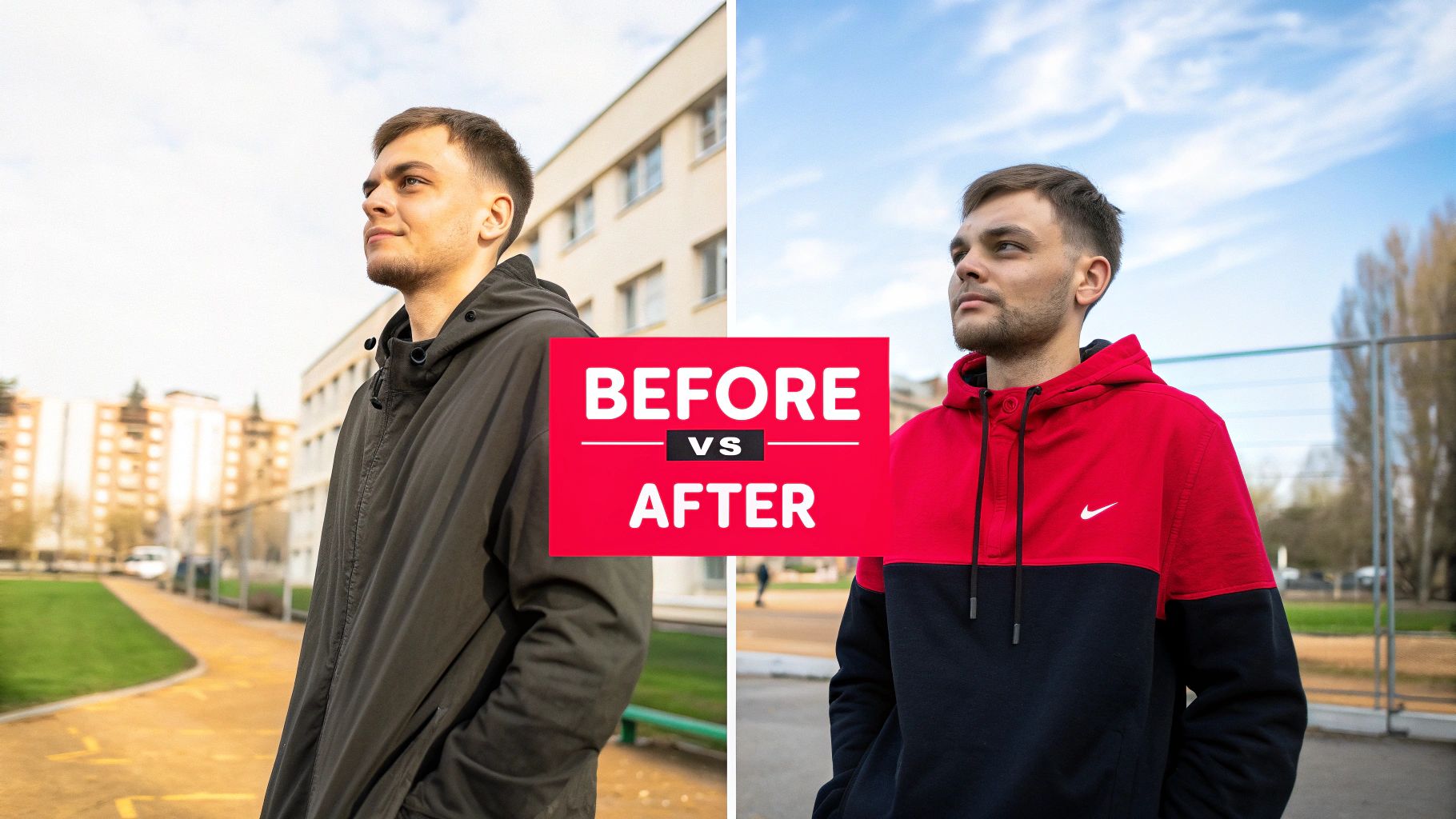
    Let's be blunt: your thumbnail is the single most important piece of real estate you have. It’s your video’s billboard. If it doesn't stop someone mid-scroll, the quality of your content is completely irrelevant because they'll never even click play. A killer thumbnail doesn’t just look good; it stops the scroll and starts a story.

    This isn't about some mystical creative spark. It's about strategic design. You have less than a second to communicate value and trigger an emotion. Getting this right is a skill you can learn and repeat, not just a lucky guess.

    A person holds a tablet displaying 'Irresistible Thumbnails' with three example images, on a wooden table.

    So, forget the generic advice. We're going to break down a framework I use that focuses on three things: clarity, emotion, and branding. This is how you create visuals that viewers find almost impossible to ignore.

    The Foundation: High Contrast and Bold Colors

    The first rule of thumbnail design is just being seen. Your masterpiece has to be clear and readable even when it’s a tiny icon on a phone. This is where high-contrast colors become your absolute best friend.

    Think bright backgrounds with dark text and subjects, or the other way around. Steer clear of muddy, similar colors that just blend into a mush. A bright yellow on a deep blue will always smack someone in the face harder than beige on light gray.

    • Vibrant Palettes: Don't be shy. Use colors that actually stand out on the YouTube homepage. Saturated blues, greens, yellows, and reds are all proven to grab attention.
    • Outline Your Subjects: One of my favorite tricks is to add a subtle white or black outline (a "stroke" in Photoshop terms) around the main person or object. It makes the subject "pop" right off the background and dramatically boosts clarity.
    • The Squint Test: This is non-negotiable. Once you've finished your design, shrink it way down and squint your eyes. Can you still make out the main subject and feel the emotion? If it turns into a blurry mess, you need more contrast.

    Communicating Emotion Through Faces

    As humans, we're hardwired to look at and react to other faces. Sticking an expressive face in your thumbnail is one of the fastest ways to forge an emotional connection before the video even starts. It instantly tells a story and sets the viewer's expectations.

    Are you shocked, thrilled, confused, or celebrating? Showing that emotion clearly gives immediate context. A thumbnail for a video about a surprising gaming outcome is way more compelling with a genuinely shocked face than with a generic screenshot from the game.

    Now, this doesn't mean you have to do the over-the-top, exaggerated "YouTube face" if that's not your style. Authenticity is still king. The point is to make sure the emotion is clear, intentional, and actually matches what's in the video.

    Minimal Text That Packs a Punch

    One of the biggest mistakes I see creators make is cramming their thumbnail with text. Your title is sitting right there next to the thumbnail—don't make them fight for attention. Any text on your visual should be minimal, huge, and readable in a split second.

    Your thumbnail text should add a layer of curiosity or context, not just repeat the title. Think of it as a tiny, punchy sub-headline. If your title is "I Tried the World's Spiciest Ramen," your thumbnail text could be a simple, bold "REGRET" or "NEVER AGAIN."

    My rule of thumb is three words or fewer. Use a bold, clean font that’s easy to read when it’s small. The text is there to support the visual story, not take it over.

    Using Composition to Guide the Eye

    The best thumbnails aren't just thrown together; they use classic design principles to tell the viewer's eye exactly where to look. One of the most powerful and simple tools for this is the rule of thirds.

    Just imagine your thumbnail has a 3×3 grid overlaid on it. By placing the most important things—like your face or a key object—along those lines or where they cross, you create a much more balanced and professional-looking image. It immediately feels more dynamic than just centering everything, which often comes off as static and a bit boring.

    This kind of visual strategy is key to packaging your content. For more ideas on creating content that naturally lends itself to strong visuals, you can check out our guide on how to find great video ideas at https://blog.viewsmax.com/how-to-ideas-for-a-video/.

    And if you really want to level up, look into quick design hacks to boost ad click-through rates. The same principles that make an ad effective apply directly to making a thumbnail that gets the click.

    Writing Magnetic Titles That Work With Your Thumbnails

    An incredible thumbnail is your first hook, but it can't land the click all by itself. It needs a killer title to seal the deal and convince someone that your video is the one they've been looking for. The real magic happens when your image and your text work together, creating a one-two punch that's impossible to ignore.

    Think of it this way: the thumbnail sparks the emotion, and the title delivers the logic. Your thumbnail grabs their eye with a compelling image, while the title gives them a concrete reason to commit. When these two elements are perfectly aligned, they create an irresistible package that sends your click-through rate soaring.

    A person in a blue shirt is typing on a laptop and writing in a notebook at a desk.

    This synergy is all about setting an expectation and then promising to meet it. If your thumbnail shows one thing and your title says another, you create confusion. And a confused viewer is a viewer who keeps scrolling. But when they match up, you build instant trust, making the click feel like a safe bet.

    Proven Formulas For High-CTR Titles

    You don't need to reinvent the wheel for every single video. I've found that certain title structures just work because they tap into basic human psychology—our curiosity, our desire for simple answers, and our fear of missing out. These aren't just clickbait; they’re proven frameworks for communicating your value proposition in a split second.

    Here are a few formulas I come back to again and again:

    • Titles with Numbers: Our brains love numbers. They promise a structured, easy-to-digest format. "7 Thumbnail Mistakes Killing Your Channel" is way more powerful than a vague title like "How to Make Better Thumbnails." It's specific and instantly tells the viewer what they'll get.
    • Provocative Question Titles: Asking a good question gets the viewer's mind working, and suddenly, your video becomes the obvious place to find the answer. A title like, "Is Your Camera Betraying Your Vlogs?" creates immediate intrigue. They have to click to find out.
    • "How-To" and Solution-Oriented Titles: These are the lifeblood of YouTube Search. They make a direct promise to solve a viewer's problem. Something like "How to Edit Videos 3x Faster (Without New Software)" is brilliant because it clearly states the benefit and even handles a common objection upfront.

    The best titles don’t just describe what’s in the video; they sell the outcome. Instead of "My Morning Routine," try "The 5 AM Morning Routine That Changed My Life." The first is a description. The second is a transformation.

    Weaving Keywords in Naturally

    While curiosity-gap titles are fantastic for getting clicks from the homepage and suggested videos, you can't afford to ignore search traffic. A well-optimized title is your secret weapon for getting discovered for weeks, months, or even years down the road. The trick is to make the keywords feel natural, not like they were stuffed in by a robot.

    First, figure out your main target phrase. Let’s say you’re making a video about a budget-friendly home studio. Your core keyword might be "home studio setup." A fantastic title would be, "My Ultimate Home Studio Setup for Under $500." It nails the keyword, uses a number, and adds a super compelling benefit (the price).

    Finding the right phrases is half the battle. To get a feel for what people are actually typing into the search bar, it pays to explore some popular YouTube video keywords in your niche. Seriously, this simple research can be a game-changer for your video's long-term discoverability.

    A Creator’s Guide to A/B Testing and Iteration

    Let’s be honest: guessing what your audience wants to click on is a losing game. The top creators I know don’t just have great instincts; they have a system. They test their ideas, listen to the data, and learn from the results.

    This is where A/B testing your thumbnails and titles becomes your secret weapon for growth.

    At its core, an A/B test is just a simple experiment to see which of two options performs better. By systematically testing your creative, you figure out exactly what makes your specific audience click. This simple process takes the guesswork out of the equation and helps you build a playbook of proven tactics that consistently lift your click-through rate over time.

    A Simple Method for Testing on YouTube

    You don’t need any fancy or expensive software to get started. All the tools you need are already inside YouTube Studio. The whole idea is to change just one thing—either the thumbnail or the title—after an initial run and measure what happens to your CTR.

    Here's the straightforward protocol I’ve used for years:

    • Publish Your Video: Go live with your first choice for the thumbnail and title. We’ll call this "Version A."
    • Let It Run: Give the video some breathing room to collect data. I recommend letting it run for at least 24 to 48 hours. This gives the algorithm enough time to push it out to an initial audience and establish a baseline CTR.
    • Make One Change: Once that initial period is over, change only one thing. Swap the thumbnail for "Version B" or update the title to "Version B." Whatever you do, never change both at once.
    • Measure Again: Now, let the video run with Version B for the same amount of time—another 24 to 48 hours.
    • Compare the Results: Time to dive into your analytics. Look at the CTR for the first period (Version A) and compare it to the CTR for the second period (Version B). The one with the higher click-through rate is your winner.

    This method is so effective because it uses your own audience's behavior as the ultimate judge. What works for a massive gaming channel might fall flat for your cooking channel, but this data is undeniable. It's tailored to your viewers.

    Common Mistakes to Avoid When Testing

    Running tests is a bit of a science, and it's surprisingly easy to get bad data if your process isn't clean. Trust me, I’ve made all of these mistakes so you don't have to.

    • Testing Too Many Things at Once: This is the cardinal sin of A/B testing. If you change both the thumbnail and the title, you have no idea which change actually helped (or hurt) your CTR. You have to isolate one variable per test to get clear, actionable results.
    • Calling a Test Too Early: I see this all the time. A creator gets impatient and calls it quits after just a few hours. That's a huge mistake. CTR can fluctuate like crazy in the first day as YouTube shows your video to different pockets of viewers. Wait at least a full 24 hours before making any conclusions.
    • Ignoring Statistical Significance: A tiny jump from 4.1% to 4.2% isn't a clear win; it could just be random noise. You're looking for significant, repeatable lifts. As a rule of thumb, I look for a change of at least 0.5% or more to feel confident that the new version is a true winner.
    • Not Documenting Your Learnings: Every single test, whether it wins or loses, teaches you something valuable. If you don't write it down, you’ll forget what you learned and find yourself making the same mistakes months later.

    The goal of A/B testing isn't just to find one winning thumbnail. It's to build a deep understanding of your audience's psychology. Over time, you’ll start to see patterns—maybe your audience prefers faces with surprised expressions, or titles that ask a direct question. These insights are gold.

    Keep a Simple Testing Log

    To make sure those valuable insights don't get lost, keep a simple testing log. It doesn’t need to be some complicated database; a basic spreadsheet is perfect. This little document is what turns your one-off tests into a powerful knowledge base for your channel.

    Here’s a basic template you can copy to track your experiments and keep a record of what you learn along the way.

    Sample Thumbnail and Title A/B Testing Log

    Video Title Test Date Variable A (e.g., Thumbnail/Title) Variable B (e.g., New Thumbnail/Title) CTR for A (First 48h) CTR for B (Next 48h) Winner Key Learning
    My Ultimate Desk Setup Oct 26 Minimalist thumbnail, clean desk Thumbnail with bright red circle on new keyboard 4.5% 6.2% B Bright color pops and highlighting a specific product dramatically increased clicks.
    How to Edit Faster Nov 02 Title: "Edit Videos Faster" Title: "Edit Videos 3x Faster in Premiere" 5.1% 5.0% A (No change) Adding specificity to the title didn't improve CTR for this topic. Stick to broader benefits.

    By making this iterative process a habit, you stop throwing ideas at the wall and hoping something sticks. Instead, you build a data-driven system that ensures your ability to improve your CTR gets stronger with every single video you publish.

    Your Top YouTube CTR Questions, Answered

    Once you start getting serious about improving your click-through rate, the questions start piling up. It's a tricky metric because the "right" answer almost always depends on your specific video, audience, and niche.

    Let's clear up the confusion. Think of this as your troubleshooting guide for those common CTR scenarios that can leave you scratching your head. We'll go beyond the basics to help you make smarter, data-driven decisions for your channel.

    How Long Should I Wait Before Changing a Thumbnail?

    This is the big one. You launch a new video, and the initial CTR is… disappointing. The urge to immediately swap the thumbnail is strong, but jumping the gun is usually a mistake.

    Here’s why: YouTube needs time to push your video out to different groups of people. I always recommend waiting at least 24 to 48 hours before touching anything. This gives the algorithm enough time to gather meaningful data and establish a baseline. If you change things too early, you're just reacting to noise, not real performance.

    Can a High CTR Ever Be a Bad Thing?

    It sounds crazy, but yes, an unusually high CTR can be a red flag. This almost always points to a mismatch between what you promised and what you delivered—in other words, clickbait.

    Sure, you might score a massive 15% CTR in the first few hours with a wild, sensationalized title. But what happens next? Viewers click, realize they were duped, and bail within seconds. This absolutely crushes your Audience Retention and Average View Duration, which are signals YouTube values way more than CTR.

    A sky-high CTR paired with terrible watch time tells the algorithm your video is unsatisfying. YouTube will stop showing it to people almost as fast as it started. The real goal is a sustainable CTR that comes from genuinely happy viewers.

    Does a Low CTR Mean My Video Is Bad?

    Not at all. A low CTR is a problem with your packaging—your thumbnail and title—not necessarily the video content itself. I've seen countless amazing videos die on the vine because they were wrapped in a boring or confusing first impression.

    In fact, a video with a low CTR but great audience retention from the people who do click is a goldmine. It's a clear signal that the content is strong, but the marketing is weak. This is the easiest problem to fix. All you need to do is go back and test some new thumbnail and title ideas to unlock the potential that's already there.


    Ready to stop guessing and start growing? ViewsMax provides AI-powered tools and actionable insights to help you craft better titles, design clickable thumbnails, and make data-driven decisions that boost your CTR. Learn how to grow your channel smarter at https://blog.viewsmax.com.

  • What Are People Searching On YouTube A Guide for Creators

    What Are People Searching On YouTube A Guide for Creators

    When people jump onto YouTube, they're usually looking for one of four things: a solution to a problem (how-to guides), an explanation of a concept (what is…), help with a buying decision (reviews), and—most of all—entertainment. This blend of education, commerce, and leisure is what fuels the platform's incredible search volume.

    What Are People Actually Searching for on YouTube?

    It's easy to think of YouTube as just a place to watch videos, but it’s much more than that. It's the world's second-largest search engine, a place where people actively look for answers, solutions, and, yes, a good distraction. Viewers don't just show up to browse; they arrive with a specific goal in mind.

    That goal almost always falls into one of four distinct categories. Understanding these motivations is the first step to creating content that people will actually find and watch.

    The Four Main Reasons People Search on YouTube

    • Learning and Education: This is the realm of "how-to" and "tutorial" videos. Viewers are on a mission to learn something new, whether it's fixing a bike, mastering a recipe, or figuring out a piece of software.

    • Explanation and Understanding: These are the "what is" and "explainer" searches. When someone wants a complex topic broken down into a simple, easy-to-digest video, this is where they turn.

    • Purchasing Decisions: Before pulling out their wallet, people head to YouTube for reviews, unboxing videos, and product comparisons. They want to see a product in action and get a real person's take on it.

    • Entertainment and Leisure: This is the biggest category of them all. It covers everything from music videos and gaming live streams to vlogs, movie trailers, and comedy sketches. It's the ultimate destination for escapism.

    This simple breakdown shows the core needs driving the billions of searches happening on the platform every day.

    A concept map illustrating YouTube search categories: learning, buying products, and entertainment content.

    As you can see, viewer behavior isn't random. It’s a predictable pattern of needs just waiting for a creator to meet them. And the scale is mind-boggling—we’re talking more than 3.5 billion searches every single day.

    Within that massive volume, entertainment is the clear winner. One study found that out of the top 100 global searches, a whopping 20% are music-related. Terms like 'song' and 'movie' consistently dominate. The lessons from this data are powerful, and it's worth exploring what YouTube has taught about AI search to see how these trends are shaping the future of content discovery.


    The Four Core Types of YouTube Search Intent

    To make this even clearer, here’s a quick breakdown of the four main types of search intent. Think about which of these your content serves.

    Search Intent Type Viewer Goal Example Search Query Content Opportunity
    Informational To learn something or get an answer to a question. "how to tie a tie" Step-by-step tutorials, explainer videos, educational deep dives.
    Navigational To find a specific channel, brand, or creator. "mrbeast" Building a strong brand and consistent content that people will seek out by name.
    Commercial To research a product or service before buying. "iphone 15 pro review" In-depth product reviews, comparisons, and "best of" lists.
    Transactional To find something to enjoy or be entertained by. "lofi hip hop radio" Music, vlogs, comedy, gaming streams, short films, and other entertaining formats.

    The key takeaway is simple: Every successful YouTube channel is built on understanding what the viewer wants. Your job isn't just to make videos; it's to provide the exact video someone is searching for, right when they need it.

    Once you grasp these fundamental search categories, you can stop guessing what to create. Instead, you can start strategically answering the direct needs of your audience. This shift is the most important step you can take toward making content that gets discovered, watched, and shared.

    Why Search Intent Is Your Ultimate Growth Tool

    A person interacts with a YouTube Search interactive display featuring numerous digital frames and screens.

    Knowing what people search for is a great start. But understanding why they're searching for it is the real secret to growing your channel.

    Think of it this way. A customer walking into a restaurant and asking for "food" is one thing. But a customer who asks for "spicy vegan ramen" gives you a clear, specific need to meet. Nail that request, and you've got a very happy customer. The same principle applies to YouTube.

    This "why" behind every search is called search intent. It’s the goal a viewer is trying to accomplish with their query. When your video perfectly aligns with that goal, you give them exactly what they came for. That’s a powerful signal to the YouTube algorithm.

    This isn't just some abstract theory—it's the engine that drives the entire platform. The algorithm's main job is to play matchmaker, connecting a user's search to the most satisfying video possible. Getting good at this means understanding search intent and the psychology behind it.

    How Intent Powers the Algorithm

    The YouTube algorithm can’t physically watch your video to see if it’s any good. Instead, it looks at viewer behavior. Think of every action a viewer takes as a vote of confidence. When there's a strong match between their search and your video, their actions send all the right signals.

    These are the metrics that tell the story:

    • Click-Through Rate (CTR): A high CTR is the first clue. It tells YouTube that your title and thumbnail caught someone's eye and felt like the right answer to their search.
    • Average View Duration (AVD): This shows how long people actually stick around. A high AVD means your content is delivering on the promise of your title and is holding their attention.
    • Audience Retention: This chart shows you exactly when people drop off. Strong retention from start to finish is the ultimate proof that you completely fulfilled their search intent.

    When these metrics look good, the algorithm sees your video as a high-quality, satisfying result. It solved a user's problem, and that's exactly what YouTube wants.

    A video that perfectly aligns with searcher intent isn't just a video—it's a solution. When you provide the best solution, YouTube rewards you with more visibility, pushing your content to a wider audience.

    From Ranking to Resonance

    Focusing on intent changes your entire mindset. You stop trying to just rank for a keyword and start creating content that genuinely resonates with a real person on the other side of the screen.

    Someone searching for "how to replace a faucet" doesn't just want a video with that keyword in the title. They're probably standing in their kitchen, tools in hand, looking for a clear, frustration-free guide to get the job done.

    When you deliver that experience, you get more than just views. You build trust. The person who successfully fixed their sink because of your video is way more likely to subscribe, check out your other content, and become a genuine fan. This is what separates a channel with fleeting traffic from one that builds a loyal community. By mastering intent, you create content that doesn't just get found—it gets remembered.

    Free Ways to Uncover What People Are Really Searching For

    You don't need a fancy budget to get inside the minds of your potential viewers. In fact, some of the best research tools are already baked right into YouTube, and they won't cost you a dime. Think of these manual methods as your secret weapon for listening in on what your audience is asking for.

    When you use these techniques, you stop guessing and start creating videos based on proven demand. You're simply tapping into the conversations already happening in your niche. Let's walk through a few simple, yet incredibly powerful, ways to do just that.

    Master YouTube Autocomplete

    The most obvious tool is often the most overlooked. That little search bar at the top of YouTube isn't just for typing; it's a live feed of what people are curious about right now. This feature, called Autocomplete, is basically a crystal ball for viewer intent.

    Just start typing a broad topic or "seed keyword" from your niche. For instance, if you run a fitness channel, type "home workout for…" and just wait a second. YouTube will immediately show you a dropdown list of the most common ways people complete that phrase, like:

    • home workout for beginners
    • home workout for weight loss
    • home workout for women without equipment
    • home workout for abs

    Every single one of those is a validated video idea, served up on a silver platter by your future audience. Try this again with different starting points like "best exercises for…" or "how to fix…" to find all sorts of long-tail keywords that signal a viewer is ready to watch. Our complete guide on YouTube video keywords can show you how to organize these ideas into a real content strategy.

    Don't just see this as a list of phrases. It's a ranked hierarchy of what matters most to your audience. The suggestions at the top almost always have the highest search volume, making them fantastic targets for your next video.

    Mine the Comments for Gold

    Your competitors' comment sections are an absolute goldmine. They are packed with raw, unfiltered feedback and tons of content ideas. Viewers drop by to ask questions, share their confusion, or even beg for a follow-up video on a topic that wasn't fully explained. This is free market research, plain and simple.

    Go browse the comments on a few popular videos in your space and keep an eye out for recurring themes. Are several people asking the same question? Is there a common roadblock they keep hitting?

    A comment like, "Great video, but I'm still confused about how to properly adjust the settings on this camera for low light," isn't just a piece of feedback. It's a giant, flashing neon sign pointing directly at your next video title: "A Beginner's Guide to Camera Settings for Low Light."

    Go Where Your Audience Hangs Out on Reddit

    Finally, get off YouTube for a bit to learn the language of your audience. Online communities like Reddit are where people have real, unguarded conversations about their hobbies, problems, and passions. Find the subreddits dedicated to your niche (think r/gardening, r/personalfinance, or r/blender) and just listen.

    Look for a few key things:

    • Frequently Asked Questions: Spot the threads titled "Newbie question…" or "Can anyone help me with…"
    • Common Frustrations: What are the recurring pain points or complaints?
    • Success Stories: What tools, techniques, or solutions get people excited?

    This isn't just about finding what people want to know, but how they ask. Adopting their exact phrasing for your titles and descriptions makes your content feel instantly more authentic and findable, which can make a huge difference in how well it connects.

    Leveling Up Your Research with AI Tools

    While manual methods are a great place to start, AI-powered tools are what really move the needle in understanding what people are searching for on YouTube. Think of it like this: manual research is like using a handheld map. It gets the job done, but it's slow. AI is like having a live satellite feed—it shows you the entire landscape, traffic patterns, and hidden shortcuts, all in real-time. That’s the kind of jump you get with specialized creator platforms.

    A laptop and notebook on a wooden desk with a red banner overlay stating 'FIND TRENDS'.

    These tools don’t just spit out keywords; they crunch massive amounts of data to give you a genuine strategic advantage. They can spot trends before they take off, identify low-competition keywords that are perfect for a new channel, and give you a full rundown on your competition in minutes, not hours. This shifts your whole approach from making educated guesses to making truly data-driven decisions.

    The biggest win here is pure efficiency. Instead of spending your morning piecing together clues from Autocomplete and comment threads, you can get a full report that maps out your next few videos. That time you save can go right back into what actually grows your channel: making amazing content.

    The Power of AI in YouTube Research

    Modern AI tools go so much further than just suggesting keywords. They connect the dots between search volume, competition, and what’s currently trending to shine a light on opportunities you’d otherwise miss. This helps you move from just finding a topic to truly understanding the entire ecosystem around it.

    Here’s a look at what these platforms bring to the table:

    • Spotting Trends: They can flag search queries that are on the rise, giving you a chance to create timely content that could catch a viral wave.
    • Difficulty Scoring: Most tools will score keywords to show you how tough it would be to rank for them. This is an absolute game-changer for new channels trying to gain traction.
    • Sizing Up the Competition: You can plug in a competitor's channel and see exactly which keywords are sending them views. It’s a fantastic way to learn from what’s already working.
    • Finding Content Gaps: These systems can compare your channel to others in your niche and point out popular topics you haven't touched on yet—instant video ideas!

    This kind of insight is what turns a hobby channel into a professional, scalable operation. You're no longer just throwing spaghetti at the wall to see what sticks; you’re making calculated moves based on solid data.

    The real advantage of AI isn't just about speed—it's about depth. These tools help you see the "why" behind the "what," uncovering the viewer intent and competitive dynamics that manual research alone just can't reveal.

    For instance, this trend analysis dashboard from ViewsMax lets creators see rising and falling interest in topics over time. It’s all laid out visually, making it easy to spot seasonal patterns or new fads so you can time your videos for maximum impact.

    Choosing the Right Research Approach

    So, when should you go manual, and when should you fire up an AI tool? Honestly, the best strategy is a blend of both. Manual methods are fantastic for getting a real, human feel for your audience's language and problems. Then, you can use AI tools to validate those hunches with hard data and see if there's enough search volume to make a video worthwhile.

    This table breaks down the key differences to help you decide which approach fits your needs at any given moment.

    Manual Research vs AI-Powered Tools A Comparison

    Feature Manual Methods (e.g., YouTube Autocomplete) AI Tools (e.g., ViewsMax) Best For
    Speed Slow and methodical; requires a good chunk of time. Incredibly fast; delivers insights in seconds. Quick idea validation.
    Data Depth Surface-level ideas without search volume or competition data. In-depth metrics like search volume, difficulty, and trends. Strategic planning and competitive analysis.
    Scalability Hard to scale; your research is limited by how much time you have. Highly scalable; can analyze hundreds of keywords and channels. Long-term content strategy.
    Cost 100% free, just takes time. Typically a subscription-based monthly or annual fee. Creators ready to invest in growth.

    Ultimately, bringing AI into your workflow is about working smarter, not just harder. It takes the most tedious parts of research off your plate so you can pour your creative energy into making videos that people not only find, but absolutely love to watch. When you combine your human intuition with the power of machine intelligence, you build a powerful system for sustainable channel growth.

    Analyzing Top YouTube Search Trends and Niches

    It’s one thing to talk about YouTube search in theory, but the real lightbulb moment comes when you see it play out in the wild. Looking at some of the fastest-growing categories on the platform lets us see exactly what people are searching for right now. These mini-case studies show how savvy creators tap into very specific viewer needs.

    Let's break down a few powerful examples. These niches perfectly illustrate how to move beyond generic keywords and find incredible content ideas that truly connect with an audience.

    The Gaming Deep Dive

    The gaming world on YouTube is gigantic, but just making "gaming videos" is a recipe for getting lost in the noise. The real wins come from zeroing in on how gamers actually search. For example, players diving into massive, story-rich games like Elden Ring or Baldur's Gate 3 aren't just watching someone play. They're actively searching for things like "lore explained" to piece together the complex backstory.

    Challenge runs are another huge trend. You’ll find viewers flocking to videos titled "Can you beat Minecraft with only one block?" or "Skyrim speedrun world record." These searches aren't just about entertainment; they’re driven by a desire to see a beloved game pushed to its absolute limits, combining novelty with a display of pure mastery.

    Combat Sports Breakdowns

    Sports, and combat sports in particular, offer another fantastic look at niche search intent. Sure, people search for fight highlights, but the dedicated fans are digging way deeper. Channels are blowing up by creating content that answers the hyper-specific questions of a truly educated audience.

    • Fighter Breakdowns: People search for "Islam Makhachev grappling analysis" because they want an expert to break down what makes a fighter’s style so effective.
    • Technique Tutorials: Aspiring fighters and hobbyists are looking for "how to throw a proper jab" or "best BJJ submissions for beginners," seeking out practical, actionable advice.

    These creators aren’t just recapping a fight; they’re teaching the science behind it. That's a perfect match for the intent of a passionate, knowledgeable community. If you're hunting for a passionate audience of your own, our guide on choosing the best niche for YouTube is a great place to start.

    The ASMR Sensory Experience

    ASMR (Autonomous Sensory Meridian Response) is a fascinating phenomenon that basically grew up on YouTube. This entire niche is built around satisfying a very specific, sensory-based search. People aren't searching for information here; they're searching for a feeling.

    Creators in this space are masters of keywords tied to specific triggers. Think about it:

    • "ASMR tapping sounds"
    • "inaudible whispering for sleep"
    • "crinkle sounds no talking"

    This incredibly precise language shows a deep understanding of what the audience wants to experience. The search intent is all about targeting moods and sensations, proving that search isn't always about finding facts.

    Each of these niches—gaming, sports, and ASMR—thrives because it serves a very precise viewer need. Success on YouTube isn’t about trying to appeal to everyone. It’s about becoming the absolute best answer for a dedicated community.

    While music videos often dominate the charts, gaming and sports are catching up fast. Titles like Minecraft and Roblox consistently appear on global search lists, and UFC viewership has exploded by 203% in just five years. This surge in specific interests is a massive opportunity for any creator willing to go deep and figure out what fans are really looking for.

    Turning Search Data Into High-Performing Videos

    Having a list of what people are searching for on YouTube is one thing; turning that insight into a video people actually want to watch is where the real magic happens. This is the moment your research becomes reality. It’s a hands-on process of aligning every single part of your video—from the title to the final second of content—with what the viewer was looking for in the first place.

    Think of it like building a bridge. Your keyword research is the blueprint, sure. But now you have to actually lay the steel beams (your title), pour the concrete (your description), and make sure the road is smooth enough to get the driver to their destination (your actual content). If any part is weak, the whole thing falls apart.

    Crafting the Perfect Title and Description

    Your video’s title and description are your first, and most important, handshake with both the viewer and the algorithm. You have to thread the needle, creating something that’s optimized for a search engine but still compelling to a human.

    A great title usually follows a pretty simple formula: it includes your primary keyword while also promising a clear benefit or sparking some curiosity.

    • Weak Title: "DSLR Camera Settings"
    • Strong Title: "5 DSLR Camera Settings Every Beginner Must Know (2024 Guide)"

    See the difference? The second title works because it targets the keyword, calls out the specific audience ("Beginner"), and creates a little urgency ("Must Know"). It’s a complete package that tells both YouTube and the viewer exactly what they're getting into.

    Your description is also prime real estate for search. The first two or three sentences are absolutely critical, since they’re what shows up in search results. A good approach is to rephrase your title using your main keyword and a few related terms in a natural-sounding way.

    Pro Tip: Don’t just stuff keywords in there. Write a genuinely helpful, human-readable summary of your video. Think of it as a mini-blog post that adds context and value. This encourages YouTube to rank your video for a wider range of related searches.

    The Role of On-Page SEO Elements

    Beyond the title and description, a few other elements help round out your on-page optimization. While the weight YouTube gives to each of these has changed over the years, together they still send a powerful signal to the algorithm.

    • Video Tags: Honestly, tags are less critical than they used to be, but they don't hurt. They still help YouTube categorize your content and clear up any potential confusion. Use your main keyword, a few variations, and some broader category tags. Their main job is to reinforce what your video is about.
    • Timestamps (Chapters): Adding timestamps to your description does more than just improve the viewer experience; it gives YouTube a ton more information about your content. Each chapter title can act like a mini-keyword, helping your video appear in more specific search results.

    Beyond SEO: The Content Must Deliver

    Look, on-page optimization will get your video discovered, but it’s the content itself that will make it successful. A perfectly optimized video that doesn't deliver on its promise is dead in the water. If viewers click away in the first 30 seconds, the algorithm learns that your video isn't a good answer to their search, and it'll stop showing it to people.

    This is where your video’s structure is everything.

    1. The Hook (First 15 Seconds): Right away, you need to confirm that the viewer is in the right place. State the video’s purpose and promise them a clear outcome.
    2. The Core Value (The Middle): This is the meat of the video where you deliver the information, entertainment, or solution. Keep the energy up and don't wander off-topic.
    3. The Call to Action (The End): Gently nudge viewers to like, comment, or subscribe.

    The entire video, from the title to the final frame, has to feel like a cohesive unit designed to solve a specific problem or answer a specific question. Learning how to write a compelling script for your YouTube videos is the key to ensuring your content is strong enough to hold viewer attention. When your content truly delivers, the algorithm rewards you with the one thing we're all after: more views.

    Still Have Questions About YouTube Search? Let's Clear a Few Things Up

    A laptop displays video editing software next to a notebook and pen, with a red banner saying 'OPTIMIZE VIDEOS'.

    When you start digging into YouTube search, a few common questions always pop up. Getting straight answers to these can make a huge difference in your content strategy and help you sidestep some common mistakes. Let's tackle some of the most frequent ones I hear from creators.

    How Long Does YouTube SEO Take to Work?

    Patience is key here—YouTube SEO is definitely a long game, not a quick fix. Sure, a perfectly optimized video might sneak into the rankings for a low-competition term within a few days, but that's the exception. For more popular searches, it often takes weeks or even months for the algorithm to gather the data it needs—like watch time and click-through rate—to trust your video.

    Think of it as building a reputation. Consistency is your best friend. Every time you upload a video with solid SEO practices, you're building your channel's authority. Over time, this helps your new videos get found much faster.

    Should I Make Videos About Trends or Evergreen Topics?

    Honestly, the smartest channels do both. A mix of the two gives you the best of both worlds, blending immediate traffic spikes with long-term, stable growth.

    • Trending Topics: Jumping on a trend can bring a huge, sudden wave of new viewers who are actively searching for that topic right now. The catch? That traffic usually dries up as soon as the trend dies down.
    • Evergreen Topics: Videos like "how to fix a leaky faucet" or "beginner's guide to investing" are the bedrock of a stable channel. They pull in a steady, reliable stream of views for years because people will always be looking for that information.

    A winning strategy balances the quick buzz from trends with a solid foundation of evergreen content that keeps your channel growing day in and day out.

    Is YouTube Search Different from Google Search?

    Yes, absolutely. They operate with fundamentally different goals. Google Search is on a mission to find the most accurate, authoritative text-based answer to a question. YouTube, on the other hand, wants to find the most engaging and satisfying video for a viewer.

    While keywords are important on both, YouTube's algorithm cares way more about user behavior. Signals like watch time and audience retention are what ultimately tell YouTube, "Hey, people love this video—it's the best answer for this search."

    How Important Are Video Tags for YouTube Search?

    Video tags just aren't the powerhouse they used to be, but they aren't completely useless either. Your title, thumbnail, and description are now the most important pieces for ranking in search.

    It's better to think of tags as a helpful bit of context for YouTube's algorithm. They can clarify things if your main topic is ambiguous. My advice? Use your main keyword and a handful of close variations, but don't waste time "tag stuffing" with dozens of irrelevant terms. It just doesn't move the needle anymore.


    Ready to stop guessing and start growing? ViewsMax gives you the AI-powered tools to uncover high-demand, low-competition keywords, analyze your competition, and optimize your videos for maximum discoverability. Build your data-driven content strategy with ViewsMax.

  • What Is Monetization on YouTube A Guide to Making Money

    What Is Monetization on YouTube A Guide to Making Money

    So, what exactly is YouTube monetization? Put simply, it’s the process of earning money from the videos you create and upload.

    Think of your channel like a digital storefront. You stock the shelves with great content, and monetization is how you open for business and start making sales.

    Unpacking Your Creator Toolkit

    A person works on a laptop with a camera and microphone, preparing to monetize their channel.

    Becoming a monetized creator isn't about flipping a single switch. Instead, YouTube hands you a whole toolkit filled with different ways to build an income. Each tool works a bit differently, and some will be a better fit for your channel and audience than others.

    The one everyone knows is ad revenue—getting a cut from the ads that run on your videos. But that’s just the tip of the iceberg. The platform has evolved to offer a ton of ways to earn directly from your community, brand partners, and even YouTube itself.

    The 8 Main Ways to Earn on YouTube

    To really get what monetization is, you need to see it as a collection of different opportunities, not just one paycheck. The most successful creators I know rarely rely on a single income source; they mix and match several methods to build a much more stable and reliable business.

    Let's quickly break down the primary tools in your monetization toolkit.

    To give you a bird's-eye view, here's a quick summary of the most common ways creators earn money on the platform.

    YouTube Monetization Methods at a Glance

    Monetization Method How It Works Best For
    Ad Revenue You earn a share of the money from ads shown on or around your videos. All eligible channels; a foundational income stream.
    Channel Memberships Viewers pay a monthly fee for exclusive perks like badges, emojis, and members-only content. Channels with a dedicated, loyal community.
    Super Chat & Stickers Fans can buy highlighted messages or animated stickers during live streams and Premieres. Creators who do live streams and engage with their audience in real time.
    Super Thanks Viewers can buy a fun animation on a video page to show extra appreciation. Any creator looking for a simple way for fans to show support on-demand.
    YouTube Premium You get a portion of a viewer's subscription fee when they watch your content. All monetized channels, as it's a passive income stream.
    Merchandise Shelf You can showcase and sell your own branded products directly below your videos. Creators with a strong brand identity and engaged fanbase.
    Brand Deals You partner with brands for sponsored content or affiliate marketing. Channels of all sizes, but especially those with a defined niche.

    Each of these methods opens up a new potential revenue stream for your channel.

    A common mistake is thinking monetization is only about ads. The reality is, a diversified strategy that taps into fan funding and brand deals almost always leads to more significant and stable earnings over time.

    To understand the bigger picture of how creators make money online, exploring general monetization strategies can be a real eye-opener. For now, let's dive into each of these YouTube-specific tools so you can figure out how to unlock and make the most of them for your channel.

    Unlocking Your Earnings with the YouTube Partner Program

    Before you can turn your creative passion into a paycheck, you have to get the keys to the kingdom. On YouTube, that key is the YouTube Partner Program (YPP), the official gateway that unlocks all the money-making features on the platform. Think of it as your formal entry into YouTube's bustling creator economy.

    But joining the YPP isn't automatic; it's a milestone you have to earn. YouTube has put some clear benchmarks in place to make sure creators have built a real, engaged audience and are consistently playing by the rules before they can start earning. It's a system designed to protect everyone—viewers, advertisers, and other creators—from low-effort or harmful content.

    The Milestones You Need to Hit

    To even be considered for the YPP, your channel has to meet some specific thresholds. These numbers aren't arbitrary; they show YouTube that you have a proven track record of getting people to watch and stick around.

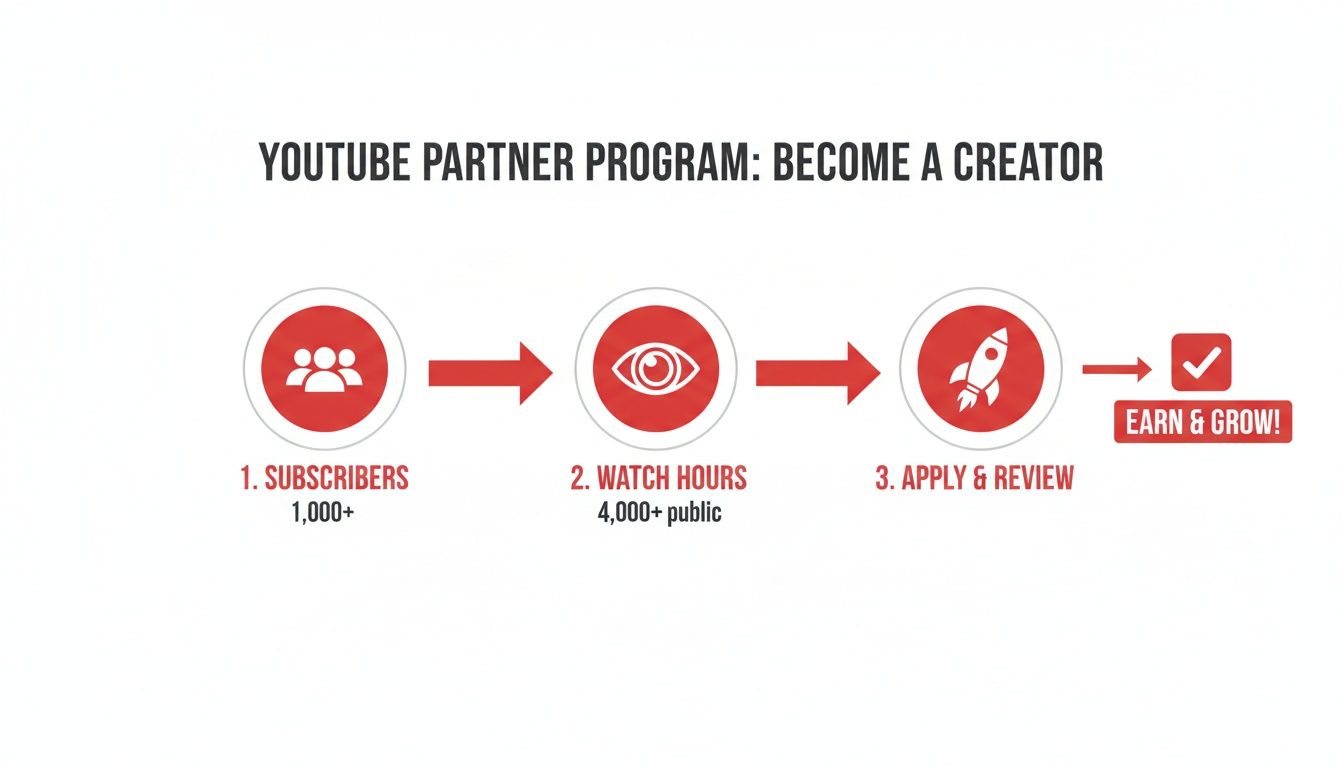
    The primary requirements are:

    • 1,000 Subscribers: This is the first big signal that you’ve built a foundational community that actually cares about what you're making.
    • 4,000 Public Watch Hours: This one is a bit trickier—it has to be accumulated over the last 12 months. It proves your content isn't just getting clicks, but is genuinely holding people's attention.

    There's also a path for creators who live and breathe short-form content. You can qualify with 1,000 subscribers and 10 million valid public Shorts views in the last 90 days. Hitting these numbers is your ticket to apply. It’s also smart to keep an eye on platform updates, since these things can shift. You can read up on recent changes in YouTube to stay in the loop.

    It's More Than Just Numbers: You Have to Follow the Rules

    Hitting your subscriber and watch time goals is really only half the battle. To get accepted into—and, just as importantly, stay in—the YPP, you have to be a stickler for YouTube's policies.

    Your channel must have zero active Community Guideline strikes and follow all YouTube channel monetization policies, including the AdSense Program policies. This is non-negotiable for long-term success.

    This boils down to creating original, advertiser-friendly content that respects copyright law and doesn't violate community standards. Once you meet the eligibility numbers, you’ll submit your application right from YouTube Studio. From there, a real human on the review team will manually go through your channel—your videos, your themes, your descriptions—to make sure everything aligns with their guidelines.

    The financial incentive for playing by the rules is massive. YouTube’s ad revenue recently shot up to $36.1 billion, a 14.6% jump from the previous year. For creators in the YPP, a piece of that enormous pie is up for grabs, with the standard revenue share sending 55% of ad earnings straight to your pocket. This really drives home why understanding and following the rules isn't just a suggestion; it's critical to your success.

    Your Primary Income Streams: Ads and Premium

    Once you get that "Congratulations, you're in!" email from the YouTube Partner Program, you unlock the two most fundamental ways to make money: ad revenue and YouTube Premium revenue.

    Think of these as the foundation of your channel's earnings. They're the consistent, mostly passive income sources that scale directly with your audience. Getting a solid grip on how they work is the first real step toward building a predictable income from your content.

    The process itself is pretty simple once you're approved.

    Process flow for YouTube Partner Program: qualify with subscribers and watch hours, apply, and earn revenue.

    This graphic really boils it down: meet the thresholds, get approved, and you're officially in the business of earning. So, let's break down what those earnings actually come from.

    Decoding Your Ad Revenue

    When people talk about YouTube monetization, ads are usually the first thing that comes to mind. Once you flip the switch, YouTube will start placing different types of ads on your videos—like the skippable ones you see before a video or the short, non-skippable ones. For every ad that runs on your content, you get to keep a 55% share of what the advertiser paid.

    Everything is handled through Google AdSense, which you’ll link to your channel to process all the payments. A common misconception is that more views automatically mean more money, but it's more nuanced. Your earnings depend heavily on who is watching, what they're watching, and where they're watching from.

    You'll quickly run into two key metrics in your analytics:

    • CPM (Cost Per Mille): This stands for "cost per 1,000 impressions." It's what advertisers are paying to have their ads shown 1,000 times across YouTube. It’s an advertiser-focused metric.
    • RPM (Revenue Per Mille): This is your "revenue per 1,000 views." This is the number that really matters to you. It shows your total earnings (from ads, Premium, and more) for every 1,000 video views, after YouTube has taken its cut.

    Things like your channel's niche, your audience's location and age, and even how long your videos are can cause these numbers to swing wildly. If you want to get into the nitty-gritty, our guide on the meaning of CPM on YouTube breaks it all down.

    Earning with YouTube Premium

    There's another powerful revenue stream that often flies under the radar: YouTube Premium. This is the platform's ad-free subscription service, and it creates a completely separate way for you to get paid. When a Premium subscriber watches your video, you earn a portion of their monthly subscription fee.

    The calculation is pretty straightforward: it’s based on how much watch time you get from Premium members. The more a Premium subscriber watches your channel, the bigger your piece of the revenue pie.

    This is a bigger deal than you might think. YouTube Premium has been growing like crazy, recently hitting 125 million subscribers—that's a massive 25% jump from just 100 million. It took seven years for the service to reach 50 million subscribers, but only two more years to more than double that number.

    This signals a huge shift in how people consume content. For creators with dedicated audiences, especially in fields like education or coaching where viewers are highly engaged, Premium revenue can sometimes even outpace ad revenue on a per-view basis.

    Building Community with Fan Funding Features

    Man records video about fan funding with a smartphone, two jars of dried herbs on the table.

    Ad revenue is a great starting point, but it's a passive stream that can swing wildly from month to month. The real key to understanding YouTube monetization is building a direct, authentic connection with your audience. That’s where fan funding comes in.

    These tools empower your most dedicated viewers to support you directly, turning them from casual watchers into true patrons of your work. Think of it like this: ads are like a radio station playing commercials for everyone, while fan funding is like selling tickets to your own private concert. It’s a far more stable and personal way to earn because it's built on relationships, not just algorithms.

    Turn Your Channel into a VIP Club with Memberships

    Channel Memberships are essentially YouTube's built-in version of Patreon. Your viewers can pay a small monthly fee to join your channel's "club," unlocking special perks that you get to design.

    This is where you can let your creativity run wild and offer genuine value that your public videos don't. Some of the most successful perks I've seen include:

    • Custom Emojis and Badges: Members get special emojis to spam in the comments and a loyalty badge next to their name that levels up over time. It's a simple, visual way to recognize your top supporters.
    • Exclusive Content: Think behind-the-scenes vlogs, early access to new videos, or even members-only live streams where you can hang out in a more intimate setting.
    • Community Access: Many creators set up a members-only Discord server or a private section in their channel's Community tab.

    You can set up multiple tiers—like Bronze, Silver, and Gold—with increasingly valuable perks. This gives everyone a chance to support you at a level they're comfortable with.

    The secret to great fan funding isn't just about asking for money. It's about creating an experience so cool and exclusive that your community genuinely wants to be part of it.

    Make Live Streams Interactive with Supers

    During a live stream or a video Premiere, the chat can fly by at a million miles an hour. "Supers" are a way for your audience to pay to make their message pop, and it's an incredible tool for boosting engagement and earnings during live events.

    There are a few different types of Supers you'll see:

    1. Super Chat: A viewer pays to have their comment highlighted in a bright, flashy color. It gets pinned to the top of the chat for a certain amount of time—the more they pay, the longer it stays.
    2. Super Stickers: Instead of a message, viewers can buy fun, animated stickers that appear in the chat feed. It's a quick, visual way to show support and get your attention.
    3. Super Thanks: This is basically a tip jar for your regular, pre-recorded videos. A viewer can buy a colorful animation that plays right over your video, and their comment will be highlighted in the comments section to show their appreciation.

    These features make supporting you feel like a game. It's interactive, it's fun, and it gives you a chance to shout out your biggest fans in real-time, which only strengthens that community bond you've been working so hard to build.

    Monetizing Your Brand Beyond YouTube

    While YouTube's built-in tools are great starting points, the most successful creators know their channel is a launchpad, not the final destination. Real, sustainable growth comes from building a brand that can stand on its own, independent of any single platform.

    It's a mental shift—from thinking like a YouTuber to thinking like a business owner.

    This is where you graduate from earning a slice of YouTube's ad revenue to creating and controlling your very own income streams. These off-platform methods often have a much higher ceiling for earnings because you're the one setting the prices and keeping the lion's share of the profits. You’re turning your hard-earned influence into a tangible, independent business.

    Selling Your Own Products

    One of the most powerful ways to do this is through YouTube Shopping. This handy feature lets you link your own online store, like one built on Shopify or Spring, directly to your channel. Your products show up in a slick "merchandise shelf" right under your videos, making it ridiculously easy for fans to shop without ever leaving the page.

    And this goes way beyond just slapping your logo on a t-shirt. Think about what your audience actually needs or wants.

    • A fitness creator? Sell custom workout plans or branded resistance bands.
    • An artist? Offer prints of your work, digital brush packs, or your favorite art supplies.
    • A gaming channel? Think custom mousepads or inside-joke apparel that only true fans will get.

    When you create products that genuinely solve a problem or resonate with your community’s identity, you’re building a revenue stream that’s both valuable and scalable.

    The real magic of selling your own merch is that you control everything: the product, the price, and the direct relationship with your customers. This helps insulate your business from the whims of ad rates or algorithm changes.

    Partnering with Brands and Affiliates

    Another massive opportunity lies in working directly with brands. This happens outside of YouTube's built-in systems and usually takes two forms:

    1. Sponsorships: A brand pays you to create content featuring their product. This could be a whole dedicated video or just a quick mention.
    2. Affiliate Marketing: You promote a product using a special link or a discount code. For every person who buys through that link, you get a commission.

    The absolute key to making this work is authenticity. Your audience trusts you. Don't break that trust by promoting something you don't actually believe in. A single inauthentic partnership can do lasting damage to your credibility. As your channel grows, you'll also see that short-form video opens up new doors for these kinds of deals. We dive deeper into that in our guide on how to make money on YouTube Shorts.

    Common Questions About YouTube Monetization

    Diving into the world of YouTube monetization can feel like navigating a maze. Lots of questions pop up, especially when you're just starting out. Getting clear answers from the get-go can save you a ton of headaches and help you avoid common pitfalls.

    Let's clear up some of the most frequent questions creators have about earning money on YouTube.

    How Long Does It Take to Make Money?

    This is the big one, and the honest answer is: it depends entirely on how quickly your channel grows. There's no magic number. Before you can earn a single penny from ads, you have to get into the YouTube Partner Program (YPP).

    To even apply for the YPP, you need to hit two key milestones: 1,000 subscribers and 4,000 hours of public watch time within a 12-month period. Some creators knock this out in a few months of dedicated effort, while for others, it can take a year or more.

    Once you hit those numbers and apply, YouTube's team will review your channel, which can take up to a month. If you're approved, you can finally switch on monetization. But even then, the money doesn't just show up in your bank account. You only get paid once your AdSense earnings reach the $100 payment threshold.

    Do I Pay Taxes on YouTube Earnings?

    Yes, absolutely. Any money you earn from YouTube is considered taxable income. For tax purposes, you're usually treated as a self-employed individual or a small business owner. This means you are responsible for tracking your income and reporting it to the tax authorities in your country.

    Google will ask you to fill out tax forms in your AdSense account, and depending on where you live, they might even withhold a portion of your earnings for taxes.

    Treat your channel like a business from day one—this is non-negotiable. I always recommend consulting with a tax professional. They can help you understand your obligations, find eligible deductions (like new gear or software!), and set up a system to manage your finances correctly.

    Can I Monetize Videos with Copyrighted Music?

    This is a huge minefield for new creators. Using popular, copyrighted music without a license is a surefire way to get your video demonetized.

    Most of the time, the song's owner will hit your video with a Content ID claim. When this happens, they get to place ads on your video and keep 100% of the revenue. It's their music, so it's their money. To play it safe and actually earn from your hard work, stick to music from the YouTube Audio Library or use a trusted royalty-free music service where you pay for a license.

    Thinking beyond ads is also smart. To diversify your income, you can explore tools that offer YouTube integrations for enhanced content, which can open up new avenues for sales outside the platform.


    Ready to turn your passion into a profession? ViewsMax gives you the AI-powered tools to optimize your titles, tags, and descriptions, helping you meet those monetization thresholds faster. Grow your channel with confidence by visiting https://blog.viewsmax.com.

  • How to Make Money on YouTube Shorts A Creator’s Guide

    How to Make Money on YouTube Shorts A Creator’s Guide

    Making money on YouTube Shorts isn't some far-off dream—it's a very real possibility for creators who know how to play the game. The main gate you need to walk through is the YouTube Partner Program (YPP), and for Shorts creators, the entrance requirements are crystal clear: 1,000 subscribers and 10 million valid Shorts views within the last 90 days.

    Once you're in, you start getting a cut of the ad revenue that runs between Shorts in the feed.

    Your Blueprint for Monetizing YouTube Shorts

    A laptop displaying the YouTube logo with 'MONETIZE SHORTS' text, a smartphone, and a notebook on a wooden desk.

    Turning your creativity into cash is more straightforward than you might think. We've moved past the era where only long-form video giants could earn a living. YouTube has built out an entire ecosystem for Shorts creators, and for good reason—Shorts are pulling in over 70 billion daily views. They know where the attention is.

    Your first major step is getting into the YouTube Partner Program (YPP). Think of it less as a hurdle and more as the key that unlocks a whole suite of income streams that come directly from the platform itself.

    Understanding the YPP Thresholds

    For Shorts creators, the path into the YPP is refreshingly direct. Forget about watch hours; your focus is on two core metrics.

    • Building a Community: You’ll need at least 1,000 subscribers. This tells YouTube that you're not just getting random views; you’re building a loyal audience that wants to see more from you.
    • Hitting Viral Velocity: The big one—you must generate 10 million valid public Shorts views in a rolling 90-day period. This benchmark proves your content has what it takes to capture widespread attention and keep people scrolling.

    Meeting these milestones gets your foot in the door. Once accepted, you can flip the switch on Shorts monetization and start earning from the "Creator Pool," which is funded by the ads that appear in the Shorts feed.

    How Shorts Revenue Sharing Actually Works

    The way you get paid for Shorts is unique. It's not like the pre-roll ads you see on long-form videos. Instead, YouTube pools all the revenue from ads shown in the Shorts feed. From that pot, they first pay for music licensing (a huge deal for Shorts). What's left is the Creator Pool.

    Your slice of that pie is based on your share of total monetized Shorts views in your country. The more views you drive, the bigger your piece. Simple as that.

    The big question is always, "How much can I actually make?" The reality is that your earning potential is tied directly to your audience's location and engagement. Most creators see an RPM (revenue per 1,000 views) somewhere between $0.01 and $0.05.

    So, what does that look like in practice? Hitting that 10 million view YPP requirement could mean an initial payout of $100 to $500. Creators with audiences in high-value ad markets like the US, UK, or Australia will naturally trend toward the higher end of that range.

    Officially, you get to keep 45% of the allocated ad revenue. It's a system built to reward consistency and the ability to capture and hold attention. You can dive deeper into Shorts statistics and earnings to set some realistic goals.

    To help you visualize the different ways you can earn, here’s a quick breakdown of the primary monetization pathways available to you.

    YouTube Shorts Monetization Pathways at a Glance

    This table summarizes the main methods for making money with your Shorts, giving you a clear picture of what's required and what you can expect.

    Monetization Method Requirements Typical Earnings (RPM/CPM) Best For
    Shorts Ad Revenue YPP: 1k subs & 10M Shorts views (90 days) $0.01 – $0.05 RPM All monetized creators looking for consistent, passive income.
    Channel Memberships YPP qualification + 18 years old Varies by creator (you set the price) Creators with a loyal, engaged community willing to pay for perks.
    Super Thanks YPP qualification + available in your region Varies (viewer-funded tips) Creators who create highly valuable or entertaining "share-worthy" content.
    Brand Deals Established niche & engaged audience $10 – $50+ CPM (highly variable) Creators with a strong personal brand and influence in a specific niche.
    Affiliate Marketing No official requirements, just an audience Commission-based (5%-30% of sales) Creators who can naturally recommend products or services to their audience.

    Each of these methods taps into a different aspect of your channel's strength—from raw view counts to the trust you've built with your community.

    This guide will show you how to move beyond just chasing views and start building a real, sustainable business around your content.

    Tapping Into YouTube's Official Monetization Tools

    Getting into the YouTube Partner Program (YPP) is your official ticket to earning money directly from your content. It’s the moment your channel goes from a passion project to a real business, giving you access to all of YouTube’s built-in revenue features. While there are a few ways to get in, YouTube created a specific, fast-paced track just for Shorts creators.

    If you're focused on short-form video, you have a clear path to the YPP. You need to hit two main goals:

    • Build a community of at least 1,000 subscribers. This tells YouTube that you've got a core audience that cares about what you're making.
    • Rack up 10 million valid public Shorts views in the last 90 days. This is the big one—it proves your content has viral potential and can hold people's attention in the fast-scrolling Shorts feed.

    Once you cross those thresholds and get accepted into the program, you unlock the primary way to make money on Shorts: ad revenue sharing.

    How Shorts Ad Revenue Sharing Actually Works

    The way you earn from Shorts ads is totally different from long-form videos. Instead of an ad running right before your video, ads pop up between Shorts as people scroll. YouTube takes all the money made from these ads and puts it into a big pot called the "Creator Pool."

    Before that money gets to you, YouTube first takes out a cut to pay for music licensing. What’s left is then split up among monetizing creators based on their slice of the total Shorts views in their country. So, if your Shorts made up 1% of all eligible Shorts views in your region last month, you'd get 1% of the Creator Pool for that area.

    From there, you get a 45% cut of that allocation. It’s a system that directly rewards you for consistently cranking out Shorts that people watch.

    This visual from YouTube's own resources helps show how money from different sources, including Shorts ads, flows through their system.

    The main thing to remember is that your earnings aren't a simple calculation. They're a piece of a much larger pie that changes based on overall viewership and how well ads are doing across the entire platform.

    Going Beyond Ads with Fan Funding

    Ad revenue is a great starting point, but it should never be your only source of income. Once you're in the YPP, you get access to powerful features that let your most dedicated fans support you directly. Honestly, this is where you can often make much more per fan than you ever could from ads alone.

    These "fan funding" features are a game-changer. They create a direct financial link between you and your audience, which helps protect you from the constant ups and downs of ad rates and algorithm tweaks. For a closer look at how these rules change over time, our article covering recent changes in YouTube policies is a must-read.

    Super Thanks

    Think of Super Thanks as a digital tip jar for your Shorts. A viewer can buy a cool, animated graphic that pops up over your video to show their appreciation. It's a quick, easy way for someone to say "thanks!" for a Short that made them laugh, taught them something cool, or just really resonated with them.

    Here’s how to encourage more Super Thanks:

    • Give shout-outs to supporters in your next Short or in a Community tab post.
    • Focus on creating Shorts that deliver huge value or hit a strong emotional note.
    • Pin a comment on your best videos reminding people that Super Thanks is an option if they want to show some love.

    Channel Memberships

    Channel Memberships are the ultimate way to build a loyal, paying community. Your fans can pay a monthly fee to get exclusive perks you create just for them. It’s how you turn casual viewers into your biggest supporters. You can even set up different price tiers with better benefits for each level.

    Here's the key difference: Ad revenue monetizes your views, but memberships monetize your relationships. A single fan paying $4.99 a month can easily be worth more than tens of thousands of ad views.

    Some popular perks creators offer their members include:

    • Custom Badges & Emojis: Little icons that members can show off next to their name in comments.
    • Members-Only Content: Behind-the-scenes Shorts, unfiltered Q&As, or early access to your regular videos.
    • Exclusive Access: A private Discord server or a promise that you'll reply to their comments first.

    To make memberships work, you have to be crystal clear about the value you're providing. Use your Shorts to tease the exclusive content members get, and don't be shy about reminding your audience how their support helps you keep the channel going. By putting these official tools to work, you can build a much more stable and diverse income stream right inside the YouTube ecosystem.

    Creating Shorts That Actually Get Views and Make Money

    A man records a video outdoors using a smartphone on a tripod, with documents and a pen on a table, and 'HOOK VIEWERS' text.

    Let's be real: just throwing short videos at the wall and hoping something sticks isn't a strategy for making money. That's playing the lottery. To build a real income from YouTube Shorts, you have to be intentional. You need a content plan that consistently grabs attention and plays nice with the YouTube algorithm.

    Going viral isn't just a fluke. It’s about knowing what makes people stop their endless scroll and what signals tell YouTube, "Hey, people love this, show it to more of them!" It all comes down to creating content that keeps people watching.

    The First Three Seconds are Everything

    You have a tiny window—maybe three seconds, tops—to convince someone your Short is worth their time. If you blow the intro, the rest of your video is dead in the water. Your opening has to be punchy, clear, and spark instant curiosity.

    Forget the slow burns and lengthy "hey guys" intros. Jump straight into the action. Start with the most dramatic clip, a controversial take, or a question that your target viewer can't help but want the answer to. This "hook" is the single most critical part of your video.

    A few hook formulas I've seen work incredibly well:

    • Problem/Solution: "You're editing your videos all wrong. Stop doing this…"
    • The Big Reveal: "I tried the viral [trend], and you won't believe what happened."
    • The Direct Question: "Are you tired of getting zero views on your Shorts?"

    A strong hook grabs them by the collar and promises that sticking around for the next 30 seconds will be worth it.

    Finding the Sweet Spot for Length

    Just because you can make a 60-second Short doesn't mean you should. I've found the magic window for keeping people glued to the screen is somewhere between 20 and 40 seconds.

    That's enough time to tell a quick story, share a solid tip, or get a point across without overstaying your welcome. Sure, a super-short video under 15 seconds can work for a quick meme or trend, but that 20-40 second range is where you can actually deliver substance and keep retention high.

    Watch time is king, but percentage watched is what really moves the needle. A 30-second Short where people watch 90% (27 seconds) looks way better to the algorithm than a 60-second video where they only watch 50% (30 seconds). High retention percentage is a massive green flag for YouTube.

    Keeping it tight also makes you a better creator. It forces you to trim the fat and deliver pure value.

    How to Use Trends and Audio Without Selling Out

    Hopping on a trend is one of the fastest shortcuts to getting your Shorts in front of a new audience. The algorithm is already pushing trending audio and formats, so you're basically catching a ride on a wave that's already building.

    But here's the key: don't just blindly copy a trend. Adapt it to your niche. If you run a channel about gardening and a new dance challenge is everywhere, find a creative way to tie it to planting a new flower bed. This lets you tap into the trend's momentum while still being authentic to your brand.

    Where to spot trends early:

    • Your Shorts Feed: Just scroll. When you hear the same sound over and over, that's your cue. Tap the sound to see how many people have used it.
    • The "Trending" Tab: YouTube literally has a page for this. It often highlights popular Shorts and the audio driving them.
    • TikTok and Instagram Reels: Trends are rarely contained to one platform. See what's blowing up elsewhere, because it's probably on its way to YouTube.

    A popular sound can be the difference between getting a few hundred views and a few hundred thousand.

    Optimizing for the Algorithm and Your Audience

    Making a great video is only half the job. You have to package it so the algorithm knows exactly who to show it to. This is where a little bit of SEO for Shorts makes a huge difference.

    Your title is your first shot. Keep it short, compelling, and load it with your most important keyword. Think like a viewer: what would they type in the search bar to find your content?

    Next up are your description and tags. While they're less important for discovery in the Shorts feed, they are crucial for showing up in YouTube search. A tool like ViewsMax can be a lifesaver here, helping you generate titles, descriptions, and tags that are already proven to work in your niche. For a deeper look at this, check out our guide on how to get more views on YouTube Shorts.

    Finally, don't forget the technical stuff. Make sure your video file is formatted correctly to avoid any weird compression or quality issues on upload. Brushing up on YouTube's video size limits and optimal formats is a simple step that ensures your content looks as good as you intended.

    Taking Your Income Beyond YouTube Ads

    Relying just on the Shorts ad revenue pool is a classic mistake. Think of it like building a house on land you don't own. It's a great starting point, but algorithm changes and fluctuating ad rates can pull the rug out from under you without warning.

    Real financial independence as a creator comes from building your own thing. You need to diversify. The great news is your Shorts audience is the perfect launching pad.

    Every Short you post isn't just a piece of content; it's a free ad for your bigger ventures. When a video takes off, it's your chance to guide those thousands—or millions—of viewers toward partnerships and your own products, where the earning potential is in a completely different league. This is the mental shift you need to make: from earning fractions of a cent per view to building a real, sustainable business.

    Landing Your First Brand Deal

    A lot of creators think they need a massive subscriber count to get noticed by brands. That's a myth. Brands are smarter now; they're hunting for micro-influencers with smaller, super-engaged niche audiences.

    Honestly, a passionate community of 5,000 mountain bikers is way more valuable to a bike gear company than an audience of 100,000 who just passively watch random videos.

    First things first, you have to look professional. Put together a simple media kit—a clean, one-page PDF is all you need.

    • Your Channel Stats: Show off your view counts, audience demographics (age, gender, location), and most importantly, your engagement rate.
    • Your Niche & Vibe: Spell out what your channel is about and who you're talking to.
    • Contact Info: Don't make them hunt for it. A clear, professional email address is a must.

    Start small. Reach out to brands in your niche that you already use and genuinely like. A personal email explaining why you're a great fit for their product will always beat a generic template. Offer them a simple starting package, like one dedicated Short or a mention in three videos, just to get your foot in the door.

    Mastering Affiliate Marketing the Right Way

    Affiliate marketing is probably the easiest income stream to get started with. You get a commission when someone buys a product through your unique link. The trick is to make it feel authentic and helpful, not like you're just trying to make a buck.

    Please, don't just spam links everywhere.

    Instead, create Shorts that actually solve a problem or show a product in action. If you're a tech creator, maybe it's a Short titled "The one accessory every gamer needs." If you're in the beauty space, "My 30-second trick for perfect eyeliner" is perfect.

    Your audience trusts your recommendations. The moment you promote something you don't believe in, you erode that trust. Always prioritize authenticity over a quick commission; your long-term success depends on it.

    So, how do you get the links in there without being obnoxious?

    1. Pin a Comment: This is the best way. Post your affiliate link in a comment and pin it. Then, just say in your video, "Link for this is in the pinned comment!" Easy.
    2. Use a Link-in-Bio Tool: Direct viewers to a single, clean link in your channel bio that holds all your recommended products.
    3. Add it to the Description: It's less visible on Shorts, but it's good practice. Some viewers will look for it.

    Selling Your Own Products

    This is the end game. Turning your viewers into your customers is the ultimate goal for any creator. When you sell your own stuff, whether it's merch or digital products, you have complete control over your income and it cements your brand identity.

    Your Shorts become the top of your sales funnel, driving free, targeted traffic straight to your online store.

    For physical merchandise, platforms like Printful or Spring (formerly Teespring) let you create custom shirts, mugs, or hats with zero upfront cost. You can design products around inside jokes or catchphrases from your channel, which makes your audience feel like they're part of an exclusive club.

    Digital products, though, are where the real magic happens. They often have much higher profit margins. This could be anything—e-books, workout plans, video editing presets, or in-depth guides. To really scale up, you need a solid strategy when you create and sell digital products, giving your audience something genuinely valuable. A Short that gives a "sneak peek" of a killer tip from your new e-book? That’s a simple, powerful sales pitch.

    Decoding Your Earnings with Real World Examples

    Alright, let's get down to what you really want to know: the numbers. It's one thing to talk about abstract ideas like RPM and revenue sharing, but seeing what actual creators are making is what truly helps set realistic goals for your own channel.

    The truth is, your earnings can feel a bit all over the place when you're starting out. You might have one Short blow up with 10 million views but earn less than another that only got 7 million. It’s a common scenario, and it almost always comes down to a few key things—mainly where your audience is from and the niche you’re in.

    A Look at Real Creator Payouts

    To really wrap your head around the potential, there's no substitute for looking at real-world data. One creator in the popular storytelling niche, for example, shared their analytics from a few viral Shorts, and it paints a very clear picture.

    Here's how their numbers broke down:

    • 5.9 million views earned $733.63 and pulled in 22,400 new subscribers.
    • 7.7 million views brought in an impressive $1,263.33 and 25,900 subscribers.
    • Interestingly, a Short with even more views—9.5 million—earned a bit less at $1,252.31, while still adding 21,800 subscribers.

    These results show a pretty consistent trend. In niches like storytelling or finance tips, creators are often seeing earnings in the ballpark of $160 to $200 per million views. You can dive deeper into these examples and see how other creators are doing by checking out breakdowns of their earnings on YouTube.

    The big takeaway here is that more views don't automatically mean more money. The quality of those views is what counts. A view from a country with high ad spend, like the US or UK, is simply worth more than a view from a country with a smaller ad market.

    To make this even clearer, I've put together some real-world examples in a table.

    Sample Earnings from Real YouTube Shorts

    This table shows a few different Shorts and how their views translated into subscribers and cold, hard cash. Notice how the "Revenue per 1M Views" fluctuates—this is a perfect illustration of how much your niche and audience demographics matter.

    Views Subscribers Gained Total Revenue (USD) Approx. Revenue per 1M Views (USD)
    5.9M 22,400 $733.63 $124
    7.7M 25,900 $1,263.33 $164
    9.5M 21,800 $1,252.31 $132

    As you can see, the relationship isn't always linear. The goal isn't just to get views, but to get the right views from an audience that advertisers are willing to pay more to reach.

    Getting a Grip on RPM and CPM

    Your RPM, or Revenue Per Mille, is the metric that tells you how much you're earning for every 1,000 views. For Shorts, this number is almost always lower than what you'd see on long-form videos. Based on what many creators report, a typical RPM for Shorts lands somewhere between $0.17 and $0.25 (that's 17 to 25 cents per 1,000 views).

    Just remember not to confuse RPM with CPM. Your RPM is your actual take-home pay, whereas the CPM (Cost Per Mille) is what advertisers are paying YouTube for 1,000 ad impressions. If you want to get into the nitty-gritty, our guide explaining the CPM meaning on YouTube is a great resource.

    The chart below really drives home the point that Shorts ad revenue is just one part of a much bigger strategy for top creators.

    A bar chart illustrating income sources: Brand Deals, Affiliate, and Merch/Products, with Brand Deals being the largest.

    It's clear that while ads provide a nice, steady income stream, the serious money often comes from diversifying into brand deals, affiliate marketing, and selling your own products or merchandise.

    What Really Moves the Needle on Your Earnings?

    So, why does one Short make bank while another with similar views falls flat? It boils down to a few critical factors that create a unique financial fingerprint for every single video you post.

    • Audience Geography: This is the heavyweight champion of earning factors. A million views from the United States will almost always outperform a million views from a region where companies spend less on advertising. It's that simple.
    • Content Niche: Advertisers are willing to pay a premium to get in front of certain audiences. If your Shorts are about finance, tech, or business, your RPM will likely be higher than if you're in the comedy or prank space. The potential customer value is just higher.
    • Engagement Signals: While likes and comments don't directly deposit money into your account, they are powerful signals to the YouTube algorithm. High engagement tells the algorithm your content is worth pushing, leading to more views and, by extension, more potential earnings.
    • Seasonality: Advertising budgets aren't static; they change throughout the year. Budgets typically spike during the Q4 holiday season, which can give your RPM a nice temporary boost.

    Once you start understanding these variables, you can shift from just chasing viral trends to building a real strategy. The goal is to create content that not only gets a ton of views but attracts the right kind of views—the ones that advertisers are lining up to reach.

    Your Top Questions About Monetizing Shorts, Answered

    Jumping into YouTube Shorts monetization often feels like navigating a new world. The rules are a bit different from what long-form creators are used to, and it's natural to have questions. Let's clear up some of the most common things creators ask when they're figuring out how to make money with their Shorts.

    How Quickly Can I Actually Get Paid After I Qualify?

    So you've hit the magic numbers: 1,000 subscribers and 10 million Shorts views in 90 days. Great! The first step is to apply for the YouTube Partner Program (YPP), and you can expect the review process to take about a month.

    Once you get the green light, don't forget to accept the "Shorts Monetization Module" in the Earn tab of your YouTube Studio. This is a crucial step. From that moment, your eligible Shorts start earning revenue. But keep in mind, you won't see that cash instantly. YouTube works on a monthly payment cycle. For example, everything you earn in March gets finalized and sent to your AdSense account in mid-April, and the actual payment usually lands in your bank account later that month, as long as you've met the payment threshold.

    Do All My Shorts Views Make Me Money?

    This is a big one that catches a lot of people off guard. The short answer is no—not every single view translates into revenue. For a view to count towards your ad revenue share, it needs to be what YouTube considers a "monetizable view."

    Here’s a quick rundown of what makes a view ineligible:

    • Non-original Shorts: If you just upload unedited clips from movies, TV shows, or other creators' content, those views won't count.
    • Artificial or invalid views: Any traffic from bots or other inorganic methods gets filtered out.
    • Ad-unfriendly Shorts: Content that goes against the advertiser-friendly guidelines won't have ads run on it.

    Your best bet is to focus on creating original, engaging content that people genuinely want to watch. That way, you know the vast majority of your views are actually contributing to your bottom line.

    A key mindset shift for any Shorts creator is to stop chasing just any view and start chasing quality views. A smaller, highly engaged audience in a country with strong ad markets can easily be more profitable than a massive, passive audience elsewhere.

    Is it Okay to Re-Upload My Old Videos as Shorts?

    Absolutely! In fact, this can be a powerhouse strategy. If you've got a backlog of longer videos, you already have a goldmine of potential Shorts. Go back through your content and pull out the best moments—the punchlines, the "aha!" moments, the most valuable tips, or the most dramatic scenes.

    Repurposing these clips as vertical Shorts is a brilliant way to give your old work a second life and introduce it to a completely new audience on the Shorts shelf. Just make sure the clips you choose can stand on their own and are edited to look great in a vertical format. This tactic not only helps you rack up views toward that 10 million requirement but can also act as a trailer, driving curious viewers back to your full-length videos.

    What Type of Content Makes the Most Money on Shorts?

    While you can build a profitable channel in almost any niche, some topics naturally attract higher-paying ads. This is measured by RPM (Revenue Per Mille, or revenue per 1,000 views).

    Historically, niches with higher RPMs include:

    • Finance & Business: Think investing tips, side hustle ideas, and digital marketing.
    • Tech & Gadgets: Unboxings, reviews, and tutorials on the latest tech.
    • Education & How-Tos: Any content that solves a specific problem for the viewer.

    But here’s the most important piece of advice: authenticity will always outperform a trend. Don't jump into a high-RPM niche if you couldn't care less about it. Viewers can spot a fake from a mile away. The creators who build a sustainable income are the ones who are genuinely passionate and consistent, building a real community around a topic they love.


    Ready to stop guessing and start growing? ViewsMax gives you the AI-powered tools and data-driven insights to create Shorts that get noticed. From generating viral titles to optimizing your descriptions, we help you build a content strategy that turns views into revenue. Explore our creator toolkit and see the difference.

  • Cpm Meaning YouTube: What Is cpm meaning youtube for Creators

    Cpm Meaning YouTube: What Is cpm meaning youtube for Creators

    On YouTube, the term CPM gets thrown around a lot, but what does it actually mean for your wallet? CPM stands for Cost Per Mille, which is just a fancy way of saying cost per thousand impressions.

    Think of it as the price an advertiser is willing to pay to have their ad show up on your videos 1,000 times. It’s the foundational metric that tells you how much your channel’s "digital real estate" is worth to businesses.

    What Does CPM Mean for Your YouTube Channel

    A wooden desk with a laptop, coffee cup, and notebook, featuring a 'CPM Explained' YouTube overlay.

    Let's use an analogy. Imagine your YouTube channel is a busy highway, and your viewers are the cars driving down it. Advertisers want to put up billboards (their ads) to catch the attention of all that traffic.

    The CPM is the price they agree to pay for every 1,000 cars that pass by their billboard.

    It's a purely advertiser-focused number. It tells you what they're bidding to get in front of your audience, not what you actually pocket. Still, it’s a critical number because a higher CPM often means advertisers see your audience as a premium, high-value group they're willing to pay more to reach.

    Why CPM Matters for Monetization

    Getting a handle on your CPM is one of the first real steps to building a sustainable income on YouTube. It gives you a direct look into the market value of the content you work so hard to create.

    Here's why it's a metric you can't ignore:

    • It's a Barometer for Your Content's Value: A high CPM is a clear signal that advertisers in your niche see your channel as prime advertising space. They believe your viewers are exactly who they want to reach.
    • It Directly Influences Your Bottom Line: While CPM isn't your take-home pay (we'll get to that!), a higher CPM is the starting point for higher earnings. Think of it as the raw ingredient for your revenue.
    • It Helps Steer Your Strategy: By watching your CPM, you can see which videos attract the big spenders. This insight is gold, helping you decide what kind of content to make next to maximize your income.

    Essentially, CPM is the raw price tag for ad space on your channel. It’s what advertisers pay, not what you earn, but it’s one of the most powerful clues you have about your channel's monetization potential.

    To boil it down, here is a quick look at what CPM really means for a creator.

    CPM at a Glance

    Concept Simple Explanation
    CPM The amount an advertiser pays for 1,000 ad views on your videos.
    Advertiser-Centric This metric reflects the advertiser's cost, not your final paycheck.
    Value Indicator A higher CPM shows that your audience is more valuable to advertisers.

    Ultimately, understanding this key metric helps you make smarter, more informed decisions about your content and growth strategy. It’s about working smarter, not just harder, to turn your passion into a profession.

    How YouTube Calculates Your CPM

    Knowing what CPM stands for is the first step, but the real power comes from understanding how that number gets calculated. It’s the key to seeing what advertisers are willing to pay to get in front of your audience.

    The formula itself is actually pretty straightforward. It’s a simple calculation designed to figure out the average cost for every one thousand ad views on your content.

    The CPM Formula:
    (Total Advertiser Ad Spend / Total Ad Impressions) x 1,000 = CPM

    This formula gives you the raw number—the gross amount an advertiser paid before YouTube takes its cut. Think of it as a pure measure of your content's value in the ad market. It's a fantastic indicator of how much advertisers are competing for your viewers' attention.

    A Practical Calculation Example

    Let's put this into a real-world context. Say you have a video that's doing pretty well, and you dive into your YouTube Studio analytics for a specific time frame.

    Here's what you see:

    • Advertiser Ad Spend: $150 (The total amount advertisers paid to show ads on your video).
    • Total Ad Impressions: 25,000 (The number of times ads were actually displayed to viewers).

    Now, let's run the numbers through the formula:

    1. Divide the total ad spend by the total impressions: $150 / 25,000 = $0.006
    2. Multiply that result by 1,000: $0.006 x 1,000 = $6.00

    In this example, your CPM is $6.00. This means for every 1,000 times an ad was shown on that video, advertisers paid an average of $6.00.

    Standard CPM vs. Playback-Based CPM

    When you get into your YouTube Analytics, you'll spot two different kinds of CPM. This is a small detail that trips up a lot of creators, but it’s easy to understand once you see the difference.

    • Standard CPM: This is a broad metric. It includes ad impressions from all over YouTube—the homepage, search results, your channel page, and of course, your videos.
    • Playback-Based CPM: This is the one you really want to watch. It only counts the ad impressions that happened while someone was actively watching one of your videos. This gives you a much clearer, more accurate picture of what your specific content is earning.

    Because it's so focused, your playback-based CPM is usually higher than the standard CPM. It’s the true measure of your video's monetization power.

    Staying on top of this and other platform updates is crucial. To get a better sense of the landscape, you can learn more about recent changes in YouTube that could impact your channel. For now, just remember to keep your eyes on the playback-based CPM—it’s the number that will help you make the smartest decisions for your content strategy.

    Understanding CPM vs RPM for Creators

    Diving into your YouTube analytics can feel a bit like trying to read a foreign language. You're hit with a wall of acronyms, and two of the most confusing are CPM and RPM. They sound almost the same, but they tell completely different stories about how your channel makes money. For any creator who's serious about turning their passion into a paycheck, getting these two straight is non-negotiable.

    Let's break it down with a simple analogy. Think of CPM (Cost Per Mille) as the sticker price an advertiser is willing to pay to show their ad 1,000 times on videos like yours. It’s an advertiser-focused number that reflects the raw market value of your audience, before anyone else gets a piece of the pie.

    Now, RPM (Revenue Per Mille) is the number you really want to keep your eye on. This is your actual take-home pay for every 1,000 views your videos get, after YouTube has taken its 45% cut from ad revenue. RPM gives you a far more realistic picture of how much money is actually landing in your bank account.

    Why RPM Is the Creator’s North Star

    Having a high CPM is great, don't get me wrong. It means advertisers see value in your audience. But it's not the whole story, and it certainly doesn't guarantee a big payout. The real key to understanding your channel's financial health is tracking your RPM.

    That's because RPM is a much broader metric. It doesn't just look at ad revenue; it bundles together all the ways you make money on the platform.

    Your RPM calculation includes earnings from:

    • Advertisements: The money from ads that play before, during, or after your videos.
    • YouTube Premium: Your cut from the subscription fees of Premium members who watch your content.
    • Channel Memberships: The monthly recurring revenue from fans who join your channel.
    • Super Chat & Super Stickers: Donations and paid messages viewers send during live streams and premieres.

    In simple terms, RPM answers the single most important question you have as a creator: "For every 1,000 views I get, how much am I actually making?" Focusing on this number is what allows you to make smart, strategic decisions to grow your income.

    For instance, you might have a video with a so-so CPM from ads, but if it's a livestream that generated a ton of Super Chats, its RPM could be through the roof. Looking only at CPM would give you a misleading picture of that video's success. RPM gives you the full, unvarnished truth.

    CPM vs RPM A Clear Comparison

    To really nail down the difference, it helps to see them side-by-side. This quick comparison should clear up any lingering confusion and show you exactly when to look at each metric.

    Metric What It Measures Who It's For Key Takeaway for Creators
    CPM The gross amount advertisers pay per 1,000 ad impressions before any cuts. Advertisers and YouTube A great indicator of how valuable your audience is to the market, but it’s not what you actually earn.
    RPM The net revenue you earn per 1,000 video views, after YouTube's cut and including all revenue sources. You, the creator This is the most accurate measure of your channel's financial performance and should be your guide for monetization strategy.

    Ultimately, CPM tells you what advertisers are willing to spend, while RPM tells you what you actually get to keep. Both are useful, but only one gives you a true sense of your business's bottom line.

    The Key Factors That Influence Your CPM Rate

    Have you ever looked at your YouTube analytics and wondered why your CPM seems to be all over the place? It’s a common question. One creator might be pulling in a $25 CPM, while another is stuck around $3. This isn't just luck of the draw—several key factors directly influence what advertisers are willing to pay to get in front of your audience.

    Once you understand what these variables are, you can start to see where you have some control to boost your channel's earnings.

    Audience Location

    The single biggest factor dictating your CPM is where your viewers are watching from. Think about it from an advertiser's perspective: they'll always pay a premium to reach audiences in countries with strong economies and high purchasing power. A view from someone in the United States or Germany is simply more valuable to a global brand than one from a region with lower average consumer spending.

    The difference isn't small, either. It can be massive. For example, data shows that Norway can have a CPM as high as $43.15. That means a creator could earn $43 for every thousand ad impressions from a Norwegian audience. Germany is not far behind at $38.85, and the United States often hovers between $32.75 and $36.03.

    Your Content Niche

    Right after geography comes the topic you cover. The niche of your channel plays a huge role in determining your CPM because advertisers in certain industries just have bigger budgets. They’re willing to spend top dollar to reach a highly relevant audience.

    • High-CPM Niches: If you create content about personal finance, software tutorials, real estate, or luxury cars, you're in a great position. An advertiser in one of these spaces knows that a single lead from your video could be worth hundreds, if not thousands, of dollars to their business.
    • Lower-CPM Niches: On the other hand, entertainment-focused niches like gaming vlogs or comedy skits tend to have lower CPMs. They can attract enormous audiences, but the products being advertised are often lower-cost consumer goods, which naturally leads to smaller ad bids.

    For a deeper dive, it's worth learning about mastering content performance metrics to see the bigger picture. A big part of that is choosing the right topics and then zeroing in on high-value YouTube video keywords to attract the right kind of advertisers.

    Seasonality and Video Length

    Finally, two other practical elements can cause your CPM to swing: the time of year and how long your videos are.

    First, ad spending isn't a flat line throughout the year. It predictably spikes in the fourth quarter (Q4) as brands ramp up their budgets for the holiday shopping season. Creators often refer to this as the "Q4 bump," where CPMs climb in October, November, and December because of the intense competition for ad placements.

    Second, the length of your videos matters a lot. Any video over eight minutes long becomes eligible for mid-roll ads. These are the ad breaks you see in the middle of a longer video. Having more ad slots available on a single piece of content increases your potential earnings and can significantly lift the overall CPM for that video.

    This image below does a great job of breaking down the difference between CPM (what advertisers pay) and RPM (what you, the creator, actually earn).

    A chart comparing ad revenue metrics: CPM (Cost Per Mille) for advertisers and RPM (Revenue Per Mille) for creators.

    It’s a simple but crucial distinction: CPM is the advertiser's cost, while RPM is a more accurate measure of your actual revenue per thousand views after YouTube takes its cut.

    Ready to Boost Your YouTube CPM? Here’s How.

    A desk workspace with a laptop, camera, lamp, documents, and a red banner displaying 'increase CPM'.

    Knowing what CPM means is half the battle. The other half? Actually getting that number to climb. Boosting your YouTube CPM isn't just wishful thinking; it comes down to making smart, strategic choices about your content, your audience, and how you structure your videos. A few focused tweaks can make your channel far more valuable to advertisers.

    It all starts with the kind of content you produce. Some topics are just naturally more profitable because the audience they attract has more spending power. Think about it—advertisers will pay a lot more to reach people actively looking for information on finance, technology, or business.

    At the same time, you have to create content that’s considered "advertiser-friendly." That means steering clear of controversial topics and sticking to YouTube's community guidelines. The more brand-safe your channel is, the bigger the pool of advertisers willing to bid for a spot on your videos.

    Target High-Value Audiences and Niches

    In the world of YouTube ads, not all views are created equal. A view from a viewer in a country with a strong economy is often worth more to an advertiser than a view from somewhere else.

    This is where picking the right niche becomes so important. Topics like finance and digital marketing consistently pull in the highest rates, with CPMs often ranging from $14.55 to $36.36. In contrast, other niches might not even come close.

    The same logic applies to geography. Focusing on viewers in high-CPM countries like Norway (where CPMs can hit $8.19–$43.15) or Germany ($9.79–$38.85) can dramatically increase your earnings. You can also translate your YouTube videos to reach a global audience, which opens you up to more viewers and potentially higher-paying international advertisers.

    Key Takeaway: Your CPM is directly tied to who is watching and what they’re watching. If you want to raise your ad revenue, focus on high-value niches and target audiences in countries with strong economies.

    Optimize Video Length and Ad Placements

    Here’s one of the most powerful levers you can pull: video length. Once your videos are longer than eight minutes, YouTube gives you the option to place mid-roll ads. These are commercial breaks you can strategically insert during natural pauses in your video.

    Think of it this way: a longer video creates more ad inventory. More ad slots mean more chances for advertisers to run their campaigns, which can drive up the total revenue (and thus, the CPM) for that single video.

    But there’s a catch. You have to keep your audience engaged. If you cram too many ads into your content, you risk annoying your viewers and sending your watch time plummeting. The secret is finding that sweet spot where you maximize revenue without sacrificing the viewer experience.

    Why a High CPM Doesn't Always Mean High Earnings

    Here’s a lesson every creator learns, sometimes the hard way: a big, flashy CPM number in your YouTube Analytics doesn't automatically translate into a bigger paycheck. It’s a common misconception. Remember, CPM is what advertisers are willing to pay for 1,000 ad impressions, not what you actually earn from 1,000 video views.

    Think about it. Your video could be racking up millions of views, but if ads aren't actually being shown and watched during those views, you're not making any money from them. The real money is made in the gap between a simple "view" and a "monetized view."

    Views vs. Monetized Playbacks

    This is the most important distinction to grasp. A view only counts as a monetized playback if a viewer is actually shown an ad. If no ad runs, no money is generated for that view.

    So, what stops an ad from running? A few common culprits are at play:

    • Ad Blockers: A surprising number of people use software that stops ads from ever loading.
    • Skipped Ads: Viewers who hit "Skip Ad" instantly often don't register as a paid impression for the advertiser.
    • No Ad Available: Sometimes, YouTube's system simply doesn't have a suitable ad to show to a particular viewer at that exact moment.

    Think of it this way: a high CPM is like knowing the price of a single, premium fish at the market. That's great information, but your total income for the day depends on how many fish you actually catch and sell.

    This is exactly why a channel with a modest CPM but a dedicated audience that watches ads can easily earn more than a channel with a sky-high CPM and an audience that skips everything. Chasing CPM alone gives you a distorted view of your business. That's why RPM is a much more reliable metric for understanding what you're actually banking.

    Your Top YouTube CPM Questions, Answered

    Even with a solid grasp of the basics, a few questions about YouTube CPM always seem to pop up. It's totally normal. Let's dig into some of the most common ones I hear from creators so you can get a clearer picture of what’s happening with your channel’s revenue.

    What Is a Good CPM on YouTube?

    This is the big one, isn't it? Everyone wants to know the magic number. But the truth is, there isn't one. What's considered a "good" CPM is completely relative and hinges on your niche and where your viewers are watching from.

    • A gaming creator with a worldwide audience might be thrilled with a $3 to $5 CPM.
    • But for a creator making videos about personal finance for a US-based audience, anything under $15 could feel disappointing.

    The best way to think about it is to stop chasing some universal "good" number and start benchmarking against other channels in your specific field. A good CPM for you is one that's either growing over time or holding steady compared to your peers.

    Here's the key takeaway: A good CPM isn't a single number. It's a competitive figure for your niche and your audience. Focus on improving your own metrics instead of getting hung up on what creators in totally different categories are earning.

    Why Does My CPM Fluctuate So Much?

    If you've ever seen your CPM numbers jump around and felt a little panicked, take a breath—it's perfectly normal. Your CPM isn't a static rate. It’s the live result of a dynamic ad auction, and it's always in motion.

    The single biggest reason for this is seasonality. Advertisers pour money into ads during the fourth quarter (Q4) to reach holiday shoppers, which is why CPMs often shoot up in October, November, and December. Then, just as predictably, they tend to drop in January when new budgets are set. On top of that, advertiser demand for your specific niche can change with market trends, causing your CPM to go up or down unexpectedly.

    How Do I Find My CPM in YouTube Studio?

    Thankfully, YouTube makes it easy to find this data. Everything you need is right inside your channel's dashboard.

    1. First, log in to YouTube Studio.
    2. On the left-hand menu, click on the Analytics tab.
    3. From there, select the Revenue tab at the top of the page.
    4. You'll see a graph that prominently displays your Playback-based CPM.

    From this screen, you can also change the date range to track how your CPM has performed over weeks, months, or even years. If you want to get really granular, click "See More" to break down the CPM for individual videos and figure out which content is attracting the highest-paying advertisers.


    Ready to stop guessing and start growing? ViewsMax provides AI-powered tools to help you optimize your titles, find high-value keywords, and make data-driven decisions that can boost your CPM and RPM. Start turning your creative passion into measurable channel growth today. Learn more at https://blog.viewsmax.com.
  • How to Start a Gaming YouTube Channel That Gets Noticed

    How to Start a Gaming YouTube Channel That Gets Noticed

    So you've decided to start a gaming YouTube channel. Awesome. But before you even think about hitting that record button, we need to talk strategy. The first, most crucial step isn't about buying a fancy microphone; it's about carving out your unique space in a very, very crowded world.

    Defining Your Niche in a Crowded Gaming World

    A gaming controller, a notebook with a house floor plan, and a red "FIND YOUR NICHE" book on a wooden desk.

    Let's be real: with thousands of creators uploading gaming content every minute, just playing a big-name game like Fortnite or Minecraft is a surefire way to get lost in the noise. Your success depends entirely on finding a specific niche—a corner of the gaming universe where you can become the go-to person.

    Think of this as your foundational move. A well-defined niche doesn't just get you views; it helps you build a loyal community of people who come back for you, not just the game you're playing. It will guide every decision you make, from your channel name to your video titles.

    Finding Your Unique Angle

    Your perfect niche sits at the intersection of three things: what you're genuinely passionate about, what an audience is actively searching for, and what makes you, well, you. The goal is to find that sweet spot.

    Here are a few ways to start thinking about your unique space:

    • Go deep on a genre. Instead of a single game, become the authority on something like indie horror games, retro JRPGs, or complex grand strategy titles. This keeps your content focused but gives you plenty of games to explore.
    • Innovate the format. Maybe your angle isn't what you play, but how you play it. You could create detailed video essays analyzing game narratives, produce hilarious "no-hit" challenge runs, or become the ultimate source for deep-dive lore videos.
    • Focus on a specific audience. Tailor your content to a particular group. Imagine a channel for "Gaming for Busy Dads" that reviews games you can beat in under 15 hours. That's a much more defined (and loyal) audience than a generic "Let's Play" channel.

    If you want to explore this further, our guide on choosing the best niche for YouTube has a ton of great ideas.

    A huge part of your niche is your creator persona. Are you the hyper-analytical expert? The hilarious, chaotic entertainer? The calm, cozy guide? Leaning into your natural personality will make your content feel authentic and help you connect with viewers.

    Sizing Up the Competition (Without Just Copying Them)

    Got a few niche ideas? Great. Now it's time for some recon. Head over to YouTube and search for your potential topics. See who the top creators are in that space. What are they doing that works? Even more importantly, what are they missing?

    Look for the gaps. Maybe no one is making high-quality, beginner-friendly guides for a complex new indie game. Perhaps the content for a beloved classic feels totally outdated. These gaps are your golden opportunities.

    And trust me, the audience is there. YouTube Gaming recently hit a record-breaking 2.2 billion hours watched in a single quarter, and it now owns 24% of the entire global livestreaming market. With over 350 gaming channels that have blown past the 10 million subscriber mark, there’s a proven path to success for new creators who find their unique voice.

    Building Your Gaming Creator Starter Kit

    Let's get one thing straight: you don't need a Hollywood-sized budget to get started. I've seen legendary channels kick off with setups that were surprisingly basic. Your first goal isn't to build a pro studio; it's to get the right tools to record clean video and, most importantly, clear audio without breaking the bank.

    Think of it as putting together your first loadout. Every piece of gear should solve a specific problem: capturing your gameplay, recording your voice, showing your face (if you want), and then stitching it all together.

    Core Hardware Essentials

    Before we even touch software, let's talk about the physical gear. Your absolute top priorities should be your microphone and your lighting. Seriously. Viewers will forgive a slightly grainy video, but they will click away in seconds if your audio is a muffled, echoey mess.

    • Microphone: Your built-in laptop mic or that flimsy one on your gaming headset just isn't going to cut it. A dedicated USB microphone is the single best investment you can make for your channel's quality. Models like the Blue Yeti or Rode NT-USB+ are fantastic, giving you that crisp, clear radio voice right out of the box. If you're on a tighter budget, something like the FIFINE K669B punches way above its weight class.

    • Webcam: This is optional—plenty of massive channels have faceless creators—but showing your face is one of the fastest ways to build a connection with your audience. The Logitech C920 has been the gold standard for years, delivering solid 1080p video. If you want to step it up, the Elgato Facecam or Razer Kiyo Pro offer a much sharper image and more control.

    • Lighting: Good lighting makes even a basic webcam look incredible. You don't need a complicated three-point lighting setup right away. A simple ring light placed behind your camera or a couple of small LED panels can instantly make your video look more polished and professional by getting rid of those harsh shadows.

    Capturing Your Gameplay

    Alright, this is where the action is. How you record depends entirely on whether you’re on a PC or a console.

    PC gamers have it easy—all you really need is the right software. For console players on PlayStation, Xbox, or the Nintendo Switch, a capture card is an absolute must-have. This little device acts as a middleman, sending the video and audio from your console straight to your computer so you can record it cleanly.

    A capture card, like the workhorse Elgato HD60 S+, is one of the few truly non-negotiable pieces of gear for console creators. It ensures you're recording high-quality, lag-free footage that’s ready to be edited.

    Choosing Your Software Suite

    Once your hardware is sorted, you need the software to bring your vision to life. The best part? Some of the most powerful tools out there are completely free.

    Gaming Creator Gear Budget Breakdown

    To make this easier, I've broken down what a starter, mid-tier, and pro-level setup might look like. Remember, you can mix and match, but this gives you a solid idea of where to invest your money first.

    Gear Category Starter Budget (Under $300) Mid-Tier Budget ($300-$800) Pro-Level Budget ($800+)
    Microphone FIFINE K669B or similar USB mic Blue Yeti, Rode NT-USB+ Shure MV7, Rode Procaster (XLR setup)
    Webcam/Camera Use your phone or skip face-cam Logitech C920, Razer Kiyo Pro Elgato Facecam, Sony ZV-1
    Lighting Natural light from a window A single ring light or LED panel Two-point or three-point LED light kit
    Capture Card N/A (for PC) or budget off-brand Elgato HD60 S+ Elgato 4K60 Pro (internal)
    Software OBS, DaVinci Resolve (Free) OBS, DaVinci Resolve (Free) OBS, Adobe Premiere Pro (Subscription)

    This table shows that you can get all the essentials for a great-looking and sounding channel without spending a fortune. Start with what you can afford and upgrade gear as your channel grows.

    Recording and Streaming Software:

    • OBS Studio: This is the undisputed king. It’s free, open-source, and ridiculously powerful. You can set up different "scenes" for your gameplay, your webcam, and any graphic overlays you want to use.
    • Streamlabs Desktop: Built on the back of OBS, Streamlabs offers a much friendlier interface, which is perfect for beginners. It comes with built-in themes and alert systems that make getting started a breeze.

    Video Editing Software:

    • DaVinci Resolve: It's almost unbelievable that the free version of this software is as powerful as it is. It's a professional-grade editor with high-end tools for color grading and audio mixing that rival expensive paid programs.
    • CapCut: What started as a mobile app is now a surprisingly capable desktop editor. It’s super intuitive and perfect for creating fast-paced edits, especially for Shorts, with features like auto-captions and trending effects built right in.

    If you’re a PC gamer and OBS feels like overkill, you can also explore the best free screen capture software to find a simpler tool. The real secret is to pick one piece of software and just learn it inside and out. Don't get hung up on having the "best" gear; focus on mastering the tools you have.

    Your Production Workflow: From Recording to the Final Cut

    Great content isn't just about what you record; it's about what you craft in the edit. This is where you take raw, clunky gameplay footage and transform it into a polished, engaging story. Your production workflow—the system you use to get from A to B—is what separates forgettable clips from videos that hook viewers and keep them coming back.

    Nailing down a solid workflow does more than just make your videos look better. It saves you a ton of time. The idea is to build a repeatable process that helps you produce higher-quality videos faster, freeing you up to focus on being creative instead of getting lost in the technical weeds.

    Setting Up for a Flawless Recording Session

    Before you even think about hitting that record button, spending a few minutes on setup will save you hours of headaches later. Your recording software, whether it’s OBS Studio or Streamlabs, is the command center of your operation. You'll want to configure it to capture the best possible audio and video your rig can handle without turning your game into a slideshow.

    • Resolution and Framerate: Always aim to record in at least 1080p at 60 frames per second (FPS). This is the baseline standard for smooth, professional-looking gaming content on YouTube. If your PC is gasping for air, you can drop to 30 FPS, but 60 FPS really is the gold standard that viewers expect.
    • Bitrate is Key: For a clean 1080p/60fps recording, a video bitrate somewhere between 15,000 and 25,000 Kbps is a fantastic starting point. This ensures your recording captures all the fine details without dissolving into a pixelated mess during intense, fast-moving action.
    • Isolate Your Audio Tracks: This is a game-changer, and it's easier than it sounds. In OBS, you can configure your game audio, your mic, and other sources like Discord to record on separate audio tracks. This gives you god-tier control in post-production, letting you tweak the volume of each source independently. No more viewers complaining they can't hear you over the explosions.

    Getting these fundamentals right is the foundation of your entire production pipeline. This simple flowchart breaks down the core components you’ll be juggling.

    A flowchart illustrating the gaming starter kit process, detailing audio, gameplay, and video steps.

    As you can see, you're essentially managing three main inputs—your voice, the game itself, and your facecam—that all need to come together seamlessly in the final video.

    The Art of the Gaming Edit

    Once you’ve captured your footage, the real magic begins. Editing for a gaming channel is its own unique skill, a mix of storytelling and quick, punchy cuts. Your main job is to mercilessly trim the fat and amplify the best moments to keep your audience glued to the screen.

    I always start with a "rough cut." This is where I sync up my gameplay, facecam, and audio files and just start chopping out all the boring bits. Be ruthless. Get rid of loading screens, long stretches of silence, technical hiccups, or any gameplay where absolutely nothing is happening.

    Your viewer’s time is your most valuable asset. If a segment doesn't entertain, inform, or move the story forward, cut it. A shorter, more dynamic video will always perform better than a long, meandering one.

    After you have a lean rough cut, you can start layering in the personality and polish that will define your channel's style.

    Essential Editing Tricks for Gamers:

    • Hook Them Fast: The first 15-30 seconds are everything. Open with a killer moment—a hilarious fail, a dramatic clip from later in the video, or a quick, direct promise of what the viewer is about to see.
    • Embrace Jump Cuts and Zooms: To keep the energy high, use jump cuts to slice out small pauses in your commentary. Add subtle zooms on your facecam to emphasize a reaction or to draw attention to something important you're saying.
    • Add Music and Sound Effects: The right soundtrack sets the entire mood. Use a service like Epidemic Sound or Artlist to find royalty-free music that fits your vibe. Sprinkle in subtle sound effects—a "swoosh" for a transition or a "ding" for an achievement—to make your edits pop.
    • Master the Montage: Facing a repetitive task like grinding for resources in a survival game? Don't bore your audience. Speed up the footage, lay some killer music over it, and turn it into a quick, energetic montage.

    While a slick edit can save a video, having a solid plan from the start is even better. For more structured videos, learning how to write a script for YouTube videos can seriously level up your workflow and the quality of your final product. Over time, you'll develop a consistent editing style that becomes a signature of your brand, making your content instantly recognizable.

    Getting Your Gaming Videos Discovered with YouTube SEO

    Making a great video is only half the battle. The other, arguably more important half, is actually getting people to find and watch it. This is where YouTube SEO (Search Engine Optimization) becomes your best friend. It’s the art and science of sending the right signals to lead viewers straight to your content.

    Without a smart SEO strategy, even the most epic gameplay highlight will just get lost in the noise. Millions of videos are uploaded every single day. You have to remember that YouTube isn't just a video platform; it's the second-biggest search engine on the planet. Your mission is to tell its algorithm exactly what your video is about so it can show it to the people who are actively searching for it.

    Crafting the Perfect Video Title

    Your video's title is the single most important piece of SEO real estate you own. It has to pull double duty: it needs to be packed with the right keywords for the algorithm while also being completely irresistible to a human scrolling through their feed.

    Let's say you just pulled off a ridiculously hard challenge in Elden Ring.

    • A bad title: "My Elden Ring Video." Way too generic. Nobody will ever find this.
    • A slightly better title: "Elden Ring Malenia Boss Fight." It’s searchable, sure, but it's also boring and you'll be competing with thousands of identical titles.
    • An excellent title: "How I FINALLY Beat Malenia Solo (No Summons Elden Ring Guide)." Now we're talking. This targets a super-specific search, includes the game's name, and sparks real curiosity.

    The best titles usually merge a clear, searchable phrase with an emotional hook. They promise a solution, make people curious, or show off an achievement that makes them think, "I have to see how they did that."

    Writing Descriptions That YouTube's Algorithm Actually Reads

    The description box is your secret weapon for SEO, and it's shocking how many new creators completely ignore it. While viewers only see the first couple of lines without clicking "more," YouTube’s algorithm scans every single word to understand the context of your video.

    Don't just cram a bunch of keywords in there. Write a natural-sounding paragraph or two that actually explains what's happening in the video, weaving in your main keywords and some related phrases along the way.

    Think of your description as a mini-blog post for your video. The first 1-2 sentences are crucial. They should summarize the video's main point and include your primary keyword, instantly reassuring both the viewer and the algorithm that they're in the right place.

    After that opening summary, you can pack in even more value:

    • Timestamps: For longer videos, breaking them into chapters is a game-changer. It’s amazing for the viewer experience and can even get your video chapters listed directly in Google search results.
    • Helpful Links: Drop in links to your social media, another related video on your channel, or any affiliate links for the gear or games you're featuring.
    • Give Credit: If you used music or collaborated with another creator, always link out to them. It's just good practice.

    Using Tags and Keywords the Smart Way

    Tags are another signal you send to YouTube about your video's topic. While their importance isn't what it once was, they still help the algorithm categorize your content and suggest it alongside similar videos. The trick is to use a healthy mix of broad and very specific tags.

    Here’s a simple way to think about it:

    • Broad Tags: gaming, video games, let's play
    • Specific Tags: Baldur's Gate 3 build, BG3 Paladin guide, best Baldur's Gate 3 honor mode build
    • Channel Tags: your channel name

    This combination helps YouTube understand the big picture (gaming) and the super-specific niche (a particular build for a certain game mode). If you're just starting out, a great first step is learning some foundational strategies for finding powerful YouTube video keywords that people are actually typing into the search bar.

    The Rise of AI in Channel Growth

    Trying to manually optimize every single video can feel like a full-time job. Thankfully, modern AI toolkits can take a lot of that work off your plate. These tools are great for brainstorming click-worthy titles, optimizing descriptions, generating dozens of relevant tags, and even spying on what's working for your competitors.

    The results speak for themselves. As of early 2025, top channels like PANDA BOI have skyrocketed to 56.3 million subscribers. Creators who zoned in on a specific game, like Typical Gamer with Fortnite, saw their hours-watched jump by an insane 121% to 31.5 million. It's proof that a strategic approach builds massive audiences. You can dive deeper into how these channels grew by exploring the latest gaming channel statistics.

    At the end of the day, mastering YouTube SEO is about sending a clear, consistent message. When your title, description, tags, and the video itself are all aligned, you make it incredibly easy for YouTube to do its job: connecting you with the viewers who are out there waiting to discover your channel.

    Growth Strategies That Work Beyond the Upload Button

    A person uses a laptop and smartphone to grow their online channel, featuring video content.

    Hitting “Publish” feels like the finish line, but in reality, it’s just the starting gun. If you think uploading a great video is all it takes, you're in for a long wait. To get real traction, you need to actively promote your content and build a community around it.

    Think of your channel as the hub of your brand. The real work is building spokes from all corners of the internet that lead people back to it. You have to meet viewers where they already are and give them a good reason to click over to your channel.

    Extend Your Reach to Other Platforms

    Your audience isn't just sitting on YouTube waiting for your next video. They're scrolling TikTok on their lunch break, checking Twitter for gaming news, and hanging out in Discord servers with friends. You need to be there, too.

    Each platform gives you a different angle to hook people in.

    • TikTok and YouTube Shorts: These are absolute growth powerhouses. A single 60-second clip of a hilarious fail, a mind-blowing clutch, or a quick tip can go viral overnight, sending thousands of new people your way.
    • Twitter (X): Perfect for firing off quick thoughts, sharing behind-the-scenes glimpses, and chatting directly with your followers and other creators. Running a quick poll asking what game you should play next is a simple, brilliant way to get people involved.
    • Discord: Starting your own Discord server is a game-changer. It gives your most dedicated fans a clubhouse to connect with you and each other, turning them from passive viewers into a loyal community that's invested in your journey.

    The trick is to avoid just spamming links. Post native content—a funny clip on TikTok, a screenshot of a wild in-game moment on Twitter—and then guide people to your main YouTube videos for the full story.

    Build Your Community Brick by Brick

    Your channel’s long-term survival depends entirely on your community. A strong community will stick with you through algorithm slumps, recommend your videos to their friends, and give you honest feedback. This all starts in your comment section.

    Make it a habit to read, reply to, and heart as many comments as you can, especially in the early days. Pose questions in your videos to get the conversation started and pin the most insightful or hilarious replies. It's a small thing, but it makes people feel seen and valued.

    Your first 100 true fans are more valuable than 10,000 passive viewers. Nurture those early relationships. They will become the foundation of your channel's growth and your most vocal advocates.

    Another killer strategy for community building is collaboration. Teaming up with another creator in your niche is one of the fastest ways to cross-pollinate audiences. Find someone with a similar vibe and sub count, then cook up a video idea where you both get to shine. It's a win-win that introduces both of your communities to a new creator they'll probably love.

    Analyze and Adapt with YouTube Analytics

    Your YouTube Analytics dashboard is your secret weapon. It’s packed with data telling you exactly what’s working and what’s falling flat. Don't just obsess over the view count; dig into the metrics that really matter.

    • Audience Retention: This graph is pure gold. It shows you the exact moment viewers are dropping off. Are your intros dragging on? Is there a boring segment that needs to be cut? This data helps you craft tighter, more engaging videos.
    • Click-Through Rate (CTR): If your CTR is low (typically under 5%), it’s a big red flag that your titles and thumbnails aren’t grabbing attention. A/B test different styles and see what makes people click.
    • Traffic Sources: This shows you how people are finding you. Is it through YouTube search? Suggested videos? Knowing this lets you double down on the strategies that are actually bringing people in.

    By consistently promoting your work, engaging with your audience, and learning from your analytics, you create a powerful feedback loop. This turns growth from a game of chance into a repeatable strategy, transforming your passion for gaming into a channel that actually thrives.

    Turning Your Passion into a Paycheck

    Alright, you've got a growing community and people are consistently watching your videos. This is where things get really exciting. It’s time to start thinking about how to turn all that hard work into actual income. Monetizing a gaming channel is a huge step, but it’s not just about flipping a switch—it’s about building a real business around your content.

    For most creators, the journey begins with the YouTube Partner Program (YPP). Think of it as your official entry into earning money directly from the platform through things like ad revenue.

    Getting into the YouTube Partner Program

    Before YouTube starts sharing ad money with you, they need to see you've built a genuine audience. The requirements are clear-cut, but they demand real dedication.

    You'll need to hit two key milestones:

    • 1,000 subscribers: This is the magic number that shows YouTube you have a core community that's invested in what you're doing.
    • 4,000 valid public watch hours: This isn't just about views; it's about watch time, all racked up over the last 12 months. It proves people are sticking around and actually engaging with your content.

    Once you cross both of those thresholds, you can apply. After YouTube gives you the green light, ads will start running on your videos, and you'll get a cut of the revenue. It's an incredible feeling to see that first dollar come in.

    Why You Can't Rely on Ad Revenue Alone

    Getting paid from ads is a fantastic start, but let me give you a piece of advice I wish I’d taken seriously sooner: don't stop there. Ad revenue can be a rollercoaster. It fluctuates wildly depending on the time of year, the advertisers, and YouTube's own algorithm.

    Relying solely on ads is like trying to build a house on a single pillar. It's risky. The most successful creators build a diverse set of income streams to create stability.

    Don't put all your eggs in the AdSense basket. Building multiple revenue streams is the single most important strategy for creating a resilient and profitable creator business that can weather any storm.

    So, let's look at some of the best ways to build out your income beyond basic ads.

    Smart Ways to Make Money as a Gamer

    Once you're in the YPP, a whole new world of monetization tools opens up, both on and off YouTube. Here are the ones that really move the needle for gaming channels.

    • Channel Memberships: This is a game-changer. It lets your most dedicated fans support you with a small monthly fee in exchange for exclusive perks. Think custom emojis for the chat, members-only livestreams, or getting to see videos before anyone else. It builds an amazing inner circle and creates a predictable, recurring income stream.

    • Super Chats & Super Stickers: If you livestream, this is a must. Viewers can pay to make their message stand out in a busy chat. It’s a direct and fun way for them to show support, and it turns your live interactions into a real source of revenue.

    • Affiliate Marketing: This is such a natural fit for gamers. You can recommend the gear you already use—your mouse, your keyboard, your microphone—and earn a small commission when someone buys it through your unique link. It doesn't cost your audience anything extra, and it's an authentic way to earn by sharing products you genuinely believe in.

    • Merchandise: Once you've established your brand and have some inside jokes or catchphrases, selling your own merch can be a home run. We're talking t-shirts, hoodies, mugs, mousepads—you name it. Not only is it a great source of income, but it also strengthens your community and turns your viewers into walking billboards for your channel.

    • Brand Sponsorships: This is often the holy grail for creators. As your channel gets bigger, brands will start reaching out to you for sponsored videos or "brand deals." They’ll pay you to feature their game, product, or service in your content. These deals can be incredibly lucrative and often become the largest source of income for established channels.

    Building a truly sustainable career from your gaming content means thinking like an entrepreneur. To dig deeper into all the possibilities, check out a comprehensive guide to content monetization and start planning your strategy. By weaving these different income streams together, you create a solid financial foundation that lets you focus on what you love: making awesome videos.

    Answering the Big Questions for New Gaming Channels

    Diving into the world of YouTube gaming always kicks up a storm of questions. Everyone starts with the same worries, wondering about everything from the right gear to how on earth you actually grow an audience. Let's clear up some of that confusion and tackle the most common questions head-on.

    So, How Much Cash Do I Really Need to Start?

    This is the big one, isn't it? The good news is, you can get started for $0. Seriously. If you already have a PC or a console that can play games, the barrier to entry is practically nonexistent.

    You can get professional-level software for free. OBS Studio is the industry standard for recording and streaming, and it costs nothing. For editing, DaVinci Resolve offers a free version that's more powerful than most people will ever need.

    Your first investment, when you're ready, should be a decent microphone. A good USB mic for under $50 will improve your quality more than a $500 camera ever could. Start lean, use what you've got, and let the channel's earnings fund future upgrades.

    How Long Until I Can Actually Get Paid?

    The magic numbers for the YouTube Partner Program (YPP) are 1,000 subscribers and 4,000 hours of watch time over the last 12 months. Getting there is a different journey for everyone. There’s no secret timeline.

    Some creators get lucky with a viral hit and blow past these numbers in a few months. For most of us, though, it's a slow and steady climb that can take a year or even longer. It all comes down to consistency, the quality of your videos, and finding a real connection with your viewers. A channel that posts one fantastic, well-edited video a week will almost always get there faster than someone churning out low-effort daily content.

    Don't obsess over the monetization finish line. Your real goal is to build a community and make videos you're genuinely proud of. If you focus on giving people something great to watch, the subs and watch hours will take care of themselves.

    Do I Have to Show My Face on Camera?

    Nope, not at all. It's a total myth that you need a facecam to be successful. While showing your face can definitely build a more personal connection with your audience, plenty of massive gaming channels have proven it's not a requirement. Their personality, voice, and gameplay are the stars of the show.

    Think about some of the formats that work incredibly well without a camera:

    • Skillful Montages: Let the gameplay do the talking with slick editing and great music.
    • Deep-Dive Guides: Viewers are there for your knowledge, not to see your face.
    • Video Essays & Storytelling: A compelling script and well-chosen footage are all you need.

    This really just comes down to what you're comfortable with. Authenticity is what keeps viewers coming back, so do whatever allows you to be yourself.


    Ready to stop guessing and start growing? ViewsMax provides the AI-powered tools and insights you need to optimize your videos, find the right keywords, and build a thriving gaming channel. Learn more about ViewsMax and how it can help your channel.

  • 10 Proven How To Ideas For a Video That Will Grow Your Channel in 2025

    10 Proven How To Ideas For a Video That Will Grow Your Channel in 2025

    Every successful YouTube channel is built on a foundation of great video ideas. But a great idea is only the beginning. To truly stand out, you need to master the 'how-to' of YouTube itself: how to craft a title that demands a click, how to structure a video that holds attention, and how to analyze your performance to get smarter with every upload.

    This guide moves beyond generic content suggestions and provides 10 essential how to ideas for a video that focus on building a system for sustainable growth. We are covering the actionable frameworks used by top creators to turn concepts into an engaged community. You will learn the mechanics behind viral thumbnails, data-driven content strategy, and efficient production workflows that prevent burnout while maximizing impact. To truly unlock your channel's potential, consider these practical tips on 5 easy ways to create awesome YouTube videos for your campaign as you absorb the strategies ahead.

    From optimizing your video descriptions for discoverability to creating a content calendar that ensures consistency, each point in this list is a crucial component of a thriving channel. This isn't just about what to film; it’s about how to build an engine for success. Let's dive into the strategies that create real, lasting momentum.

    1. How to Create a YouTube Video Title That Gets Clicks

    Your video title is the single most important factor determining whether someone clicks play or scrolls past. Crafting a magnetic title is a non-negotiable skill for any creator, as it directly impacts your click-through rate (CTR), a key metric the YouTube algorithm uses to recommend content. This foundational "how to" idea for a video isn't about the content itself, but about packaging it for maximum discovery and engagement. It's the first promise you make to your potential viewer.

    A laptop with a blank screen, a notebook with a pen, and a red 'GET CLICKS' sign.

    The best titles balance keyword relevance for search with psychological triggers that create a curiosity gap. For instance, MrBeast's "I Gave My 100,000,000th Subscriber $456,000" uses an extreme, specific outcome to hook viewers, while MKBHD’s "Why I'm Leaving YouTube" creates urgent curiosity that demands an answer. This approach works for every niche by transforming a simple description into a compelling headline.

    Actionable Tips for Magnetic Titles

    • Front-Load Keywords: Place your main topic or keyword at the beginning of the title to immediately signal relevance to both viewers and search algorithms.
    • Leverage Numbers: Titles with numbers, like "7 Mistakes to Avoid," see a CTR increase of up to 38%. Specificity builds credibility.
    • Use Brackets and Parentheses: Add context and draw the eye with tags like [2024 Guide], (Step-by-Step), or [Insane Results].
    • Keep it Mobile-Friendly: Aim for 50-60 characters to prevent your title from being cut off on mobile devices, where most views occur.
    • Test Power Words: Experiment with words that evoke strong emotion or curiosity, such as "Secret," "Proven," "Ultimate," or "Shocking."

    2. How to Optimize YouTube Video Descriptions for SEO and Engagement

    Your video description is a powerful, yet often underutilized, tool for boosting discoverability and viewer engagement. It’s more than just a summary; it's a strategic space to communicate value to both the YouTube algorithm and your audience. Crafting an optimized description is a fundamental "how to" idea for a video that focuses on post-production excellence, ensuring your content is found via search and effectively guides viewers to your other platforms.

    A great description serves multiple functions: it improves SEO ranking through keyword integration, provides context, and drives actions like subscribing or visiting a website. Creators like Graham Stephan use the top lines for strong CTAs and affiliate links, while educational channels like Veritasium use detailed timestamps to improve user experience and watch time. This approach transforms the description from an afterthought into a multi-purpose asset for channel growth.

    Actionable Tips for Optimized Descriptions

    • Prioritize the First Three Lines: This is the text visible before a viewer clicks "Show more." Use it to include your primary keyword and a compelling hook or call-to-action (CTA).
    • Write for Humans and Robots: Craft a natural, readable paragraph (150-250 words) that elaborates on the video's content while strategically including secondary keywords.
    • Structure with Timestamps: For videos longer than 10 minutes, add timestamps to create chapters. This enhances viewer experience and can lead to higher engagement metrics.
    • Link to Your Ecosystem: Include relevant links to playlists, related videos, your newsletter, social media profiles, or products to keep viewers within your content universe.
    • Use Hashtags Sparingly: Add 3-5 relevant hashtags at the bottom of your description to help YouTube categorize your video and connect it to trending topics.

    3. How to Research and Select High-Performing Keywords for YouTube Videos

    Beyond a great idea, your video's success hinges on being discoverable. Creating a "how to" video on keyword research is a meta-strategy that teaches creators how to build a content plan based on actual viewer demand, not just guesswork. This approach ensures your videos are aligned with what your target audience is actively searching for, dramatically increasing the chances of ranking in YouTube search and getting recommended. It’s the foundational skill for sustainable channel growth.

    Effective keyword research involves identifying topics with high search volume and manageable competition. For example, a gaming channel might target a specific, low-competition phrase like "Palworld best breeding combinations" instead of the broad "Palworld guide." Similarly, a finance creator can find an audience by focusing on "how to invest $1,000 for beginners" rather than the highly saturated term "how to invest." This strategic targeting is a core principle popularized by SEO experts like Brian Dean and YouTube strategists at Think Media.

    Actionable Tips for Keyword Discovery

    • Start with Autocomplete: Type your core topic into the YouTube search bar and analyze the suggestions. These are real, popular queries from users.
    • Target Long-Tail Keywords: Focus on phrases with four or more words. They have lower competition and attract a more specific, engaged audience.
    • Analyze Your Competitors: Look at the top-ranking videos for your target keyword. Identify what they do well and find opportunities to create something more comprehensive.
    • Leverage Google Trends: Use this tool to spot rising keywords and seasonal topics, allowing you to create content just as demand is peaking.
    • Use SEO Tools: Platforms like TubeBuddy or VidIQ provide data on search volume, competition, and related keywords to help you make informed decisions. For a deeper look, you can learn more about YouTube video keywords on viewsmax.com.

    4. How to Create Compelling YouTube Thumbnails That Increase Click-Through Rates

    If your video title is the promise, your thumbnail is the visual advertisement that seals the deal. A compelling thumbnail stops the scroll, conveys the video's value in a split second, and dramatically impacts your click-through rate (CTR). This "how to" video idea focuses on the art and science of thumbnail design, a skill just as crucial as the content itself. It's about creating a miniature billboard that stands out in a crowded feed of millions.

    A hand holding a stylus points at a computer monitor displaying various video thumbnails and 'BOLD THUMBNAILS'.

    Effective thumbnails combine high-contrast colors, clear focal points, and strong emotional cues to generate curiosity. For example, MrBeast's signature shocked face and bold text create an unmissable sense of excitement, while Marques Brownlee (MKBHD) uses a minimalist, professional aesthetic to signal high-quality tech content. This visual strategy is one of the most powerful how to ideas for a video because it directly translates to more views by making your content visually irresistible.

    Actionable Tips for High-CTR Thumbnails

    • Prioritize High Contrast: Use bright, complementary colors to make your subject and text pop. Avoid color combinations that blend together, like white text on a yellow background.
    • Show, Don't Just Tell: Incorporate a human face with an exaggerated but genuine emotion (surprise, joy, curiosity) to create an instant connection with the viewer.
    • Keep Text Minimal: Limit text to 5-7 powerful words. The text should enhance the visual story, not explain it entirely.
    • Design for Mobile: Ensure your thumbnail is clear and legible even at a tiny size (150x150px). The main subject should be instantly recognizable.
    • Test and Iterate: Create 2-3 thumbnail variations for a video and use YouTube's "Test & Compare" feature to see which one performs best, then apply those learnings.

    5. How to Structure and Format Videos for Maximum Audience Retention and Watch Time

    Your video's structure is the invisible framework that determines whether a viewer stays for thirty seconds or ten minutes. Creating a video focused on mastering structure is a powerful "how to" idea because it directly addresses watch time, a critical signal to the YouTube algorithm. This concept isn't just about the beginning, middle, and end; it's about strategically pacing content, placing hooks, and using visual cues to guide the viewer’s journey and prevent them from clicking away.

    Mastering this means engineering the viewing experience. For instance, MrBeast grabs attention by immediately revealing the stakes, while Ali Abdaal uses clear chapter markers and visual transitions to segment complex information into digestible chunks. This proactive approach to pacing and formatting transforms a standard video into an engaging, high-retention asset that the algorithm is more likely to promote. A well-structured video respects the viewer's time and attention. To dive deeper into crafting the perfect blueprint, explore our guide on how to script for YouTube videos.

    Actionable Tips for High-Retention Structure

    • Hook Within 3 Seconds: Start with a question, a bold statement, or a preview of the final outcome to secure immediate buy-in from the viewer.
    • Use Pattern Interrupts: Change the visual scene, add B-roll, use a sound effect, or switch camera angles every 8-12 seconds to reset viewer attention.
    • Implement Chapter Markers: For videos over 8 minutes, use chapters to help viewers navigate and improve the overall user experience, which YouTube rewards.
    • Build to a Climax: Structure your content to build momentum, saving the most valuable information or the biggest reveal for the final act to keep viewers watching.
    • Monitor Your Analytics: Use YouTube Studio to identify where viewers drop off. Re-edit or restructure future videos to fix these weak points.

    6. How to Grow a YouTube Channel from Zero to 10K Subscribers: Complete Roadmap

    One of the most powerful "how to" ideas for a video is documenting the very process of growth itself. This meta-narrative transforms your channel-building journey into valuable, shareable content. A video outlining a complete roadmap from zero to 10,000 subscribers provides immense value by demystifying the process, setting realistic expectations, and offering a strategic framework for aspiring creators. It positions you as an authority while building a community invested in your success.

    This video idea moves beyond generic advice and focuses on milestone-specific strategies. For example, Ali Abdaal transparently documented his growth journey, explaining the tactics he used to go from 2K to 100K subscribers in 18 months. Similarly, Think Media popularizes frameworks that break down the first 1,000 subscribers, then the next 10,000, showing viewers that growth isn't random but a series of calculated steps. This approach is evergreen and highly searchable.

    Actionable Tips for a Growth Roadmap Video

    • Define Your Niche First: Emphasize that all growth starts with a specific, well-defined niche and target audience. Generic content gets lost.
    • Establish a Strict Publishing Schedule: Detail the importance of consistency, such as publishing at least once a week for the first six months to build momentum with the algorithm.
    • Focus on Community Building: Advise new creators to respond to every single comment in the early stages to foster a loyal initial audience.
    • Engineer "Breakthrough" Videos: Explain how to analyze competitors and trends to create one or two videos with a higher potential for virality that can accelerate growth. For more details, explore our guide on how to grow a YouTube channel fast.
    • Track Key Metrics: Instruct viewers to monitor their Click-Through Rate (CTR) and Average View Duration (AVD) weekly to understand what resonates and what doesn't.

    7. How to Repurpose One Piece of Content Into Multiple YouTube Video Formats

    One of the best "how to ideas for a video" isn't about creating something from scratch, but about maximizing what you already have. Content repurposing is the art of transforming one core piece of content, like a long-form tutorial, into multiple assets. This strategic approach allows you to increase your upload frequency, reach different audience segments, and maintain channel momentum without burning out. It’s a system for working smarter, not harder, by ensuring every minute of effort yields multiple pieces of content.

    This method is popularized by creators like Gary Vaynerchuk, who famously turns a single keynote speech into dozens of clips, quotes, and articles. For example, a 20-minute product review can be sliced into multiple YouTube Shorts highlighting key features, a Community Tab poll asking about viewer preferences, and even a detailed blog post. To maximize the impact of your content and reach diverse audiences, understanding what is content repurposing and how it works is fundamental. It turns a single video shoot into a content engine.

    Actionable Tips for Content Repurposing

    • Start with "Pillar Content": Create a comprehensive, in-depth video (15-30 minutes) that can serve as the source for all other repurposed assets.
    • Extract Micro-Content: Identify 5-10 key moments, tips, or compelling soundbites from your pillar video and edit them into standalone YouTube Shorts or TikToks.
    • Use the Community Tab: Post insightful quotes, behind-the-scenes photos from the pillar video shoot, or polls related to the topic to keep the conversation going.
    • Record Audio Separately: If your video is dialogue-heavy, a clean audio recording can easily be repurposed into a podcast episode.
    • Build Content Playlists: Group your main video and all its related Shorts into a dedicated playlist to guide viewers through the entire topic.

    8. How to Analyze YouTube Analytics to Make Data-Driven Content Decisions

    Creating great content is only half the battle; understanding what resonates with your audience is what fuels sustainable growth. This "how to" video idea for a video focuses on transforming raw data into a strategic roadmap. Instead of guessing what to create next, you can use YouTube Analytics to make informed decisions that improve watch time, subscriber growth, and overall channel health. It’s about letting your viewers tell you, through their behavior, exactly what they want to see.

    This data-driven approach is a core strategy for creators like Derral Eves and the team at Think Media. A gaming channel might discover a specific game series drives 60% of new subscribers, signaling an opportunity to double down. Similarly, a fitness creator could find that their morning uploads outperform evening ones by 35%, allowing them to optimize their publishing schedule for maximum reach. The goal is to find patterns that reveal what truly works for your unique audience.

    Actionable Tips for Data-Driven Decisions

    • Analyze Your Top 5 Videos: Identify common threads in your most successful content. Is it the topic, format, length, or title style? Replicate those winning elements.
    • Monitor Average View Duration: Pinpoint where viewers drop off. A sharp decline in the first 30 seconds suggests a weak hook, while a mid-video drop could indicate a segment that needs tightening.
    • Track Subscriber Sources: Use the "Subscribers by video" report to see which content is converting viewers into loyal fans. Make more videos like those.
    • Compare Click-Through Rates (CTR): When a video has high impressions but low CTR, it often signals that the thumbnail or title isn't compelling enough to earn the click.
    • Review Audience Demographics: Understand who is watching (age, gender, geography) to tailor your language, references, and topics to be more relevant to them.

    9. How to Monetize Your YouTube Channel Beyond AdSense: Complete Revenue Model Guide

    Relying solely on AdSense is a common mistake that leaves significant revenue on the table. A video explaining how to diversify income streams is one of the most valuable "how to" ideas for a video because it directly addresses creator sustainability. This guide moves beyond the basics of ad revenue and teaches your audience how to build a resilient business around their content through sponsorships, affiliate marketing, digital products, and memberships. It transforms a channel from a hobby into a multi-faceted enterprise.

    This concept is powerfully demonstrated by creators like Ali Abdaal, who seamlessly integrates digital product sales (courses, templates) into his productivity content, and Graham Stephan, who masterfully combines sponsorships, affiliate links, and course sales in the finance niche. The goal is to show viewers that true financial success on YouTube comes from a layered approach, where each revenue stream supports the others, creating a stable and scalable income model.

    Actionable Tips for Diversified Monetization

    • Qualify for AdSense First: Use the initial goal of 1,000 subscribers and 4,000 watch hours as the foundation before expanding into other models.
    • Pitch Aligned Sponsors: Only approach brands whose products genuinely serve your audience. Negotiate rates based on engagement and conversion potential, not just subscriber count.
    • Use Affiliate Links Authentically: Recommend only 2-3 products or services you personally use and trust. Disclose these relationships clearly to maintain audience trust and comply with FTC guidelines.
    • Create Digital Products Early: Develop a valuable digital product like an ebook, template, or mini-course early in your channel's lifecycle to capture audience interest from day one.
    • Build an Email List: Start building an email list as soon as you hit 1,000 subscribers. This creates a direct line to your audience that you own, perfect for promoting products and content.

    10. How to Create a Content Calendar and Batching System for Consistent YouTube Publishing

    Consistency is the engine of YouTube growth, but it's also a leading cause of creator burnout. This "how to" video idea for a video focuses on the operational backbone of your channel: creating a sustainable system. By teaching viewers how to build a content calendar and batch-produce videos, you're not just giving them a content idea; you're offering them a framework for long-term success and mental well-being. This is a meta-topic that provides immense value by solving a universal creator problem.

    A content calendar with a red header, laptop, camera, smartphone, and sticky notes on a wooden desk.

    The concept is simple: plan your content in advance and group similar production tasks together to maximize efficiency. Creators like Ali Abdaal have popularized batching, where they might script four videos on a Monday, film them all on a Tuesday, and pass them to an editor. This method transforms the chaotic, video-by-video grind into an organized, assembly-line process, ensuring a steady stream of content goes live even during busy weeks. It works for any niche, from a fitness creator filming a month's worth of leg-day workouts in one session to a gaming channel dedicating a day to a specific game series.

    Actionable Tips for a Sustainable Workflow

    • Plan in 4-Week Sprints: Create a content calendar for the next month, outlining video topics, filming dates, and publish dates. This provides structure without being overly rigid.
    • Theme Your Batching Days: Dedicate specific days of the week to specific tasks. For example, Monday is for research and scripting, Tuesday for filming, and Wednesday for thumbnail creation.
    • Build a Content Buffer: Aim to have 2-4 weeks of fully edited videos ready to go at all times. This buffer is your safety net against unexpected delays or creative blocks.
    • Use Project Management Tools: Organize your entire workflow using tools like Trello, Asana, or a simple Google Sheet to track each video's progress from idea to publication.
    • Leave Room for Spontaneity: Keep one or two flexible slots in your monthly calendar to create timely videos on trending topics that suddenly emerge in your niche.

    10 YouTube How-To Topics: Side-by-Side Comparison

    Item Implementation Complexity 🔄 Resource Requirements ⚡ Expected Outcomes ⭐📊 Ideal Use Cases 💡 Key Advantages ⭐
    How to Create a YouTube Video Title That Gets Clicks Low 🔄 — simple copy tests & formulas Low ⚡ — time + basic keyword tool ↑ CTR & impressions; faster view velocity ⭐📊 New uploads; thumbnails pairing 💡 Direct CTR lift; data-driven tweaks ⭐
    How to Optimize YouTube Video Descriptions for SEO and Engagement Medium 🔄 — structured writing & linking Low–Medium ⚡ — writing time + SEO suggestions Improved searchability & external clicks ⭐📊 Tutorials, courses, videos needing links 💡 Better discovery; CTA-driven traffic ⭐
    How to Research and Select High-Performing Keywords for YouTube Videos Medium–High 🔄 — analysis & tool familiarity Medium ⚡ — TubeBuddy/VidIQ, Trends, time Targeted impressions & sustained organic growth ⭐📊 Niche topic selection; launch planning 💡 Reduces guesswork; demand-driven topics ⭐
    How to Create Compelling YouTube Thumbnails That Increase Click-Through Rates Medium 🔄 — design + A/B testing Medium ⚡ — design skills/tools/templates Significant CTR gains (20–50%) & branding impact ⭐📊 High-competition niches; attention-driven content 💡 Strong visual differentiation; brand recall ⭐
    How to Structure and Format Videos for Maximum Audience Retention and Watch Time High 🔄 — scripting, pacing, edits High ⚡ — production time, editing resources Longer watch time; better recommendation placement ⭐📊 Long-form education, storytelling, interviews 💡 Boosts retention & algorithm favorability ⭐
    How to Grow a YouTube Channel from Zero to 10K Subscribers: Complete Roadmap High 🔄 — long-term strategy & iteration Medium–High ⚡ — consistent content, promotion Gradual steady subscriber growth; sustainable channel ⭐📊 New channels aiming for scalable growth 💡 Clear milestones; focus on high-leverage actions ⭐
    How to Repurpose One Piece of Content Into Multiple YouTube Video Formats Medium 🔄 — planning & format adaptation Medium ⚡ — batching workflow, editing for formats Increased reach & publishing frequency without equal effort ⭐📊 Creators wanting volume from single asset 💡 Multiplies ROI; cross-platform visibility ⭐
    How to Analyze YouTube Analytics to Make Data-Driven Content Decisions Medium–High 🔄 — interpretation & hypothesis testing Low–Medium ⚡ — analytics access + time Faster optimization; identify top/bottom performers ⭐📊 Channels optimizing performance and tests 💡 Removes guesswork; prioritizes experiments ⭐
    How to Monetize Your YouTube Channel Beyond AdSense: Complete Revenue Model Guide Medium–High 🔄 — sales, product development Medium–High ⚡ — partnerships, product creation Diversified income streams; reduced ad dependence ⭐📊 Established audiences; creators seeking revenue mix 💡 Higher revenue stability; multiple monetization levers ⭐
    How to Create a Content Calendar and Batching System for Consistent YouTube Publishing Medium 🔄 — setup and discipline Medium ⚡ — planning tools, batch production time Improved consistency and production efficiency ⭐📊 Channels needing reliable schedules & scale 💡 Reduces decision fatigue; builds buffer for trends ⭐

    From Idea to Impact: Your Next Steps to YouTube Growth

    Navigating the path to YouTube success is not about finding a single "viral" video idea; it's about building a sustainable engine for consistent growth. The ten foundational "how-to" strategies detailed in this guide, from keyword research to monetization models, are the essential components of that engine. Each element works in tandem with the others. A high-performing keyword identified in your research only delivers results when paired with a compelling title and an irresistible thumbnail. Likewise, a video structured for maximum retention is the vehicle that turns a casual viewer into a loyal subscriber.

    Instead of feeling overwhelmed by the need to master everything at once, approach this as a cycle of continuous improvement. The journey from a simple concept to a polished, high-impact video is an iterative process. With each new upload, you have an opportunity to refine one specific skill. This focused approach is the key to transforming abstract knowledge into tangible results and building momentum for your channel.

    Your Action Plan for Channel Growth

    The true value of this guide lies in its application. Don't just read the ideas; put them into practice. Here’s a simple, actionable framework to get started today:

    1. Choose One Skill to Master: Pick the single area from this article that represents your biggest weakness or opportunity right now. Is it title creation? Thumbnail design? Analyzing your data? Commit to improving just that one skill for your next three videos.
    2. Implement and Document: Apply the specific tactics outlined for your chosen skill. If you're working on titles, test different formats. If you're focused on retention, experiment with new hooks or editing patterns. Keep a simple log of what you changed and why.
    3. Analyze and Adapt: After publishing, dive into your YouTube Analytics. Did your click-through rate improve with the new thumbnails? Did your audience retention graph show a positive change? Use this direct feedback to inform your next content decision.

    This systematic approach demystifies growth and replaces guesswork with a data-driven strategy. By implementing these how to ideas for a video, you are not just making content; you are building repeatable systems that save time, amplify your creativity, and consistently drive your channel forward.

    The difference between a struggling creator and a thriving one often comes down to this commitment to process. Your creative vision deserves a powerful strategy to bring it to the world. Embrace this framework, stay consistent, and you will build a channel that not only attracts viewers but also creates a lasting impact.


    Ready to turn these ideas into a high-performance content strategy? ViewsMax uses AI to analyze your channel and provide data-driven suggestions for titles, keywords, and video structures, streamlining the entire optimization process. Stop guessing and start growing by exploring the tools at ViewsMax.

  • Finding the Best Niche for YouTube: 12 Profitable Ideas for 2025

    Finding the Best Niche for YouTube: 12 Profitable Ideas for 2025

    Choosing the right niche is the single most important decision you'll make for your YouTube channel. It's the foundation that dictates your audience, shapes your content strategy, and ultimately determines your potential for growth and monetization. A well-chosen niche attracts a dedicated, engaged community, while a broad or generic one forces you to compete for scraps in an overcrowded arena. But what truly separates a profitable niche from a digital dead end? The answer lies in the strategic intersection of audience demand, manageable competition, and strong monetization potential.

    This guide moves beyond generic suggestions to provide a data-driven framework for finding the perfect fit. We will break down 12 of the most promising and viable niches, offering a comprehensive analysis of each one. You won't just get a list; you'll get a strategic blueprint.

    For each niche, we will explore:

    • A data-driven rating across key metrics like audience demand, competition level, and monetization potential.
    • Concrete, actionable video ideas to kickstart your content calendar.
    • Proven growth and SEO tactics tailored specifically to that audience.

    Our goal is to equip you with the strategic insights needed to turn a passion into a thriving, sustainable channel. We'll help you identify the best niche for YouTube that not only aligns with your unique skills and interests but also sets you on a clear path to success. This article provides the clarity needed to make that critical first decision with confidence, ensuring you invest your time and effort where it will deliver the greatest return.

    1. Personal Finance & Investing for Beginners

    The Personal Finance & Investing niche is a powerhouse on YouTube, driven by a universal desire for financial stability and wealth creation. This niche involves creating educational content that demystifies complex financial topics for a broad audience, covering everything from budgeting basics and debt management to stock market investing and real estate. Its evergreen nature ensures a constant stream of viewers seeking to improve their financial literacy, making it a consistently strong contender for the best niche for YouTube.

    Creators like Graham Stephan and The Financial Diet have built massive followings by making intricate financial concepts accessible and relatable. The audience demand is incredibly high, as economic shifts and life milestones continuously create new pools of people needing financial guidance.

    A laptop showing financial charts next to a red 'START INVESTING' sign, coffee, and a notepad on a wooden desk.

    Actionable Growth & Monetization Strategies

    To succeed here, building trust is non-negotiable. Authenticity and transparency are your greatest assets.

    • Establish Credibility: Clearly state your qualifications, experience, or certifications. If you lack formal credentials, frame your journey as a well-documented case study, sharing both your wins and losses to build relatability.
    • Create Content Pillars: Structure your channel around core topics like investing, budgeting, saving, and side hustles. This creates a predictable content flow and helps viewers find exactly what they need.
    • Optimize for High-Intent Keywords: Use keyword research to target specific, beginner-focused phrases. Instead of a generic "Investing Tips" video, create "How to Start Investing with Just $100 in 2024," which captures a more motivated search audience.
    • Develop Beginner-Friendly Series: Launch a multi-part series like "Investing 101" or "Your First Budget." This encourages binge-watching and transforms casual viewers into loyal subscribers who follow your entire curriculum.
    • Strategic Affiliate Marketing: This niche offers high-paying affiliate opportunities. Partner with brokerage platforms, financial apps, and credit card companies, but only recommend products you genuinely use and trust to maintain audience credibility.

    2. Productivity & Time Management for Remote Workers

    The Productivity & Time Management niche thrives on the global shift towards remote work and the universal desire to achieve more in less time. This niche focuses on creating actionable content that helps professionals, students, and entrepreneurs optimize their workflows, build effective habits, and master tools to enhance their output. Its evergreen appeal ensures a steady audience, making it one of the best niche for YouTube for creators passionate about systems and personal development.

    Creators like Ali Abdaal and Thomas Frank have attracted millions by breaking down productivity into systematic, achievable steps. The audience demand is continuously fueled by the growing creator economy and the challenges of maintaining focus and work-life balance in a digitally connected world.

    Actionable Growth & Monetization Strategies

    To stand out in this space, you must move beyond generic tips and offer a unique, systematic approach that delivers tangible results.

    • Develop a Signature Methodology: Differentiate your channel by creating a unique framework or system, like Tiago Forte’s "Second Brain." This establishes you as an authority and gives your audience a specific process to follow.
    • Create In-Depth Tool Tutorials: Focus on specific productivity software like Notion, Asana, or Todoist. Create detailed videos like "My Complete Notion Setup for 2024" or "Automating Your Workflow with Zapier" to attract a targeted, high-intent audience.
    • Show, Don't Just Tell: Share before-and-after transformation stories. For example, create a video documenting how a new system helped you save 10 hours a week, providing concrete metrics and proof of your methods' effectiveness.
    • Build a Community Ecosystem: Use your YouTube channel as a top-of-funnel for a dedicated community on platforms like Discord or a paid membership. This fosters deeper engagement and creates a loyal following.
    • Offer Digital Products & Sponsorships: Monetize by creating and selling downloadable resources like custom templates and checklists to grow your email list. Partner with productivity app companies for high-value sponsorships that align with your content.

    3. Skill-Based Tutorials & Freelancing (Design, Coding, Video Editing)

    The Skill-Based Tutorial niche capitalizes on the massive demand for practical, career-oriented education. This niche involves creating hands-on tutorials teaching in-demand digital skills like coding, graphic design, and video editing. It targets a highly motivated audience of aspiring freelancers and career-changers looking to acquire marketable abilities, making it an excellent candidate for the best niche for YouTube.

    Creators like Traversy Media and Fireship have cultivated huge, engaged communities by delivering high-value, project-based lessons that provide tangible outcomes. The demand is perpetual, as software updates and industry shifts constantly create a need for new skills and updated training, ensuring a steady stream of viewers.

    A desk with a laptop displaying code, a plant, headphones, and a 'LEARN A SKILL' sign.

    Actionable Growth & Monetization Strategies

    Success in this niche hinges on clarity, practicality, and demonstrating real-world value. Your content should empower viewers to build something tangible.

    • Specialize in a Tool or Stack: Instead of being a general "design" channel, focus on becoming the go-to expert for Figma, Adobe Illustrator, or a specific coding framework like React. This builds authority faster.
    • Create Project-Based Series: Develop a multi-part series like "Build a Portfolio Website from Scratch" or "Editing a Cinematic Travel Video." This format encourages viewers to follow along, increasing watch time and subscriber loyalty.
    • Offer Downloadable Resources: Provide project files, code snippets, or design templates as free downloads. This not only helps your viewers but also serves as a great lead magnet to build an email list for future course sales.
    • Leverage Software Partnerships: Many software companies (like Adobe, Figma, or Webflow) have lucrative affiliate programs. Create tutorials for their tools and earn a commission on new subscribers you refer.
    • Develop a Tiered Content Model: Use your YouTube channel for free, foundational content that builds a large audience. Then, monetize your most dedicated followers by offering advanced, in-depth courses or paid workshops on a separate platform.

    4. Niche Gaming & Game Analysis (Strategy, Esports, Indie Games)

    The Gaming niche is often seen as oversaturated, but specializing within it unlocks immense potential. Niche Gaming & Game Analysis moves beyond generic "let's plays" to focus on deep-dives into specific genres like strategy or indie games, in-depth esports analysis, or highly detailed game reviews. This approach thrives by catering to dedicated communities who crave expert-level content, making it a powerful contender for the best niche for YouTube.

    Creators like GamersNexus and Skill-Up have built authoritative channels by providing meticulous hardware benchmarks and critical game analyses, attracting viewers who want more than just gameplay. The demand is fueled by the constant release of new titles, patches, and esports events, ensuring a never-ending supply of relevant content topics.

    Actionable Growth & Monetization Strategies

    Success in this niche requires specificity and a deep connection with your chosen gaming community.

    • Specialize to Dominate: Instead of covering all games, become the go-to expert for a single game (like Baldur's Gate 3), a specific genre (like "Soulslikes" or "cozy indie games"), or a content type (like deep-dive video essays).
    • Create "First 10 Hours" Reviews: For new releases, a "First 10 Hours Review" can capture massive search traffic from players deciding on a purchase. This format is timely, valuable, and positions you as a trusted source.
    • Target Community-Driven Keywords: Go beyond basic game titles. Researching and targeting the right YouTube video keywords will help you connect with players searching for specific guides, meta-discussions, or lore explanations.
    • Develop Beginner Guides for Complex Games: Create comprehensive "Getting Started in [Complex Game]" guides. These videos serve as evergreen content that attracts a continuous stream of new players to the community and your channel.
    • Leverage Clips and Shorts: Edit your best moments, funniest clips, or most insightful analytical points from longer videos or streams into YouTube Shorts. This is a powerful strategy for reaching new audiences virally.
    • Engage with Gaming Communities: Actively participate in the Reddit, Discord, and forums dedicated to your niche. Share your content where appropriate but focus on becoming a valued member of the community first.

    5. Home Improvement & DIY Projects

    The Home Improvement & DIY niche taps into the deeply satisfying pursuit of transforming a living space with one's own hands. This category covers a vast range of content, from full-scale home renovations and woodworking to simple repairs, gardening tips, and interior design hacks. It’s an evergreen field fueled by a constant audience of homeowners and renters looking to improve their environment, learn valuable skills, and save money, solidifying its place as a strong candidate for the best niche for YouTube.

    Creators like Home RenoVision DIY and Woodworking for Mere Mortals have attracted millions of subscribers by making complex projects feel achievable. Audience demand is consistently high, driven by the housing market, seasonal trends, and a growing interest in sustainable, hands-on living.

    A power drill, ruler, tape measure, and renovation plans on a workbench for a DIY project.

    Actionable Growth & Monetization Strategies

    Success in this niche relies on clear, detailed instructions and building viewer confidence. Your goal is to be a trusted guide for their projects.

    • Document Transformations: Use time-lapses and before-and-after shots to create compelling, shareable content. Showing the full transformation from start to finish is incredibly motivating for viewers.
    • Provide Detailed Resources: For every project, create comprehensive material and tool lists. Offering these as free downloadable checklists or project plans is an excellent way to build an email list.
    • Target High-Intent Keywords: Focus on specific problems and aspirations. Instead of "Kitchen Renovation," create content around "Cheap Ways to Renovate a Kitchen" or "DIY Kitchen Cabinet Makeover on a Budget."
    • Create Foundational "How-To" Content: Start with beginner-friendly projects to build your audience's skills and confidence. A video on "How to Use a Power Drill Safely" can become a gateway to more advanced content.
    • Leverage Affiliate & Sponsorships: This niche is perfect for affiliate marketing with home improvement retailers and tool brands. Create comparison videos (e.g., "Best Paint Brands for Bathrooms") and partner with companies for sponsored project builds.

    6. Health & Fitness Transformation (Weight Loss, Muscle Building, Wellness)

    The Health & Fitness Transformation niche is a perennial giant on YouTube, fueled by the deeply personal and universal goal of self-improvement. This niche centers on creating motivational and educational content that guides viewers through significant health changes, from weight loss and muscle building to overall wellness. Its power lies in its tangible, visible results, making it an evergreen and highly engaging contender for the best niche for YouTube.

    Creators like Jeff Nippard and Athlean-X have cultivated massive, loyal communities by providing science-backed, actionable advice. The demand is constant, as new audiences continuously seek guidance, motivation, and reliable information to start their own fitness journeys, ensuring the niche remains vibrant and full of opportunity.

    Actionable Growth & Monetization Strategies

    In a niche crowded with misinformation, credibility and evidence-based content are your most powerful differentiators.

    • Establish Authority: Display your credentials, such as certifications or a relevant degree, prominently. If you're documenting your own journey, present it as a detailed case study, emphasizing the process and lessons learned to build trust.
    • Focus on a Specific Transformation: Specialize in one core area, like "fat loss for busy professionals" or "beginner muscle building at home." This targeted approach attracts a dedicated audience and makes you the go-to expert for a specific problem.
    • Create Evidence-Based Content: Differentiate yourself by explaining the science behind your workout and nutrition advice. Citing studies and breaking down complex physiology, as Jeff Nippard does, builds immense credibility with a more discerning audience.
    • Develop Lead Magnets: Offer free, valuable resources like a "7-Day Beginner Workout PDF" or a "High-Protein Recipe Guide." This builds your email list and provides a direct path to monetizing through advanced, paid programs or personalized coaching.
    • Authentic Brand Partnerships: Collaborate with fitness apparel, supplement, or equipment brands that you genuinely use and believe in. An authentic recommendation is far more effective and maintains the trust you've worked hard to build with your community.

    7. Content Creation & YouTube Growth (Meta/Educational)

    The Content Creation & YouTube Growth niche operates on a meta-level, teaching aspiring creators the very skills they need to succeed on the platform. This involves creating educational content that demystifies the YouTube algorithm, video production, content strategy, and monetization. Its audience is highly motivated and actively searching for solutions, making this a perpetually relevant and potentially lucrative contender for the best niche for YouTube.

    Creators like Think Media and Derral Eves have built empires by providing actionable advice that helps others build their own channels. The demand is evergreen, as new creators join the platform daily and existing ones constantly seek an edge to stay competitive and navigate algorithm changes.

    Actionable Growth & Monetization Strategies

    To succeed in this niche, you must prove your methods work. Your own channel’s success is your most powerful marketing tool.

    • Be the Case Study: Showcase your own analytics and growth transparently. Use your channel to demonstrate the exact optimization principles you teach, turning your content into a live case study that builds immense trust.
    • Develop Signature Frameworks: Create and name your own systems for things like scripting, thumbnail design (e.g., "The 3-Second Rule"), or titling. This makes your advice unique and memorable, positioning you as an authority.
    • Analyze and Deconstruct Success: Create videos breaking down why a viral video or a successful channel works. This provides immense value and showcases your expertise in pattern recognition, a key skill for any creator. Learning how to get clips from YouTube videos is crucial for this type of analysis, allowing you to legally and effectively use examples to illustrate your points.
    • Offer Tiered Value: Structure your business model with multiple entry points. Provide high-value free content on YouTube, sell in-depth digital courses or templates, and offer premium 1-on-1 coaching for your most dedicated followers. If you want a deep dive into rapid growth, you can learn more about how to grow your YouTube channel fast.
    • Partner with Creator-Focused Brands: This niche is ripe for affiliate marketing and sponsorships with software companies (editing, analytics, design), equipment brands, and other creator-centric services. Only promote tools you actively use to maintain authenticity.

    8. Sustainable Living & Eco-Conscious Lifestyle

    The Sustainable Living niche is fueled by a growing global consciousness about environmental impact, creating a dedicated and engaged audience. This niche involves creating educational content around eco-friendly practices, zero-waste transitions, sustainable product reviews, and practical tips for reducing one's carbon footprint. Its relevance is constantly increasing, making it a powerful and impactful choice for the best niche for YouTube.

    Creators like Sustainably Vegan and Trash Is for Tossers have built influential platforms by documenting their journeys and providing actionable advice. Audience demand is high and value-driven, attracting viewers who are actively seeking to make more conscious purchasing decisions and lifestyle changes.

    Actionable Growth & Monetization Strategies

    Authenticity is paramount in this niche, as viewers are highly discerning about greenwashing and genuine commitment.

    • Document Your Personal Journey: Be transparent about your transition to a more sustainable lifestyle. Sharing challenges and imperfect progress builds trust and makes your content more relatable than a preachy, all-or-nothing approach.
    • Focus on Budget-Friendly Solutions: Address the common misconception that sustainability is expensive. Create content around "cheap eco-friendly alternatives," DIY projects, and cost-comparison videos that show the long-term savings of sustainable choices.
    • Create Comparison and Review Content: Test and review eco-friendly products, from cleaning supplies to fashion. Compare them against traditional, less sustainable counterparts on cost, effectiveness, and environmental impact to provide clear value to your audience.
    • Partner with Legitimate Sustainable Brands: Monetize through sponsorships and affiliate marketing with brands that have strong ethical and environmental credentials. Your audience will appreciate well-vetted recommendations, reinforcing your channel's authority.
    • Develop Downloadable Resources: Offer free resources like a "Zero-Waste Kitchen Checklist" or a "Beginner's Guide to Composting." This builds your email list and provides tangible value that keeps viewers coming back for more guidance.

    9. Career Guidance & Professional Development

    The Career Guidance & Professional Development niche taps into the universal ambition for career growth, job satisfaction, and financial security. This niche involves creating content that equips viewers with the tools and strategies needed to navigate the modern job market, covering everything from resume writing and interview prep to salary negotiation and leadership skills. Its high-impact, problem-solving nature makes it an evergreen contender for the best niche for YouTube.

    Creators like Andrew LaCivita and Chris Do have attracted large, dedicated audiences by offering actionable advice that delivers tangible results. The demand is constantly renewed by graduates entering the workforce, professionals seeking promotions or career changes, and anyone looking to adapt to evolving industry standards, ensuring a perpetual audience.

    Actionable Growth & Monetization Strategies

    Success in this niche hinges on providing clear, credible, and results-oriented advice that viewers can immediately apply to their professional lives.

    • Document Your Journey: Share your personal career wins, failures, and transition stories. This builds an authentic connection and positions you as a relatable guide rather than just an expert.
    • Specialize in Industries or Roles: Instead of generic advice, create targeted content like "How to Ace a Software Engineer Interview" or "Marketing Manager Resume Breakdown." This attracts a highly motivated and specific audience.
    • Offer High-Value Lead Magnets: Provide free resources like resume templates, interview cheat sheets, or salary negotiation scripts in exchange for email sign-ups. This builds your email list for future monetization.
    • Interview Industry Professionals: Host interviews with successful people from various fields. This adds immense credibility to your channel and exposes your content to their audiences, accelerating your growth.
    • Monetize with High-Ticket Services: Beyond ad revenue, this niche is perfect for offering premium services. Develop and sell in-depth courses, one-on-one career coaching sessions, or paid resume review services.

    10. Mental Health & Personal Psychology (Therapy/Self-Help Education)

    The Mental Health & Personal Psychology niche addresses a profound and growing societal need for accessible, educational content on well-being. This niche involves breaking down complex psychological concepts, therapeutic techniques, and self-help strategies into digestible videos. Content ranges from managing anxiety and understanding depression to exploring philosophical approaches to a better life, making it an incredibly impactful and potentially the best niche for YouTube for creators with a passion for helping others.

    Channels like Psych2Go and Therapy in a Nutshell have attracted millions by providing valuable, evidence-based insights in an approachable format. Audience demand is exceptionally high and consistently growing as the stigma around mental health declines and more people seek resources for self-improvement and emotional resilience.

    Actionable Growth & Monetization Strategies

    Responsibility and trust are the cornerstones of this niche. Your content must be handled with care, empathy, and ethical considerations.

    • Establish Authority and Ethics: Clearly state your qualifications if you are a licensed professional. If not, collaborate with experts and always include disclaimers that your content is for educational purposes only and not a substitute for professional therapy.
    • Create Topic-Specific Playlists: Organize your videos into focused series like "Anxiety Management Techniques," "Understanding Cognitive Behavioral Therapy (CBT)," or "Building Healthy Relationships." This helps viewers find targeted support and encourages longer watch sessions.
    • Use Evidence-Based Content: Ground your videos in scientific research and established psychological principles. A well-researched script for your YouTube video is crucial for delivering accurate and helpful information that builds viewer trust.
    • Develop Guided Meditations & Exercises: Create audio-visual content like guided breathing exercises, mindfulness meditations, or journaling prompts. These formats offer direct, practical value and have high replay potential.
    • Partner with Mental Health Brands: Monetize ethically by partnering with meditation apps, online therapy services, or wellness brands. Only promote services and products you can genuinely stand behind, ensuring they align with your channel's supportive mission.

    11. Business & Entrepreneurship Strategies (SaaS, Startups, Business Scaling)

    The Business & Entrepreneurship niche taps into the high-stakes world of building and scaling companies, offering immense value to an ambitious and motivated audience. This domain focuses on practical strategies for SaaS startups, e-commerce ventures, and digital businesses, covering everything from customer acquisition and pricing models to fundraising and team leadership. The content is evergreen, as the principles of building a successful business remain relevant, making it a powerful contender for the best niche for YouTube.

    Creators like Alex Hormozi and the Y Combinator channel have attracted massive, dedicated followings by providing actionable frameworks that viewers can apply directly to their own ventures. The audience demand is fueled by a global entrepreneurial spirit, with a constant influx of founders seeking proven playbooks to navigate the challenges of growth and profitability.

    Actionable Growth & Monetization Strategies

    In this niche, authority is earned through tangible results and transparent insights. Your ability to deliver real-world value is paramount.

    • Document Your Journey: Share the transparent metrics of your own business journey, including revenue, user growth, and key failures. This builds unparalleled credibility and trust with an audience tired of vague "guru" advice.
    • Develop Actionable Playbooks: Create highly specific, step-by-step video guides on topics like "How to Get Your First 100 SaaS Customers" or "Building a 7-Figure E-commerce Pricing Strategy." Provide downloadable templates and frameworks to increase value.
    • Interview Successful Entrepreneurs: Leverage the expertise of others by hosting interviews with founders and operators in your ecosystem. This provides fresh perspectives for your audience and expands your network.
    • Create Tiered Monetization: Use your free YouTube content as the top of a value funnel. Offer in-depth digital courses, paid community access, or high-ticket coaching and consulting for your most engaged followers.
    • High-Value Affiliate Partnerships: Collaborate with B2B software and service companies like HubSpot, Stripe, or Shopify. Since these tools are essential for business operations, affiliate commissions can be substantial and recurring.

    12. Tech Reviews & Product Analysis (Software, Gadgets, Apps)

    The Tech Reviews niche is a dominant and perpetually relevant force on YouTube, fueled by the relentless pace of technological innovation and consumer curiosity. This niche involves creating detailed analysis, unboxings, comparisons, and tutorials for everything from smartphones and laptops to software and niche gadgets. Its value is immense, as creators help viewers make informed purchasing decisions, making it an evergreen and authoritative choice for the best niche for YouTube.

    Creators like Marques Brownlee (MKBHD) and Linus Tech Tips have become trusted voices, guiding millions through the complex world of consumer electronics. The audience demand is constant, with every new product launch or software update creating fresh search traffic and viewer interest.

    Actionable Growth & Monetization Strategies

    Success in this niche hinges on credibility, depth of knowledge, and high-quality production. Your goal is to become the go-to resource for a specific tech category.

    • Specialize to Build Authority: Instead of reviewing everything, start by mastering a specific category like cameras, mechanical keyboards, or productivity apps. This focus helps you build a dedicated audience and establish expertise faster.
    • Create Comparison Frameworks: Develop a standardized testing and review process. For smartphone reviews, this could include consistent camera tests, battery life benchmarks, and performance scores, allowing viewers to easily compare products across your videos.
    • Target "Versus" Keywords: Create direct comparison videos like "iPhone 15 Pro vs. Samsung S24 Ultra" or "M3 MacBook Air vs. Dell XPS 13." These high-intent keywords attract viewers who are at the final stage of their buying journey.
    • Balance First Impressions with Long-Term Reviews: Produce timely unboxing and "first impressions" videos to capture launch-day hype. Follow up with "6 Months Later" reviews to provide deeper, real-world insights that build long-term trust and evergreen views.
    • Monetize Ethically with Affiliate Links: The tech niche is highly lucrative for affiliate marketing. Use links for the products you review, but always disclose your partnerships clearly. Recommending products honestly, even with their flaws, is crucial for maintaining audience trust.

    Top 12 YouTube Niches — Quick Comparison

    Niche Implementation Complexity 🔄 Resource Requirements ⚡ Expected Outcomes 📊 Ideal Use Cases & Tips 💡 Key Advantages ⭐
    Personal Finance & Investing for Beginners Medium‑High 🔄 – requires expertise & regulatory care Low‑Medium ⚡ – research, data feeds, editing High 📊 – high CPM, sponsorships, evergreen traffic Beginners seeking financial literacy; comparison and how‑to series High revenue potential ⭐⭐⭐⭐
    Productivity & Time Management for Remote Workers Medium 🔄 – consistency & personal credibility needed Low ⚡ – software demos, screen capture Good 📊 – engaged audience, multiple monetization paths Remote workers, app/tool tutorials, routine experiments Strong engagement & partnerships ⭐⭐⭐
    Skill‑Based Tutorials & Freelancing High 🔄 – deep technical skill + production High ⚡ – software, screen recording, assets High 📊 – course sales, freelance leads, evergreen demand Project‑based series for career changers; downloadable assets Direct monetization & upsells ⭐⭐⭐⭐
    Niche Gaming & Game Analysis Medium 🔄 – gameplay + commentary/analysis Medium‑High ⚡ – capture gear, streaming setup Moderate 📊 – loyal communities, diversified revenue streams Esports analysis, indie reviews, strategy guides Passionate audience & cross‑platform growth ⭐⭐⭐
    Home Improvement & DIY Projects High 🔄 – hands‑on projects, safety protocols High ⚡ – tools, materials, workspace High 📊 – evergreen views, affiliate & sponsor deals Renovations, step‑by‑step builds, budget vs premium guides Tangible results & affiliate revenue ⭐⭐⭐⭐
    Health & Fitness Transformation High 🔄 – credentials + long‑term documentation Medium ⚡ – equipment, filming, coaching High 📊 – strong engagement, digital programs sales Transformation series, workout + nutrition plans Scalable programs & loyal followers ⭐⭐⭐⭐
    Content Creation & YouTube Growth Medium 🔄 – must demonstrate channel success Low‑Medium ⚡ – editing tools, analytics, case studies Good 📊 – authority, consulting, course sales Aspiring creators; thumbnail, script, SEO tutorials Direct relevance to creators & tools ⭐⭐⭐
    Sustainable Living & Eco‑Conscious Lifestyle Medium 🔄 – authenticity required to avoid greenwashing Low ⚡ – product tests, research, lifestyle demos Moderate 📊 – niche growth, brand partnerships Zero‑waste guides, product comparisons, cost vs impact Values‑aligned community & sponsorships ⭐⭐⭐
    Career Guidance & Professional Development Medium 🔄 – up‑to‑date market knowledge needed Low‑Medium ⚡ – templates, interviews, research High 📊 – high CPM, premium courses & consulting Job seekers, industry‑specific guides, interview prep Premium services & strong monetization ⭐⭐⭐⭐
    Mental Health & Personal Psychology High 🔄 – ethical/legal caution; professional input needed Low‑Medium ⚡ – expert collaboration, sensitive framing High impact 📊 – loyal audience, app sponsorships Educational mental‑health content with disclaimers Meaningful impact & community trust ⭐⭐⭐
    Business & Entrepreneurship Strategies High 🔄 – proven results and deep strategy required Medium ⚡ – case studies, interviews, frameworks Very High 📊 – high CPM, high‑ticket offers, consulting SaaS, scaling playbooks, founder interviews High revenue & premium consulting opportunities ⭐⭐⭐⭐
    Tech Reviews & Product Analysis Medium‑High 🔄 – technical testing & impartiality needed High ⚡ – purchasing products, testing rigs High 📊 – affiliate income, sponsored reviews, evergreen comps Buyers researching products; first impressions + long‑term tests Strong affiliate/sponsorship potential ⭐⭐⭐⭐

    From Idea to Action: Choosing and Validating Your Niche

    We've explored a dozen of the most dynamic and promising areas on the platform, from the evergreen appeal of Personal Finance and Tech Reviews to the growing importance of Sustainable Living and Mental Health. Each niche presents a unique landscape of audience demand, monetization potential, and competitive challenges. But scrolling through a list of the best niches for YouTube is just the first step; the real work begins now, in the space between inspiration and execution.

    The most critical takeaway from this entire guide is this: the perfect niche is not found, it's forged. It is the unique intersection of three powerful forces:

    • Market Opportunity: Does a dedicated audience exist for this topic? Is there sufficient search volume and potential for monetization?
    • Personal Passion: Are you genuinely fascinated by this subject? Can you imagine enthusiastically creating your 100th video on it?
    • Unique Expertise: What distinct perspective, skill, or experience can you bring that sets you apart from the sea of existing creators?

    A niche that looks perfect on paper will crumble without the foundation of your authentic interest. Burnout is the silent killer of YouTube channels, and passion is your most effective shield against it.

    Your Action Plan for Niche Validation

    Reading this article gives you the map, but you still need to plot your specific course. Don't let analysis paralysis stop you before you start. Follow these concrete steps to move from idea to action with confidence.

    1. The Passion Test: Select your top three niches from our list (or your own ideas). For each one, open a blank document and brainstorm 50 potential video titles. If you struggle to reach 20, it’s a red flag. If ideas flow freely and excite you, it's a strong positive signal.
    2. The Expertise Audit: For your narrowed-down list, ask yourself: "What is my unique angle?" It doesn't have to be a PhD. It could be your journey as a beginner (the "learn with me" approach), your specific career background, a unique sense of humor, or your ability to simplify complex topics. Define your "only-ness" factor.
    3. The Data-Driven Verdict: This is where you replace guesswork with certainty. Use keyword research tools to analyze the core topics within your chosen niches. Look for keywords with high search volume but moderate competition. Analyze the top-ranking channels in that space. What are they doing well? What gaps have they left that you can fill? This data validates that an audience is actively searching for the content you want to create.

    Key Insight: The goal isn't to find an untapped niche with zero competition. The goal is to find a proven niche with an established audience and carve out your own unique, valuable space within it.

    Choosing the best niche for YouTube is less about a single, final decision and more about committing to a direction. Your channel will evolve, your content will mature, and your audience will help shape your path. What matters most is starting with a solid foundation built on genuine interest and a clear understanding of the value you provide. You have the framework, the ideas, and the tools. The only thing left is to begin.


    Ready to stop guessing and start growing? Don't leave your channel's success to chance. Use ViewsMax to perform deep keyword research, analyze competitor strategies, and validate your niche with real-time YouTube data. Sign up for ViewsMax today and build your channel on a foundation of data-driven confidence.

  • Unlocking Growth with YouTube Video Keywords

    Unlocking Growth with YouTube Video Keywords

    Think of YouTube video keywords as the bridge between what you create and the people who are actively looking for it. They're the exact words and phrases someone types into that search bar, hoping to find a video just like yours. Getting a handle on these keywords is non-negotiable if you want to get discovered on the second-biggest search engine in the world.

    Why YouTube Video Keywords Are Your Secret Weapon

    Let's get real for a second. You can pour your heart and soul into making fantastic videos, but if no one can find them, what's the point? This is where a smart keyword strategy completely changes the game. Too many creators treat YouTube like a simple video-hosting site, but it’s really a massive search engine. Your content isn't just fighting for attention; it's fighting for discoverability.

    When you start targeting the right youtube video keywords, you stop just uploading videos and start strategically placing them in front of millions of people who are already interested. It’s the difference between shouting into the void and having a direct conversation with your ideal audience. By aligning your topic, title, and description with what people are actually searching for, you're giving the YouTube algorithm a crystal-clear signal about who needs to see your video.

    Moving Beyond Guesswork to Growth

    A keyword strategy based on real data gives you a repeatable roadmap for growth. Forget relying on luck or praying for a video to go viral. Instead, you can build a system that consistently brings in the right viewers.

    This approach directly boosts the metrics that matter most for your channel's health:

    • Better Search Rankings: Using the right keywords helps your videos climb higher in YouTube's search results, making it so much easier for new people to find you.
    • Higher Watch Time: When your video is the perfect answer to someone's search, they're going to stick around and watch more of it. That's a huge positive signal to the algorithm.
    • The Right Subscribers: Targeting specific phrases attracts an audience that’s genuinely into your niche, which means you get more loyal and engaged subscribers who actually care.

    This isn't just a hunch; the numbers are mind-boggling. YouTube pulls in 1.7 billion organic visits every single month, with people watching a billion hours of content daily. With 500 hours of video being uploaded every minute, a solid keyword strategy is how you cut through all that noise. You can learn more about how to stay ahead of the curve by understanding the latest changes in YouTube.

    The fundamental shift you need to make is this: Don't create content and just hope people find it. Figure out what people are searching for, and then create the absolute best content to answer that need. That mindset is the bedrock of every successful YouTube channel.

    By mastering keyword research, you take control of your channel's future. You turn random views into a real community. This guide will walk you through the practical, actionable steps to make your content impossible to ignore and drive growth you can actually measure.

    Finding Keywords That Viewers Actually Use

    Theory is great, but the real magic happens when you uncover the exact words and phrases people are typing into that YouTube search bar. To do this, you have to get out of your own head and think like a viewer. It’s about moving past the obvious, generic terms and digging for the specific, intent-driven YouTube video keywords that lead to clicks, watch time, and new subscribers.

    The best approach is a blend of scrappy, manual detective work and smart, data-driven analysis. This process isn't just about finding keywords; it's about understanding the relationship between your content, your audience, and how they find you.

    Diagram illustrating a YouTube keyword strategy with steps for content, keywords, and audience.

    Think of it this way: your great content is the destination, and keywords are the road signs that guide your ideal audience right to it.

    Start With What's Free and In Front of You

    You don't need a hefty budget to kick off your research. In fact, some of the most potent keyword research methods are completely free and baked right into the platform. These techniques reveal what real people are looking for, right now.

    • YouTube Autocomplete: This is your secret weapon. Seriously. Head to the YouTube search bar and start typing a broad topic. The suggestions that appear aren't random; they're the most popular related searches. Typing "beginner watercolor" might lead you to gems like "beginner watercolor tutorial for landscapes" or "beginner watercolor supplies you actually need." Those longer, more specific phrases are keyword gold.

    • Spy on Your Competitors (Ethically!): Pick a few channels in your niche that are crushing it. Go to their "Videos" tab and sort by "Most Popular." What do you see? Scour the titles of their biggest hits. You’ll quickly spot patterns and keyword phrases that have a proven track record of resonating with the very audience you want to reach.

    • Mine Your Own Comments Section: Your current audience is telling you what they want to see, you just have to listen. Scroll through your comments. Are people asking questions like, "how do you edit your audio?" or "can you do a video on your camera settings?" Each question is a direct content request and a powerful keyword phrase handed to you on a silver platter.

    Your most powerful keyword insights often come from simply listening. Pay attention to the language your community uses, the questions they ask, and the problems they're trying to solve. Your next hit video idea is probably already in your comment section.

    Get Inside the Viewer's Head: Understanding Search Intent

    Not all searches mean the same thing. Someone searching for "iPhone 15 review" has a very different goal than someone searching for "how to fix iPhone 15 screen." If you can nail the intent behind the search, you can create a video that delivers exactly what the viewer wants, keeping them hooked.

    On YouTube, search intent usually boils down to a few key types:

    1. Informational Intent: These are the classic "how-to," "tutorial," and "what is" searches. The viewer wants to learn something or find an answer.
    2. Commercial Intent: The viewer is in research mode, getting ready to make a purchase. Think "best camera for vlogging" or "[Product Name] vs [Competitor Name]."
    3. Navigational Intent: Simple and direct. The viewer is looking for a specific channel or video, like searching for "ViewsMax channel."
    4. Entertainment Intent: The viewer just wants to be entertained. Keywords here are often broader, like "funny cat videos" or "gaming highlights."

    What people search for is constantly shifting. For instance, data shows that searches for UFC-related content have skyrocketed with 203% growth in the last five years, while ASMR videos pull in a staggering 53 million global searches every single month. Tracking these trends, which you can explore on sites like ExplodingTopics.com, helps you see where the attention is going.

    Using Tools to Validate and Find Hidden Gems

    After you’ve gathered a solid list of ideas from your manual digging, it’s time to bring in the data. Paid tools can feel like a superpower, helping you validate your ideas and uncover opportunities you might have missed.

    Choosing the right tool depends on your budget and what you're trying to achieve. Some are browser extensions that work right inside YouTube, while others are powerful, all-in-one SEO platforms.

    Comparing Keyword Research Tools for YouTube Creators

    Tool Type Best For Key Feature
    YouTube Autocomplete Free Generating initial long-tail keyword ideas. Real-time, popular search suggestions directly from viewers.
    TubeBuddy Paid (Freemium) On-platform analysis and channel optimization. Browser extension with a Keyword Explorer and competitor insights.
    vidIQ Paid (Freemium) Competitive analysis and trend alerts. "Trending" video suggestions and robust channel audit features.
    Semrush Paid In-depth market and competitor keyword research. Comprehensive SEO suite that shows keyword volume and difficulty.

    These tools give you the hard numbers—like search volume and competition scores—that turn a good guess into a strategic decision.

    The goal isn't just to find a keyword with a massive search volume. Sure, a term with 50,000 monthly searches looks great on paper, but if the competition is "High," your video will be buried on page 10. You'll never get found.

    The real sweet spot, especially for growing channels, is in keywords with reasonable search volume (think 500-5,000 searches/month) and "Low" or "Medium" competition. These are the battlegrounds you can actually win. By targeting these opportunities, you can start ranking, driving consistent traffic, and building the authority you need to eventually take on the bigger keywords.

    Writing Titles and Descriptions That Actually Get Clicks

    So you’ve done the hard work and found the perfect keywords. That’s a huge win, but it’s only half the battle. Now comes the fun part: weaving those keywords into your titles and descriptions in a way that satisfies the algorithm and convinces a real person to click.

    This is where the art and science of YouTube SEO really come together. A great title sparks curiosity and promises a solution, while a killer description gives YouTube more context and pulls viewers deeper into your world. Let’s break down how to get both right.

    A creative workspace with a laptop displaying "YouTube EDITOR" and sticky notes, next to a notebook and pen, with text about "CLICK-WORTHY TITLES DRAFTS".

    Crafting Magnetic Video Titles

    Think of your video’s title as its first impression. It has to pull double duty, appealing to both search algorithms and human psychology. The single most important rule? Front-load your primary keyword.

    Getting your main keyword as close to the beginning of the title as possible instantly signals to YouTube and potential viewers what your video is all about.

    I’ve found this simple formula works wonders:
    [Primary Keyword] + [Benefit or Curiosity Hook] + [Context]

    Let's see how this plays out.

    • Before: My New Camera Gear
    • After: Best Camera for YouTube in 2024? My Unbiased Review

    The "before" title is vague and won't show up in any meaningful search. The "after" version, however, leads with a high-value keyword, uses a question to spark curiosity, and adds credibility with "unbiased review." It’s a night-and-day difference.

    Here’s another one for a tutorial:

    • Before: Baking Sourdough Bread
    • After: Easy Sourdough Bread Recipe for Beginners (No-Knead Method!)

    The improved title targets a specific, searchable phrase ("easy sourdough bread recipe"), calls out the intended audience ("for beginners"), and highlights a major selling point ("no-knead method"). This is the kind of detail that turns a passive impression into an enthusiastic click.

    Pro Tip: Aim to keep your titles under 60 characters. YouTube gives you more space, but longer titles often get cut off in search results, especially on mobile. Don't let your brilliant hook or keyword get hidden!

    Structuring Your Description for Maximum Impact

    Too many creators treat the description box as an afterthought. Don't make that mistake. It’s an absolute powerhouse for both SEO and viewer engagement.

    The algorithm pays closest attention to the first 200 characters—that's about two or three sentences. This is your most valuable real estate.

    Just like with the title, you need to get your primary keyword in that very first sentence. This immediately confirms to YouTube that your video is a strong match for the search query. A great opening also serves as a hook, tempting viewers to click that "Show more" button.

    Once you’ve nailed the intro, a well-organized description can guide the entire viewer experience. Here’s a structure I use all the time:

    1. The Hook (First 2-3 Sentences): Kick things off with a compelling summary of the video. Naturally weave in your primary keyword and maybe a secondary one. This is all most people will see, so make it count.
    2. Timestamps (Video Chapters): Break your video into chapters using timestamps. This isn't just great for viewers; it also helps Google display "Key Moments" in its search results, giving you even more visibility. Be sure to use keywords in your chapter names (e.g., "02:15 Choosing Camera Settings").
    3. Important Links: This is your chance to drive traffic where you want it to go. Add links to your website, social media, products, or other relevant videos. If you want to turn your video's content into a more structured narrative, our guide on crafting a great script for YouTube videos is a huge help.
    4. Keyword-Rich Paragraph: After the links, write a short paragraph (3-4 sentences) that expands on the video's topic. This is the perfect spot to sprinkle in related long-tail keywords you found during your research. Think of it as a mini-blog post that gives the algorithm more juicy details to index.

    Let's see what this looks like for our sourdough video example:

    "Learn our easy sourdough bread recipe for beginners with this simple, no-knead method! In this tutorial, we'll walk you through making a perfect artisan loaf from scratch…

    (Show More)

    CHAPTERS:
    00:00 – Introduction
    01:10 – Feeding Your Sourdough Starter
    03:45 – Mixing the Dough
    08:20 – Folding and Shaping the Loaf
    12:50 – Baking Your Sourdough Bread

    FOLLOW US:
    [Your Social Media Links Here]

    ABOUT THIS VIDEO:
    If you've been looking for a foolproof homemade sourdough tutorial, this is the one for you. We cover the entire process, from maintaining a healthy sourdough starter to getting that perfect crust in your Dutch oven. This guide is designed for anyone who has struggled with complex baking techniques in the past."

    This approach transforms your description from a forgotten text box into a strategic tool that works for you 24/7.

    Tags and Other "Hidden" SEO Opportunities

    While your title and description do most of the heavy lifting, ignoring the other SEO levers is like leaving views on the table. Think of tags, filenames, and even playlists as your supporting cast. They give YouTube’s algorithm extra context to really understand what your video is about and, more importantly, who it should be recommended to.

    A lot of creators either skip these things or just get them plain wrong. That's a huge opportunity for you. Let's pull back the curtain on video tags and some of those other spots where you can seriously strengthen your youtube video keywords game.

    Making Sense of YouTube Video Tags

    For years, the YouTube community has debated whether tags still matter. Let me settle it for you: yes, they absolutely do, but their role has shifted. Tags are now less about direct search ranking and more about helping YouTube connect your video with similar content.

    A solid tag strategy is your ticket to getting your video to show up in the "suggested videos" sidebar, which is a massive source of traffic for most channels.

    Here’s a simple, effective way to structure your tags:

    • Primary Keyword First: Your very first tag should always be the exact primary keyword you used in your title. No exceptions. This creates a strong, clear signal to the algorithm.
    • Broader Category Tags: Next, add a few tags that describe the general category. For a video on an "easy sourdough bread recipe," you'd use tags like "baking," "bread making," or "homemade bread."
    • Specific & Long-Tail Tags: Now get more specific. Include variations like "how to make sourdough for beginners" or "no-knead sourdough method." These are the phrases people might be searching for.
    • Brand & Channel Tags: Always toss in your channel name and any common misspellings of it. This helps YouTube suggest your other videos to people who are already watching your content.

    Don't go overboard. The old strategy of stuffing the tag box with hundreds of keywords is dead and can actually confuse the algorithm. I've found that 5-15 highly relevant tags work best. Quality always wins over quantity here.

    If you want to go even deeper on this, our full guide on choosing the best tags for YouTube has more advanced tips and tools.

    SEO Starts Before You Even Hit "Upload"

    Believe it or not, your video's SEO journey begins before it ever touches YouTube's servers. One of the most common mistakes I see is people uploading a video with a generic filename.

    Before you upload, change the name of your raw video file to your primary keyword.

    So, instead of MOV_2451.mp4, rename it to easy-sourdough-bread-recipe.mp4. YouTube reads this filename, and it acts as one more piece of evidence confirming your video's topic. It’s a simple, two-second habit that backs up your entire keyword strategy.

    The Untapped Power of Playlists and Captions

    Once your video is live, you’re not done. Playlists and captions are two incredibly powerful tools for boosting both visibility and watch time.

    Build Keyword-Rich Playlists
    Playlists are so much more than just a way to keep your videos organized; they are a discovery engine. When someone watches a video from one of your playlists, the next one starts playing automatically—a fantastic way to rack up session watch time.

    Try creating playlists around the core topics of your channel. Give the playlist a keyword-optimized title and description, just like you would for a single video. A playlist titled "Beginner Baking Tutorials," for example, can start to rank in search results all on its own, bringing new viewers to a whole collection of your best work.

    Supercharge Your Closed Captions
    YouTube does a decent job of automatically transcribing your videos for closed captions (CC), but the results are often riddled with errors. By uploading your own accurate transcript or just taking a few minutes to edit the auto-generated one, you're essentially handing the algorithm a perfect, keyword-rich script of your video.

    This gives YouTube a ton of extra context, helping it understand every single word you said and rank your video for all sorts of long-tail search terms you hadn't even thought of. Plus, it makes your content accessible to a wider audience, which is always a win.

    Finally, don't sleep on video chapters. Beyond just tags, mastering video timestamps for better SEO lets you create clickable chapters in your description. You can name these chapters with relevant keywords, which not only improves the viewer experience but also helps you show up for more specific searches.

    Tracking Your Results to Refine Your Strategy

    A keyword strategy isn't something you can just set and forget. It's a living, breathing part of your channel's growth that needs constant attention. The real work actually begins after you hit publish—that's when you get to see what's working, what isn't, and where your next big opportunity might be hiding.

    This is where you put on your data-detective hat and dive into YouTube Studio. Tracking the real-world performance of your chosen YouTube video keywords is the only way to know if all that research is actually paying off. It's how you turn educated guesses into a repeatable system for growth.

    A computer monitor displaying data performance charts, with a notebook, pen, and keyboard on a wooden desk. Text: Track Keyword Performance.

    Uncovering Your Best Performing Keywords

    Your most valuable insights are waiting for you right inside YouTube Studio. To find them, head over to the Analytics tab for a specific video and dig into the "Reach" section. This is where you'll see exactly how viewers are finding your content.

    The gold is in the Traffic source: YouTube search report. This little gem lists the exact search terms people typed into YouTube right before they clicked on your video. This isn't theoretical data from some third-party tool; it’s a direct look at the phrases that are driving actual views to your channel.

    Keep an eye out for keywords you didn't even mean to target. Sometimes, you'll start ranking for unexpected long-tail phrases, which can be an absolute goldmine for future video ideas.

    Connecting Keywords to Viewer Engagement

    Driving traffic is great, but it’s pretty meaningless if those viewers click away after 10 seconds. The next step is to connect your traffic sources with your audience retention data. Are the keywords you're ranking for bringing in people who actually want to watch your stuff?

    Here’s how this plays out in the real world:

    1. You see a video is getting a ton of traffic from the keyword "quick video editing tips."
    2. You then check the audience retention graph specifically for traffic coming from YouTube search.
    3. You notice that viewers who found you through that search term have a much higher-than-average retention rate.

    Bingo. That’s a powerful signal. It tells you that your content perfectly nailed the searcher's intent for that keyword. Now you know you should double down and create more content around that specific topic.

    Your goal isn't just to rank for keywords; it's to rank for the right keywords that attract viewers who will stick around. High watch time from search traffic is one of the strongest positive signals you can send to the YouTube algorithm.

    Using Data to Optimize and Experiment

    Once you have this data, you can start making smart, informed decisions. Don't be afraid to experiment, A/B test your thumbnails, and even go back and update older videos to give them a second chance at life.

    Here are a few actionable ways to use your findings:

    • Optimize Underperformers: Find a video that has high impressions from search but a really low click-through rate (CTR). This means people see your video in the results but aren't clicking. Try rewriting the title to be more compelling or creating a completely new, eye-catching thumbnail.
    • Update Old Metadata: Go back to some of your popular videos from a year ago. Are there new, relevant keywords you’ve discovered since then that you could add to the description or tags? A simple metadata refresh can give an old video a surprising new boost.
    • Inform Your Content Calendar: Use your top-performing search terms as direct inspiration for your next few videos. If "sourdough starter for beginners" is driving tons of engaged traffic, your next video could easily be "common sourdough starter mistakes" or "how to feed your sourdough starter."

    Ultimately, YouTube ranks videos based on two main things: how well the metadata matches a search query and which videos have generated the most engagement for that query. This is exactly why a data-driven approach is so effective—it lets you align your content perfectly with what both the algorithm and your audience want.

    Of course, even with a perfect keyword strategy, timing is essential. Understanding when to upload on YouTube to boost views helps ensure your freshly optimized video gets the maximum initial traction it needs.

    Got Questions About YouTube Keywords? We’ve Got Answers.

    When you get deep into YouTube SEO, the big picture starts to make sense, but it’s the little details that can trip you up. Creators are always asking about the nitty-gritty of keyword strategy, and for good reason—getting it right is what separates the channels that grow from those that stagnate.

    Let's clear up some of the most common questions I hear all the time. This is all about practical, no-fluff advice you can start using today.

    How Many Keywords Should I Really Use?

    This is probably the number one question, and my answer is always the same: quality over quantity, every single time. The old-school method of cramming dozens of keywords into your metadata is long dead. It just confuses YouTube’s algorithm and can actually do more harm than good.

    A much smarter, more focused approach works best. For any given video, think in terms of a simple hierarchy:

    • One Primary Keyword: This is your North Star. It’s the main phrase you're trying to rank for, and it absolutely needs to be in your title and right at the top of your description.
    • Two to Three Main Variations: Think of these as supporting actors. Weave a couple of closely related, long-tail versions of your primary keyword into the first few sentences of your description. Make it sound natural.
    • Five to Fifteen Highly Relevant Tags: Keep your tag list tight and strategic. It should include your main keyword, a few specific variations, broader category terms, and, of course, your channel name.

    You're trying to send a few powerful signals to the algorithm, not a hundred weak ones.

    Are Long-Tail Keywords Actually Better?

    For most channels just getting started or still in the growth phase, the answer is a huge "yes." It’s so tempting to go after a massive, single-word keyword like "fitness," but you'll find yourself up against giant channels with millions of subs. Frankly, it’s a battle you're not going to win right now.

    But a long-tail keyword like "best 20-minute HIIT workout no equipment" is a whole different ballgame. It's incredibly specific, which gives you two massive advantages:

    1. The competition is way, way lower.
    2. The viewer knows exactly what they want.

    When someone searches for that phrase, they have a clear problem they need to solve. If your video is the solution, they’re much more likely to watch the whole thing. That high watch time and engagement sends a massive thumbs-up to the YouTube algorithm.

    The fastest way to grow is to win the smaller battles first. Dominating specific, long-tail keywords builds the authority you need to eventually compete for those bigger, broader terms.

    Should I Bother Updating Keywords on Old Videos?

    You absolutely should. Going back to optimize older content is one of the most underrated growth hacks on YouTube. Your YouTube Studio Analytics is basically a treasure map pointing you to hidden opportunities.

    Here’s what to look for: find videos with a high number of search impressions but a really low click-through rate (CTR). That's a huge red flag. It means people are seeing your video in search results, but something is stopping them from clicking. The culprit is almost always a weak title, a boring thumbnail, or off-target keywords.

    When you spot one of these underperformers, give it a refresh. Do some new keyword research for that topic, write a more compelling title, and punch up the description. Swap out the old tags for your new, focused list. And please, make a fresh thumbnail—sometimes that alone is enough to breathe new life into a forgotten video.

    Does Saying My Keywords in the Video Actually Matter?

    It matters more than you’d think. YouTube automatically transcribes every single video to create captions, and its algorithm combs through that transcript to figure out what your video is truly about.

    When you naturally say your target keywords and related phrases—especially near the beginning of your video—you're basically giving the algorithm an extra layer of confirmation. It's a powerful signal that reinforces everything you've done with your title, description, and tags.

    This isn't about awkwardly shoehorning phrases into your script. It's just about talking naturally about your chosen topic. When your spoken words align with your written metadata, you create a cohesive SEO signal that can genuinely boost your rankings.


    Optimizing your videos is a cycle: you research, you apply what you've learned, and you analyze the results. With the right strategy, you can stop guessing and start building a channel that sees real, measurable growth. ViewsMax was built to give you that edge, offering AI-powered insights to find the best keywords, write killer titles, and make smarter content decisions. Learn how ViewsMax can help you grow your channel faster.

  • How to Grow YouTube Channel Fast (how to grow youtube channel fast)

    How to Grow YouTube Channel Fast (how to grow youtube channel fast)

    If you want to grow a YouTube channel fast, the work starts long before you ever press the record button. It’s all about building a strategic foundation. You need to define a specific niche, find the gaps your competitors are missing, and lock in a consistent content schedule. This is what separates the creators who rely on luck from those who engineer rapid, sustainable growth from day one.

    Build a Foundation for Rapid YouTube Growth

    Growing quickly on YouTube isn't about chasing fleeting trends or just hoping the algorithm smiles on you. It's about being intentional. So many creators fizzle out because they skip this critical planning phase, and they end up with random content and a confused audience.

    Real growth starts with a deep, almost obsessive, understanding of who you're making videos for. From there, you build a clear plan to serve that audience better than anyone else. This foundation comes down to three things: nailing your niche, spying on the competition, and mapping out a content strategy you can actually stick with. Without this clarity, you’re just shouting into the void, making it impossible for YouTube to figure out who to show your videos to.

    Find Your Profitable Niche

    Your niche isn't just a topic; it's the sweet spot where three things overlap: what you're passionate about, what you genuinely know, and what a real audience wants to watch. Passion is what keeps you going when the views are low. Expertise is what builds trust and authority. And audience demand? That ensures you’re not just making videos for yourself.

    Start by brainstorming broad topics you love, then get laser-focused. Don't just do "cooking." Do "30-minute vegan meals for busy professionals." Don't just be a "gaming" channel. Be the go-to source for "in-depth strategy guides for Valorant agents." A specific niche helps you stand out in a sea of creators and attracts a loyal, dedicated community.

    Key Takeaway: A well-defined niche makes your content instantly recognizable. More importantly, it tells the YouTube algorithm exactly who your ideal viewer is, which supercharges the recommendation process.

    Analyze Your Competition and Find the Gaps

    Once you’ve got a niche in mind, it's time for some recon. Find 5-10 channels that are already killing it in that space. Your goal isn't to copy them—it's to find opportunities they've missed.

    • What topics do they cover over and over? This is a dead giveaway for high viewer interest.
    • What questions pop up constantly in their comments? These are free content ideas handed to you on a silver platter.
    • What formats are they not using? If everyone is doing long, rambling tutorials, maybe there's a huge opening for short, punchy tip videos.
    • What’s their production quality like? Look for weaknesses. Can you offer clearer audio, better graphics, or more dynamic editing?

    You're hunting for the "content gap"—that valuable topic, angle, or format your competitors have completely overlooked. This is your way in.

    Create a Sustainable Content Strategy

    Think of your content strategy as your channel's roadmap. It outlines what you’re making and when you’re posting it. One of the best ways to structure this is by using content pillars. These are 2-4 main sub-topics within your niche that you'll return to again and again.

    For example, if your channel is about personal finance for millennials, your pillars might be:

    1. Budgeting for Beginners
    2. Investing Explained Simply
    3. Side Hustle Ideas

    This simple framework keeps you focused and helps you build topical authority. It’s a strong signal to YouTube that you’re an expert in your field.

    A diagram outlining the YouTube foundation process in three key steps: Niche, Strategy, and Schedule.

    This entire process ensures every single video you create is targeted, strategic, and part of a bigger plan. It’s also smart to keep an eye on how the platform itself is evolving; you can learn more about recent changes in YouTube that might open up new opportunities for your content.

    Finally, build a consistent schedule around these pillars—say, one long-form video every Tuesday. This trains your audience to come back for more. This isn't just about a few quick tricks; it's about building a system for lasting success.
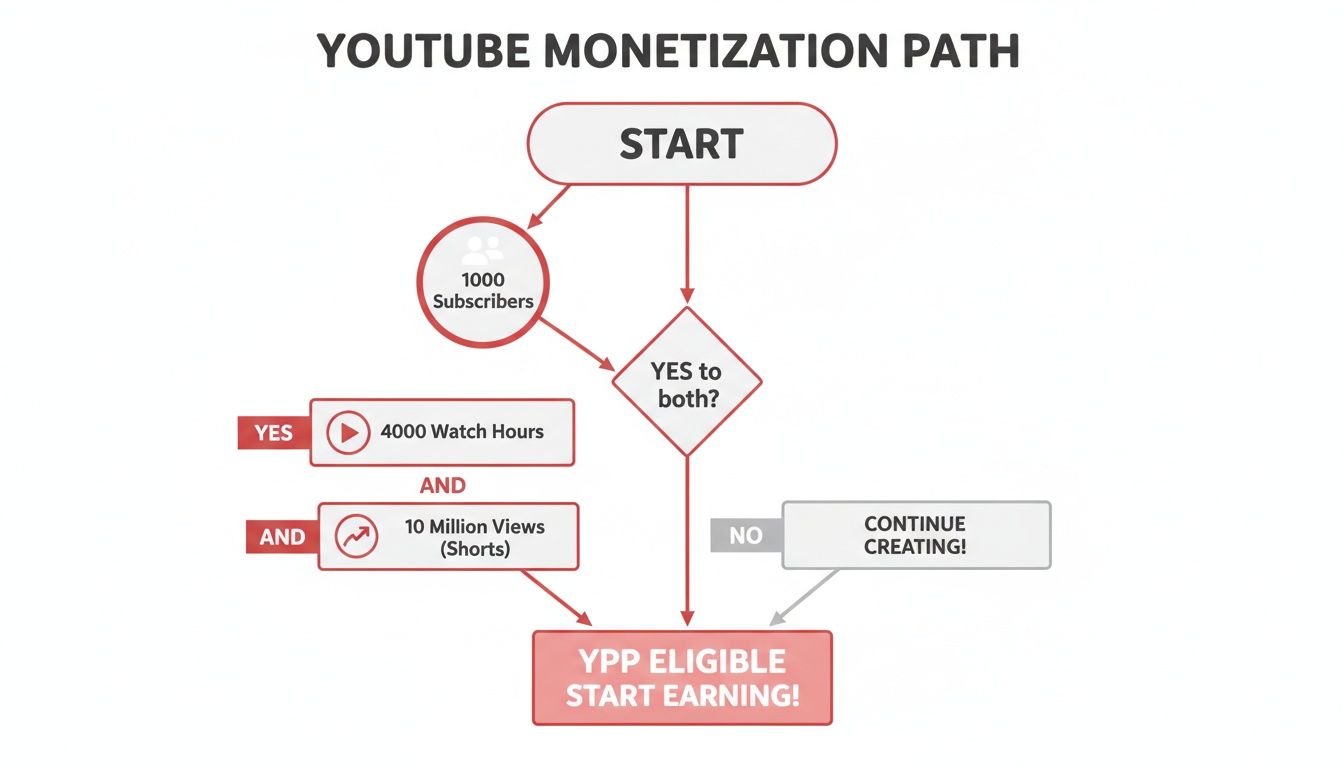
    Craft Videos People Can't Help But Click

    A man works on a laptop at a desk with a 'CONTENT STRATEGY' sign on the wall, surrounded by colorful sticky notes.

    You could have the best video idea on the planet, but if no one clicks on it, it’s just digital noise. That first impression in a crowded feed or a long list of search results is everything. It all boils down to the powerful trifecta: your title, your thumbnail, and your opening hook.

    When these three elements work together seamlessly, they create an almost irresistible urge to click. They make a clear promise to the viewer about what they're going to get—whether that's valuable information, pure entertainment, or the solution to a nagging problem. Getting this combination right is one of the fastest ways to put your channel on the growth fast track.

    Write Titles That Make People Curious

    A great title doesn’t just describe your video; it sells it. It has to pull double duty, appealing to a real person scrolling by while also signaling to the YouTube algorithm what your content is about. So, let’s ditch the boring, literal descriptions and aim for titles that spark an emotional response or create a "curiosity gap."

    This is where the ViewsMax Title Suggester can be a secret weapon, giving you data-backed ideas you probably wouldn't think of on your own. A simple but effective trick is to frame your topic as a compelling solution, a burning question, or a surprising result.

    • Weak Title: "My Morning Routine"
    • Strong Title: "The 5 AM Morning Routine That Changed My Life"

    See the difference? Adding specificity and a clear benefit makes the second option so much more powerful. It sets an expectation and promises a real takeaway.

    Design Thumbnails That Stop the Scroll

    Think of your thumbnail as your video’s billboard. In an endless sea of content, it has less than a second to catch someone's eye. Your goal is a design that’s clean, emotionally engaging, and visually different from everything else on the page.

    A few fundamental principles will immediately boost your thumbnail game:

    • High Contrast is Key: Use bright, bold colors that pop against YouTube's white, grey, or dark-mode interface. Try to avoid using too much red, white, or black, as they tend to blend in.
    • Keep Text Minimal: If you use text, stick to three or four powerful words at most. The font needs to be huge and dead simple to read, even on a tiny phone screen.
    • Faces Draw Clicks: Human faces are magnetic. A thumbnail showing a clear emotion—like shock, excitement, or confusion—can seriously boost your clicks.

    The following table shows how a title and thumbnail can work in tandem to create a click-worthy package.

    Title and Thumbnail Synergy Examples

    This table illustrates how to create powerful title and thumbnail combinations that work together to maximize clicks by sparking curiosity and clearly communicating value.

    Video Concept Weak Combination (Low CTR) Strong Combination (High CTR)
    Building a DIY Desk Title: "How to Build a Desk"
    Thumbnail: A photo of the finished desk.
    Title: "I Built My Dream Desk for Under $100!"
    Thumbnail: A close-up of a power tool mid-cut, with a surprised face and "$97?!" text overlay.
    Making a New Recipe Title: "Chocolate Chip Cookie Recipe"
    Thumbnail: A plate of cookies.
    Title: "The One Mistake RUINING Your Cookies"
    Thumbnail: An expressive face looking disappointed at a burnt cookie, next to a perfect one.
    Productivity App Review Title: "Review of a New App"
    Thumbnail: The app's logo.
    Title: "This App Saved Me 5 Hours Last Week"
    Thumbnail: A person looking relaxed, with "5 Hours/Week!" in bold text next to a phone screen.

    When your title and thumbnail support each other, they tell a micro-story that viewers want to see the end of.

    When your title asks a question, your thumbnail should hint at the answer. This synergy is key to getting a higher Click-Through Rate (CTR), a crucial metric for anyone looking to grow their YouTube channel fast.

    Nail the All-Important First 15 Seconds

    You got the click! Now the clock is ticking. The first 15-20 seconds of your video, known as the hook, are absolutely make-or-break. This is your chance to prove to the viewer that they made the right choice and need to stick around.

    A killer hook does three things, fast:

    1. Confirms the Promise: It immediately reassures the viewer they're in the right place by reflecting the title and thumbnail.
    2. Gives a Sneak Peek: It teases the most valuable or exciting part of the video that’s coming up.
    3. Sets the Tone: It establishes the energy and style for the rest of the content.

    Nothing kills watch time faster than a slow, rambling intro. Jump right into the meat of your topic. To make sure your videos are not just clickable but also keep people watching, check out these actionable video script tips that focus on viewer retention.

    A solid opening is non-negotiable, and you can get a great head start by reading our guide on how to write a script for YouTube videos.

    Master YouTube SEO to Dominate Search and Discovery

    A person designs irresistible thumbnails on a tablet, with a camera and papers on a desk.

    Getting someone to click on your video is a huge win, but what happens after that? The real magic behind growing a channel fast is getting YouTube's algorithm to do the heavy lifting for you, promoting your content long after you hit publish. This is where mastering YouTube SEO becomes your secret weapon.

    It helps to think of YouTube as the world’s second-largest search engine. Believe it or not, a staggering 70% of what people watch is driven by its recommendation algorithm. When you optimize your videos the right way, you're not just crossing your fingers and hoping for views. You're giving the platform a clear roadmap, telling it exactly who needs to see your work. This is how a single video can keep pulling in new viewers for months, or even years.

    The Foundation of YouTube SEO: Keyword Research

    Before you even think about your title or description, you have to get inside the head of your audience and figure out what they’re actually searching for. Solid keyword research is the difference between creating a video that gets found and one that gets lost in the noise.

    Your mission is to find search terms with decent traffic that aren't completely saturated with competition. A great starting point is YouTube's own search bar—the autocomplete suggestions are a goldmine of what's popular right now. For a deeper dive, using a dedicated tool can give you hard data on search volumes and competition. For example, the ViewsMax Tag Recommendations tool is fantastic for uncovering related long-tail keywords you would have never thought of on your own.

    Pro Tip: Don’t just chase single, broad keywords. The real opportunity is in "long-tail keywords"—phrases of three or more words, like "how to edit gaming videos for beginners." They're far less competitive and attract a super-specific, highly motivated viewer.

    Weave Keywords into Your Video Metadata

    Once you've got your target keywords, it's time to put them to work. The algorithm scans your video's title, description, and tags to understand what it's about. This metadata is how you speak its language.

    Your Title: Your main keyword needs to be in your title, preferably as close to the beginning as you can get it without sounding unnatural. This is the single most valuable piece of SEO real estate you have.

    Your Description: The first two or three sentences are absolutely critical. This is the snippet that shows up in search results, so it has to hook a human while also telling the algorithm what's inside. But don't just stop there. Aim for a detailed, helpful description of at least 150-200 words.

    Write Descriptions That Serve Viewers and the Algorithm

    A lot of creators sleep on the video description, but it's an incredibly powerful growth tool. It provides massive value to both your audience and YouTube's crawlers. A great description isn't about stuffing keywords; it’s about providing context and making the viewing experience better.

    Here’s a simple but effective structure I always recommend:

    • A strong opening: Kick things off with a punchy paragraph that summarizes the video's value and naturally includes your primary keyword.
    • Add helpful timestamps: For any video longer than a few minutes, timestamps are a non-negotiable. They create chapters, making it easy for viewers to find what they need and giving YouTube even more contextual clues about your content.
    • Include relevant links: This is your chance to keep people in your world. Link to your socials, other relevant videos on your channel, or any tools and resources you mentioned.

    The Strategic Art of Tagging

    Tags are another crucial signal you send to YouTube about your video's subject matter. While the debate on their exact impact on discovery rages on, they still play a key role in helping the algorithm categorize your video and connect it with similar content.

    The best approach is to think in layers, from specific to broad:

    1. Specific Tags: Start with your primary long-tail keyword (e.g., "fastest way to level up in Elden Ring").
    2. Broader Tags: Add more general terms that relate to your topic (e.g., "Elden Ring guide," "gaming tips").
    3. General Niche Tags: Round it out with broad tags that define your channel's category (e.g., "video games," "RPG").

    This layered strategy helps YouTube understand not just what your video is about, but also where it fits in the wider content ecosystem. That’s how you start showing up as a recommended video next to the big players in your niche.

    Use Shorts and Content Trends for Explosive Growth

    If you're serious about growing a YouTube channel quickly right now, ignoring Shorts is like trying to build a fire without oxygen. It’s not just another feature; it’s a totally separate ecosystem built for speed, discovery, and getting new subscribers in the door.

    The Shorts feed plays by a different set of rules. It rewards quick engagement and instant gratification, which is a massive opportunity for new channels. While your longer videos work to build a loyal audience over time, a single well-made Short can get blasted out to millions of people in a few days. It's the most powerful magnet you have for pulling in viewers who might never have found you otherwise.

    The Shorts Growth Flywheel Effect

    The potential here is staggering because Shorts tap into a completely different viewing behavior: the endless scroll. Some channels have seen absolutely meteoric rises, like CurioVerse, which pulled in over 1.7 million subscribers in just 30 days by cranking out viral clips.

    With 63% of all YouTube views coming from mobile, vertical video is king. To get in on this, you need to be posting Shorts daily, jumping on trending audio, and writing titles that grab people instantly. You can get a feel for what's working by checking out the latest YouTube trends to see which niches are blowing up.

    But it’s not just about the views on that one Short. This creates a powerful flywheel. A viral Short brings in thousands of new subscribers. The next time you post a long-form video, that bigger subscriber base gives the main algorithm a huge initial signal, boosting its velocity and getting it recommended to even more people.

    Best Practices for Creating Viral Shorts

    Making a great Short is an art form. It's a blend of speed, value, and psychology. The rules are different here.

    • Hook in the First Second: Forget introductions. Start with the most shocking, interesting, or valuable part of your video immediately. You have no time to waste.
    • Use Trending Audio: Hopping on a trending song or sound is like catching a wave. The algorithm is already pushing content with that audio, giving you an instant lift.
    • Master the Loop: The best Shorts are infinitely rewatchable. Craft them so the end flows seamlessly back into the beginning. This tricks people into watching multiple times and skyrockets your retention.
    • Deliver One Clear Idea: Don't cram too much in. A Short should be about a single tip, a single surprising fact, or a single entertaining moment. Keep it simple.

    The goal of a Short is to deliver a quick dopamine hit that leaves the viewer feeling satisfied or curious. If they learn something, laugh, or are amazed in under 60 seconds, they are far more likely to check out what else your channel has to offer.

    Smartly Repurposing Your Long-Form Content

    The good news? You don't have to create every Short from scratch. Some of your best short-form content is probably already hiding inside your existing videos. This is the smartest way to feed the Shorts algorithm without burning yourself out.

    Comb through your longer videos and look for moments that can stand on their own.

    1. Find the "Golden Nuggets": Isolate the single most powerful tip, the most surprising statistic, or the funniest moment from your video.
    2. Reformat for Vertical: Edit that clip into a 9:16 aspect ratio. Add big, bold captions because most people watch with the sound off.
    3. Add a Call-to-Action (CTA): End the Short with a simple text overlay or a quick voiceover like, "Full breakdown linked in the comments!" to drive people back to the original video.

    This strategy turns your Shorts into powerful little trailers for your main content. If you're looking for more inspiration, we have a whole guide packed with YouTube Shorts ideas to get your creative gears turning. By folding Shorts into your strategy, you’re not just making more videos—you’re building a complete growth engine.

    Turn Your Viewers Into a Loyal Community

    Getting a flood of views is great, but it's just the first step. The real magic, the secret to long-term, sustainable growth, is turning those viewers into a genuine community. A view can be a one-time thing, but a community member shows up for every video, lights up your comments section, and tells their friends about your channel.

    This shift from passive viewer to active fan all comes down to one thing: making them feel like part of something. It starts with holding their attention. The YouTube algorithm is obsessed with watch time and audience retention. When people stick around for your entire video, it screams to YouTube that your content is valuable, which in turn gets you recommended to more people. This is the feedback loop that fuels explosive channel growth.

    Keep Them Watching, Second by Second

    From the moment your video starts, you're fighting for every second of a viewer's attention. A static, ten-minute talking head video is a recipe for a massive drop-off in viewership. The key is to constantly reset their focus.

    This is where pattern interrupts come into play. These are small, almost unnoticeable changes that snap a viewer's wandering attention back to your video.

    • B-Roll Footage: Don't just tell them, show them. Cut away to relevant clips, screen recordings, or graphics. It gives context and breaks up the visual monotony.
    • On-Screen Text & Graphics: Use text to punch up key points or simple animations to explain a tricky concept. This adds another layer of engagement.
    • Zooms and Angle Changes: Even something as simple as a slow zoom-in when you're making a crucial point can pull a viewer back in. It’s a subtle cue that says, "Hey, pay attention to this."

    Think of your video's editing like a good story—it needs rhythm, moments of intensity, and visual variety to keep people hooked until the very end.

    The Art of a Call-to-Action That Actually Works

    We've all heard the robotic "Like, comment, and subscribe" at the end of a video. But the most successful creators know that a truly effective call-to-action (CTA) is specific, well-timed, and gives people a compelling reason to act.

    Stop just asking for a comment and start asking a question in your comment. If you made a video about budget travel, you could ask, "What's the single best budget travel hack you've ever discovered? Drop it in the comments!" Suddenly, your comment section transforms from a simple metric into a goldmine of shared knowledge.

    The goal isn't just to rack up engagement numbers; it's to start a real conversation. When you pose a specific, interesting question, you're inviting your audience to be part of the content, which builds a much stronger sense of community.

    The same goes for subscribing. Tie it to what's coming next. Instead of just "subscribe," try: "If you found this useful, make sure you subscribe because next week, I'm revealing my exact process for finding the cheapest flights." Now, they know exactly what they get for hitting that button.

    Take the Conversation Beyond the Video

    The community isn't just built during the video; it's nurtured long after you hit "publish." Your two best friends here are your comment section and the Community Tab.

    Get Active in the Comments: Make it a personal rule to respond to as many comments as you can, especially in the first hour or two after a video goes live. Heart your favorite comments and pin the most helpful or insightful ones to the top. This shows people you're actually listening and that you value what they have to say.

    Master the Community Tab: This feature is your direct hotline to your most dedicated fans. Don't just use it for self-promotion. Treat it like a real community hub:

    • Run polls to ask what video they want you to make next.
    • Share behind-the-scenes photos from your recent shoot.
    • Pose open-ended questions to get a discussion going.

    This ongoing interaction is what builds the relationship. For a deeper dive into fostering this kind of audience connection, check out these effective community management strategies on social media. Following these steps will help you transform your channel from a place people just watch videos into a place where they feel like they truly belong.

    Common Questions About Growing a YouTube Channel

    Smiling man engaging with a red smartphone and laptop, showing a social media community feed.

    Even with a solid game plan, the road to YouTube growth is full of questions. Every creator hits these common roadblocks, so let’s tackle them head-on with some straight, practical answers.

    Getting clarity on these key areas will help you stay focused on what actually moves the needle. Let's clear up the confusion so you can get back to creating great content.

    How Long Does It Realistically Take to Grow a YouTube Channel Fast?

    This is the big one, isn't it? While "fast" is a bit subjective, you can see real, meaningful momentum within 3 to 6 months if you're consistent and strategic. But that timeline depends heavily on your niche's competition, how good your videos are, and how often you're publishing.

    Sure, a viral Short can get you a burst of subscribers overnight, but building a loyal community around your long-form videos is a marathon. A decent goal for most new creators is hitting that first 1,000 subscribers within a year. But if you apply the strategies we've covered from day one, you can definitely speed that up.

    Should I Focus on Video Quality or Quantity When Starting?

    It's a balancing act, but when you're just starting out, lean towards consistent quantity with "good enough" quality. Your first goal is to get into a rhythm, start gathering data, and figure out what your audience actually wants to watch.

    Posting more frequently helps you:

    • Test out different video ideas and see what sticks.
    • Get faster at editing and filming just through repetition.
    • Give the algorithm more data to understand who your channel is for.

    Once you have some traction and your analytics are telling you what's working, then you can start pouring more time and money into making those proven video formats look and sound amazing. The aim is sustainable output, not perfection right out of the gate.

    Can I Grow a YouTube Channel Without Showing My Face?

    Absolutely. Plenty of huge channels have built massive audiences without the creator ever showing their face. The trick is delivering outstanding value in other ways.

    For these "faceless" channels, success usually comes down to:

    • High-Quality Information: Your content has to be incredibly well-researched, accurate, and genuinely helpful.
    • Engaging Narration: A clear, confident voiceover is non-negotiable. It's what keeps people listening.
    • Strong Visual Storytelling: Whether you use slick animations, screen recordings, or stock footage, your visuals need to carry the narrative.

    It can be easier to build a personal connection when viewers see your face, but you can build a massive, loyal community with a strong brand voice, a consistent style, and content that solves a real problem.

    How Important Is Promoting My Videos Outside of YouTube?

    In the beginning, it's critical. When your channel is new, the YouTube algorithm doesn't know you exist yet. It's your job to bring the first wave of viewers to the party.

    That initial traffic from outside sources sends all the right signals to YouTube—things like watch time and engagement. These signals tell the algorithm, "Hey, people like this video, maybe you should show it to more people here on the platform." The key is to share your content where it adds real value, not just spamming links everywhere.

    A few smart ways to do this include:

    • Sharing your video in relevant subreddits where people would genuinely find it useful.
    • Posting in niche Facebook groups or online forums that align with your topic.
    • Creating eye-catching pins on Pinterest that lead back to your video.
    • Sending your latest video out in an email newsletter to your list.

    Think of external promotion as the spark that gets the algorithmic fire going.


    Ready to stop guessing and start growing? ViewsMax gives you the AI-powered tools and data-driven insights you need to optimize your titles, find the right tags, and make smarter content decisions. Take control of your channel's growth by visiting https://blog.viewsmax.com today.