Think of YouTube SEO as the practice of making your videos, playlists, and your entire channel more visible in YouTube's search results. It’s all about figuring out what your ideal audience is typing into that search bar and then using those exact phrases to shape your video's title, description, and tags. The whole point is to make it crystal clear to YouTube's algorithm what your video is about so it can show it to the right people.
Why YouTube SEO Is Your Secret Weapon for Growth
Starting a new YouTube channel can feel like shouting into an empty room. You pour hours into making an amazing video, hit that publish button, and then… crickets. It's a common story. Many new creators get caught up chasing the dream of "going viral," but that's a lottery ticket, not a strategy for long-term success.
There's a much smarter way to grow.
You need to shift your perspective and see YouTube for what it truly is: the world's second-largest search engine. This one mental switch changes everything. Instead of praying for a lucky break, you can strategically place your videos directly in the path of people who are actively searching for them. That’s the entire game when it comes to YouTube SEO for beginners.
The Algorithm Wants What Viewers Want
At the end of the day, YouTube’s goal is simple: keep people on the platform as long as possible. Why? More watch time means more ad revenue. To do this, its algorithm is constantly learning to identify and promote videos that people find genuinely valuable and engaging.
So, your job is to convince the algorithm that your videos are the answer to a viewer's search. It looks for specific signals to figure this out:
- Click-Through Rate (CTR): What percentage of people who see your video actually click on it? A high CTR tells YouTube your title and thumbnail are doing their job and grabbing attention.
- Watch Time & Audience Retention: Once someone clicks, how long do they stick around? A video that holds a viewer's attention sends a massive signal that the content is top-notch.
- Engagement: Comments, likes, shares, and new subscribers are all proof that your video is connecting with people on a deeper level.
When you focus on SEO, you're not trying to cheat the system. You're building a sustainable engine that consistently brings in the right viewers by giving the algorithm exactly the signals it's looking for.
The Scale of Opportunity on YouTube
To really grasp why SEO is so crucial, you have to understand the mind-boggling scale of YouTube. The platform handles over 3 billion searches every single month. On top of that, a staggering 500 hours of video are uploaded every minute.
In a sea of content that vast, just uploading a video and hoping for the best is a recipe for failure. But all that search traffic also represents a massive opportunity. Creators who learn to optimize their content can tap into this endless stream of viewers. Plus, with YouTube being owned by Google, the ripple effects of good SEO are huge. You can dive deeper into these YouTube statistics on SEMrush to see the full picture.
How to Find Video Ideas People Are Actually Searching For

This is the first, most crucial step in any YouTube SEO for beginners playbook. Forget guessing what people want to watch. Real growth comes from discovering the exact phrases your audience is already typing into the search bar. Think of it as finding the question so you can show up with the perfect answer.
Amazing content is completely wasted if no one can find it. When you ground your video ideas in solid keyword research, you're not just creating content you hope will work—you're creating content you know people are looking for.
Start with YouTube’s Own Search Bar
The easiest place to find video ideas is staring you right in the face: the YouTube search bar. Its autocomplete feature is a goldmine because it shows you what real people are actively searching for, right now.
Just type in a broad topic related to your channel. Let’s say you run a channel about home coffee brewing. Start typing "french press coffee."
Before you even hit enter, YouTube gives you a list of suggestions:
- french press coffee ratio
- french press coffee recipe
- french press coffee for beginners
- french press coffee grinder
These aren't random guesses. They're popular, real-world search queries. Each one is a potential video topic with a built-in audience ready to watch. That last one, "french press coffee for beginners," is a perfect example of a long-tail keyword. It's specific, less competitive, and attracts a viewer who knows exactly what they want to learn.
Pro-Tip: Don't stop there. Try typing your main topic followed by different letters of the alphabet (e.g., "french press coffee a," "french press coffee b"). You'll uncover tons of hidden gems and variations that people are searching for.
Legally Spy on Your Competitors
Another brilliant tactic is simply learning from what’s already working. There's no need to reinvent the wheel. Analyzing successful channels in your niche gives you a proven roadmap to topics that resonate with your ideal viewers.
Head over to a competitor's channel and click on their "Videos" tab. Now, sort their library by "Most Popular." This instantly shows you their greatest hits—the videos that have earned them the most views and engagement.
Pay close attention to the titles of these home-run videos. What keywords are they built around? If a channel like yours has a video called "The Ultimate Sourdough Starter Guide for Beginners" with a million views, you can bet that "sourdough starter guide" is a validated topic.
This simple trick accomplishes two things:
- It proves there's a huge audience for a specific topic.
- It gives you a benchmark for what a successful video on that topic looks like.
The goal isn't to copy them. It's to find that winning keyword and then create your own, unique, and even better video on the subject. For a deeper dive, check out our complete guide to discovering effective YouTube video keywords.
The Sweet Spot: Balancing Search Volume and Competition
Once you have a list of potential keywords, the next challenge is finding that sweet spot between search volume (how many people search for it) and competition (how many other videos are targeting it).
As a new creator, targeting a massive keyword like "weight loss" is a recipe for failure. Your video will be instantly buried by thousands of others from huge, established channels.
Instead, look for topics with healthy interest but less cutthroat competition. A quick way to check is to search for your keyword on YouTube. How many results are there? Now look at the top-ranking videos. Are they all from channels with millions of subscribers? If so, you might want to find a more specific angle.
Getting this right can have a massive impact. Good SEO can drive 157% more organic traffic from search engines. It's a key strategy because YouTube ranks for over 187 million keywords, pulling in an incredible 1.7 billion monthly organic visits. For creators, this is a lead-generation machine, with 51% of video professionals calling it their highest ROI content. You can learn more about these powerful video SEO statistics on Vidico. This data proves why finding the right keywords isn’t just a small step—it’s the foundation of your channel’s growth.
Building Your Video's 'Digital Storefront' for Maximum Impact
Alright, you've done your homework and found a great keyword. Now what? The next step is all about execution—building a video page that screams to YouTube, "Hey, my video is exactly what people are searching for!"
Think of your video's title, thumbnail, description, and tags as its digital storefront. Each piece needs to work together to pull people in and convince the algorithm that your content is the right choice.
This is where your keyword research pays off. Getting these on-page elements right is how you translate all that data into actual views. You're essentially making a case to both people and the algorithm that your video deserves to be seen. Let's dig into how you do that.
Titles That Make People Need to Click
Your title is your first impression, your opening line. It has to do two jobs at once: grab a viewer's attention and signal relevance to YouTube. It’s a delicate balance between searchability and raw curiosity.
A killer title always does two things well:
- It weaves your main keyword in naturally, ideally somewhere near the beginning. This gives the algorithm an immediate clue about your video's subject.
- It promises a solution, sparks intrigue, or offers a clear benefit that makes someone feel like they're missing out if they don't click.
For instance, "Making French Press Coffee" is fine, but it’s forgettable. A much better title is "The Perfect French Press Coffee Ratio (Beginner's Guide)." It targets a specific keyword ("french press coffee ratio") while also clearly defining the audience and the value they'll get.
Your title and thumbnail are a dynamic duo. The title makes a promise, and the thumbnail visually delivers on it. When they're in perfect sync, your click-through rate (CTR) can absolutely soar.
Descriptions That Actually Help You Rank
So many creators treat the description box as an afterthought, tossing in a single sentence or a few links. This is a huge mistake and a massive missed opportunity for SEO. The description is your secret weapon for feeding YouTube more context about your video.
Your goal should be a detailed, naturally-written summary of what’s in the video. I always aim for at least 200-250 words to give the algorithm plenty to work with.
Here’s a simple structure I use for my descriptions:
- The Hook (First 2-3 lines): Start strong. Reiterate your primary keyword and get straight to the point about the video's value. This is the snippet people see before clicking "Show more," so make it count.
- The Details (The Body): This is where you can expand on the topics you cover. It's the perfect place to sprinkle in secondary keywords and answer related questions you found during your research.
- Video Chapters (Timestamps): Breaking your video into timestamped chapters is a game-changer. It makes for a better viewing experience and can even help your video show up for more specific, long-tail searches.
- Links & Calls-to-Action: Finish up with links to your social media, other relevant videos, or a simple request for viewers to subscribe.
This approach gives both the algorithm and your viewers everything they need.
How to Use Tags for Better Discovery
YouTube tags can feel a bit mysterious, but their job is pretty straightforward: they help YouTube figure out the broader context of your video. Think of them as signposts. While they aren't as critical as your title and description, they still play a key role in getting your video to appear in the "Suggested Videos" feed next to similar content.
A smart tagging strategy is all about variety. When combined with a strong title and description, the right tags help the algorithm connect the dots. If you want to go deeper, there are fantastic guides out there that cover all the different types of good tags for YouTube and how to use them.
Here's my go-to method:
- Primary Keyword: Your very first tag should always be your exact target keyword (e.g., "youtube seo for beginners").
- Broad Tags: Add a few tags that describe the general category (e.g., "youtube marketing," "video seo").
- Specific Tags: Include longer, more descriptive phrases that people might search for (e.g., "how to rank youtube videos," "youtube optimization tips 2024").
You're basically casting a net—the specific tags catch the precise searches, while the broad ones help YouTube find a wider, but still relevant, audience for you.
Thumbnails That Stop the Scroll
Let’s be honest: your thumbnail is your video’s billboard. In a sea of search results, an eye-catching thumbnail is what makes someone slam the brakes on their scrolling and pay attention to your video. It's no surprise that over 90% of the best-performing videos on YouTube use custom thumbnails.
You don't need to be a Photoshop wizard, but you do need to understand what works.
Here's a quick checklist to reference as you create your thumbnails. Think of it as your on-page SEO cheat sheet.
On-Page SEO Element Checklist
| Element | Beginner Goal | Pro-Tip |
|---|---|---|
| Title | Include your main keyword near the beginning. | Add a number or a bracketed phrase like "[2024 Guide]" to stand out. |
| Description | Write 200+ words with your main keyword in the first sentence. | Add timestamps to create video chapters for better navigation and SEO. |
| Tags | Use a mix of 5-8 broad and specific tags, with your main keyword first. | "Spy" on top-ranking videos for your keyword to see what tags they're using. |
| Thumbnail | Use a high-contrast image and bold, readable text (3-5 words max). | Test different facial expressions. Surprised or curious faces tend to boost clicks. |
By mastering these four elements—title, description, tags, and thumbnail—you're giving your video the best possible chance to succeed from the second you hit "Publish."
Keeping Viewers Glued to the Screen: Watch Time and Engagement
Getting the click is a great start, but it's only half the job. Now for the real challenge: keeping them watching. The single most important signal you can send to the YouTube algorithm is that your videos are so good, people watch them all the way through. This is what we call audience retention.
When your video keeps people on YouTube longer, the platform's algorithm sits up and takes notice. It sees that high watch time as a big thumbs-up for quality content, which means it will start recommending your video to a wider audience. If you want to get serious about YouTube SEO, you absolutely have to master this.
The First 15 Seconds: Make or Break
You have a tiny window of opportunity to convince someone they've landed on the right video. Those first 15 seconds? They're everything. If you waste that time with a generic, drawn-out intro or talking about yourself, you'll see viewers drop off in droves, and your audience retention graph will take a nosedive.
You have to open with a hook that grabs them immediately. I've seen these techniques work time and time again:
- Lead with the "Why": Get straight to the point. Tell them exactly what problem you're about to solve for them. Instead of the tired "Hey guys, welcome back," try something like, "In the next five minutes, I'll show you the one camera setting that will make your photos look professional."
- Try a Cold Open: Jump right into the most exciting part. If it's a DIY video about building a desk, show the stunning finished product first, then rewind and walk them through how you did it.
- Ask a Question They're Already Thinking: Connect with your viewer instantly. For a video on personal finance, you could open with, "Ever get to the end of the month and have no idea where your money went?"
A strong hook doesn't just grab attention; it sets the tone and reassures the viewer that their time is in good hands.
Fight Off Viewer Boredom with Pattern Interrupts
Okay, you've got their attention. Now, how do you keep it? Viewers often click away for one simple reason: boredom. The video just becomes monotonous. The secret weapon against this is using pattern interrupts—small, strategic shifts that jolt the viewer's brain and reset their attention.
Think about it. If you're just a talking head on screen for ten minutes straight, it's easy for someone's mind to wander. You have to keep things moving, both visually and audibly.
A well-structured video isn't just about what you say; it's about how you present it. The pacing, visuals, and audio all work together to create an experience that either holds attention or loses it.
The best way to bake these elements into your content is to plan them out from the start. For a deeper dive, check out our guide on how to write a compelling script for YouTube videos.
How to Structure Your Video for Maximum Engagement
Thoughtful content structure is just as crucial as the information you're sharing. When you break your video into clear, digestible chunks, it’s much easier for viewers to follow along and stay locked in. Luckily, YouTube gives you some great built-in tools for this.
Video Chapters Are Your Friend
By adding timestamps to your video description, you create chapters that viewers can see right on the progress bar. This is a game-changer for a few reasons:
- It massively improves the viewing experience by letting people jump to the sections they care about most.
- It spoon-feeds the YouTube algorithm more data about your video's content, helping you rank for more specific search terms.
- It acts like a "table of contents," making your video appear more professional and well-organized at a glance.
Use End Screens and Cards Strategically
Never let your video just fade to black. The final 20 seconds are prime real estate to tell your viewer what to do next. Use end screens to point them to another one of your videos or a relevant playlist. This is a fantastic way to boost your channel's overall session time—the total time a viewer spends on YouTube after starting with one of your videos.
Bad Audio Will Kill Your Watch Time
I can't stress this enough: you can have the most stunning, 4K video ever shot, but if the audio is terrible, people will click away. It's just that simple. Hissing, echoes, background noise, or muffled voices create a jarring experience that sends viewers running.
Since bad audio can so drastically hurt viewer experience and watch time, mastering effective noise reduction for video is a crucial skill for any creator looking to improve their quality. Seriously, investing in a decent microphone and learning some basic audio editing will give you one of the biggest returns on investment you can make for your channel.
Your Post-Publish Checklist for Long-Term Success
That feeling of hitting the "Publish" button is amazing, but it's not the finish line. In reality, it’s the start of a brand new race. What you do right after your video goes live can make or break its long-term performance. It’s all about sending immediate, positive signals to the YouTube algorithm that your content is valuable and deserves a bigger audience.
Think of it this way: all your prep work got the video ready for the algorithm. Now, you have to give it that initial nudge to get the flywheel spinning. This phase is about sparking that first wave of engagement and then digging into the data to see what really happened.
The Critical First 24 Hours
The first day is everything. I can't stress this enough. YouTube watches how viewers react right out of the gate. If you get strong initial performance—especially with watch time and click-through rate—the algorithm is far more likely to start showing your video to a wider audience beyond your subscribers.
Your one and only goal here is to drive high-quality traffic to your new video as quickly as you can. You want people who are actually going to watch a good chunk of it.
- Your Email List: If you have one, this is your secret weapon. These are your true fans, and they're the most likely to watch your video all the way through. That sends an incredible retention signal to YouTube.
- Relevant Social Media: Don't just blast the link everywhere. Be strategic. If your video is about graphic design tips, share it on your design-focused Instagram or to a professional group on LinkedIn. Match the content to the platform.
- Community Engagement: Jump into relevant Reddit subs or Facebook Groups. If your video genuinely solves a problem or adds value to a conversation, share it. But remember the golden rule: be helpful first, promotional second.
This entire process is about creating a journey for the viewer, from the initial hook all the way to keeping them engaged.
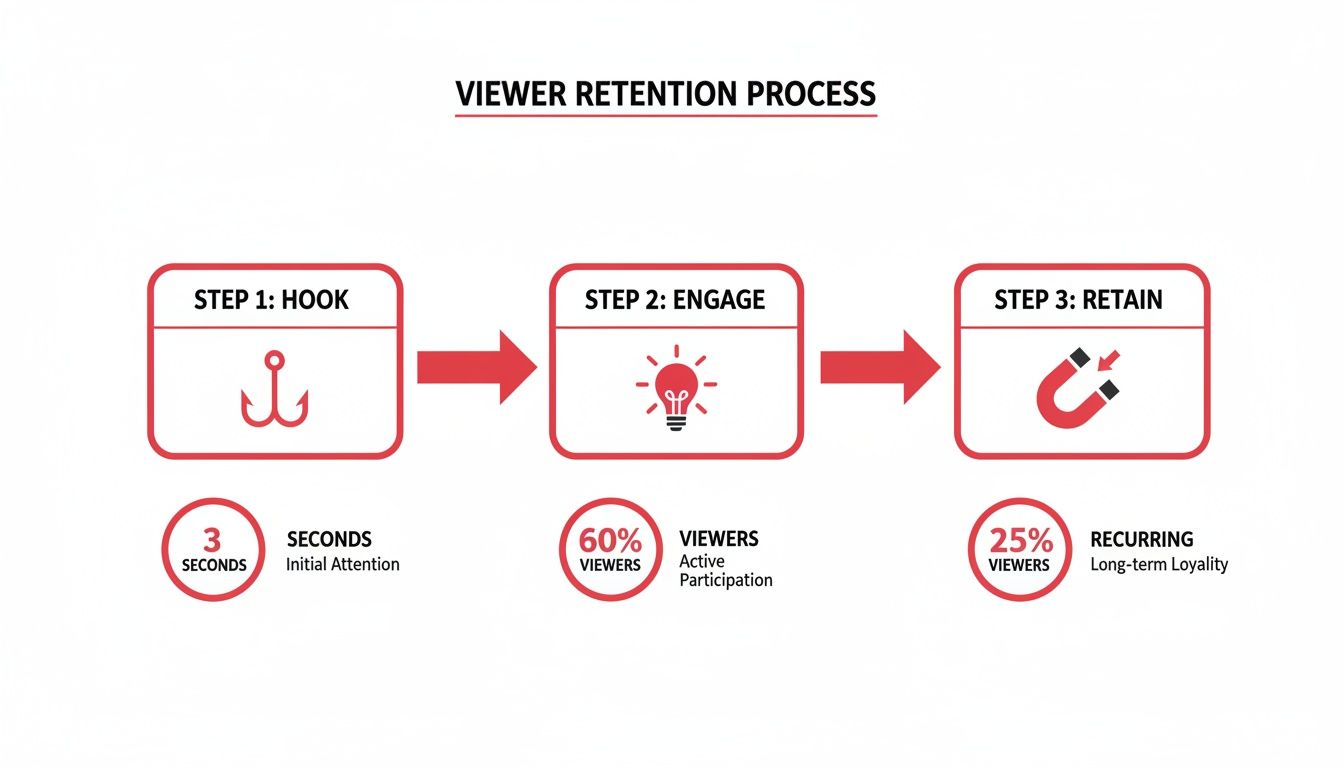
As you can see, once you've hooked someone, the real work is in providing continuous value to hold their attention, which is what ultimately drives those all-important retention metrics.
Making Sense of YouTube Analytics
After a few days, it’s time to pop the hood and see how your video is actually doing. Heading into YouTube Analytics can feel like drinking from a firehose, but for YouTube SEO for beginners, you really only need to zero in on a couple of key metrics.
Find the video in your YouTube Studio and focus on these two numbers above all else:
- Click-through rate (CTR): This is the percentage of people who saw your thumbnail and title and then actually clicked to watch. If your CTR is low (think below 2-3%), it’s a strong sign that your thumbnail or title just isn’t grabbing people's attention.
- Average view duration: This tells you how long, on average, people are sticking around. Dive into the audience retention graph here—it shows you the exact moments where viewers are bailing. A huge drop in the first 30 seconds? Your hook isn't working.
Don’t look at these numbers as a final grade. They're not. Think of them as free, direct feedback from your audience. Every single video is a chance to learn what they love and what makes them click away.
Turning Data Into Action
Analytics are totally useless if you don't do anything with them.
See a video with a surprisingly high CTR? Go back and study that thumbnail and title. What did you do differently? Figure out what made it so clickable and apply those lessons to your next video.
If another video has an amazing average view duration, re-watch it from the perspective of a viewer. Pinpoint the exact moments that kept people hooked and lean into that style or format in the future.
Over time, this cycle—publish, promote, analyze, and adapt—is how you build a successful channel. It’s how you stop guessing and start building a real, data-driven strategy. For those who want to get a little more advanced, exploring some of the best YouTube SEO tools can give you even deeper insights to make smarter decisions, faster.
By constantly refining your process based on what your viewers actually do, you'll turn every upload into a stepping stone toward real, sustainable growth.
A Few Common YouTube SEO Questions Answered
Diving into YouTube SEO can feel like learning a new language. You hear all these terms—CTR, tags, algorithms—and it's easy to get a little lost. I get it. To help you out, I've pulled together answers to the questions I hear most often from new creators.
Let's cut through the noise and get you some clear, straightforward answers.
How Long Does It Take for YouTube SEO to Actually Work?
This is the big one, and the honest answer is: it takes patience. YouTube SEO isn't like flipping a switch; it's more like planting a tree. You won't see a massive surge of traffic overnight.
Realistically, you should expect to see significant, steady results in about 3-6 months. Why so long? Because YouTube's algorithm is learning. It's watching how people react to your videos, figuring out who your ideal audience is, and testing where to place your content.
A quick tip from my own experience: Don't get discouraged if your first few videos feel like a dud. Just keep creating and optimizing. The momentum builds on itself as you create a library of content that the algorithm understands.
Are Video Tags Still Important in 2024?
Yes, they are—but their job has changed. A few years ago, tags were a huge ranking factor. Now, your title and description carry much more weight. Think of tags as a supporting player, not the star of the show.
They still give YouTube valuable context, especially for getting your video to appear in the "Suggested Videos" sidebar next to similar content. A good tagging strategy is simple:
- Lead with your main keyword. Make the very first tag your primary target phrase.
- Add a few broad tags. These define the general category (e.g., "Content Marketing," "Home Cooking").
- Get specific with long-tail tags. Describe exactly what the video covers (e.g., "how to batch record youtube videos," "easy sourdough recipe for beginners").
Tags are basically your final chance to whisper a few extra clues to the algorithm about what your video is about.
Can I Go Back and Optimize My Old Videos?
You absolutely can, and you absolutely should! This is one of the most underrated growth hacks on YouTube. Going back to update your older content is a brilliant use of your time.
Got videos from a few months or a year ago? Their titles, thumbnails, and descriptions are probably not pulling their weight anymore.
A great place to start is in your YouTube Analytics. Look for videos with a low click-through rate (CTR). These are perfect candidates for an optimization refresh. Try this:
- Design a brand new, eye-catching thumbnail.
- Rewrite the title to be more compelling and include a strong keyword.
- Beef up the description with more details, links, and keywords.
I've seen creators double the daily views on an old video just by giving it a new thumbnail and title. It's an incredible way to get more mileage out of the work you've already done and a core part of any smart YouTube SEO for beginners playbook.
I know this can seem like a lot to take in at first, so here’s a quick-glance table to help summarize some of the most common questions beginners have about getting started with YouTube SEO.
Common YouTube SEO Questions Answered
| Question | Quick Answer |
|---|---|
| What is the most important SEO factor? | Watch time and click-through rate (CTR). You need people to click and then stick around. A great title and thumbnail get the click; great content gets the watch time. |
| How many tags should I use? | Aim for 10-15 highly relevant tags. A mix of broad and specific keywords is best. Quality over quantity is the key. |
| Is YouTube SEO a one-time thing? | No, it's an ongoing process. You should regularly review your analytics and update underperforming videos to keep your channel growing. |
| Can I just copy tags from a popular video? | It's not a good idea. While you can get inspiration, your tags should be specific to your video's content. Blindly copying is ineffective. |
| Do comments and likes help SEO? | Yes, engagement signals matter. Likes, comments, and shares tell YouTube that viewers are enjoying your content, which can boost its visibility. |
Hopefully, these answers give you a solid foundation to build on. Keep learning, keep experimenting, and you'll get the hang of it.
Ready to stop guessing and start growing? ViewsMax provides the AI-powered tools and data-driven insights you need to optimize your videos for real results. From keyword research to title generation, our toolkit is designed to help creators like you get more views, subscribers, and watch time. Explore ViewsMax and build your channel with confidence.