Let's get one thing straight right away: when someone asks, "How long should my YouTube video be?" the only real answer is this: as long as it needs to be to deliver its value, and not a single second longer.
There's no magic number. A viral 30-second Short and a gripping 30-minute documentary can both be wildly successful. This proves that the content itself—not a stopwatch—is what truly determines the perfect length.
Why There Is No Magic Number for Video Length

One of the biggest mistakes new creators make is chasing a specific minute count they heard was "optimal." The perfect video length is a moving target. It shifts based on your goals, your video's format, and, most importantly, what your audience has come to expect from you. A snappy product review and an in-depth tutorial serve different purposes, so of course, they should have different runtimes.
Think of yourself as a storyteller. Some stories are best told as a quick, witty anecdote. Others need the breathing room of a full-length novel to really land. If you chop a novel down to a single paragraph, you lose all its depth. But if you stretch a simple anecdote into a 20-page chapter, it becomes a boring slog. Your job is to be the editor who knows exactly what the story needs.
The Real Metrics That Matter
Instead of obsessing over the clock, you need to focus on what the YouTube algorithm actually cares about. It's all about two key metrics that are directly tied to your video's length and quality:
- Watch Time: This is the grand total of all the minutes people have spent watching your videos. For YouTube, this is a massive signal that you're creating quality content that keeps people on the platform.
- Audience Retention: This is the percentage of your video that, on average, people stick around to watch. A high retention rate tells the algorithm your video is genuinely engaging from start to finish.
The core idea is simple: A video's ideal length is the duration that maximizes both watch time and audience retention. It has to be long enough to feel substantial but tight enough to keep people from clicking away.
Setting the Stage for Your Channel
Getting a feel for this trade-off is the first real step toward finding your channel's sweet spot. A longer video has the potential to rack up a ton of watch time, but it also comes with a much bigger risk of viewers getting bored and leaving early, which tanks your retention.
On the flip side, a super short video might get fantastic retention rates, but it won't contribute much to your channel's overall watch time. It's a balancing act.
In the next sections, we'll dive into how to manage these competing metrics. We'll look at some data-backed starting points for different kinds of videos and, crucially, show you how to use your own channel's analytics to let your audience's behavior guide your strategy.
Why Watch Time Is Your Most Important Metric

Before we can even talk about the perfect video length, we need to get inside YouTube's head. Think of YouTube as a gigantic, global television network. Its main goal? Keep people watching for as long as humanly possible. The more they watch, the more ads YouTube can show, and the more money it makes. Simple as that.
Your channel is a business partner in this mission, and your primary contribution is a metric called watch time. This isn't about how many people click play; it's the total, cumulative number of minutes people spend watching your videos. When your content keeps people on the platform, the algorithm sees your channel as a valuable partner and rewards you for it.
Retention vs. Watch Time: The Critical Difference
So many creators get hung up on Audience Retention, which is the percentage of a video that people watch. A high percentage seems great, but it's only one piece of a much larger puzzle. The total minutes watched almost always carries more weight.
Let's look at a quick example.
- Video A: A 3-minute video with a fantastic 90% retention.
- Video B: A 10-minute video with a decent 50% retention.
Instinct might tell you Video A is the winner, but let's do the math. The average viewer of Video A sticks around for 2.7 minutes. But the average viewer of Video B watches for a full 5 minutes. Video B generates nearly double the watch time from every single view. That’s a powerful signal to the YouTube algorithm.
High watch time is the ultimate vote of confidence. You're not just telling YouTube that your content is interesting enough to click on—you're proving it's engaging enough to hold someone's attention.
This is exactly why longer videos often have a higher ceiling for growth. They simply have more potential to rack up the massive watch time totals that get YouTube's attention and fuel your discoverability.
Monetization and The 8-Minute Mark
Watch time isn't just about pleasing the algorithm; it directly impacts your wallet. Once you're in the YouTube Partner Program, videos that are over eight minutes long can have mid-roll ads placed throughout the content, not just at the start.
This gives you far more opportunities to earn revenue from a single video. Of course, this only works if your video is compelling enough to keep viewers watching through those ad breaks. This is where good pacing and structure become essential. For these longer videos, knowing how to properly add chapters to a YouTube video can make a world of difference for the viewer experience.
Ultimately, by focusing on content that keeps people watching longer, you create a win-win scenario. You provide more value to your audience, generate more watch time for YouTube's algorithm, and open up more revenue for your channel. While length is a key part of this, it's just one element of a larger strategy for how to grow YouTube subscribers.
Matching Your Video Length to Your Content Format

Before you can even begin to answer, "how long should my YouTube video be?", you need to ask a much more important question: what kind of video am I actually making? It’s a simple question, but the answer changes everything.
Someone clicking on a quick tech tutorial has a totally different mindset—and a different amount of time to spare—than a viewer settling in for a long-form documentary. The secret isn't finding a single magic number; it's about aligning your video's length with its format to meet your audience's expectations head-on.
Think of it this way: a steak needs a few minutes of intense heat, while a good stew needs to simmer for hours. If you get those two mixed up, you’re left with a mess. Your content works the same way. The format is your recipe, and it dictates the ideal cooking time.
Quick and Engaging Formats
For content meant to be consumed on the fly, brevity is your best friend. These formats are all about delivering a quick hit of value, a laugh, or a key piece of information before the viewer scrolls on.
-
YouTube Shorts (Under 60 seconds): This one is a hard rule set by YouTube itself. Shorts are designed for pure, unadulterated speed. You've got less than a minute to land a single idea, a punchline, or a "wow" moment. There's no room for a fancy intro—you have to hook them in the first three seconds and get straight to it.
-
Product Reviews (5-10 minutes): When someone is thinking about buying something, they want a clear, no-fluff summary of the pros and cons. A solid 5-10 minute video gives you just enough time to cover the essential features, show the product in action, and give your final verdict without dragging it out.
Deep Dive and Storytelling Formats
When your goal is to teach a complex skill, tell a compelling story, or offer a deep analysis, you've got a lot more runway. Viewers clicking on these videos are prepared to invest more of their time, but only if you keep them engaged and deliver on your promise.
Your video should be as long as it takes to tell the full story and not a second more. If a section doesn't serve the core message, it’s a candidate for the cutting room floor, regardless of your target runtime.
This is where looking at platform-wide data can be a huge help. It might surprise you to learn that the average YouTube video length hovers around 11.7 minutes. That number isn't an accident. It reflects that delicate balance creators strike between providing detailed content and holding onto their audience's attention. Videos in that 5-15 minute sweet spot often nail this balance, and the algorithm tends to reward them for it.
Educational and In-Depth Content
These types of videos succeed only when they provide a complete, satisfying answer to a viewer's problem. If you rush it, you'll leave them feeling like they didn't get what they came for.
-
Tutorials and How-To Guides (10-18 minutes): If you’re teaching something complicated, you need the time to do it right. This length allows you to break down each step, show clear examples, and troubleshoot common issues without making the viewer feel overwhelmed. A tight script is absolutely critical here to keep things moving. A great place to start is our guide on how to write a script for your YouTube videos.
-
Vlogs and Personal Stories (8-15 minutes): With vlogs, the real goal is to build a personal connection. This duration gives you enough time to craft a genuine narrative arc—a clear beginning, middle, and end—that makes your audience feel like they've just shared a meaningful experience with you.
At the end of the day, these are just guidelines, not strict rules. The perfect length is always going to be unique to your channel, your topic, and your audience. But by starting with a length that matches your format, you’re giving yourself a massive head start.
Using Your Analytics to Find What Works
Forget industry averages for a second. The most powerful data for figuring out how long your YouTube videos should be is already sitting in your dashboard, waiting for you. Your own audience is giving you the answer with every single view. It's time to put on your detective hat and dive into YouTube Studio.
Your primary tool in this investigation is the Audience Retention graph. Think of this as your secret weapon. It shows you, second-by-second, the exact moment a viewer’s attention starts to wander. It's like having a live focus group for every video you post, showing you what’s working and, more importantly, what’s causing people to click away.
By digging into this data, you can stop guessing and start making decisions based on how your viewers actually behave.
Decoding Your Audience Retention Graph
Picture your Audience Retention graph as the story of your video's engagement. The line always starts at 100%—that’s everyone who clicked play. As the video goes on, the line will naturally dip as people leave. Your job is to keep that line as high as possible for as long as possible.
Here’s what a typical retention graph looks like inside the YouTube Studio dashboard.
This visual tells a crystal-clear story, showing where the video held attention and where it fell flat. It's full of clues for your next video.
So, what are you actually looking for? The trick is to spot patterns not just in a single video, but across your entire channel.
- Sudden Dips: A sharp, steep drop is a huge red flag. Jump to that exact timestamp in your video. What happened there? A long, boring intro? A confusing point? A sponsor read that felt jarring? These dips are your audience shouting, "This part wasn't for me."
- Gradual Slopes: A slow, steady decline is completely normal, but you still need to pay attention to where the drop-off accelerates. If your 12-minute videos consistently lose a huge chunk of viewers around the 7-minute mark, that’s a powerful signal. It could mean your audience has a shorter attention span, or maybe your videos just need a "re-hook" around that point to pull them back in.
- Flat Plateaus and Spikes: Ever see moments where the line stays flat or even bumps up? These are your golden nuggets. It means viewers are actually re-watching that specific part. Go figure out what you did right. Was it a brilliant joke, an incredibly clear explanation, or a stunning visual? Whatever it was, bottle that magic and do more of it.
Comparing Videos to Find Your Sweet Spot
The real breakthrough happens when you start comparing the retention graphs of different videos. Open up two tabs: one for your best-performing long video and one for your best-performing short video.
Your analytics don't just show you what happened; they tell you why. By comparing the retention curves of successful and unsuccessful videos, you can build a blueprint for what your specific audience wants to see.
Don't get fixated on just the final retention percentage. The shape of the curve tells the real story. Does your 15-minute video suffer a massive drop in the first two minutes, while your 7-minute video holds strong almost to the end? That’s a strong hint that your shorter, punchier content is doing a much better job of grabbing and holding your audience's attention.
On the other hand, if a longer video maintains a high, flat retention plateau for over 10 minutes, your audience is clearly hungry for that kind of in-depth content. Let this data be your guide. If your viewers are telling you they love your 12-minute deep dives by sticking around, lean into it. If they consistently bail after 5 minutes, it’s time to be more ruthless in your editing and get to the point faster. Your data holds the answer to "how long should my YouTube videos be?" for your channel.
How to Systematically Test Your Video Lengths
Looking at your past performance is a fantastic starting point. But to truly nail down how long your YouTube videos should be, you have to move from just looking at data to actively testing your assumptions. The best way I’ve found to do this is with simple A/B tests—it’s a methodical way to see what your audience actually wants, not just what you think they want.
The idea is pretty simple. You create two videos on a very similar topic, but you intentionally make them different lengths. This helps you isolate the video’s duration as the main thing you’re testing.
Setting Up Your A/B Test
First, you'll need to pick a topic that you already know your audience enjoys. It also needs to be a topic that you can present in both a quick, to-the-point version and a more detailed one.
Let’s say you run a cooking channel. You could create two different videos about making the perfect pizza dough.
- Video A (The Short Version): This one would be a snappy, 7-minute video. It gets straight to the recipe and the core techniques, with no fluff or extra chatter.
- Video B (The Long Version): This is your 12-minute deep dive. It covers the same recipe but also gets into the science of fermentation, compares different flour types, and walks through common mistakes to avoid.
It’s this process—analyze, identify, and tailor—that gets you closer to your ideal video length.
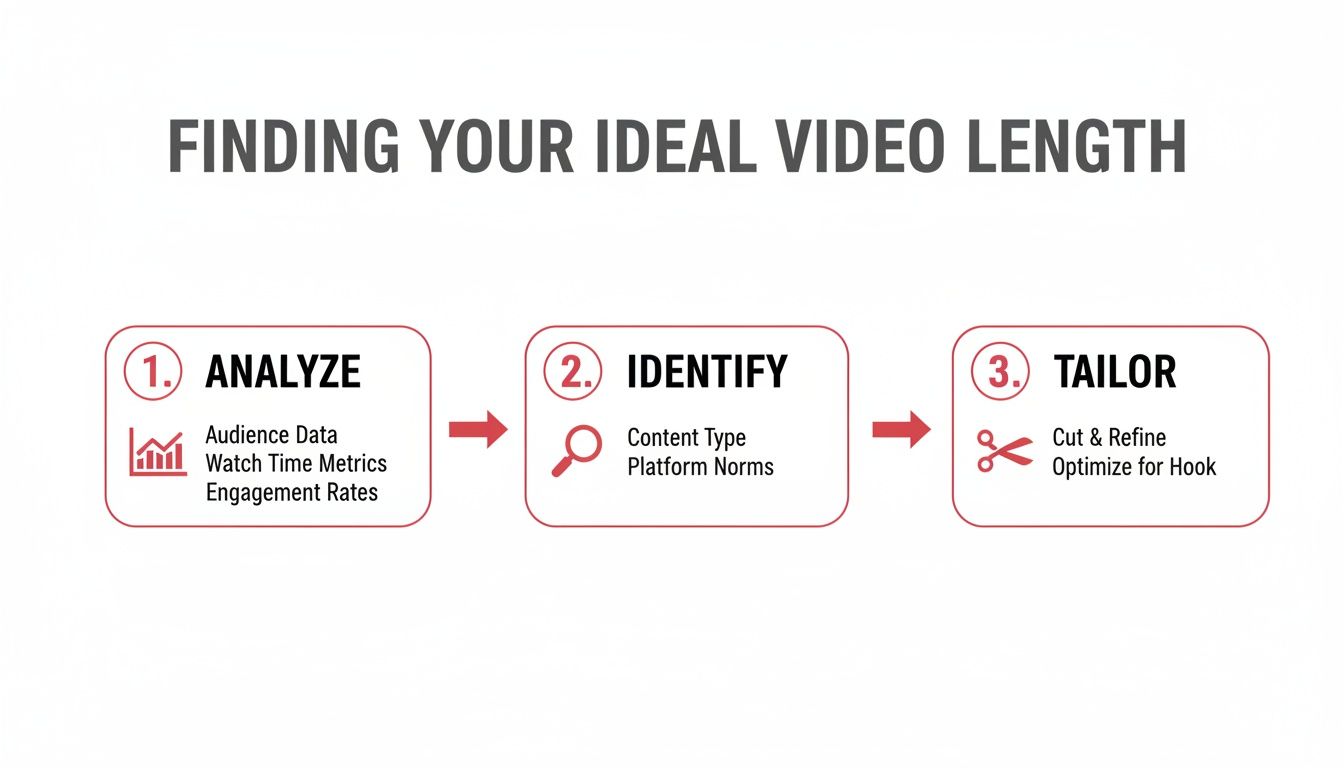
The image here really breaks it down: you look at your data, spot the patterns, and then adjust your video length to give your audience exactly what they’re sticking around for. To produce different versions quickly for testing, you might find that some text-to-video tools can help speed up the workflow.
Measuring Your Test Results
After both videos are published, you need to give them some time—at least a few weeks—to collect enough meaningful data. Once that’s done, jump into your YouTube Studio analytics and put them side-by-side, focusing on a few key metrics.
Don't just look at the view count. A shorter video might get more initial clicks, but the deeper metrics will tell you which one actually provided more value to your viewers and the algorithm.
Here’s exactly what you need to be looking at:
- Average View Duration (AVD): This is your number one metric. Did the 12-minute video hold people for an average of 6 minutes, while the 7-minute one only kept them for 3? If so, the longer video generated way more total watch time per viewer.
- Audience Retention at Key Moments: Pull up the retention graphs for both videos. Does the longer one have a massive drop-off halfway through, or does it hold steady? The shape of that curve tells you if your extra details were genuinely engaging or just felt like filler.
- Click-Through Rate (CTR): This is a good secondary metric. Are viewers more drawn to a title that promises a quick answer, or one that signals a comprehensive guide? This gives you a clue about what they were looking for when they clicked.
By comparing these numbers, you're essentially letting your audience vote with their attention. Do this a few times, and you’ll start to build a clear, data-backed understanding of what works for your channel. Making these little experiments a regular part of your strategy is a game-changer. And if you need a hand staying organized with it all, you might want to use something like a YouTube content calendar template.
It’s About Value, Not a Stopwatch
So, after all that talk about analytics, testing, and different video formats, what's the real answer? How long should your YouTube video actually be?
The truth is, the perfect length isn't a number you can just look up. It’s however long it takes you to deliver a complete, compelling experience to your audience. Nothing more, nothing less.
Your number one job is to respect the viewer’s time. Think about it this way: if you can explain a concept brilliantly in four minutes, don't drag it out to eight just to squeeze in another ad. You'll kill your audience retention and, worse, you'll break their trust. On the flip side, cramming a complex tutorial that needs fifteen minutes into a rushed five-minute video just leaves everyone confused and frustrated.
Stop chasing a magic number. Start listening to what your content and your audience are telling you. The perfect length is the one that makes your viewer feel like their time was well spent—leaving them satisfied, informed, and genuinely excited for what you post next.
The Real Goal
Ultimately, you want to make your video as long as it needs to be and not a single second longer.
When you focus on creating a tight, value-packed video, the watch time and retention metrics naturally fall into place. The data-driven strategies we've talked about aren't for hitting some arbitrary time target; they're for figuring out how much detail your audience truly wants.
Think of your analytics as your compass. It will always point you toward creating videos that are perfectly paced for the people who matter most—your viewers. When they feel you've valued their time, they’ll reward you with the kind of engagement that truly grows a channel.
Frequently Asked Questions
Even with a solid game plan, you're bound to have some lingering questions about video length. Let's tackle a few of the most common ones I hear from creators.
Does Making Videos Over 8 Minutes Automatically Make More Money?
In short, no. It’s a common misconception. While hitting the 8-minute mark unlocks the potential for mid-roll ads, you only get paid if people actually watch them.
If your audience clicks away before the first mid-roll even has a chance to play, that magic 8-minute mark means nothing for your bottom line. Your real focus should be on making a video that's so engaging people want to stick around. When you nail that, the watch time and ad revenue will naturally follow.
Think engagement first, ad placements second. A truly captivating video will always outperform one that's just stretched to hit a certain timestamp.
Should I Break a Really Long Video Idea Into a Series?
Absolutely. This is one of the smartest moves you can make for a deep-dive topic. If you feel a video is creeping past the 25-30 minute mark and you’re worried about losing people, splitting it up is the way to go. A tight series of 10-15 minute episodes often works wonders.
Here’s why that approach is so powerful:
- It gets people hooked: A great Part 1 almost guarantees a click on Part 2. Hello, binge-watching!
- It juices your channel's watch time: All those minutes add up across the entire series, sending positive signals to the algorithm.
- It gives you more chances to be found: Every video you upload is another lottery ticket in the YouTube discovery game.
Can I Re-upload a Shorter Cut of a Video That Flopped?
You can, but don't just trim it and hit "upload" again. YouTube's system can flag that as duplicate content, which you definitely want to avoid.
Instead, treat it as a brand-new creation. Go back to the drawing board and re-edit the core ideas into a snappier, more engaging video. Figure out what went wrong the first time—was the hook too slow? Did a section in the middle drag on forever? Fix that core problem. Then, give it a completely fresh title, thumbnail, and description and send it out into the world.
Ready to stop guessing and start growing? ViewsMax provides AI-powered tools to help you find the perfect video length, optimize your titles, and analyze your performance. Get the insights you need to grow faster on ViewsMax.